


Samsung Galaxy S8: Everything you need to know
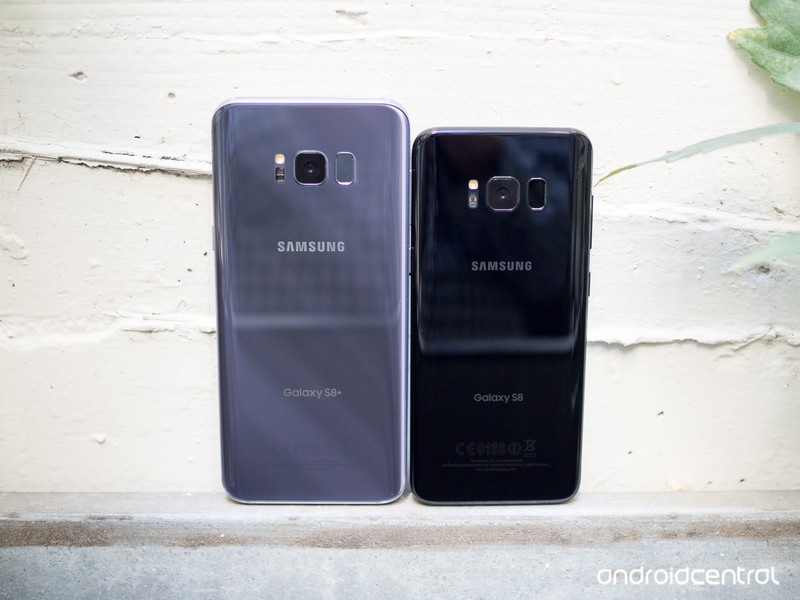
Get to know the new Galaxy S8 and Galaxy S8+ from Samsung.
Samsung is an absolutely massive player in the smartphone space, and that all comes down from up high with the flagship Galaxy S line. The latest in the lineup, the Galaxy S8 and its larger partner the Galaxy S8+, build on the core features and experiences from the Galaxy S7 and bring things into the future with great new design and a few eye-catching features that are all new for 2017.
Here’s everything you need to know about the Samsung Galaxy S8 and Galaxy S8+.
Galaxy S8 and S8+: The basics
The two phones, which are only differentiated by their screen size and battery capacity, come in at 5.8-inches and 6.2-inches with extra-tall 18.5:9 aspect ratio displays. That battery difference is pretty subtle: 3500mAh for the Galaxy S8+ and 3000mAh for the standard Galaxy S8. You may note that the Galaxy S8+’s battery is actually 100mAh smaller than the Galaxy S7 edge of last year, while the Galaxy S8’s is the same size as the Galaxy S7 despite being a larger phone.
Though the batteries haven’t increased in size, the hope is that the improved efficiency of the new 10 nm processor inside — that’ll be the Qualcomm Snapdragon 835 or the Samsung Exynos 8895, depending on the region — will provide some help. The processor is backed up by 4GB of RAM, an increase to 64GB of storage, and of course a microSD card slot. Waterproofing and wireless charging are still here as well, plus a new USB-C port on the bottom. The rear camera is unchanged in terms of its 12MP sensor and f/1.7 lens, but has improved processing thanks to new software and a new ISP (image signal processor).
This is some beautiful hardware all around.
The overall design for the phones is identical on both sizes, and is still shimmering glass and metal much like the previous generation. It’s punctuated by the long edges of the displays curving subtly off the side, more so like the Galaxy Note 7 than the more dramatic Galaxy S7 edge — and to that point, there is no “edge” model here, as both phones sport the curves.
Read: Samsung Galaxy S8 review
The displays have a new 18.5:9 aspect ratio with a QHD+ resolution, meaning they’re extra tall while staying relatively narrow. Samsung has also moved to on-screen buttons and reduced bezel size dramatically in order to fit as much screen into the body as possible. That necessitated the movement of the fingerprint sensor to the back of the phones, where it sits somewhat-awkwardly next to the camera lens. Iris scanning makes its return in a new-and-improved version from the Note 7 to try and pick up the slack.
Get familiar with all of the Galaxy S8’s specs
Samsung is trying to drive a narrative that we’ve moved beyond specs (and you can definitely argue that we have), but the enthusiasts will always want to know the details of what’s powering the latest phones. You get just about everything in here that you’d expect
| Operating System | Android 7.0 Nougat | Android 7.0 Nougat |
| Display | 5.8-inch AMOLED2960x1440 (570 ppi) | 6.2-inch AMOLED2960x1440 (529 ppi) |
| Processor | Qualcomm Snapdragon 835or Samsung Exynos 8895 | Qualcomm Snapdragon 835or Samsung Exynos 8895 |
| Storage | 64GB (UFS 2.1) | 64GB (UFS 2.1) |
| Expandable | microSD up to 256GB | microSD up to 256GB |
| RAM | 4GB | 4GB |
| Rear Camera | 12MP Dual Pixel, f/1.71.4-micron pixelsOIS | 12MP Dual Pixel, f/1.71.4-micron pixelsOIS |
| Front Camera | 8MP, f/1.7auto focus | 8MP, f/1.7auto focus |
| Connectivity | Wi-Fi 802.11ac MIMOBluetooth 5.0NFC, GPS, Glonass, Galileo, BeiDouLTE Cat.16 | Wi-Fi 802.11ac MIMOBluetooth 5.0NFC, GPS, Glonass, Galileo BeiDouLTE Cat.16 |
| Charging | USB-CFast chargingQi wirelessPowermat wireless | USB-CFast chargingQi wirelessPowermat wireless |
| Battery | 3000mAh | 3500mAh |
| Water resistance | IP68 | IP68 |
| Security | One-touch fingerprint sensorIris scannerSamsung KNOX | One-touch fingerprint sensorIris scannerSamsung KNOX |
| Dimensions | 148.9 x 68.1 x 8 mm | 159.5 x 73.4 x 8.1 mm |
| Weight | 155 g | 173 g |
As for the two different models, the Galaxy S8 and S8+ are identical internally aside from the batteries and of course screen sizes.
Notable camera improvements on the GS8
On the face of it, the spec hounds among us won’t be satisfied with the fact that Samsung has stuck with the same camera specs from the Galaxy S7 in the new Galaxy S8. Yes that means we’re looking at a 12MP “Dual Pixel” camera with an f/1.7 lens — but remember that the software and ISP (image signal processor) have been improved since last year, and this was arguably the best camera of 2016. On the other side, Samsung has completely revamped the front-facing camera to an 8MP unit with auto focus — all the better for your selfies of all types.
How does it all come together? Here’s Daniel’s take from our Galaxy S8 review:
Since the Galaxy S8 has the same fundamentals as its predecessor, it’s still one of the fastest, most reliable cameras on any phone. […] Unlike some of the other substantive hardware improvements, the Galaxy S8’s rear camera is another solid effort, but not more.
Compared to the Galaxy S7, the Galaxy S8 takes naturally sharper photos (meaning it uses less artificial sharpening), and also takes less-saturated and more accurate photos. Those are both overall quality improvements, while the GS8 also remains lightning quick with lots of extra software features to boot.
The Galaxy S8 has what it takes to capture wonderful photos with extreme reliability, but unlike this time last year it is challenged overall by the flagship competition — namely the LG G6, Google Pixel XL and HTC U11.
Everything you need to know about the Galaxy S8’s cameras
All of the new software features in the Galaxy S8
As Samsung often does, we got a good sneak peak at the Galaxy S8’s software experience in the form of the Android Nougat update for the Galaxy S7 and S7 edge. But there are some changes to make note of.


What you’ll find on the Galaxy S8 is very similar in terms of its design, core apps and behaviors, but you’ll also find a new launcher layout, new icons, on-screen buttons and of course a bunch of new features. Not the least of which being Bixby, DeX, S Pen-styled note taking features and more.
A complete look at the Galaxy S8’s software in our review
Bixby Voice is a whole new way to use your phone … well, soon
Bixby isn’t so much a head-to-head competitor with Google Assistant and Amazon Alexa, but instead an assistant to help you on the phone phone itself. That means Bixby is designed to help you locally throughout the phone using the screen, the camera and soon also your voice. The problem is Bixby wasn’t fully ready at the launch of the phones, and at the end of June just started rolling out Bixby Voice in beta. Without Voice, it only has a small set of features, limited to some intelligent information offered in “Bixby Home” on your home screen, and “Bixby Vision” for identifying objects using the camera.
Bixby is initially limited, but shows promise.
That’s frustrating, but the system itself has potential. Bixby Voice can basically respond to any command and perform actions within whatever app you’re using as if you tapped though the software yourself. Samsung also claims Bixby can fail more gracefully when it doesn’t understand your query entirely, getting you through the answer as far as it can before asking for more information. Samsung is betting this is the next interface paradigm, and it’s exciting to watch the developments on the Galaxy S8.
Everything you need to know about Bixby Voice
This is Samsung’s DeX desktop dock for the Galaxy S8
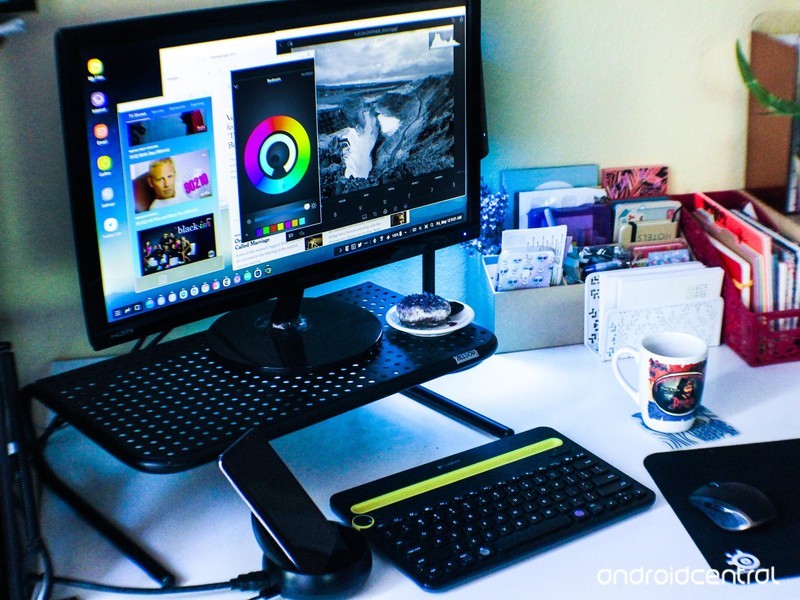
Far on the other end of interaction from Bixby is the new “DeX” desktop docking system for the Galaxy S8. It’s a little piece of hardware no larger than a wireless charger that lets you plug in your Galaxy S8, attaching it to a keyboard, mouse and monitor to transform it into a desktop-like environment. The Galaxy S8’s interface scales up gracefully to fill the large monitor, and Samsung’s own apps have been designed to be resized and operated with a keyboard and mouse.
Samsung has also struck deals with Adobe and Microsoft to bring their most popular apps to the big screen — the only question is how it works with other non-optimized apps, and who will invest in these docks and this setup to use DeX on a regular basis.
Samsung DeX review: This isn’t a replacement for your laptop
Compare the Galaxy S8 today’s hot devices
Plenty of people will just pick up the Galaxy S8 or S8+ because Samsung is the brand they know, but many of us will comparing it head to head with other leading devices. To help you make up your mind on which phone is right for you, we’ve compared the Galaxy S8 and Galaxy S8+ to the likes of the Pixel and Pixel XL, LG G6 and of course the iPhone 7 and 7 Plus.
Galaxy S8 and S8+ vs. Pixel and Pixel XL: Two ways to do a flagshipGalaxy S8 vs. LG G6: Tall, skinny and very similarGalaxy S8 vs. iPhone 7: Battle of the platforms
Which one should you buy?
So now that you have all the information, which one should you buy? You have a big phone and a bigger phone; one with a big battery and a bigger battery. There are so few differences between the Galaxy S flagships this year that it comes down to size and battery preference alone, and that may make your decision even harder.
Should you buy a Galaxy S8 or a Galaxy S8+?
Where to buy the Galaxy S8 or Galaxy S8+
The Galaxy S8 and S8+ are now on sale. In the U.S., you’ll have your choice of the Galaxy S8 or Galaxy S8+, both in 64GB storage configuration, in one of three colors: black, silver or orchid grey. You can also pick up a proper U.S. unlocked model from Samsung or Best Buy if you don’t want to bother with a carrier. Prices are in the range of $720-750 for the Galaxy S8, and $820-$850 for the Galaxy S8+.
Where to buy the Galaxy S8 in the U.S.Where to buy the Galaxy S8 in Canada
Updated June 2017: Article updated with new links and information on Bixby Voice and Samsung DeX.
Samsung Galaxy S8 and S8+
- Galaxy S8 and S8+ review!
- Galaxy S8 and S8+ specs
- Everything you need to know about the Galaxy S8’s cameras
- Get to know Samsung Bixby
- Join our Galaxy S8 forums
Verizon
AT&T
T-Mobile
Sprint
Unlocked
Get the Android O and Java Development Mastery Course for just $15
In today’s modern age, understanding coding is becoming more and more essential. So much so that some school districts are adding coding classes to their curriculum. Those who dove into the world of Java and other coding languages via a Computer Science degree or by self-taught methods a decade ago are well-positioned for a sustaining career.
Take your coding to the next level for less! Learn More
Are you second guessing your own career path, or simply interested in learning the basics of coding? Maybe you’re considering heading back to school to study Computer Science, but really who can afford to put their life on hold for more schooling? Even if you’re knowledge of computer programming could fit on the back of a postage stamp, you can still learn everything you need to know to get started coding with Android O and Java.

That’s where this great deal from Android Central Digital Offers comes in. You can get lifetime online access to the The Android O & Java Developer Mastery Course
for just $15. This package includes 214 lectures which translates to over 30 hours of content that’s yours 24/7.
The newest Android OS release is available for developers, so there’s no time like the present to learn the powerful new capabilities to this operating system as you learn how to build apps for Android. Even if you know absolutely nothing about coding, this course will introduce you to Java, the Android Studio, IntellJ IDEA, and other key concepts of creating apps for Android.
Save more than 92% right now! Learn More
An online course like this would typically cost $200, but for a limited time you can get the whole package at a steep 92% discount — you’ll pay only $15!
Buy now and you’ll be on your way to being a coding pro in no time.
Netflix adds Dolby Atmos support, but you probably can’t use it yet
Netflix is adding Dolby Atmos support, but it’s not coming to Android or Chromecast anytime soon.
It’s often said that video streaming services like Netflix, Hulu, Amazon Prime Video and even YouTube focus too much on video enhancements at the expense of audio. As we’ve moved from 1080p to 4K to HDR to wide color gamut, we’ve remained stubbornly adherent to audio standards that are approaching 10 or 15 years old.
Netflix wants to change that with the introduction of Dolby Atmos support for some of its titles, beginning with the acclaimed (and reportedly very weird) film Okja.
The requirements to actually experience Dolby Atmos on Netflix are quite restrictive at the moment: it’s limited to the Xbox One or Xbox One S (and soon, LG OLED TVs) along with a “4 Screens + Ultra HD” streaming plan and, of course, a compatible receiver and speaker configuration.
Atmos is here, but you may not have the hardware for it yet.
I have admittedly fallen behind the times when it comes to surround sound codecs — the last 5.1 setup I had was probably 10 years ago — so I had to look up exactly how to take advantage of Dolby Atmos the way the company intends, and it’s intense. The idea behind the setup is to create a 360-degree soundscape by augmenting a traditional 5.1 or 7.1 surround sound setup with between two and four ceiling speakers or, barring that, upwards-facing satellites.
There are easier ways to get Dolby Atmos, though: the company has worked with a number of companies to add support in a number of phones, headphones and, perhaps most importantly, sound bars that do a decent job emulating the surround experience.
More Netflix titles will get Atmos support in the coming months, including BLAME!, Death Note, Bright, and Wheelman.
Shine bright with these fireworks-filled wallpapers!

“Look at the fireworks, look at the fireworks light up the night sky!!”
Fireworks add an extra pop of excitement to any holiday that features them. Whether you’re watching a magnificent, professional fireworks spectacular or some backyard sparklers, fireworks are wonderful and should be observed (safely) with wonder and respect. And while we can’t have fireworks every day, we can have firework wallpapers every day at least.

When there are fireworks displays going on all across the country on one night, places that normally have fireworks have to step it up. Take Illuminations at Epcot. They kick things up after their unity-focused fireworks, with a five minute finale of — I kid you not — solid pyrotechnic booms. I thought I was gonna go deaf at one point. And while the booms in this lovely image are significantly less eardrum-bursting, they’re nonetheless beautiful.
Illuminations

This weekend Americans will be shooting off fireworks by the bushel, but fantastic firework displays are found all over the world. This show in Singapore is magnificent, and while most of us might never see their National Day display, wallpapers like these can remind us of the spark of adventure… and phosphorus.
Fireworks by nuic

While fireworks wow in every color, there’s something about red fireworks that’s special. It’s the color we celebrate in the Star Spangled Banner, the rocket’s red glare. It’s a deeply patriotic color in countries around the world, from America to France to Germany to Russia to China, where these red rockets cast the castle at Hong Kong Disneyland in a brilliant silhouette.
Disneyland Hong Kong Red Skies by sleekpixels

There are many different kinds of fireworks and while most of them get macho, patriotic names, some are more whimsical. Take this impressive display right here, with a name Roger Rabbit could get behind: Exploding Flower Bed fireworks. They do kinda resemble a bed of exotic fire-red flowers… expect that picking one would probably lost you some bones…
Exploding Flower Bed

Fireworks come in just about every shape and size imaginable, and the level of chemistry and artistry that goes into crafting their colors, shapes, and type of burn is quite impressive. Each color here requires a different metal or metallic compound to achieve its particular hue, from Stronium red rockets to Cesium blue bombshells.
Fireworks

Fireworks are fantastic, but without people to enjoy them with, it’s just a quick burn and a loud bang. People (And music) can turn fireworks from a noise complaint into a full-fledged show, and no one puts on firework shows quite like Disney. As one of the largest fireworks purchasers in the world, it should be no surprise that the mouse puts on quite a show for its guests… and everyone within a few miles of the property.
Awesometacular Disney Fireworks
This $8 grid organizer is a must-have for every gadget lover
Keeping organized is not something that comes naturally to everyone, but staying on top of it makes finding what you need much easier. With how many gadgets, chargers, headphones, and other accessories we have in our life, it is hard to keep them all easily accessible. What usually ends up happening is they all turn into a huge ball that you have to try and untangle, which never works out.
Grid organizers are a great way around that, and UGreen is currently offering its large organizer for just $8.13 with coupon code YUVFNAO8 at Amazon. This is a savings of around $3 from its regular price and marks the lowest we’ve seen on it.

The board has anti-slip elastic bands to help keep your cables, chargers, flash drives, keys, and more in place and easily accessible. There are a bunch of different size slots, so each gadget can have an appropriate location, and the organizer is backed by a lifetime warranty.
See at Amazon
For more great deals be sure to check out our friends at Thrifter now!
Best microSD Cards for Galaxy S8

What are the best microSD cards for the Galaxy S8?
Following in the footsteps of the Galaxy S7, the Galaxy S8 offers support for microSD cards so you can increase the storage of the phone. This time around, however, Samsung has increased the onboard storage from 32GB up to 64GB, so many people may find that more than enough. But if you’re worried about filling that 64GB up with music, video or pictures, you should grab a microSD card and put it all there so you can easily access it.
Here are some of the best options to put in your new Galaxy S8, divided into performance and value options.
Performance options
These cards are all rated U3, which is a speed classification shorthand for UHS Speed Class 3, offering a minimum sequential write speed of 30MB/s. Why does this matter? Because without a card this fast, the Galaxy S8 can’t record 4K video to an external card.
SanDisk Extreme 32GB

If the 64GB that Samsung gives you inside the Galaxy S8 isn’t enough for your daily needs, adding a bit more doesn’t have to cost a ton. SanDisk’s high-performance card offers transfer speeds of up to 80MB/s and with its U3 rating it is capable of handling 4K video. To make syncing files to and from your computer easy, Lexar includes a USB 3.0 reader in the packaging.
Adding 32GB of storage to a 64GB phone may seem a bit weird, but if you aren’t looking to spend a lot this may be the way to go at under $20 for the card.
See at Amazon
PNY PRO Elite 128GB microSD

If you’re planning to do a lot of 4K video recording, you’ll want a fast and reliable card in your phone. PNY’s PRO Elite 128GB card adds plenty of storage, and the speeds you need. Being U3 it is great for video, and it is capable of up to 95MB/s on the read, and 90MB/s on write. At around $70, this isn’t a cheap option but it is a highly-rated, reliable one.
See at Amazon
Samsung 256GB EVO Select microSD

Samsung’s own 256GB option is one of the best to go for if you are ready to just go all out on storage. With read speeds of up to 100MB/s and write speeds of up to 90MB/s you can quickly and easily transfer files to and from the phone. It’s also U3 classified which means it’s great for 4K video.
With the speed and storage capacity comes a larger price tag on this card, but if you want the biggest on the market this is the way to go.
See at Amazon
Value options
If you don’t care about 4K video capture and just want a card that stores media for playback, or captures exclusively 1080p video on the Galaxy S8, these cards cost significantly less than U3-speed options.
Samsung EVO 128GB microSD

This is not Samsung’s top-end offering but it comes with decent speeds and a price tag to match. With up to 48MB/s for read and write you can keep the card updated easily, and it can handle 1080p video without a problem. If you want a Samsung-branded card that doesn’t break the bank, this is the one to go with.
See at Amazon
SanDisk Ultra 200GB microSD

If you’re looking to add a ton of extra storage at a relatively low cost, SanDisk’s 200GB microSD card is the way to go. This card from SanDisk provides transfer speeds of up to 90MB/s and can record Full HD video. If you like to keep your digital library with you at all times, you’ll want one of these.
We’ve seen the price drop significantly over the past year, and most of the times you can find it for under $80.
See at Amazon
SanDisk Ultra 128GB microSD

SanDisk is a well-known company when it comes to memory cards and storage products, and cards like this show you why. It comes with a 10-year warranty and has quick transfer speeds (up to 80MB/s), so it should check many of the boxes that you look for in a microSD card. The price is great as well at just over $40 most of the time.
See at Amazon
Your favorite?
Do you have a favorite microSD card that isn’t listed here? Be sure to drop a comment below and let us know which card it is, and why you like it!
Update June, 2017: Divided the article into Performance and Value sections based on card speeds. Exchanged Samsung Evo+ 256GB with Evo Select since the former is no longer available.
Samsung Galaxy S8 and S8+
- Galaxy S8 and S8+ review!
- Galaxy S8 and S8+ specs
- Everything you need to know about the Galaxy S8’s cameras
- Get to know Samsung Bixby
- Join our Galaxy S8 forums
Verizon
AT&T
T-Mobile
Sprint
Unlocked
Snag this Galaxy S8 launcher update to fix some of its lag
Always take these types of updates.
If you’ve been using the Galaxy S8’s default TouchWiz Home launcher and noticing some unfortunate slowdowns, Samsung has just pushed out an update you should know about. The new version of TouchWiz Home is 6.1.09.2, and the changelog is pretty simple:
- Added an information screen to Samsung TouchWiz Home.
- Fixed the lag issue when swiping up and down to switch between the home and apps screens.
- Improved the visibility of app names under icons.

The app update is available both from the Galaxy Apps store and also the Google Play Store, though it’s not clear how it’s determined which one you get it from. On one of our Galaxy S8s, the app was updated from Galaxy Apps but doesn’t show as even being installed in the Play Store. Check both places, and also refer to your phone’s settings to see if “TouchWiz Home” has actually already been updated.
This update may not fix all of your Galaxy S8 lag concerns, but the fact that Samsung is directly addressing slowdowns in its app update shows it knows that it’s happening.
Samsung Galaxy S8 and S8+
- Galaxy S8 and S8+ review!
- Galaxy S8 and S8+ specs
- Everything you need to know about the Galaxy S8’s cameras
- Get to know Samsung Bixby
- Join our Galaxy S8 forums
Verizon
AT&T
T-Mobile
Sprint
Unlocked
Google Photos’ improved (and potentially creepy) sharing features are here
Google Photos just made sharing much easier and potentially more intrusive.

Google launched its photos platform at I/O two years ago, but at its recent developer conference in Mountain View it gave an overview of some new features that would be coming over the summer.

Well, the first round of those updates is here, including proactive suggested sharing and, perhaps more interestingly, automatic photo sharing on an opt-in basis.
As of today, people on Android will see a new tab at the bottom right of the Google Photos app called Sharing. Tapping on that gives an overview of recently-shared albums and, if created, suggested albums to share with friends and family based on existing facial recognition.
Other features to come include suggested sets of photos based on events — Google suggests a wedding or a summer barbecue — as well as proactive suggestions from friends for adding their photos to your albums from a shared event.
Finally, Shared Libraries allow couples or family members to share their entire photo gallery with another person, which can be risky but Google is playing it smart, allowing photos from only a certain time forward — say, the day you met your partner — to be seen.
These updates are rolling out over the next few days on Android, iOS and the web. What do you think? Will you use these features? Let us know in the comments!
Apply now for Engadget’s $500,000 immersive art program
We’re just two days away from the official deadline to apply for Engadget’s unreal arts program for unreal times. But what is time, really?
In the spirit of breaking with convention, we’ve extended the deadline to apply for Engadget’s Alternate Realities grant program an entire week. If you’re an artist working with emerging technologies like AR, VR or AI, you have until July 7th to apply for one of five grants of up to $100,000 a piece. If you hadn’t heard, we’re funding immersive art projects (no, they don’t have to be AR or VR specifically) that focus on the theme of Alternate Realities. Those projects will debut at the Engadget Experience, a one-day event exploring the future of creativity at the historic United Artists Theatre in downtown LA on November 16th, 2017.
For more information you can check out our event page or apply here.
Source: The Engadget Experience
Will ‘Eve’ be the next high-end Chromebook made by Google?
Google might be working on new Chromebook features, and maybe even a new Chromebook to go with those features.
First, the new features could be a fingerprint reader and a key specifically for bringing up Google Assistant. As for the new Chromebook, which is codenamed Eve, it may even be produced by Google itself. All these details have emerged thanks to Chrome Unboxed, which has been tracking related leaks and comments from Chrome OS developers over the past year.
The new Chromebook has been under development for at least eight months now, and it’s believed the device will feature a 2400×1600-pixel resolution display (3:2 aspect ratio) and a Kaby Lake processor. The fingerprint scanner is also expected to be included, allowing for more security, and there will be a dedicated key for Google Assistant, which might offer voice activation capability.
- Chromebook tips and tricks: Getting the most out of Chrome OS
- Google Pixel tips and tricks: Getting to grips with Google’s phone
Eve is thought to be a convertible laptop with a backlit keyboard, stylus, and an improved trackpad. But it’s not yet clear which manufacturer is making the Chromebook. Chrome Unboxed suggested Google could be making it. The company axed its premium Chromebook Pixel line earlier this year, though it did hint that it wasn’t opposed to making more Chromebooks down the road.
Is Eve the next Google-branded Chromebook? It certainly seems to have a few high-end features, if so.
 AIVAnet