


Get into shape with the best iPhone fitness apps
Update: Added Cyclemeter and FIT Radio.
If you’re trying to lose weight, work on your fitness, or eat better, your iPhone can be a helpful tool — but only if you have the right app. Thankfully, we’ve dug through hundreds of apps out there to give you our take on the best apps in the App Store to help you stay healthy and fit.
Weight Loss
Sometimes, the prospective health benefits of exercise aren’t enough to get you out the door and on the trail. The apps below are designed to give you another compelling reason, whether it’s the opportunity to earn virtual badges, a chance to win actual prizes, or simply the prospect to not get ridiculed.
Nike+ Training Club

Nike’s official app has a library of 30 to 45-minute workouts that are based on your goals and fitness level. Importantly, the app explains how to execute each exercise with how-to videos and even lets you share your accomplishments on social networks.
Download now from:
iTunes
Carrot Fit: 7 Minute Workout, Step Counter and Weight Tracker ($4)

Carrot is an AI construct that threatens, inspires, ridicules, and bribes you — whatever it takes — to get you moving. It’s a wonderful motivator that features a “7 minutes in hell” workout that will require you to do 30 seconds of 12 punishing exercises, and will berate you if you don’t.
Download now from:
iTunes
Argus: Calorie Counter & Activity Tracker for Heart Healthy Living

Argus is a neat all-in-one activity tracker that monitors your sleep, heart rate, calories, and more. The app offers challenges to overcome, as well as the option to build your own workout plan. You can even add food you eat by scanning the barcode on the label to track your calories.
Download now from:
iTunes
Lose It! Weight Loss Program and Calorie Counter
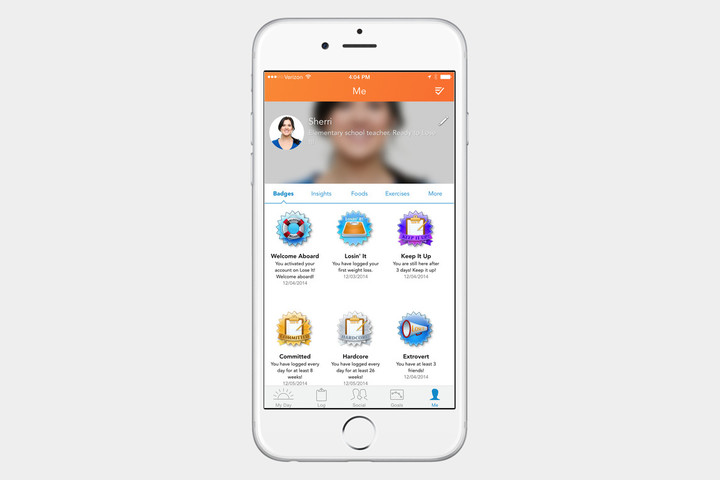
Lose it tracks food intake and fitness activities. Plug in your height, weight, age, and how much weight you are trying to lose (if any at all), and the app constructs a recommended net calorie intake based on how many calories you consume and how many you burn.
Download now from:
iTunes
MyFitnessPal Calorie Counter and Diet Tracker

Calorie Counter and Diet Tracker by MyFitnessPal boasts a database of more than 5 million foods to sort through, making it easier to track what you eat. It also features a step tracker and a barcode scanner, to make sure you’re able to track everything in your diet.
Download now from:
iTunes
Lifesum: Healthier Living and Better Eating

Lifesum is a weight loss app that works with apps from Withings and RunKeeper to give you an accurate assessment of your daily calorie intake. It even features a built-in barcode scanner that can pull up nutritional data on millions of items.
Download now from:
iTunes
Fitocracy

Fitocracy is for the competitive. The personal trainer lets you track workouts and encourages you to work toward real-life goals through a leveling system and in-game achievements you can share among your friends and the Fitocracy community.
Download now from:
iTunes
Pokémon Go

This isn’t a traditional weight loss app, sure, but many hail Pokémon Go as being a great way to get off the couch and into the wild. It might be more suited for ’90s kids who grew up with Pokémon, but regardless of who you are, you’ll find yourself walking all over your city as you try to find new Pokemon.
Download now from:
iTunes
Cyclemeter ($5)

Looking to get shed some weight on a bicycle instead of a treadmill? This app will help you do exactly that! Cyclemeter is accurate and great at collecting data. It can can also track various walking and running metrics, though, you might not get as much data. However, if cycling is your preferred fitness routine, this is the app for you.
Download now from:
iTunes
Fitstar Personal Trainer

This app creates a custom workout based on your fitness level. It learns from you as you use it. You choose workouts, and then you tell the app whether the exercises were too easy or too tough for you. The information is used to create a workout routine that fits your level. It will also track your overall fitness, as it’s compatible with the Health app, Fitbit, MyFitnessPal, and Strava. The freemium app is also compatible with Apple Watch, though some features require a subscription to use. Sadly, the latter will run you anywhere between $8 and $40 annually.
Download now from:
iTunes
Weight Watchers

Weight Watchers has an official app that promises to help you in your journey to a healthier lifestyle, and helps you track and share your weight loss progress with your friends. Since the Weight Watchers program is about tracking points, this app also makes it easy to keep track of your food intake, since everything you eat has a point value. The free app is compatible with the Apple Watch, too, but you’ll need to subscribe to Weight Watchers Online if you want to make the most of it.
Download now from:
iTunes
Everything you need to know about Samsung Pay
Updated with news that Samsung is adding Samsung Pay to the new Galaxy J7 Pro and J7 Max smartphones.
Mobile payments have come a long way since Apple made a huge push into the space with Apple Pay in 2014. Google introduced Android Pay in 2015, and Samsung has joined the fray with its own mobile payment system called Samsung Pay. Here’s what you need to know about it.
Which devices support Samsung Pay?

Samsung Pay is limited to the Galaxy S8, S8 Plus, Galaxy S7, S7 Edge, Galaxy S6, S6 Edge, S6 Edge Plus, Note 5, Gear S2, and, most recently, the Galaxy J7 Pro. It also now works with Samsung’s new smartwatch, the Gear S3 — and you don’t need to connect a Samsung phone for it to work.
With the J7 Pro receiving support, Samsung has finally expanded its mobile payment system to non-flagship smartphones. Another budget device, the J7 Max, will receive Samsung Pay Mini, a lighter version of the software that is designed for online payments only. Both these phones are expected to become available in India starting in late June through mid-July, where the J series is very popular. Launching Samsung Pay on those devices could be a way for the company to jump-start adoption in the country after recently launching the service there.
Going forward, all of Samsung’s devices will support Samsung Pay. That’s according to Koh Dong-jin, president of the company’s mobile business division. “We have decided to preinstall Samsung Pay devices in Samsung Electronics’ smartphones to be released from [2017],” he told Business Korea.
The idea that Samsung Pay will come to all of Samsung’s phones is further corroborated by a previous report from Mashable, which noted that Samsung was exploring ways to bring Samsung Pay to its nonpremium devices in order to play a bigger role in mobile payments in India.
Gear S3 owners with an Android phone can use Samsung Pay
A recent update to the Gear manager app allows for Gear S3 users to use Samsung Pay, even if they don’t own a Samsung smartphone. Most Android devices running 4.4 KitKat and above should work, but Samsung says there are a few exceptions at the moment — notably, the Google Pixel.
To get started on paying with your Gear S3, you’ll need to add your cards via the Gear manager app. You can launch Samsung Pay by holding down on the back button.
Hi there, #SamsungPay on the Gear S3 is not available with Pixel devices. (1/2)
— Samsung Pay (@SamsungPay) November 25, 2016
What’s unique about the update is that unlike the Gear S2, the Gear S3 supports MST, not just NFC. That means it will work at most payment terminals — just hold your watch near the checkout terminal when you’re ready to pay.
Support for the Gear S2
Samsung announced late last year that the company’s flagship smartwatch, the Gear S2, would gain support for contactless payments. After a lengthy delay, it finally arrived in the beta program for the S2 during the summer for the Bluetooth-only model. In October, users with the cellular model of the Gear S2 reported that they are able to use Samsung Pay as well.
Samsung Pay Mini
Samsung has announced Samsung Pay Mini, a slimmed-down version of Samsung Pay designed to work on other Android phones, and not just those made by Samsung. Samsung Pay Mini will initially be available in South Korea, where the app will be ready to download over the coming few months.
What’s the difference? Samsung Pay Mini is only for online payments. Offline payments, that’s those used in stores, will require ownership of a Samsung phone and the full Samsung Pay app. This is due to Samsung Pay Mini and phones not made by Samsung not supporting the magnetic secure transactions (MST) hardware that allows Samsung devices to complete wireless payments at legacy payment terminals.

The app is compatible with Android phones running version 5.0 Lollipop and later, provided the device’s screen has a resolution higher than 1280 x 720 pixels, which should cover most models released over the past few years. In addition to online payments, the app will feature Samsung Pay features for membership cards, transportation cards, and lifestyle options. And it’ll boast a Shopping feature that connects directly with famous local online shopping malls that are partnered with Samsung.
The final launch date hasn’t been confirmed, but a trial version for existing Samsung Pay users to try out will be released on February 6 through Google Play in South Korea.
The announcement follows earlier rumors published by ET News, a report which also discussed Samsung Pay Mini’s chances of reaching iOS in the future. Sadly, it’s highly unlikely, but it’s not entirely Samsung’s fault. The company told ET News that Apple had rejected the Samsung Pay Mini app for iOS devices, adding, “After Apple rejected registration of Samsung Pay Mini onto its app store, we have decided to focus on smartphones with Android OS.”
Samsung hasn’t made any announcements regarding Samsung Pay Mini’s launch outside of South Korea at this time.
Which countries support Samsung Pay?

Samsung Pay is currently available in the U.S. on all major carriers’ networks, as well as in Spain, South Korea, China, Thailand, and most recently the United Arab Emirates, Sweden, Hong Kong, and Switzerland.
The service fully launched in the UAE and Sweden in April following beta testing. Those two are the first Middle Eastern and Nordic markets to receive Samsung Pay. For users in Hong Kong and Switzerland, the platform is only available in early access form at the moment, with a limited number of supported banks.
Samsung Pay was first brought to Thailand in October 2016, but the system is now much more widely available in the country. In Thailand, Samsung Pay is compatible with MasterCard and Visa cards, and a range of banks are supported, including KCC Bangkok Bank, and Citibank.
Samsung initially promised Pay would expand to the U.K. and Canada sometime in 2016, but has backtracked on its promise to the former. In a statement, Samsung said, “Following successful launches of Samsung Pay around the world, we are planning to launch the service in the U.K. in 2017.
No reason for the delay has been given, but negotiations between Samsung and U.K. banks are speculated to be the issue by The Telegraph. No exact timeframe other than 2017 has been given, meaning it may be up to two or more years after Apple Pay launched in the U.K., that Samsung joins the market. Android Pay, which launched earlier in 2016, operates on most Samsung smartphones already.
Samsung Pay arrived in Brazil in July 2016. It’s supported by the county’s largest institutions, among them Banco do Brasil, Brasil Pré-Pagos, Caixa, Porto Seguro, Satander, Banrisul, Bradesco, Nubank, and Itaú-Unibanco. And it will support both Visa and MasterCard accounts.
The payment service is now available in Puerto Rico as well — cards from U.S. territory’s largest bank, Banco Popular, are now supported and Samsung Pay is available on AT&T, T-Mobile, Sprint, and Claro networks.
In mid-June 2016, through a partnership with Citibank and American Express, Samsung Pay formally launched on Galaxy devices in Australia. Availability varies by “local operator,” Samsung warned, but Samsung Pay users in the Land Down Under should be able to pay at any sales terminal that accepts conventional debit and credit cards.
Also in June, Samsung Pay went live in Spain. Unfortunately, Samsung Pay users in Spain will miss out on one major feature of the payment service: support for magnetic point of sales. In other words, Spanish residents can only use Samsung Pay at NFC terminals, with Samsung giving no indication as to whether that will change.
That same month, Samsung formally brought the service to Singapore as well. The announcement came quickly after Apple Pay launched in Singapore, but only for American Express card holders. Samsung will support MasterCard and Visa in the country, and Samsung Pay is available to customers of the DBS Bank, Standard Chartered, and Oversea-China Banking Corporation.
On March 29, 2016, Samsung Pay went live in China through Samsung’s previously announced partnership with China UnionPay. The deal, announced in December 2015, is crucial, as UnionPay is China’s main credit provider. In addition, Samsung partnered up with Ant Financial Services Group, Alipay’s parent company, which will further expand Samsung Pay’s presence in China. The partnership will allow users of Alipay, China’s largest third-party payment processing service, with over 450 million users, to use Samsung handsets to pay for products and services.
Driving these international launches forward is Samsung’s extended partnership with MasterCard overseas, helping Samsung Pay break into Europe, and for people to activate debit, credit, and reloadable prepaid cards. It also supports Visa and American Express, along with other major payment networks. The full list can be found here. Additionally, Samsung has signed a partnership with point of sale equipment company Verifone, helping adoption in the U.S. and internationally.
The first system to let you pay with your eyes?
A report from Yonhap News Agency in South Korea claims Samsung plans to enable payment by iris scanning in the region, at the recommendation of the country’s credit card firms. These companies reportedly wanted to enable the feature in last year’s Galaxy Note 7, but ultimately only used it for account verification, rather than transactions. According to the article, experts regard this method as more secure than passwords and fingerprints, saying it makes fraud “virtually impossible.”
Iris scanning is one of three biometric authentication methods on the new Galaxy S8 and S8 Plus — the others being the aforementioned fingerprint sensor and facial recognition. With iris scanning, users can unlock their devices simply by looking at them. Samsung’s rival, LG, is reportedly seeking to enable face-sensing tech on its recently released G6, with the ambition to use it for payments. Yonhap provides no timetable for release of the feature on the Galaxy S8.
Samsung Pass
At the Samsung Galaxy S8 Unpacked event, Samsung unveiled a new way to use Samsung Pay on websites and other online services — Samsung Pass. But what does it do? The main goal here is to make Samsung Pay easier to use, so Samsung Pass stores your passwords and lets you use biometric data — like your fingerprint — instead. That means you won’t have to waste time trying to remember and enter your individual passwords for each service.
It’s really a very handy feature, and Samsung hopes it will help convince people to use Samsung Pay more often in apps and online — rather than just in stores.
With Qualcomm’s new platform, companies can make their own Google Home
Why it matters to you
Qualcomm’s Smart Audio Platform could lead to a veritable explosion of new smart speakers.
Smart speakers like Amazon’s Echo, Google’s eponymous Google Home, and Apple’s HomePod may seem like a dime a dozen, these days, but Qualcomm wants to make it easier for smaller companies to build their own. To that end, the San Diego, California-based chip maker took the wraps off a reference “smart audio” design on Tuesday, June 13 — a combination microphone, speaker, and voice-recognition sensor that third parties can use to build their own speakers from scratch.
Qualcomm’s new Smart Audio Platform, which runs on the open source Linux operating system and Google’s Android Things IoT (Internet of Things) platform, comprises far-field microphone technology that can detect “wake” phrases like, “OK Google,” at a distance. Beamforming, a type of electronic signal processing that uses multiple microphones to pick up a user’s voice, is in tow, as is echo cancellation, Bluetooth aptX HD audio, and Wi-Fi.
The Smart Audio Platform is packed to the brim with high-end audio tech, too, including robust support for codecs like MP3, OggVorbis (Hi-Res 32-bit/192kHz), lossless FLAC/ALAC, and the latest implementation of Qualcomm’s multi-room AllPlay audio system, which lets you control multiple wireless speakers on the same network. There is also support for voice-activated AI assistants like Amazon’s Alexa and Google Assistant.

Generally speaking, Qualcomm’s Smart Audio platform aims to make it easier for smaller companies to create their own voice-enabled, high-quality speakers. But it has a disadvantage: Platform support. So far, only a handful of speakers from Hitachi, Panasonic, and Monster support the AllPlay standard, which is fewer than the growing number that support Google’s Cast Audio and a mere fraction of speakers with Apple’s AirPlay built in.
But Qualcomm says broader adoption is around the corner. The new chips at the heart of the Smart Audio Platform, the APQ8009 and APQ8017, will begin to ship in the third quarter of this year.
“The Qualcomm Smart Audio Platform combines high-performance processing power, world-class Bluetooth and Wi-Fi, advanced far-field voice capture and wake-word detection, AllPlay multi-room audio-streaming technology, and support for major voice ecosystems in a single solution” Anthony Murray, Qualcomm’s senior vice president and general manager of voice and music, said in a statement. “This platform is ideal for traditional speaker manufacturers wanting to make the move to a connected platform as it is designed to bring together all the necessary hardware, software, and tools needed to reduce development time. It also offers a great degree of flexibility for those manufacturers who want to push the boundaries when it comes to possible future applications for smart speakers.”
With Qualcomm’s new platform, companies can make their own Google Home
Why it matters to you
Qualcomm’s Smart Audio Platform could lead to a veritable explosion of new smart speakers.
Smart speakers like Amazon’s Echo, Google’s eponymous Google Home, and Apple’s HomePod may seem like a dime a dozen, these days, but Qualcomm wants to make it easier for smaller companies to build their own. To that end, the San Diego, California-based chip maker took the wraps off a reference “smart audio” design on Tuesday, June 13 — a combination microphone, speaker, and voice-recognition sensor that third parties can use to build their own speakers from scratch.
Qualcomm’s new Smart Audio Platform, which runs on the open source Linux operating system and Google’s Android Things IoT (Internet of Things) platform, comprises far-field microphone technology that can detect “wake” phrases like, “OK Google,” at a distance. Beamforming, a type of electronic signal processing that uses multiple microphones to pick up a user’s voice, is in tow, as is echo cancellation, Bluetooth aptX HD audio, and Wi-Fi.
The Smart Audio Platform is packed to the brim with high-end audio tech, too, including robust support for codecs like MP3, OggVorbis (Hi-Res 32-bit/192kHz), lossless FLAC/ALAC, and the latest implementation of Qualcomm’s multi-room AllPlay audio system, which lets you control multiple wireless speakers on the same network. There is also support for voice-activated AI assistants like Amazon’s Alexa and Google Assistant.

Generally speaking, Qualcomm’s Smart Audio platform aims to make it easier for smaller companies to create their own voice-enabled, high-quality speakers. But it has a disadvantage: Platform support. So far, only a handful of speakers from Hitachi, Panasonic, and Monster support the AllPlay standard, which is fewer than the growing number that support Google’s Cast Audio and a mere fraction of speakers with Apple’s AirPlay built in.
But Qualcomm says broader adoption is around the corner. The new chips at the heart of the Smart Audio Platform, the APQ8009 and APQ8017, will begin to ship in the third quarter of this year.
“The Qualcomm Smart Audio Platform combines high-performance processing power, world-class Bluetooth and Wi-Fi, advanced far-field voice capture and wake-word detection, AllPlay multi-room audio-streaming technology, and support for major voice ecosystems in a single solution” Anthony Murray, Qualcomm’s senior vice president and general manager of voice and music, said in a statement. “This platform is ideal for traditional speaker manufacturers wanting to make the move to a connected platform as it is designed to bring together all the necessary hardware, software, and tools needed to reduce development time. It also offers a great degree of flexibility for those manufacturers who want to push the boundaries when it comes to possible future applications for smart speakers.”
How to keep your smartphone cool during the hot summer months

Sun’s out, the smartphone’s out. But don’t forget that in addition to slathering on the sunscreen, you’ll have to keep your phone protected, too.
Summer is all about streaming the hits of year’s past and shooting a bounty of selfies. But while you’re out doing that, remember to keep tabs on how hot your smartphone becomes as you’re having fun.
The warmer weather months don’t offer a friendly climate for electronics, and the heat can actually be hazardous to overall device health. Here are a few tips to keep your smartphone cool for the summer.
Don’t leave the phone in the car
 Grab one of these if you need to tend to use turn-by-turn directions, in your car, during the hot summer months.
There’s a reason it’s illegal in some areas to leave your child or a pet behind in a hot car. Even with the windows cracked a bit, cars are effectively giant metal incubators. It’s also why you shouldn’t leave your smartphone behind.
Overall, it’s best to pre-plan where you’ll put things before you get into the vehicle. If you’re driving long distances, for example, grab a magnetic car mount to keep the phone affixed to the air conditioning vent as you’re using turn-by-turn directions. If you have to leave the phone in the car for safety reasons, try storing it in the trunk instead. That’s the part of the car with the least “greenhouse gas” effect (link is a PDF).
Another rule I abide by is to never leave any gadgets in the glove compartment, even if I’m streaming music and my phone is connected to the auxiliary cable located inside. Glove boxes are hot enough to melt the cassette tapes of yore, and unless you’ve got an air conditioning vent located inside, it’s definitely hot enough to toast your electronics.
Turn off what you don’t need
Bluetooth, LTE, Wi-Fi, and GPS — if you don’t need these things while you’re out and about, turn them off. That will ensure your phone isn’t working in overtime in your purse or pocket while you’re out gallivanting in sun-stroked gardens. It’ll also be a boon for battery life, which you’ll want considering how much warmer a smartphone gets when it’s plugged in for a charge.
Take off the case

Don’t bother with a case in the hot summer months. It’ll just make things hotter.
You wouldn’t wear layers in the hot summer heat, right? There is no need to pile them on top of your smartphone, either. If you’re in need of a case because you’re engaging in outside activity, put the phone inside an Otterbox and keep the screen off during your excursion.
Keep devices separate
I don’t live in a humid climate or in the desert, so I’ve never had this sort of issue. But if you’re walking around with several devices clustered in a bag or backpack and the air is positively thick with heat, be sure that they’re powered off and kept in separate compartments. This gives all the metal things on your shoulder a little room to breathe as the world outside bakes everything else.
Don’t put it in the fridge

A strange practice that isn’t worth practicing at all.
I used to do this with my MacBook Air until I was scolded for doing so. According to Gazelle, a site where you can sell your old gadgets, cooling your gadgets too rapidly could actually damage the inside components.
Don’t cool it too fast. If your phone overheats, your initial reaction is going to be to rush it to the coldest place you can find. However, rushing the cooling process can cause condensation to get trapped on the inside of the devices and inevitably, water damage.
Whoa! The best thing to do if you feel like your device is too hot is to slowly cool it down by turning it off completely and leaving it alone for a while. You should also unseat the battery pack, if it’s removable, and definitely place the phone away from direct sunlight.
What are your tricks?
We all have our own tricks for dealing with the heat. What are you some of your methods for cooling your smartphone down when the world outside is burning up? Let us know!
Join the Honor/Huawei community incentive program to win great prizes!
Be an active part of the Honor/Huawei community and earn some great prizes for your participation!
Some prizes are really hard to win — ever tried to win one of those arcade claw games? — and others are mercifully easy. This year, Huawei and Honor want to make it super easy to win a great set of prizes just for participating in the Android Central community!
How to win great prizes

Here’s how it works: each month, we’re going to select three winners from the Android Central community based on engagement with the Huawei / Honor forums. Doesn’t matter if it’s the Honor 8 or Huawei Mate 9 — if you’re active in the community, you’re entered to win.
The person with the most interaction wins the grand prize each month and the next two will receive runner-up prizes.
What do we mean by interaction? Post a lot! Start new threads! Reply to other people in a helpful and honest way. Be a vital member of the community!
A few things to keep in mind:
- Spamming the forums with low-quality posts will result in immediate disqualification from the program. You have to participate because you love Huawei/Honor!
- It doesn’t matter which Huawei or Honor forums you’re active in, as long as you’re active!
- Winners are immediately eligible again the following month. As long as you’re engaged, you can win!
- We’ll have prizes from June through November. This is a long-term program!
- Unfortunately, the program is for U.S. participants only. Sorry!
So what prizes can you win?

Thanks for asking!
List of prizes by month:
- June: 1x Huawei MediaPad M3; 2x Honor Band Z
- July: 1x Honor 6X; 2x Honor Band Z
- August: 1x Huawei MediaPad M3; 2x Honor Band Z
- September: 1x Huawei Watch 2; 2x Honor Band Z
- October: 1x Honor 6x; 2x Honor Band Z
- November: 1x Huawei Mate 9; 2x Honor Band Z
- December: 1x Huawei Watch 2; 2x Honor Band Z
The Huawei MediaPad M3 is a great all-rounded tablet with amazing build quality. The Honor 6X is a fantastic mid-range smartphone with a metal build and a dual camera setup. The Huawei Watch 2 is a rugged, powerful Android Wear 2.0 smartwatch with GPS and all-day battery. The Honor Band Z is a terrific little fitness tracker. And the Huawei Mate 9 is one of the best big phones you can buy! Altogether these are some of the best devices on the market, and they can be yours — free.
Ready to start?
Jump into the Huawei or Honor forums and show ’em what you got! We’ll contact the winners through the email in your forum profile, so make sure it’s up to date!
- Join the conversation in the Honor forums!
- Join the conversation in the Huawei forums!
These were the biggest VR games shown at E3 2017

These were the biggest announcements for the HTC Vive, Oculus Rift, and PSVR at E3 2017.
The leading video game show of the year, E3, is currently underway in Los Angeles. Various press conferences have already outlined upcoming projects among top publishers in the industry and virtual reality continues to be a growing trend. Despite VR having a reduced presence in comparison to last year’s show, owners of the HTC Vive, Oculus Rift and PSVR all have titles to look forward to. We’ve rounded up the biggest VR game announcements from E3 2017.
Read more at VRHeads.com
What color HTC U11 should you buy: Black, blue, silver, white or red?

You want the phone … now you just have to pick a color.
The HTC U11’s big design feature is its pristine curved glass back, which has a unique color infusing process to bake the colors into the glass rather than layering on top or underneath. It’s a look that you can’t get from any other glass-backed phone, and it means you may be taking extra care in choosing which color HTC U11 you want to buy.
We have great pictures of all five colors, and some things you may want to keep in mind when making a choice — read on.
HTC U11 in Brilliant Black
When you’re releasing a new phone, you pretty much have to offer a “safe” color — that’s Brilliant Black. It’s a pretty basic look, but you still get the shiny “deep” color embedded in the glass. When you turn the phone the colors do shift and give it a look of some deeper greens and blues, just not to the extremes that the other colors do.
Who is it for?
If you’re interested in the U11 but don’t want to go all out with one of the flashy colors, black is going to be the one to get. The glass still stands out, but it isn’t way out of line.
HTC U11 in Sapphire Blue
The “Sapphire Blue” U11 is one step above the black in terms of flash. The deep blue glass flows into color-matched blue metal on the side, and it really looks nice. When you tilt the phone the colors change to different shades of blue, and because it’s a bit lighter it also starts to pull in colors from around it.
Who is it for?
If the black U11 feels a bit boring for you, but you still don’t want to go flashy, the blue will be a good middle ground.
HTC U11 in Amazing Silver
This is where things start to get crazy. Depending on what angle you see it from, the “Amazing Silver” U11 can look like anything from shiny chrome all the way to deep blue. In a purely white room with no other colors around, the silver U11 is more of a very light blue — both the glass back and metal sides. But because of the extreme reflectivity, it pulls in colors from all around — it’s hardly ever the same color twice.
Who is it for?
If you want a super-interesting color that will stand out from every angle every single day, this is the one to get. So long as you’re okay with the “regular” view of it being a light blue base color, the silver U11 is a good choice.
HTC U11 in Ice White
The “Ice White” U11 is a pretty typical white glass and silver metal color scheme. The back has a very deep color that isn’t nearly as reflective as the other colors, and the color doesn’t shift as much. You get a pearlescent look and hints of pink from some angles, but the back stays very much “white” from most angles.
Who is it for?
There aren’t a lot of white glass phones available, so if you’ve been looking for something that’s beyond the standard black/gold/silver options, this is for you.
HTC U11 in Solar Red
It’s hard to explain the ridiculousness of the “Solar Red” U11. Nominally, it’s red. But when you tilt it off-axis, it turns a deep gold, orange or yellow depending on the angle. It’s an amazing effect that’s truly unique, even among the other U11 color options.
Who is it for?
The Solar Red color is absolutely for someone who wants to stand out. Not only are there so few red phones out there in general, but you won’t find another “red” phone out there that can change colors so dramatically.
Regional differences matter
As is always the case, you won’t necessarily be able to choose from all five colors in all regions around the world. Right at launch, HTC is primarily offering the black, blue and silver colors. White and red were not finalized until later on in the development of the U11, so they won’t be widely available for some time. Here’s the current breakdown of availability, as of mid-June:
- U.S.: Sapphire Blue, Brilliant Black, Amazing Silver (Amazon and htc.com only)
- Europe: Sapphire Blue, Brilliant Black, Amazing Silver, Ice White, Solar Red (coming soon)
- China: Sapphire Blue, Brilliant Black, Amazing Silver, Ice White, Solar Red (coming soon)
- Taiwan: Sapphire Blue, Brilliant Black, Amazing Silver, Ice White, Solar Red (coming soon)
- Australia: Brilliant Black, Amazing Silver (carrier/retailer dependent)
One thing you’ll notice is that the Solar Red model isn’t available anywhere right at launch — but expect it to head out to various regions soon. So if you have your heart set on red, be patient rather than settling for another color, because it is coming.
HTC U11
- HTC U11 review
- HTC U11 specs
- Manufacturing the U11: Behind the scenes
- Join our U11 forums
- HTC U11 vs Galaxy S8
- HTC U11 vs LG G6
Amazon
Sprint
HTC
Razer Blade Stealth gets a bigger display and awesome new gunmetal colour
Razer has unleashed a new version of its popular Blade Stealth laptop. The latest version has a bigger 13.3-inch touch screen and comes in a new gunmetal grey colour.
While it doesn’t come with the 4K resolution screen, the Quad HD+ 3200 x 1800 screen does boast 100 per cent sRGB colour space as standard. That should mean your graphics are still superb, even if they don’t quite reach the sharpest available.
Despite being a bigger screen, it hasn’t forced the laptop to increase much in size. Razer thinned down the bezel, making it closer to being all-screen, and equipped the panel with 178-degree viewing angles.
Inside, powering the device, is a 7th generation Core i7 processor and 16GB RAM as standard, with up to 1TB of storage available. Of course, it’s used to power the latest version of Windows 10.
Razer claims that the 53.6Wh battery can last up to nine hours, in a device that measures only 0.52-inches thick and weighs just under three pounds.
Razer
As you’d expect from Razer, the keyboard is backlit. The gunmetal version has a more traditional white backlight, while the black model features the Razer Chroma colour-changing lighting.
Ports-wise we’re looking at two USB 3.0 ports, Thunderbolt 3 (USB Type-C), one HDMI 2.0 port and a 3.5mm jack for headphones and/or microphones. It charges using a 45W power adapter.
For those who want to use it for desktop gaming, the Blade Stealth can connect to an optional external graphics enclosure. Razer will be selling a universal enclosure called the Razer Core which is compatible with the latest NVIDIA and AMD graphics cards, and connects using a Thunderbolt 3 cable to the Razer Stealth.
This enclosure is true plug-and-play, so you can hook up your laptop to it, without it forcing you to restart your system. The benefit here is that you can potentially have your cake and eat it. In other words, you get your light, powerful laptop for out and about work, and get desktop quality gaming at home when you plug it in to the Core.
The new 13.3-inch Razer Stealth starts at $1399 for the base model which comes with 256GB storage. There are also 512GB and 1TB storage models. The Razer Core graphics card enclosure costs $499, buthose buying the Core with a Blade Stealth or Blade laptop will get it with $100 discount.
Which Fitbit is right for me?
Fitbit is no stranger to the activity tracking market. It’s been kicking around for a years, sitting at the top of its class smugly watching as its competitors hope to raise the same brand awareness.
Chances are if you are reading this feature, you too have heard of it. The problem you have probably since found however, is deciding which of the eight Fitbit activity tracking devices is the right one for you.
We have broken each of the Fitbit trackers down into how much each costs, what features each offers and why you might considering buying each one. This feature is all about helping you work out which Fitbit will suit you and your lifestyle best.
Quick Summary
The Fitbit Zip is the cheapest Fitbit and it allows for simple, subtle tracking.
The Fitbit One is a little more expensive than the Zip but it adds sleep tracking to the mix so this device is good for someone who wants basic sleep and activity tracking without having to wear anything on their wrist.
The Fitbit Flex 2 is a simple, stylish activity tracker that will do the activity basics, plus sleep tracking and smartphone notifications (sort of). It is easy and comfortable to wear and a little more on trend than clip-on devices currently are, which might be a reason to select it over the One. It is also the only waterproof Fitbit tracker.
The Fitbit Alta is very similar to the Flex in terms of functionality but it is a little more substantial thanks to its display. It isn’t waterproof, but it does smartphone notifications in a more useful way to the Flex 2, offering caller ID, the ability to read the text and calendar alerts.
The Fitbit Alta HR has a very similar design to the standard Alta but it adds heart rate monitoring, a different clasp and more advanced sleep data, as well as a slightly extended battery life. Other functions are the same as the Alta, but it is a little more expensive due to the extra features.
The Fitbit Charge 2 offers more advanced activity tracking again thanks to the continuous heart rate monitoring, along with VO2 Max, Guided Breathing, and Connected GPS. It is a little more expensive but its the cheapest way to get access to some of Fitbit’s more advanced features.
The Fitbit Blaze is for for those that want an activity tracker that is a little smarter looking and more like a watch. It isn’t as feature rich as the Charge 2, but it does have the advantage of music control and a coloured screen. It is the Fitbit for those after an activity tracker that could potentially replace their watch.
The Fitbit Surge will track basic activity, as well as more specialised activities like free running. It’s not cheap, standing as the most expensive Fitbit device, but while it misses out on some features, it offers full GPS tracking rather than just connected and it is the only Fitbit device to do so.
Fitbit
Fitbit Zip
Buy now from Amazon.co.uk | Buy now from Amazon.com
- What it tracks: Steps, distance, calories, active minutes
- Type: Clip-on
- Features: LCD display, clock
- Battery: Four to six months
- Price: £49.99
The Fitbit Zip is the cheapest activity tracker available within Fitbit’s portfolio and it allows you to monitor basic activity discreetly. It is a clip-based device that can be worn on a belt, pocket or a bra.
The Zip has an LCD display for easy access to stats without the app and its replaceable coin battery should last between four and six months. Through the Fitbit app, Zip users will be able to see their progress, complete challenges with friends, log food, record workouts and earn badges.
The Fitbit Zip comes in charcoal, lime, midnight blue and magenta colour options.
Read the full review: Fitbit Zip review
Fitbit
Fitbit One
Buy now from Amazon.co.uk | Buy now from Amazon.com
- What it tracks: Steps, distance, calories, active minutes, sleep
- Type: Clip-on
- Features: OLED display, clock
- Battery: 10 to 14 days
- Price: £79.99
The Fitbit One is similar to the Zip, only it adds sleep tracking to its list of attributes, as well as a more slender design. Like the Zip, it will sync wirelessly to the app or your computer and it is also a clip-based device so you can wear it on a belt, pocket or bra.
Rather than an LCD display, the One opts for an OLED screen and its battery type changes to a rechargeable lithium polymer that offers between 10 and 14 days on a full charge.
The same app features apply as the Fitbit Zip, but users with the One will also get access to sleep trend graphs, sleep goals and sleep quality data. The Fitbit One comes in black or burgundy colour options.
Fitbit
Fitbit Flex 2
Buy now from Amazon.co.uk | Buy now from Amazon.com
- What it tracks: Steps, distance, calories, active minutes, sleep
- Type: Wrist-worn
- Features: Five LED lights, text and call notifications, special accessories, waterproof, silent alarms
- Battery: Up to five days
- Price: £69.99
The Fitbit Flex 2 replaces the original Flex and offers exactly the same as the Fitbit One in terms of tracking features. The OLED display is replaced by five LED lights, meaning more visits to the app for progress details, while the design moves from a clip-on device to a wrist-worn band.
As there is no display, there is no clock feature like there is with the Zip and One, but the Flex 2 does offer text and call notifications in the form of colour-coded LED lights. Battery life is up to five days.
The Flex 2’s tracker is removable so while you can stick with the standard rubber band comes with, you can also buy special accessories. There is a bracelet in gold, silver or rose gold options and a necklace in gold or silver for those that want to increase their fashion status with their step count. For those happy with the rubber band, it comes in four colours including black, navy, lavender and magenta.
Read full review: Fitbit Flex 2 review
Fitbit
Fitbit Alta
Buy now from Amazon.co.uk | Buy now from Amazon.com
- What it tracks: Steps, distance, calories, active minutes, sleep
- Type: Wrist-worn
- Features: OLED display, clock, smartphone notifications, interchangeable bands, silent alarms
- Battery: Up to five days
- Price: From £99.99
The Fitbit Alta offers many of the same features as the Flex 2, meaning no elevation or heart rate data, though it does smartphone notifications in a slightly more useful way compared to the Flex 2.
The Alta is slim and sits in line with the Flex in terms of size but the display allows you to see your progress and alerts, including text notifications, incoming caller ID and calendar alerts. The same app functions apply as the Flex 2, along with the same battery life, which stands at five days but the Alta is not waterproof.
The Fitbit Alta comes in four standard colours comprising black, blue, teal and plum, but there are also two leather band options for an extra £50 each or a metal bracelet for £80 extra.
- Fitbit Alta HR vs Alta vs Flex 2: What’s the difference?
Read full review: Fitbit Alta review
Fitbit
Fitbit Alta HR
Buy now from Amazon.co.uk | Buy now from Amazon.com
- What it tracks: Steps, distance, calories, active minutes, heart rate, sleep
- Type: Wrist-worn
- Features: OLED display, clock, smartphone notifications, interchangeable bands, silent alarms
- Battery: Up to seven days
- Price: From £129.99
The Fitbit Alta HR features a very similar design to the Alta, meaning a slim and sleek device with a display for smartphone notifications and progress.
It adds heart rate tracking to the Alta party though, along with a colour-matched buckle for a more secure fastening and its battery life has been extended to seven days, which is more than the Flex 2, Alta and Charge 2. The Alta HR also offers more advanced sleep tracking data but it still lacks elevation data and waterproofing.
The Fitbit Alta HR comes in four standard colours comprising black, fuchsia, coral and blue grey, as well as two special edition models for £20 extra than the standard model. There are also three Luxe leather bands available at £40 each and a metal bracelet like the Alta for £70.
- Fitbit Alta HR vs Charge 2: What’s the difference?
Read full review: Fitbit Alta HR review
Fitbit
Fitbit Charge 2
Buy now from Amazon.co.uk | Buy now from Amazon.com
- What it tracks: Steps, distance, calories, active minutes, sleep, heart rate, elevation, VO2 Max
- Type: Wrist-worn
- Features: OLED display, clock, smartphone notifications, interchangeable bands, Connected GPS, multi-sport tracking, automatic exercise recognition, silent alarms
- Battery: Up to five days
- Price: From £139.99
The Fitbit Charge 2 replaces the Charge and Charge HR in one device. It is slightly larger than the Alta, Alta HR and Flex 2 but it adds several extra features, including Cardio Fitness Level (essentially VO2 Max), which gives you a personalised fitness score over time, and Guided Breathing, which offers personalised breathing sessions based on your heart rate.
There is also Connected GPS on board the Charge 2 and battery life is sits at up to five days, so around the same as the Flex 2 and Alta. It is sweat, rain and splash proof like the Alta and Alta HR, but not waterproof like the Flex 2. App functions are the same as the other devices but unlike the Flex 2 and standard Alta, you’ll get the added bonus of being able to monitor your heart rate data, as well as see more detailed analysis of workouts.
The Fitbit Charge 2 comes in black and silver, plum and silver, blue and silver, and teal and silver. There are also two special edition models and a number straps that can be bought separately for a different look as the Charge 2 offers interchangeable straps, like the Alta and Alta HR.
- Fitbit Charge 2 vs Charge HR vs Charge: What’s the difference?
Read full review: Fitbit Charge 2 review
Fitbit
Fitbit Blaze
Buy now from Amazon.co.uk | Buy now from Amazon.com
- What it tracks: Steps, distance, calories, active minutes, sleep, heart rate, elevation
- Type: Wrist-worn
- Features: Colour OLED display, clock, smartphone notifications, music control, Connected GPS, multi-sport tracking, automatic exercise recognition, on-screen workouts, silent alarms
- Battery: Up to five days
- Price: From £139.99
The Fitbit Blaze offers everything the original Charge HR offered, but it misses out on a few of the features found on the newer Charge 2, such as VO2 Max and Guided Breathing. It’s larger than the Charge 2, taking more of a sportswatch stance and there are various straps and frames available to change its look. It’s a different mechanism to the Charge 2 but no longer more expensive, with Fitbit having dropped its price from £159.99.
The Multi-Sport feature, also found on the Charge 2, allows you to choose various sport modes and see real-time stats, and the Blaze also offers smartphone notifications like the Alta, Alta HR and Charge 2. The Blaze adds music control and on-screen workouts to the capabilities of the Charge 2, but it also features Connected GPS like the Charge 2.
The Blaze is more like a smartwatch than the other activity trackers we have already mentioned, offering a coloured touchscreen but it won’t be right for everyone. The classic band comes in three colours comprising black, blue and plum, but there are three leather options and a metal links model too.
Read full review: Fitbit Blaze review
Fitbit
Fitbit Surge
Buy now from Amazon.co.uk | Buy now from Amazon.com
- What it tracks: Steps, distance, calories, active minutes, sleep, heart rate, elevation
- Type: Wrist-worn
- Features: Monochrome OLED display, clock, smartphone notifications, music control, GPS, multi-sport tracking, automatic exercise recognition, silent alarms
- Battery: Up to seven days
- Price: From £199.99
The Fitbit Surge is the most expensive Fitbit device, acting as more of a watch than a band, like the Blaze. It comes with a monochrome display (rather than coloured) and proper GPS tracking, meaning you can track a run without your phone, unlike the Blaze or the Charge 2.
The Surge offers everything the Blaze does in terms of other features, including music control, call and text notifications, and the multi-sport feature. That means it still misses out on the most recent features found on the Charge 2 however, such as guided breathing and VO2 Max tracking. It also doesn’t have on-screen workouts like the Blaze, but it is more advanced when it comes to running, offering different running options.
The Surge is said to last up to seven days and it offers the same app functionality as the Blaze and other Fitbit devices, with the added advantage of maps of where you have gone for a run or walk with the GPS on. The Fitbit Surge comes in black, blue and orange, but unlike the Blaze, Alta, Alta HR and Charge 2, it isn’t customisable with other straps.
Read full review: Fitbit Surge review
 AIVAnet