


Get your own WiFi HD waterproof endoscopic camera for only $32.99!
Typically when you hear the word endoscopic camera it’s being said by a doctor for the purpose of looking inside a patient. But these bendable snake cameras can be used for many everyday things beyond medical applications.
Get your very own endoscopic camera for only $32.99! Learn more
The versatility of an endoscopic camera can allow you to investigate what’s clogging a drain, peer inside the tight spaces of your car, or give you an inside look at any tough to reach areas of your home. The camera head is adjustable and waterproof, making it perfect for inspecting underwater areas, gaps or holes.

Best of all, you can get your very own WiFi-enabled waterproof endoscopic camera for just $32.99 via Android Central Digital Offers! With an 8-way adjustable LED, this waterproof, 2 MP resolution camera can slip into the tight or dark spaces or fingers or eyes can’t and send a feed right back to any device you’re using via WiFi.
Typically, endoscopic cameras like this are sold for $49.99, but you can get yours and save 87%! What a deal!
Save 34% on this handy endoscopic camera! Learn more
So what are you waiting for? You never know when you may need a versatile endoscopic camera to get you out of a jam. But act fast — this deal won’t be around forever!
How to get the best Gear VR experience from your phone

These tips will help you get the best experience on Gear VR out of your phone!
Your Samsung phone is capable of plenty of awesome things, but one of the best experiences it can deliver is giving you access to Gear VR. You’ll want to make sure that your phone is up to the task though, and there a few things you can do to get better performance while you’re in VR. This goes from checking your battery, to closing extra apps, and more.
Here’s how to get the best experience from your phone!
Read more at VRHeads.com
The case for killing off the Bixby button

Even when Bixby Voice eventually arrives, there’s no reason to keep the annoying, user-hostile hardware button.
This week there was at least some good news around Bixby, Samsung’s maligned AI thing from the Galaxy S8. Two months after launch, Samsung announced that Bixby Voice would finally be arriving… in the form of a beta program, in one country, the United States.
On one hand, the glacial pace of Bixby’s development is understandable. It’s far more complex in scope than most traditional voice assistants — in supported apps, Bixby needs to be able to support any function you could otherwise access via touch, and navigate the labyrinthine mess of verbal communication to get there.
Still, we’re months into the (very finite) lifespan of this phone, and outside of Korea, Bixby Voice only exists in beta form for U.S. English. That’s not great.

We could be well into 2018 before many non-English languages get Bixby Voice.
Other flavors of the English language will have to wait even longer, to say nothing of other tongues with large addressable audiences, like German, Spanish and Mandarin Chinese. Earlier in the year, the ETA for German was Q4 2017. The Samsung support page stating that timeframe now 404’s, and in light of other delays I wouldn’t be surprised if we were well into 2018 before Bixby Voice had any real non-English Western language support.
In some territories where the local language isn’t a big priority for Samsung, a Galaxy S8 owner might go most or all of its supported lifespan with the Bixby button just opening Hello Bixby. If I were a GS8 owner in somewhere like the Netherlands, Romania or Japan… well, I wouldn’t be holding my breath.
And even then that’s for the initial rollout of Bixby Voice features in a handful of Samsung applications. Support in other third-party apps will take even longer to build out.
It’s not a good look considering how central Bixby — and Bixby Voice in particular — was to Samsung’s messaging around the GS8 launch back in March. Now, this delay wouldn’t be such a big deal were Bixby not permanently, unchangeably mapped to a physical hardware button on the phone’s left border. (A button which The Verge’s Dieter Bohn correctly calls a monument to the company’s inability to ship a feature on time.)
You might think the Bixby button would be easy enough to ignore. That’s what I and others on the AC team have tried to do over the past couple of months. But through a combination of its placement, precariously close to the volume rocker, and the fact that it automatically overrides all other input, it’s become a perpetual annoyance.
The most irksome scenario is something Daniel Bader and I have experienced over and over again. When you double-tap the power key to launch the camera, there’s a non-zero chance that you’ll brush the Bixby button at the same time. Maybe not every time, but a statistically significant number. And when you do so, the phone… well, derps.
I have lost so many potentially great photos because the Galaxy S8 derps nearly every time I double tap the power button to open the camera
— Daniel Bader (@journeydan) June 14, 2017
The Bixby button will launch Hello Bixby over the top of whatever’s running, including the camera. So in the case of the camera shortcut, the GS8 will lag as it attempts to load both at the same time, first giving you a second or so of lockscreen, then a second or so of viewfinder, then whatever useless info Hello Bixby decides to conjure up.
The Bixby button also bypasses the lock screen — a feature which can’t be turned off — and that’s led to another common annoyance for GS8 owners on the AC team. Once again, you brush the Bixby button as you’re taking the phone out of your pocket, and once again, first thing you see is Hello Bixby, as opposed to anything useful.
Samsung has preemptively tanked any goodwill Bixby might have been able to earn.
The sum of all these annoyances is, for me, a sense of antipathy towards Bixby in general. I don’t care that it might do something useful eventually. Until such time as it does, it’s an unnecessary burden on an otherwise great phone. For regular users, I suspect Samsung might have preemptively tanked any goodwill Bixby might have been able to earn. Right now it’s a feature which deserves to be ignored, and yet the hardware button, through its placement and its behavior, makes it impossible to ignore.
Samsung’s vision for Bixby Voice sounds great. If it actually works, it’ll take us one step closer to Star Trek “computer”-like natural language interaction. But the button needs to go. There are countless other ways for Samsung to activate Bixby Voice, even when the phone is off. A double-tap of volume up, for instance, is less likely to trigger accidental presses. Or something along the navigation bar — a virtual button would allow Samsung to telegraph when Bixby Voice can spring to life, avoiding user disappointment in unsupported apps.
At best, the current Bixby button placement and behavior is premature. At worst, it’s a reason against buying the next Samsung phone.
Some other odds and ends for a working Sunday:
- We’re heading into OnePlus 5 launch week, and needless to say you’ll want to watch Android Central pretty closely this Tuesday. (We’ve arleady gotten a sneaky look at the full chassis, front and back, in a TV spot in India.)
- I’ve been getting to grips with the HTC U11 this past week. Between lackluster battery life and a pretty lousy display, I wasn’t a massive fan of the HTC 10, and the 10 Evo — the Euro version of the Bolt — flew under my radar. But the U11 is a huge improvement across the board. More next week, but I’m tempted to say HTC is back on track. Battery life in particular is awesome for a 3,000mAh device.
- Oh, and in a stupid but fantastic move, UK review units come bundled with an actual juicer for you to squeeze!
- The Honor 9 is on the way, earlier this year than in previous release cycles. Given the (likely) more expensive price point of the OnePlus 5 this year, I’m curious to see what Huawei’s online sub-brand can do around the $400 mark. Check out our preview for more!
- Finally, if you want some great wallpaper for your new OnePlus 5, or any other AMOLED phone, check out this phenomenal shot of Jupiter from NASA’s JunoCam.
That’s it for this week. I’ll leave you with a note that as much as Bixby annoys me, the Galaxy S8 still ranks as our best overall Android phone.
The Indie Megabooth is a calm bubble floating above E3 chaos
One of the best experiences at E3 wasn’t actually at E3. The Devolver parking lot was positioned directly across the street from the flashing lights, gigantic banners and thumping booths packed inside of the Los Angeles Convention Center, and it offered a calm yet energetic alternative to the mainstream madness. This year, the Indie Megabooth shared Devolver’s lot, exposing a rotating selection of independent games each day to the periphery of E3 — which was plenty. Trust.
We asked a trio of independent developers about how it felt to showcase their work in the Indie Megabooth, attached to the most prominent video game convention of the year. In the video above, we hear directly from Nathanael Weiss, the creator of Songbringer; Jacob Burgess, a voice actor in Masquerada; and Ben Myres, game designer of Semblance.
Follow all the latest news from E3 2017 here!
After Math: Reach out and touch someone
It’s been a telling week for communications. Chinese scientists bounced quantum entangled photons into space and back, McDonald’s recruited new hires through Snapchat, and it would appear that North Korea has had its fingers in everybody’s cyber-pies since 2009. Numbers, because how how else are you going to work the keypad?
The best electric kettle
By Michael Sullivan & Winnie Yang & Tim Barribeau
This post was done in partnership with The Sweethome, a buyer’s guide to the best homewares. When readers choose to buy The Sweethome’s independently chosen editorial picks, it may earn affiliate commissions that support its work. Read the full article here.
We’ve spent dozens of hours researching and long-term testing electric kettles. For the fourth year in a row, we think the Cuisinart CPK-17 PerfecTemp Cordless Electric Kettle is the best electric kettle for most people. It’s a high-end, variable-temperature model that’s ideal for brewing teas, making pour-over coffee, or simply boiling water for instant oatmeal. Thanks to its winning combination of speed, accuracy, and ease of use, it bested all the other electric kettles we tested.
How we picked and tested
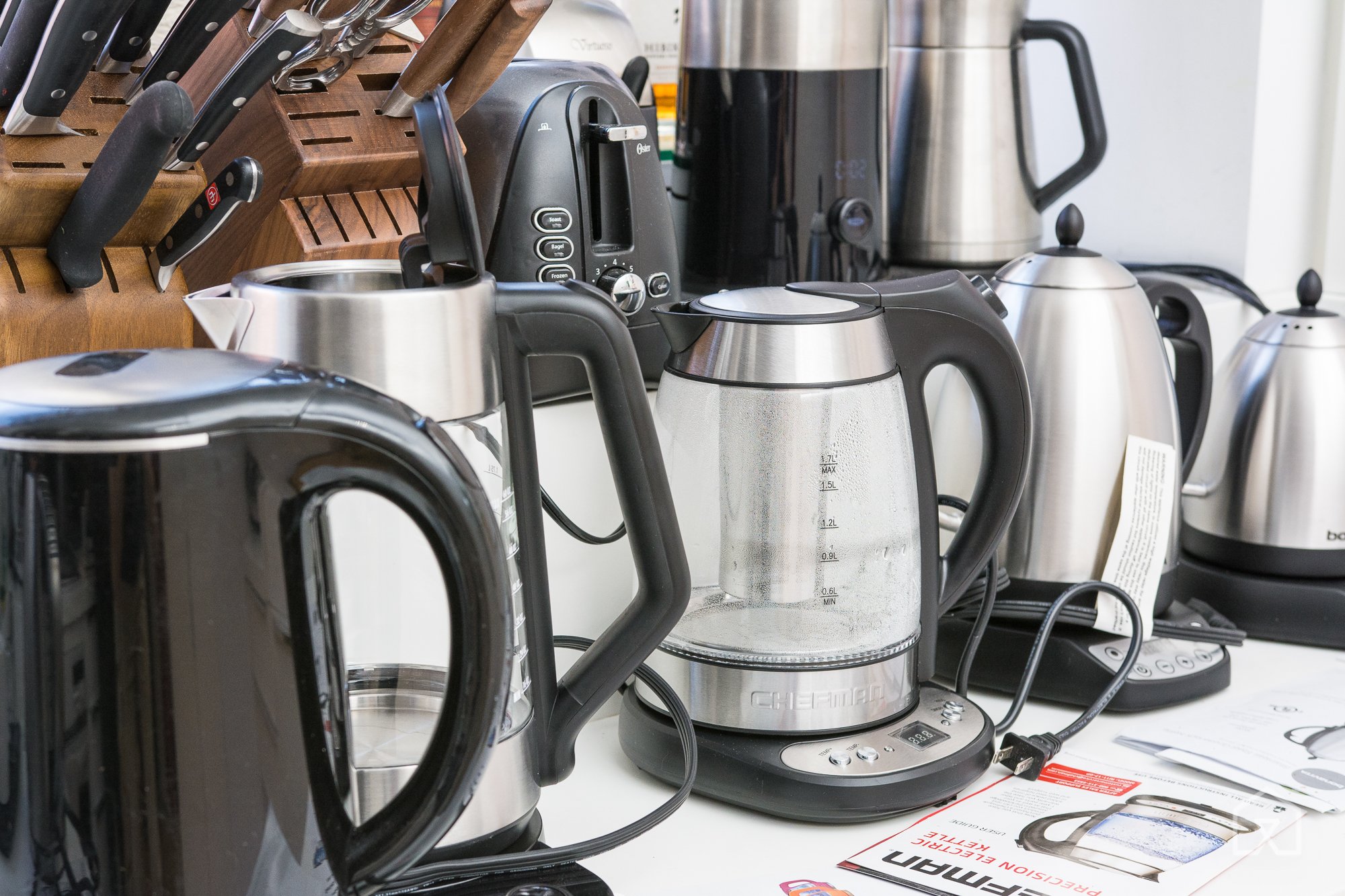
For 2017, we tested a new round of electric kettles for speed, accuracy, and ease of use. Photo: Michael Hession
Because different types of coffee and tea are meant to be brewed at different temperatures, a great electric kettle should have a wide variety of temperature settings that it can reach with reasonable accuracy. However, we realize that not everyone is a coffee or tea aficionado, so we also looked at kettles that do not have variable temperature settings and simply boil water.
Speed is critical—you don’t want to wait forever for your water to come to temperature. An electric kettle should also be easy to use, have a handle that doesn’t get too hot, and feature automatic shutoff so you don’t have to worry about forgetting to turn it off. A large mouth for easy cleaning is another plus.
All of the kettles we tested for our 2017 update were metal or glass. Some people, including our experts, complain about plastic kettles imparting a funny taste or smell to the water. We excluded any kettles made entirely of plastic, but all of the models we did test contained some minor plastic elements, such as parts of the lid, a filter, or the water-level window.
We tested each variable-temperature kettle by measuring how long it took to bring a liter of water to a boil and by measuring how accurate the internal thermometer was for non-boiling temperatures compared with measurements taken from a Thermapen thermometer. For the simple electric kettles we tested, we just measured the time to boil.
Some models in the test group had a warming feature that could hold set temperatures, so we checked their accuracy after letting them rest for an extended period of time. We also tested automatic-shutoff features and took note of any excessive or annoying beeps. Additionally, we tasted the water from each model after boiling to see if it had any off flavors caused by plastic components.
Our pick: Cuisinart CPK-17

The Cuisinart CPK-17 remains our top pick for the fourth year in a row. Photo: Michael Hession
Our top pick for the fourth year in a row is the Cuisinart CPK-17 PerfecTemp Cordless Electric Kettle, thanks to its ease of use, speed, and accuracy. It has an intuitive interface with a keep-warm option that conveniently holds water at a set temperature. The wide handle is comfortable to hold, and the spout doesn’t cause water to dribble when pouring. Unlike many of the kettles we tested, it has a simple streamlined design, so it won’t be an eyesore if you store it on your kitchen counter.
Compared with all the other variable-temperature models we tested, the Cuisinart CPK-17 was the simplest to operate. It offers six preset temperature settings as buttons on the handle, along with a Start button and a Keep Warm button.
Although the Cuisinart CPK-17 had better accuracy than most of the other kettles we tested, we found it wasn’t as accurate at hitting lower temperatures, measuring 8 degrees over when we set it to 160 °F. On temperatures of 175 °F and up, it measured only 3 to 4 degrees off, which is pretty accurate. Because this model has a slew of other noteworthy features and has been consistently reliable over three years of testing, we’re willing to forgive its minor temperature variances at the lowest setting.
Runner-up: Bonavita BV382510V

The 1-liter Bonavita BV382510V is great for preparing pour-over coffee or heating water to precise temperatures for making tea. Photo: Michael Hession
We think the stainless steel Bonavita BV382510V 1.0L Digital Variable Temperature Gooseneck Kettle represents an excellent compromise between a traditional tea kettle and one better suited for making pour-over coffee (see our guide to the best pour-over coffee gear for more). Although this model wasn’t the fastest kettle to bring water to a boil, the Bonavita had the most accurate temperature controls among all the models we tested. The long, gooseneck spout provides superior pouring technique, and the interface is easy to use. We also like the looks of this kettle; it’s handsome enough for you to keep on your kitchen counter.
Of all the models we tested, the Bonavita BV382510V had the most precise temperature control, impressively measuring just 1 degree off regardless of the temperature setting. It gives you the freedom to set it in 1-degree increments from 140 °F to 212 °F on an easy-to-read digital display. This model also tracks the water’s temperature accurately as it rises or lowers, so you always know how hot it is.
It has some minor drawbacks, however. This model took about two and a half minutes longer to boil than our top pick, and it doesn’t provide a water-level window for you to see when it’s getting low. Unlike our top pick, it lacks a boil setting, so you have to manually enter 212 °F using the plus button. Also, the lid doesn’t have a push button and needs to be removed, as on a traditional stovetop kettle. But despite those minor flaws, after over two years of using the Bonavita BV382510V daily, we haven’t experienced any issues, and we think it’s the best for anyone who will use it for both tea and pour-over coffee.
Budget pick: Hamilton Beach 40880

The Hamilton Beach 40880 offers fast and consistent boiling times at a bargain price. Photo: Michael Hession
We recommend the Hamilton Beach 40880 Stainless Steel 1.7 Liter Electric Kettle for anyone who wants an affordably priced basic model that quickly brings water to a boil. This kettle doesn’t have preset temperature controls or a keep-warm setting, but it does have all the other features we look for in a decent kettle.
Our testers were impressed with the speed of this kettle, which was on a par with our main pick in boiling time (about four minutes). This Hamilton Beach model is very simple to operate: You flick the tab up on the base of the handle, and the kettle begins heating the water. Once the water reaches a rolling boil, the kettle automatically shuts off, so you don’t have to worry about turning it off manually.
The plastic hinges on the Hamilton Beach 40880’s lid are its only significant drawback. Other models, such as our top pick, have metal hinges that seem more durable.
This guide may have been updated by The Sweethome. To see the current recommendation, please go here.
Note from The Sweethome: When readers choose to buy our independently chosen editorial picks, we may earn affiliate commissions that support our work.
France believes it can transport people on driverless trains by 2023
Why it matters to you
If all goes well, train rides in France could not only be more efficient but also a lot more frequent.
Who says cars are the only form of transportation that could benefit from being driverless?
Certainly not engineers in France, who have high hopes for the future of their trains. According to a new report from FranceInfo, SCNF, the French government-owned railway company responsible for managing the country’s rail services, has its sights set on what it calls a “train drone” project. The goal is for a prototype of this technology to be on the tracks by 2019 (though it’ll transport goods, not humans, at first).
You won’t necessarily be able to tell that this train doesn’t have a conductor — at least, not from afar. Rather, the French publication notes, it’ll simply be outfitted with external sensors meant to keep tabs on obstacles in its way. Should the sensors detect potential danger in its way, it’ll trigger automatic braking. Ultimately, the company hopes this driverless train could make for more efficient journeys by eliminating the “tedious maneuvers of setting up in stations before departure” — although it likely won’t make the list of the world’s fastest trains.
The first humans should be able to ride this drone train by 2023, making their way between Paris and the southeast of France. But don’t worry — there will be humans onboard who aren’t passengers. A driver will still be on hand, though his or her role will largely be relegated to closing doors and intervening should an emergency arise.
While the idea of automated mass transportation may seem a bit daunting to some, Matthieu Chabanel, the adjoint director of SNCF, pointed out that a driverless train wouldn’t be very different from the autopilot feature on airplanes. “In aircraft, you always have a driver, fortunately, but you have an automatic steering system,” he noted. The same would apply to French trains. Similar efforts are under way to create self-driving trucks as well.
If all goes well, SCNF believes that it could level up both the regularity and speed of trains, especially in Paris, the hub of French transportation. So look out, world. France is setting the bar high when it comes to autonomous technology.
These 10 apps make searching for a home a cinch
House hunting done the old-fashioned way — that is to say, checking the local classifieds, noting the “For Sale” signs you spot on your way to work, and chatting with your network of realtor friends — can be one of life’s most stressful undertakings. But it doesn’t have to be. Thanks to venerable platforms such as Zillow, Realtor.com, and Dwellr, finding homes that fit your criteria — and fall within your budget — is a lot easier than it used to be. Better yet? Most of the aforementioned platforms are free.
However, there are more services than you might think. To help make your digital house-hunting experience a little easier, we’ve rounded up the best we can find in an easy-to-browse list. Read on for a closer look at the best real estate apps available.
Redfin
If you’re looking for a place to call home, you can’t go wrong with Redfin. Thanks to features like a foreclosure notifier, short sales alters, and for-sale-by-owner listing updates, it’s one of the most holistic real estate apps on the market. You can search nearby homes, schools, condos, open houses, and townhouses, and see photos, top-down maps, and more about prospective properties. A host of built-in sharing tools also let you send your favorites via text message, email, or social media, and if one strikes your fancy, you can book an open house or home tour with Redfin’s Real Estate Agent feature.
Download now for:
Android iOS
Homes.com
Homes.com puts millions of homes, apartments, condos, and townhome listings at your fingertips. Better yet, you can sort the results by neighborhood market conditions, neighborhoods, foreclosure status — which includes listings from REO, HUD, and others — and project your likely mortgage or rent payments with the Homes.com calculator. Each listing is packed with property photos and stats, too, and when you find one that piques your interest, you can share it via a text message, email, and a number of other avenues.
Download now for:
Android iOS
Xome
Xome, an integrated real estate platform, aims to streamline the home-hunting process with innovative search tools. Xome Zoom lets you “zoom in” on any of the 100 million homes in Zoom’s property list (refreshed every 15 minutes), and filter search results by property type, price range, the number of bedrooms and bathrooms, nearby schools, square footage, open houses, and a slew of other popular metrics. Xome’s Walk Score and school information also show which communities might be a good fit for you and your family, while Xome’s aptly-titled Value feature shows the market value for a given property. One of the app’s other hallmarks, Xome Concierge, puts you in touch with an agent, who can schedule a showing and answer questions about the property at hand.
Download now for:
Android iOS
Dwellr
Dwellr, a house-hunting app created by the U.S. Census Bureau, lets you search across property listings in the top 25 cities and towns that “best fit your lifestyle.” You can sort potential houses using a variety of categories, including home value, education, and more than 40 other topics ranging from education to commuting. You can even see nearby listings using your phone’s GPS, and given the app is a little more privacy-conscious than other real estate apps, you can rest easy knowing that all your data is stored locally on your phone.
Download now for:
Android iOS
Real Estate by Smarter Agent
Real Estate by Smarter Agent collates house-hunting data in a single place. You can narrow down listings to recently-sold homes, homes within a given geographic area, and homes listed by third parties like Apartments.com. Smart Agent’s GPS technology also pinpoints your location, city, and zip code, and lets you refine your search based on address, city, and zip code. Other searchable criteria includes price, the number of beds and baths, taxes, interior and exterior features, property type, and distance. Every listing is also accompanied by pictures, an interactive map, and a sharing feature that allows you to text and email listings to your friends and family. You can even save homes to the app’s search function for access later.
Download now for:
Android iOS
Century 21 Local Listing Search
Century 21’s app makes it easy to sort nearby home listings. You can personalize searches by an assortment of metrics — including the number of bedrooms and bathrooms, price, square footage, and neighborhood — and get listing alerts when new properties come on the market. After you’ve identified a few top contenders, you can scout out the surrounding areas for restaurants, grocery stores, and shopping centers, or draw your own search area using the app’s traffic feature. When you’re ready to buy, one tap connects you to a Century 21 agent who’ll walk you through the process.
Download now for:
Android iOS
Zillow
Zillow is one of the most comprehensive — and customizable — real estate services on the market. Its Zestimate tool lets you look up the rent or worth of any property in the United States, and robust search tools let you search by foreclosure stats, property type (single-family homes, apartments, townhomes, condos, and more), geographic location, address, region, price, and features such as the number of beds and baths. Social tools include a Renter profile, which helps you reach potential landlords and realtors, and a sharing tool that lets you circulate finds among friends and family. When you’re finally ready to commit, Zillow makes it easy to track down a local lender who’ll pre-approve you for a mortgage.
Download now for:
Android iOS
HomeSnap
HomeSnap isn’t your average home-hunting app. Snap a picture of any home, and the app shows details like home value estimates, interior photos, beds, baths, taxes, lot boundaries, related schools, school ratings, and more. HomeSnap says it has 20-percent more agent listings than national portals, and that its buying tools are “best in class.” It certainly does seem that way, especially given you can also chat with realtors and landlords directly after taking a photo.
Download now for:
Android iOS
Trulia
Trulia’s bursting at the seams with time-saving features designed to make house searching a cinch. After you’ve filtered home listings, you’ll gain access to an immersive collection of photos and video tours, along with interactive maps with crime reports, school ratings, restaurants, shops, and more. You can search for homes and apartments for rent by location, feature, size, price, and keyword, and share your favorites with friends or contact the listing agent directly. But that’s just the tip of the iceberg. Trulia features an affordability breakdown that calculates the full cost of a property, as well as an open house scheduler, a mortgage calculator, voice controls, a chat platform, and support for Android Wear smartwatches.
Download now for:
Android iOS
Realtor.com
The Realtor.com app lets you find nearby properties you otherwise might miss; it claims to show more homes for sale than any other real estate app. You can browse listings (updated every 15 minutes) by snapping real-life “For Sale” signs, or by swiping through the Android Wear smartwatch app. You can also filter listings based on the address, city, zip code, home prices, the number of beds and baths, square footage, and a multitude of other metrics, and listings include information about price, sales, schools, and more. The app even supports Google’s Chromecast, meaning you can stream open house and apartment info — including directions — to your TV.
Download now for:
Android iOS
Smartphones are helping kill the mall

There are so many ways to “window shop” with apps from the Google Play Store, that the convenience is what convinced us to stay home.
Have you heard? America’s mega shopping malls are on the decline. The latest figures reveal that about one-fourth of the malls-of-yore left in the country will go the way of the Dodo within the next five years. But is anyone surprised? With the proliferation of so many at-your-door delivery services and online shopping rates at their highest, it appears that the modern way to window shop is with your smartphone.
Granted, there actually are a host of other reasons why shopping malls are no longer a Great American Staple, including the fact that many retailers have simply ceased operations. But I still can’t help but wonder if the reason fewer people make it to the store is that there is simply no need when everything can be accessed at the push of a button.
You don’t even have to talk to anyone
 Get yourself a new patio set without having to set up a creepy meeting.
I’m so anxious to get started on remodeling, that I’ve taken to spending my evenings on the Galaxy Tab S3 looking for furniture in the Wayfair app, and “trying it on” in my living room with the included silly camera effect. It’s easier than driving across town to the nearest furniture outlet to look at what’s on display or having to endure IKEA, and I can do this all from the comfort of my home without the pressure of a salesperson breathing down my neck to buy something.
I’m not just looking at new furniture though — I’m open to bringing in a second-hand piece through Letgo if it’s something that might match my decor. I haven’t had much success with the app yet, but I like the idea of being able to buy and sell used items without the prevailing creepiness of a service like Craigslist. I want to see what the item is that I’m buying before I bother leaving the house, and I want that person to be traceable. I’m also considering using Letgo to put up a love seat for sale since all it requires is snapping a photo with my Pixel XL to post it in the virtual classifieds.
There are, of course, already a number of very popular, robust shopping apps that we’ve become accustomed to using, including Amazon, eBay, and Overstock. We also have other apps making their way to the top of the shopping charts — new virtual storefronts if you will — with an attempt at coercing us toward new shopping habits. Why bother thrifting, for instance, if you can search for a used designer threads through an app like threadUP without leaving your couch? And who needs the expertise of a shopping assistant at Nordstrom when Polyvore offers the ability to piece together entire outfits and find the best deals, without the obvious attempt at an upsell?

Shopping apps offer one-touch access to some of the biggest online bazaars in the world.
One thing’s for sure: the ability to procure stuff has become easier than ever.
Shopping apps aren’t perfect, and there are plenty of reasons why you shouldn’t just download any app that pops up in the Google Play Store. Many also don’t offer any help when it comes to visualizing how the tangible thing looks in your world, so it’s likely that until the idea of shopping with augmented reality becomes a mainstream habit, brick and mortar stores will have to exist to cater to a particular shopper. I could also see retail storefronts becoming the next “collector’s items,” or so to speak, the way that books have. Sure, you can read the text with your mobile device, but if you want something that’s special, you can pay a bit extra for the collector’s edition and display it in your home. In this way, I imagine that visiting a retail store will one day be reserved special occasions, which is the way my personal shopping habits have slowly morphed.
One thing’s for sure: the ability to procure stuff has become easier than ever. We’re literally carrying online bazaars in our pockets with access to the biggest and best storefronts that exist. Our next challenge, as consumers, is to choose the ones worth keeping around. Perhaps rather than continuing on our path of rampant consumerism, we scale it back a bit and refocus on supporting quality brands that aren’t just hawking light-up fidget spinners.
Lead image from unsplash.com by way of Pexels.
NVIDIA Shield vs. Shield Pro: Which should I buy?

We know NVIDIA Shield rocks a solid Android TV experience, but the Shield Pro might just be the better buy for some.
The NVIDIA Shield TV does just about everything from streaming 4K movies and TV shows to playing high-end Android games with the included Shield Controller. But when NVIDIA refreshed the line at the start of the year, it kept around the Shield “Pro” model as well — and in this case, it hasn’t been physically redesigned like the standard version, though it retains its $299 price tag.
That leaves an interesting question about whether you should consider the standard Shield Android TV model or the Pro — let us help you decide.
See at Amazon
It’s all about the storage

On the face of it, there’s one big choice: can you get by with 16GB of internal storage, or do you need the breathing room of a 500GB hard drive? The Shield Pro’s 500GB storage will give you tons of room to install as many games and store as much media as just about anyone would want.
With NVIDIA’s streaming game solutions GeForce Now and GameStream there are fewer games to be properly “installed” than before, and all of the popular media services are streaming-only, but if you plan to load local media or use the Shield Android TV as a Kodi or Plex device you’ll probably want that extra storage.
You get a different remote

All new Shield Android TVs come with the great redesigned Shield Controller, but NVIDIA has decided to ship different versions of the TV-style remote depending on which version of the box you buy. The standard box comes with the new design, which drops the headphone jack and rechargeable battery in exchange for year-long battery life from a pair of coin cell batteries.
The new Shield Pro still comes with the original TV remote — offering rechargeable batteries (via included Micro-USB cable) and a headphone jack for private listening. The decision between the two is personal choice, really, but it’s important to know they don’t offer the same experience.
The most important thing to know is that both Shield Android TV models give you a remote in the box — that’s a good improvement over the original models that only came with a controller.
A few extra features

Because the Shield Pro is still based on the original hardware design, it retains a few of the features that were lost when the standard model moved to a smaller body. That means the pro retains the microSD card slot for expanding its storage and Micro-USB port a direct connection to your computer.
Both features are nice to have, but not really essential. You already have 500GB inside the box and can extend it further with any USB storage device, and NVIDIA has enabled PC connections via one of the USB-A ports as well.
One slightly bigger deal is the inclusion of an IR receiver on the Shield Pro, meaning it can be easily controlled by popular universal remotes that use IR for multi-device management. If you already use something like a Logitech Harmony for your entertainment center, this may be a make-or-break situation. Don’t count out the chance that universal remote makers like Logitech could update with Bluetooth versions that could connect to the Shield Android TV directly in the future, though.
The Pro is a bit bigger, too

This is a relatively minor consideration after you think about all of the functional differences between the models, but the new Shield Android TV design is dramatically smaller than the Pro. The new box is roughly 40% smaller and 60% lighter than the Pro since it doesn’t have the extra ports and storage inside, and that could make a difference if you have a tricky home entertainment setup.
Chances are if you need any of the Pro’s extra features you’ll be able to make it work, but if you have a very specific place or mounting requirements for hiding the box, keep the size difference in mind.
Which should you buy?
If you’re going to be doing a lot of local gaming and/or storing a bunch of movies and TV shows on your Shield Android TV, you should snag the upgraded Shield Pro with 500GB of storage. If you plan to use apps like Plex to turn your Shield into a DVR, that extra storage will be a must-have. Chances are the features like an SD card slot, IR receiver and rechargeable remote won’t in themselves be enough to spend $100 more on the Pro, though — like I said, it really is all about that storage.
If the addition of those features don’t feel like they’re worth $100, the 16GB base model should be sufficient for you. Use the money you saved on a USB 3.0 flash drive for some extra storage, and maybe invest the rest in some games to play!
See at Amazon
Update June 17, 2017: Article updated with new information on Plex live TV and how that may influence your decision.
NVIDIA Shield Android TV
- Read our Shield Android TV review
- The latest Shield Android TV news
- Shield vs. Shield Pro: Which should I buy?
- Join the forum discussion
- Complete Shield Android TV specs
Amazon
 AIVAnet