


App Highlight: My Disney Experience

The App
Developed by Disney, who is tagged as a top developer, My Disney Experience is the must have app for any Disney fan. My Disney Experience is the companion app to plan, manage, and share your Disney vacation.
What it does
My Disney Experience allows you to manage every element of your vacation at Disney. You can check attraction wait times, manage your photos, find your way around the park, and make reservations including fast passes.
You’ll be able to see the menus of all the restaurants around the park so you can chose what you want to eat without having to walk there. You’ll also find parade showtimes and events.
Why we like it
Our house is a huge fan of everything Disney so this app is perfect and a must have when we head on vacation to Disney, which we do a lot. It’s very well designed and works perfectly, allowing us to book fast passes and restaurant reservations right from the app. If you are heading to Disney, this is a must have app.
How to get it
My Disney Experience is available for free from the Google Play Store. You can download it right here.
Logitech Universal Folio review
Look back around five years ago and you may recall that tablets were all the rage. Nearly every person we know was looking to add one to the house or office. And why not? The average phone screen was maxed out around 4.5-inches; laptops were expensive, and Chromebooks were just taking off. In other words, there was something extremely appealing about a 7-inch or 10-inch slate for reading, playing games, and consuming media.
Today, however, it seems almost silly to consider dropping a few hundred bucks on a tablet when you can get a touch-screen Chromebook that also offers Android support. The Microsoft Surface and iPad Pro changed the way we use our mobile computers and tablets have somewhat lost some of the appeal.
Still, though, tablets haven’t gone away completely. Amazon’s Fire HD tablets are great sellers and consumers are picking up less expensive alternatives. A key trade-off, of course, is the functionality that you might get from a 2-in-1 or more robust device.

Logitech recently introduced its latest add-on keyboard for tablets which pairs with Android, iOS, and Windows tablets. Called the Universal Folio, it’s a $60 Bluetooth keyboard that promises to work with just about any 9-inch or 10-inch tablet. We were sent a review unit of the device from Logitech; here are our thoughts on it.
Design
The Folio’s setup is pretty straightforward in that it’s a protective case that offers a built-in Bluetooth keyboard. As to how it can fit tablets in a “universal” manner, well, that’s actually rather interesting.
The Folio has a set of spring-loaded corners on the top left and right. It’s as easy as setting your tablet in the bottom row of clips and expanding the top pieces to fit. They’ll move both horizontally and vertically which means you’ve got a whole range of tablet sizes to work with.

The bottom clips have small tabs underneath which can be used to prop the tablet up at around a 45-degree angle. They’re not magnetic but they do have a slight lip to them that keeps things locked in place rather well. You’ll have to make a concerted effort to pull the tablet up and out for closing. Additionally, it ensures that the tablet doesn’t accidentally fall backward from a too-hard press of the display.
On the very edge of the keyboard is an elastic loop/sleeve for a stylus. Mileage will vary here as the pens we had with a stylus end did not fit. The Apple Pen and Surface Pen were also tight but ultimately fit.
Battery
This is an interesting one to say the least. Rather than opt for a microUSB or rechargeable port, the Folio relies on a pair of replaceable coin batteries for power. This means you have one less device to worry about keeping powered.

According to Logitech, the case has a two-year battery life and offers a smart power management system to help consumption low. In other words, we have not had to plug this one in yet, nor could we if we tried. On the other hand, once your batteries are dead, there’s no finding a wall to charge back up.
Performance
Pairing the Universal Folio is as easy as anything else in that you turn it on and hold down the Bluetooth button for two seconds. Your tablet should detect it pretty quickly so you can get to pounding out emails in no time.
If there was one feature we would have liked to see here, it would be the ability to pair to more than one tablet at a time. Given that there may be multiple users in a household or office environment who could use the Universal Folio, we’d appreciate two or three profiles for pairing.
Generally speaking, the Universal Folio likes to pick up your oils and dirt. By that we mean after a week of toting around, snacking during work, and basic wear and tear, we see traces of oil, smudges, and various trace “stuff”. It does wipe down rather nicely, but you’ll need to exercise caution when opening up.

While the tablet does seem to lock nicely in the 45-degree angle, we wish we could say the same about the case when it’s closed. Truth be told, we thought we were doing something wrong when closing it as there was more play and movement than expected.
The attached elastic strap does help, though, as it keeps the unit from opening up. We assumed the reason for this was in the universal approach and that thickness and sizes vary from tablet to tablet.
Speaking of various tablets, we found the Universal Folio worked well in nearly all cases. Things were really tight on a 10.1-inch tablet, but that’s also a shade outside of the claimed compatibility. We tossed in various Kindle, Fire HD, and other tablets, all of which fit securely.
We were impressed with the size of the keyboard and the spacing. Pressing the keys results in a soft, but noticeable feedback. There was essentially zero learning curve with the keyboard. Our first few times with the keyboard were pretty fluid save for understanding placement for delete, backspace, and a few of the outer keys.

Because it speaks to a wide base of platforms, there’s no row of dedicated keys that you won’t use. Logitech plays it pretty safe and includes a few standard for home, back, search, music control, and lock. None of these have to be programmed; our Android tablets knew how to treat each without setup.
Conclusion
For $60 the Universal Folio is an affordable way to breathe new life and functionality into a tablet. If you’ve been kicking around the idea of getting a 2-in-1 but aren’t ready to drop a few hundred dollars, this is a great stop-gap measure. You’ll find out whether you’re using email as often think you might.

A few quibbles aside, we’re fans of the Logitech Universal Folio. In fact, we’ve taken to using it as the default case for our Nexus 9. Our usage has gone from lean-back, passive consumption to more productive and engaged.
LX7 Mini Bluetooth (LX851) Speaker review

Bluetooth speakers are more affordable and easier to find now than ever before. With the saturation of smartphones and tablets, more and more manufacturers are offering Bluetooth speakers as a solution to the slimming down of smartphones and their speakers. Chinese manufacturer, Shenzhen Longxin Industrial has jumped into the foray and has now offered a few Bluetooth speakers that are worth consideration. The most recent being the LX7 Mini Bluetooth with the LX-851 model designation.
Features
Shenzhen Longxin Industrial has designed a neat little speaker that feels great in the hands during transport and still looks sleek and modern while sitting at your desk or table. The features are 100% up-to-date and surprisingly advanced considering the low suggested price.
- 12 hour playtime
- Bluetooth 4.1
- NFC compatibility
- Micro-USB charging
- Rugged aluminum casing
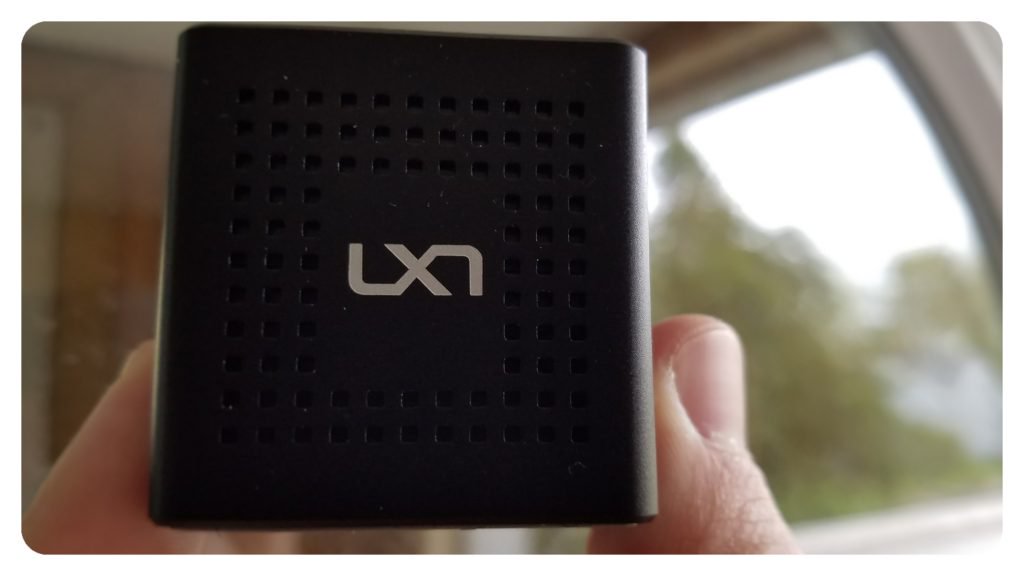 The LX7 Mini fits nicely in two fingers yet packs a loud punch
Sound Quality
The first thing I noticed with the LX7 Mini was the overall volume and clarity of such a small device. Although the audio coming from the LX7 did not blow me away, I was very surprised with how clean and clear the sound remained, even at high volumes. The unidirectional sound from the single speaker made me wish I had two, especially when listening to music, but still did a nice job filling in when I wanted a little more than just my smartphone speaker. The LX7 Mini allowed me to share videos and music with multiple people in a social setting from my smartphone or tablet.
I listened to all kinds of music and a few podcasts with the LX7 Mini and found that most music and all voice sounds great. It hardly needs to be mentioned that the LX7 lacks a bit in the bass department–it’s virtually impossible with today’s technology to have a tiny speaker that offers decent bass. With that said, I enjoyed listening to music that relied on mid-range instruments and strong vocals as it always sounded near-perfect on the LX7 Mini.
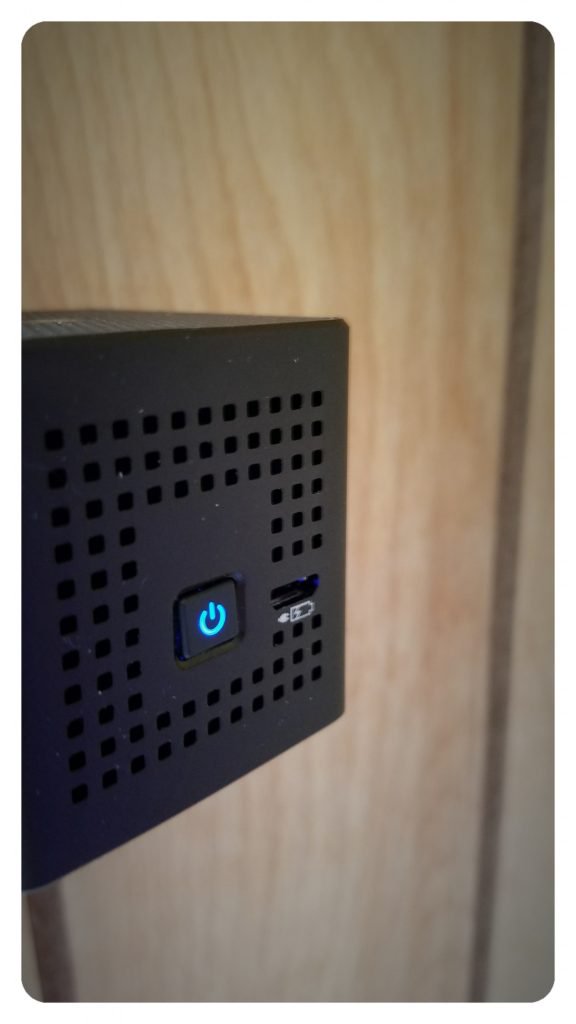 The power button on the front lights up with a nice blue hue; next to it sits the Micro-USB charge port.
Build Quality
The LX7 Mini has a wonderful aluminum casing with a three of four sides perforated with small square indentations. While I love the look, I don’t believe that the perforations add anything to overall sound enhancement or quality. The biggest knock I have against the overall design of the LX7 Mini are the sharp edges that can be uncomfortable when placed inside of a pocket. Thankfully Shenzhen has included a small, soft carrying case the has a cinching pull-string to protect (and soften up) the speaker during transport.
The power button on the front sits flush against the face and has a strong clicky feel that provides nice feedback when pressed. It doubles as Bluetooth pairing button and indicates as much with a blue flashing light while in pairing mode. Next to the pairing button sits the micro-USB charging port that is labeled and easy to utilize. Along the bottom side of the cube, you’ll find a thin rubber base that works great for preventing the speaker from slipping on slick surfaces.
 Use the included pouch to carry the LX7 anywhere, or hook it on your backpack or belt loop for even greater ease
Conclusion
LX7 has created an ultra-compact speaker with enough punch to fill a small area with clear and concise sound. While this “pocket speaker” is designed to generally play music for one person (or a few in close proximity), its size will leave a bit to be desired in its overall range of audio. Bass is virtually non-existent and most music can sound somewhat tinny. With that said, I was very impressed with the overall volume and the ability of the LX7 Mini speaker to be free of distortion at high volumes.
The cubic shape of the LX7 speaker offers stability when placed on a table-top or similar flat surface, yet makes stashing it in a pocket almost completely impractical. Style and Portability are the keys in design here and I feel the LX7 Mini Bluetooth Speaker succeeds at being both portable and stylish while delivering a solid audio punch for its size.
‘Stranger Things’ action figures cash in on ’80s nostalgia
Netflix’s Stranger Things is ultimately one long nostalgia trip for kids from the ’80s, so it only makes sense that it you’d see tributes to every last facet of ’80s culture, right? Funko agrees. It’s preparing Stranger Things action figures that are bound to rekindle memories of playing with GI Joe or She-Ra toys as a kid. The collection will include two packs of three figurines that mostly center around the kids at the heart of the series, complete with character-appropriate props. Eleven has a box of Eggo waffles, for instance, while Lucas is packing a slingshot.
Both packs will arrive in August at an unspecified price. They promise to be a delight if you’re a fan of the Spielberg-inspired show, but we can imagine that the narrow selection of the packs (at least, in its initial form) will upset some fans. Where are other major characters like Jim, Joyce or (of course) Barb? That may give Funko an excuse to come back with another round of action figures, but completionists will have to sit tight for now.
Via: io9
Source: Funko
Sean Bean cast as lead in Crackle’s 50 Cent series ‘The Oath’
In April, Sony Pictures Television announced a new slate of original programming for its streaming service Crackle, two shows of which are being produced by Curtis “50 Cent” Jackson’s G-Unit Film and Television Inc. The first of those shows is now being cast and is scheduled to premiere in 2018.
The Oath is a gritty drama about a world of highly selective gangs, the members of which have to swear to protect each other at all costs. Sean Bean of Game of Thrones and Lord of the Rings fame has been cast as the lead — a cop and ex-gang leader trying to work his way back to the top after a stint in prison.
“Sean Bean is the perfect choice for the role of Tom Hammond,” said Crackle’s General Manager Eric Berger in a statement, “He embodies the grit and intensity that drives this character throughout the series’ uncompromising and fast paced narrative. We are excited to have him anchor this incredible production from Joe Halpin and 50 Cent’s G-Unit division.”
The series is created by ex-Los Angeles cop Joe Halpin who has written for a number of police dramas including Hawaii Five-O and Secrets and Lies. He’ll also serve as the showrunner and one of the executive producers.
The Oath is slated for 10 episodes and will begin production next month in Puerto Rico.
Via: The Hollywood Reporter
Source: Crackle
Ikea shopping experience will be augmented with AR app for iOS 11
Why it matters to you
Augmented reality is going to become a much more commonplace technology over the next few years. The launch of iOS 11 will act as a catalyst for its early growth.
Ikea will be one of the first companies to launch an augmented reality application on Apple’s upcoming iOS 11 with a view to improving the in-store shopping experience. Ikea hopes that users will bring along photos of their rooms, which they can then use to place digital versions of Ikea furniture in, to give an augmented reality idea of what it might be like to own something new, reports Digital.di, via 9to5Mac.
Apple CEO Tim Cook reiterated several times what a big fan he is of augmented reality and Apple, too, has made it clear that the upgrade to iOS will give the fledgling technology a real leg up. While a number of companies will take advantage of such a move, Ikea is betting big on it and is looking to get in on the ground floor when the new operating system debuts later this year.
Although other companies have toyed with augmented reality as a sales tool, Ikea is putting its AR efforts front and center. While it will launch the app with between 500 and 600 products, any new furniture pieces it sells will show up on the AR app first.
Ikea’s digital transformation manager Michael Valdsgaard believes that augmented reality is the future of the shopping experience. While the app will initially be pushed for use in-store to encourage sales and allow customers to make more informed purchases, the end goal is to have people try out different furniture options digitally while at home, before ordering online.
It is not exactly clear if the new app will be ready for the iOS 11 launch, though Valdsgaard did say that Ikea developers were working to a tight deadline, so it is certainly possible.
This is not the first time Ikea has toyed with augmented reality. Four years ago it released an AR app and AR catalog that helped shoppers visualize furniture in their home. It is not the only one though. Earlier this year FaceCake debuted a smart mirror that let you ‘try out’ different makeup styles using augmented reality.
Sweden’s Musuem of Failure celebrates tech’s biggest flops
Why it matters to you
The Museum of Failure makes a case for remembering history’s botched products — if only so we can learn from their mistakes.
Everyone remembers history’s most successful products, but sometimes its flops can be fondly remembered, too. That can be especially true in tech, where a failure can mean a product was ahead-of-its-time, or a bad implementation of a good idea.
Those ideas — ranging from the noble flops to the “who on earth thought this was a good idea” down-and-outs — form the basis of the newly opened Museum of Failure in the Swedish town of Helsingborg.
“I’m not sure failure should be celebrated, but it should be given more attention,” curator Samuel West, a licensed clinical psychologist, told Digital Trends. “Success might be good for inspiration, but it is through failure that we learn. Eighty to 90 percent of all innovation projects fail, yet we seldom see or read about these failures. Also, organizations need to improve their ability to learn from failure. Even the coolest Silicon Valley ‘Fail Forward’ companies may be good at accepting failure, but they suck at learning from failure.”
As you might imagine, given that the pace of innovation is much higher in the tech sector, there are plenty of tech gadgets in the museum’s 70-plus item permanent collection. In fact, West says he had to work hard to avoid having an exhibition that was entirely tech-focused.
“There are so many failed smartphones that it would have been easy to have too many,” he said. “We’ve got the uninteresting and short-lived Microsoft Kin to the highly interesting — from a failure perspective — TwitterPeek.”
You’ll also find a motley crew of everything from the Segway (remember when it was going to change transportation as we know it?) to the Apple Newton MessagePad, which laid the groundwork for the later iPhone and iPad, but never sold more than a couple of hundred thousand units over its five-year lifespan.
To see the museum’s collection, there are a few possible options. A traveling collection will go on tour later this year, although no dates have yet been set. For conferences and events, a small miniature pop-up version of the museum is available for hire. In addition, Google has offered to help create a virtual version of the museum, although West doesn’t know when this will be made available.
The best option, though? “Fly to Copenhagen, Denmark,” he said. “Have a beer. Get on a train to Helsingborg, Sweden, which takes one hour.” That way you get to witness the failure in all its glory.
And if you happen to have anything to donate to the collection, bring it along! “I am always looking for interesting additions,” West finished. “They don’t always have to be consumer products or big brands. The criteria is that the item, service, or product must a) be an innovation in someway, and b) be a failure.”
We’ll get thinking.
Sweden’s Musuem of Failure celebrates tech’s biggest flops
Why it matters to you
The Museum of Failure makes a case for remembering history’s botched products — if only so we can learn from their mistakes.
Everyone remembers history’s most successful products, but sometimes its flops can be fondly remembered, too. That can be especially true in tech, where a failure can mean a product was ahead-of-its-time, or a bad implementation of a good idea.
Those ideas — ranging from the noble flops to the “who on earth thought this was a good idea” down-and-outs — form the basis of the newly opened Museum of Failure in the Swedish town of Helsingborg.
“I’m not sure failure should be celebrated, but it should be given more attention,” curator Samuel West, a licensed clinical psychologist, told Digital Trends. “Success might be good for inspiration, but it is through failure that we learn. Eighty to 90 percent of all innovation projects fail, yet we seldom see or read about these failures. Also, organizations need to improve their ability to learn from failure. Even the coolest Silicon Valley ‘Fail Forward’ companies may be good at accepting failure, but they suck at learning from failure.”
As you might imagine, given that the pace of innovation is much higher in the tech sector, there are plenty of tech gadgets in the museum’s 70-plus item permanent collection. In fact, West says he had to work hard to avoid having an exhibition that was entirely tech-focused.
“There are so many failed smartphones that it would have been easy to have too many,” he said. “We’ve got the uninteresting and short-lived Microsoft Kin to the highly interesting — from a failure perspective — TwitterPeek.”
You’ll also find a motley crew of everything from the Segway (remember when it was going to change transportation as we know it?) to the Apple Newton MessagePad, which laid the groundwork for the later iPhone and iPad, but never sold more than a couple of hundred thousand units over its five-year lifespan.
To see the museum’s collection, there are a few possible options. A traveling collection will go on tour later this year, although no dates have yet been set. For conferences and events, a small miniature pop-up version of the museum is available for hire. In addition, Google has offered to help create a virtual version of the museum, although West doesn’t know when this will be made available.
The best option, though? “Fly to Copenhagen, Denmark,” he said. “Have a beer. Get on a train to Helsingborg, Sweden, which takes one hour.” That way you get to witness the failure in all its glory.
And if you happen to have anything to donate to the collection, bring it along! “I am always looking for interesting additions,” West finished. “They don’t always have to be consumer products or big brands. The criteria is that the item, service, or product must a) be an innovation in someway, and b) be a failure.”
We’ll get thinking.
Asus reveals specs of its upcoming ZenBook 3 Deluxe UX490 super-slim laptop
Why it matters to you
The Asus Zenbook 3 Deluxe UX490 is great for customers looking for an elegant, powerful, and slim laptop with Thunderbolt 3 connectivity.
Update: Added news that the ZenBook 3 Deluxe UX490 is now available for purchase, along with some additional design details.
During the CES 2017 tech convention in January, Asus teased the ZenBook 3 Deluxe UX490 notebook as part of its “Zennovation” lineup. It’s an enhanced version of the original ZenBook 3 sporting a 14-inch screen. It measures just 0.50 inches thin and not only packs a new seventh-generation Kaby Lake processor from Intel but also sports two Type-C ports supporting Thunderbolt 3 at the full 40Gb/s.
The super-thin notebook is listed on the Asus website as the ZenBook 3 Deluxe UX490UA. There will be two models once the laptop hits the market: one with an Intel Core i5-7200U processor and one with an Intel Core i7-7500U chip. Asus has just announced that the Core i7 version is now available for purchase at a retail price of $1,699. Both machines feature Windows 10 Pro visually powered by Intel’s integrated HD Graphics 620 component.
Here are the hardware specs for both Intel processors:
Core i5-7200U
Core i7-7500U
Launch date:
Q3 of 2016
Q3 of 2016
Process node:
14nm
14nm
Number of cores:
2
2
Number of threads:
4
4
Base speed:
2.50GHz
2.70GHz
Boost clock speed:
3.10GHz
3.50GHz
Cache:
3MB
4MB
Maximum power draw:
15 watts
15 watts
Integrated graphics:
Intel HD Graphics 620
Intel HD Graphics 620
Graphics base speed:
300MHz
300MHz
Graphics boost speed:
1,000MHz
1,050MHz
Max resolution:
4096 x 2304 @ 60Hz
4096 x 2304 @ 60Hz
Now here are the specs for the UX490UA laptop:
Screen size:
14 inches
Screen resolution:
1920 x 1080 @ 60Hz
Color gamut:
72 percent NTSC
100 percent sRGB
Viewing angles:
178 degrees
Contrast ratio:
1,000:1
Memory:
8GB or 16GB LPDDR3 @ 2,133MHz
Storage:
512GB or 1TB PCI Express Gen3 x4 SSD
256GB SATA 3 SSD
Connectivity:
Wireless AC
Bluetooth 4.1
Ports:
1x SD card reader
2x USB 3.1 Type-C ports with Thunderbolt 3 at 40Gb/s (one on each side)
1x Microphone/headphone jack
Battery:
46 watt-hour lithium-polymer
Keyboard:
Illuminated chicklet-style
Webcam:
VGA camera
Color:
Navy Blue or Silver
Size:
12.95 x 8.50 x 0.50 inches
Weight:
2.42 pounds
Keeping this laptop cool is a new thermal design that includes a liquid-crystal-polymer fan impeller measuring just 0.3mm thin, and a copper-alloy heat pipe with walls measuring 0.1mm thick. Overall, the cooling system measures just 3mm high, enabling Asus to keep the laptop super-thin while efficiently pulling heat away from the Intel processor. The warm air is “gently” ejected from the inside through hidden vents in the hinge.
Other notable features not listed in the hardware specs include an Asus SonicMaster Premium quad-speaker audio system, a special four-channel smart amplifier, an all-aluminum chassis, Corning Gorilla Glass 5 protection measuring 0.55mm thin on the display, and ultra-narrow bezels measuring 7.46mm wide on each side with a 77-percent screen-to-body ratio. There’s also a fingerprint scanner embedded in the touchpad for jumping into Windows 10 Pro with just a touch, and the touchpad supports the usual multi-touch gestures along with handwriting support.
“The perfect curves of the all-aluminum chassis are carved from a single block of metal that then goes through a 40-step process to create the iconic ultra-fine spun-metal finish with its lustrous, silky sheen,” the product page states. “A complex two-phase anodizing process is then used to create the elegant golden diamond-cut edges and unique golden Asus lid logo.”
As indicated above, Asus is now shipping the Core i7 version of the ZenBook 3 Deluxe UX490 from a variety of retailers including Amazon, Newegg, the Asus store, and others. The available model includes a seventh-generation Core i7-7500U processor, 16GB of LPDR3-2133MHz RAM, and a 512GB PCIe M.2 SSD. Asus is throwing in USB Type-C to Type-A and USB Type-C to HDMI dongles.
Amazon
Lace up and head for the hills with the best hiking apps
Update: Added Cairn, Mountain Hub, Gaia, and Animated Knots.
We all get cabin fever now and then, and there’s nothing quite like a hike in the woods or a camping trip to shed the desk-job blues. It’s time to get outdoors and go on an adventure. Thankfully, we’ve been scouring the iOS and Android app stores in search of handy hiking aids, camping help, and adventure apps. If you’re heading out into the wild and leaving the comforts of the modern world behind, just make sure you install these apps first — some of which are features on our picks for the best iPhone and Android apps. Also, don’t forget your smartphone!
Yonder
If you’re a lover of the outdoors, you may want to discuss your adventures with other outdoor junkies. Yonder allows you to easily share your experiences when it comes to hiking, camping, and biking. It acts like a social media network for those that enjoy the great outdoors. Yonder isn’t just a social app, however. The other half of the app is aimed at exploration, and such being the case, it allows you to see experiences close to you. You can also view shared images, which is helpful when you’re searching for something to do.
Download it now for:
Android iOS
Cairn
Safety when you’re hiking is paramount, but it’s the last thing you want to worry about on the trail. Fortunately, Cairn helps you stay out of harm’s way, and get help should you need it. The app crowdsources cell coverage areas, so you know where you can expect service before you set foot on the trail. It also ties into your GPS, so friends or loved ones can keep tabs on your location when you’re out and about. You can set up the app to automatically notify specific contacts when you’re overdue, and even download a collection of free maps and trails with statistics for thousands of routes in the United States and United Kingdom. Cairn is iOS-only at the moment, but an Android version is on the way.
Download it now for:
iOS
Geocaching
Want more of a challenge when hiking? Geocaching is basically a modern day treasure hunt, one that requires players to hide small items and tokens before posting their GPS coordinates in the Geocaching app. The app features upwards of 2 million treasures, and utilizes your phone’s GPS to help you find them. It even provides recommendations and tips for beginners.
Download it now for:
Android iOS
Leafsnap
Maybe birds aren’t your thing — maybe you’re more into flora than fauna. If that’s the case, Leafsnap is the app for you. Leafsnap is a joint project between Columbia University, the University of Maryland, and the Smithsonian Institution. It uses visual recognition technology to help you identify what species of tree a leaf is from — just take a photo and the app will tell you what you’re looking at. The app doesn’t just identify leaves, though. It also offers hi-resolution photos of bark, fruit, and flowers, which can help in the identification process.
Download it now for:
iOS
AllTrails
With 50,000 trail guides in the U.S. and Canada alone, it’s not too difficult to work out why the AllTrails app has more than 1.5 million users. It’s an easy way to find trails near you, whether you want a gentle hike, a bone-rattling mountain bike track, or a great spot for some fly-fishing. You can create your own trails with GPS tracking, photos, and text, and save them for later or share them with others. If you are willing to splash out $30 per year for a membership, then you get the pro version, which takes advantage of a partnership with National Geographic Maps, and gives you the ability to print and edit maps. There are also events, such as the World Elevation Challenge, which lets participants to compete and track their progress in real-time as they scale Matterhorn, Kilimanjaro, Mount McKinley, and Everest.
Download it now for:
Android iOS
Mountain Hub
With Mountain Hub, you can look to your fellow hikers, skiers, hunters, climbers, and so on for updates on terrain and weather. The app pulls together resources from a wealth of contributors to explain trail data in a practical, concise way. Mountain Hub is free to download, but there’s a premium version that runs $3 a month or $25 a year that adds a variety of features. Pro users can mark hazards and points of interest on their way, for instance, and download topographic and aerial maps with a variety of layers for offline viewing.
Download it now for:
Android iOS
MapMyHike GPS Hiking
Looking for an app to track your hike or cycle? This one will provide you with detailed feedback on your route, your average pace, distance covered, calories burned, and a whole lot more. It’s geared towards workouts, but it has a number of features that make it ideal for anyone looking to record hiking routes and share them easily. You can also find popular local routes and compete with others to record the best times. If you sign up for the premium version at $6 per month, there’s a live tracking feature that lets you keep tabs on your hiking buddies in real time, heart rate analysis, audio coaching, and route recommendations.
Download it now for:
Android iOS
 AIVAnet