


Amazon is the latest to offer clothes-by-mail to try on at home
Amazon just announced its latest service — Prime Wardrobe. Adding to its growing list of fashion-focused offerings, the service makes shopping for clothes online a commitment-free experience, one of the few advantages brick-and-mortar stores still had on online retailers.
With Prime Wardrobe, you can pick out a number of items, including clothes, shoes, and accessories. Once you have at least three, Amazon will send them to you and you’ll have a week to try them on and decide what you like. Whatever you don’t want, you can send back for free and you’re only charged for what you keep. If you keep at least three things, you’ll get 10 percent off; and you’ll get 20 percent off if you keep at least five.
This service is similar to popular fashion companies like Stitch Fix, Trunk Club and DailyLook Elite, which deliver a selection of items to your door. But with those, a stylist picks out what’s sent to you based on information you’ve provided about your fashion preferences. And each of those companies charge a styling fee that counts towards your purchase if you choose to buy something. Stitch Fix is on the lower end, charging $20 while DailyLook Elite’s fee is $40.
Amazon’s other fashion-centric moves could work well with this service. Once you get your items, you can use Echo Look to take a quality selfie and Amazon’s Outfit Compare to figure out which looks are more stylish. Prime Wardrobe is currently in beta, but you can get a notification when it launches.
Via: TechCrunch
Source: Amazon
Apple’s 2017 Summer Camps to Help Kids Learn to Code, Draw, and Edit Video at Retail Stores
Following the worldwide debut of “Today at Apple,” Apple in July will launch this year’s summer camps for kids at its retail stores, aimed at those between ages 8 and 12. The free “Apple Camp” will educate kids on how to create characters, make movies, design storybooks, code robots, and more while using Apple products (via Macworld).
Apple Camp’s workshops this year include Coding Games and Programming Robots, Creating Characters and Composing Music, and Stories in Motion with iMovie. Each workshop is designed as a series of three 90-minute classes that kids visit on three separate days.
For the first two days kids will work on projects specific to the session they choose, while the final day will be a show and tell where they present their final project to parents, friends, and fellow Apple Campers.
Creating Characters and Composing Music: Kids ages 8-12 will create their own stories through drawings and sounds. Campers will start their session by sketching characters and scenes with iPad Pro and Apple Pencil, then they’ll explore the basics for composing a track using GarageBand. They’ll bring their story to life by adding vocals and finishing touches.
Stories in Motion with iMovie: Future filmmakers ages 8-12 will explore the creative process of turning their ideas into real movies. In this three-day session, Campers will learn how to brainstorm and storyboard. Then they’ll get hands-on with movie-making techniques like learning camera angles and editing with iMovie. On the final day, they’ll present their masterpieces.
Coding Games and Programming Robots In this three-day session for kids ages 8-12, we’ll introduce programming through interactive play. Kids will learn visual-based coding by solving puzzles with Tynker. Then they’ll learn how to program Sphero robots, and even create fun stories starring Sphero as the main character.
Apple Camp will begin July 10 and run through July 28, and registration is up now on Apple.com. Today at Apple also offers other kid-focused sessions called “Kids Hour,” with more classes teaching coding as well as basic knowledge of GarageBand and iMovie.
Tags: Apple Camp, Apple retail
Discuss this article in our forums
Apple Says Qualcomm Has Overcharged Billions of Dollars By ‘Double-Dipping’ on iPhone’s Innovation
Apple has expanded its lawsuit against Qualcomm, accusing the wireless chipmaker of “double-dipping” by way of unfair patent licensing agreements, according to an amended complaint filed with a United States federal court in San Diego today.
The complaint broadens the claims Apple made in its original lawsuit against Qualcomm in January, when it sued the chipmaker for $1 billion in alleged unpaid royalty rebates. Apple also accused its longtime supplier of the iPhone’s wireless chip of engaging in anticompetitive licensing practices.
Since the original iPhone, Qualcomm has supplied Apple with modems that enable the smartphone to, for example, connect to a Wi-Fi or LTE network. But as the iPhone has gained more features, Apple argues that Qualcomm has been unfairly “levying its own tax” on those innovations through “exorbitant royalties.”
Apple said Qualcomm wrongly bases its royalties on a percentage of the entire iPhone’s value, despite supplying just a single component of the device.
As Apple innovates, Qualcomm demands more. Qualcomm had nothing to do with creating the revolutionary Touch ID, the world’s most popular camera, or the Retina display Apple’s customers love, yet Qualcomm wants to be paid as if these (and future) breakthroughs belong to it. Qualcomm insists in this Court that it should be entitled to rely on the same business model it applied over a decade ago to the flip phone but while that model may have been defensible when a phone was just a phone, today it amounts to a scheme of extortion that allows Qualcomm unfairly to maintain and entrench its existing monopoly.
The licensing agreements are in addition to paying for the wireless chips themselves. Apple said Qualcomm’s “double-dipping, extra-reward system” is precisely the kind that the U.S. Supreme Court recently forbade in a lawsuit between Lexmark and a small company reselling its printer cartridges.
If that were not enough, the U.S. Supreme Court’s recent landmark decision in Impression Products, Inc. v. Lexmark International, Inc., condemned Qualcomm’s business model as a violation of U.S. patent law. The Supreme Court flatly rejected Qualcomm’s business model, holding that a patent holder may demand only “one reward” for its patented products, and when it has secured the reward for its invention, it may not, under the patent laws, further restrict the use or enjoyment of the item. Qualcomm, by its own admission, will not sell chips to manufacturers who do not also pay separate royalties and enter Qualcomm licenses at usurious rates. This is precisely the kind of double-dipping, extra-reward system that the Court’s decision in Lexmark forbids.
Apple said it has been “overcharged billions of dollars” due to Qualcomm’s so-called “illegal scheme,” including the $1 billion in unpaid royalty rebates that led Apple to sue Qualcomm in January.
In its countersuit, Qualcomm accused Apple of failing to engage in good faith negotiations for a license to its 3G and 4G standard essential patents on fair, reasonable, and non-discriminatory (FRAND) terms.
Apple, however, argues that Qualcomm’s monopolistic licensing demands violate its FRAND obligations.
By tying together the markets for chipsets and licenses to technology in cellular standards, Qualcomm illegally enhances and strengthens its monopoly in each market and eliminates competition. Then, Qualcomm leverages its market power to extract exorbitant royalties, later agreeing to reduce those somewhat only in exchange for additional anticompetitive advantages and restrictions on challenging Qualcomm’s power, further solidifying its stranglehold on the industry.
Apple also claims that Qualcomm has never made it a worldwide offer on FRAND terms for a direct license to its patented technologies.
Apple said Qualcomm subsequently filing lawsuits against iPhone manufacturers Foxconn, Pegatron, Wistron, and Compal reveals “its true bullying nature,” calling it “a blatant attempt to exert pressure on Apple to acquiesce to” its “non-FRAND royalty demands” by attacking its smaller contract manufacturers.
Qualcomm knows that these are companies who have been effectively coerced by its monopoly practices in the past. Qualcomm knows that these companies merely pass through the usuriously high royalty demanded by Qualcomm and so have little incentive to resist its monopolistic tactics.
Apple has called for the court to declare Qualcomm’s patents in the lawsuit unessential to 3G/4G standards used in the iPhone and its other products, and to prevent Qualcomm from taking any adverse or legal action against Apple’s contract manufacturers related to the allegations in today’s amended complaint.
Tag: Qualcomm
Discuss this article in our forums
All about Android O’s Notification Channels
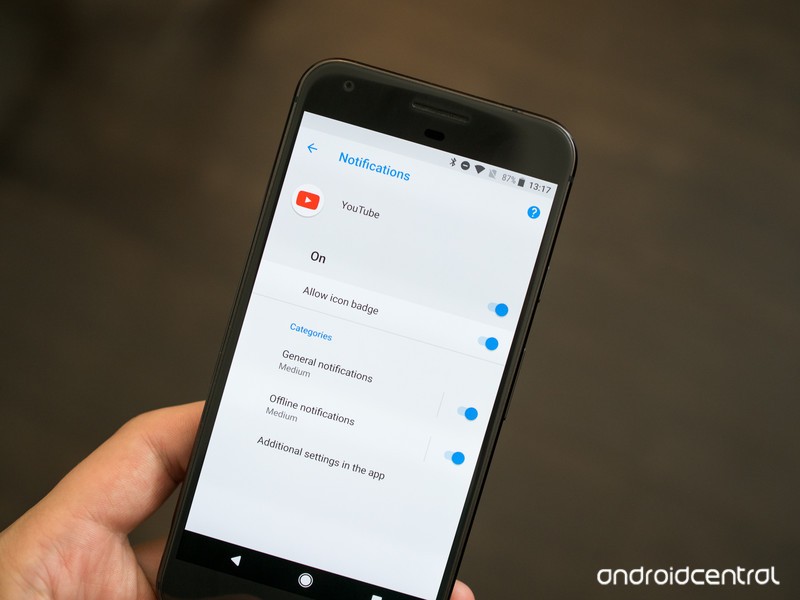
Android 8 comes with the power to take control over your notification tray so you can sort out just what you want to see.
One of the bigger changes and features coming with Android O is the new Notification Channels system. It can also be a little confusing to talk about, since it’s not something we’re used to seeing on our phones. But when you cut through all the fancy technical words and developer language, they’re not hard to understand at all!
What are Notification Channels
Coming with Android O, Notification Channels are something a developer uses to break down the notifications his or her app can give to us by type. The channels are decided by the people doing the developing, and the idea is to give us a way to separate out the notifications that are important to us from the ones that aren’t, then decide how they will be shown. Some apps will have a lot of different channels. Some will have just a few and some will have only one.
How a notification is prioritized is no longer left for the app developer to decide.
In versions of Android before O, a developer used what was called a priority level to decide how to show you a notification. If they felt the notification was important, they could set it to peek (show a visual indication on your screen) or make a sound, or both. If they felt it wasn’t it would just be placed in the tray for you to see the next time you went through them.
Now they break things out into channels and we get to decide how each type of notification is displayed. All notifications of the same type (for example, a reply on your Twitter feed) are placed into the same channel without any other types of notification grouped with them.
As a bonus, apps that allow us to use more than one account can have channels for each combined — your personal email and work email can follow the same rules and show you things the same way no matter which account received the notification.
Notification Channels developer documentation from Google
How we can set things up
The whole reason for the change is so that we have better control and can see the things we want to see. That means we need to have ways to filter all the different channels and the notifications that come with them. Through the settings, we can see every channel an app has for notifications and change how they are delivered with the following settings:
- Importance: Urgent will make a sound and show on the screen. High makes a sound. Medium makes no sound. Low makes no sound and gives no indication that it’s been received.
- Sound: Set any supported sound as the notification tone for the channel.
- Lights: Whether the notification should trigger a hardware notification light.
- Vibration: Whether the notification should vibrate your phone.
- Show on lock screen: Decide if a notification should appear on the lock screen.
- Override do not disturb: Decide if a notification should bypass any do not disturb settings for sounds.
Most of these are self-explanatory. That’s a good thing because this isn’t really better if it’s difficult to understand.
YouTube is a great example
If you have the Android O beta installed on your phone, you already have an app that’s using notification channels: YouTube. It’s also a really good example because there are only two channels — Standard notifications and offline notifications.

In the image above, the left side shows the two channels and the right side shows the individual settings for a channel. You’ll find these settings in Settings > Apps and notifications > App info. Choose the YouTube app and tap App notifications.
This is an easy way for us all to see how notification channels work because the YouTube app has such simple notification settings. But this will all scale to something like Facebook or Gmail that will possibly have more channels. And if an app only needs one channel, it only has to use one. The whole idea scales well and should be a great way to help us sort through all the distractions!
Android O
- Everything new in Android O
- Should you put Android O on your phone?
- How to get the Android O Beta on your Pixel or Nexus
- Join the Discussion
Grab three of these USB-C adapters for just $7 right now!
Our friends at Thrifter are back again, this time with a deal to make your transition to USB-C even easier!
Aukey is currently offering a three-pack of its Micro-USB to USB-C adapters for just $7 with coupon code AUKCBA23, a savings of $3. With these adapters, you can turn those old cables you have laying around into something that can charge your new Samsung Galaxy S8, LG G6, Google Pixel or other compatible phone. The adapters are quite small so you could easily fit them in your pocket or maybe even your wallet, and always have one with you so you are never without a cable to charge up with.

Odds are this deal won’t hang around too long, so be sure to act quickly if you are interested. Don’t get stuck with only old cables around and a dead battery! Grab these adapters now and thank yourself later. If you are only looking to grab two of them, you can pick up the 2-pack of aluminum adapters for just $4.99 with coupon AUKCBA92.
See at Amazon
For more great deals on tech, gadgets, home goods and more, be sure to check out our friends at Thrifter now!
Best Android Games for the NVIDIA Shield TV
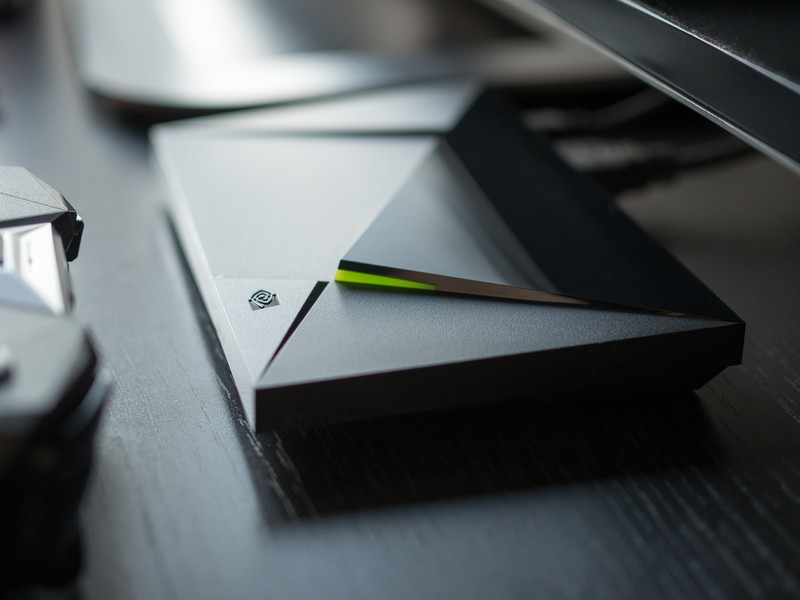
What are the best games to play on the NVIDIA Shield TV from the Google Play Store?
As NVIDIA proclaims in every ad, their new Shield Android TV box is “the streamer for gamers”. So which games are worth checking out?
Well, for starters we’re not going to dive into NVIDIA’s GeForce Now subscription service, or NVIDIA Gamestream. We’ll touch on those services later.
For now, we’re just going to highlight some of the best games available via the Google Play Store, specifically adapted to play on the NVIDIA Shield TV. So let’s dive right in!
- The Witness
- Borderlands: The Sequel
- Ultimate Chicken Horse
- GoNNER
- Metal Gear Rising: Revengeance
- Telltale Games
- Half-Life 2
- Skateboard Party 3
The Witness
If you consider yourself a hardcore puzzle gamer, you owe it to yourself to check out The Witness, one of the most beautifully crafted and challenging puzzle games ever conceived. At first glance, this appears to be a rather standard puzzle adventure game, where you wander around a mysterious island solving grid puzzles all the live long day, things become quite layered as you start to unravel the true nature of the island and just how deep the puzzle theme extends.
I’ll keep the description vague and cryptic because it’s really one of those games you want to experience for yourself.
Download: The Witness ($19.99)
Borderlands: The Pre-Sequel
The Borderlands franchise is a gloriously unique first-person shooter, mixing genre elements from action, RPG, and FPS into an addictive experience, topped off with the beautiful cel-shaded graphics and a storyline featuring razor-sharp wit.
The Pre-Sequel was originally released in 2014 for the major consoles, and fits in story wise between the first and second Borderland games. As such, it largely uses the game mechanics from Borderlands 2, while adding in some new weapons and elements. The game also supports co-op play, though sadly no split-screen co-op is available at this time.
Still, Borderlands: TPS plays like a dream on the NVIDIA Shield and should provide hours of fun.
Download: Borderlands: The Pre-Sequel ($14.99)
Ultimate Chicken Horse
Ultimate Chicken Horse is a rather unique party platformer that’ll have you and your friends gathering around the TV like it was 1998 again. The concept is that up to four friends collaborate to build out a challenging level — based on the different platforms and traps, made available to the group. Then, everyone simultaneously tries to complete the level.
Equal parts strategic and stupid, this game is great fun to get a few friends together and have at it (if you’ve got the right number of Shield controllers to accommodate the crew — third-party Bluetooth controller support is lacking). The goal is to set enough traps to sabotage your opponents while leaving a clean route for yourself to make it through the level and reach the goal. Everything is packaged in a fun, cartoony art style, with a host of farm animals as your disposal as playable characters.
Download: Ultimate Chicken Horse ($11.99)
GoNNER
GoNNER was my personal favorite game I played on the NVIDIA Shield TV in 2016, and it’s a real treat for folks looking for a challenging shooter-platformer. Levels are generated procedurally, meaning that you’ll never play the exact same level twice. The game seems to adapt the level difficulty to your skill and playing ability as you work your way through the multiple worlds.
But it’s worth noting that this game is tough. Like really tough. Before you head out to play, you choose your head and gun — you unlock more of both as you explore levels throughout the game — and then you’re tasked with dispatching the enemies as fast and efficiently as possible to continue to collect ammo for your weapons, and purple tiles which are used to heal up and upgrade weapons before boss battles, or save them to “delay” a game over screen.
I specifically chose the word delay because, again, this game is really hard. Are you up for the challenge?
Download: GoNNER ($9.99)
Metal Gear Rising: Revengeance
Right off the hop, for those wondering this game is nothing like the stealth action found in Metal Gear Solid, the crown jewel of the Metal Gear franchise. Instead, this is a slick-looking hack-and-slash action spin-off title starring Raiden, whom fans will remember best from Metal Gear Solid 2.
In Metal Gear Rising: Revengeance, players assume control of Raiden, a katana-wielding cyborg. Set in the far-off year of… 2018… the story revolves around conflicts between rival Private Military Companies, with some corporations actively looking to court chaos to keep the war economy chugging along. We won’t dive too much into the plot specifics, but just want to reiterate that this is nothing like the gameplay found in Metal Gear Solid games. Another thing worth noting is the file size — a whopping 5.5GB! If you just have the 16GB console, you’ll definitely want to look into expandable storage options for your Shield TV, or start clearing out some room before installing.
Download: Metal Gear Rising Revengeance ($14.99)
Telltale Games (The Walking Dead, Batman, Guardians of the Galaxy)
Telltale Games has carved out a nice niche for itself by delivering narrative-driven games based on our favorite comics, movies, and TV shows. You can play its games on your phone or on your NVIDIA Shield, and thanks to the cloud save, you can bounce between your devices.
The games play really well on the NVIDIA Shield TV. If you’ve never played a game made by Telltale Games before, you help progress the story by making choices for the characters and quicktime events where you must match the direction or button on the screen. It actually works better with a controller rather than a touch screen, so if you play things well enoug,h it should feel like you’re controlling a movie.
There are a number of franchises available on the Google Play Store, with the latest game being Guardians of the Galaxy. It’s a great example to mention, actually, because if you’re a fan of the movies, you’ll want to know that it’s not a direct tie-in to the movie franchise, although it is stylized after the movies. Star Lord looks more Stephen Baldwin than Chris Pratt, but the story is fresh and completely separate from the ongoing Marvel Universe storyline, so it’s a nice break.
Here’s a quick rundown of the other franchises available:
- The Walking Dead
- Tales from the Boarderlands
- Game of Thrones
- Batman
Note that while many of these games are free, each game is broken up into seasons and episodes, which you can either buy individually or via season passes.
Half-Life 2
Half-Life 2 is a masterpiece of a game. Developed by Valve, it’s the sequel to 1998’s groundbreaking first-person shooter Half-Life and was developed alongside Steam and the Source engine platforms.
If you own an NVIDIA Shield and have never played Half-Life 2, you owe it to yourself to check this game out. You don’t have to have played the first one to jump into this one, but if you need a bit of the backstory, you play as Gordon Freeman, a very quiet scientist who previously worked for Black Mesa Research Facility and accidentally opened a Portal to another dimension.
Half-Life 2 picks up with Freeman being awoken from stasis, learning that the world has fallen under the control of the Combine, an inter-dimensional empire who have implemented a brutal world-wide police state to control the human race. You must evade the Combine soldiers and meet up with a band of freedom fighters to help save the world.
It’s a bloody, epic game that’s been celebrated for years and is still worth playing in 2017 due to its brilliant visual and audio design, fantastic storytelling, and outstanding gameplay. If you’ve played it all before, you may as well play it again as we wait for Half-Life 3 (any day now, right?).
Download: Half-Life 2 ($9.99)
Skateboard Party 3 ft. Greg Lutzka
Fans of the classic Tony Hawk Pro Skater games from back in the day who lament the storied franchise’s current state should check out Skateboard Party 3. It’s a throwback game to those classic games we loved from the late 90s and early 00s before things went… sideways.
The game physics and controls feel very familiar and you’re given a couple couple game modes to choose from. In Career mode, you get four minutes to explore the eight different locations and rack up a huge score, collect P-A-R-T-Y scattered around as floating letters, and find other hidden items. Things are unlocked by spending experience points, which you collect by completing challenges and landing tricks.
Now is this as polished as the classic THPS games? No. Who is Greg Lutkzka? No idea. Is it the best thing you can get on the Shield for just $2? Yes. And it’s worth checking out for that reason alone, until Activision gets their act together and re-releases THPS 2 and 3 on Android.
Download: Skateboard Party 3 ($1.99 w/IAPs)
Portal
When making a list of best games, and Portal is one of the options, you always got to plug arguably one of the most fun and inventive games of all time. If you’ve never played Portal before, I’m actually jealous because it means you get to experience this outstanding game fresh for the first time.
This game is celebrated justly for its brilliantly subtle storyline, mind bending puzzles, and one of the most celebrated video game villains of recent time. And it’s been ported beautifully over to the NVIDIA Shield TV via the Google Play Store.
Anyone who’s played this knows exactly why this game deserves every award it’s ever won. If you haven’t played it yet, spend the $10 and enjoy.
Download: Portal ($9.99)
Real Racing 3
So far every game on this list has been a paid title. Real Racing 3 bucks that trend. It’s already arguably the best looking racing game available for Android phones, and it looks just as pretty on the big screen playing through the NVIDIA Shield TV.
Jump behind the wheel of one of over 140 intensely detailed vehicles based on real cars, and hit the track in over 4,000 events including Cup races, Eliminations and Endurance challenges on 17 race tracks based off of iconic circuits from around the world, including Silverstone, Hockenheimring, Le Mans, Dubai Autodrome and many more.
If you’re a racing fan and looking for a good title for your Shield TV, give Real Racing 3 a try.
Real Racing 3 (Free)
What are your favorite titles for the NVIDIA Shield TV?
These are the games that piqued our interest, but what are your favorite games for the NVIDIA Shield TV? Got any opinions on the games that made our list? Let us know in the comments!
Update June 2017: Added Half-Life 2, Skateboard Party 3, and the Telltale Games series to our list!
NVIDIA Shield Android TV
- Read our Shield Android TV review
- The latest Shield Android TV news
- Shield vs. Shield Pro: Which should I buy?
- Join the forum discussion
- Complete Shield Android TV specs
Amazon
Galaxy Note 8 could debut in late August without in-display fingerprint

August 26 could be Note 8 day — but the phone may miss out on the much anticipated in-display fingerprint sensor.
According to two separate reports, Samsung looks set to unveil the Galaxy Note 8 at a late August event. Reuters says a Note 8 with a display “marginally larger” than the 6.2-inch Galaxy S8 Plus will break cover towards the end of August in New York City. Korean outlet Naver pins the date down to August 26, just days before IFA 2017 in Berlin — a major electronics trade show which has hosted several Note launch events over the years.
A slightly later Galaxy Note launch this year — compared to the Note 7’s early August debut in 2016 — isn’t entirely surprising. After all, the Galaxy S8 series shipped around a month and a half later than the S7 did last year, as a more cautious Samsung focused on safety in the wake of the Note 7 cancellation.
An August 26 launch date could see the Galaxy Note 8 arriving on store shelves before the end of September, which, depending on Apple’s iPhone 8 launch schedule, would give it a fighting chance of releasing before its major rival.
We might have to wait until 2018 for a Samsung phone with fingerprint security built into the screen.
However, the Note 8 may miss out on one rumored feature when it eventually does arrive. Naver reported recently that Samsung once again wasn’t able to integrate fingerprint into the display in the Note 8, noting “various technical limitations such as security,” according to one unnamed Samsung official. Unverified reports from “industry insiders” on Weibo suggest that Samsung Display’s current in-screen fingerprint technology produces brightness anomalies around the fingerprint scanner area. While it’s possible this could be mitigated with display tuning — selectively darkening the pixels around the fingerprint area — the implication is the technology won’t be ready in time to ship in the Note 8, and will instead have to wait until next year’s Galaxy S9.
Let’s just hope that the (presumed) rear-mounted fingerprint scanner will be more conveniently located than Galaxy S8’s.
So what are we expecting in the next Note? How about a larger display, upgraded RAM and storage, an improved S Pen and Samsung’s first dual-camera setup. We’ll be watching with interest come August 26.
Samsung Galaxy Note 7
- Galaxy Note 7 fires, recall and cancellation: Everything you need to know
- Survey results: Samsung users stay loyal after Note 7 recall
- Samsung Galaxy Note 7 review
- The latest Galaxy Note 7 news
- Join the Note 7 discussion in the forums!
Samsung Pay support comes to more banks in the UK
Samsung Pay now available for HSBC, First Direct and M&S Bank customers.
Samsung Pay’s UK rollout continues today, with the addition of three new banks for Samsung’s mobile payment service. From today, customers of HSBC, First Direct and M&S Bank can use Samsung Pay on supported devices, in addition to launch partners MBNA, Nationwide, and Santander.

Samsung Pay’s UK bank support is still nowhere near as comprehensive as Android Pay, which covers just about all major high street banks in the country. Nevertheless, the addition of new banks is a step forwards, giving customers more choice when it comes to mobile payments. In today’s media release, Samsung notes that more partners, including American Express, will be getting onboard soon.
Samsung Pay currently supports the Galaxy S8, S8 Plus, S7, S7 edge, S6 and S6 edge (with a software update) — in addition to the mid-range Galaxy A3 2017 and A5 2017 phones with an over-the-air update. The service will be coming to more Samsung phones in the near future, the company says.
More: How to set up Samsung Pay on the Galaxy S8
Professor Layton gets Pokemon Go treatment, gotta solve ’em all
Another game that became a craze on Nintendo consoles is has been turned into a real world, AR and social treatment for smartphones – much like Pokemon Go.
The Professor Layton series has been hugely successful on DS then 3DS, with numerous games featuring the puzzle-solving, adventuring exploits of the Professor and his assistant Luke. Now a browser-based free game for iOS and Android has been released that will eventually present 50 puzzles all around the world for you to solve.
Layton’s Mystery Journey: Real World Puzzle Solving stars Professor Layton’s daughter Katrielle and places puzzles in 10 countries around the globe, kicking off in Japan today, 20 June. It lasts for three months (until 21 September) and different puzzles will drip feed into famous locations in each region throughout.
The first puzzle is presented by Pikotaro (creator of viral hit PPAP) and you can watch it below. Others will appear in major cities, including a larger-than-life character wandering the streets of Shibuya, with a suspicious top hat that could be a clue. He or she will appear from 23 June to 30 June.
A giant puzzle piece will also appear in London between 20 to 23 July. Head to London’s Waterloo Station to find out what it is.
Many others will appear in other cities, but we’ll leave you to figure them out. All the puzzles will give you clues to a major end goal.
You don’t have to worry about getting your passport out, however. Players will be encouraged to share hints through their Google or Twitter accounts. That way everybody gets to solve the mystery without using up their airmiles.
You can start your adventure by visiting layton.world through your phone, tablet or even PC browser. Good luck!
The online game has been created to help promote new iOS, Android and 3DS title Layton’s Mystery Journey: Katrielle and the Millionaire’s Conspiracy, which is release on 20 July.
Echo alerts you to voice or text messages with a yellow light
Now that the Echo has become a handy way to place calls and send messages, wouldn’t it be nice to be able to tell them apart? Amazon is about to make it a lot easier to do just that by changing how it notifies you of voice and text messages. As before, the device signals that you’re receiving calls by illuminating a green rotating ring light, but it now shows any new message, whether voice or text, via a solid yellow light.
🚨New light alert 🚨Coming soon to an Echo near you, yellow light = new message (voice or text) awaits. Green light = incoming call. 💛📩💚📞 pic.twitter.com/jNp96NxqtM
— Amazon Echo (@amazonecho) June 19, 2017
Until now, Echo devices (including the Echo, Echo Dot and 2nd-gen Echo Dot) would flash the green ring light until you checked your messages. They may have decided to change it as that indication is fairly similar to the rotating green light for calls, however.
Amazon got some grief when it first launched calling, because it allowed anyone who had your contact info to reach you, while making it very difficult to block them. It has since remedied that by finally adding contact-by-contact call-blocking a month later, but US users (calling isn’t available anywhere else yet) must call customer service if they want to stop the feature altogether.
Given what appears to be a rapid consumer adoption — it is pretty convenient to just yell at Alexa when you want to place a call — expect Amazon to roll out more features that make it handier and, hopefully, safer.
Source: Amazon (Twitter)
 AIVAnet