


OnePlus 5 specs: Snapdragon 835, 3,300mAh battery, optional 8GB RAM and 128GB storage

Specs! Get your specs here!
OnePlus has always played the spec game, and with the OnePlus 5, it’s offering just about everything inside that people are asking for. That starts with the top-end Snapdragon 835 processor and continues to an optional 8GB of RAM and 128GB of storage. The 3,300mAh battery is right around the industry average, and you’re missing a couple things like waterproofing and an SD card slot, but on the whole OnePlus set another high bar for the specs you can fit in a single phone and not have it cost a fortune.
Perhaps most impressive of all, from a smartphone nerd standpoint, is that OnePlus has just one model for the entire world — including radio bands to be used in dozens of countries. Combine that with its dual SIM capability and you have a true world phone.
| Operating System | Android 7.1.1 Nougat |
| Display | 5.5-inch AMOLED, 1920×1080 (401 ppi)Gorilla Glass 5 |
| Processor | Qualcomm Snapdragon 835 octa-core 2.45GHz |
| GPU | Adreno 540 |
| RAM | 6/8GB LPDDR4X |
| Storage | 64/128GB UFS 2.1 |
| Expandable | No |
| Battery | 3300mAh |
| Charging | USB-CDash Charge |
| Water resistance | No |
| Rear Camera 1 | 16MP (IMX398), f/1.7, 1.12-micron pixels, EISDual LED flash, 4K 30 fps / 720p 120 fps video |
| Rear Camera 2 | 20MP (IMX350), f/2.6, 1-micron pixels |
| Front Camera | 16MP (IMX371), f/2.0, 1-micron pixels, EIS1080p 30 fps video |
| Connectivity | LTE 3xCA, 256QAM, Cat 12Wi-Fi 802.11 ac, dual band, 2×2 MIMOBluetooth 5.0, aptX HDGPS, GLONASS, BeiDou, NFCUSB 2.0 |
| Security | One-touch fingerprint sensor |
| SIM | Dual Nano SIM |
| Network | FDD-LTE: Band 1/2/3/4/5/7/8/12/17/18/19/20/25/26/28/29/30/66TDD-LTE: Band 38/39/40/41HSPA: Band 1/2/4/5/8TD-SCDMA: Band 34/39GSM 850/900/1800/1900 MHzCDMA: BC0 |
| Dimensions | 154.2 x 74.1 x 7.25 mm153 g |
| Colors | Slate grey, Midnight black |
OnePlus 5
- Complete OnePlus 5 review
- Reviewing our first OnePlus 5 photos
- OnePlus 5 specs
- OnePlus 5 vs. Galaxy S8
- The latest OnePlus 5 news
- Join the discussion in the forums
OnePlus
You can order a OnePlus 5 right now using this code, no invite required
Supply is extremely limited, so you have to act fast.
OnePlus isn’t completely opening up sales of the OnePlus 5 until June 27, but if you were watching the launch event (or are reading this article) you’ll know that OnePlus has decided to open up an early order page where fans can be the first to get their OnePlus 5 before the official launch date. Outside of those who go to a pop-up shop in the next few days, if you order right away you’ll be among the first in the world to have a OnePlus 5; perhaps even before June 27.

To get your order in, all you have to do is:
Visit the OnePlus “early drop” page at oneplus.net/early-drop
In the box, enter code Clearer Photos and hit “Go”
Choose 6GB/64GB ($479) or 8GB/128GB ($539) model
Confirm your payment details.
If you don’t submit an order in time before the very real possibility that OnePlus sells out of its first batch, your other option is to go to one of the OnePlus 5 pop-up shops in one of several cities including New York, London, Paris, Berlin and Amsterdam. Pop-up stores will be open on June 21, with the exception of New York City, which is open on June 20.
Full-on orders open up around the world for real on June 27, where we expect a larger number of phones to be available.
OnePlus 5
- Complete OnePlus 5 review
- Reviewing our first OnePlus 5 photos
- OnePlus 5 specs
- OnePlus 5 vs. Galaxy S8
- The latest OnePlus 5 news
- Join the discussion in the forums
OnePlus
Netflix now lets kids choose their own adventure
Netflix is adding interactive branching stories for kids. What about big kids?
Netflix is announcing something pretty cool — interactive storytelling. Beginning with Dreamworks’ Puss in Book: Trapped in an Epic Tale, kids will be able to use their controller to choose the narrative direction of a particular story.
It doesn’t work on Android or Chromecast yet, but it will, and by the time it does there will be another show — Buddy Thunderstruck: The Maybe Pile — to peruse. Netflix says that this is as much an experiment in behavior as it is in showing off its new technology:
We’ve done extensive research and talked to lots of kids and parents, collecting qualitative data to better understand if this is something viewers will like. While we’ve gotten positive feedback (for example, parents like the fact their child has the ability to make decisions and take a seat in the director’s chair, if you will), we’re eager to learn how our members will engage with the experience. Which choices or storylines will be the most popular? Will the mean bears or the friendly bears be more popular? Are members more compelled to rewatch and uncover all of the different storylines?
The children’s programming space was a natural place for us to start since kids are eager to “play” with their favorite characters and already inclined to tap, touch and swipe at screens. They also talk to their screens, as though the characters can hear them. Now, that conversation can be two-way. It’s really about finding the right stories – and storytellers – that can tell these complex narratives and bring them to life in a compelling way.
You can see where this is going, too; so many of the conduits for Netflix, from the NVIDIA Shield to the Xbox One, have controllers, and it makes sense for the company to add as much “gaming” to the increasingly personalized experience as possible. As Amazon has with its X-Ray feature, which allows you to look up actors’ names and bios during a movie or TV show, Netflix may start overlaying pieces of information on top of its own content.
MrMobile’s OnePlus 5 video review
Almost a year ago to the day, I kicked off the MrMobile YouTube channel with a review of the OnePlus 3 – so it seems fitting that MrMobile’s one-year anniversary lands alongside the debut of the next phone in the family formerly known as “flagship killers.”
Like its immediate predecessor the OnePlus 3T, the OnePlus 5 is better described as a killer flagship, with top-of-the-line specs packed into a very affordable package. That’s OnePlus’s game, after all, and the company plays it well. But does its focus on camera quality justify the slightly higher price tag – and will you be able to tell it apart from your friends’ iPhones? Hit up MrMobile’s OnePlus 5 review to find out, and then hop on over to Android Central’s full OnePlus 5 review to learn what it really means to “never settle.”
Stay social, my friends
- YouTube
- The Web
- Snapchat
Best Heavy Duty Cases for Google Pixel
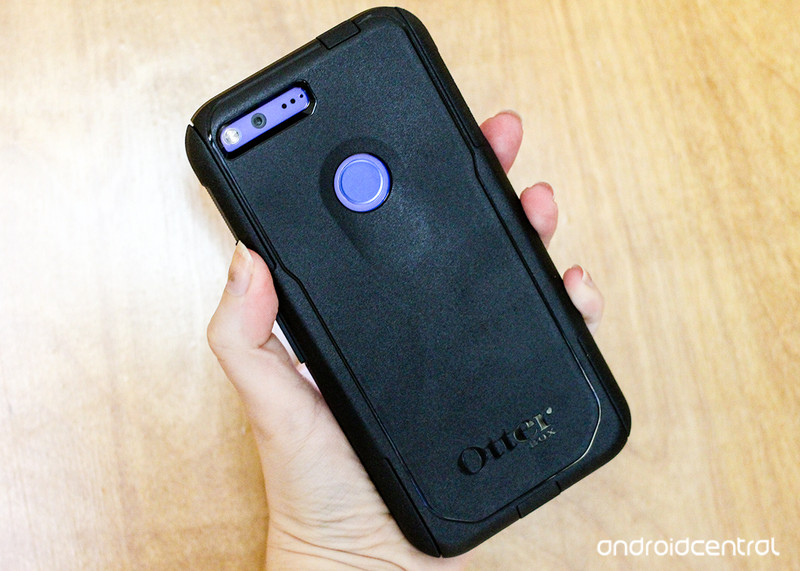
What are the best rugged cases for the Google Pixel?
The Google Pixel is quite possibly the best phone of 2016. It’s a beautifully designed phone (and rather expensive to boot). If you’ve got one, you’ll want to make sure you keep it protected.
And therein lies the problem with any new phone — should you forgo a case and risk scratches and scuffs or keep it looking brand new with a rugged case? If you fall into the latter category, we’ve got some great options for you and your new phone.
Note: These are cases designed for the 5-inch Pixel, not the larger Pixel XL.
- Spigen Rugged Armor
- OtterBox Commuter
- SUPCASE Unicorn Beetle Series
- YOUMAKER Rugged Belt Clip
- Wellci Hybrid Dual Layer Armor
- Lifeproof FRE
Spigen Rugged Armor
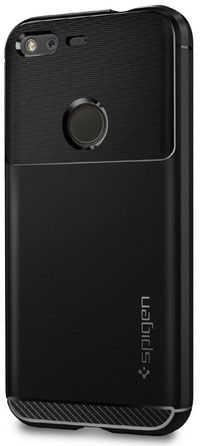
We trust the cases Spigen makes, and you should too. Spigen’s durable Rugged Armor cases are typically among the best heavy duty cases you can buy for your phone. For their Pixel case, Spigen has gone an extra step in incorporating some of the unique design elements of the Pixel right into the case.
Along with the tough TPU providing edge-to-edge protection of scratches and scuffs and military-grade drop protection in the corners, the back of the case around the fingerprint scanner is designed to look like the iconic glass sheet on the top third of the Pixel. That way people in the know will recognize you’re using a Pixel even when you’ve got it covered in a case. This is the only one-piece case on this list, so if you’d prefer the added protection of a two-piece design keep reading.
For protection that’s stylin’, Spigen’s got what you need.
See at Amazon
OtterBox Commuter
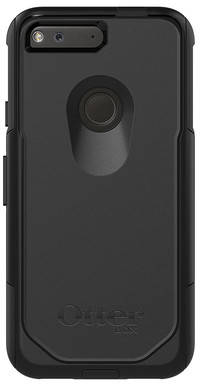
OtterBox is another trusted name in phone cases, and their Commuter case for the Pixel is equal parts rugged and stylish.
This two-piece case features a rubber slipcover and a polycarbonate shell to offer superior protection for both drops and scratches. On the back, the case features a smart, ergonomically-designed channel to help your finger quickly find the fingerprint scanner.
Amazon provides your best deal on this case, but as of writing it is currently out of stock. If you’re not patient enough to wait, you should be able to get one right away from OtterBox .
See at Amazon
SUPCASE Unicorn Beetle Pro Series
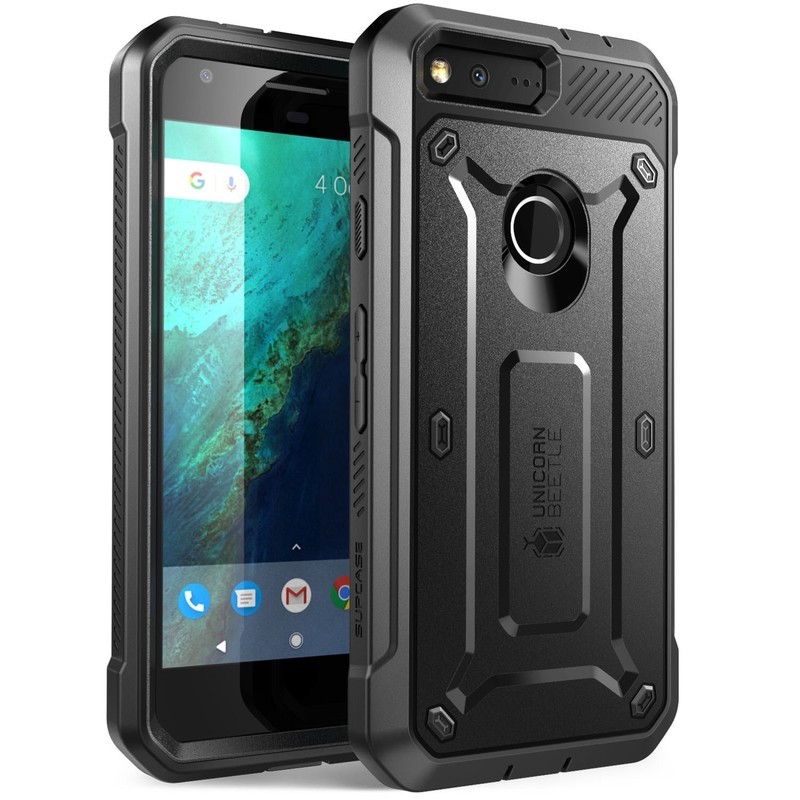
SUPCASE is known for making some outstanding heavy-duty cases, and their Unicorn Beetle Pro series offer a great combination of rugged protection and easy grip for your Pixel
It’s a dual layer case with a hard PC shell covering a flexible TPU sleeve that hugs tight to your phone and protects against the shock of a nasty drop. It also includes a front cover with a built-in screen protector which will keep your screen safe without affecting the touch sensitivity or clarity of the screen. There are also port covers to block out dust and debris.
All this, and the case also comes with a side mount belt clip holster. If you want a case that will keep your Pixel in pristine condition, this is it!
See at Amazon
YOUMAKER Rugged Belt Clip
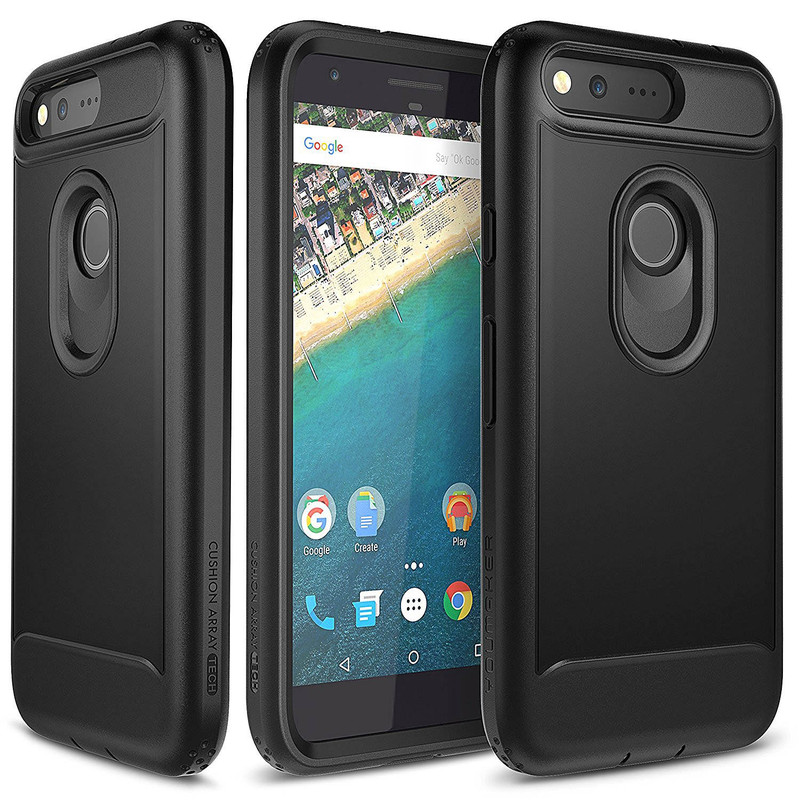
If protection is your top priority, this option from YOUMAKER offers layers of full-body protection along with an included belt clip if that’s your style.
With a thick TPU shell on the back, and a hard polycarbonate front plate featuring a built-in screen protector, this case is as rugged as they come. Clipped into the belt clip, your phone is fully protected from everything, making this a great option if you work on your feet and need the phone to be accessible and protected. Precise cutouts keep all the ports and buttons accessible, and the big loop around the fingerprint scanner makes it quick to find without looking. It’s a great option for those looking for quality protection and features at a reasonable price.
See at Amazon
Wellci Hybrid Dual Layer Armor
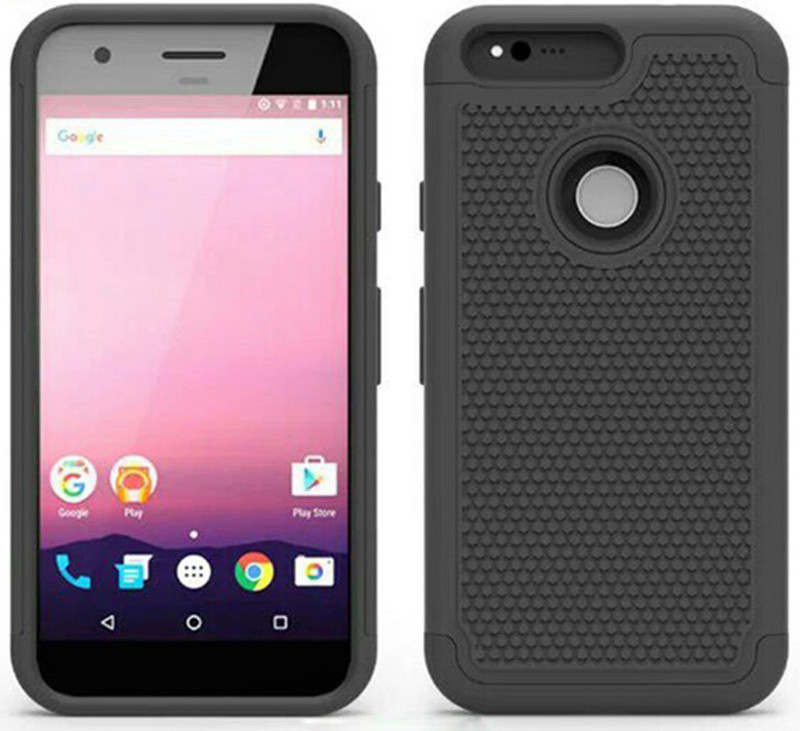
Sometimes the best way to prevent your phone from suffering drop damage is to make it harder to drop. The first thing you’ll notice about this case from Wellci is the pattern on the back of the polycarbonate shell, which helps to make this one of the grippier heavy duty cases you can get for your Pixel.
The shell works with the TPU slipcover to provide impact resistance and protection against scratches and scuffs. It’s also the cheapest case on this list, making it a great frugal option if you’re still looking for quality protection for your new Pixel.
See at Amazon
Lifeproof FRE
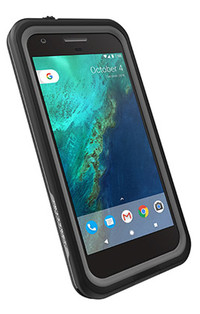
One of the glaring features omitted from the Pixel’s design was waterproofing. Considering the latest iPhone and Samsung devices have included it, some were a little disappointed Google didn’t match those specs with the Pixel.
A guide to waterproofing your Pixel
If the threat of water ruining your phone is a major concern for you, you’ll want to get a Lifeproof case. Their cases are some of the best you can get if you’re willing to spend top dollar to keep your phone protected. Currently, the Lifeproof FRE is not yet available for the Pixel, but you can learn about it and sign up for an email alert when it’s ready to ship.
See at Lifeproof
Protection or style: What do you prioritize?
Are you the type to buy a case as soon as you get a new phone? Or do you prefer to show it off in it’s full splendor? Let us know in the comments!
Update June 2017: Added the SUPCASE Unicorn Beetle Pro to the list.
Google Pixel + Pixel XL
- Google Pixel and Pixel XL review
- Google Pixel XL review: A U.S. perspective
- Google Pixel FAQ: Should you upgrade?
- Pixel + Pixel XL specs
- Understanding Android 7.1 Nougat
- Join the discussion in the forums!
Google Store
Verizon
South Korea wants its own Hyperloop for high-speed transit
Hyperloop Transportation Technologies has signed a deal to codevelop the future of transit with South Korea. The partnership will see the company working with both the local government, its institute of civil engineering, and Hanyang University. The group will research all aspects of Hyperloop technology, from the tubes themselves through to developing safety regulations determining its use.
That’s not the only news to emerge from the world of Hyperloops either, with Canadian company TransPod signing a deal with Liebherr Aerospace. The latter business designs systems for the aviation industry, amongst other things, and will help TransPod design the thermal systems for its pod. Presumably the pair are concerned about how hot Hyperloop pods would get while in transit.

Recently, too, Hyperloop One threw out a suggestion that it may build its German Hyperloop above the country’s autobahn network. The tube could, theoretically, connect the country’s major cities, from Hamburg and Berlin in the north, through to Munich and Stuttgart in the south. A solar roof above the tubes would provide around 7,000,000 MW/year of energy, theoretically could power the entire loop itself.
The fact that so many countries, from France through to South Korea, are all interested in the Hyperloop bodes well. After all, the international competition may be enough to ensure we get to zoom around in tubes soon, or else plenty of nations will be made to look pretty silly.
Source: TransPod, PR Newswire, Hyperloop One
Uber adds tipping and teen fares to make drivers happy
After weeks of faulty course-correction punctuated with multiple board member resignations, Uber is fighting to win back public approval, starting with its drivers. The company sent an email to all its contractors today promising many overdue features to improve their quality of life, with more to follow in the next 180 days.
First and foremost, riders can finally tip their drivers — at least in Minneapolis, Seattle and Houston starting today, which Uber promises to roll out nationwide by the end of July. Cancellation fees now trigger after two minutes, down from five, and drivers will now get paid to wait for passengers after two minutes of waiting. Drivers also get a $2 bump to the base fare for teen riders, assumedly to make up for having to drive teen riders anywhere. Uber’s also set up optional injury protection insurance and bumped up the per-mile rate to ostensibly make up for the cost.

Drivers are encouraged to restart their Uber apps to see if their area has been rolled into these improvements, which are expanding to all US cities on an undisclosed schedule. This is just the first batch in a series of additions to come once a month for the next 180 days, Uber’s mea culpa states, concluding that we should “Look out for the next round of improvements in July.”
Via: Gizmodo
Source: Uber
OnePlus 5 review: The flagship-killer’s coming of age
When OnePlus launched its first phone back in 2014, it was clearly the plucky upstart, one that was trying to offer as powerful a phone as possible that almost anyone could afford. Many of its strategies – from marketing to launch and invites for sales – screamed that this was a small company without the usual corporate strings attached. It could afford to be bold and different.
Fast forward three years and the key fourth-generation OnePlus device, the OnePlus 5, has arrived. With its latest creation, OnePlus is still trying to give users as good a phone as possible, without charging equivalent flagship prices. And there really is a whole lot of good under the hood.
- OnePlus 5 is here, and it’s more powerful than ever
- OnePlus 5: Release date, hardware specs and everything else you need to know
However, with official carrier partners, growing international presence and a functioning supply chain, it’s more corporate than it used to be. It might not be the £200 flagship-killer anymore, but the OnePlus 5 still promises a lot for a price point that’s comfortably cheaper than the competition.
OnePlus 5 review: Design
- 154.2 x 74.1 x 7.25mm; 153 grams
- Slate Grey or Midnight Black
- Ceramic fingerprint sensor
In many ways, the OnePlus 5 looks like its predecessors – it looks like a slimmer, rounder OnePlus 3/3T – but it has a clear enough identity of its own.
Like its predecessor, it’s made from a solid block of aluminium that feels really well made and has a smooth finish. Compared to most other 5.5-inch devices, the OnePlus 5 is narrower, thanks to its slim bezels. It’s noticeably more compact than the iPhone 7 Plus, Google Pixel XL or Moto Z2 Play.
One of the more subtle changes, which makes the biggest difference in use, is on the OnePlus 5’s edges. On the previous 3T, there’s a corner (or dividing line) between the edges and the back which runs all the way around the phone. With the OnePlus 5, the company has shifted this so that it’s further up the edges, increasing the curves on the back. It’s called the Horizon Line and, combined with the 7.25mm thinness, means the phone feels even more comfortable in hand than before.
This does, of course, mean that there’s less space for buttons and switches. It’s no surprise, then, that the volume rocker, alert switch and power button on the right edge are slimmer than before.
Other important new features in the OnePlus 5 include a new camera design. The new dual camera is no longer placed in a large protrusion in the centre of the back panel like with earlier OnePlus models. Instead, it’s placed in the top left corner. It still protrudes, but nowhere near as much as before. That means the phone won’t rock around so much when placed flat on its back.
There’s also the new antenna band design. Like the Midnight Black OnePlus 3T, the OnePlus 5’s antenna bands are colour matched to make them harder to notice. They also now run around the insides of the corners to follow the edge more closely, instead of being right across the back. It makes for a cleaner design, similar to the iPhone 7 and 7 Plus.
You’ll find the usual selection of ports and holes on the OnePlus 5’s bottom edge. That includes the Type-C port, a 3.5mm headphone jack – OnePlus hasn’t had the “courage” to remove that one yet, despite the slowly growing trend to do so – and five machined holes for the loudspeaker.
On the front, Corning Gorilla Glass 5 has been chosen to protect the display from bumps and scrapes, while the fingerprint sensor is now ceramic, for better durability.
Overall, the OnePlus 5 represents a more refined approach. By evolving the look and feel of its flagship device, while keeping all of what made the last model great, it’s even more likely to make a dent against the current flagship elite.
OnePlus 5 review: Display
- 5.5-inch AMOLED screen
- Full HD (1080 x 1920) resolution
- Gorilla Glass 5 protection
If there’s one thing we’ve wanted to see from the “flagship killer” for the past couple of years, it’s a Quad HD display. Sadly, the OnePlus 5 doesn’t feature one. Those wanting a more pixel dense experience are going to have to wait a little longer or choose something else.
That’s not to say a 1080p Full HD panel on a 5.5-inch phone is low quality. It isn’t. Indeed, this is a very good display. It’s AMOLED based, and is one of the more punchy panels we’ve seen of late. Blacks are pitch black, while colours are really vibrant and saturated in the default calibration.
Here’s where the screen really shines though, for those with very particular standards and requirements: the display can be changed to show sRGB or DCI-P3 colour standards, the latter being the wider colour gamut that Apple is using in its latest devices. If you want a more natural, less saturated appearance, such settings should suit you just fine. Or you can just adjust the colour temperature slider in the Screen Calibration menu to fine tune the white balance to your own preferences.
We’d still like OnePlus to dabble in a higher resolution panel, though. We could notice the difference between this and higher resolution panels. Text and curves aren’t exactly rough or jagged, but when viewing them up close, they’re clearly not quite as smooth and sharp as a QHD panel might be. Still, despite that, when holding at arm’s length, gaming, browsing and watching movies all look great on the OnePlus 5. But it’s how much the screen pops with life rather than resolution that makes it a pleasing experience.
OnePlus 5 review: Software
- OxygenOS on Android Nougat
- Reading mode
OnePlus’ OxygenOS is back and remains one of the more customisable and clean custom Android skins available. On the surface, it looks very much like the Google Pixel’s software, as the app drawer pulls up from the bottom of the screen.
Pocket-lint
There are also the quick actions which pop-up on compatible apps when you press-and-hold the app icon. The phone dialler lets you add a new contact, you can take a selfie, photo, video or launch Pro mode with the camera, or compose new messages with the Messaging app, among many other uses. Any of these quick actions can be dragged onto the screen as permanent shortcuts too.
Of course, being OxygenOS there are some differences compared to stock Android. The most apparent is the Shelf – a feature which lives to the left of the primary home screen – which acts an area where your most needed information and widgets live. Recent contacts and apps are placed in individual cards, as is the Manager Centre which tells you how much storage and battery you’re using. You can even add practically any widget that’s available in the system.
One really useful and battery-saving feature is Reading Mode. This changes the screen to display greyscale and sharpens text to make it feel more like an e-reader. You can activate it manually, or set it to apply to any of your specific reading apps when you open them.
There are gestures like flipping the phone on its face to mute an incoming phone call, or to take a screenshot by swiping the screen with three fingers. There’s also the usual selection of letters you can draw on the lock screen to launch a particular app, much like Huawei’s EMUI features: you can assign apps to open when you draw O, V, S, M or W, and double-tap the screen to wake it up.
In traditional OnePlus style you can choose whether or not you want onscreen navigation buttons, and which sides you want the back and recent apps buttons to be on. You can even assign shortcuts to each of the capacitive buttons depending on whether you long press or double-tap them.
One of the more useful features is App Locker, which adds an extra layer of security to the apps that contain personal information or communication. By activating it, you choose which apps you’d like to lock behind a fingerprint scan. That way, whenever you launch those specific apps, it asks you to rest your finger on the sensor, draw your pattern or input a PIN.
As is also customary for OxygenOS, you can change the look of the interface too. Choose between a few app icon styles, plus a system-wide dark or light theme. Once you’ve chosen a theme, you can choose an accent colour which appears on any toggle switches, and on some text.
Pocket-lint
None of the changes made to Android by OnePlus feel like obstacles. In fact, they seem beneficial and they’re not obtrusive. If you leave it as it is from the outset, there’s very little to distinguish it from a clean version of Google’s standard operating system.
There is one thing missing though: Google Assistant. As things stand, in our review unit, the search assistant is still the older version. You can still ask it almost anything, it just doesn’t display it in the Assistant’s chat-like interface.
OnePlus 5 review: Performance
- 2.45Ghz Snapdragon 835 chip
- 6GB or 8GB RAM (LPDDR4X)
- 64GB or 128GB storage
The Snapdragon 835 processor is the latest, and most powerful, currently available from Qualcomm. And it absolutely flies in the OnePlus 5. Regardless of what task you might throw at it, the phone takes it in its stride.
This isn’t all to do with processor, though. With a minimum of 6GB RAM, there’s plenty of memory to go around. And with it being a faster, more efficient kind of memory, things are that bit smoother and more responsive.
OnePlus also uses a software tool called App Priority which learns the apps you use most frequently and makes sure they’re always ready to go when you need them. Again, a bit like Huawei’s EMUI software in the P10 Plus. In daily use, we’ve found our most used apps load up very quickly on the OnePlus 5.
If there’s any minor criticism, it’s that sometimes the content moves and scrolls slower than your finger or thumb moves across the screen. It’s not hugely noticeable, though, unless you look for it closely and compare it to something like an iPhone. Otherwise the OnePlus 5 compares very well to other high-end Android phones – including pricier flagship devices.
OnePlus 5 review: Battery life
- 3,300mAh battery
- Dash Charge fast-charging
- USB Type-C port
On paper, the battery specs may not seem too impressive in the OnePlus 5. The 3,300mAh cell is less capacious than its predecessor’s, but we’ve been getting pretty much the same performance. That’s to say the OnePlus 5 will get to the end of a work day very easily.
In our testing, starting the day at 100 per cent battery at around 8am, we managed to get to nearly midnight with 40 per cent of the battery’s charge still remaining with light to moderate use. Heavy users should be able to get to the end of a day too, albeit with less remaining charge.
One of the OnePlus 5’s best features is that, regardless of how much you use the phone, you don’t have to wait ages for it to charge back up again. Even if the phone dies before your work day finishes (we’d call that super-heavy use), you can plug it in for 30 minutes and have enough juice to comfortably get you through the rest of the evening.
This is thanks to something the company calls Dash Charge. It works by amping up the current to deliver lots of power, quickly, and uses a thick cable to dissipate any heat. That means even if you’re using the phone to game, watch videos or navigate in your car, the battery continues to fill up quickly.
The company’s slogan “a day’s power in half an hour” is pretty much bang on. Starting at zero, you can easily get it to more than two thirds full after 30 minutes plugged into its charger. Or starting at 25 per cent, we checked it again after 30 minutes to find that it was over 80 per cent.
The last 10-15 per cent does take a little while longer, as is typical of current battery technology. Even so, you’re never going to be left waiting much longer than an hour to completely refill the OnePlus 5’s battery from empty.
OnePlus 5 review: Camera
- Dual camera (16MP f/1.7 and 20MP f/2.6)
- Depth effect in portrait mode
- 16MP front-facing camera
OnePlus has upped its camera game in the OnePlus 5. There’s now a dual camera system on the back made up of one 16-megapixel camera with f/1.7 aperture lens and one longer focal length 20-megapixel camera with f/2.6 aperture lens.
In a manner similar to the iPhone 7 Plus, the OnePlus’ cameras combine to form a depth effect in Portrait mode. This means keeping the subject in the foreground in focus, but adding lots of background blur via software, as applied from a depth map created by offsetting the data of both cameras. There’s also the option to switch to 2x zoom quickly at the press of a button.
For the most part, the depth effect function is as good as we anticipated: like most other depth effect cameras, the results can be hit and miss. Sometimes the camera does well at detecting the difference between the background and foreground, creating a nice bokeh effect. Other times, it confuses some of the subject with the background, and blurs the edges that you would ideally like to keep sharp.
One part that has us confused is the way in which the 2x zoom works. Sometimes when hitting the 2x button, the phone switched to the secondary 20MP f/2.6 camera. This resulted in an image that was sharper and had more detail, although there was always more visual noise in these shots (likely a combination of the smaller aperture, smaller pixels on the sensor and different processing being deployed).
Other times we noticed that the phone was still using the primary 16MP camera and, therefore, not using so-called optical zoom at all. In these instances, the images were no sharper than the regular pictures.
For most users, it’s going to be hard to notice this on the phone’s screen itself. We had a dig into the image properties to see what was going on, and experimented by covering lenses during shooting to see which camera was being used. Whether this is a designed feature, or the switch between the two cameras is not working correctly at present is unclear.
The long and short of it is that you can hit a handy 2x button on the screen to grab a zoomed in picture really quickly. To call it optical zoom is arguable, however, as the OnePlus 5 has two rather different cameras.
Even so, in general the OnePlus 5’s image quality is up there among the best of them. Colours and detail really shine, while the phone focuses really quickly and reliably. In fact, this fast autofocusing was easily one of the camera’s best features. In low lighting conditions, you’ll notice more image noise, especially in automatic mode, but the relatively fast aperture settings help keep results at a level that’s typical of a high-end smartphone.
We noticed a tendency for the camera to sometimes overexpose shots in a number of lighting conditions, however, by letting in too much light, and thus killing some detail. Thankfully there is a brightness slider near the focus ring on screen to help you adjust this. There is a new Pro mode which will let you adjust ISO, shutter speed, white balance, focus and gain, too.
Pocket-lint
Overall the OnePlus 5’s camera is impressive, it’s certainly more consistent than any previous OnePlus. In conditions where your subject is backlit, the OnePlus’ HDR system does a better job of highlighting the subject than an iPhone 7 Plus does. Other images in good lighting are comparable to the latest iPhone too.
It’s still a little way off competing with the Galaxy S8 though. All-round shots from that device appear more vivid, vibrant and seem more detailed to our eyes. The fact that we can compare the OnePlus 5 camera to a Samsung flagship at all shows the progress made by an ambitious smartphone maker.
Verdict
It’s impossible to look at the OnePlus 5 and not see the price hike this year. Last year’s first flagship cost £309. Then the OnePlus 3T launched at £399. With the OnePlus 5 that’s up again, to £449 for the Slate Grey 6GB/64GB model. In the space of 12 months, OnePlus has increased the price of its best phone by £140 – which is just over 45 per cent.
With that said, when you compare the OnePlus 5 to what it’s competing with, it’s still very good value for money. The Midnight Black model with 8GB RAM and 128GB storage (as reviewed here) costs a little more again, at £499. But compare that to an iPhone 7 Plus or the Pixel XL with the same storage and you’re effectively saving £320 by comparison.
Besides, we can’t get solely hung up on the price difference. Sure, the OnePlus 5 is more expensive than the series has been in the past, but it’s a brilliant phone. It’s better than any OnePlus before it by quite a margin, too, thanks to great software, ultra-powerful loadout, a refined design and some great features.
It’s clear OnePlus is no longer the plucky upstart. It’s a proper, grown up company. And the OnePlus 5 is a fitting flagship: a sophisticated, grown-up flagship that’s still great value for money.
Alternatives to consider
Pocket-lint
Google Pixel XL
Spec the Google Pixel XL to the same storage option as the OnePlus 5 and you’ll have to pay considerably more for it. Still, those wanting a pure Android experience in excellent hardware will love this phone. What’s more, you’ll get upgraded to the latest and greatest versions of Android way before OnePlus manages to get its OxygenOS updated to the same version.
Read the full review: Google Pixel XL review: Android’s new heavyweight champion
Pocket-lint
iPhone 7 Plus
On the hardware front, there are so many comparisons between the iPhone and OnePlus 5. It has the same size and resolution screen, and it has a similar dual camera make-up. It’s even roughly the same thickness. Apart from the price difference, the main reason for considering the iPhone is the software. iOS is quite different to Android, and you’ll always be on the latest software.
Read the full review: Apple iPhone 7 Plus review: Big changes from the big iPhone
Pocket-lint
HTC U11
HTC surprised us all this year with the U11. It may have a bit of a gimmick feature thrown in, but it’s a very capable piece of hardware. The Liquid surface finish is really eye-catching, it has a bright, big screen and is powered by the same Snapdragon 835 processor as the OnePlus 5.
Read the full review: HTC U11 review: Flagship glory, with a gimmick squeezed in
OnePlus 5 is here, and it’s more powerful than ever
OnePlus has just taken the wraps off its latest flagship, the OnePlus 5. The company has again stuffed some of the most powerful components available inside a sleek, solid metal chassis.
From the outside, the OnePlus 5 looks like a rounder, slimmer version of the OnePlus 3/3T. Improving on last year’s version, the manufacturer shaved down the body thickness to a meagre 7.25mm, rounded the corners and added extra rounding on the edges to make it even more comfortable to hold.
- OnePlus 5 review
- OnePlus 5: Release date, hardware specs and everything else you need to know
The size and resolution of the display on the front has remained. That’s to say it’s a full HD 5.5-inch AMOLED panel, this time covered in Corning Gorilla Glass 5 that’s slightly curved towards the edges.
One feature that’s definitely new to OnePlus is the dual camera system on the back. It’s made up of one 16-megapixel f/1.7 camera and one 20-megapixel f/2.0 telephoto camera. That means, like the iPhone 7 Plus, they can combine to create depth effects, or you can use the quick 2x zoom feature.
OnePlus
Inside, there’s a the latest Qualcomm mobile processor; specifically, the Snapdragon 835 which is tuned to 2.45GHz. Alongside that there’s 6GB RAM and 64GB storage in the Slate Grey model or 8GB RAM and 128GB storage in the Midnight Black version.
With the newer processor, and a more efficient kind of RAM, OnePlus was able to get better battery performance, despite dropping down to 3,300mAh. That’s 100mAh less than the 3T. As you’d expect, you can refill it very quickly using the Dash Charge technology built into the power adapter and cable.
To help keep the phone running smoothly, there’s a feature built in called App Priority. This learns what your most used apps are and makes sure they’re ready to go and load quickly when you need them. It also de-prioritises apps you rarely use, and stops them using too much of your battery when you’re not using them.
From a software perspective, it’s no surprise to see a new version of OxygenOS which, this year, is based on Android 7.1.1 Nougat. It includes most of the familiar features including the Shelf for quick access to important information and tools, customisable buttons, icons and theming.
OnePlus
The latest software does include some new features however. There’s reading mode which turns the screen monochrome, filtering out blue light and adapting sharpness to provide an e-reader like experience. You will also be able to take expanded screenshots, similar to what we’ve seen from the likes of Samsung and LG.
There are also new off-screen gestures for launching functions and apps, a customisable vibration motor, Secure Box for hiding private files behind a PIN or fingerprint and a Do Not Disturb mode specifically designed for when you’re gaming.
The phone will be available to buy direct from OnePlus from 27 June. The entry model costs £449, while the more powerful black version costs £499. As is traditional for OnePlus, there will be the usual selection of slim, snap-on cases in various wood, plastic and carbon fibre finishes. That includes the mainstay Sandstone finish.
OnePlus 5 vs LG G6: What’s the difference?
OnePlus has announced its 2017 flagship smartphone, the OnePlus 5. The new device hits shelves on 27 June bringing plenty of power for under £500, but how does it compare to its rivals?
We’ve compared the OnePlus 5 to the Samsung Galaxy S8 in a separate feature, as well as to the iPhone 7 and 7 Plus, but here we are focusing on how it stacks up against the LG G6.
OnePlus 5 vs LG G6: Design
- LG G6 smaller but thicker and heavier
- LG G6 waterproof, OnePlus 5 isn’t
- Both have dual rear cameras and USB Type-C
The OnePlus 5 features an aluminium build with rounded corners and chamfered edges. It measures 154.2 x 74.1 x 7.25mm, weighs 153g and it comes in two colours, comprising Midnight Black and Slate Grey.
The antenna bands on the rear are more subtle than they have been on previous OnePlus generations, and the new model adds a horizontal dual-camera to the rear too. On the front, you’ll find a fingerprint sensor within a capacitive button, while USB Type-C and a 3.5mm headphone jack are present at the bottom. The OnePlus 5 has no IP water or dust rating.
The LG G6 also features an aluminium frame but it has a glass front and rear and it is a little smaller even if not slimmer than the OnePlus 5, measuring 148.9 x 71.9 x 7.9mm. It is also a little heavier at 163g, but it is available in three colour options rather than two, including Black, Platinum and White. It is IP68 water and dust resistant.
Like the OnePlus 5, there is a horizontal dual camera on the rear, with USB Type-C and a 3.5mm headphone jack on board too. The fingerprint sensor is rear mounted on the G6 though, with the display being the main feature of the front, offering very minimal bezels with no physical buttons.
- LG G6 review
OnePlus 5 vs LG G6: Display
- LG G6 has larger and sharper display
- LG G6 has Mobile HDR and 18:9 aspect ratio
- OnePlus has AMOLED screen
The OnePlus 5 has a 5.5-inch Full HD AMOLED display, which results in a pixel density of 401ppi. The aspect ratio is the standard 16:9 and it is protected Corning Gorilla Glass 5, with 2.5D glass blending seamlessly with the edge of the handset.
The LG G6 on the other hand, has a 5.7-inch FullVision display, despite its smaller body. It opts for LCD over AMOLED, which means colours are likely to be more vibrant and punchier on the OnePlus 5, even if they are more realistic on the LG G6.
LG’s device does have a higher resolution though at Quad HD+ (2880 x 1440 pixels), which results in a sharper pixel density of 565ppi. It also offers a 18:9 ratio display with support for HDR10 and Dolby Vision, making it an excellent device for entertainment with compatible content filling the display.
- Mobile HDR: Dolby Vision, HDR10 and Mobile HDR Premium explained
OnePlus 5 vs LG G6: Camera
- Higher resolutions on OnePlus 5 cameras
- Both have manual modes and up to 4K video recording
- LG G6 focuses on wide angle capture, OnePlus 5 on optical zoom and bokeh
The OnePlus 5 has a 16-megapixel f/1.7 main sensor on the rear, coupled with a 20-megapixel f/2.6 telephoto sensor, while the front-facing camera is 16-megapixels with an f/2.0 aperture.
There is a dual-LED flash on board the rear, 4K video recording capabilities and up to 8x optical zoom. Portrait Mode allows users to create bokeh images, while the Pro Mode allows users to adjust various settings manually from ISO sensitivity to shutter speed and exposure. The front-facing camera will record video up to 1080p.
The LG G6 takes a slightly different approach with its dual camera setup, offering two 13-megapixel sensors on the rear, one with a standard lens at f/1.8, the other a 125-degree wide-angle lens with an f/2.4 aperture. The front-facing camera has a 5-megapixel sensor with an f/2.2 aperture.
In terms of features, the G6 also offers a dual-LED flash and it too is capable of recording up to 4K video from its rear snapper. Rather than focusing on optical zoom and bokeh effects though, it uses the dual camera setup to enable users to capture as far as the eye can see thanks to the wide-angle lens. Manual mode is available on the G6 too, allowing for adjustments of various settings.
- OnePlus 5 review
OnePlus 5 vs LG G6: Hardware
- More advanced processor and more RAM on OnePlus 5
- LG G6 offers microSD support
- Both have 3300mAh battery and fast charging
The OnePlus 5 has the latest Qualcomm Snapdragon 835 chipset under its hood, supported by either 6GB of RAM and 64GB of storage or 8GB of RAM and 128GB of storage, depending on the model. There is a 3300mAh battery on board too, which supports Dash Charge for fast charging and as we mentioned previously, it is charged via USB Type-C.
The LG G6 has the Qualcomm Snapdragon 821 processor at its core, which although a powerful chipset, it isn’t quite as new as the 835. There is also a little less RAM and storage, with the G6 only available in one model which has 4GB of RAM and 32GB of storage, although the recently announced G6+ now offers a larger storage option.
LG offers microSD support for storage expansion up to 2TB, something OnePlus doesn’t offer at all. The LG G6 has the same capacity battery as the OnePlus 5 at 3300mAh and it too supports fast charging through Quick Charge 3.0.
OnePlus 5 vs LG G6: Software
- Both Android at core
- OnePlus runs on modified version of Android, LG adds own software on top of Android
The OnePlus 5 runs on OxygenOS, which is a customised version of Android Nougat 7.1.1, while the LG G6 runs on Android Nougat with LG’s software over the top.
Both are Android at their core but they will offer different software experiences with different features. You can read more about the software for each device and what it offers in our separate tips and tricks features or reviews.
- LG G6 tips and tricks
OnePlus 5 vs LG G6: Price
- OnePlus £200 cheaper at launch
The OnePlus 5 costs £449 for the 64GB model and £499 for the 128GB model. It will be available from 27 June.
The LG G6 went on sale at £650 when it first launch, though it is now available a little cheaper from some retailers.
OnePlus 5 vs LG G6: Conclusion
Both the OnePlus 5 and the LG G6 are excellent devices based on our experiences with them. The LG G6 has an amazing display that is not only bigger and sharper than the OnePlus 5, despite having a smaller body overall, but it also packs in some of the latest tech, including Mobile HDR.
The OnePlus 5 on the other hand is all about the power. It features a lovely premium design with all the power and RAM you could possibly need. There is no microSD on board and no waterproofing, but it is £200 cheaper than many of the flagships out there, including LG’s G6.
The decision between these two handsets will therefore come down to what you want from your device and how much you have to spend. If you want a device that has a great camera and is excellent for entertainment, the G6 is your winner. If you want all the power in a nice package without having to spend over £500, the OnePlus 5 is a great choice.
 AIVAnet