


Instagram wants to use machine learning to crack down on nasty comments
Why it matters to you
Machine learning could help change the way users behave on social media going forward.
Instagram is fighting back at offensive comments. In a blog post titled “Keeping Instagram a Safe Place for Self-Expression,” CEO Kevin Systrom outlined a pair of new features based on machine learning that aims to clean up responses to posts and live video.
The first is an optional filter that simply hides comments automatically determined to be toxic or abusive. It can be toggled on or off in the settings and is launching first in English, with other languages to follow. Instagram points out that if a few comments do manage to slip through the net, you are still free to delete and report them as before or turn commenting off entirely.
Another new feature uses similar technology to automatically block spam, and currently works in a multitude of languages: English, Spanish, Portuguese, Arabic, French, German, Russian, Japanese, and Chinese. This filter has actually been kicking around in some form or another since last fall, according to Wired, which states that the success behind it inspired Instagram to tackle the problem of hate speech using the same kind of algorithms.
As with anything dependent on machine learning, Systrom says these features will improve over time as more users report certain posts and share others. The company considers these measures a critical step toward fostering “kind, inclusive” communities on the network, though admits its work is “far from finished and perfect.”
Instagram is aware of the pitfalls of inadvertently curbing free speech in the name of protecting users, though the system is intelligent enough to take account of the context surrounding each communication. For example, the algorithms are more likely to favor someone you have had frequent and positive experiences with in the past than a stranger. In addition, a user who ends up leaving a blocked comment on one of your posts won’t know their comment has been hidden — preventing people from tempting the censors just for fun.
Comment filtering is just one of a number of new features that have made their way to the photo-centric social network in recent months, with the ability to archive posts recently undergoing testing.
Earlier in 2017, Twitter set foot on a similar path to curb abusive behavior by hiding offensive content and “less-relevant” replies that don’t contribute to a discussion. Unlike Instagram’s approach, the posts are still there — they have just collapsed automatically and can be viewed with an extra tap or click. Twitter also instituted a 12-hour probation-like system for users behaving violently toward non-followers and taken steps to ensure banned individuals cannot simply turn around and make another account to rejoin the network.
Keep your KEYone protected with a Tempered Glass Screen Protector

How can you best keep your KEYone’s screen protected?
The BlackBerry KEYone has less screen to protect than other phones, but it’s still worth keeping it safe from scratches and drop damage with a tempered glass screen protector.
If you’ve spent some time with the KEYone, you’ll know that the screen has a curve at the edge, which is never good news for tempered glass screen protectors. There’s also a limited offering at this point, but we’ve rounded up the best options as recommended in the CrackBerry KEYone Forum and from reputable brands on Amazon.
Brotect AirGlass screen protector

This recommendation came from the CrackBerry Forums, and is deceptively thin. Brotect claims its AirGlass line of screen protectors is thinner and lighter than ever before while still offering strong anti-scratch hardness. Do note that does not curve around the edges of the KEYone screen.
Now, Brotech claims their protector is the thinnest glass screen protector — so much so that it flexes like crazy. This has lead do some people to claim they’re offering a plastic film screen protector, so Brotect has this video showing what happens when you snap one in half.
They include an extra cutout of glass with the screen protector as a sample which you can test for yourself.
By the way, if you’re in the hunt for KEYone accessories, the CrackBerry forums have an ongoing thread on that very topic)
See at Amazon
J&D Tempered Glass Screen Protector [3-pack]

Looking for more than one screen protector… you know, just in case? Consider this offering from J&D which includes three tempered glass screen protectors for your KEYone. Each is precisely cut to cover to the edge of the screen with some room around the curved edge for case compatibility.
The dimensions and design of the KEYone sure made it pretty easy for accessory makers — all it needs is a rectangular slab of glass with no cutouts needed for the camera or speakers. So really how could it go wrong?
See at Amazon
Skinomi Tech Glass

You can pre-order a 3-pack of tempered glass screen protectors on the Skinomi website, which will be available on July 15. Three is always better than one, especially at only $8 for the pack. Skinomi also offers a 30-day money back guarantee if you through its website, so if you’re unsatisfied with the fit or quality you can send it back — just be sure to hold onto the original packaging.
Meanwhile, if you’re OK with a film screen protector, Skinomi offers it’s TechSkin Carbon Fiber full body skin that might be enticing to some, which also ships with a film screen protector. Might be an option to consider as we wait for more tempered glass options to hit the market.
See at Skinomi
Keep it protected
Do you strictly stick to tempered glass to keep your phone’s screen protected? Got any other recommendations to offer? Drop a line in the comments!
BlackBerry KEYone
- BlackBerry KEYone review
- KEYone vs. Priv: Battle of the BlackBerry keyboards
- BlackBerry KEYone specs
- The latest KEYone news
- Join the discussion in the forums
Amazon
Best Buy
BlackBerry Mobile
Google Play launches summer sale with discounted app subscriptions, $0.99 movie rentals and more
Get in on these great deals for the next two weeks.
Google Play is launching its first-ever storewide sale for the summer, with wide-reaching discounts on all kinds of items for the next two weeks. The deals are broken into two categories: apps, games, books and music deals running through July 6, and deals on movies and TV shows running through July 13.

Here’s how the deals break down for apps, games, books and music from June 29 to July 6:
- Apps: 50% off 1 year subscriptions in apps like the New York Times, Runtastic, Memrise, TuneIn and more
- Games: “Flash deals” with limited-time in-app purchase discounts, and premium games discounted up to 80%
- Books: Discounts on dozens of top books, ranging from 50-80% off
- Music: Up to 4 months free on a Google Play Music subscription
And for the longer-running deals on movies and TV, from June 29 to July 13 (Google says these will vary by market):
- Movies: Get a $0.99 movie rental using this code
- TV shows: Up to 50% off new releases
Those are some pretty great deals, and you don’t have to do anything special to get them other than click the links above to the specific sale pages. If previous sales are any indication, there will be more deals added over the coming days as well. With wide-reaching discounts, you’re likely to find something that will stand out to you.
See anything else great on the Google Play Store in this sale? Let us know in the comments!
Android Pay now works with AMEX cards in Canada
Android Pay gets another partner in Canada.

Android Pay may not have had the all-encompassing support of the Canadian banks that Apple Pay did, but Google continues to add partners to the mobile payment platform.

This week, American Express cardholders can now add their credit and charge cards to the service, augmenting the existing Visa, MasterCard and Interac support that came earlier in June.
While popular banks like CIBC, BMO, Scotiabank, PC Financial, Desjardins, National Bank, and soon Tangerine, are on board, Canada’s two most popular consumer banks, TD Canada Trust and RBC Royal Bank, are nowhere to be found, subsisting on their own considerably less useful in-app mobile payment solutions.
In the meantime, AMEX cards — which are still not accepted at many small businesses across the country — are free to tap, tap, tap.
How to set up Android Pay in Canada
Dealing with Daydream Controller issues

How do I fix my Daydream controller?
There isn’t a lot that can go wrong with Google Daydream, due in no small part to the way it gets used, but when something does happen it’s usually a problem with the controller. This tiny accessory is a Bluetooth controller with directional sensors so Daydream knows where it is positioned in space, and while that’s incredibly cool it also means Bluetooth bugs can mess up a gaming session.
Here’s how to deal with the most common Daydream controller issues, so you’re quickly able to jump back into your VR world!
Read more at VR Heads!
PopSockets vs. Spigen Style Ring: Which grip should you stick to your phone?
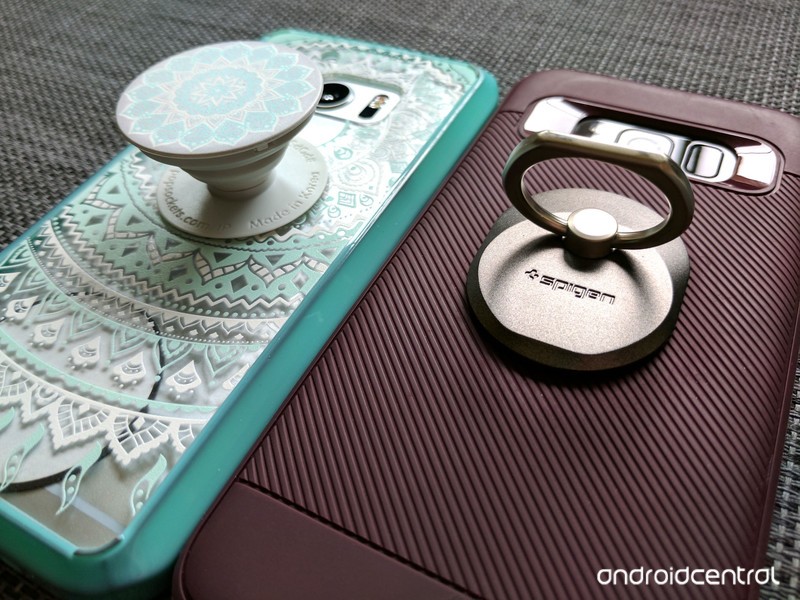
Sometimes you just need to get a grip on your phone.
We can white-knuckle grip our phones all day while we carry them around, but let’s face it: phones get slippery. Hands get sweaty. Sometimes we just need something a little easier to hold on to. There are a number of solutions on the market to help us get a grip, but the two that seem to have risen to the top are PopSockets and the Spigen Style Ring.
They’re two answers to the same problem, but there can only be one on the back of your phone. So which one should you slap on yours?
See Spigen Style Ring at AmazonSee PopSockets at Amazon
Accordions vs. hinges
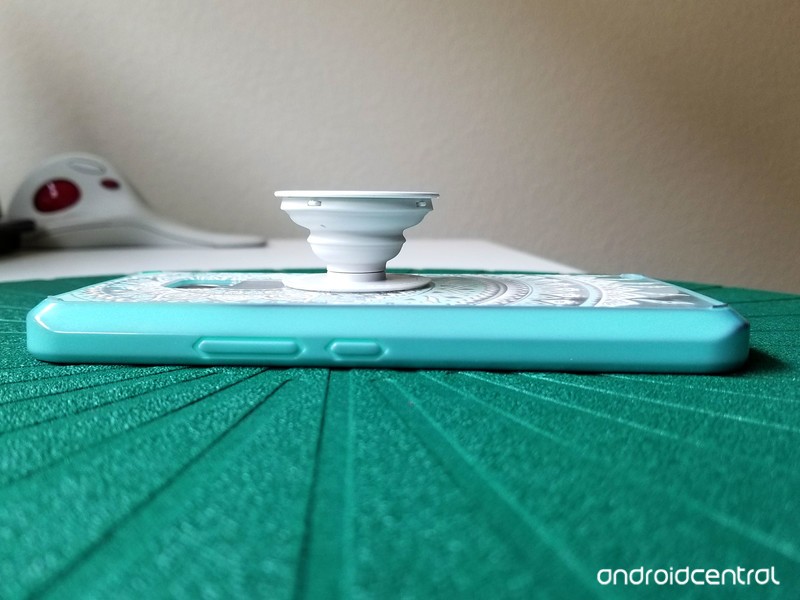
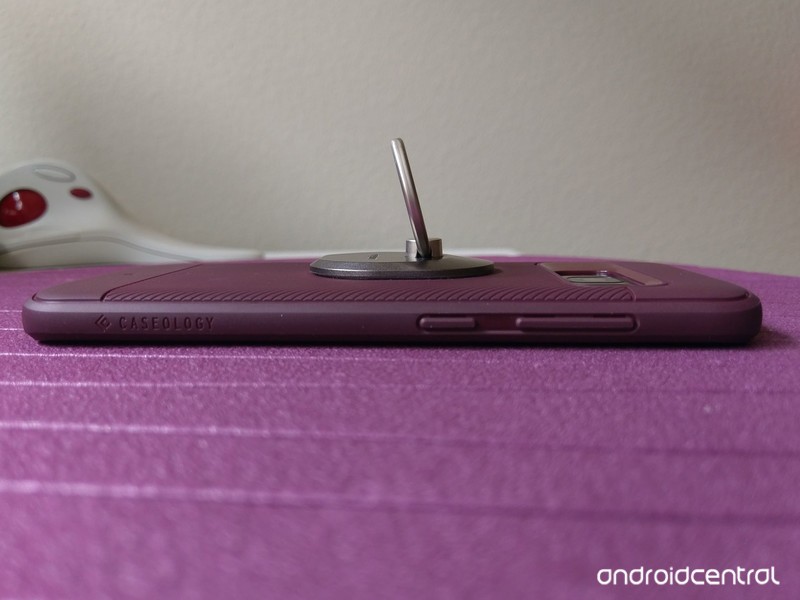
Both PopSockets and Spigen Style Rings use 3M-style adhesives to stick their base onto the back of your phone (or phone case), and while the adhesive doesn’t quite last forever, it sticks remarkably well to the back of the phone and if you need to reposition it once or twice, it can be moved without losing its strong grip.
Where the two products diverge is the shape and mechanism of your grip. The Spigen Style Ring employs a sturdy metal ring that rotates 180-degrees vertically on a metal swivel hinge that rotates a full 360 degrees, giving you a full range of angles to either grip the phone or use the metal ring as a kickstand. Meanwhile, PopSockets use an all-plastic assembly of “poppable” and collapsible levels to let you have the PopSocket at one of three levels: flat, halfway (one level popped open) and full (both levels popped open).
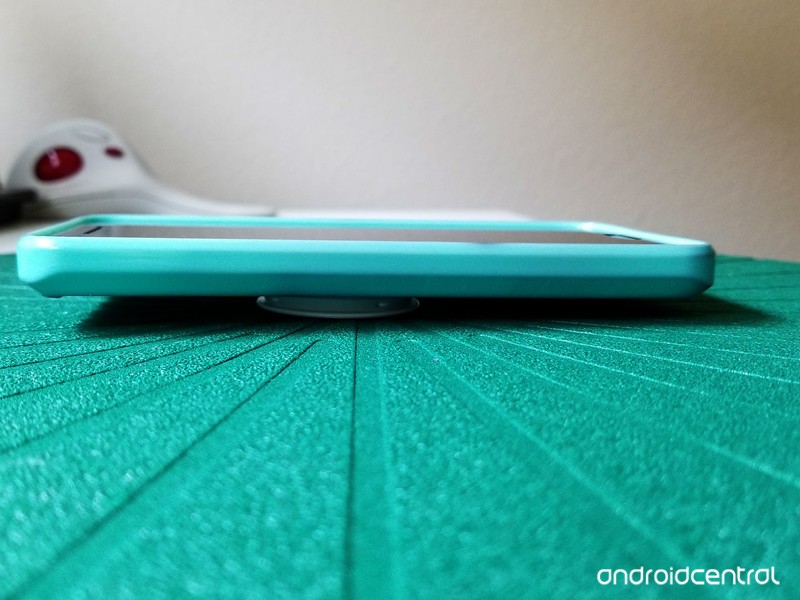
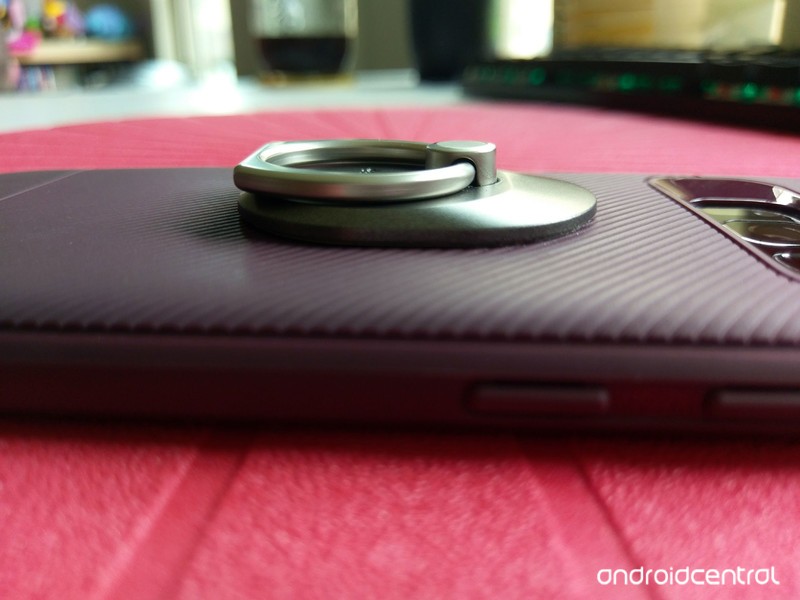
Because the PopSocket features a flat back, your phone can still sit flat-ish on a desk or tabletop when you don’t have it popped out for a kickstand, whereas the Spigen Style ring wobbles a bit as the back of the Style Ring is a tiny bit uneven. A word of warning: the back of the PopSocket is quite slippery, meaning that your PopSocketed phone will slide around on tabletops and counters.
In-hand grip
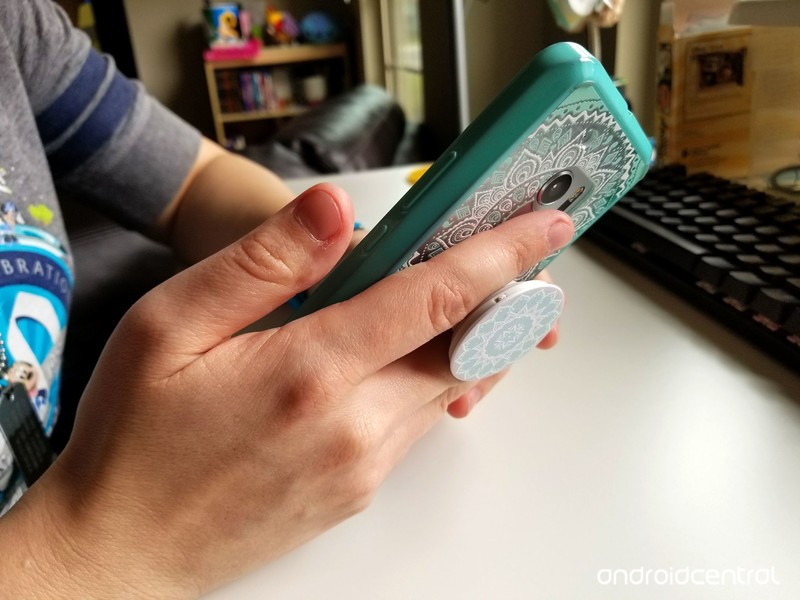
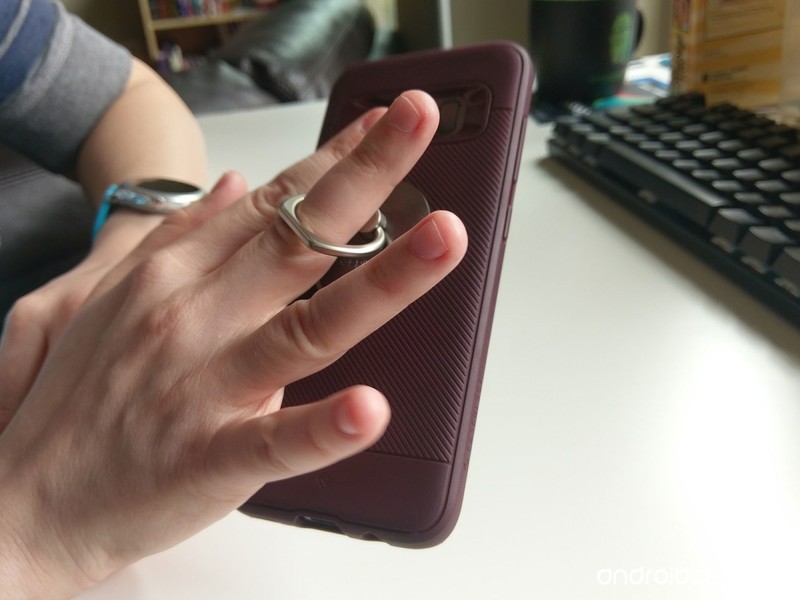
When it comes to gripping your phone, both PopSockets and the Spigen Style Ring indeed make gripping your phone much easier. You’ll use two fingers to grip the sides of your PopSocket, or you’ll use one finger slipped through the ring of the Spigen Style Ring to grip the ring and back of the phone.
The Spigen Style Ring takes a little getting used to, but the grips you can get with the Ring are more diverse. If you have thin fingers, the PopSocket’s halfway open mode can provide excellent grip, and the fully open mode keeps things grippy while giving you a little leeway. The PopSocket also acts as a kind of phone-mounted fidget toy, allowing you to pop it in and out and wiggle it around between levels when you need distracting.
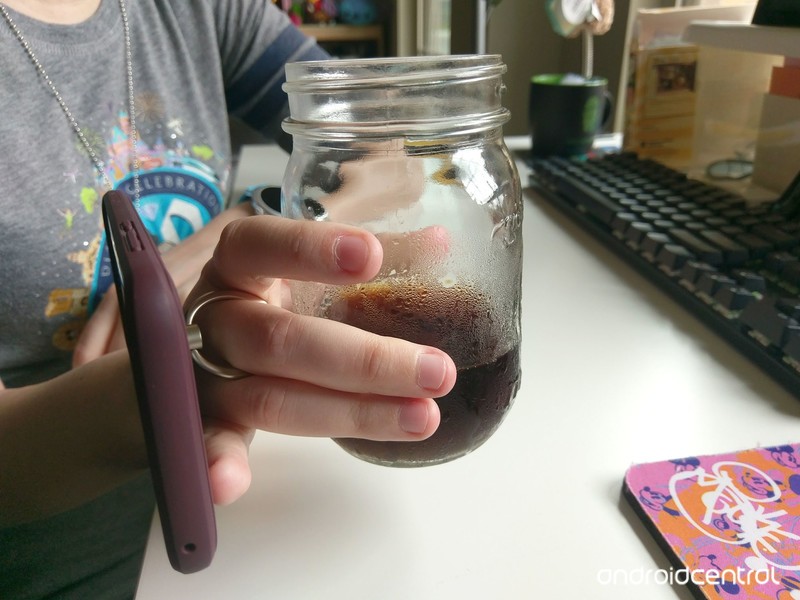
The Spigen Style Ring has a small functional advantage here because you can slip the ring on backward and wear your phone like a giant ring, freeing up your hand to carry something else like coffee. If your wardrobe is often lacking in phone-sized pockets, this can be a lifesaver.
Kickstands and mounts
Both phone grips double as kickstands, but unlike our other categories, there is a clear winner here. The Spigen Style Ring’s adjustable hinges allow you to set your kickstand at a variety of heights, both horizontally and vertically. The kickstand ability on PopSockets is pretty basic: if your PopSocket is fully extended, it’ll hold your phone up horizontally. That’s it. One PopSocket or two, they won’t prop your phone up vertically.
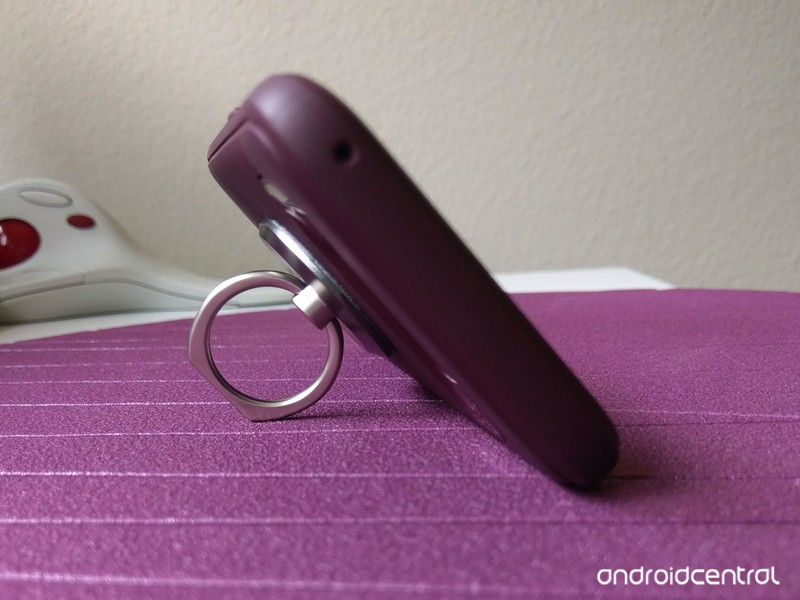
If you want to use the separate, wall-mountable and car-mountable stands, be prepared to shell out. PopSockets sell their mounts separately, and they cost $10, same price as PopSockets themselves. The Spigen Style Ring includes a car mount with purchase, but if you need more than one, you’ll have to buy another Style ring, too; they aren’t sold separately right now. There are some third-party mounts made for Style Ring imitators, but none of them fit quite as well as the real deal.
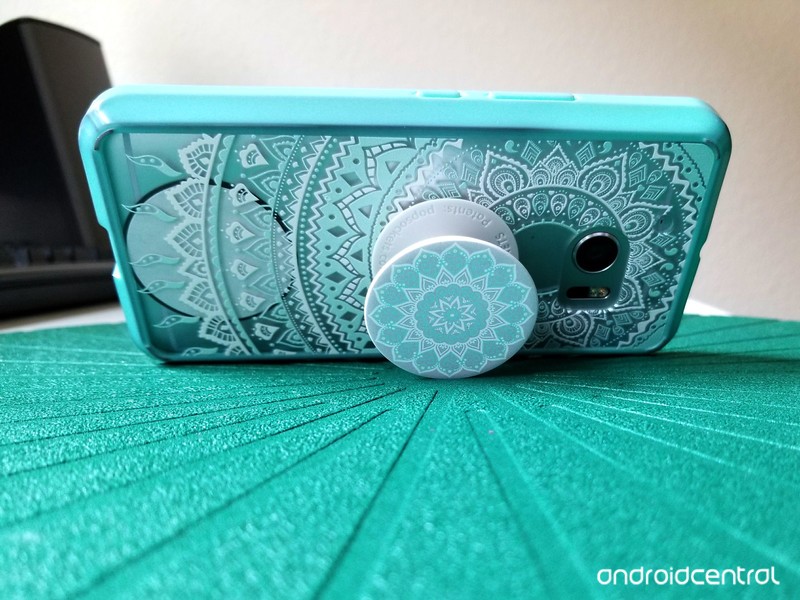
On a brighter note, if you put your PopSocket or Style Ring high enough on your phone, you can skip the specialty mounts and use a magnetic air vent car mount, which is all but required here in the hellish heat of a Texas summer.
Which should you buy?
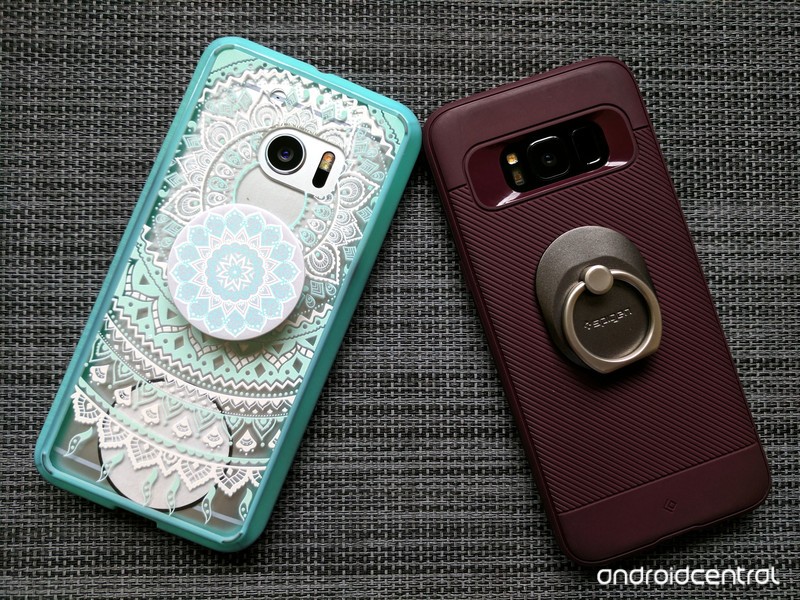
PopSockets are a more stylish-looking accessory, being easily customizable and adding a … well … pop of color and flair to your device, but they’re not quite as versatile and functional as the Spigen Style Ring. If you want to have a vertical kickstand from your phone grip, or you want a grip that will actually free up your hands, The Spigen Style Ring is for you. If you just need a little grip, and a little flash, Popsockets are more your speed. The Spigen Style Ring does list higher at $20, but you can easily find it on Amazon for $14.
As stylish as PopSockets may be, this themer will stick to the Spigen Style Ring, especially for gaming and late-night web surfing.
See Spigen Style Ring at AmazonSee PopSockets at Amazon
Instagram taking new steps to reduce offensive and spammy comments using machine learning
Everything helps in the fight against spam.

In the seemingly never-ending fight against spam and generally low-quality comments on the internet, Instagram is taking new approaches in cleaning up comments on photos and videos. Instagram says it’s the next step in its commitment to “foster kind, inclusive communities,” but really it’s just the right thing to do for our collective sanity online.

The first change is straight-up blocking offensive comments by default. Instagram knows that toxic comments discourage you from sharing on Instagram, so it is now by default applying a filter that will block offensive comments. You can still report individual comments that make it through, and can choose to turn off this filter if you’d like in the app’s settings under “Comment Settings.”
The filters can (and will) improve over time as they see more spam.
The next part is addressing spam comments — something that we’ve all seen in Instagram. Instagram has apparently formulated a spam filter that can remove spam in several languages. Hopefully this will help cut down on the pretty immense number of spam accounts as well.
Instagram says both types of filters are powered by machine learning and can of course improve over time as they see more of the types of content that should be blocked. With these filters in place, perhaps more people will consider having a public profile rather than taking the stronger choice of going to a private one just to avoid the spam and negative comments.
Bixby may be even better than we hoped

Bixby is pretty damn good, even this early in its life. Here’s what our community says.
Samsung’s Bixby assistant has enjoyed a rough road to stardom, but now that it’s in an open preview for U.S. Galaxy S8 users, we’re starting to get the impression that the wait may have been worth it.
One of our forum members, erasat, sums things up nicely for us:
erasat
06-21-2017 05:00 PM“
A lot better than expected, so far the commands are great, I love the easiness creating shortcuts, it works great with a location reminder that btw was very easy and fast to create, I’m already in level 5 with 20 minutes of teaching it my voice and most commands. You can turn the phone off, reboot reboot in safe mode, etc… in a summary most of the settings commands are available. If you try to…
Reply
The one thing that people keep pointing out about Bixby is how different it is from Google Assistant and Siri, and how capable it is at reproducing what your fingers do to navigate through your phone. Stringing commands together in natural language makes a lot of sense when you realize just how complex some of the apps are that we use on a regular basis.
One member, GRUNT11B, points out that Bixby is better than Google Assistant and Siri for a number of tasks:
GRUNT11B
06-24-2017 05:57 PM“
I’ve been at it comparing the same commands with both Bixby and Google Assistant. And can say bixby is winning. And that says a lot as it’s still in beta. From system settings to sharing photos. You can get more of a true hands free experience with Bixby.
Reply
Another poster, Sapient, isn’t quite sold on Bixby just yet, claiming that some things will just be done faster using fingers — but there is plenty of room for improvement given that the service is still in preview in the U.S.
Sapient
06-22-2017 01:15 PM“
I really want to like it, and I’ve found a couple of things to be cool, but mostly I find it irritating and slow. I think it is super cool to say “Open camera and take a slow motion video”. I find it really irritating to say “Send a message to Pedro” and all I get is a list of apps to open, or maybe a list of the one person in my contacts named Pedro.
Where I think it could shine for me is…
Reply
What are your impressions of Bixby so far? Like it? Hate it?
Join the conversation in the forums!
Samsung Galaxy S8 and S8+
- Galaxy S8 and S8+ review!
- Galaxy S8 and S8+ specs
- Everything you need to know about the Galaxy S8’s cameras
- Get to know Samsung Bixby
- Join our Galaxy S8 forums
Verizon
AT&T
T-Mobile
Sprint
Unlocked
Project Fi to soon support new ‘mid-tier’ phone from a Google partner
We could see an expansion of device compatibility on Project Fi soon.
One of the only big frustrations with Project Fi is its limited device selection, which requires that you purchase or bring your own Pixel XL, Pixel, Nexus 6P, Nexus 5X or Nexus 6 to the service. And even though it kind of works in unlocked phones, Project Fi has never explicitly supported any other phones.
But then, there was this Twitter response to some complaints about not having device choices on Project Fi.
We hear you loud and clear. Keep an eye out for a new Fi-compatible device at a mid-tier price from one of our partners later this year. https://t.co/74U3bq16pa
— Project Fi (@projectfi) June 29, 2017
There are two ways you could go with this. One is that Project Fi just outed the fact that there’s a new “mid-tier” Pixel (or, gasp, Nexus) coming later this year. Or slightly less excitingly, we’re looking at Project Fi expanding beyond Google-branded smartphones to a at least one new device from a partner instead.
We saw a tiny glimpse of this when Project Fi added data-only SIM cards and supported any tablet that had T-Mobile LTE bands, but as we know there’s far more involved with getting a phone to work on the carrier. Project Fi’s unique setup of using three different carriers simultaneously while also seamlessly integrating with Wi-Fi for calls and texts takes a bit of extra work, and is one of the driving factors behind its limited compatibility currently.
We have no idea which company this “partner” may be, but no matter what we’re excited to see Project Fi expand its phone offerings to a wider range of price points — and hopefully by far more than that one device going forward.
Google Project Fi
- What is Project Fi?
- Get the latest Project Fi news
- Discuss Project Fi in our forums
- Phones: Google Pixel | Nexus 6P | Nexus 5X | Nexus 6
- Sign up for Project Fi

It’s easy to upgrade your PlayStation 4 storage with an external hard drive

Upgrading your hard drive is as easy as plugging in a compatible external hard drive.
It used to be when you bought a console, upgrading your storage was something that was easier said than done. When you initially pick up a PlayStation 4, 500GB or a full Terabyte of space seems like a lot. In reality though, that might only hold 15 or 20 games. If you intend on purchasing plenty of digital movies, or you play every new game that comes out then expanding how much space you have available can quickly become a necessity.
All you need is a USB 3.0 external hard drive, and you can access up hundreds of gigabytes more storage space for your console.
How to use an external hard drive with PlayStation 4
Connect your external hard drive to the PlayStation 4 via USB port.
From the menu go to settings
Click on devices.

Click on USB storage devices
Click on the USB hard drive you want to use.

Click on format as extended storage.

How to disconnect an external hard drive from PlayStation 4
From the menu select settings.
Click on devices.
Click USB storage devices.
Click stop using this extended storage.
Questions?
Have you used an external hard drive to upgrade your storage space? Is this process news to you? Let us know about it in the comments below!
PlayStation 4

- PS4 vs. PS4 Slim vs. PS4 Pro: Which should you buy?
- PlayStation VR Review
- Playing PS4 games through your phone is awesome
See on Amazon
 AIVAnet