


How to listen to music on Google Home
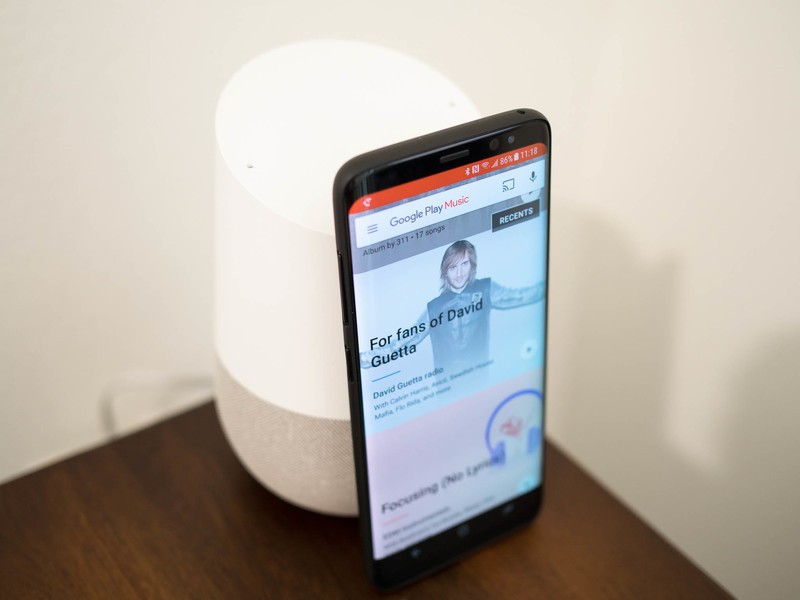
Google Home is more than capable of acting as your music player, and setting it up only takes a few moments.
Google Home has a great set of speakers, making it fully capable of filling the room with music. All you need to do is link up a music account, and you’ll be good to go. With options like Pandora, Spotify, YouTube Music and Google Play Music, you’ll always be able to listen to the music you’re craving, and all you have to do is ask Google Home to play what you want to hear.
We’ve got the details on setting up music with Google Home!
How to connect a music app to Google Home
By default, Google Home connects to a Google Play Music account, but if you want to play music or podcasts from somewhere else — Spotify, for instance — you have to connect it.
Open the Google Home app.
Tap the menu button (it looks like three horizontal lines).
Tap Music.
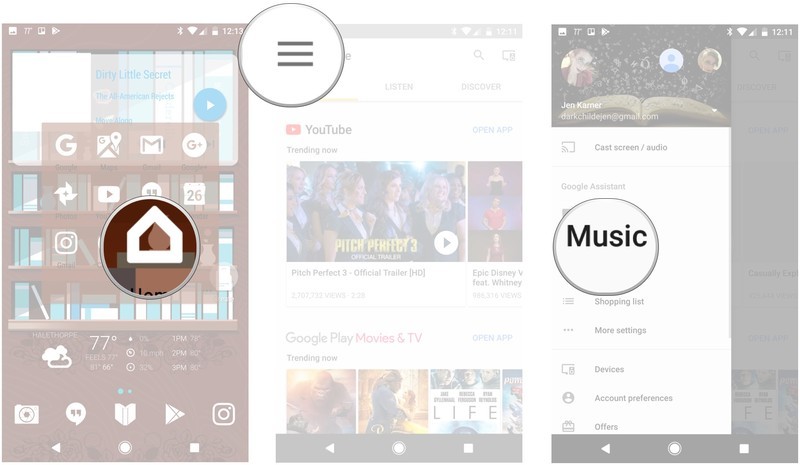
Tap the music service you want to link.
Tap link account.
Log in to the account you want to link.
How to unlink a music app from Google Home
If you don’t want a service connected anymore, you can simply unlink it from your profile!
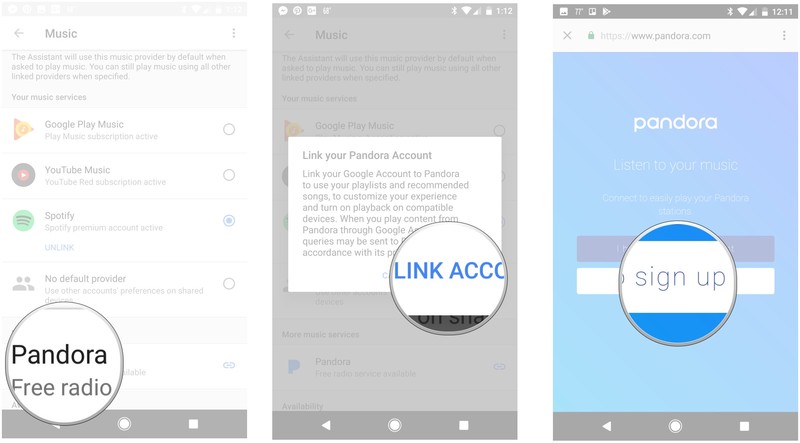
Open the Google Home app.
Tap the menu button (it looks like three horizontal lines).
Tap Music.
Tap Unlink on the app you want to disconnect.
Tap unlink account.
How to change your default music service
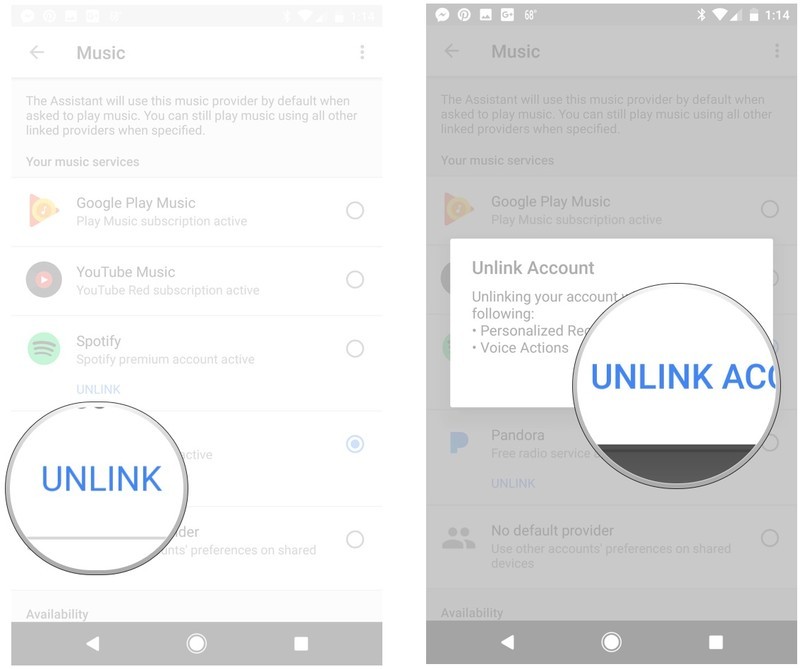
If you want to use something other than Google Play Music, but don’t want to keep saying, “Play X on Spotify,” then you should change your default music service.
Open the Google Home app.
Tap the menu button (it looks like three horizontal lines).
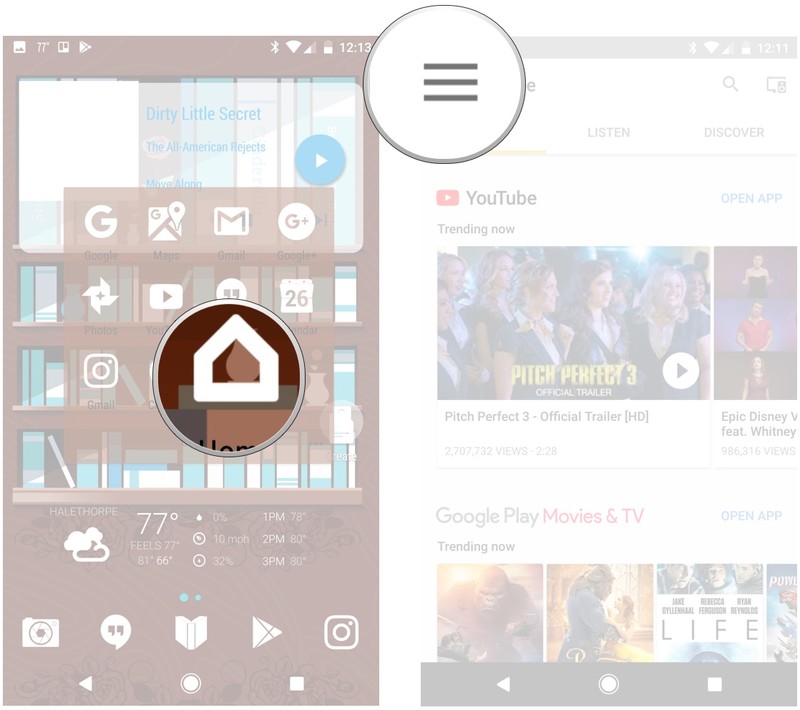
Tap Music.
Tap the circle next to the music service you want to change to.
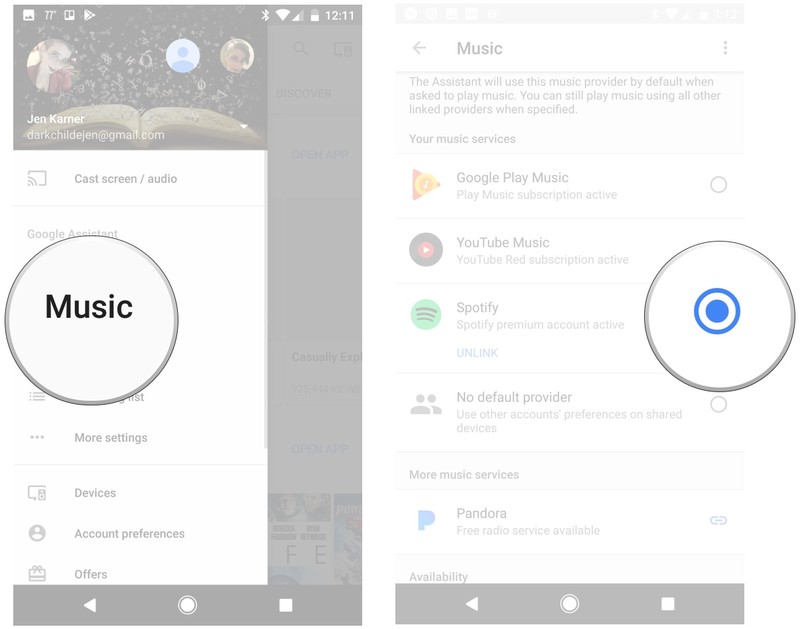
Questions?
Have you been using Google Home to play music for you? Is there a preferred music app when listening to music with Google Home? Do you still have questions? Drop us a comment below and let us know about it!
Google Home
- Google Home review
- These services work with Google Home
- Google Home vs. Amazon Echo
- Join our Google Home forums!
Google Store Best Buy Target
Honor 9 hands-on preview: The affordable flagship

The new flagship phone from Honor is cheaper and prettier than the OnePlus 5.
The “affordable flagship” segment — occupied by Huawei’s Honor brand and rivals like OnePlus and ZTE — is one of the most exciting areas of the smartphone market right now. It’s never been easier to get hold of a great high-specced phone without paying Galaxy or iPhone money. And while Honor might not have the instant recognition of the bigger names, it’s tough to argue with performance and build quality of its latest offering, the Honor 9.
For £379, you get most of the internal specs of the Huawei P10, encased in a beautiful metal and glass chassis, running software that’s light years beyond what you might remember from the Honor 8 at launch. It’s easily the best Honor phone yet, and it’s coming to Europe in July.
The design of last year’s Honor flagship has been refined and trimmed into an even more impressive slab of metal and glass.
First off, there’s a LOT of Honor 8 DNA in this phone — which is mostly a good thing. The rear is clad with a stunning 15-layer glass panel, which is now gently curved at the edges. The headline color for the UK is sapphire blue, with black and silver variants also available for the color-averse. This splash of color in continues through the aluminum side walls around to the front, where it spruces up the tapered 2.5D glass of the display.
The updated design hasn’t changed a whole lot compared to last year’s model, but subtle tweaks like the removal of a plastic rim between the metal and glass parts make it feel significantly more premium. And the curved back, of course, helps the Honor 9 fit more comfortably in the hand. The sharper joins between metal and glass also make it less slippery in the hand than I remember the Honor 8 being, helping with one-handed gripability.
The Honor 8’s hockey puck-like tendencies make an unwelcome return.
Unfortunately though, this phone remains decidedly slippery on… well, things that aren’t hands. The smooth glass rear will manage to slide its way across flat surfaces given the opportunity — one of my least favorite characteristics of the Honor 8.
Regardless, it’s a gorgeous-looking design, and a lustrous counterpoint to the unremarkable visuals of its main rival, the OnePlus 5. Sure, there are undeniable Samsung influences — the curved glass rear will remind a lot of folks of the Galaxy Note 5, and some of Xiaomi’s recent offerings. And from the front, it could just as easily be a Huawei P10 or either of the past three OnePlus phones.
While we’re mentioning OnePlus, the Honor 9’s button layout now mirrors that of the OnePlus 5, with a central fingerprint scanner that doubles as your home key, flanked by swappable capacitive keys. No more on-screen keys. No more rear-mounted fingerprint scanner. Both are matters of personal taste — and personally, I’m fine with the new direction Honor’s taking here.

On the front is a 5.15-inch 1080p IPS LCD panel which, while it’s not as pixel-dense as still looks fantastically vibrant, and is easily visible out in bright daylight. The smaller size may be a turn-off for some — it’s actually pretty rare to find high-end specs like this in an Android phone that’s so friendly to one-handed use. Yet after using a lot of phones at 5.5-inch and up lately, including this phone’s main rival the OnePlus 5, it’s kinda refreshing to go back to a smaller handset like the Honor 9.
It’s refreshing to see flagship-level specs paired with a display as small as 5.15 inches.
Sound is also a big focus for the new Honor flagship, with audio tuning by Grammy-winning engineer Rainer Maillard, and sound profiles inspired by Monster. (Part of the new partnership between the smartphone brand and the headphone giant that’s spawned new earbuds.) The verdict on sound quality is going to remain out until I’ve spent more time with the Honor 9, but at the very least the built-in loudspeaker seemed suitably punchy — if a little distorted at very high volume levels.
When it comes to internals, the Honor 9 is almost a carbon copy of the Huawei P10. Running the show is a Kirin 960 octa-core chip, a proven 16nm processor combining four ARM Cortex-A73 cores for power-hungry tasks with four efficient A53s for lower-powered stuff. There’s also 4 or 6GB of RAM depending on which country you buy it in — more on that later — and 64GB of storage plus microSD. There’s also an ample 3,200mAh power pack with quick charging — pretty capacious for this size of phone.
All the major internal specs from the Huawei P10, with a few exceptions.
Notable P10 features you don’t get in the Honor 9 include Huawei’s faster Super Charging tech, and Optical Stabilization in the main camera. I’m inclined to think neither is a huge deal, especially considering the price point.
Once again, Honor has gone with a dual rear camera setup, with a 12-megapixel color sensor and 20-megapixel monochrome sensor, behind f/2.2 lenses. Unlike the Huawei P10, there’s no Leica tuning in this camera, but it really doesn’t seem to be worse off for it. In my brief time with it, the Honor 9 was quick to capture images with vibrant colors and excellent dynamic range. And thanks to that 20-megapixel sensor, you also get the same hybrid zoom feature and portrait mode that we’ve enjoyed on the P10.

But we’ll have to wait and see how it shapes up in darker conditions, where the new low light mode with pixel binning is designed to produce clearer night shots. The current generation of smartphones — handsets like the LG G6 and OnePlus 5 in particular — is all about using software processing to pull great photos from run-of-the-mill sensors. Given what we’ve seen from the Honor 8 Pro already, I’m hopeful the Honor 9 will deliver in this area.
Software-wise, the Honor 9 runs Huawei’s EMUI 5.1 firmware, based on Android 7.0 Nougat — and Honor is already promising an update to Android 8.0 when it’s release, but there’s no timeframe for that yet. (Based on the track record of the Honor 8, early 2018 is a good bet.)

You’ll find more on EMUI 5.1 in our Huawei P10 and Mate 9 reviews, but the quick version is that it’s Huawei’s best software yet, though still highly differentiated compared to what you might be used to from Samsung, Google or HTC. However it is a vast improvement on earlier versions of Huawei’s software, as we saw on the Honor 8 last year. Nothing is broken, everything is fast, and nothing is too terribly offensive to the eyes.
Out of the box, EMUI 5.1 feels a lot more like Android than prior versions, and there’s a pleasant blue and white theme running through Huawei’s own apps — while other parts of the software can be endlessly themed and customized.
For just £379 in the UK, the Honor 9 is highly competitive.
The Honor 9 is shaping up to be one of the best affordable Android flagships available, delivering great specs, speedy software, a promising camera and a sharp design. And it does so at a highly competitive price point: All this stuff is yours for £379 in the UK, or €449 in Europe. (The UK and most other countries will get the 4GB RAM model, France and Italy will score an Honor 9 with 6GB of RAM, likely with a proportionally higher price tag.)
That balance of specs, design, feature set and price is truly impressive, and the Honor 9 looks set to give OnePlus a run for its money in the always-interesting “affordable flagship” space. Time will tell which one will come out on top.
Honor 9
- Honor 9 hands-on preview
- Honor 9 specs
- Join the Discussion
Honor 9 specs

Honor’s latest phone has specs broadly in line with the Huawei P10.
The Honor 9 is upon us, once again bringing top-tier performance and design to a more affordable price point — in the UK, just £379. When it comes to specs, you’re mostly looking at Huawei P10-level innards, with one or two exceptions.
That means you get Huawei’s high-end Kirin 960 octa-core processor, with 4 or 6GB of RAM depending on where you buy, and an ample 64GB of storage. And there’s a capable dual camera setup around the back — 12MP plus 20MP, with laser autofocus.
The top-level differences between the P10 and Honor 9: No OIS in the RGB sensor of the main camera, no Super Charging support — instead just regular 9V/2A quick charge — and fewer radio bands, meaning the European Honor 9 doesn’t have band coverage for U.S. LTE. (Sorry, importers!)
In any case, here’s your complete Honor 9 spec sheet. For more on Honor’s latest phone, check out our hands-on preview!
| Operating System | EMUI 5.1 / Android 7.0 |
| Processor | Kirin 960 octa-core, 4x 2.4GHz + 4x 1.8GHz |
| RAM | 4GB (6GB in some mainland European countries) |
| Storage | 64GB |
| Display | 2.5D glass front 5.15-inch 1920×1080 – 428 ppi |
| Main Cameras | 12MP RGB + 20MP monochrome, f/2.2 |
| Front Camera | 8MP |
| Connectivity | Wifi a/b/g/n/ac, 2.4/5GHz Bluetooth 4.2 Fingerprint USB Type-C supporting USB-OTG |
| SIM Card | Dual nano SIM or nano SIM + microSD |
| Frequency bands | 4G LTE: B1/B3/B5/B7/B8/B203G UMTS: B1/B2/B5/B8GSM/EDGE: B2/B3/B5/B8 |
| Battery | 3,200mAh, 9V/2A quick charging |
| Dimensions | 147.3 x 70.9 x 7.45 mm |
| Weight | 155 grams |
| Colors | Glacier Grey / Sapphire Blue / Midnight Black |
Honor 9
- Honor 9 hands-on preview
- Honor 9 specs
- Join the Discussion
Honor 9 isn’t coming to the U.S. anytime soon

An Honor 9 release in the United States is ‘not planned at this moment,’ Honor exec tells Android Central.
The new Honor 9 packs impressive specs, and offers a fresh take on the design of the Honor 8, with a curved glass rear and an upgraded dual camera setup. But unlike its predecessor, the Honor 9 won’t be coming to the United States when it launches in Europe this July.
At a meeting ahead of today’s launch, Eva Wimmers, VP of Honor Global and president of Honor EU, told Android Central that a U.S. release for the Honor 9 is “not planned at this moment.” That doesn’t completely rule out the phone coming to the U.S. at some point, but it sounds like it won’t be hitting American shores anytime soon.
So far this year, the Honor 6X is the only Honor phone to have graced the U.S.
Despite debuting at a glitzy San Francisco launch event last August, momentum (and presumably also sales) around the Honor 8 in the U.S. was described as “well below expectations” according to one source cited in an Android Police report in October.
The Huawei-owned brand has since launched the budget-centric Honor 6X in the U.S., but subsequent phones like the Honor 8 Pro haven’t been released there.
Wimmers told us that it’s still early days for Honor’s efforts in the U.S., compared to Europe and Asia, where the brand is better established.
Nevertheless, it seems to us that the failure of the Honor 8 to establish a U.S. foothold has led to a re-thinking of its strategy for this notoriously tricky market. Time will tell whether the Honor 9 or Honor 8 Pro — or something else entirely — will make it to the U.S. market.
Honor 9
- Honor 9 hands-on preview
- Honor 9 specs
- Join the Discussion
Honor debuts Band 3 wearable and Monster earphones
New wearable does fitness tracking on the cheap, as Honor announces partnership with Monster.
Alongside today’s Honor 9 launch, Huawei’s online brand has unveiled three new accessories targeted at its audience of so-called “digital natives.” The first is the Honor Band 3, a cheap, lightweight fitness band that comes in three colors, with a 0.19-inch PMOLED display. The Band 3 works with Android 4.4 KitKat and up smartphones, and iPhones running iOS 8.0 and up, and features a 3-axis accelerometer and PPG cardio tachometer.

It’s good for use underwater, with 5 ATM water resistance, and features sleep tracking through Huawei’s TruSleep tech, built with data from the Center for Dynamical Biomarkers at Harvard Medical School. Battery life is ranked at 30 days from the 105mAh internal battery, and the band will sell for £59.99 in the UK.

Next up are the Honor Monster Earphones, developed through Honor’s new partnership with the headphone giant. The goal is to produce crisp, lifelike 3D sound, and the two companies have brought Pure Monster Sound and Huawei’s Super Wide Sound (SWS) technology to the new cans. Other features include sound compensation and enhancement, and master tone tuning — along with a Hi-Fi mic for clear calls, and volume controls.

They Honor Monster earphones will go on sale for £44.99 with three sizes of earplugs, and color options including Dark Blue, Pearl White and Red with Black.
Honor is also getting into the Bluetooth audio game with the new Honor Sport earphones. Retailing for £59.99, these earphones are available in black, red and blue, boasting up to eleven hours of playback from their 137mAh battery. They’re also rated IPX5 for sweat resistance, ensuring they’ll hold up to intense workouts — if not a dunk in the pool.
For more on today’s Honor announcements — including the brand’s new flagship smartphone — check out our Honor 9 hands-on preview!
Honor 9
- Honor 9 hands-on preview
- Honor 9 specs
- Join the Discussion
Honor 9 is official: Flagship specs + curved glass for £379

New flagship builds on the well-received Honor 8 with a refined design and spec upgrades across the board — while keeping the affordable price tag.
At a launch event in Berlin, Germany, today, Huawei’s Honor brand took the wraps off a phone we’ve been eyeing since it launched in China a few weeks back — the Honor 9.
Like its predecessor, the Honor 9 is clad in aluminum and glass, only this time with a subtly curved back panel, and cleaner joins between the metal and glass. The phone now boasts 15 layers of glass in its curved back panel, which has a uniquely lustrous finish. The fingerprint sensor has also been relocated to the front, where it’s joined on either side by two (swappable) capacitive buttons, similar to OnePlus’s recent designs.
The latest Huawei hardware, packed into a gorgeous glass-backed chassis.
There’s a 5.15-inch screen diagonal, making the Honor 9 one of the smaller Android flagships available, and the display itself is a 1080p IPS LCD panel with DCI-P3 color space support. Like most high-end Huawei phones, the Honor 9 is powered by an octa-core Kirin 960 chip (four ARM Cortex-A73 cores at 2.4GHz, plus four Cortex-A53s at 1.8GHz), and that’s backed up by 4GB or 6GB of RAM depending on where you buy. There’s also 64GB of internal storage, plus microSD expansion via the second SIM slot.
And there’s a relatively large 3,200mAh battery inside, which can be refilled extra-quick via Huawei’s own 9V/2A quick charging standard.

More: Honor 9 specs
The Honor 9 also packs a familiar dual camera setup around the back, which is essentially the Huawei P10 or Mate 9 camera without OIS or any of the Leica software processing. Instead, Honor has built out its own image processing software, which includes a new low-light mode using pixel binning to capture clearer pics in night shots.
There’s also a new focus on audio quality in Honor’s latest phone, with new 3D sound system from Huawei, dubbed Huawei Histen. And thanks to a partnership with Monster, the Honor 9’s audio will be tuned to emulate the style of the headphone giant.
The Honor 9 will go on sale in the UK and mainland Europe in early July in sapphire blue, midnight black and glacier grey color options. In the UK, it’ll cost £379.99 SIM-free and come with 4GB of RAM. In Europe, the price starts at €449.99, and France and Italy will get a slightly upgraded Honor 9 with 6GB of RAM.
In the UK, Three is the exclusive carrier partner for the phone, with on-contract deals expected to be announced soon ahead of an early July launch.
Next: Honor 9 hands-on preview
Honor 9
- Honor 9 hands-on preview
- Honor 9 specs
- Join the Discussion
OnePlus 3 and 3T to receive Android O update by the end of 2017
Android O will be rolling out to the OnePlus 3 and 3T before December 31, 2017.
Remember when OnePlus kicked off the Nougat update for the OnePlus 3 and 3T on December 31, 2016? The company is once again committing to deliver the next platform update before the end of the year, which in this case is Android O.

OnePlus announced its intention to roll out Android O to the OnePlus 3 and 3T by the end of the year in yesterday’s AMA session on Reddit. While the company didn’t mention the update cycle for the OnePlus 5, it’s safe to assume the phone will also pick up Android O at the same time or before its predecessors.
OnePlus has improved its update reliability in recent months — the OnePlus 5 has already picked up two updates — but the company’s decision to not roll out Nougat to the OnePlus 2 wasn’t its producest moment. This time around, OnePlus is making sure it delivers two platform updates for the OnePlus 3 and 3T.
OnePlus 3T and OnePlus 3
- OnePlus 3T review: Rekindling a love story
- OnePlus 3T vs. OnePlus 3: What’s the difference?
- OnePlus 3T specs
- Latest OnePlus 3 news
- Discuss OnePlus 3T and 3 in the forums
OnePlus
Amazon
Google Pixel 2: Release date, rumours and everything you need to know
We’re into the cycle where all the phones of the year get updated – Samsung, LG, Sony and Huawei all launched new devices at Mobile World Congress or around it. Nokia also rejoined this list and HTC has revealed its latest.
Heading toward the end of 2017 we’ll see the update to the iPhone 8, the Galaxy Note 8 and Google’s new phone, which we’ll call the Pixel 2.
Rumours have already suggested that the Pixel 2 codenames might be Muskie, Walleye and Taimen, although the latest information suggests that one of these models – Muskie – has been dropped, leaving us with two new potential Pixel handsets for 2017.
Google Pixel 2: Design
- Taimen = Pixel 2 XL; Walleye = Pixel 2
- Could be HTC manufacture
- LG might also be involved
- Waterproofing likely to be included
Design is the thing that has probably divided people the most when it comes to the Pixel. Although the body is a high quality design, the top glass section has drawn a lot of criticism. It makes the phone a little different, making it distinctive so it sits apart from the iPhone and all of Android’s metal phones.
It was confirmed by Rick Osterloh, senior vice president of hardware at Google, that the Pixel 2 will still be a premium offering in 2017, providing the first bit of information on the new phones.
Pocket-lint
Prior to the launch of the Pixel, it was rumoured that HTC had signed up to manufacture multiple devices across the next 3 years, so they might be the hardware partner once again. We’ve also recently seen a report that claims that some codenames were lurking in the HTC U11’s files which might point to HTC’s involvement with the new Pixel devices.
Reports coming from “sources familiar with the matter” talking to XDA suggest that the Taimen, the larger device, will keep the two-tone glass and metal design of the Pixel, although it won’t now house the fingerprint scanner. There’s no mention of where that might move to.
There is also talk of LG having something to do with the “Taimen” codenamed device, which is thought to be the new Pixel XL. This could be about build, but it might simply be that LG Display is providing the OLED display for the phone. At the moment it’s not clear if LG is building one and HTC the other, or exactly what the position is.
The fundamental failing of the Pixel is the lack of waterproofing: with many competitors offering protection, for the price that Google is asking the Pixel 2 needs to step up with a solid IP rating. That’s something that HTC added to the U11, so as a build partner, they now appear to have all the skills.
Waterproofing wsa apparently something that was attempted for the Pixel, but eventually dropped, but there’s an unconfirmed rumour that’s been mentioned to 9to5Google, shared via Twitter.
Little tidbit we were told in October last year that I forgot about: “Waterproofing definitely coming with next Pixel device.”
— Stephen Hall (@hallstephenj) January 25, 2017
Google Pixel 2: Display
- Potential shift to 18:9 display
- 4.97 and 5.99-inch displays rumoured
With two Pixel models on offer giving you the choice of 5.0 or 5.5-inches, we’re not really looking for a huge change. We also wouldn’t expect a shift in resolution. The 2560 x 1440 pixels offered gives you the detail when magnified in a Daydream headset, it’s crisp and sharp in all things.
There are rumours of changing the display aspect, however, very much in the style of LG and Samsung’s 2017 flagships. The information is limited with a reported benchmark result suggesting a 5.6-inch screen with a 2560 x 1312 pixel resolution. However, this report isn’t corroborated anywhere, so it’s difficult to believe.
Taimen
However, the report from XDA suggests that the new Pixel XL 2 will have a 5.99-inch display, but only mentions a 1440p resolution. That could see a shift back to Nexus 6 sizes, or a be a shift in aspect: the Galaxy S8+ is 6.2-inch in 18.5:9, but has 2960 x 1440 pixels. Until we hear more, it’s difficult to discern the aspect. It’s either a huge phone, or jumping on the latest trend.
There is a little more information which is that the bezels are going to be smaller.
Walleye
The smaller phone is reported to have a 4.97-inch display. This is likely to come out as a 5-inch display meaning no great shift from the Pixel. In this case, the XDA report mentions that it’s “Full HD”, or 1920 x 1080 pixels, suggesting that this handset would be a regular 16:9 aspect, at least.
Google Pixel 2: Specs and hardware
- Qualcomm Snapdragon 835 suggested
When it comes to power, the 2016 Pixel devices opted for a new chip – Qualcomm Snapdragon 821 – a step-up over most of 2016’s flagship phones. Qualcomm doesn’t stand still and the Snapdragon 835 is rolling out.
We’d expect the Snapdragon 835 to feature in the Pixel 2, supported by at least 4GB of RAM. With some companies pushing to 6GB, that may be a suggestion, although we’re yet to see any real demand for that sort of increase. That said, there has been talk of Google testing a couple of different chipsets from Qualcomm, Intel and even a custom chip. Rumour has it there may also be a Pixel 2B handset, which will apparently be cheaper with less powerful hardware.
The use of Snapdragon 835 is again reported by XDA from a source, so at the moment it seems the most likely.
We’d expect storage options to start at 32GB as they currently do and as Google has avoided microSD card support, we don’t think there will be any luck there.
We’d expect USB Type-C as the standard moving forward, as well as a fingerprint scanner, likely on the rear, unless there are serious moves to embrace a scanner under the glass on the front. This is a technology that’s already been demonstrated by Qualcomm, so it’s not impossible.
There’s no telling what the battery capacity might be, but with 3500mAh offering the performance many want, we’d expect that sort of battery size to be crammed into the frame.
Google Pixel 2: Audio and speakers
- 3.5mm headphone socket could go
- Dual front speakers on the Walleye
A new piece of information has suggested that the Pixel 2 (Walleye, the smaller device), might feature dual front firing speakers and lose the 3.5mm headphone socket. As HTC is suggest as the build partner for the phone, this sounds very much like HTC of old. BoomSound in a Pixel? It looks like that might happen.
The loss of the 3.5mm headphone socket might set alarm bells ringing for some though as that suggests we’re looking at USB Type-C audio for the Pixel 2. At the moment it’s not clear whether this will apply to both sizes of phone or just one.
Pocket-lint
Google Pixel 2: Cameras
Perhaps the biggest movement in cameras at the moment is dual-lens cameras. While LG, Huawei and Apple have all embraced this trend in 2016, we’re yet to see if the likes of Samsung will adopt the format too. From a competitive point of view, Google may choose to use a dual-lens camera to add customer appeal.
It has been claimed the Pixel 2 will have a much improved camera, though it apparently won’t be all about megapixels and more about extra features instead. The Pixel is coming from a strong place for photography, unlike the previous Nexus handsets, so we hope that continues.
- Dual lens smartphone cameras: The history running up to iPhone 7 Plus
Google Pixel 2: Software
The Pixel launched with Android 7 Nougat and a selection of exclusive features, like Google Assistant, Pixel Launcher and the Pixel camera. That unique software position is being chipped away as features appear elsewhere, but we’d expect the Pixel 2 to debut Google’s new software version with a few unique features again.
Android O is currently in development, it was launched as a dev beta, showcasing a number of new features. There’s rumours that the current Pixel handsets will have Android O in August, suggesting that it’s further ahead in development than in previous years. Android O looks to boost a lot in the background, increasing speed and security and add features like picture-in-picture.
- Android O: Features, release date and everything you need to know
Google Pixel 2: Release date
Google launches its phones towards the end of the year, so we wouldn’t expect to see a new device from Google until around October 2017.
It has been claimed the Pixel 2 will see a price increase of $50 and be aimed at a different market to the cheaper Pixel 2B that is also being talked about. One thing is clear: Google has failed to meet demand with the Pixel, so needs to think bigger with the Pixel 2.
Rick Osterloh, SVP of hardware at Google also confirmed in an interview that “there is an annual rhythm in the industry. So, you can count on us to follow it”, suggesting that Pixel 2 will follow a similar cycle to the first device.
We will keep you posted.
Can’t buy a SNES Classic Mini? How to build your own retro console for just £50
Like vinyl records, The Crystal Maze and seaside holidays, retro gaming is in the middle of a resurgence. There are reimagined machines based on both the ZX Spectrum and Commodore 64, and the Xbox, PlayStation and Nintendo download stores are crammed with old classics or retro-inspired games.
There is also the NES Classic Mini, reviewed here and, recently announced, its successor, the SNES Classic Mini. Both are Nintendo’s own stab at recapturing some of the company’s former glories through rereleased 80s games. There’s only one snag: the former is completely sold out and Nintendo has no plans to manufacture any more units.
Even pre-orders for the SNES Classic Mini went past faster than a rocket-powered cheetah. So you may well have missed out.
There is an alternative though, you can make your own retro games console.
We’ve done exactly that, using a Raspberry Pi 3 Model B and a free download of Retropie. What’s more, because the latter software sets up the final build with emulation for a vast number of computers and consoles, it can be argued that you end up with a machine that’s a lot better than Nintendo’s much sought-after boxes.
- 5 fun Raspberry Pi projects you can do with your kids
You have to source the games online yourself, as you can only legally download and play them if you own the originals or if their licence has expired, but technically you can build a console that is capable of playing games for more than 50 systems. That includes NES and SNES, but also Megadrive/Genesis, N64, ZX Spectrum, C64, PlayStation, Amiga, Atari St and more.
Interested? Well, here’s how to do it…
What you need and how much it costs
Pocket-lint
Raspberry Pi 3 Model B – from £30
- Order from here
You can actually use a Raspberry Pi 2 or even a first generation version, but they are slower in operation and will therefore struggle with some games. For the price you are best opting for the Pi 3 Model B and then you also get Wi-Fi and Bluetooth connectivity built in.
Raspberry Pi 3 case – from £5
- Order from here
There are plenty on the market including some for even less than a fiver. It’s up to you how you’d like your finished console to look. We particularly like the sloped white and red case recently released, but are equally as enamoured by a simple black case that suits the rest of the kit under our telly.
Pocket-lint
microSD card (16GB) – from £7
- Order from here
We actually opted for a 64GB microSD card at around £16, but to keep within the £50 budget, a 16GB version does the job just as well. It will more than hold the Retropie operating system, plus has plenty of space left over for games.
Raspberry Pi 3 power supply – from £6
- Order from here
If you have a standard mini-USB cable to hand, that will do to power your Pi. However, for the full effect we’ve added its own, dedicated power unit. Third-party versions can be sourced for cheap.
HDMI cable – from £1
- Order from here
A HDMI cable from the pound shop will do just as well as any other. Or you can get them online for around the same price.
Additional accessories
You will also need a joypad of some description. There are dedicated USB controllers, even some styled around the original SNES or N64 pads, which go well. That’s why we’ve chosen the former – an iBuffalo Classic USB Gamepad, which looks exactly like the PAL Super Nintendo pad from yesteryear. You can also get versions based on the purple Super Famicom design.
You can also get a Bluetooth retro controller, such as the 8bitdo SFC30, which will sync with your Raspberry Pi 3 wirelessly.
Pocket-lint
If you have a spare Xbox 360 or PS3 pad lying around, they work too. We particularly like the fact you can pair a PS3 DualShock with the final console to work wirelessly, even turning the machine on using the PlayStation button. Even a PS4 DualShock 4 is claimed to work wirelessly.
It’s a complicated process though, which you can read about here.
It is also handy to have a USB keyboard to hand too as you will need to input text during the process.
Software
The Raspberry Pi 3 itself comes with four USB 2.0 ports, an Ethernet port, HDMI output and power socket. It also has a microSD card slot which is compatible with a large array of different cards, including some 128GB cards.
The card will double as storage space for the device, but you also flash it with the user interface and software you desire.
There are several operating systems available, with Noobs and Raspbian being the most popular. They are all based on Linux, but the one we are interested in for our retro games console is Retropie.
Pocket-lint
Retropie
Retropie is free software available to download here. It builds upon the Raspbian system but stands alone. It gives access to the host of console and computer emulators needed to play games, and also other software such as the media player and streaming platform Kodi.
You essentially download it and install it onto your microSD card (previous Pi computers use a standard sized SD card instead). Then, when inserted into the Raspberry Pi, it will boot automatically and present a user-friendly interface that makes it a doddle to get to and choose your favourite games.
In essence it turns a small, barebones computer into a fully-fledged games console. For free.
Step 1: Install Retropie
After downloading the file marked as a Retropie SD-card image from the Retropie website (there are two different files, one for Pi 0 or 1 and one for the Pi 2 or 3, so make sure you get the right one), you need to install it onto your microSD card.
You’ll need a PC or Mac and a microSD card slot or reader. You will also need software that can extract a .gz file. And a tool to install the .img file found in the compressed file onto the card.
For the PC, you can use Win32DiskImager. Mac users can use Apple Pi Baker. They are both free to download and install.
Linux users can get instructions of how to burn the image onto a card here.
Pocket-lint
Step 2: Insert microSD card into Raspberry Pi 3
On the underside of the Raspberry Pi 3 there is a tiny slot for the microSD card. Most cases also have an opening for you to insert the card without having to take the Pi board back out.
Insert the card and plug the Raspberry Pi in to power it (it doesn’t come with a physical power switch as standard). Beforehand, also ensure that it is connected to your TV, monitor or AV receiver through HDMI. And it is advised at this point that you have a keyboard plugged into one of the USB ports – a gamepad too.
Step 3: Boot-up and joypad configuration
The first time you switch it on, the Raspberry Pi will run through installation procedures and set itself up fully. You will be greeted by the Retropie loading screen and then joypad configuration software.
Pocket-lint
You have to assign the different buttons of the gamepad by pressing each as requested. Sometimes you will be asked to press the corresponding key when there isn’t one, such as on the SNES-style pad. Just hold any button in that case and it will skip that input. We also found that the SNES pad’s top bumpers worked as LEFT BOTTOM and RIGHT BOTTOM buttons rather than those listed TOP.
Once the pad is configured you will find yourself in Emulation Station, a front-end that has easy, graphical access to each of the different emulators on offer.
At the beginning, you’ll not see that many as they only appear when you add ROMs – the game files for each system. Before you do though, there are a few sub-steps we advise going through first.
Step 4: Wi-Fi and screen size
To begin with, the Raspberry Pi 3 has wireless and wired internet connectivity. If you want to set it up through Wi-Fi, you need to go into the Retropie menu and down to the “WIFI” section. There you will be given the option to choose your Wi-Fi connection from a list and enter your security key. You’ll need a keyboard plugged in for this.
Pocket-lint
Another thing you might find that you need to do from the off is change the screen size. We run our Raspberry Pi console on a 65-inch 4K LG OLED TV (oh yes) and from the beginning it doesn’t expand to fit the entire screen – there is a large black border surrounding the menu and, subsequently, any games we run.
There doesn’t seem to be a menu option to correct this, but you can simply get rid of the borders by editing a config file in the command prompt. You get there by quitting EmulationStation. Then enter “sudo nano /boot/config.txt” on your keyboard without the quotation marks. Note there is also a space between “nano” and “/boot”.
This will open the boot config file. Scroll down to “#disable_overscan=1” delete the hashtag so it just reads “disable_overscan=1”. Save it using CTRL X and then Y, then press ENTER to confirm. Now reenter EmulationStation by typing “emulationstation” into the prompt (without the quote marks again) and then quit and restart system.
The black surround should be gone.
Step 5: Add ROMs (games)
While Retropie and the EmulationStation are fantastic pieces of software, bar one or two exceptions, the emulators don’t come with games pre-installed. You’ll have to therefore find the games yourself.
This is where it gets a bit dodgy when it comes to copyright.
If you don’t already own a game, downloading and installing a ROM on Retropie is 99.9 per cent of the time illegal. That’s why we’re not going to actively tell you to go and download classic SNES, NES, Mega Drive or other console games from the past. We will though point you to some online resources that might have them available for download and then you can decide whether you want to or not.
One excellent site for ROM files is Emuparadise. It has a vast number of ROMs and ISO files for many of the consoles and computers supported by Retropie, including Super Nintendo, NES, N64 and many more, even PSOne games.
Another we have loved throughout the years is World of Spectrum, which stores thousands of ZX Spectrum games available to download. It’s a fantastic resource of everything Speccy even if you don’t download the files.
Then there’s c64.com for Commodore 64 games.
To be honest, you only need type “ROMs” into Google and you’ll find plenty of download sites.
Pocket-lint
Once you’ve downloaded ROMs onto your PC you need to transfer them onto the Raspberry Pi itself and you’ll need a USB memory stick for that. It’s actually a doddle to do and here’s how:
- Insert a USB stick (formatted to FAT32) into a spare port on your PC or Mac.
- Create a folder on the stick called “retropie” (without the quotation marks).
- Remove the stick from your computer.
- Insert the stick into one of the spare ports on your Raspberry Pi and wait for a while. This is because Retropie is creating the correct folder system on the stick that it needs to recognise ROMs.
- Remove it from the Raspberry Pi.
- Insert it back into your computer’s USB port and you’ll see that there are are folders for all the major different console and computer types inside “retropie/roms/”.
- Just add the relevant ROMs into the respective console or computer folder.
- Unplug the stick from your computer and plug it back into your Raspberry Pi.
- You’ll need to wait for the Pi to recognise all of the ROMs and it can take quite a while depending on how many you have.
- Refresh EmulationStation by hitting “F4” on your keyboard or through the start menu.
- The games should be available under the logo for each console or computer.
- Bingo.
We’ve actually found that this process can take a while to complete for the ROMs to be ready and playable. You might also find some ROMs just won’t work. Not all the emulators are perfect and the older the games machine, the more likely they will work properly.
In addition, not all file types will be recognised by each emulator. And some emulators require BIOS images before they work (such as the Amiga).
You can find out more, and which file types are best for each emulator at github.com.
Step 5: Tidying the games lists
When you first add ROMs, they will be presented in the menu for each emulator in a list as a file name. However, you can make the whole interface look more professional and Plex-like by “scraping” the metadata and cover art from the internet.
Pocket-lint
Before you start, you should expand the usable space left on your microSD/SD card. When Retropie installs, it only uses a fraction of the card’s storage space, but the installation process can lock off the rest of the card, preventing you from writing information – such as metadata – to the remainder.
Just head to the Retropie menu, select Raspi-config and the top option in the subsequent menu enables you to expand the filesystem.
When you return, there is a Scraper option in the menu which will search for the correct game art and details for every ROM you have stored. You can also filter for a specific machine and there are two different resource sites that can be selected.
Pocket-lint
Depending on your internet connection, this is either a speedy or lengthy process, but we think it’s worthwhile for the end results.
Conclusion
Of course if all this sounds a little too complicated you can keep checking Amazon.co.uk to see if either of the Classic Minis are back in stock. But we think it’s worth persevering.
Above are the basic steps you need to perform to set up your Raspberry Pi/Retropie games console and they really aren’t that hard. There are plenty of other tweaks and improvements you can make, including the installation of less stable emulators to play even more game types (such as Sega Saturn).
You can also overclock your Raspberry Pi 3 to get rid of some errors in games, specifically with N64 games where they can often have issues with sound. Overclocking the Pi might be hazardous and cause it to dramatically overheat – it will shorten its life for sure. If you really want to though, here’s a video on how to do it.
We’re just thrilled to have a fully working NES, SNES and Mega Drive games console that’s the size of a kitchen box of matches, to be honest. One that we can tap into any time we like. The upscaling tech also works brilliantly on our 4K TV, with no blur or drop out.
It is quite simply awesome and we thoroughly recommend it to every games player out there.
OnePlus 5 now available to order, here’s how you can get yours
The OnePlus 5 was officially announced just over a week ago and gained the full five stars from Pocket-lint when it went under review. It’s a fantastic phone that still manages to comfortably compete with, and on occasion perform better, than the majority of 2017’s flagship phones.
- OnePlus 5 review: The flagship-killer’s coming of age
- OnePlus 5 tips and tricks: The essential guide to the flagship killer
Once again, OnePlus has somehow managed to price the phone much lower than its peers, and now you can buy one of your very own.
The only places in the UK you can buy a OnePlus 5 is either from OnePlus directly, for a SIM-free unlocked model in Slate Gray or Midnight Black, or from O2 on a monthly contract or on a pay as you go tariff.
The OnePlus 5 is available in two different storage options, and its colour denotes which one you’ve chosen. If you buy directly from OnePlus, you have a very simple choice to make:
- Slate Gray, 6GB RAM, 64GB storage – £449
- Midnight Black, 8GB RAM, 128GB storage – £499
If you get one from O2, then there are a few different options you can choose from. For the OnePlus 5 in Slate Gray, these are the available tariffs. All of them have a £9.99 upfront cost:
- Unlimited minutes, unlimited texts, 1GB data – £38/month
- Unlimited minutes, unlimited texts, 6GB data – £41/month
- Unlimited minutes, unlimited texts, 15GB data – £45/month
- Unlimited minutes, unlimited texts, 30GB data – £49/month
For the OnePlus 5 in Midnight Black, the following tariffs are available, again, all with a £9.99 upfront cost:
- Unlimited minutes, unlimited texts, 1GB data – £40/month
- Unlimited minutes, unlimited texts, 6GB data – £43/month
- Unlimited minutes, unlimited texts, 15GB data – £47/month
- Unlimited minutes, unlimited texts, 30GB data – £51/month
Alternatively, you can get the Slate Gray OnePlus 5 on a pay as you go tariff for £465.99, or the Midnight Black version for £513.99.
 AIVAnet