


Amazon and Whole Foods: A New Era for ECommerce?
Amazon’s recent acquisition of high-end food vendor Whole Foods has sent shockwaves through the ecommerce world. It’s a bold move for the online retailer, and some experts have expressed doubts as to whether it will prove to be a wise one. More than one economist has suggested that Amazon have bitten off more than they can chew.
The Final Mile
In particular, skeptics point to “the final mile” – the last crucial steps between the actual supplier and the customer. Groceries aren’t the same as electronics, books or music. If a customer’s new iPad is held up for a couple of days at the warehouse, that’s a minor delay and will probably not affect the purchaser’s experience. If a gallon of milk gets held up, it’s no longer saleable. More to the point, the customer is likely to make their purchase elsewhere – not just on this occasion, but in future. The theoretical convenience of Amazon’s online ordering is offset by the logistical problems of supplying perishable goods.
Stiff Competition
Another issue is that many stores already offer online grocery shopping, and have proven very effective at providing this kind of service. In the US — perhaps Amazon’s largest potential market — Walmart has invested significantly in its online grocery shopping services. Amazon faces stiff competition from Instacart, an online shopping service that works closely with local stores to supply same-day deliveries to meet its customers’ needs. Amazon will need to replicate and supersede this established and thriving service in order to compete.
Other experts, however, take a more positive view. Kenneth Sanford, an expert in data science and an adjunct professor at Boston College, argues that the acquisition of Whole Foods puts Amazon in an unparalleled position to leverage its mastery of data collection and interpretation to provide unique new kinds of ecommerce experiences to its users. Amazon already has a staggering amount of user data to draw on – especially since the advent of its digital assistant, Alexa. By pooling this information with the extensive consumer data held by Whole Foods, Amazon can anticipate customers’ needs and step in to fulfill them.
Small-scale ecommerce entrepreneurs should observe the unfolding situation with interest. While not everyone can hope to be the next Jeff Bezos, there are likely to be lessons for us all in the ways that Amazon navigates its new market role.
OnePlus CEO claims the company doesn’t know how to overclock
OnePlus CEO talks about the OnePlus 5’s benchmark scores, retail pricing, and lack of water resistance.
OnePlus came under fire last week after it was revealed that the OnePlus 5 was manipulating benchmarks to gain a favorable score on synthetic benchmarking apps like GeekBench. The company’s co-founder Carl Pei responded to the issue, stating that when running a benchmark, the phone “performs the same as when running resource intensive apps.”
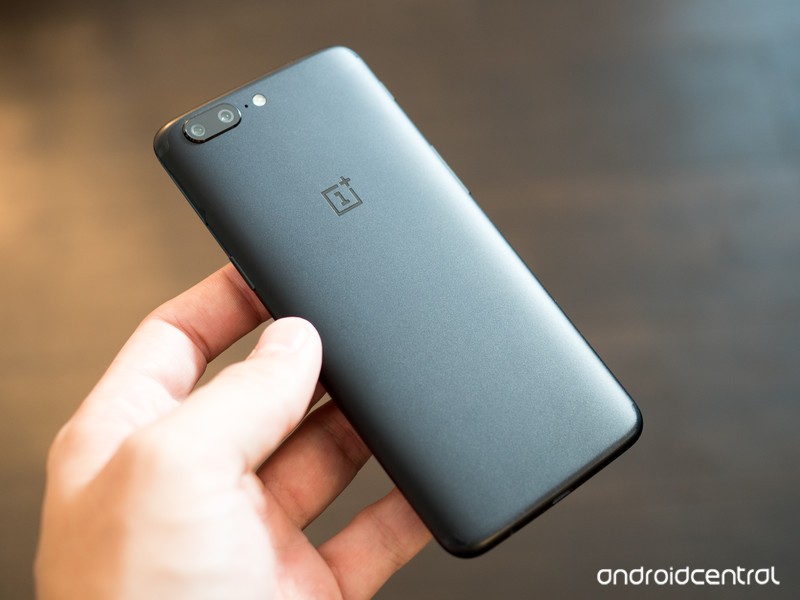
Meanwhile, in an interview with The Indian Express, OnePlus CEO Pete Lau took a different approach, noting that effective heat dissipation influences the CPU performance:
If there is heating the performance of the CPU will not reach the maximum. We only try to tap the full potential of the CPU. We don’t even know how to overclock.
For a company that obsesses over specs (you don’t need 8GB RAM on a phone), Lau said that giving customers the best experience is what matters when asked about the lack of a QHD panel on the OnePlus 5:
We don’t play around with specs, we just want to give our customers the best experience.
Talking about the dual camera in the OnePlus 5, Lau said that the tech will continue to get better as the company rolls out updates:
In OnePlus 5, the 16MP + 20MP combination provides the best possible images. Technology around the camera will continue to progress and I expect more improvement.
As for the price hike, OnePlus had to factor in the increasing costs of its retail packaging:
Across the industry the inputs costs have gone up from CPU to memory, and we are using an 8GB RAM in this phone. Even the cost of the box has gone up now.
Lau also said that waterproofing the OnePlus 5 would’ve made the device thicker and heavier, with the exec noting that the feature isn’t a “big consumer requirement.” He also stated that the OnePlus 5 has a certain degree of water resistance. It’s likely the company isn’t advertising the same as that would lead to the OnePlus 5 being eligible for water damage under warranty.
OnePlus certainly isn’t having an easy time marketing its latest phone, which is going up for sale globally later today. After the first sales event, company claimed that the OnePlus 5 was its “fastest-selling device ever,” but hasn’t provided statistics on how many units it sold.
What are your thoughts on the OnePlus 5? Will you be picking up the phone once it goes on sale?
OnePlus 5
- Complete OnePlus 5 review
- OnePlus 5 specs
- Which OnePlus 5 model should you buy?
- Camera comparison: OnePlus 5 vs. Galaxy S8
- The latest OnePlus 5 news
- Join the discussion in the forums
OnePlus
T-Mobile bolsters speeds with unlicensed LTE rollout
T-Mobile is launching support for unlicensed spectrum to bolster download speeds in smartphones and tablets on its network.
T-Mobile has announced the first rollout of its unlicensed LTE strategy in the U.S., which lets carriers attach themselves to spectrum in the 5GHz range that is traditionally used for Wi-Fi signals.
T-Mobile is the first national wireless provider to make LTE-U available to customers. LTE-U uses publicly available 5 GHz airwaves to bolster existing LTE capacity and give a speed boost to what is already America’s fastest, most advanced 4G LTE network. T-Mobile LTE-U is live in select locations in Bellevue, WA; Brooklyn, NY; Dearborn, MI; Las Vegas, NV; Richardson, TX; and Simi Valley, CA, with more rolling out later this year.
The idea behind LTE-U is quite simple: the spectrum used by Wi-Fi standards, typically 2.4GHz and 5GHz, are not “controlled” the same way that cellular airwaves are overseen by the FCC, since companies don’t have to purchase access to them. That leaves practically any company or product to claim a stake in those signals, including cellular companies after the FCC certified LTE-U equipment back in February.
T-Mobile has been testing LTE-U for some time, using it to augment, not replace, existing licensed bands. LTE-U bands combine with licensed spectrum in compatible phones to seamlessly increase throughput using carrier aggregation.
Another standard, License Assisted Access, is another form of the LTE-Advanced standard technically under the auspices of LTE-U, but uses a much more rigid set of guidelines to achieve greater speeds. LAA is still in testing, and even T-Mobile isn’t ready to issue wide support for the burgeoning standard just yet, but the potential implications are huge given that, according to Ericsson, there are hundreds of megahertz of unused, unlicensed 5GHz spectrum that, with the use of small cells and other precise equipment, can increase speeds over 150Mbps. T-Mobile claims that in its initial public tests of LAA in the Los Angeles area, it “showed blazing 741 Mbps download speeds using 80 MHz of aggregated spectrum.”
Expect to hear more from T-Mobile about its LTE-U and LAA strategies in the coming months — especially in relation to how far behind AT&T and Verizon are in achieving the same thing.
The best unlimited data plan in the U.S.

Volvo is working with NVIDIA to develop self-driving car tech by 2021
With virtually every major car manufacturer dumping R&D money into the field, it looks like autonomous vehicles are going to be a thing whether we want them to or not. Early Tuesday morning NVIDIA and Volvo announced that they are redoubling their self-driving system efforts by teaming with a number of other companies to develop and distribute a proprietary autonomous AI platform by the start of the next decade.
First off, Volvo has gone in halfsies with Autoliv to create a new software development subsidiary called Zenuity. Volvo and NVIDIA have announced that they’re teaming up with Zenuity to develop the next generation of self-driving vehicle systems which will be built on NVIDIA’s Drive PX AI module.
This is the same module that Tesla already uses and which both Audi and Toyota have begun developing on. The system stitches together data from its camera and radar inputs, then compares what it senses to a known high-definition map to automatically plot a safe course around oncoming obstacles. Volvo hopes to have its production vehicles using these self-driving systems available for sale by 2021.

NVIDIA also announced that it will be working with ZF and Hella, a pair of big name parts suppliers from Germany that produce vehicular camera and sensor systems, to develop a non-exclusive autonomous steering system. What’s more, NVIDIA hopes that integrating additional autonomous safety features like automatic braking will help increase the scores of AI-equipped vehicles taking the DOT’s New Car Assessment Program (NCAP) crash test safety certification.
This technology will help more than individual drivers. An increasing numbers of vehicles trading data with each other as they travel, why not have them talk to the infrastructure around them as well. “We’ll be able to project traffic patterns,” Danny Shapiro, Senior Director of Automotive at NVIDIA, said during a recent media briefing call. “We’ll be able to protect areas of potential congestion and really work with infrastructure, vehicles and navigation systems to optimize traffic flow and ultimately reduce congestion.”
“Looking through social media or websites or transit schedules, we’ll be able to detect trends and see what’s happening in communities and help people plan their journeys,” he added.
You only have to log into NBC’s app once across Apple devices
It’s much easier to fire up This is US and SNL on iPhones and iPads now that NBC’s iOS app finally works with Apple’s single sign-on (SSO). You simply have to activate the feature on your device by going to Settings > TV Provider and typing in your cable TV credentials to log into all the apps you have that support it. This update will sound even better if you have an Apple TV, since the network’s tvOS application worked with SSO from the start.
See, the feature syncs across devices, as long as they use the same Apple ID. That means you only need to log in once on your phone, tablet or streaming box to access NBC’s streamable shows on all of them. Neat trick, right? Unfortunately, you can only use the feature right now if you’re in the US, since it involves collaborating pay TV companies. To see what apps have SSO support, head over to the App Store, select the Featured tab and find the icon that shows your cable provider’s logo.
Source: iTunes
Augmented reality studio castAR reportedly closes its doors
When Jeri Ellsworth and Rick Johnson left their engineering posts at Valve, they took their augmented reality research with them and built an ambitious company called castAR. They had big plans, including the general release of their AR glasses later this year. For a while, they also had the money to make them happen. Unfortunately, things might not have gone well for the duo: According to Polygon, the company has closed its doors and laid off around 70 people from its Palo Alto and Salt Lake City offices.
That studio served as the home base for the Disney Infinity and Eat Sleep Play game developers who joined the company last year to work on AR software. Apparently, the employees only found out that the company is folding at a meeting on the evening of June 26th. Everything was liquidated, and only a core group of employees remain to get things sorted out, so they can sell their existing technology.
castAR started as a campaign on Kickstarter, where it raised over $1 million. A year later, it shipped an early design of its mixed reality glasses (with camera for input and projector to display 3D images onto a surface) to its backers. It secured $15 million in funding from Andy Rubin’s Playground around that time, but Polygon says the hardware startup incubator refused to continue funding the company last week. Since it also failed to get other investors to commit, the company had no choice but to shutter.
castAR hasn’t made an official announcement yet — its website still says it’s launching in 2017 — but we’ve reached out for confirmation. One of its game developers retweeted Polygon’s article, though, a couple of hours after announcing that he got laid off.
https://t.co/zk3qURPmD8 I had a wonderful time here and met many smart talented people. I will cherish these memories forever… 🙁
— Baqir Shah (@bakershah) June 27, 2017
Source: Polygon
Corsair K70 RGB Rapidfire Mechanical Gaming Keyboard review
Research Center:
Corsair K70 RGB Rapidfire
If there’s one thing PC gaming requires, its performance. But the associated peripherals need to be just a responsive, because input lag could cost the gamer points or even the match itself. To combat that, Corsair has built the K70 RGB Rapidfire, a full-size mechanical keyboard based on Cherry’s MX Speed RGB switches. These switches promise faster keystroke inputs compared to Cherry’s other switches for PC gaming, like the MX Red and MX Black. There’s no question that the keyboard lives up to its “Rapidfire” name, but at $170, it’s one of the most expensive gaming keyboards around. Is it worth the price? We put it to the test in our comprehensive Corsair K70 review.
Consider it the Porsche of mechanical keyboards
The Corsair K70 RGB Rapidfire has no dedicated macro keys, but Corsair stuffs a few media keys in the upper right corner. For starters, there’s an extremely handy volume wheel mounted in the corner along with a mute button sitting to its left. Located under the volume wheel are four dedicated keys for media control — Stop, Backward, Play/Pause, and Forward. These four buttons reside in a special spot above the number pad, under the volume wheel.
On the back, the keyboard measures one inch to play host to a USB pass-through port, a braided fiber USB cable, and a switch for adjusting the keyboard’s report rate. The two feet under the keyboard measure 0.50 inches in height.
Kevin Parrish/Digital Trends
Kevin Parrish/Digital Trends
Kevin Parrish/Digital Trends
Kevin Parrish/Digital Trends
About a quarter-inch of space separates each key, providing space for the Cherry MX Speed switch LEDs to spill their illumination around each key. Add a clear typeface to each key cap, and you have one gorgeous lighting system that looks great in both ambient light and dark PC gaming caves.
The keyboard features a report rate switch, which adjust how fast the Cherry MX Speed switches respond. It has four selectable speeds and a BIOS mode. This feature essentially controls how many times the keyboard updates the PC with input information. Some PCs and games simply can’t handle ultra-fast input, so the switch lets you adjust the report rate accordingly, to get the fastest speed possible without causing issues.
The report rate is typically referred as a keyboard’s “polling rate.” For the Corsair K70 RGB Rapidfire, users can switch between 8ms (125Hz), 4ms (250Hz), 2ms (500Hz), and 1ms (1,000Hz). The BIOS Mode switches the keyboard into a compatibility mode, so that the device can work on older PCs sporting a motherboard that doesn’t support modern PC gaming mechanical keyboards.
Grab a fresh toothbrush while you’re spending $170
The keyboard ships with a detachable “soft-touch” wrist rest. Technically, it’s not soft to the touch, but is patterned with small, shallow divots to provide a sense of softness when in fact it’s just a hard, plastic surface with small indentations. The drawback to these divots is that they can collect junk such as dust, kid funk, and whatever your hands pick up from day to day. This can get ugly and eventually require something like a toothbrush to clean.
The K70 RGB Rapidfire is crazy fast, as the Cherry MX Speed RGB switches do not disappoint.
A similar texture covers the spacebar, though instead of shallow divots, the space bar uses jagged vertical lines to create a rough texture. The keyboard also ships with a keycap puller and two sets of contoured keycaps using a similar texture. Provided for right-handed FPS and MOBA gamers, these two keycap sets promise “maximum grip” and an “enhanced” feel for all those heated multiplayer moments.
On a whole, the K70 RGB Rapidfire is a solid mechanical keyboard sporting an aircraft-grade anodized brushed aluminum frame. Each keycap feels comfortable to the fingertip, confining fingers to each letter without feeling rigid and protruding. And because this is a mechanical keyboard, the switches provide a dull thumping each time users press a key. They’re not sharp and clicky to the ears, but they’re loud enough to keep your significant other up all night if they’re trying to sleep in the same room.
Customization arrives in the name of CUE
At the heart of Corsair’s K70 RGB Rapidfire is the company’s Corsair Utility Engine (CUE) software. Free to download and use, the tool provides all the customization aspects including the lighting system, creating macros, assigning commands to specific keys, and more. The CUE interface breaks all of this down into a toolbar on the left and the main window on the right.
Kevin Parrish/Digital Trends
The toolbar lists the default profile and all other profiles created by the user, the Actions section, the Lighting Effects section, and the Performance section. It also provides small clickable buttons to create a new profile, create a new folder for organizing profiles, copying profiles, importing and exporting profiles, downloading custom profiles from Corsair, and more.
You can edit the default profile by attaching a custom profile icon, adding a background image, and turning the tabs transparency up or down to give the interface a personal touch. There’s a field for linking the profile to games, so it starts when the game is launched. The default profile is generally set aside for everyday use, and gamers are encouraged to create individual profiles for each game.
Corsair K70 RGB Rapidfire Compared To
Brydge 12.3
Logitech MK850
Aukey KM-G3
Logitech G Pro Mechanical Gaming…
Microsoft Universal Foldable…
Logitech G213 Prodigy
Steelseries Apex M500
Razer Turret
Razer Blackwidow X Chroma
Cougar Attack X3 gaming keyboard
Razer Deathstalker Chroma
Logitech K400
Cooler Master Storm QuickFire
Logitech iPad 2 Keyboard Case by…
Logitech K750 Wireless Solar…
The Actions section is where users can assign commands to keys, create and assign macros, use a key to launch a specific program, launch a timer, quickly switch profiles, and more. For instance, we assigned the ALT + F1 keystroke to the Home button, which allows us to take a screenshot via Nvidia’s GeForce Experience tool. To bring up the GeForce Overlay using the Insert button, we chose “Keystroke” and typed ALT + Z into the text field. The Remap Key option also supports mouse buttons.
Look at all those pretty colors!
The Corsair K70 keyboard supports 13 different lighting effects and 16.8 million colors. The effects include Spiral Rainbow, Rainbow Wave, the Cylon-like Visor, Color Wave, and even two specific to Corsair’s Void headsets. Type Lighting either lights up a single key as they’re pressed, or creates an explosion of color around a pressed key like a colorful atom bomb. Users can tweak all lighting effects such as setting random colors, changing the effect speed, setting two alternating colors, and changing the effect direction (if supported).
The keyboard is highly durable, and the key switches will last forever.
What’s really cool about the Lighting Effects aspect is that users can stack effects. For instance, in our Star Wars Battlefront profile, we first created a lighting effect for the movement keys, assigning them with a static green color and calling the effect “movement.” Next, we created four additional lighting effects for each special ability, assigning a distinct color for each assigned key. We rounded off the profile with a “background” lighting effect using the Rain preset, dimmed colors, and a medium raindrop speed.
The Performance section of each profile deals with the Win Lock button and its associated commands. On this panel users can choose to disable the Windows key and three keyboard commands: ALT + TAB, ALT + F4, and SHIFT + TAB. Users can also change the lock indicator colors for OFF and ON too. Generally, disabling the Windows key prevents the Start menu from popping up and causing annoying video issues and game disruption.
However, we need to provide one note about all the colors, key assignments, and settings. None of this is available without the CUE software running in the background. The only details that users can save in the keyboard’s on-board memory is static lighting, and whatever users set in the Performance section.
This keyboard earns its “rapid fire” name
The Corsair K70 RGB Rapidfire is crazy fast. Sometimes that’s a good thing, and sometimes it’s not. That’s because the Cherry MX Speed RGB switches mounted under the key caps have an actuation point of 1.2 millimeters (mm). This is where the keystroke is registered and sent over to the PC before the key is fully pressed. The actual distance a key must travel between its idle position and making a full electrical contact is around 3.4mm.
Kevin Parrish/Digital Trends
By comparison, Cherry’s highly-popular MX Red switches have an actuation point of around 2.0mm and a key travel (actuation distance) of around 4.0mm. This means the Cherry MX Speed RGB switches are more sensitive, due to the shorter travel time to the actuation point, and shorter travel time to the hard registration point. Cherry says the MX Speed RGB switch is 40 percent faster than its standard MX switch.
We noticed the slightest weight on a key would trigger its actuation. In other words, when your fingers are resting on the keyboard and you’re reading something on the screen, the highly responsive keys could lead to gibberish or deleted sentences in a document if you’re not paying attention to the weight of your fingers.
There’s no question the keyboard lives up to its “Rapidfire” name, but it’s not exactly cheap.
For an extremely fast typist needing to quickly dictate the boss’ speech on the fly, the MX Speed switches should be ideal. But for the average typist, they might be overkill, and in some cases an annoyance. Then again, the average typist probably wouldn’t spend $170 on a gaming keyboard.
When gaming, the fast key stroke helps whenever twitch reactions are a factor. Every stroke of a key meets an immediate reaction. It may sound odd, but the difference is noticeable, especially when compared to mechanical keyboards that use long-stroke key switches. Will it make you a better gamer? Probably not. But the faster perceived reaction can feel reassuring after you’ve downed a few energy drinks.
We can confirm that the keyboard correctly recognizes 10 keys when they are pressed simultaneously. Anti-ghosting is seemingly a thing of the past anyway, and this test proved that PC gamers can quickly cast their multi-key commands without ghosts typing in rogue keystrokes. In the past, anti-ghosting was a sign that the keyboard wasn’t registering the switch actuations properly and were receiving multiple keystrokes, or strokes from keys that weren’t pressed by the user.
Warranty
Corsair provides warranty information on its website. Corsair will cover the keyboard for up to two years after purchase regarding defects in the material and workmanship. In other words, if it doesn’t work as advertised, then Corsair will repair or replace the keyboard, or refund the customer’s money. But don’t wait too long — Corsair will keep 10 percent of that money as a “usage” fee for each year since the date of purchase.
Our Take
Corsair’s K70 RGB Rapidfire mechanical keyboard lives up to its name. It’s highly responsive due to the use of Cherry MX RGB Speed switches, and is ideal for not only PC gamers who demand super-fast input, but typists who need a “sensitive” keyboard for quick and accurate text input. That said, it may be over-sensitive for customers looking for a flashy new keyboard for general use.
Is there a better alternative?
An online search for a mechanical keyboard using the same Cherry MX Speed RGB switches provided very few results. Corsair seems to dominate the MX Speed RGB market, although G.Skill’s Ripjaws KM570 mechanical keyboard sells for a cheaper $120. The limited number of products on the market is surprising given the MX Speed switch first appeared in April of 2016. Corsair uses this switch in the $200 K95 RGB Platinum mechanical keyboard, too.
How long will it last?
As stated, the keyboard switches have a durability of 50 million keystrokes. For PC gamers, certain keys will wear out before others, but that’s still a long lifespan if you’re not playing in tournaments each day. That said, the $170 pricetag should be a worthwhile investment for the next several years. Given the MX Speed RGB switch is rarely used, competing products may be scarce for a while.
Should you buy it?
Yes, if you have $170 to spend on a mechanical keyboard dedicated for PC gaming. The keyboard is attractive, the keys are responsive, and the switches will last forever, making this peripheral a great buy.
Verizon Wear24 review
Research Center:
Verizon Wear24
Smartwatches, the Dick Tracy-inspired gadgets that track your workouts and buzz when you get a text message, are a little more commonplace than they were a few years ago. Now, there’s a smartwatch at every price point, with luxury Swiss brands like Movado and Tag Heuer filling out the high end and ZTE, Misfit, LG, Huawei, and others sitting somewhere in the middle.
Given the well-established competition, it’s a little surprising that Verizon, the U.S.’s largest cellular carrier, is jumping on the smartwatch bandwagon. The Wear24, a watch made in partnership with Taiwanese company ODM Quanta, boasts high-end hardware in a lightweight, $300 package. It’s got a waterproof body, a colorful display, and 4G LTE connectivity.
Despite that laundry list of features, Verizon’s Wear24 falls short in crucial respects. Namely, it omits sensors the competition doesn’t. That’s not to say Verizon’s first attempt at a smartwatch isn’t good, but it’s tough to recommend the Wear24 over similarly-priced watches from Apple, Huawei, Samsung, and others.
Elegant minimalism
On paper, the Wear24 seems pretty compelling. Verizon’s first smartwatch has an unibody that measures 13.4 x 42 x 42mm and weighs 85 grams, making it smaller and lighter than the ZTE Quartz (14 x 46 x 46mm and 89 grams).
Kyle Wiggers/Digital Trends
Kyle Wiggers/Digital Trends
Kyle Wiggers/Digital Trends
Kyle Wiggers/Digital Trends
The Wear24 is round and compact, and elegant — there’s a single physical button on the side, and lugs that protrude a little too much. It’s a little heavy, but on the whole, the Wear24 is minimal — if a little bland.
It’s IP67 rated for water- and dust-resistance, meaning it’ll emerge unscathed from watery depths up to 3 feet, and packs a 1.39-inch, AMOLED touchscreen with a resolution of 400 x 400 pixels. It’s powered by Qualcomm’s Snapdragon Wear 2100 processor, like most Android Wear smartwatches, and it comes with 768MB of RAM, 4GB of internal storage, and a 450mAh battery that supports wireless charging.
It’s fast, too. The Wear24 flew through Android Wear 2.0’s menus in our testing, never once showing signs of slowdown in the course of a long work week using Google’s activity-tracking Fit software, turn-by-turn Google Maps directions, and a deluge of Trello, Facebook Messenger, and email notifications running in the background.
On the whole, the Wear24 is tastefully — if a little blandly — designed.
Our testing didn’t seem to make a dent in the Wear24’s battery. Despite the battery’s comparatively smaller, 450mAh size (the cheaper ZTE Quartz packs a 500mAh), the Wear24 tended to last about a day and a half on a charge. Even with Wi-Fi and LTE enabled and the brightness cranked to maximum, we struggled to run the Wear24’s battery down below 25 percent. That’s much better than we managed with the LG Watch Sport, which frequently fell short of the 20-hour mark, and it’s on par with the Apple Watch and Samsung Gear S3, both of which last about a day.
On the subject of the Wear24’s battery, we found the charger — a wireless dock that comes packed in the box and plugs in via MicroUSB cable — to be a nice touch. It’s much easier to use than the Huawei Watch 2’s finicky magnets, and a lot less finicky than the ZTE Quartz’s clip-on charger.
True wireless
The Wear24 is one of the few Android Wear smartwatches to support 4G LTE. In real-world terms, that means you can use it in lieu of your smartphone — Android Wear 2.0’s native calling features let you answer and place calls with your cellphone plan’s number, or respond to incoming texts.
You can dictate messages or tap text out letter-by-letter on Android Wear 2.0’s tiny keyboard. Alternatively, a nifty handwriting tool turns the letters you doodle with a finger into text.
Kyle Wiggers/Digital Trends
There’s also Smart Replies, which uses on-device machine learning to generate short, contextually relevant message replies. When you get a text message from a friend asking if you’re free this evening, for example, you’ll get options like, “Sounds good,” or, “Can’t make it.”
Mobile data doesn’t come free, of course — adding the Wear24 to an existing Verizon data plan is $5 a month. But if you’re the kind of watch wearer who appreciates the freedom of being able to ditch your smartphone when heading to the grocery store or go for a jog, the convenience might be worth the cost.
The lack of an ambient light sensor means it won’t adjust the brightness automatically.
That said, we were disappointed by the Wear24’s speaker quality, which tended to sound tinny and washed out. The speaker comes in handy on those rare occasions when you aren’t wearing earbuds and your smartphone’s out of reach, and we would’ve liked to see more attention paid to it for that reason.
The Wear24 isn’t without other drawbacks. The screen is less sharp than the Huawei Watch 2’s display (290 ppi versus 326 ppi); its body has a lower IP rating than the Samsung Gear S3 and the LG Watch Sport (IP67 versus IP68); and it doesn’t have removable wrist straps, meaning you’re stuck with the thin, flimsy silicon bands that come permanently bolted to it.
While it has GPS, the Wear24 doesn’t have a heart-rate sensor — so you won’t be able to track fitness activities more accurately, unlike comparably-priced watches. The lack of an ambient light sensor means it won’t adjust the brightness automatically, and it does feature Near Field Communication (NFC) radio, but it doesn’t support Android Pay. The LG Watch Sport, Huawei Watch, and Moto 360 use NFC to let you tap to pay at retailers that accept Android Pay, Google’s payments platform, but the Wear24 inexplicably doesn’t.
Android Wear 2.0
The Wear24 is one of the first smartwatches to ship with Android Wear 2.0, the latest version of Google’s smartwatch operating system. That’s a good thing, because it’s a huge improvement over its predecessor.
Verizon Wear24 Compared To
Motorola Moto 360 (2015)
LG Watch Sport
Huawei Watch 2 Sport
Huawei Fit
Apple Watch Series 2
Martian Passport MP100WSB
Garmin fenix 2
LG G Watch R
Netatmo June
Neptune Pine
Motorola Moto 360
Martian Notifier Watch
Samsung Gear 2
Phosphor Touch Time
Samsung Gear Fit
In contrast to the first version of Android Wear, which we found to be a little clunky and confusing, Android Wear 2.0’s interface is fast, intuitive, and simple. Swiping down from the top of the watch brings up quick settings, and swiping up scrolls through your notifications.
The watch face options are improved as well. Apple Watch-like Complications — animated widgets for watch apps — show updates and notifications in real time. By default, the Wear24 offers the choice of a battery indicator, step counter, and weekday planner, but third-party apps add their own Complications. Swiping left lets you customize the layout and appearance of Complications, or swap watch faces entirely.
Kyle Wiggers/Digital Trends
The Wear24 misses out on one new feature of Android Wear 2.0 — hardware shortcuts. Unlike the LG Watch Sport, which has a rotating dial that serves as a scroll wheel or zoom adjustment in Android Wear apps, the Wear24’s inputs are pretty much restricted to touch. Short of pressing the crown to access apps and the Google Assistant, most interactions are of the tapping and swiping variety.
The Wear24, unsurprisingly, ships preloaded with Verizon’s Messaging app, which handles texting on the watch and phone. It’s optional — you can use Android Wear 2.0’s default messaging app, if you choose — but Verizon’s app helpfully dismisses text message notifications on your phone if you’ve viewed them on your watch, and vice versa. That said, it also encourages you to purchase in-app stickers, which is why we recommend avoiding it.
Warranty, availability, and pricing
Verizon offers a standard 12-month limited warranty on the Wear24, which protects against defects in material and workmanship under normal use and service. If you’re claim is approved, the carrier will repair your damaged Wear24 using new or refurbished parts. It doesn’t cover moisture damage, “unauthorized” modifications, damage caused in shipping, or Wear24 devices purchased from unauthorized third parties.
The Verizon Wear24 is available from Verizon for $350 unlocked, or $300 on a two-year contract. It comes in steel, black and rose gold, and is available on Verizon’s website and brick-and-mortar stores.
Our Take
Verizon’s Wear24 is a pretty good smartwatch, but it needs to be cheaper. At $300 on a two-year contract, and $350 unlocked, it’s just not good enough to justify the asking price. The competition has sharper screens, heart-rate tracking features, ambient light sensors, Android Pay support, and more. The Wear24 handles Android Wear basics, like notifications, messaging, and watch faces, just fine. But its princely price makes it hard to recommend.
Is there a better alternative?
Yes. The ZTE Quartz, which is admittedly bigger and bulkier than the Wear24, is a good deal less expensive at $192. The LG Watch Style is a close second, but it’s $50 more.
If you’re the uncompromising type, consider the Huawei Watch 2 Sport or the LG Watch Sport for their better screens, heart-rate monitors, and NFC sensors that support Android Pay. The former, unlike the Wear24, doesn’t support 4G LTE, but it’s cheaper than the unlocked Wear24 at $300.
How long will it last?
The Wear24 is Verizon’s first Android Wear smartwatch, so it’s a little difficult to tell how long the carrier will support it. But if other Android Wear devices are any indication, we expect it to receive updates for at least 2 years.
Should you buy it?
No. Simply put, the Wear24 is an expensive smartwatch with deal-breaking shortcomings — namely, the lack of heart-rate monitor and support for Android Pay. There are far more competitive options at its $300 to $350 price range.
How to repost on Instagram
If there is one word at the heart of social media, it’s this: sharing. When people post something on social media, they want people — whether it’s their close friends and family, or the entire world — to see it. Photos, videos, and lame jokes flow freely, which makes it all the stranger that Instagram doesn’t have an easy, readily apparent way to share content you find in your feed. If you really want to learn how to repost on Instagram — an action we omitted from our roundup of some of the more popular Instagram tips and tricks — there are a couple things you can try. Sharing a photo of your friend’s latest creation or a touching graduation video isn’t as difficult as you might think.
Use a reposting app
App stores abhor vacuums. If there is a niche to be filled, some app developer will try to fill it, so it should come as no surprise that there are several apps available that allow users to repost content on Instagram, such as Repost for Instagram and Insta Repost. These apps tend to be free — with ads — and are pretty straightforward. As an example, we’ll use the apt-titled Insta Repost.
Step 1: Once you’ve downloaded and installed the app, open Instagram. Find a post you want to repost, and tap the button in upper-right corner that resembles three gray dots.
Step 2: Tap the button labeled Copy share URL.
Step 3a: Insta Repost will then automatically launch. You will be given a prompt allowing you to choose Repost now or Save to repost later. If you want to post immediately, choose the first option.
Step 3b: If you chose to Save to repost later, the post will be filed under the Saved section in Insta Repost, which you can access by tapping the star tab on the top. Then, when you want to repost said content, simply tap the saved post in question.
Step 4: Whether you choose to repost now or later, you will eventually arrive at a screen like the one featured below. Once here, tap the Repost button at the bottom to post the image or video to your Instagram account.
Take a screenshot and post it
There are plenty of reasons not to install a reposting app. Maybe you don’t want to clutter up your phone’s storage with more apps, or you don’t like the idea of giving yet another app access to your photos and files. Regardless, if you don’t want to use an app to repost, you can always just take a screenshot of a post you like and share that.
The process to take a screenshot differs from platform to platform, but, thankfully, we have guides on how to take a screenshot on an iPhone and how to take a screenshot on an Android phone. Once you take the screenshot, just go to Instagram and upload it as you would any other photo or video in your camera roll. Note that you should credit the creator of the original post!
Make your Windows 10 PC a lot prettier with new Windows Store themes
Why it matters to you
It’s easy to add some flair to your Windows 10 PC — just open the Windows Store and select from a number of free themes.
Windows has long offered ways to customize its look and feel. For example, you’ve been able to select the background image for your desktop, change the color scheme for Windows title bars and other elements, and choose your own sounds for various system events. In addition, themes have made it easy to select a specific look and feel with just a few mouse clicks.
Windows 10 allows for much of the same personalization and also offers a variety of themes. As of the Windows 10 Creators Update, Windows desktop themes are available in the Windows Store to download and install on your fully updated machine. They’re free, and Microsoft spent some time on the Windows blog announcing that some new themes are available.
As Microsoft describes Windows 10’s themes:
“Choose from endless options to make your PC yours, including hundreds of wallpapers, sound options, and custom accent colors. Themes include plants and flowers, landscapes, animals, natural wonders, cityscapes — anything to suit your style. The photography, art, and illustrations you see come from creators across the globe.”
Heading over to the Windows Store, you’ll find a solid selection of themes that can provide a real boost to your PC’s look and feel. Assuming that you have Creators Update installed, you can go to the Action Center > All settings > Personalization > Themes and click “Get more themes in the Store,” or click here to go straight to the Windows Store’s collection of themes.
When you apply your theme, it will change the color of your screen elements, apply a background, and more. You can select your own individual elements by heading to the Themes section of Settings and choosing what you want to customize. For example, you can choose your own system sounds by clicking on the Sounds option.
Whether you’re into cityscapes, nature scenes, or art, you’re likely to find a theme to fit your desires. Themes are free to download and install, and Microsoft promises to add new themes with each Windows 10 update. Themes are an option for U.S. users only, however, which one hopes will change at some point and open up the selection of free themes worldwide.
 AIVAnet