


Amazon’s Prime Air ‘drone tower’ would look and sound like a giant beehive
Why it matters to you
Although many of these ideas may never come to fruition, it’s always fascinating to find out what the R&D folks are thinking about behind the scenes.
In case you didn’t already know it, Amazon envisions a world where the skies buzz with autonomous drones carrying packages from fulfillment centers to customers’ homes. The ecommerce giant has long been working on its Prime Air flying machine, though strict regulations governing the commercial use of such contraptions means that a full-fledged, drone delivery service is still a ways off.
Amazon
Still, that doesn’t stop Amazon making plans, evidenced by a string of related patents landing on the desk of the U.S. Patent & Trademark Office in recent years.
The latest one focuses on the design of its fulfillment centers and how it could be adapted to suit drone delivery operations in urban areas.
Currently, most of Amazon’s depots comprise single-floor warehouses built away from city centers. Its latest patent describes a multi-level fulfillment center “designed to accommodate landing and takeoff of unmanned aerial vehicles.”
Illustrations included in the patent application show a giant beehive “drone tower” with numerous exit and entry points for delivery drones. For reasons of speed and efficiency, it’s perfectly understandable that Amazon would want to base a drone delivery operation in an urban area, enabling it to reach more customers in super-quick time. However, the company would first have to satisfy regulators that having so many drones flying in such a concentrated area posed no safety issues for people on the ground, and noise could also potentially be an issue for occupants of nearby buildings.
While Amazon’s latest idea may seem fanciful to many observers, it’s clearly not as wacky as the flying warehouse with incorporated drone airport that it proposed in another patent.
Another patent described using the top of street lights, cell towers, and church steeples as docking stations to charge its drones as they make their way to and from customers’ homes.
Of course, we should note that at this stage Amazon’s plan for a drone tower is only a patent application, and that even if it’s granted by the USPTO, there’s a chance it’ll forever remain as an idea on a piece of paper.
Timex is going to use micro-technology to change the way watches look and function
Why it matters to you
In the future our watches will look different, the batteries will last longer, and they will be more reliable thanks to the creative use of micro-technology.
Watchmaker Timex will integrate a cutting-edge new micro-technology into its watches in 2019, which has the potential to change the way watches function, how they’re designed, and how long the battery inside lasts. In a world first, Timex will use Micro-Electro-Mechanical System, or MEMS, technology from French company SilMach to power a watch, instead of the magnetic system (known as Lavet) used to power current quartz watches.
What does this mean? Timex says the watch world is limited by the size and shape of traditional magnetic motors used today; but MEMS devices are really small, with components only able to be seen using a microscope. The two companies will use the technology in a new way, which they call PowerMEMS, to replace the old motor with nano-scale gears and a direct drive that’s smaller, more efficient, more accurate, and easier to make than the Lavet. Additionally, because MEMS drives are built using silicone and not metal, they don’t require ongoing maintenance like metal does, making the movement more reliable and with no need for future servicing.
This will result in Timex being able to experiment with new watch designs using batteries that last longer than ever before, with a smaller and less complex movement, that’s of higher quality and more durable than the one it replaces. Timex’s CEO is very confident that introducing PowerMEMS will have a massive impact on the industry. He said, “With this development, we are taking revolutionary steps that will dramatically enhance design and function in watchmaking that were previously not thought possible.”
While Timex and SilMach’s PowerMEMS technology is for quartz watches, and not for replacing spring-based watch movements, it also has the potential to be used in connected watches. Hybrid smartwatches — which combine traditional timepiece looks with smart functionality — are becoming more popular, and would equally benefit from increased accuracy, design freedom, and longer battery life. Timex has dabbled in connected watches already, but hasn’t followed in Fossil’s footsteps with a full hybrid yet.
There’s still a little while to go before we see the first PowerMEMS watch though, as the first example will arrive as part of Timex’s collection in 2019. Timex has been making timepieces since 1854, and produces its own quartz movements, while SilMach was founded in 2003. It previously hit the headlines with a MEMS powered micro drone shaped like a dragonfly.
Timex is going to use micro-technology to change the way watches look and function
Why it matters to you
In the future our watches will look different, the batteries will last longer, and they will be more reliable thanks to the creative use of micro-technology.
Watchmaker Timex will integrate a cutting-edge new micro-technology into its watches in 2019, which has the potential to change the way watches function, how they’re designed, and how long the battery inside lasts. In a world first, Timex will use Micro-Electro-Mechanical System, or MEMS, technology from French company SilMach to power a watch, instead of the magnetic system (known as Lavet) used to power current quartz watches.
What does this mean? Timex says the watch world is limited by the size and shape of traditional magnetic motors used today; but MEMS devices are really small, with components only able to be seen using a microscope. The two companies will use the technology in a new way, which they call PowerMEMS, to replace the old motor with nano-scale gears and a direct drive that’s smaller, more efficient, more accurate, and easier to make than the Lavet. Additionally, because MEMS drives are built using silicone and not metal, they don’t require ongoing maintenance like metal does, making the movement more reliable and with no need for future servicing.
This will result in Timex being able to experiment with new watch designs using batteries that last longer than ever before, with a smaller and less complex movement, that’s of higher quality and more durable than the one it replaces. Timex’s CEO is very confident that introducing PowerMEMS will have a massive impact on the industry. He said, “With this development, we are taking revolutionary steps that will dramatically enhance design and function in watchmaking that were previously not thought possible.”
While Timex and SilMach’s PowerMEMS technology is for quartz watches, and not for replacing spring-based watch movements, it also has the potential to be used in connected watches. Hybrid smartwatches — which combine traditional timepiece looks with smart functionality — are becoming more popular, and would equally benefit from increased accuracy, design freedom, and longer battery life. Timex has dabbled in connected watches already, but hasn’t followed in Fossil’s footsteps with a full hybrid yet.
There’s still a little while to go before we see the first PowerMEMS watch though, as the first example will arrive as part of Timex’s collection in 2019. Timex has been making timepieces since 1854, and produces its own quartz movements, while SilMach was founded in 2003. It previously hit the headlines with a MEMS powered micro drone shaped like a dragonfly.
Indian government calls Google Maps unreliable, wants citizens to use its own mapping solution instead
The Indian government launches its latest salvo in a long-running fight with Google over mapping data.
The Indian government doesn’t have a high opinion of Google Maps, and it conveyed that sentiment today by saying that the service is “not authenticated” and calling into question its reliability.

That’s according to a statement made by the head of the country’s mapping and survey organisation, aptly named the Survey of India:
If you talk about the authentication, the Google Maps is not authenticated. It hasn’t been produced by the government, so they aren’t authenticated.
If you are using Google Maps to reach a restaurant or park, even if you reach 50 meters close to that place, you are happy. But when we have to put a new railway line or make canals, that is where our topographic maps come in, when you require very accurate, engineering quality data.
This isn’t the first time the Indian government has gone up against Google. Back in 2010, the government issued a notice to the search giant for classifying two states — Jammu & Kashmir and Arunachal Pradesh — as “disputed territories” and Pakistan-occupied Kashmir as belonging to Pakistan. The area in question has been hotly contested by both India and Pakistan for decades.
Last year, the government prohibited Google from bringing its Street View vehicles into the country, stating that the vehicles could record potentially sensitive military installations. Shortly thereafter, it rolled out legislation to curb the efficacy of services like Google Maps.
Contrary to what the government says, Google has invested significant resources into making its Maps data much more reliable in India. In fact, the search giant employs hundreds of contractors in its sprawling Hyderabad office solely for improving location details in Maps. The main issue here is the lack of control — the Indian government cannot enforce Google to remove a specific location or tailor topographic data to suit its needs:
There should be some controls, but the fact is that government doesn’t have any restrictions or control over the applications like Google Earth or Maps.
To that effect, Swarna Subba Rao, the Surveyor General of India, is asking Indians to cut down on their reliance on Google Maps and instead switch to the Survey of India’s own mapping solution:
We are asking Indians to use maps produced by Survey of India and not those developed by companies outside the country.
The Survey of India is working on its in-house topographic data that will be available to Indians free of cost. According to a senior official within the department, the data is not without its glitches, but the issues are being ironed out right now:
The maps are still being uploaded and there are some glitches with the website which are being fixed.
And if you were interested in seeing what kind of solution the government is planning, head to the official website. Who else feels like it won’t be able to match up to what Google is offering?
Find My Device: The ultimate guide to finding your lost phone
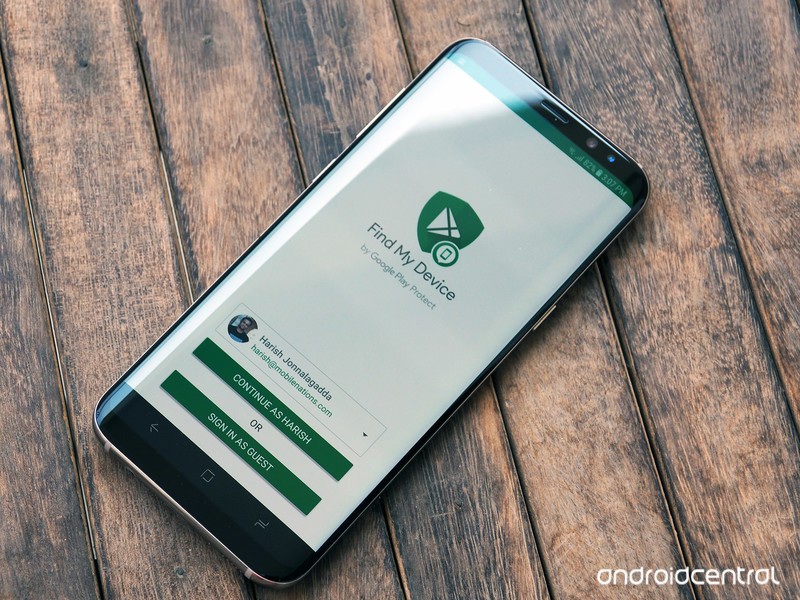
Find My Device lets you remotely track, lock, and erase the data on a lost or stolen phone.
Android Device Manager has picked up its first major update in two years, bringing a new visual layout and a new name: Find My Device. The app’s functionality isn’t changing — you’ll still be able to remotely track, lock, and erase the data on a lost or stolen phone — but the interface has picked up much-needed polish.
With the rebranding, Find My Device is now a part of Google Play Protect, a suite of services designed to protect your phone from malicious content. Google is leveraging its machine learning expertise to scan and verify the apps installed on your phone, and while the Verify Apps feature has existed since the Jelly Bean era, Google is making the process much more visible to users.
With Find My Device, you’ll also be able to see the battery life remaining on your phone and the Wi-Fi network it is connected to. Here’s what you need to know about Find My Device, and how you can set it up on your phone.
- Will my phone work with Find My Device?
- How to install Find My Device
- How to sign in to Find My Device
- How to confirm your phone is discoverable with Find My Device
- How to locate over the internet
- How to ring your phone with Find My Device
- How to lock your phone with Find My Device
- How to erase your lost phone’s data remotely
Can I install Find My Device on my phone?
Before we show you how to get started installing and setting up Find My Device, it’s important to know whether your phone will work with it. If you’re running a device running Android 4.0 Ice Cream Sandwich or later, you’ll be able to install Find My Device. That means roughly over 99% of active Android devices — or 2 billion devices worldwide — are eligible to install Find My Device.
How to install Find My Device
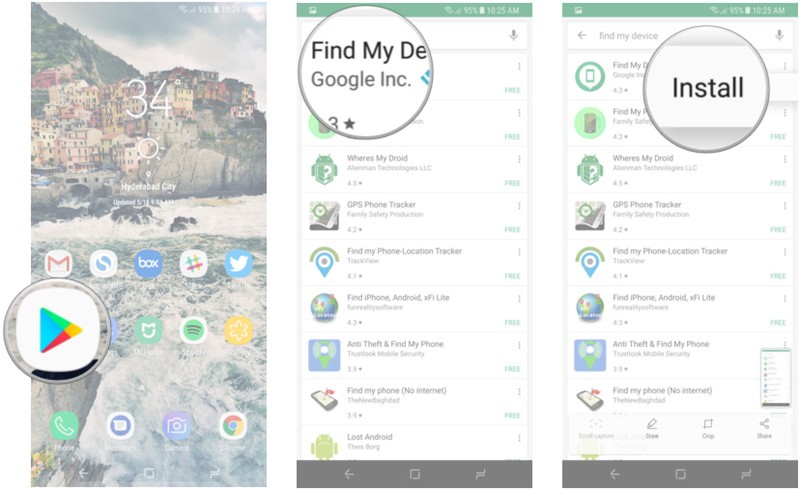
This is the easy bit. Just head to the Play Store and search for Find My Device to download the app. We’ll break it down for you:
Open Play Store from your home screen or app drawer.
Search for Find My Device.
Tap the three dots next to the first search result and select Install.
How to sign in to Find My Device
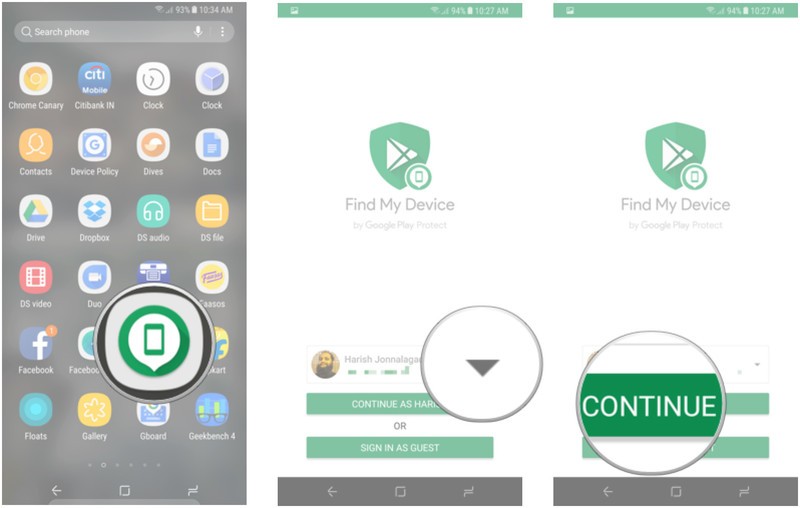
After installation, you’ll need to sign in to Find My Device from your Google account. If you’re signed into more than one account on your phone, you get a drop-down menu from which you can select the account you want to associate with the phone.
Open Find Device from your home screen or app drawer.
Select the Google account you want to use the service with.
Hit the Continue as button.
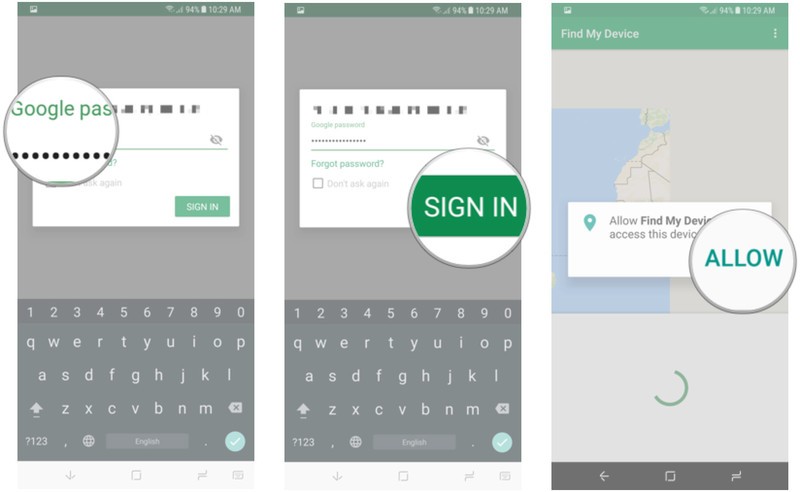
Enter your Google account password.
Tap Sign in.
Give location access to the service.
How to see if your phone is discoverable with Find My Device
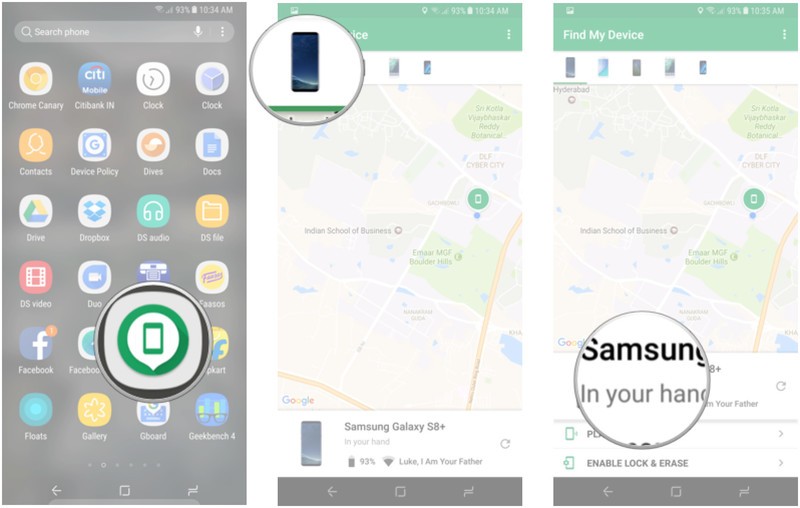
Once you’re signed in to Find My Device, you’ll see a map with your current location as well as the make and model of your phone, and two options — Play Sound, and Enable Lock & Erase. Hitting the latter option will allow you to start using the Lock and Erase functions.
If you’ve signed into more than one phone, you can select a particular device by browsing the list at the top of the screen.
Open Find My Device from your home screen or app drawer.
Select your phone from the list of devices at the top of the screen.
See if your phone is discoverable.
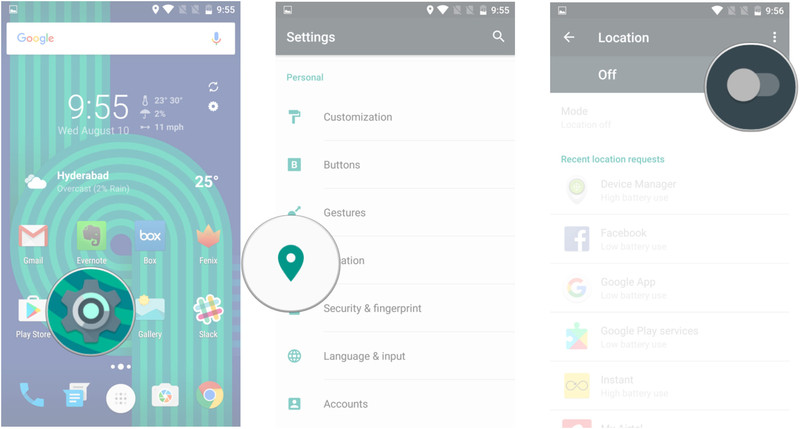
If you’re not able to find your phone or if it says that the device is unavailable, it is likely that the location services are disabled. Find My Device relies on GPS to track your phone, so now would be a good time to enable location services.
Open Settings from your home screen or app drawer.
Tap Location.
Toggle Enable location services.
How to locate your phone over the internet
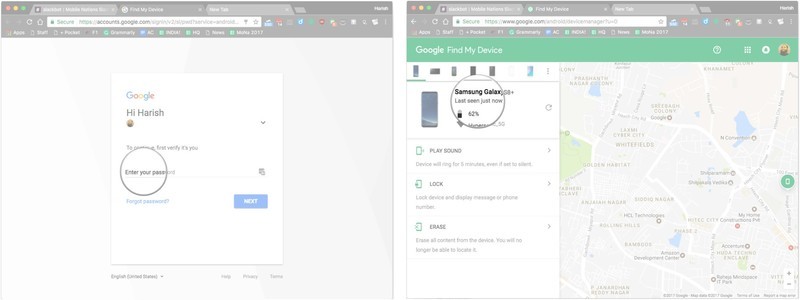
If you’ve lost your phone, you can remotely locate it through the Find My Device website. You’ll need to sign in to the Google account that was used to set up Find My Device. It takes a few seconds, but the service should be able to track your phone. Alternatively, you can also do a Google search for “find my phone” to locate your handset.
Head to the Find My Device website.
Sign in to your Google account.
Check if your device is visible.
How to ring your phone with Find My Device
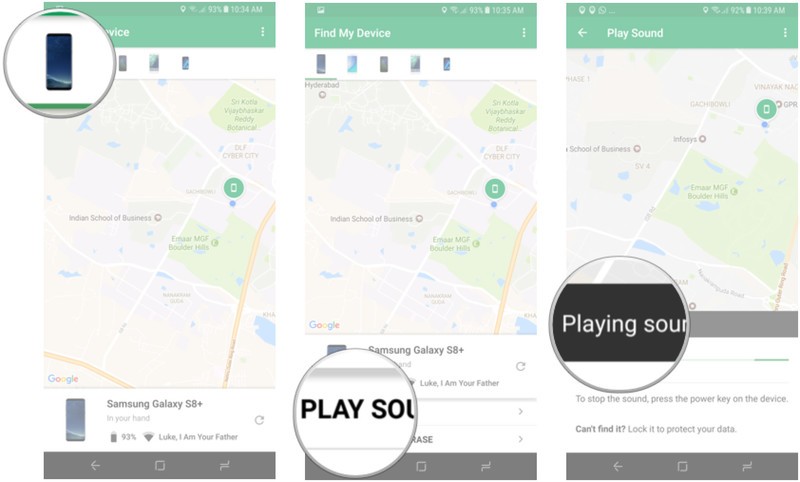
The best part about Find My Device is that it is easily accessible. If you need to locate your phone, just head to the website or log in to the service from another phone. Once you sign in to Find My Device and locate your device, you can use the Play Sound option, which plays a loud tone on your phone continuously at full volume for five minutes even if you turned the ringer off. Once you find your phone, you can hit the power button to stop the ringing.
Locate your phone on Find My Device.
Tap Play Sound.
Your device will start ringing. You can hit the power button to stop the sound.
How to lock your phone with Find My Device
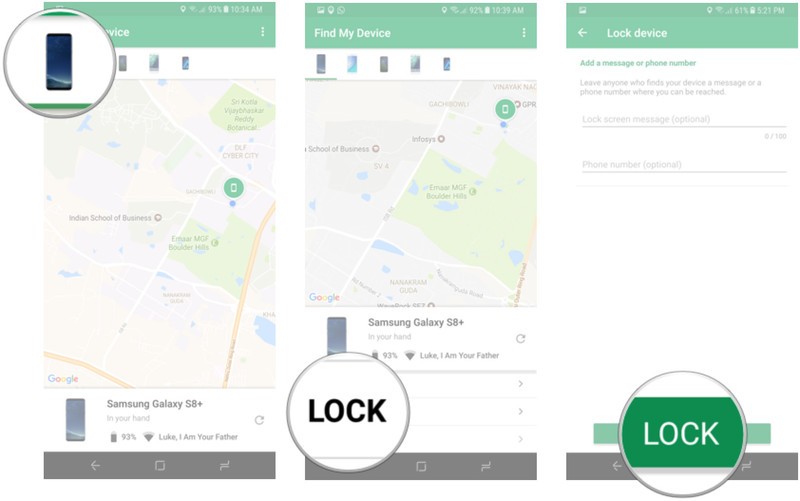
There’s also a Lock option that lets you set a new password to unlock the phone. You can also display a message over the lock screen and add a button to call back your number so that anyone that comes across your phone can easily get in touch with you.
Locate your phone on Find My Device.
Tap Lock.
Enter a message and phone number to display on the lock screen and tap Lock.
How to erase your lost phone’s data remotely
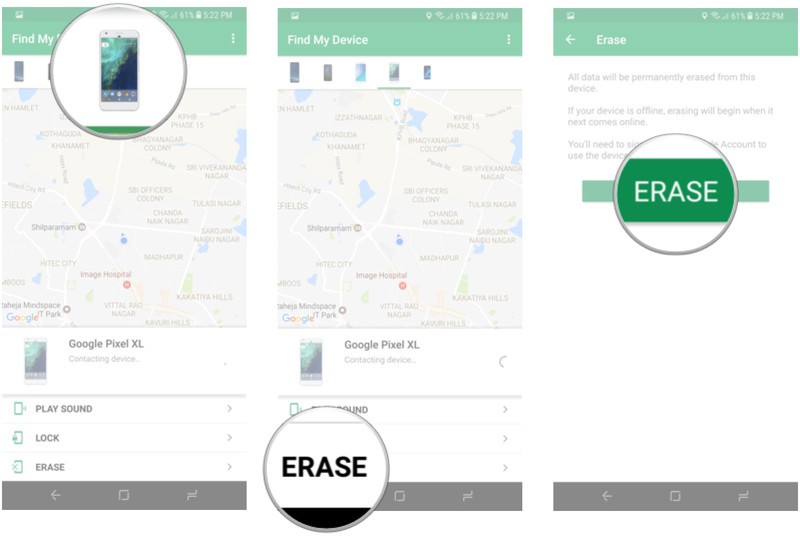
If you’re certain that you’re not going to see your phone again, there is the nuclear option of erasing the data remotely. Selecting the Erase option deletes all the data on your phone. The service also deletes data from a connected SD card, but there is a chance that it may not be able to, based on the manufacturer and Android platform version. Even if your phone is switched off when you send the Erase command, the factory reset process will be initiated as soon as it goes online.
Locate your phone on Find My Device.
Tap Erase.
Confirm deletion of data by hitting the Erase button.
Are you prepared if your phone goes missing?
How has your experience been with Find My Device? Have you successfully used it to recover a lost phone? Let us know in the comments.
Two years on, the original Huawei Watch is still one of the best Android wearables

If you don’t want LTE — and let’s be honest, you don’t want LTE — Huawei’s original Android watch remains a fantastic option.
Android Wear is kind of all over the place right now. All the watches released in the past few months have either been ridiculously huge — hi there LG Watch Sport and Huawei Watch 2 — or underwhelming for other reasons — sup LG Watch Style, with sub-24-hour battery life. Even outside of the Android Wear world, the smartwatches of 2017 seem dead set on pushing superfluous features like LTE connectivity at the cost of aesthetics — whaddup Samsung Gear S3. And maybe I’m just weird, but the first thing I want from a watch is for it to look good. The functionality I seek from a wrist computer is relatively basic — show me notifications and keep the cruft to a minimum.
You’d think that wouldn’t be too much to ask. And yet it’s been surprisingly difficult to find a modern watch that delivers on those basic requirements, without complicating things too much.
For that reason, I’ve found myself turning to the previous generation of wearables as they’re updated to the new Android Wear 2.0, and my current favorite is a device I’ve used on and off for the past couple of years — the original Huawei Watch.

First and foremost, a smartwatch needs to look good — and that’s something many current wearables have lost sight of.
The primary reason I’m using the OG Huawei Watch right now, as opposed to anything more recent, is the way it looks. The model I’m using is the silver variant with a metal strap, and despite its lack of ambient light sensor, this thing looks better than just about any other smartwatch — with the possible exception of the Apple Watch, if that’s your thing.
The appearance of the first-gen Huawei Watch hasn’t changed since we reviewed it way back in September 2015. It’s admittedly chunky, but the appearance of the device isn’t completely entirely removed from that of a fashion watch. The strap doesn’t fasten quite as effortlessly as Apple’s milanese loop, but it’s close. And it’s aged better than the relatively cheap leather paired with other Huawei Watch variants.
Battery life, too, has held up well. I haven’t used the Huawei Watch ever single day for the past two years, but still, it’s still able to get me through a full day of notification wrangling, music shortcutting and call rejecting with around 50 percent in the tank by the day’s end. There’s been no change — either positive or negative — with the Android Wear 2.0 update.

The same goes for the display, which in a world of Huawei Watch 2s and LG Watch Sports which can adjust their brightness on the fly, stands out as a minor inconvenience. I still need to set the brightness level of my Huawei Watch manually whenever I go inside. And that means I’m constantly bouncing between not being able to see it in daylight, and having to scramble to dim the brightness level in darker settings.
I’m also aware of at least two friends who’ve experienced significant display burn-in after using the same watch face on their Huawei Watch for the past year or so. (That’s where parts of the watch face appear to be inked permanently into the panel.) That’s not unexpected for an OLED panel, but something to watch out for as the device ages. And another long-running annoyance: I’ve been continually vexed by the watch’s frustrating charging dock — which loves to slip free from its contact pins — and the physical button, which feels decidedly squishy on my unit.
Android Wear 2.0 is much more at home on a circular display.
All of these are hardware quirks which aren’t going to disappear anytime soon. But the Huawei Watch’s software has changed significantly over the past couple of months, as the Android Wear 2.0 update has been rolled out. It’s now easier to hop between watch faces with a quick swipe. The circular app drawer is immediately accessible behind a press of the hardware key — and like Wear 2.0’s notifications, this part of the UI is now better suited to a circular display.
Notifications themselves are a bit of a mixed bag. If you’re used to the ease with which you could dismiss or read alerts on a Tizen watch or Android Wear 1.x device, you’ll find a few more taps and swipes are required to drill down and deal with emails, instant messages, calls and other notifications. Nevertheless, the whole UI seems more at home on the Huawei Watch’s circular screen, which is something you couldn’t say about the preloaded software back in 2015.
The other big change in Wear 2.0 is the ability to — independently — run apps directly on the watch itself. There’s a Play Store app on the watch, and the device now functions like any other Android gadget, with your Google accounts and other data being copied across during setup.
I’m not big on running apps on my watch, for one pretty simple reason — if a task takes me more than a few seconds to execute, I’m just going to pull out my phone anyway. And so I haven’t gone into great depth with on-watch apps. I’ve dabbled in Google Assistant, and Google’s AI seems to have stepped up its game significantly since it first debuted on Wear, with speech recognition being one notable area of improvement.
Swiping out quick replies on Wear’s wrist-based keyboard is surprisingly not terrible on the Huawei Watch’s large display.
Nevertheless, no amount of software can eliminate the social stigma of talking into your wrist, and so I’ve also appreciated the move towards on an on-watch keyboard in Android Wear 2.0. Ironically, this works better on the older Huawei Watch compared to the newer one, due to the larger screen, and I’ve found it fits the bill when I need a quick, convenient way to fire off a reply without reaching for my phone.
I’m still not using the Huawei Watch to anywhere near its full potential. But given that newer watches are building out functionality that I, and many others, simply don’t want or need, I’m happy to use and recommend it even two years on from its initial debut. The lack of automatic brightness is a downer. I’m moderately) disappointed that there’s no NFC for Android Pay. But on a day-to-day basis, it’s hard to argue with the basic “meat and potatoes” experience offered by the Huawei Watch.
Meaningful progress in the smartwatch space may have stalled, but at least we still have attractive, capable Android wearables like the “Huatch” that do a great job of putting notifications on your wrist.
More: Huawei Watch 2 review
33 obsolete technologies that will baffle modern generations
Advancements in technology come in leaps and bounds, meaning it doesn’t take long for new gadgets to become obsolete shortly after they reach their target market. Several modern technologies, such as mobile phones and computers, offer the ability to do many of the same things that these older gadgets were capable of, but in a smaller and more portable forms.
That’s why we’re taking a nostalgic walk down memory lane, looking at some of the biggest, best and most memorable gadgets from the last century that have been outdated, outmoded or just forced into irrelevance by better, modern technologies.
You might remember many of these, but there are plenty of the younger generation that don’t.
Typewriters
Wikipedia
The humble typewriter, the dumb precursor to the modern computer, was in its day a marvel of technology. A step up from paper and pen, the typewriter opened up a world of possibilities for those looking to craft novels, document history or scribe propaganda.
The foundations for the typewriter were laid down as far back as 1575, but it’s rarely used in a modern world of computers, laptops and tablets.
Rotary telephones and wired landlines
Pexel
Another piece of technology that nears obsoletion after being replaced by a computer that we carry around in our pocket. The wired telephone dates back as far as 1844 and it has seen many iterations over the years that have since passed.
One such variation was the rotary dial telephone which featured a dial arranged in a circular layout so the user had to turn the dial for each digit off the phone number they were trying to call.
Except perhaps as a novelty, rotary phones are long since a thing of the past. Wired landlines are following close behind as modern smartphones are easily acquirable, far more personal and affordable.
Public telephone booths
Wikipedia
The iconic phone booth; essentially a monument to telephone’s history and now just a tourist attraction or somewhere to shelter from the cold.
The public phone booth has now been rendered obsolete by the rise of the mobile phone. There’s rarely going to be any need for a coin-operated telephone when you have one in your pocket.
Pagers and beepers
Wikipedia
Pagers were originally designed and built in the 1950’s but they didn’t really take hold in terms of popularity until the 1980’s. These one-way communication devices were often used by emergency services, doctors and safety personnel who needed to be reachable at all times, even when away from a landline telephone.
The rise of smartphones in the early 2000s saw the decline in the use of pagers and beepers but due to the durability, resilience and better coverage they continued to see use for several more years and, as an example, Canada was still paying as much as $18.5 million for its pager service in 2013.
Dumb phones
Wikipedia
In a world of smartphones, these old fashioned mobile phones basically did nothing but call, send text messages and perhaps, if you were lucky, allow you to play a cheeky game of Snake.
They are now thoroughly antiquated and more or less obsolete. The precursor to the modern mobile, they were extremely useful in their time and were happily running for days without charge, something which we sorely miss.
Personal digital assistant (PDA)
Wikipedia
The forefather of the modern mobile phone, the personal digital assistant offered limited access to a lot of modern capabilities we’ve come to expect, including internet access, word processing, touchscreen functionality and more. They quickly became obsolete when smartphones started to gain favour, but before that time they were a firm favourite with businessmen across the world.
Fax machines
No Zaku
The humble fax machine was essentially a modern version of the telegram. For many years, it allowed people and businesses to transmit scanned documents from one phone number to another. The recipient would have the joy of a printed copy of the document bursting forth from their machine. This was all done by a transmission of audio frequency tones that were deciphered at the other end.
Like many of the technologies on our list, fax machines have largely been rendered obsolete by the invention of email, the internet and advancements in computing technologies.
Analogue and dial-up modems
Wikipedia
In the days before modern broadband and 4G networks, at the initial birth of the internet, we connected to the World Wide Web via analogue and dial-up modems.
These marvels of technology required an open phone line and a lot of patience to get working. If anyone called while you were connected to the ‘net then you’d immediately lose connection. Browsing the web was slow and painful, but it was a thing of beauty and showed promise for the future that we now live in.
If you’re after a bit of nostalgia, then just listen to this recorded clip of what it used to sound like.
Daisy wheel and dot-matrix printers
Youtube
Before the times of laserjet and inkjet printers, we had a number of different black and white printers that were essentially a short step up from typewriters. These printers were slow and cumbersome, but they did the job, even if they did make a lot of noise while doing so.
Phonebooks
Wikipedia
Not really a technology as such, but certainly something made obsolete by technological advancements is the simple phonebook.
These chunky paper directories included residential and business listings for all the phone numbers you could possibly need. Now rendered obsolete by the internet, these phonebooks are certainly a relic of a bygone era. Yet we still occasionally see them posted through our front door.
Floppy disks
Wikipedia
Floppy disks were a type of data storage medium that originally appeared in the 1970s. The first was the 8-inch floppy disc, capable of storing just 80 kilobytes of data. As the floppy disks got smaller, their storage capacity grew and by the mid-1980s the 3.5-inch floppy disk was able to store a respectable 1.44 MB.
Floppy disks were unfortunately vulnerable to magnets and heat, and easily corrupted. By the 1990s software size meant many disks were required for most applications (Adobe Photoshop required over a dozen disks to run) so CD-ROMs began to take over. The floppy disk now only lives on as a save icon in most software applications.
Betamax
Wikipedia
Betamax was the earliest version of consumer-level video cassette tape format, originally released in 1975. Developed by Sony, Betamax was the standard for magnetic videotape until it became obsolete as the VHS format appeared and dominated in the 1980s.
Surprisingly, Betamax recorders continued production until 2002 and the cassettes themselves were still available right up until 2016.
Video Home System (VHS)
Wikipedia
In the late 80s, VHS cassette tapes became the popular standard for home video. Whether used for recording family videos or rented for the local video store to watch the latest blockbuster, these small reels of magnetic tape wrapped in plastic housing brought joy across the lands. Unless of course, someone forgot to rewind the tape you rented or a sibling recorded over your copy of Terminator 2.
The rise of DVD saw to the slow but steady demise of VHS and, by 2008, DVD replaced VHS as the favoured video technology both for recording and film distribution.
Compact cassette tape
Public Domain Pictures
Audio brother to VHS and Betamax cassette tapes was the compact cassette tape. Originally introduced in 1968, compact cassettes used the same magnetic tape technology to deliver affordable audio to the masses. They were used as either blank tapes that could be recorded onto (via dictaphone or boombox for example) or as pre-recorded cassettes of music albums. Cassettes could also be used to store other data and were therefore used as a storage medium for early home computers.
Cassette tapes gained popularity in the 80s but by the 90s were outsold by compact discs which soon became the standard format. Nonetheless, cassette tapes continued to sell and it wasn’t until 2001 that they truly began to die, at least in pre-recorded formats. Blank tapes were still being sold right up until 2012. In their heydey, cassette tapes sold as many as 442 million in the US alone.
We have hazy memories of fighting cassette players to rescue chewed up tapes and spending hours twizzling them back together with a pencil.
Digital Audi Tapes (DAT)
Wikipedia
The digital audio tape was the brainchild of Sony and offered a digital recording capability but with a similar design style to the compact cassette tape in a smaller format.
DAT was capable of recording at a higher quality than CD and also boasted the ability to number tracks and skip right to them much like a CD. However, due to the cost of this format it never really caught on at consumer level but was used in various professional markets and as a computer data storage medium.
With lacklustre sales of around 660,000 sales since 1987, Sony announced it would stop production of DAT machines in 2005. The format was essentially superseded by hard disk drives and memory cards but is still in use in some areas.
Walkman, Discman and MP3 players
Wikipedia
Several formats of portable music player spawned over time to accommodate the preferred musical medium, these included portable cassette players (most notably Sony’s “Walkman”), portable CD players (the also popular Sony’s “Discman”), Minidisc players and MP3 players.
Each of these formats of portable music player eventually fell into obsolescence as other more technologically advanced players appeared. They all had their benefits though. We have both fond and frustrating memories of each of these players, whether it was fighting Walkmans to save a chewed up tape or desperately trying to fit a portable CD player into a coat pocket.
Portable dictation devices
Public Domain Pictures
Dictation devices, often referred to as “Dictaphones” after the company name that became synonymous with them, came in various formats and used several different data mediums that included both cassette tapes, Mini and Micro-cassettes. These gadgets were mostly used to record interviews, conversations and lectures for later note taking or write ups.
Each became obsolete as time passed by and the storage medium fell out of popularity. Digital dictation devices still exist, but even they are verging on extinction as most mobile phones are capable of offering the same functionality without the need for another standalone device.
MiniDisc players
Wikipedia
Perhaps one of the least popular formats of optical based digital storage was the MiniDisc. With a high storage capacity of as much as 1GB, these discs could hold up to 45 hours of audio in a compact format. The MiniDisc appeared at a time when CDs were still dominating and thus struggled to gain popularity in the marketplace.
MiniDisc sales began to dwindle when MP3 players started to gain popularity and were finally killed off as a format in 2011 when Sony (the main manufacturer) ceased production.
LaserDisc
Wikipedia
LaserDisc was one of those niche formats of technology that was mainly popular among videophiles and film enthusiasts. Although it was the first format of optical video storage, available from 1978, LaserDisc failed to gain mainstream popularity due to the expense of the players.
LaserDisc offered higher-quality video than VHS and Betamax and the technology behind it was the foundation for compact disc, DVD and Blu-ray in later years. Despite never going mainstream, it wasn’t until 2001 that the last video titles were released in this format and a total of 16.8 million LaserDisc players were sold worldwide.
Digital Versatile Disc (DVD)
Max Pixel
DVD was the evolution of the digital video format developed by tech giants Panasonic, Philips, Sony and Toshiba. With a high storage capacity, it became a medium for computer files, software and high-quality video. DVD had many benefits over that of previous magnetic storage formats, including larger storage space, but also durability that meant that in theory, the discs could have a lifespan of up to 100 years.
With faster internet speeds, video streaming technology and other superior formats such as Blu-ray – even 4K Ultra HD Blu-ray – on the market, DVD is likely nearing the end of its lifespan. Meanwhile, other formats of DVD such as the 1080p-capable, Blu-ray rival HD-DVD never really even took off in the first place, much like the fabled LaserDisc.
Overhead projectors
Wikipedia
A classroom classic, the overhead projector was a simple yet wonderful system for projecting images, text and drawings onto an appropriate screen. Transparent sheets of acetate were used in place of paper to enable presenters to transpose their presentation onto the screen in front of the class. Although likely still in use in some classrooms, these projectors have likely been rendered obsolete by modern projection technology and computers.
Slide projectors
Wikipedia
A form of projector appeared in the 1950s and became a popular form of home entertainment. These projectors were used to put on slide shows of individual frames of images, one frame at a time. Generally, they were used to show snaps of family holidays or special occasions.
Slide projectors were rendered irrelevant when video projectors became more affordable and accessible.
Portable DVD players
Wikipedia
With the rise of DVD and the ever falling cost of the technology behind it, as the well as the shrinking sizes of processors and advancements in screen technology, it was no surprise that portable DVD players made their way to market.
However, the size of the discs and the quality of battery life meant that DVD players failed to gain widespread popularity and initially their cost was prohibitive. Now, with easy access to streaming video via mobile phones and tablets, the need for portable DVD players is almost entirely negated.
Vinyl records
Pexel
Vinyl records are probably one of the oldest and most long-lasting formats for storing audio recordings. Available in varying formats since the late 1800s, the vinyl record is still in production today and is another format that’s sworn to be the best by audiophiles and sound enthusiasts alike. The format has even had a sales resurgence of late.
Vinyl reaches our list, not because it’s obsolete, but because it refuses to die.
Atari 2600
Wikipedia
One of the ancestors of the modern games console, the Atari 2600 was originally released in 1977 and was a cartridge-based home video game system loved and nostalgically remembered by many. Atari is also well-known for the creation of games such as Pong, Missile Command and Asteroids, true classics that were playable on the console.
Although the Atari 2600 was not the first cartridge-based games console (it was the second – the first being the Magnavox Odyssey) it is perhaps the most well-known and most memorable thanks to the games line-up and history behind it. And the fake teak panelling on the front, of course.
This early technology quickly became obsolete as game console technology progressed swiftly forward.
Nintendo Entertainment System (NES)
Wikipedia
Nearly a decade after the Atari 2600 made its way into people’s homes, Nintendo released the first of its successful gaming consoles to the world market. Backed by a number of gaming titles that included names that would become part of gaming history, the NES quickly became the best-selling games console of its time.
With the likes of Duck Hunt, Super Mario Bros and more being first released on this system, the NES shot Nintendo to the forefront of the gaming industry and turned them into a household name. Production ended in 1995, but Nintendo filled the world with nostalgic joy in 2016 when it announced the release of the NES Classic Mini, the tiny reimagined version of the console with 30 games pre-installed and the ability to work on modern HD TVs.
Nintendo N64
Wikipedia
There were many other consoles both before and after the N64, but it certainly was a great gaming machine and the last of the stubborn cartridge-based consoles to be released by Nintendo. Launching in 1996, the N64 came to market competing with the likes of the original Sony Playstation and the Sega Saturn. Strong competition aside, Nintendo still managed to sell 32.93 million N64 consoles worldwide.
The N64 is remembered fondly by many, especially for its big gaming titles that included Super Mario 64, GoldenEye 007 and The Legend of Zelda: Ocarina of Time.
Gameboy and Gamegear
Wikipedia
In 1989, Nintendo released another gaming console that would help it dominate the gaming market. The Game Boy was a classic handheld gaming system, with a monochrome green and black screen and a simple design. Big gaming titles like Tetris helped the Game Boy to sell over a million units in the first year alone.
A short while later, Sega released the Game Gear, its colour competitor to the Game Boy. Backed by a strong catalogue of games from the Sega Master System, the Game Gear should, in theory, have dominated the market, but struggled to compete with the Game Boy, mainly thanks to poor battery life.
Both have long since become obsolete with the invention of newer devices, but Nintendo still leads the market with its various DS systems.
Cathode ray tube televisions
Wikipedia
The scientific technology behind cathode ray tube televisions dates back to 1869, but it wasn’t until the mid-1920s that the technology was first put into an actual television set. These chunky televisions became the mainstay of TVs for decades until technology advances and the release of LCD and plasma flatscreen televisions pushed CRT sets into obsolescence in around 2007.
Gone are the days of degaussing, bashing the side of a set to get it to work properly or having to get up to change the channel.
Film cameras
Public Domain Pictures
The traditional film camera has basically long since been pushed from the mass market by the modern age of the digital camera.
No longer do we need to rely on reels of film or trips to the local shop to get them processed. Digital cameras, SD cards and modern computing systems mean we can snap away happily and see the results of our photos instantly with far less hassle and expense.
Pro photographers and retro snappers still use film cameras for certain artistic purposes. but few others.
Polaroid instant cameras
Wikipedia
Polaroid cameras originally came to market in the mid-1960s and at the time presented a marvel of technology that allowed people to see the photos they were taking seconds after they were snapped without having to wait for someone else to develop them. For years, Polaroid instant cameras were a wonderfully expensive marvel of photographic convenience.
In recent years, the rise of the digital camera and smartphone photography has meant that Polaroid’s technology essentially became an unnecessary nicety and declining sales forced the company to file for bankruptcy twice.
You can still find Polaroid cameras and films on sale, but it’s niche at best.
Calculators
Pexels
Although no doubt still used in some schools and offices, the humble calculator is a simple technology that’s surely reaching the end of its lifespan.
With calculator apps available on smartphones and tablets, as well as easily accessible calculators on computers and laptops, there’s barely any need left for these independent devices.
GPS navigation systems
Wikipedia
Many car manufacturers still choose to install them in new vehicles, but as a standalone unit, GPS navigation technology is nearing the end of its lifespan.
Current smartphones are more than capable of getting the modern human from point A to point B with the use of navigation apps like Google, Bing and Apple Maps. Once again, advancements in mobile technology have forced other older technology into obsolescence.
LG V30 to feature wireless charging, dual camera and rear-mounted fingerprint sensor
Usually reliable Twitter tipster @OnLeaks has cited his sources as saying the upcoming LG V30 will support wireless charging, have a dual rear camera and a rear-mounted fingerprint scanner.
- LG V30: What’s the story so far?
We expect the V30 will be officially announced and launched in either September or October, going on the previous launch cycle of the V-series of flagship devices.
If it does feature wireless charging, it should mean the V30 will ditch the metal build, or at least the rear panel from the V20, and replace it with a glass back instead. It will also mean the V30 will be the second LG phone to come with the feature, following the recent announcement of the G6+.
According to my sources, #LGV30 will support wireless charging and thus, very likely have glass back. Still have dual rear cam and rear FPS.
— OnLeaks (@OnLeaks) 23 June 2017
OnLeaks says the V30 will have a dual rear camera, but doesn’t say what the two image sensors will be, but it could feature a similar 13-megapixel dual camera system as seen on the LG G6, which has a wide-angle lens and a regular lens.
The glass rear panel is also expected to host a fingerprint sensor, which all but confirms the V30 will have a full screen front, which we expect to be 5.7-inches, and with no physical buttons.
- LG unveils G6+ with B&O Play headphones, rolls out software updates for G6
- LG V20: Specs, release date and everything you need to know
Of course, this is just a rumour for now, with no official word from LG itself, so as ever, take it with a pinch of salt. However, the suggestions match up with rumours we’ve already heard, and they would represent a natural progression from the LG V20.
How Philips is putting picture quality first
TV technology is in such a state of flux right now that it’s hard to keep up. There are, though, two things that thankfully never seem to change. First, TV buyers always pick outright picture quality as their most wanted TV feature, and second, Dutch brand Philips can always be relied on to leave no stone unturned in its bid to provide exactly the sort of premium picture quality experience consumers desire. Picture quality is simply part of Philips’ TV DNA.
For decades now, Philips has been at the forefront of picture technology, using advanced, industry-leading processing to unlock the maximum potential of every facet of television picture quality. And for 2017, Philips has pushed its picture quality ambitions further than ever before thanks to its new P5 picture engine.
Philips
Philips P5 Processing: Making sense of a crazy TV world
The new Philips P5 engine is the most comprehensive solution yet to unlock the full potential of today’s stunning new 4K Ultra HD and high dynamic range (HDR) picture quality features.
It introduces 25 per cent more processing power than any previous Philips picture engine, and somehow its ultra-efficient single-chip design manages to get through the same workload that used to need three separate chips. This ensures more balanced and accurate picture quality results.
As its name suggests, the P5 system works on all five of the most important areas of picture quality: motion, colour, sharpness, contrast and source recognition. Let’s look at each of these in turn.
Perfect Motion
LCD TVs traditionally struggle to handle movement in pictures. Moving objects tend to look blurred or juddery – or both. The P5 engine’s Perfect Natural Motion component, though, works out how to add enough extra image frames to the source content to ensure that blur and judder disappear.
Trying to work out in real time how every pixel in new ‘interpolated’ 4K-resolution image frames should look is clearly going to place a huge burden on any processing system. Which is why the P5’s four billion pixels of processing power makes such a difference, delivering even the most dynamic of action scenes with truly outstanding – and consistent – clarity and fluidity.
Philips
Perfect Colour
Only a picture engine as enormously powerful as the Philips P5 – working in conjunction with the latest wide colour gamut panels – can unlock the full impact of the new wide colour spectrum picture technology you now get alongside almost all HDR sources.
Having so much processing power at their disposal allows P5 TVs to combine wide colour performance with 17-bit processing. To give you an idea of what this offers, the P5 sets are capable of an incredible 2,250 trillion colour shades over the 69 billion of an already excellent standard TV.
This will give you pictures that deliver more vibrant, dynamic but also subtle colours perfectly suited to today’s new picture quality world.
Perfect Sharpness
The Philips P5 processor’s Perfect Sharpness system features a Detail Enhancer to turn the original pixels in any source into better pixels, to produce a sharper, cleaner, more detailed image.
With Full HD sources, the Perfect Sharpness processing first works out the appearance of each one of the millions of extra pixels you need to add to an HD picture to make it 4K, taking into account the differences in the source image between video noise and true image content. Perfect Sharpness then further improves the new Ultra HD image by refining the appearance of details, lines and edges to make the picture look even sharper.
Perfect Sharpness is so powerful and sophisticated that it can even work its magic on native 4K Ultra HD sources, making you feel like Philips has somehow squeezed even more than 3840 x 2160 pixels into its P5 TVs’ 4K screens.
Philips
Perfect Contrast
For most movie fans looking for the best in TV picture quality, contrast performance has long been a critical picture attribute. Achieving a good black level, in particular, is crucial to a convincing picture performance, yet delivering this from LCD TVs has become increasingly difficult as the arrival of HDR technology has also required TVs to deliver ever more brightness.
Cue the Philips P5 engine’s Perfect Contrast system.
A powerful algorithm breaks the picture down into thousands of separate analysis zones, so that the P5 processing can respond more accurately to the precise localised contrast needs of different parts of the image.
With Philips’ existing 901F and upcoming 9002 OLED TVs the contrast performance can be even more precise, since every single pixel in its 4K-resolution screen is capable of producing its own light, for unprecedented contrast and light control.
Perfect Source Playback
Getting the best performance possible from any source means understanding how that source was created. The P5 picture engine draws on Philips’ peerless TV picture quality experience to ensure that every P5-equipped TV responds in the most effective way possible to whatever source is received – be it a standard dynamic range, HD broadcast, or a 4K Blu-ray or broadcast with HDR.
With this in mind, Philips’ P5 TVs recognise the AV world’s two biggest HDR formats: the industry standard HDR10 and broadcast-friendly hybrid log gamma (HLG) platforms.
So P5 sounds good – where can I get it?
Philips is set to start rolling out TVs equipped with the P5 processing engine soon. Models to look for are the 7502 LCD TV and the new flagship 9002 OLED TV that looks set to build on the already stunning achievement of Philips’ debut OLED TV, the 55POS901F/12.
Check out the Philips 55POS901F OLED TV and other excellent televisions with Ambilight at Philips.co.uk.
Incredible “naked people” YouTube video will melt your brain
Director David Lewandowski caused quite a viral stir in 2013, with his crazy and brilliant “Late for Meeting” video. It starred a CGI, androgynous mannequin and its car, moving in very mysterious ways to music.
More 30.5 million viewers have watched it on YouTube.
Before that, he almost reached that amount of views with “Going to the Store”.
Now, three years later, a sequel has been posted online and it is quite simply brilliant. Disturbing and odd, but brilliant.
“Time for Sushi” takes a whole host of naked, weirdly posed figures on a journey through the streets of Japan and to the beach. It even adds an all-new mode of transport, adapted in a similarly other-worldly way.
You really need to watch this. Although once you do, you’ll probably not get it out of your head again for weeks. Months even.
Lewandowski’s first video was remade as a live action homage back in 2011, with Nathan I reenacting the strange motions in a sort-of wobbly contemporary dance.
It’d take some gathering together of loose-limbed friends to have a stab at remaking Time for Sushi, however. It’s really quite something else.
But then, considering the time delays between Lewandowski’s posts – three years, roughly – there’s plenty of time for a group to try.
 AIVAnet