


Virgin Mobile is offering a year of unlimited service for just $1
Why it matters to you
Apple and Virgin are attempting to create an end-to-end mobile user experience here — which could make phone plans a whole lot easier to manage.
Virgin Mobile is redefining itself, and a part of that new identity involves partnering with Apple and turning its business into the first “iPhone-only” carrier. The carrier’s new program is called “Inner Circle.”
Inner Circle, which Virgin announced at an event in San Francisco today, means the carrier is getting rid of all of its Android devices, and will start only selling iPhones. The program starts on July 1, and customers who sign up within the first 30 days will get 12 months of unlimited talk, text, and data for $1. You’ll need to buy an iPhone from Virgin, and set up auto pay to be able to take part in the $1 promotion. In typical carrier fashion, your data is “deprioritized” or throttled if you go over 23GB a month. Video, games, and music on Virgin’s 4G LTE are also “mobile-optimized,” meaning videos are streamed at 480-pixel resolution; music streams at 500kbps or lower; and cloud gaming streams up to 2mbps. After the first year, you will have to pay $50 a month.
An 32GB iPhone SE from Virgin Mobile will cost $279, and iPhone 6 costs $319, and an iPhone 7 will start at $650, according to Virgin’s website. The carrier is also offering perks from other Virgin brands as incentive — for example, you could get one night’s stay at Virgin Hotels (you have to pay for two nights to get the third free); or you can get up to 20 percent off on flights with Virgin America. You can take a look at the full list of “member benefits” here. These Virgin perks are only available to new Inner Circle members who enroll by September 30.
The changes aren’t just coming to Virgin — they’re also coming to Apple, which will start offering Virgin Mobile subscriptions at its retail stores. Beyond that, however, it seems as though Apple is dipping its toes into offering a full end-to-end mobile experience. With Virgin helping it out, customers may soon not need to choose a carrier or worry about picking a plan.
This marks one of the first times that Apple has forged a real partnership with a mobile carrier. It’s unclear if the Cupertino company will be pushing Virgin Mobile as a long-term option in its stores, or just during the $1 promotion this summer. It’s also unclear what will happen with current Virgin Mobile customers who have Android phones, or if new customers will be able to bring their own Android phones.
If you do not like Virgin Mobile’s service, you can return your iPhone within 14 days for a full refund. Pre-orders are open now, and iPhones begin shipping on June 27.
This story is still developing and we’ll update it as we get more information.
DeepMind’s kidney disease-fighting Streams app is coming to a new hospital
Why it matters to you
DeepMind’s Streams app will help diagnose kidney disorders in patients.
Google’s DeepMind, the British artificial intelligence firm behind the human-besting AlphaGo software, launched a healthcare platform in partnership with the U.K.’s Moorfields Eye Hospital and Royal Free London in 2015. Since then, it applied computer smarts to eye diagnoses, cancer screening, and electronic patient record management. On Wednesday, DeepMind broadened its efforts to Musgrove Park Hospital.
Starting this month, doctors and nurses at Musgrove Park will get DeepMind’s Streams app for iPhone, which helps spot early signs of acute kidney injury. DeepMind stresses that it is intended to aid, not replace, practitioners — the app will allow clinical staff to view “results of X-rays, scans or blood tests, in one place at the touch of a button.”
“This is all about early detection of seriously unwell patients so that we can immediately escalate care, ensure a very rapid response, and make sure they are treated quickly by the right specialist doctor,” Luke Gompels, a consultant in medicine at Musgrove Park Hospital, told the BBC. “In this way, we can make more of a difference, more quickly.”
The Musgrove Park announcement follows a controversial Streams rollout last year. DeepMind’s contract with London-based Royal Free Trust hospitals, which has since expired, gave it access to 1.6 million patient records, including files belonging to NHS patients who were not asked permission. The U.K.’s National Data Guardian, a watchdog bureau, argued that the company’s use of the data fell outside the boundary of its agreement.
DeepMind has not ruled out the possibility that Streams could be used in the future to detect other health conditions but told the BBC that it will hold workshops and open day events with staff and the public to demonstrate how the app works.
The Streams expansion dovetails with DeepMind Health, the company’s umbrella effort to improve the quality of care with artificial intelligence. Last year, it acquired Hark, a task management app optimized for hospital environments that was co-developed by students from Imperial College London and the National Institute for Health Research. It proved successful in early trials: During a test at St. Mary’s Hospital in London, clinicians who switched to Hark responded 37 percent faster than with the hospital’s pager system.
“Ultimately, the aim is to give nurses and doctors more time to focus on what’s most important,” DeepMind said in a statement. “From identifying challenges, to co-designing solutions, to oversight and governance, nurses and doctors will lead us every step of the way.”
Google acquired DeepMind for $500 million in 2014. Since then, the AI outfit has built systems that optimize data center power draw, teach themselves to play 49 different Atari 2600 video games, and more.
Ace three top cybersecurity certification exams with this $69 bundle!
The cybersecurity business is booming and shows no signs of slowing down; it seems like every day there is a new high profile hack or breach. That means the need for professionals in this field is at an all-time high.
Break into a new cybersecurity career with this certification training bundle! Learn more
What you need is a bundle of courses that starts with the basics of cyber security and moves through to more advanced topics covered in the certification exams needed to break into this lucrative industry.
Right now, Android Central Digital Offers has a deal on a Cybersecurity Certification Mega Bundle that includes the training needed to pass three top certification exams. Instead of the usual $999 price tag, you can right now get it at $69. That’s 93% off the regular price.

Following completion of the courses in this bundle, you’ll be set to ace the CISA, CISM, and CISSP certification exams. These three certifications are among the top needed and are what potential employers look for.
Ace the CISA, CISM, and CISSP exams with this $69 bundle! Learn more
If you’re ready to jump into a new, lucrative cybersecurity career, this bundle will help you get where you’re going. Access remains open forever once you’re enrolled, but this deal is only here for a limited time.
OnePlus 5: Which model should you buy?

Do you require 64GB or 128GB of space? And is the extra RAM really that necessary?
OnePlus has certainly figured out its formula for selling smartphones: take a no-fuss design, shove in an all-day battery along with the latest processor, and keep the Android software tweaks at a minimum. The OnePlus 5 is a great depiction of that vision as it’s equipped with all the components that fit in with the company’s winning smartphone strategy.
This year, OnePlus is offering two different models of its marquee device in an attempt to appeal to those stray few who might still require a bit convincing to steer clear of a phone from a better-known manufacturer. Rather than go with a bigger screen, however, OnePlus is offering more storage space and more memory for an extra $60.
We’re going to help you choose the OnePlus 5 model that’s right for you.
Decide how much storage you need

There isn’t much of a difference between the two OnePlus 5 models. You either get 6GB of RAM and 64GB of storage, or 8GB of RAM and 128GB of storage — and no, you can’t pick and choose your RAM and storage independently. In either case, you’ll get the same Snapdragon 835 processor, as well as a larger-than-average 3300mAh battery. You’re also getting a 5.5-inch 1080p display, 16-megapixel rear camera, and a near-stock version of Android, which is partly what’s helped make the OnePlus lineage of smartphones so attractive in the first place.
There’s no SD card slot, so get the storage right from the start.
Your primary decision here is whether you’ll need the full 128GB of storage — and that will depend entirely on your sort of usage. After all, there is no SD card expansion slot on OnePlus’s latest, so you’ll have to choose the right size from the start.
If you’re stuck, try thinking of it like this: are you planning to shoot a ton of 4K video with the OnePlus 5? Perhaps you’re planning a project where you document your life at a minute a day? Or maybe you expect to load up the device with movies and television shows you’ve purchased specifically for the long commute you endure daily? If you answered “yes” to any of those questions, you might want the extra space. For everyone else, 64GB of storage is probably sufficient, especially if you get into the habit of backing up your data regularly to several cloud services in tandem. On the flipside, if you’re simply too lazy, or maybe life leaves you feeling a little scatterbrained at times, the bigger storage unit might be the best solution as it offers plenty of wiggle room.
What about the extra RAM?
Don’t be fooled by the allure of having 8GB of RAM in the 128GB storage version of the OnePlus 5. Granted, it sounds like a good package, especially for the small additional cash, but that extra bit of RAM hardly factors into the performance of the smartphone. As explained by our own Andrew Martonik in his review:
…I’m using the model with 8GB of RAM, but this really doesn’t factor into the performance at this point. The highest average memory usage I ever reached, according to the phone’s settings, is 4.7GB — comfortably underneath the 5.5GB ceiling (500MB is reserved for the system) of even the standard 6GB RAM model.
You may personally decide that the added RAM is worth the price since it effectively helps future proof the phone — who knows what OnePlus may be able to do with software a year from now that uses the extra memory. That’s a totally fine way of thinking; but don’t expect the extra RAM to do much for overall performance in normal day-to-day usage today.
Choosing a color

Completely secondarily to internal specs that actually influence how the phone works, you’ll also have to keep in mind the chassis color.
The sleek “Midnight Black” finish of the OnePlus 5 shown off in our review is available exclusively on the 8GB/128GB version. The standard 6GB/64GB model is a lighter shade called “Slate Grey” that lands somewhere between the grey and black options offered in the OnePlus 3 and 3T. If you like wielding the special thing, the extra $60 may very be worth it for the midnight black color alone. But also consider that once you option up for it and hit the $539 price point, it’s not that much more money to get into the territory of buying an LG G6 or HTC U11.
Which model of the OnePlus 5 will you be picking up? Let us know in the comments!
OnePlus 5
- Complete OnePlus 5 review
- Reviewing our first OnePlus 5 photos
- OnePlus 5 vs. OnePlus 3: Should you upgrade?
- OnePlus 5 specs
- The latest OnePlus 5 news
- Join the discussion in the forums
OnePlus
Pavlov VR Early Access preview: Is this Counter-Strike VR?

A multipurpose shooter that will appeal to Counter-Strike and Call of Duty fans.
Pavlov VR is officially available for HTC Vive but also works with Oculus Rift through Steam VR.
Seeing some of the most popular standard PC games get the VR treatment is a thrill. We have Onward, a VR mil-sim that takes a page from ARMA’s pacing and teamwork book, we have Breach It, which borrows Rainbow Six: Siege’s destructible environments, and now we have Pavlov VR, which looks a whole lot like the insanely popular Counter-Strike: Global Offensive (CS:GO).
Let’s take a close look at Pavlov VR to help you decide whether or not it’s worth adding to your library.
See the full review at VR Heads!
How to set up an iCloud email account on Android
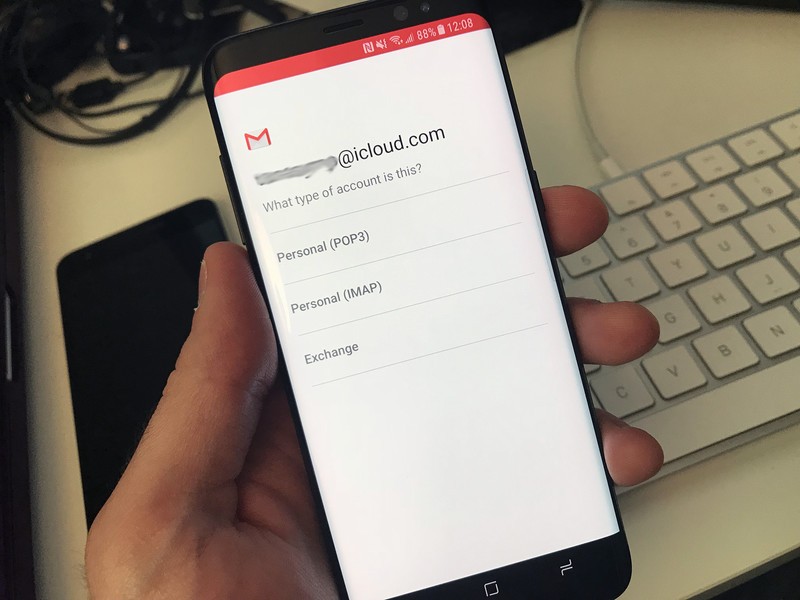
There’s no need to abandon your iCloud email address when you get a new Android device.
If you’re moving to an Android device from an iPhone or iPad, there’s every possibility you’re already set up and using an iCloud email address. Android devices require you to have a Google account (Gmail), but you might want to keep using your iCloud account for email. And that’s just fine.
The good news is it’s perfectly possible to get your iCloud email address up and running on your Android device. It’s pretty straight forward but does involve a little effort on your part. Here’s how.
How to add your iCloud email address to your Android device
Besides the Gmail app on your Android phone or tablet, you should also have an app just called “Email.” (There are also dozens of great alternatives on Google Play.) How it looks may vary from phone to phone, but the overall function should be the same since you need to set up your iCloud account using IMAP and SMTP.
However it looks, the key information remains the same. Here’s how to add your iCloud email address to your Android device,
How to add an iCloud email address to Android
Launch Settings by swiping down to reveal the notification shade and tapping the gear button.
Tap Accounts. On some phones, it may be under something like “Cloud and accounts”.
Tap Add account.
Tap Email if the option is there or tap Personal (IMAP) next to the Gmail symbol. If you choose the Gmail option, Gmail will automatically recognize your iCloud address and import the correct server settings.
If you chose the Email option, you’ll have to add the server settings manually:
- Incoming mail server:
- Server name: imap.mail.me.com
- SSL required: Yes
- Port: 993
- Username: The name portion of your iCloud email address. So if it’s johnsmith@icloud.com, just the “johnsmith” part.
- Password: Your iCloud email address password. You can also choose to generate an app-specific password.
- Outgoing mail server:
- Server name: smtp.mail.me.com
- SSL Required: Yes
- Port: 587
- SMTP Authentication Required: Yes
- Username: Your full iCloud email address, including the @icloud.com part
- Password: Use the password you used in the incoming mail server section, whether it was your original or the app-specific password you generated.
Tap Next or Continue or whichever button finishes the process.
If there is an error message in the SSL required section of either the incoming or outgoing mail server sections, use TSL instead.
Hopefully, the details above should be enough to get you up and running. It’s a little fiddly to get set up – especially if you’ve come from the iPhone which does it all for you – but it works, and it gets your existing email onto your new Android device.
Of course, there may be other apps out there that do this for you, or you might know of some tips and tricks to make things run a little smoother. If you’ve got anything that’ll help, drop it into the comments below!
Questions?
Let us know in the comments below.
Snapchat’s new Snap Map does exactly what you’d think
See what’s happening around the world on Snapchat.

Snapchat has introduced a new feature called “Snap Map” that does exactly what you’d think it does: shows you Snaps, on a map. You can move and zoom the map from city level all the way up to global level to see where people are, and you can see hot spots where multiple people are at the same place sharing.
You get to choose if you want to share your location with your friends, or you can go into Ghost Mode and keep things private. Snapchat says the app will only update when you open up Snapchat, rather than continuously track your movements.
This isn’t necessarily a direct competitor to the more granular location sharing features that apps like Google Maps and Glympse offer, but it is helpful for keeping people inside of Snapchat rather than jumping out elsewhere to find out where everyone is.
Global coral bleaching event may finally be ending
For the last three years, coral reefs in the Atlantic, Pacific and Indian oceans have been devastated by bleaching due to high ocean temperatures. But now, after looking at satellite and model data, the NOAA says that this terrible event might finally be at an end.
Coral bleaching is the result of elevated ocean water temperatures due to climate change. When coral experiences a change in conditions, it becomes stressed, and the algae that live symbiotically with the coral begin to leave. The coral starts turning white, which is why it’s called bleaching. Coral can recover from minor bleaching, but moderate or severe bleaching can often prove fatal.
Since 2015, all coral reefs in tropical areas around the world have experienced higher than normal temperatures; almost three quarters have been subject to temperatures that can cause bleaching. This is the third ever global coral bleaching event, and the most damaging; the first was in 1998.
While the end of this worldwide bleaching event is welcome good news, it doesn’t mean that coral reefs are safe. The Great Barrier Reef underwent coral bleaching for the second year in a row earlier this year, and reefs in the Caribbean, Hawaii and Florida might still be in danger. One small encouraging note, though, is that not all the coral reefs that were subject to bleaching temperatures were actually bleached. Scientists are now examining these systems to see if they have characteristics that can protect them from elevated water temperatures.
Via: Gizmodo
Source: NOAA
 AIVAnet