


‘Fuze Code Studio’ will help you design games on Nintendo Switch
The Nintendo Switch had a strong showing its first E3 (Metroid Prime 4!, three new Mario games!), for sure, but nothing quite like what Fuze Technologies is showing off. The company has announced Fuze Code Studio, which looks like a simple way to code your own games for the console on the Switch itself. You can use a USB keyboard or Joycons to enter code, audio and graphics will be packed in, you can make 2D and 3D games and Fuze’s language is supposedly simple enough to pick up that you don’t need any previous coding experience.
As Gamastura points out, this is a tweaked version of BASIC. Eager to get your hands dirty? Well, you’ll have to wait until the middle of next year. Until then, you could always give GameMaker: Studio a spin.
FUZE CODE STUDIO coming soon to Nintendo Switch! https://t.co/RnMx7M45FR #Nintendo #NintendoSwitch #FUZECODESTUDIO #BedroomCoding
— FUZE (@FUZEcoding) June 19, 2017
Via: Gamasutra
Source: Fuze
OnePlus 5 review: Making the leap from good to great
We’ve been following OnePlus and its journey to build a better flagship phone for years. Along the way, it managed a feat that’s difficult for even the biggest conglomerates: the company kept outdoing itself. I don’t mean to spoil the fun here, but the team has done it again with the OnePlus 5. Really, what’s most striking is just how much this tiny company managed to get right in a phone that costs less than $550 (more on that later). It might not have every single whiz-bang feature that you’ll find in other flagship smartphones, but the thoughtful balance of style, power and price make it a star.
Hardware and design

Chris Velazco/Engadget
Before we go any further, a few notes: We’re reviewing the top of the line OnePlus 5, with 8GB of RAM and 128GB of storage (only available in black). This model will set you back $540, but that’s still highly reasonable for the specs you get. Fortunately, there’s also a version with 6GB of RAM and 64GB of storage (only available in gray) — that’ll only set you back $480, and should still give every other flagship a run for its money.
Both versions of the phone are identical otherwise, from the Snapdragon 835 chipsets they share to their sealed, 3,300mAh batteries. (Yes, that’s just a hair smaller than the battery we got in the 3T.) For better or worse, though, OnePlus still prefers giving its phones two nanoSIM slots instead of a spot for a SIM and a microSD card. While this flexibility (and support for loads of GSM and LTE bands) make OnePlus 5 an excellent travel device, you’re better off getting the more expensive mode if you can afford it.
All of those components are wrapped in a sleek, anodized aluminum body that, yeah, kind of looks like an iPhone. Some of the cosmetic touches are similar, like the placement of the fingerprint sensor and the dual-camera. More bothersome is how the classic OnePlus design language has matured to a point where it’s starting to feel a little generic. The original OnePlus One was an unmistakable device — you just can’t say the same about the OnePlus 5.
None of that doesn’t take away from how well built this phone is, though. It’s the thinnest flagship the startup has ever made, and at 153g, it’s a just a bit lighter than the phone it replaces. All the usual OnePlus touches apply, too. High on the OP5’s right side is a handy, textured notification slider that lets you quickly jump between notification levels like Priority (where only some people get through) and Do Not Disturb.
Meanwhile, you’ll find one capacitive key on either side of the fingerprint-sensing home button that act as the Back and Recent buttons. You can swap their order or, if you’re like me and accidentally hit them all the time with your hand-meat, ditch ’em in favor of some on-screen keys instead. It’s this kind of flexibility that keeps OnePlus fans coming back for more.
Display and sound

Chris Velazco/Engadget
This year, we’re working with another 5.5-inch AMOLED panel running at 1080p, with a traditional 16:9 aspect ratio and no curves. (It is, however, covered in a slightly curved plate of Gorilla Glass 5 that’s already getting dinged up.) While I would’ve loved to see OnePlus embrace the no-bezel look that its rivals have, it’s pretty clear why it hasn’t: it’d be a financial nightmare. Personally, I’m just fine with the compromise OnePlus made here.
It might not be quite as crisp as the Galaxy S8’s screen but the pixel density on this 5.5-inch, 1080p screen works out to 401 PPI. During my testing, that’s been more than enough for nitpicking details in photos and reading very small text. Brightness was also sufficient — I took the phone for several long walks and had no trouble seeing directions.
The fact that we’re getting a no-nonsense screen doesn’t mean we’re not getting any frills. After user feedback, OnePlus added an sRGB color mode to the 3 via software update — this time the team added support for the DCI-P3 color gamut, a move Apple embraced in its most recent iPhones. These are nice perks for display junkies, but most people will never touch these settings — the punchy default mode is already very pleasant. In fact, my only real complaint is that you’ll see some mild color distortion if you look at the screen from a very oblique angle. That’s less a problem for you than for the person snooping on your texts from the seat next to you.

Meanwhile, the speaker situation hasn’t changed much: There’s still a single grille drilled into the phone’s bottom edge, and it’s a little louder than the 3T at maximum volume. I’ve mostly used the OnePlus to blast music and podcasts for a week, and both came out sounding bright, if a little muddy at high volume. As always, you’ll want to turn to headphones for the best possible audio quality. On the flip side, OnePlus baked three microphones into the phone for improved audio recording, and the difference was clear. I recorded a room full of chattering family members on Father’s Day, and the 5 produced clearer, cleaner sound than the 3T.
Software

Chris Velazco/Engadget
As always, the OnePlus 5 runs a custom version of Android called OxygenOS (version 4.5 now). Think of it as “stock Android plus” — it’s built atop a clean version of Android 7.1.1 Nougat and loaded with a host of helpful tweaks and options to give power users more control. You can, launch apps by drawing symbols on the screen or swipe into a “shelf” to the left of your home screen to quickly check the weather and leave yourself memos. Want to switch to a dark theme or inject some pink highlights into the interface like I did? Done and done.
The settings app is rife with modifications that both expand Android’s usefulness and make it feel more personal, but all of this stuff is hidden under the surface. If you just want a smooth Android experience, you could very easily ignore it all. These broad strokes will be all too familiar to current OnePlus fans, but there are plenty of new touches as well.
There’s a Do Not Disturb mode specifically for gaming, which automatically blocks notifications from rolling in when you’re mid-match. More useful for me was a reading mode that makes the screen go gray scale when you launch certain apps — say, Amazon’s Kindle or the New York Times. It’s certainly easier on the eyes, but I’m never going to give up my e-reader. There’s also a so-called “secure box” for storing sensitive files and apps from prying eyes (a la Samsung) which is always more useful than people are generally willing to admit. Beyond that, most of the changes are pretty subtle — you can customize how the phone vibrates more specifically and night mode can be set to automatically activate with the sunset.
Curiously, my OnePlus 5 was supposed to have Google’s Assistant preloaded — emphasis on “supposed to”. I’ve since been able to confirm that the Assistant works as well as expected on other OnePlus 5s, so hopefully this is just a rare mistake that users will never have to deal with.
Camera

Chris Velazco/Engadget
Dual cameras in smartphones may have seemed like a flash in the pan at first, but it’s clear they’re not going anywhere except in our pockets.Most of the time you’ll be using the 16-megapixel main camera, which stacks up well against devices like Samsung’s Galaxy S8. Photos taken with the OnePlus 5 were generally a little darker and less saturated than their S8 counterparts, but the sensor’s higher resolution kept things crisp and occasionally captured details Samsung’s might have missed.
It’s also very quick to focus thanks to the way Sony has arranged the focus pixels on the sensor — long story short, you’re probably not going to miss the moment unless your reflexes suck. The camera also has an f/1.7 aperture, which made shots taken in dim conditions come out brighter than expected, though grain became an issue when lighting was anything less than optimal. As light grew more scarce, edges softened and textures became more indistinct.
Having another, separate 20-megapixel telephoto camera to switch into is very helpful, and it’s a pleasant surprise to see OnePlus use a higher-resolution sensor for the zoom camera. (The G6, for example, uses a pair of 13-megapixel sensors.) Color saturation and detail seemed slightly better here as well, to the point where I sometimes preferred shooting in 2x mode. Thankfully, switching between the two takes a single tap, while a sideways slide brings the zoom level as high as 8x.
Both of these cameras are used for the depth effect mode, which adds a bunch of bokeh behind your subject. It’s a crowd-pleaser, albeit a finicky one. You have to maintain the right distance from your subject and have enough light for the software to do its thing. The resulting shots are generally very good, and I’ve come to appreciate OnePlus’s approach over the iPhone 7 Plus because it works surprisingly well on things besides faces. Beyond all that is a fairly spartan app for actually shooting these photos, which is just fine by me. There’s no cruft here — the only other truly neat feature is a handy Pro mode, complete with a histogram to help experienced photographers expose their photos correctly.
And what of the 16-megapixel front-facing camera? Well, selfies came out very crisp and the new screen flash makes it easier to capture your duck-face in a dimly lit bar. Good enough for me.
While I’d still give the photographic crown to Google’s Pixel, OnePlus should be proud of its work. It’s not perfect, but the dual camera here is well executed and raises the bar for a company that has struggled to get photography right.
Performance and battery life

Chris Velazco/Engadget
There was never any question that phone with specs like this would run well, but the OnePlus 5’s performance took even me by surprise. I spent the past week as I always do — using the phone as my daily work multitasking machine, and then mixing things up with shoot-outs in Afterpulse or agonizing decisions in Telltale Games’ Guardians of the Galaxy. Not once did I see the phone flinch, stutter or even drop a frame — it was almost weird how effortlessly the OnePlus 5 seemed to handle everything I threw at it. Based on my experience and the big, big numbers the phone put up in our suite of synthetic benchmarks, I have no doubt that this more expensive version of the OnePlus 5 will be overkill for most people.
Don’t get me wrong: other flagship phones look and feel better, and pack so many exciting-sounding features that I’m surprised their marketing teams can keep up. Few other phones to date have felt this smooth, and hardly any have been able to offer up this level of performance. This, in short, is wild stuff for $540.
| AndEBench Pro | 17,456 | 16,064 | 10,322 | 16,164 | 14,399 |
| 3DMark IS Unlimited | 40,081 | 35,626 | 30,346 | 29,360 | 31,691 |
| GFXBench 1080p Manhattan Offscreen (fps) | 60 | 55 | 42 | 48 | 50 |
| CF-Bench | 78,935 | 64,441 | 29,748 | 39,918 | 51,262 |
The flip side to all this is that the OnePlus 5 actually has a slightly smaller battery than the model it replaces. OnePlus says that the sealed 3,300mAh battery is capable of lasting around 20 percent longer than last year’s 3T, but I wasn’t able to replicate those claims. That doesn’t mean the battery sucks. In our standard rundown test, where we loop an HD video with Wi-Fi on and screen brightness set to half, the OnePlus 5 stuck around for fifteen hours and three minutes — that’s better than any other flagship phone I’ve tested this year, but roughly an hour short of the bar set by the 3T in 2016.
The OP5 fares better in daily use, though: while the OnePlus 3T generally lasted for just over a day on a single charge, the 5 routinely withstood a day and a half of mixed use. It doesn’t take much to get that up to two days — the battery saver mode is off by default, after all — but the included Dash charger means you can go a long way on a momentary recharge. When I forgot to plug in the phone overnight, a 15-minute top-up was enough to last me most of a day. Just try (hard) not to lose the cable or the charger, because you’ll need both to charge as quickly as possible.
The competition

Chris Velazco/Engadget
On one end of the price spectrum are the flagship contenders, like the Galaxy S8, S8 Plus and LG’s G6. The base level Galaxy S8 costs about $100 more than this particular OnePlus 5, and it’s an absolutely gorgeous device. While you get a drool-worthy screen, you’d have to put up with loads of Samsung-mandated apps that you may not want.
The G6 is similarly laden with LG software you probably don’t want, but its own dual camera setup offers more flexibility and media creation features. At $599, the unlocked G6 is still more expensive than the high-end OnePlus 5, and runs with a pokier chipset to boot. The price comparisons hurt when you look at iPhones, too. An iPhone 7 Plus with its dual camera and 128GB of storage costs $869 unlocked.
If you’re on a budget and looking for a great device in the same ballpark, there’s always the Moto Z2 Play. In our initial testing, it proved to be an excellent, modular mid-range option with a lovely sense of style. That said, it costs $499 unlocked and offers a fraction of the power the OnePlus 5 does.
Wrap-up

Chris Velazco/Engadget
I’ve been using a Galaxy S8 as my daily driver since I started reviewing it, and I thought it was going to stay in my rotation indefinitely. Well, sorry Samsung — I don’t think I’m going to put the OnePlus 5 down any time soon. The company built a phone that’s very, very hard to dislike. It’s blazingly fast, has a surprisingly good camera and excellent battery life. Its version of Android is surprisingly clean, and the price tag means true flagship power won’t destroy your wallet.
Is it perfect? No. But building a phone like this is always an exercise in compromise, and the balance that OnePlus struck between form, functionality and price is incredible. Whether this means OnePlus the company becomes a household name remains to be seen. For now though, it’s clear that anyone looking for a high-powered smartphone should have the OnePlus 5 on their shortlist.
Google’s Project Fi helps you pay your share of the phone bill
It’s not much fun to split up a wireless family plan, especially if you’re not splitting it evenly. How much do your kids owe if they’re only paying some of their bill? What about that roommate who always uses too much data and drives the bill higher? Google wants to fix that. It’s adding a Group Repay feature to Project Fi that lets group plan owners not only determine who owes what, but collect on that share in short order. You set the criteria for what members owe, such as a fixed amount or extra data use. After that, fellow Fi members just have to wait for reminders before they contribute their share.
When it comes time to pay up, you can use Google Wallet to both send and receive funds. If you’re the plan manager, you can set up automatic transfers so that any repayments go directly to your bank account.
The feature is available in the billing section of your Fi account. It probably won’t convince you to switch to Fi by itself, since there are still plenty of other hurdles (needing everyone to use compatible phones, for a start). However, it could be a tipping point if you were already thinking of signing up, whether you’re starting from scratch or joining someone else’s plan. Instead of breaking out the calculator every month, you could let Google do the hard work and spend more time actually using your service.
Source: Google
Amazon is the latest to offer clothes-by-mail to try on at home
Amazon just announced its latest service — Prime Wardrobe. Adding to its growing list of fashion-focused offerings, the service makes shopping for clothes online a commitment-free experience, one of the few advantages brick-and-mortar stores still had on online retailers.
With Prime Wardrobe, you can pick out a number of items, including clothes, shoes, and accessories. Once you have at least three, Amazon will send them to you and you’ll have a week to try them on and decide what you like. Whatever you don’t want, you can send back for free and you’re only charged for what you keep. If you keep at least three things, you’ll get 10 percent off; and you’ll get 20 percent off if you keep at least five.
This service is similar to popular fashion companies like Stitch Fix, Trunk Club and DailyLook Elite, which deliver a selection of items to your door. But with those, a stylist picks out what’s sent to you based on information you’ve provided about your fashion preferences. And each of those companies charge a styling fee that counts towards your purchase if you choose to buy something. Stitch Fix is on the lower end, charging $20 while DailyLook Elite’s fee is $40.
Amazon’s other fashion-centric moves could work well with this service. Once you get your items, you can use Echo Look to take a quality selfie and Amazon’s Outfit Compare to figure out which looks are more stylish. Prime Wardrobe is currently in beta, but you can get a notification when it launches.
Via: TechCrunch
Source: Amazon
Apple’s 2017 Summer Camps to Help Kids Learn to Code, Draw, and Edit Video at Retail Stores
Following the worldwide debut of “Today at Apple,” Apple in July will launch this year’s summer camps for kids at its retail stores, aimed at those between ages 8 and 12. The free “Apple Camp” will educate kids on how to create characters, make movies, design storybooks, code robots, and more while using Apple products (via Macworld).
Apple Camp’s workshops this year include Coding Games and Programming Robots, Creating Characters and Composing Music, and Stories in Motion with iMovie. Each workshop is designed as a series of three 90-minute classes that kids visit on three separate days.
For the first two days kids will work on projects specific to the session they choose, while the final day will be a show and tell where they present their final project to parents, friends, and fellow Apple Campers.
Creating Characters and Composing Music: Kids ages 8-12 will create their own stories through drawings and sounds. Campers will start their session by sketching characters and scenes with iPad Pro and Apple Pencil, then they’ll explore the basics for composing a track using GarageBand. They’ll bring their story to life by adding vocals and finishing touches.
Stories in Motion with iMovie: Future filmmakers ages 8-12 will explore the creative process of turning their ideas into real movies. In this three-day session, Campers will learn how to brainstorm and storyboard. Then they’ll get hands-on with movie-making techniques like learning camera angles and editing with iMovie. On the final day, they’ll present their masterpieces.
Coding Games and Programming Robots In this three-day session for kids ages 8-12, we’ll introduce programming through interactive play. Kids will learn visual-based coding by solving puzzles with Tynker. Then they’ll learn how to program Sphero robots, and even create fun stories starring Sphero as the main character.
Apple Camp will begin July 10 and run through July 28, and registration is up now on Apple.com. Today at Apple also offers other kid-focused sessions called “Kids Hour,” with more classes teaching coding as well as basic knowledge of GarageBand and iMovie.
Tags: Apple Camp, Apple retail
Discuss this article in our forums
Apple Says Qualcomm Has Overcharged Billions of Dollars By ‘Double-Dipping’ on iPhone’s Innovation
Apple has expanded its lawsuit against Qualcomm, accusing the wireless chipmaker of “double-dipping” by way of unfair patent licensing agreements, according to an amended complaint filed with a United States federal court in San Diego today.
The complaint broadens the claims Apple made in its original lawsuit against Qualcomm in January, when it sued the chipmaker for $1 billion in alleged unpaid royalty rebates. Apple also accused its longtime supplier of the iPhone’s wireless chip of engaging in anticompetitive licensing practices.
Since the original iPhone, Qualcomm has supplied Apple with modems that enable the smartphone to, for example, connect to a Wi-Fi or LTE network. But as the iPhone has gained more features, Apple argues that Qualcomm has been unfairly “levying its own tax” on those innovations through “exorbitant royalties.”
Apple said Qualcomm wrongly bases its royalties on a percentage of the entire iPhone’s value, despite supplying just a single component of the device.
As Apple innovates, Qualcomm demands more. Qualcomm had nothing to do with creating the revolutionary Touch ID, the world’s most popular camera, or the Retina display Apple’s customers love, yet Qualcomm wants to be paid as if these (and future) breakthroughs belong to it. Qualcomm insists in this Court that it should be entitled to rely on the same business model it applied over a decade ago to the flip phone but while that model may have been defensible when a phone was just a phone, today it amounts to a scheme of extortion that allows Qualcomm unfairly to maintain and entrench its existing monopoly.
The licensing agreements are in addition to paying for the wireless chips themselves. Apple said Qualcomm’s “double-dipping, extra-reward system” is precisely the kind that the U.S. Supreme Court recently forbade in a lawsuit between Lexmark and a small company reselling its printer cartridges.
If that were not enough, the U.S. Supreme Court’s recent landmark decision in Impression Products, Inc. v. Lexmark International, Inc., condemned Qualcomm’s business model as a violation of U.S. patent law. The Supreme Court flatly rejected Qualcomm’s business model, holding that a patent holder may demand only “one reward” for its patented products, and when it has secured the reward for its invention, it may not, under the patent laws, further restrict the use or enjoyment of the item. Qualcomm, by its own admission, will not sell chips to manufacturers who do not also pay separate royalties and enter Qualcomm licenses at usurious rates. This is precisely the kind of double-dipping, extra-reward system that the Court’s decision in Lexmark forbids.
Apple said it has been “overcharged billions of dollars” due to Qualcomm’s so-called “illegal scheme,” including the $1 billion in unpaid royalty rebates that led Apple to sue Qualcomm in January.
In its countersuit, Qualcomm accused Apple of failing to engage in good faith negotiations for a license to its 3G and 4G standard essential patents on fair, reasonable, and non-discriminatory (FRAND) terms.
Apple, however, argues that Qualcomm’s monopolistic licensing demands violate its FRAND obligations.
By tying together the markets for chipsets and licenses to technology in cellular standards, Qualcomm illegally enhances and strengthens its monopoly in each market and eliminates competition. Then, Qualcomm leverages its market power to extract exorbitant royalties, later agreeing to reduce those somewhat only in exchange for additional anticompetitive advantages and restrictions on challenging Qualcomm’s power, further solidifying its stranglehold on the industry.
Apple also claims that Qualcomm has never made it a worldwide offer on FRAND terms for a direct license to its patented technologies.
Apple said Qualcomm subsequently filing lawsuits against iPhone manufacturers Foxconn, Pegatron, Wistron, and Compal reveals “its true bullying nature,” calling it “a blatant attempt to exert pressure on Apple to acquiesce to” its “non-FRAND royalty demands” by attacking its smaller contract manufacturers.
Qualcomm knows that these are companies who have been effectively coerced by its monopoly practices in the past. Qualcomm knows that these companies merely pass through the usuriously high royalty demanded by Qualcomm and so have little incentive to resist its monopolistic tactics.
Apple has called for the court to declare Qualcomm’s patents in the lawsuit unessential to 3G/4G standards used in the iPhone and its other products, and to prevent Qualcomm from taking any adverse or legal action against Apple’s contract manufacturers related to the allegations in today’s amended complaint.
Tag: Qualcomm
Discuss this article in our forums
All about Android O’s Notification Channels
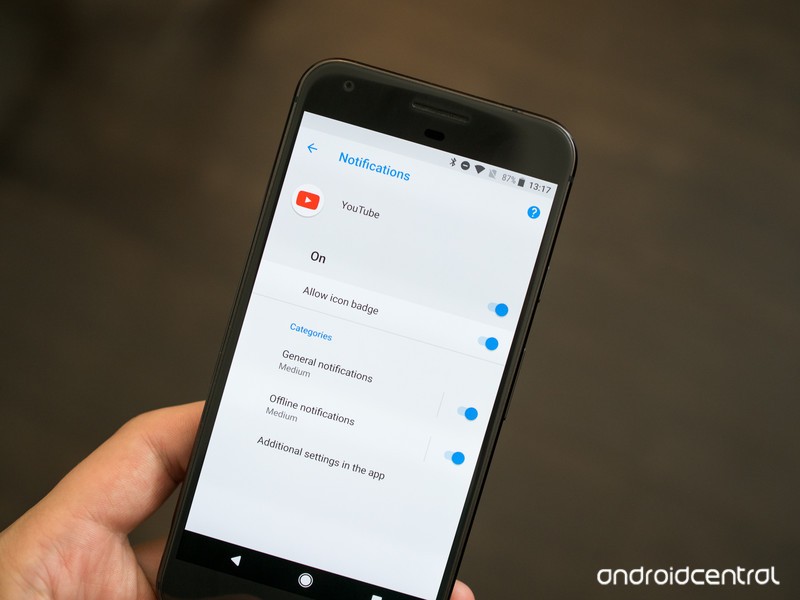
Android 8 comes with the power to take control over your notification tray so you can sort out just what you want to see.
One of the bigger changes and features coming with Android O is the new Notification Channels system. It can also be a little confusing to talk about, since it’s not something we’re used to seeing on our phones. But when you cut through all the fancy technical words and developer language, they’re not hard to understand at all!
What are Notification Channels
Coming with Android O, Notification Channels are something a developer uses to break down the notifications his or her app can give to us by type. The channels are decided by the people doing the developing, and the idea is to give us a way to separate out the notifications that are important to us from the ones that aren’t, then decide how they will be shown. Some apps will have a lot of different channels. Some will have just a few and some will have only one.
How a notification is prioritized is no longer left for the app developer to decide.
In versions of Android before O, a developer used what was called a priority level to decide how to show you a notification. If they felt the notification was important, they could set it to peek (show a visual indication on your screen) or make a sound, or both. If they felt it wasn’t it would just be placed in the tray for you to see the next time you went through them.
Now they break things out into channels and we get to decide how each type of notification is displayed. All notifications of the same type (for example, a reply on your Twitter feed) are placed into the same channel without any other types of notification grouped with them.
As a bonus, apps that allow us to use more than one account can have channels for each combined — your personal email and work email can follow the same rules and show you things the same way no matter which account received the notification.
Notification Channels developer documentation from Google
How we can set things up
The whole reason for the change is so that we have better control and can see the things we want to see. That means we need to have ways to filter all the different channels and the notifications that come with them. Through the settings, we can see every channel an app has for notifications and change how they are delivered with the following settings:
- Importance: Urgent will make a sound and show on the screen. High makes a sound. Medium makes no sound. Low makes no sound and gives no indication that it’s been received.
- Sound: Set any supported sound as the notification tone for the channel.
- Lights: Whether the notification should trigger a hardware notification light.
- Vibration: Whether the notification should vibrate your phone.
- Show on lock screen: Decide if a notification should appear on the lock screen.
- Override do not disturb: Decide if a notification should bypass any do not disturb settings for sounds.
Most of these are self-explanatory. That’s a good thing because this isn’t really better if it’s difficult to understand.
YouTube is a great example
If you have the Android O beta installed on your phone, you already have an app that’s using notification channels: YouTube. It’s also a really good example because there are only two channels — Standard notifications and offline notifications.

In the image above, the left side shows the two channels and the right side shows the individual settings for a channel. You’ll find these settings in Settings > Apps and notifications > App info. Choose the YouTube app and tap App notifications.
This is an easy way for us all to see how notification channels work because the YouTube app has such simple notification settings. But this will all scale to something like Facebook or Gmail that will possibly have more channels. And if an app only needs one channel, it only has to use one. The whole idea scales well and should be a great way to help us sort through all the distractions!
Android O
- Everything new in Android O
- Should you put Android O on your phone?
- How to get the Android O Beta on your Pixel or Nexus
- Join the Discussion
Grab three of these USB-C adapters for just $7 right now!
Our friends at Thrifter are back again, this time with a deal to make your transition to USB-C even easier!
Aukey is currently offering a three-pack of its Micro-USB to USB-C adapters for just $7 with coupon code AUKCBA23, a savings of $3. With these adapters, you can turn those old cables you have laying around into something that can charge your new Samsung Galaxy S8, LG G6, Google Pixel or other compatible phone. The adapters are quite small so you could easily fit them in your pocket or maybe even your wallet, and always have one with you so you are never without a cable to charge up with.

Odds are this deal won’t hang around too long, so be sure to act quickly if you are interested. Don’t get stuck with only old cables around and a dead battery! Grab these adapters now and thank yourself later. If you are only looking to grab two of them, you can pick up the 2-pack of aluminum adapters for just $4.99 with coupon AUKCBA92.
See at Amazon
For more great deals on tech, gadgets, home goods and more, be sure to check out our friends at Thrifter now!
Best Android Games for the NVIDIA Shield TV
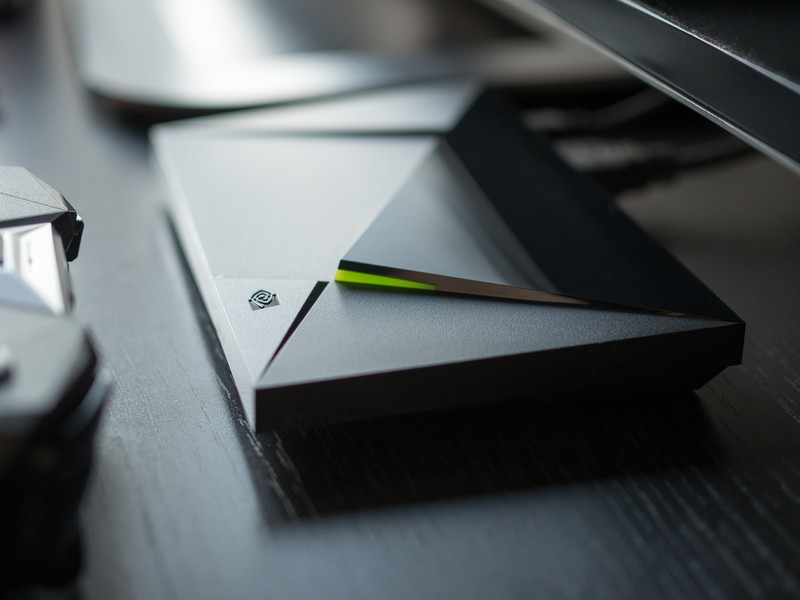
What are the best games to play on the NVIDIA Shield TV from the Google Play Store?
As NVIDIA proclaims in every ad, their new Shield Android TV box is “the streamer for gamers”. So which games are worth checking out?
Well, for starters we’re not going to dive into NVIDIA’s GeForce Now subscription service, or NVIDIA Gamestream. We’ll touch on those services later.
For now, we’re just going to highlight some of the best games available via the Google Play Store, specifically adapted to play on the NVIDIA Shield TV. So let’s dive right in!
- The Witness
- Borderlands: The Sequel
- Ultimate Chicken Horse
- GoNNER
- Metal Gear Rising: Revengeance
- Telltale Games
- Half-Life 2
- Skateboard Party 3
The Witness
If you consider yourself a hardcore puzzle gamer, you owe it to yourself to check out The Witness, one of the most beautifully crafted and challenging puzzle games ever conceived. At first glance, this appears to be a rather standard puzzle adventure game, where you wander around a mysterious island solving grid puzzles all the live long day, things become quite layered as you start to unravel the true nature of the island and just how deep the puzzle theme extends.
I’ll keep the description vague and cryptic because it’s really one of those games you want to experience for yourself.
Download: The Witness ($19.99)
Borderlands: The Pre-Sequel
The Borderlands franchise is a gloriously unique first-person shooter, mixing genre elements from action, RPG, and FPS into an addictive experience, topped off with the beautiful cel-shaded graphics and a storyline featuring razor-sharp wit.
The Pre-Sequel was originally released in 2014 for the major consoles, and fits in story wise between the first and second Borderland games. As such, it largely uses the game mechanics from Borderlands 2, while adding in some new weapons and elements. The game also supports co-op play, though sadly no split-screen co-op is available at this time.
Still, Borderlands: TPS plays like a dream on the NVIDIA Shield and should provide hours of fun.
Download: Borderlands: The Pre-Sequel ($14.99)
Ultimate Chicken Horse
Ultimate Chicken Horse is a rather unique party platformer that’ll have you and your friends gathering around the TV like it was 1998 again. The concept is that up to four friends collaborate to build out a challenging level — based on the different platforms and traps, made available to the group. Then, everyone simultaneously tries to complete the level.
Equal parts strategic and stupid, this game is great fun to get a few friends together and have at it (if you’ve got the right number of Shield controllers to accommodate the crew — third-party Bluetooth controller support is lacking). The goal is to set enough traps to sabotage your opponents while leaving a clean route for yourself to make it through the level and reach the goal. Everything is packaged in a fun, cartoony art style, with a host of farm animals as your disposal as playable characters.
Download: Ultimate Chicken Horse ($11.99)
GoNNER
GoNNER was my personal favorite game I played on the NVIDIA Shield TV in 2016, and it’s a real treat for folks looking for a challenging shooter-platformer. Levels are generated procedurally, meaning that you’ll never play the exact same level twice. The game seems to adapt the level difficulty to your skill and playing ability as you work your way through the multiple worlds.
But it’s worth noting that this game is tough. Like really tough. Before you head out to play, you choose your head and gun — you unlock more of both as you explore levels throughout the game — and then you’re tasked with dispatching the enemies as fast and efficiently as possible to continue to collect ammo for your weapons, and purple tiles which are used to heal up and upgrade weapons before boss battles, or save them to “delay” a game over screen.
I specifically chose the word delay because, again, this game is really hard. Are you up for the challenge?
Download: GoNNER ($9.99)
Metal Gear Rising: Revengeance
Right off the hop, for those wondering this game is nothing like the stealth action found in Metal Gear Solid, the crown jewel of the Metal Gear franchise. Instead, this is a slick-looking hack-and-slash action spin-off title starring Raiden, whom fans will remember best from Metal Gear Solid 2.
In Metal Gear Rising: Revengeance, players assume control of Raiden, a katana-wielding cyborg. Set in the far-off year of… 2018… the story revolves around conflicts between rival Private Military Companies, with some corporations actively looking to court chaos to keep the war economy chugging along. We won’t dive too much into the plot specifics, but just want to reiterate that this is nothing like the gameplay found in Metal Gear Solid games. Another thing worth noting is the file size — a whopping 5.5GB! If you just have the 16GB console, you’ll definitely want to look into expandable storage options for your Shield TV, or start clearing out some room before installing.
Download: Metal Gear Rising Revengeance ($14.99)
Telltale Games (The Walking Dead, Batman, Guardians of the Galaxy)
Telltale Games has carved out a nice niche for itself by delivering narrative-driven games based on our favorite comics, movies, and TV shows. You can play its games on your phone or on your NVIDIA Shield, and thanks to the cloud save, you can bounce between your devices.
The games play really well on the NVIDIA Shield TV. If you’ve never played a game made by Telltale Games before, you help progress the story by making choices for the characters and quicktime events where you must match the direction or button on the screen. It actually works better with a controller rather than a touch screen, so if you play things well enoug,h it should feel like you’re controlling a movie.
There are a number of franchises available on the Google Play Store, with the latest game being Guardians of the Galaxy. It’s a great example to mention, actually, because if you’re a fan of the movies, you’ll want to know that it’s not a direct tie-in to the movie franchise, although it is stylized after the movies. Star Lord looks more Stephen Baldwin than Chris Pratt, but the story is fresh and completely separate from the ongoing Marvel Universe storyline, so it’s a nice break.
Here’s a quick rundown of the other franchises available:
- The Walking Dead
- Tales from the Boarderlands
- Game of Thrones
- Batman
Note that while many of these games are free, each game is broken up into seasons and episodes, which you can either buy individually or via season passes.
Half-Life 2
Half-Life 2 is a masterpiece of a game. Developed by Valve, it’s the sequel to 1998’s groundbreaking first-person shooter Half-Life and was developed alongside Steam and the Source engine platforms.
If you own an NVIDIA Shield and have never played Half-Life 2, you owe it to yourself to check this game out. You don’t have to have played the first one to jump into this one, but if you need a bit of the backstory, you play as Gordon Freeman, a very quiet scientist who previously worked for Black Mesa Research Facility and accidentally opened a Portal to another dimension.
Half-Life 2 picks up with Freeman being awoken from stasis, learning that the world has fallen under the control of the Combine, an inter-dimensional empire who have implemented a brutal world-wide police state to control the human race. You must evade the Combine soldiers and meet up with a band of freedom fighters to help save the world.
It’s a bloody, epic game that’s been celebrated for years and is still worth playing in 2017 due to its brilliant visual and audio design, fantastic storytelling, and outstanding gameplay. If you’ve played it all before, you may as well play it again as we wait for Half-Life 3 (any day now, right?).
Download: Half-Life 2 ($9.99)
Skateboard Party 3 ft. Greg Lutzka
Fans of the classic Tony Hawk Pro Skater games from back in the day who lament the storied franchise’s current state should check out Skateboard Party 3. It’s a throwback game to those classic games we loved from the late 90s and early 00s before things went… sideways.
The game physics and controls feel very familiar and you’re given a couple couple game modes to choose from. In Career mode, you get four minutes to explore the eight different locations and rack up a huge score, collect P-A-R-T-Y scattered around as floating letters, and find other hidden items. Things are unlocked by spending experience points, which you collect by completing challenges and landing tricks.
Now is this as polished as the classic THPS games? No. Who is Greg Lutkzka? No idea. Is it the best thing you can get on the Shield for just $2? Yes. And it’s worth checking out for that reason alone, until Activision gets their act together and re-releases THPS 2 and 3 on Android.
Download: Skateboard Party 3 ($1.99 w/IAPs)
Portal
When making a list of best games, and Portal is one of the options, you always got to plug arguably one of the most fun and inventive games of all time. If you’ve never played Portal before, I’m actually jealous because it means you get to experience this outstanding game fresh for the first time.
This game is celebrated justly for its brilliantly subtle storyline, mind bending puzzles, and one of the most celebrated video game villains of recent time. And it’s been ported beautifully over to the NVIDIA Shield TV via the Google Play Store.
Anyone who’s played this knows exactly why this game deserves every award it’s ever won. If you haven’t played it yet, spend the $10 and enjoy.
Download: Portal ($9.99)
Real Racing 3
So far every game on this list has been a paid title. Real Racing 3 bucks that trend. It’s already arguably the best looking racing game available for Android phones, and it looks just as pretty on the big screen playing through the NVIDIA Shield TV.
Jump behind the wheel of one of over 140 intensely detailed vehicles based on real cars, and hit the track in over 4,000 events including Cup races, Eliminations and Endurance challenges on 17 race tracks based off of iconic circuits from around the world, including Silverstone, Hockenheimring, Le Mans, Dubai Autodrome and many more.
If you’re a racing fan and looking for a good title for your Shield TV, give Real Racing 3 a try.
Real Racing 3 (Free)
What are your favorite titles for the NVIDIA Shield TV?
These are the games that piqued our interest, but what are your favorite games for the NVIDIA Shield TV? Got any opinions on the games that made our list? Let us know in the comments!
Update June 2017: Added Half-Life 2, Skateboard Party 3, and the Telltale Games series to our list!
NVIDIA Shield Android TV
- Read our Shield Android TV review
- The latest Shield Android TV news
- Shield vs. Shield Pro: Which should I buy?
- Join the forum discussion
- Complete Shield Android TV specs
Amazon
Galaxy Note 8 could debut in late August without in-display fingerprint

August 26 could be Note 8 day — but the phone may miss out on the much anticipated in-display fingerprint sensor.
According to two separate reports, Samsung looks set to unveil the Galaxy Note 8 at a late August event. Reuters says a Note 8 with a display “marginally larger” than the 6.2-inch Galaxy S8 Plus will break cover towards the end of August in New York City. Korean outlet Naver pins the date down to August 26, just days before IFA 2017 in Berlin — a major electronics trade show which has hosted several Note launch events over the years.
A slightly later Galaxy Note launch this year — compared to the Note 7’s early August debut in 2016 — isn’t entirely surprising. After all, the Galaxy S8 series shipped around a month and a half later than the S7 did last year, as a more cautious Samsung focused on safety in the wake of the Note 7 cancellation.
An August 26 launch date could see the Galaxy Note 8 arriving on store shelves before the end of September, which, depending on Apple’s iPhone 8 launch schedule, would give it a fighting chance of releasing before its major rival.
We might have to wait until 2018 for a Samsung phone with fingerprint security built into the screen.
However, the Note 8 may miss out on one rumored feature when it eventually does arrive. Naver reported recently that Samsung once again wasn’t able to integrate fingerprint into the display in the Note 8, noting “various technical limitations such as security,” according to one unnamed Samsung official. Unverified reports from “industry insiders” on Weibo suggest that Samsung Display’s current in-screen fingerprint technology produces brightness anomalies around the fingerprint scanner area. While it’s possible this could be mitigated with display tuning — selectively darkening the pixels around the fingerprint area — the implication is the technology won’t be ready in time to ship in the Note 8, and will instead have to wait until next year’s Galaxy S9.
Let’s just hope that the (presumed) rear-mounted fingerprint scanner will be more conveniently located than Galaxy S8’s.
So what are we expecting in the next Note? How about a larger display, upgraded RAM and storage, an improved S Pen and Samsung’s first dual-camera setup. We’ll be watching with interest come August 26.
Samsung Galaxy Note 7
- Galaxy Note 7 fires, recall and cancellation: Everything you need to know
- Survey results: Samsung users stay loyal after Note 7 recall
- Samsung Galaxy Note 7 review
- The latest Galaxy Note 7 news
- Join the Note 7 discussion in the forums!
 AIVAnet