


Apple Camera Lens Supplier Confirms 3D Sensing Module Shipments Coming in 2017, Likely for iPhone 8
Largan Precision, one of the current suppliers for the iPhone’s camera lens component, today confirmed that it will ship lenses for 3D sensing modules in the second half of 2017, suggesting inclusion in the next-generation “iPhone 8.” The confirmation comes from Largan CEO Adam Lin, who refrained from mentioning which company exactly the modules would be allocated for (via Nikkei).
The list of companies available is very short, according to analyst Jeff Pu, who pointed out that Apple is expected to be the only company in the world to launch a smartphone with a 3D sensing module in 2017. In total, Pu estimated that Largan is set to supply 90 percent of the iPhone’s rear camera lenses, 50 percent of its 3D sensing lenses, and up to 30 percent of the front-facing camera lenses.
A mockup of the iPhone 8’s front-facing camera and sensors via @VenyaGeskin1
The features and design of the iPhone 8’s front-facing sensor bar have remained one of the more uncertain aspects of renderings and mockups over the past few weeks. It’s still unclear whether the iPhone 8 will include a dual-lens front-facing camera or keep the single-lens of current generation devices.
The inclusion of a 3D sensing module further confuses things, since it hasn’t been suggested whether or not the technology would be directly integrated into the camera lens, or added onto the side among the ambient light sensor and proximity sensor. Pu’s data appears to suggest the latter outcome.
Key iPhone camera lens provider Largan Precision on Wednesday confirmed it would ship lenses for 3-D sensing modules in the second half of this year, according to the company’s chief executive.
“We will have lenses for 3-D sensing [module used in smartphone] ready to ship in the second half this year,” said Adam Lin, Largan’s chief executive in a press conference after the company’s annual general meeting.
A 3D sensing front-facing camera has been a rumored feature of the iPhone 8 since February, when KGI Securities analyst Ming-Chi Kuo reported that the upcoming iPhone will gain a “revolutionary” front-facing camera system that consists of three modules that enable fully-featured 3D sensing capabilities. The technology’s applications could include facial and iris recognition features.
LG has been named as one of the other potential suppliers of 3D modules for the iPhone 8. If the biometric sensing features do arrive in iPhone 8, they’re believed to be fueled by technology that Apple acquired from Israeli company PrimeSense in 2013. PrimeSense is known as the creator of the original 3D body sensing technology used in Microsoft’s first-generation Kinect peripheral for Xbox 360.
Related Roundup: iPhone 8
Tags: nikkei.com, Largan
Discuss this article in our forums
Apple Supplier Confirms New iPhone Models Will Be ‘Waterproof’ With Wireless Charging
iPhone assembler Wistron has confirmed that at least one of Apple’s next-generation iPhone models will be “waterproof” and include wireless charging capabilities, according to Japanese website Nikkei Asian Review.
“Assembly process for the previous generations of [iPhones] have not changed much, though new features like waterproof and wireless charging now require some different testing, and waterproof function will alter the assembly process a bit,” [Robert] Hwang, [Wistron CEO], told reporters after the company’s annual shareholders’ meeting on Wednesday.
Apple analysts Jeff Pu of Yuanta Investment Consulting and Arthur Liao of Fubon Securities claim Wistron is splitting orders for the upcoming 5.5-inch iPhone with a flat display with larger Apple manufacturing partner Foxconn, so it’s likely that Wistron is referring to the so-called “iPhone 7s Plus.”
Given the higher-end “iPhone 8” is expected to be a premium smartphone, positioned above the iPhone 7s Plus, that model will likely feature wireless charging and improved water resistance as well. That leaves the next 4.7-inch iPhone, which is already rumored to have wireless charging, and it’s reasonable to assume the smaller model will have improved water resistance too.
iPhone 7 and iPhone 7 Plus models are already splash- and water-resistant with an IP67 rating, but Apple’s fine print warns that “splash, water, and dust resistance are not permanent conditions and resistance might decrease as a result of normal wear.” iPhone water damage is not covered by Apple’s warranties.
Nevertheless, many iPhone 7 and iPhone 7 Plus users use their smartphones in the shower, for example, without issue.
A report earlier this year said Apple’s next iPhone models will feature improved IP68-rated water resistance. In the IP68 rating, the “6” means the next iPhone would remain effectively dustproof, with “no ingress of dust” and “complete protection against contact,” while the “8” means the device will be even more water resistant.
Samsung’s Galaxy S8, which already has IP68-rated water resistance, is able to withstand 1.5 meters of water for up to 30 minutes.
Related Roundup: iPhone 8
Tag: nikkei.com
Discuss this article in our forums
Best app deals of the day! 6 paid iPhone apps for free for a limited time
Everyone likes apps, but sometimes the best ones are a bit expensive. Now and then, developers put paid apps on sale for free for a limited time, but you have to snatch them up while you have the chance. Here are the latest and greatest apps on sale in the iOS App Store.
These apps normally cost money and this sale lasts for a limited time only. If you go to the App Store and it says the app costs money, that means the deal has expired and you will be charged.
Epica 2 Pro

Create epically funny photos with this app. With new poses, new special effects, and new scenes to choose from, you can turn even the most boring images into riots.
Available on:
iOS
GMAT Practice

GMAT Practice For Dummies shows you how to approach each type of question, recognize the traps that are built into the questions, and master the tricks that help you to avoid those traps. With this study tool, you get, analytical writing, verbal, and quantitative questions and tips.
Available on:
iOS
Skiplayer

Skiplayer promises to be a powerful machine learning algorithm to build an amazing app that helps you discover who you are by exploring your music habits in 31 different ways.
Available on:
iOS
Easy Spending

Over a million users agree that Easy Spending is the way to go easy on your spending, reduce debt, and grow your wealth. Easy Spending is an easy way to improve your spending habits.
Available on:
iOS
Zen Sketch

Zen Sketch is a cross between a note-taking and a painting app. The app hopes to strike a balance between power and simplicity, letting you organize and take advantage of your best work.
Available on:
iOS
OneAvenue

Join your favorite celebs’ fan clubs and get all of their social, music, videos, live-streaming, and tickets in one place. With this app, you can follow artists on their various social feeds, discover artists playing nearby, and get festival lineup information.
Available on:
iOS
Why buy a bunch of new smart appliances when you can just buy an IntelliPlug?
Why it matters to you
Replacing all the appliances in your home with smart appliances can be a drag, but the IntelliPlug could be a viable alternative.
Why buy brand-new smart appliances when you can just breathe new life into your old ones? That, at least, is the alternative smart home company Cnct is introducing by way of the IntelliPlug, heralded as the world’s smallest and most affordable smart plug. The Wi-Fi-enabled plug allows you to control your lights, appliances, and any other plugged-in device with your smartphone or tablet, from anywhere in the world. With full iOS, Android, and Alexa integrations, you can easily turn your connected devices on and off, set timers, or select a schedule by which these appliances can operate.
The IntelliPlug wants “everyone to experience a smart home at the fraction of the cost.”
Promising to cost less than half the price of other smart plugs (the early bird price on Indiegogo is $20 for a two-pack), the IntelliPlug wants “everyone to experience a smart home at the fraction of the cost.” The company says that its new product takes just three steps to setup — simply plug the device into any electrical outlet, download the Cnct app, pair the plug with the app, and from there, you’ll be able to control any “dumb” appliance from your phone.
Cnct notes that it also has plans to integrate Google Assistant in the coming months, so no matter what your smart home hub of choice may be, you can bring the IntelliPlug into your environment.
“With IntelliPlug, we wanted to create the most affordable smart plug on the market, and after dozens of prototypes and countless software iterations, we finalized the design and are ready to bring the Cnct IntelliPlug to the world,” said Adam Anderson, founder of Cnct. “Now everyone can have a smart home and be able to seamlessly control their appliances directly from their phone or tablet, while home or on the go.”
So whether you want to turn on your old coffee pot from your phone or turn off your hair straightener while you’re at work, the IntelliPlug can help.
The new Razer Blade Stealth packs bigger display, subtle gunmetal chassis
Why it matters to you
Razer’s thin-and-light Blade Stealth now makes sense for people whose eyes aren’t quite as sharp.
Razer’s Blade Stealth laptop has been a very attractive member of the ultra-thin segment of the notebook market, competing with Razer’s typical flair against machines like Apple’s MacBook and HP’s Spectre. Now, Razer has launched a version that packs a larger display into a thin and light chassis, bumping the screen from 12.5 inches to 13.3 inches, and upping the performance along the way.
The new 13.3-inch Razer Blade Stealth model uses bezels that are 50 percent thinner to squeeze the larger display into the same size chassis as the 12.5-inch version. The chassis is crafted from CNC-milled aircraft grade aluminum, and the machine measures 0.52 inches thin, and weighs 2.93 pounds, while providing up to nine hours of battery life.

Razer
In addition, the new model provides a display that’s a bit easier on the eyes, with QHD+ (3,200 x 1,800) resolution that provides 276 PPI, compared to the 4K UHD (3,840 x 2,160) resolution at 326 PPI of the smaller display. At the same time, Razer has maintained display quality, with the same 400 nits of brightness and 100-percent sRGB color gamut support.
“The first Razer Blade Stealth’s success proved that highly mobile students, creatives and professionals alike are demanding more in terms of performance, personalization and value,” says Min-Liang Tan, Razer co-founder and CEO. “From the classroom to the boardroom, the new Razer Blade Stealth continues to set the standard for mobility, power, durability, and value in laptops for productivity everywhere.”
The new machine maintains the previous version’s solid productivity performance, with a standard seventh-generation Core i7-7500U processor and 16GB of LPDDR3-1866MHz RAM. Up to 1TB of PCIe SSD storage can be configured. In addition, the Razer Blade Stealth supports the company’s Razer Core external GPU enclosure supporting Nvidia and AMD discrete GPUs for high-end gaming.
Connectivity includes two USB 3.0 Type-A ports, a USB Type-C connection with Thunderbolt 3 and external GPU support, and HDMI 2.0a audio and video output. Stereo speakers and a 3.5mm headset provide the audio, and Killer Wireless-AC 1535 provides 802.11ac Wi-Fi and Bluetooth 4.1 wireless connectivity.
The Razer Blade Stealth is available in two color schemes, traditional black and — for the first time ever — gunmetal with tone-on-tone Razer logo. The black version of the Razer Blade Stealth includes the company’s Razer Chroma multi-color laptop keyboard supporting customizable lighting effects and 16.8 million RGB color options. Those who opt for the gunmetal version, however, will have to settle for traditional white backlighting.
The new machine is available in the US, Canada, United Kingdom, and France starting today at Razerzone.com, and will be released worldwide in June and July 2017. Pricing starts at $1,399 for the new Razer Blade Stealth, and the Razer Core is available by itself for $499, or for $399 when purchased with the laptop.
Get into shape with the best iPhone fitness apps
Update: Added Cyclemeter and FIT Radio.
If you’re trying to lose weight, work on your fitness, or eat better, your iPhone can be a helpful tool — but only if you have the right app. Thankfully, we’ve dug through hundreds of apps out there to give you our take on the best apps in the App Store to help you stay healthy and fit.
Weight Loss
Sometimes, the prospective health benefits of exercise aren’t enough to get you out the door and on the trail. The apps below are designed to give you another compelling reason, whether it’s the opportunity to earn virtual badges, a chance to win actual prizes, or simply the prospect to not get ridiculed.
Nike+ Training Club

Nike’s official app has a library of 30 to 45-minute workouts that are based on your goals and fitness level. Importantly, the app explains how to execute each exercise with how-to videos and even lets you share your accomplishments on social networks.
Download now from:
iTunes
Carrot Fit: 7 Minute Workout, Step Counter and Weight Tracker ($4)

Carrot is an AI construct that threatens, inspires, ridicules, and bribes you — whatever it takes — to get you moving. It’s a wonderful motivator that features a “7 minutes in hell” workout that will require you to do 30 seconds of 12 punishing exercises, and will berate you if you don’t.
Download now from:
iTunes
Argus: Calorie Counter & Activity Tracker for Heart Healthy Living

Argus is a neat all-in-one activity tracker that monitors your sleep, heart rate, calories, and more. The app offers challenges to overcome, as well as the option to build your own workout plan. You can even add food you eat by scanning the barcode on the label to track your calories.
Download now from:
iTunes
Lose It! Weight Loss Program and Calorie Counter
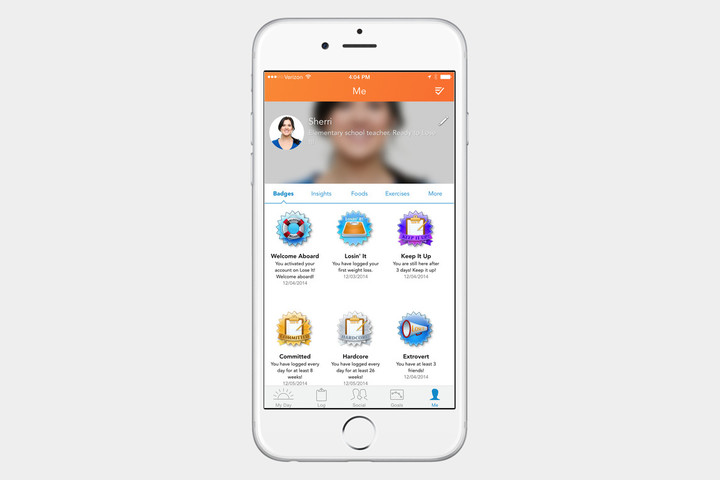
Lose it tracks food intake and fitness activities. Plug in your height, weight, age, and how much weight you are trying to lose (if any at all), and the app constructs a recommended net calorie intake based on how many calories you consume and how many you burn.
Download now from:
iTunes
MyFitnessPal Calorie Counter and Diet Tracker

Calorie Counter and Diet Tracker by MyFitnessPal boasts a database of more than 5 million foods to sort through, making it easier to track what you eat. It also features a step tracker and a barcode scanner, to make sure you’re able to track everything in your diet.
Download now from:
iTunes
Lifesum: Healthier Living and Better Eating

Lifesum is a weight loss app that works with apps from Withings and RunKeeper to give you an accurate assessment of your daily calorie intake. It even features a built-in barcode scanner that can pull up nutritional data on millions of items.
Download now from:
iTunes
Fitocracy

Fitocracy is for the competitive. The personal trainer lets you track workouts and encourages you to work toward real-life goals through a leveling system and in-game achievements you can share among your friends and the Fitocracy community.
Download now from:
iTunes
Pokémon Go

This isn’t a traditional weight loss app, sure, but many hail Pokémon Go as being a great way to get off the couch and into the wild. It might be more suited for ’90s kids who grew up with Pokémon, but regardless of who you are, you’ll find yourself walking all over your city as you try to find new Pokemon.
Download now from:
iTunes
Cyclemeter ($5)

Looking to get shed some weight on a bicycle instead of a treadmill? This app will help you do exactly that! Cyclemeter is accurate and great at collecting data. It can can also track various walking and running metrics, though, you might not get as much data. However, if cycling is your preferred fitness routine, this is the app for you.
Download now from:
iTunes
Fitstar Personal Trainer

This app creates a custom workout based on your fitness level. It learns from you as you use it. You choose workouts, and then you tell the app whether the exercises were too easy or too tough for you. The information is used to create a workout routine that fits your level. It will also track your overall fitness, as it’s compatible with the Health app, Fitbit, MyFitnessPal, and Strava. The freemium app is also compatible with Apple Watch, though some features require a subscription to use. Sadly, the latter will run you anywhere between $8 and $40 annually.
Download now from:
iTunes
Weight Watchers

Weight Watchers has an official app that promises to help you in your journey to a healthier lifestyle, and helps you track and share your weight loss progress with your friends. Since the Weight Watchers program is about tracking points, this app also makes it easy to keep track of your food intake, since everything you eat has a point value. The free app is compatible with the Apple Watch, too, but you’ll need to subscribe to Weight Watchers Online if you want to make the most of it.
Download now from:
iTunes
Everything you need to know about Samsung Pay
Updated with news that Samsung is adding Samsung Pay to the new Galaxy J7 Pro and J7 Max smartphones.
Mobile payments have come a long way since Apple made a huge push into the space with Apple Pay in 2014. Google introduced Android Pay in 2015, and Samsung has joined the fray with its own mobile payment system called Samsung Pay. Here’s what you need to know about it.
Which devices support Samsung Pay?

Samsung Pay is limited to the Galaxy S8, S8 Plus, Galaxy S7, S7 Edge, Galaxy S6, S6 Edge, S6 Edge Plus, Note 5, Gear S2, and, most recently, the Galaxy J7 Pro. It also now works with Samsung’s new smartwatch, the Gear S3 — and you don’t need to connect a Samsung phone for it to work.
With the J7 Pro receiving support, Samsung has finally expanded its mobile payment system to non-flagship smartphones. Another budget device, the J7 Max, will receive Samsung Pay Mini, a lighter version of the software that is designed for online payments only. Both these phones are expected to become available in India starting in late June through mid-July, where the J series is very popular. Launching Samsung Pay on those devices could be a way for the company to jump-start adoption in the country after recently launching the service there.
Going forward, all of Samsung’s devices will support Samsung Pay. That’s according to Koh Dong-jin, president of the company’s mobile business division. “We have decided to preinstall Samsung Pay devices in Samsung Electronics’ smartphones to be released from [2017],” he told Business Korea.
The idea that Samsung Pay will come to all of Samsung’s phones is further corroborated by a previous report from Mashable, which noted that Samsung was exploring ways to bring Samsung Pay to its nonpremium devices in order to play a bigger role in mobile payments in India.
Gear S3 owners with an Android phone can use Samsung Pay
A recent update to the Gear manager app allows for Gear S3 users to use Samsung Pay, even if they don’t own a Samsung smartphone. Most Android devices running 4.4 KitKat and above should work, but Samsung says there are a few exceptions at the moment — notably, the Google Pixel.
To get started on paying with your Gear S3, you’ll need to add your cards via the Gear manager app. You can launch Samsung Pay by holding down on the back button.
Hi there, #SamsungPay on the Gear S3 is not available with Pixel devices. (1/2)
— Samsung Pay (@SamsungPay) November 25, 2016
What’s unique about the update is that unlike the Gear S2, the Gear S3 supports MST, not just NFC. That means it will work at most payment terminals — just hold your watch near the checkout terminal when you’re ready to pay.
Support for the Gear S2
Samsung announced late last year that the company’s flagship smartwatch, the Gear S2, would gain support for contactless payments. After a lengthy delay, it finally arrived in the beta program for the S2 during the summer for the Bluetooth-only model. In October, users with the cellular model of the Gear S2 reported that they are able to use Samsung Pay as well.
Samsung Pay Mini
Samsung has announced Samsung Pay Mini, a slimmed-down version of Samsung Pay designed to work on other Android phones, and not just those made by Samsung. Samsung Pay Mini will initially be available in South Korea, where the app will be ready to download over the coming few months.
What’s the difference? Samsung Pay Mini is only for online payments. Offline payments, that’s those used in stores, will require ownership of a Samsung phone and the full Samsung Pay app. This is due to Samsung Pay Mini and phones not made by Samsung not supporting the magnetic secure transactions (MST) hardware that allows Samsung devices to complete wireless payments at legacy payment terminals.

The app is compatible with Android phones running version 5.0 Lollipop and later, provided the device’s screen has a resolution higher than 1280 x 720 pixels, which should cover most models released over the past few years. In addition to online payments, the app will feature Samsung Pay features for membership cards, transportation cards, and lifestyle options. And it’ll boast a Shopping feature that connects directly with famous local online shopping malls that are partnered with Samsung.
The final launch date hasn’t been confirmed, but a trial version for existing Samsung Pay users to try out will be released on February 6 through Google Play in South Korea.
The announcement follows earlier rumors published by ET News, a report which also discussed Samsung Pay Mini’s chances of reaching iOS in the future. Sadly, it’s highly unlikely, but it’s not entirely Samsung’s fault. The company told ET News that Apple had rejected the Samsung Pay Mini app for iOS devices, adding, “After Apple rejected registration of Samsung Pay Mini onto its app store, we have decided to focus on smartphones with Android OS.”
Samsung hasn’t made any announcements regarding Samsung Pay Mini’s launch outside of South Korea at this time.
Which countries support Samsung Pay?

Samsung Pay is currently available in the U.S. on all major carriers’ networks, as well as in Spain, South Korea, China, Thailand, and most recently the United Arab Emirates, Sweden, Hong Kong, and Switzerland.
The service fully launched in the UAE and Sweden in April following beta testing. Those two are the first Middle Eastern and Nordic markets to receive Samsung Pay. For users in Hong Kong and Switzerland, the platform is only available in early access form at the moment, with a limited number of supported banks.
Samsung Pay was first brought to Thailand in October 2016, but the system is now much more widely available in the country. In Thailand, Samsung Pay is compatible with MasterCard and Visa cards, and a range of banks are supported, including KCC Bangkok Bank, and Citibank.
Samsung initially promised Pay would expand to the U.K. and Canada sometime in 2016, but has backtracked on its promise to the former. In a statement, Samsung said, “Following successful launches of Samsung Pay around the world, we are planning to launch the service in the U.K. in 2017.
No reason for the delay has been given, but negotiations between Samsung and U.K. banks are speculated to be the issue by The Telegraph. No exact timeframe other than 2017 has been given, meaning it may be up to two or more years after Apple Pay launched in the U.K., that Samsung joins the market. Android Pay, which launched earlier in 2016, operates on most Samsung smartphones already.
Samsung Pay arrived in Brazil in July 2016. It’s supported by the county’s largest institutions, among them Banco do Brasil, Brasil Pré-Pagos, Caixa, Porto Seguro, Satander, Banrisul, Bradesco, Nubank, and Itaú-Unibanco. And it will support both Visa and MasterCard accounts.
The payment service is now available in Puerto Rico as well — cards from U.S. territory’s largest bank, Banco Popular, are now supported and Samsung Pay is available on AT&T, T-Mobile, Sprint, and Claro networks.
In mid-June 2016, through a partnership with Citibank and American Express, Samsung Pay formally launched on Galaxy devices in Australia. Availability varies by “local operator,” Samsung warned, but Samsung Pay users in the Land Down Under should be able to pay at any sales terminal that accepts conventional debit and credit cards.
Also in June, Samsung Pay went live in Spain. Unfortunately, Samsung Pay users in Spain will miss out on one major feature of the payment service: support for magnetic point of sales. In other words, Spanish residents can only use Samsung Pay at NFC terminals, with Samsung giving no indication as to whether that will change.
That same month, Samsung formally brought the service to Singapore as well. The announcement came quickly after Apple Pay launched in Singapore, but only for American Express card holders. Samsung will support MasterCard and Visa in the country, and Samsung Pay is available to customers of the DBS Bank, Standard Chartered, and Oversea-China Banking Corporation.
On March 29, 2016, Samsung Pay went live in China through Samsung’s previously announced partnership with China UnionPay. The deal, announced in December 2015, is crucial, as UnionPay is China’s main credit provider. In addition, Samsung partnered up with Ant Financial Services Group, Alipay’s parent company, which will further expand Samsung Pay’s presence in China. The partnership will allow users of Alipay, China’s largest third-party payment processing service, with over 450 million users, to use Samsung handsets to pay for products and services.
Driving these international launches forward is Samsung’s extended partnership with MasterCard overseas, helping Samsung Pay break into Europe, and for people to activate debit, credit, and reloadable prepaid cards. It also supports Visa and American Express, along with other major payment networks. The full list can be found here. Additionally, Samsung has signed a partnership with point of sale equipment company Verifone, helping adoption in the U.S. and internationally.
The first system to let you pay with your eyes?
A report from Yonhap News Agency in South Korea claims Samsung plans to enable payment by iris scanning in the region, at the recommendation of the country’s credit card firms. These companies reportedly wanted to enable the feature in last year’s Galaxy Note 7, but ultimately only used it for account verification, rather than transactions. According to the article, experts regard this method as more secure than passwords and fingerprints, saying it makes fraud “virtually impossible.”
Iris scanning is one of three biometric authentication methods on the new Galaxy S8 and S8 Plus — the others being the aforementioned fingerprint sensor and facial recognition. With iris scanning, users can unlock their devices simply by looking at them. Samsung’s rival, LG, is reportedly seeking to enable face-sensing tech on its recently released G6, with the ambition to use it for payments. Yonhap provides no timetable for release of the feature on the Galaxy S8.
Samsung Pass
At the Samsung Galaxy S8 Unpacked event, Samsung unveiled a new way to use Samsung Pay on websites and other online services — Samsung Pass. But what does it do? The main goal here is to make Samsung Pay easier to use, so Samsung Pass stores your passwords and lets you use biometric data — like your fingerprint — instead. That means you won’t have to waste time trying to remember and enter your individual passwords for each service.
It’s really a very handy feature, and Samsung hopes it will help convince people to use Samsung Pay more often in apps and online — rather than just in stores.
With Qualcomm’s new platform, companies can make their own Google Home
Why it matters to you
Qualcomm’s Smart Audio Platform could lead to a veritable explosion of new smart speakers.
Smart speakers like Amazon’s Echo, Google’s eponymous Google Home, and Apple’s HomePod may seem like a dime a dozen, these days, but Qualcomm wants to make it easier for smaller companies to build their own. To that end, the San Diego, California-based chip maker took the wraps off a reference “smart audio” design on Tuesday, June 13 — a combination microphone, speaker, and voice-recognition sensor that third parties can use to build their own speakers from scratch.
Qualcomm’s new Smart Audio Platform, which runs on the open source Linux operating system and Google’s Android Things IoT (Internet of Things) platform, comprises far-field microphone technology that can detect “wake” phrases like, “OK Google,” at a distance. Beamforming, a type of electronic signal processing that uses multiple microphones to pick up a user’s voice, is in tow, as is echo cancellation, Bluetooth aptX HD audio, and Wi-Fi.
The Smart Audio Platform is packed to the brim with high-end audio tech, too, including robust support for codecs like MP3, OggVorbis (Hi-Res 32-bit/192kHz), lossless FLAC/ALAC, and the latest implementation of Qualcomm’s multi-room AllPlay audio system, which lets you control multiple wireless speakers on the same network. There is also support for voice-activated AI assistants like Amazon’s Alexa and Google Assistant.

Generally speaking, Qualcomm’s Smart Audio platform aims to make it easier for smaller companies to create their own voice-enabled, high-quality speakers. But it has a disadvantage: Platform support. So far, only a handful of speakers from Hitachi, Panasonic, and Monster support the AllPlay standard, which is fewer than the growing number that support Google’s Cast Audio and a mere fraction of speakers with Apple’s AirPlay built in.
But Qualcomm says broader adoption is around the corner. The new chips at the heart of the Smart Audio Platform, the APQ8009 and APQ8017, will begin to ship in the third quarter of this year.
“The Qualcomm Smart Audio Platform combines high-performance processing power, world-class Bluetooth and Wi-Fi, advanced far-field voice capture and wake-word detection, AllPlay multi-room audio-streaming technology, and support for major voice ecosystems in a single solution” Anthony Murray, Qualcomm’s senior vice president and general manager of voice and music, said in a statement. “This platform is ideal for traditional speaker manufacturers wanting to make the move to a connected platform as it is designed to bring together all the necessary hardware, software, and tools needed to reduce development time. It also offers a great degree of flexibility for those manufacturers who want to push the boundaries when it comes to possible future applications for smart speakers.”
With Qualcomm’s new platform, companies can make their own Google Home
Why it matters to you
Qualcomm’s Smart Audio Platform could lead to a veritable explosion of new smart speakers.
Smart speakers like Amazon’s Echo, Google’s eponymous Google Home, and Apple’s HomePod may seem like a dime a dozen, these days, but Qualcomm wants to make it easier for smaller companies to build their own. To that end, the San Diego, California-based chip maker took the wraps off a reference “smart audio” design on Tuesday, June 13 — a combination microphone, speaker, and voice-recognition sensor that third parties can use to build their own speakers from scratch.
Qualcomm’s new Smart Audio Platform, which runs on the open source Linux operating system and Google’s Android Things IoT (Internet of Things) platform, comprises far-field microphone technology that can detect “wake” phrases like, “OK Google,” at a distance. Beamforming, a type of electronic signal processing that uses multiple microphones to pick up a user’s voice, is in tow, as is echo cancellation, Bluetooth aptX HD audio, and Wi-Fi.
The Smart Audio Platform is packed to the brim with high-end audio tech, too, including robust support for codecs like MP3, OggVorbis (Hi-Res 32-bit/192kHz), lossless FLAC/ALAC, and the latest implementation of Qualcomm’s multi-room AllPlay audio system, which lets you control multiple wireless speakers on the same network. There is also support for voice-activated AI assistants like Amazon’s Alexa and Google Assistant.

Generally speaking, Qualcomm’s Smart Audio platform aims to make it easier for smaller companies to create their own voice-enabled, high-quality speakers. But it has a disadvantage: Platform support. So far, only a handful of speakers from Hitachi, Panasonic, and Monster support the AllPlay standard, which is fewer than the growing number that support Google’s Cast Audio and a mere fraction of speakers with Apple’s AirPlay built in.
But Qualcomm says broader adoption is around the corner. The new chips at the heart of the Smart Audio Platform, the APQ8009 and APQ8017, will begin to ship in the third quarter of this year.
“The Qualcomm Smart Audio Platform combines high-performance processing power, world-class Bluetooth and Wi-Fi, advanced far-field voice capture and wake-word detection, AllPlay multi-room audio-streaming technology, and support for major voice ecosystems in a single solution” Anthony Murray, Qualcomm’s senior vice president and general manager of voice and music, said in a statement. “This platform is ideal for traditional speaker manufacturers wanting to make the move to a connected platform as it is designed to bring together all the necessary hardware, software, and tools needed to reduce development time. It also offers a great degree of flexibility for those manufacturers who want to push the boundaries when it comes to possible future applications for smart speakers.”
How to keep your smartphone cool during the hot summer months

Sun’s out, the smartphone’s out. But don’t forget that in addition to slathering on the sunscreen, you’ll have to keep your phone protected, too.
Summer is all about streaming the hits of year’s past and shooting a bounty of selfies. But while you’re out doing that, remember to keep tabs on how hot your smartphone becomes as you’re having fun.
The warmer weather months don’t offer a friendly climate for electronics, and the heat can actually be hazardous to overall device health. Here are a few tips to keep your smartphone cool for the summer.
Don’t leave the phone in the car
 Grab one of these if you need to tend to use turn-by-turn directions, in your car, during the hot summer months.
There’s a reason it’s illegal in some areas to leave your child or a pet behind in a hot car. Even with the windows cracked a bit, cars are effectively giant metal incubators. It’s also why you shouldn’t leave your smartphone behind.
Overall, it’s best to pre-plan where you’ll put things before you get into the vehicle. If you’re driving long distances, for example, grab a magnetic car mount to keep the phone affixed to the air conditioning vent as you’re using turn-by-turn directions. If you have to leave the phone in the car for safety reasons, try storing it in the trunk instead. That’s the part of the car with the least “greenhouse gas” effect (link is a PDF).
Another rule I abide by is to never leave any gadgets in the glove compartment, even if I’m streaming music and my phone is connected to the auxiliary cable located inside. Glove boxes are hot enough to melt the cassette tapes of yore, and unless you’ve got an air conditioning vent located inside, it’s definitely hot enough to toast your electronics.
Turn off what you don’t need
Bluetooth, LTE, Wi-Fi, and GPS — if you don’t need these things while you’re out and about, turn them off. That will ensure your phone isn’t working in overtime in your purse or pocket while you’re out gallivanting in sun-stroked gardens. It’ll also be a boon for battery life, which you’ll want considering how much warmer a smartphone gets when it’s plugged in for a charge.
Take off the case

Don’t bother with a case in the hot summer months. It’ll just make things hotter.
You wouldn’t wear layers in the hot summer heat, right? There is no need to pile them on top of your smartphone, either. If you’re in need of a case because you’re engaging in outside activity, put the phone inside an Otterbox and keep the screen off during your excursion.
Keep devices separate
I don’t live in a humid climate or in the desert, so I’ve never had this sort of issue. But if you’re walking around with several devices clustered in a bag or backpack and the air is positively thick with heat, be sure that they’re powered off and kept in separate compartments. This gives all the metal things on your shoulder a little room to breathe as the world outside bakes everything else.
Don’t put it in the fridge

A strange practice that isn’t worth practicing at all.
I used to do this with my MacBook Air until I was scolded for doing so. According to Gazelle, a site where you can sell your old gadgets, cooling your gadgets too rapidly could actually damage the inside components.
Don’t cool it too fast. If your phone overheats, your initial reaction is going to be to rush it to the coldest place you can find. However, rushing the cooling process can cause condensation to get trapped on the inside of the devices and inevitably, water damage.
Whoa! The best thing to do if you feel like your device is too hot is to slowly cool it down by turning it off completely and leaving it alone for a while. You should also unseat the battery pack, if it’s removable, and definitely place the phone away from direct sunlight.
What are your tricks?
We all have our own tricks for dealing with the heat. What are you some of your methods for cooling your smartphone down when the world outside is burning up? Let us know!
 AIVAnet