


How hot is your Android smartphone?

We used the FLIR One Pro to measure how hot the LG G6, Galaxy S8, and Pixel XL become when they’re charging or running applications.
Naturally, when you’re equipped with a thermal imaging camera, you want to point it at all the things. The FLIR One Pro thermal imaging camera is certainly fun to play with, even though its battery life is finicky. I rounded up a couple of the latest Android-powered smartphones I had laying around, including the LG G6, Galaxy S8, and Pixel XL, to see how hot they become (if at all) when they’re plugged in and running a benchmark. Why the heck not?
Note: I’m using a version of the FLIR One Pro thermal camera that’s running on beta software.
As they lay charging


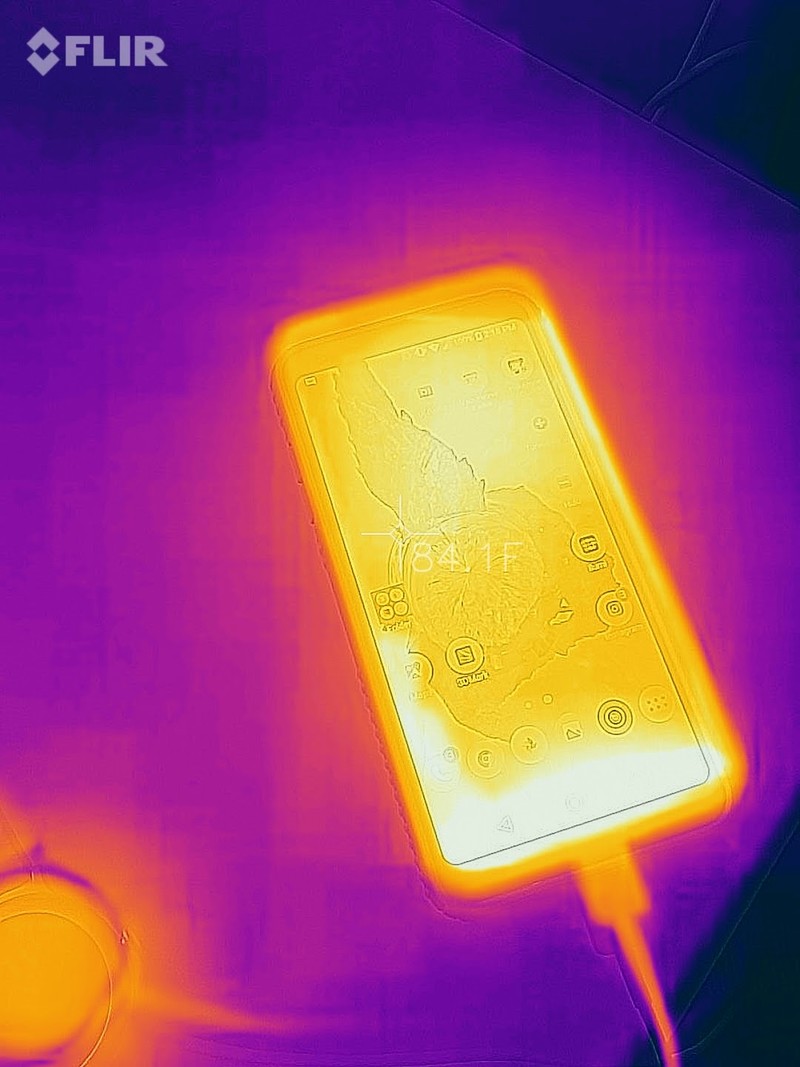
The temperatures of the Galaxy S8 (left), LG G6 (middle), and Pixel XL (right) as they’re charging with the screens on at high brightness.
It took a while for the FLIR One Pro to charge up enough to shoot the three smartphones. I pointed the One Pro at a Galaxy S8 as it charged through a USB-C cable connected to an Aukey power strip. It measured in at about 89 degrees Fahrenheit. The LG G6 measured in around 84 degrees. Both had their screens set on to full brightness.
The Pixel XL measured in surprisingly warmer at nearly 94 degrees. It was charging from the same power strip, with the screen brightness on full blast. The FLIR One Pro simply reinforces what I’ve been thinking for the past eight months: the Pixel XL runs hot.
While they’re benchmarking
Have you ever seen how hot a smartphone becomes when it’s plugged in, throttling, and running a graphics-intense benchmark at the same time? That’s what the FLIR One Pro can show you. In this case, we have a very warm set of phones, all of which are running the 3DMark benchmark suite while charging from the same power strip.

The G6 and Galaxy S8 benchmarking, side-by-side.
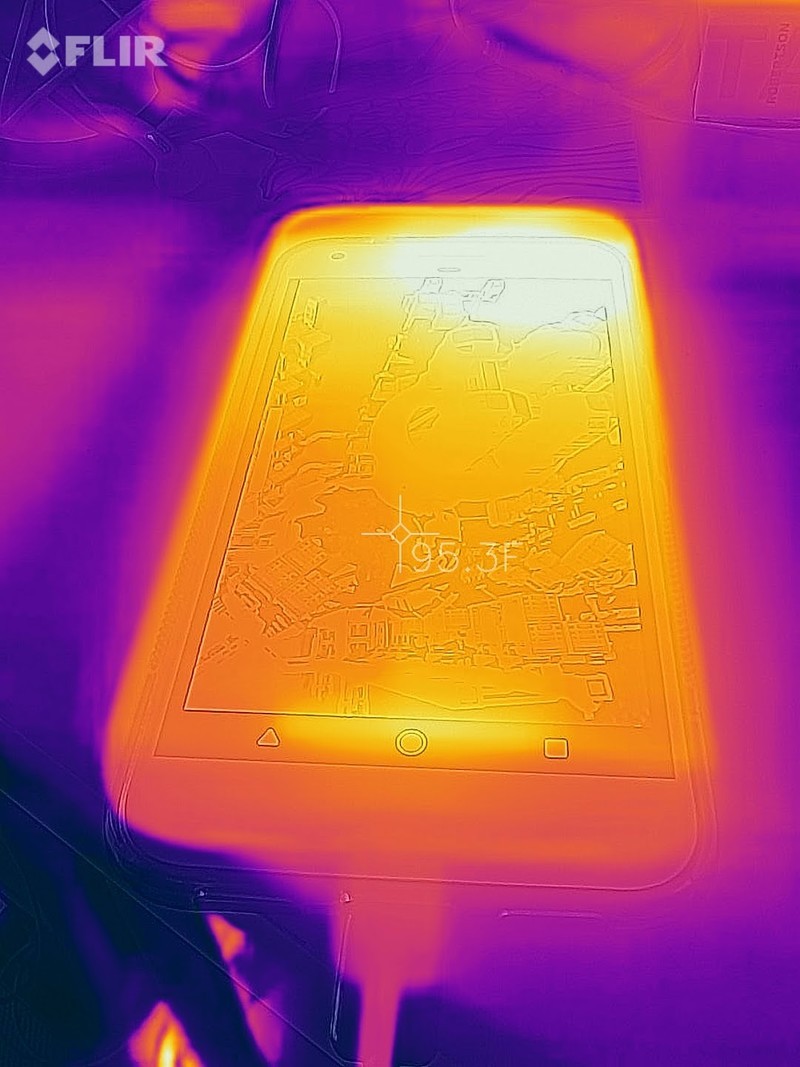

Here’s the Pixel XL benchmarking (left), as well as the Pixel XL running Snapchat (right).
Of course, we can’t overlook the fact that there are two different processors at play here. The Pixel XL and LG G6 are both running on a Snapdragon 821 processor, while the Galaxy S8 is powered by a Snapdragon 835. Both processors have different GPUs, too, though none of that seemed to really affect the temperature of either device while it was powering through 3DMark and filling up on battery. In fact, the overall heat output of each phone seem to correlate more with the brightness of each screen. For instance, perhaps the G6 measured the lowest because its screen was the dimmest of the three.
What about a smartwatch?
What about a smartwatch? Unfortunately, it was not a warm-enough day for me to show how truly heated an Android Wear watch like the LG Watch Style gets — or at least, seems to get, based on my own anecdotal experience — but it sure is dormant when it’s not being bombarded with app notifications. Interestingly, when it’s charging, it measures in at about the same temperature as the Pixel XL.

The LG Watch Style, in thermal mode.
Where else should we feel the heat?

Got ideas about what we should shoot for next?
Not only is thermal imaging such great fun, but we’re also still in the midst of testing out the FLIR One Pro. We’re planning to shoot plenty more gadgets with it. Perhaps a networking module like Google Wi-Fi, or the NEST camera while it’s on? We’re taking requests!
Let your dad tell Alexa how thrifty you are when you get a deal on an Amazon Echo or Tap
Our friends at Thrifter are back again, this time with some great deals on Amazon’s Alexa-enabled product line!
Today marks the start of several Father’s Day promotions for Amazon. These prices will continue until June 17, the day before Father’s Day, or until sold out.
Amazon is dropping the price on several Alexa-enabled Echo products. The drops for the standard Echo and the Echo Dot are matches for deals we have seen pretty recently. The Amazon Tap, however, hasn’t had a direct drop in price since December 2016. Even though this deal isn’t as big as that one was, it’s only $10 more and still a great price.

- Amazon Tap – $99.99 (Normally $129.99)
- Amazon Echo – $139.99 (Normally $179.99)
- Amazon Echo Dot – $39.99 (Normally $49.99)
Not sure which of these is best for you? Here’s a great breakdown of all three of these devices, how they compare, and which ones you should be interested in. They also explore the new, only recently announced, Echo Show and how it compares to this lineup. So if you’re struggling to pick just one, just buy them all or check out the differences and pick your favorite.
For more great deals be sure to check out our friends at Thrifter now!
6 reasons to use the Samsung browser on your Galaxy S8

The Samsung Internet browser is a formidable choice for a mobile browser and it has a number of features that make it worth using over Google Chrome.
The bundled applications aren’t usually our favorite part of Samsung’s smartphones, but with the Galaxy S8 and S8+, the Samsung Internet browser is worth using.
It’s nothing new: the browser has long been optimized specifically for use with Samsung’s smartphones, which is partly why it’s such a solid choice for a browser, particularly if you’re glued to the Samsung ecosystem. And like Google Chrome, the Samsung Internet browser is linked to your Samsung account, which unlocks a host of features you won’t find in Android’s default browser. Here’s a look at some of those features.
No pop-ups
 The Samsung browser gives you access to a variety of ad blockers.
Obstructive pop-up advertisements have officially become a nuisance on Chrome for mobile, so it’s nice to know that the Samsung Internet browser will let you enable a Pop-up blocker from inside the advanced settings panel.
You can also download an extension to rid of those follies before they even surface. Samsung’s browser features a variety of content blockers, including Adblock and Adblock Fast. At the very least, they’ll help rid of any rampant advertisements that may take over your mobile browsing experience.
Extensions
Samsung’s browser has other extensions, too, including the Amazon Assistant, which offers product matches as you’re browsing through the browser for things to purchase. There’s also a QR code reader, a video assistant overlay to help with browser playback controls, and a feature called CloseBy, which offers information and recommendations based on nearby Bluetooth beacons.
It’s better on DeX
The latest version of Samsung Internet features enhancements specifically for running the app on Samsung DeX. There’s also a secure mobile payment feature built into the Samsung browser for DeX. According to its developer documentation:
DeX also enables a new desktop shopping workflow. When presented with the option to pay for something in the browser in desktop mode, you can use biometric authentication to finalize the payment, using the fingerprint or iris scanner capabilities of the phone.
Anecdotally, I can say I was surprised at the relatively smooth experience of using the Samsung Internet browser on DeX versus using Google Chrome. Websites seemed to load faster, while multitasking mechanisms like copy and paste were easier to use with the mouse input.
It has a super Secret mode
Samsung’s browser offers a Secret mode that’s a bit more discrete than Google’s incognito mode. Granted, Google also won’t track your whereabouts on the web or log any URLs into the history, but Samsung’s browser will let you password protect any webpage data you might want to save after your browsing session. The password is different from your initial login code and it can be as short as four letters.
It offers a reading mode
 Reading mode on the Samsung browser.
Like Safari on the desktop and some Chrome extensions, the Samsung browser offers a quick-convert reading mode for turning the cluttered text on webpages into legible, linear paragraphs. It takes a second to show up in the search bar and only works with certain pages, but it pairs exceptionally well with the Galaxy S8’s rounded corners.
It works with Google
Just because you’re using Samsung’s browser doesn’t mean you’re opting out of what Google has to offer. You can set it as the default search engine, for instance, so that you’re always querying Google.
You also don’t have to stop using Chrome on the desktop. Download the Samsung Internet extension for Chrome so that your bookmarks stay synced across platforms.
New Amazon Fire 7 is a modest upgrade and still a top cheap tablet

Amazon’s latest revision to its cheapest tablet is definitely the best it has ever been.
That the ‘all-new’ Amazon Fire 7 would be a good, cheap tablet was probably never up for debate. We’ve been recommending its predecessor for some time because you can actually spend just $50 and get a good tablet.
That hasn’t always been true of the Android hardware ecosystem, and the Fire 7 is still probably unique in its recommendation at that price point.
So, Amazon made it a little bit better and kept the price the same. It’s a modest upgrade, but an upgrade nevertheless, though whether you should ditch your old one is a tougher question to answer.
See at Amazon
What’s new?

The changes are mild, but still important and the sum of the parts makes for something more meaningful. We’re looking at a slightly slimmer, lighter tablet that boasts improved battery life, a better display, and dual-band Wi-Fi. The microSD card slot has also been upgraded to allow the use of the largest storage options currently available.
On paper, all those sound like small, but decent upgrades. In reality, some are more useful than others. Yes, the newer model is slimmer and lighter, but it doesn’t really make a noticeable difference outside of numbers on a spec sheet. It still feels basically the same as the previous model.
The screen is way better despite being the same resolution.
The display is a different story. It retains the same size at 7-inches and the same resolution at 1024 x 600, but it’s noticeably better looking. It’s brighter and the colors boast more contrast, which is enough to offset the low resolution. On the older model the display was OK, but not a lot more. On the newer model it’s actually very good and makes using it in brighter light less frustrating.
The dual-band Wi-Fi support is also something that would be easy to ignore in most cases, but for the Fire 7 it’s a notable inclusion. The old model was limited to just 2.4GHz Wi-Fi, the newer model adds in support for 5GHz bands as well. For a tablet based around media consumption, better connectivity is a sure win.
Alexa on the Fire 7

One of the biggest new features on the Fire 7 isn’t to do with its hardware. As is now the case with all of Amazon’s current hardware options, the Fire 7 comes with support for Alexa, the AI assistant behind the Echo.
A word of warning on that front is that you’ll probably need to accept a software update first. In the UK, Alexa wasn’t enabled when the device arrived, and Amazon was telling its customers that it would be a day or two before it rolled out. So if it’s not there at first, don’t panic too much.

The OS update to look out for is version 5.4.0.0, so if you’re not on that when then keep checking for updates.
Accessing Alexa requires holding down the home button and then talking to it. Just as you would with Google Assistant. If you’re new to Alexa, there will be a little bit of a learning curve, but essentially you can use it to do all the same great stuff as you can an Amazon Echo. That means controlling your smart home, checking the weather, setting some music playing and a whole host of other interesting things.
It’s basically the same Alexa you would find inside an Echo product. Except it’s on a tablet. A tablet that costs the same as an Echo Dot, no less.
Fire OS hasn’t really changed

The Fire 7 is cheap but it’s also a total upsell for Amazon’s content and its retail store.
Fire OS made a pretty decent jump forward when Amazon introduced the direct predecessor to this version of the Fire 7. Amazon has always done things differently to the rest of the Android crowd, but eventually it brought in some more familiar aspects like the regular on-screen buttons and notifications. What it didn’t and still doesn’t have is Google services.
The Fire 7 is cheap but it’s also a total upsell for Amazon’s content and its retail store. You’ll have to pay more to get rid of the lockscreen ads by getting the tablet without them, and the home screen is partly your apps, mostly still Amazon content.
It’s not really a bad thing, in the sense that if you’re buying one of these there’s a good chance you’re already using at least some of Amazon’s stuff and likely even a Prime subscriber. It’s tidy, at least, but nothing to get excited about.
The Amazon Appstore keeps on keeping on as the best alternative out there to Google Play. It’s still not as well stocked, but the days are long gone of you struggling to find most of your favorite apps and games. You’ll see big titles like Hearthstone and VainGlory in here, for example, and the only elephant in the room remains the lack of Google. There’s no YouTube app, and that’s not great for a lot of people.
The reading credentials of Amazon hardware also isn’t forgotten, and even on this entry-level tablet you get Blue Shade, a blue light filter that makes it less strenuous on your eyes at night.
The bottom line

Despite being labelled as “all-new” the latest iteration of the Fire 7 really isn’t. It’s an upgrade, for sure, and though modest it all adds up to a better experience than its predecessor. It’s also still, hands down, the best cheap tablet you can buy. If you only want to spend $50 just don’t even look at anything else, get this. It’s got a good screen, decent enough battery life and a microSD card slot that makes it easy to add tons more storage for apps and media content.
It’s not the only improvement Amazon has made to its tablets, though, and for not a lot more you can get the Fire HD 8, which is a little larger but has a nicer looking screen and even better battery life. Of the two that’s probably the better tablet, but when it comes to just great, cheap tablets, you still can’t go wrong with the Fire 7.
See at Amazon
Moto E4 and E4 Plus hope to bring a touch of class to the entry level
Motorola is on a hardware tear, revealing two new entry-level devices in the Moto E lineup.
Motorola has unveiled yet another set of phones this week, after the entry-level Moto C series in May and the near-flagship Moto Z2 Play in early June.
 Moto E4 Plus in Iron Gray
These ones, the Moto E4 and E4 Plus, fit somewhere in the middle of the company’s lineup, and reinforce a design language that debuted with the new Moto G lineup in March.
We’ll start with the Moto E4: it looks a lot like the Moto G5, with a 5-inch 720p display, a quad-core Qualcomm 425 or MediaTek6737 SoC, an 8MP rear camera and 5MP front-facing camera, and a 2,800mAh removable battery. It’s not entirely metal but, like the Moto G5, has metal accents.
The Moto E4 Plus is a bit more substantial, adding more aluminum to the design along with a larger 5.5-inch (still 720p) display and a massive 5,000mAh battery that Motorola claims lasts two days on a charge. Around back is a 13MP rear camera, with a 5MP front-facer, along with the same Qualcomm or MediaTek SoC options (depending on the market).
Both phones will be available in the U.S. and a number of worldwide markets. The Moto E4 starts at $129.99 USD and €149, and will also be an Amazon Prime Exclusive later this summer. The Moto E4 Plus starts at $179.99 and €199.
Who’s buying?
Read: Moto Z2 Play review
Moto E4 vs Moto E4 Plus vs Moto E3 (2015): What’s the difference?
Given the announcement of the ultra-budget Moto C and refresh of Moto G (in the G5 and G5 Plus models) in 2017, we weren’t entirely convinced that Lenovo would continue to produce the Moto E series.
But produce it has, and in two guises: the Moto E4 and Moto E4 Plus. Available worldwide from 12 June 2017, both devices will be universally unlocked (quite a big deal for our American friends), with a feature set that, depending on which E4 you choose, is knocking on the door of Moto G5 territory, making either device a savvy budget purchase.
- Motorola Moto C vs Moto E3 vs Moto G5: Which budget Moto phone is right for you?
Moto E4 vs Moto E4 Plus vs Moto E3: Design and display
- Moto E3 & E4: 5-inch, 1280 x 720 resolution panel
- Moto E4 Plus: 5.5-inch, 1280 x 720 resolution panel
- Moto E4 & E4 Plus feature new metal design
- All models are splash-resistant (no IP rating)
In 2016 the Moto E3 settled on a 5-inch display size. For 2017 the Moto E4 sticks with the same scale, while the E4 Plus – as its name suggests – goes one bigger, with a 5.5-inch display. All are 720p resolution.
The design is wholly different in the E4 models, however, opting for a new metal build (again, much like the Moto G5) and doing away with the giant speaker “slits” of the earlier E3 model. Ultimately the E4 models look more like part of the current Moto family – and all the better for it.
- Moto G5 review
Moto E4 vs Moto E4 Plus vs Moto E3: Fingerprint scanner
- Both E4 models feature front-facing scanner, which E3 lacks
- Scanner offers One-button Nav gesture control
A big new feature for the E4 models is the presence of a fingerprint scanner on the front – something the E3 lacks. We’re surprised to see such tech available at this entry-level point, but it’s a great addition.
This new scanner can be used for fingerprint gestures, too, (what Moto calls One-button Nav), which means swipe-based gestures rather than using the on-screen trio of Android soft keys. It’s not essential to use, and is only activated from within the pre-installed Moto app.
However, at the time of writing, there’s no confirmation of NFC for mobile payments and proximity connections. Motorola told us it’s “possible, depending on the partner”, which may yet mean we’ll see the feature in the Plus model in the UK.
Moto E4 vs Moto E4 Plus vs Moto E3: Cameras
- Moto E3 & E4: 8-megapixel rear, 5-megapixel front
- Moto E4 Plus: 13-megapixel rear, 5-megapixel front
- On the cameras front the E series doesn’t offer the creme de la creme of what you can get in a smartphone, but it’s passable. The Moto E3’s
- camera remains the same in the Moto E4: an 8-megapixel snapper, albeit in a raised rear position for the newer device.
The Plus enhances things a touch, by offering a 13-megapixel rear camera – the same as you’ll find in the Moto G5, hence the cross-over between Moto’s close-positioned ranges.
Moto E4 vs Moto E4 Plus vs Moto E3: Battery and hardware
- Moto E3 & E4: 2800mAh battery; Moto E4 Plus: 5000mAh
- Moto E3: 140.6g; Moto E4: 151g; Moto E4 Plus: 198g
- Moto E3: 1GHz quad-core, Mediatek MT6735P, 1GB RAM
- Moto E4 & E4 Plus: 1.3GHz quad-core, MediaTek MT6737, 2GB RAM (Qualcomm Snapdragon 427 will be used in some regions)
- All devices: 8GB storage as standard, microSD slot for expansion
When it comes to hardware, the base Moto E4 model features the same 2800mAh battery capacity as found in last year’s Moto E3. The newer model ups the performance considerably, however, by doubling the RAM to 2GB this year, while utilising a faster MediaTek chipset (will be Qualcomm in some regions).
The Moto E4 Plus, however, is a totally different prospect. It features a huge 5000mAh battery capacity, along with the same internal hardware features as the smaller Moto E4. If you want longevity, then, the Plus is definitely the model to go for.
More battery means more weight, though, with the Plus model touching on the 200g mark. The E4 is almost a 25 per cent lighter, at 151g; the earlier E3 is lighter still, at 141g.
- Moto G5 Plus review
Moto E4 vs Moto E4 Plus vs Moto E3: Software
- Moto E3: Android 6.0 Marshmallow
- Moto E4 & E4 Plus: Android 7.1 Nougat
Motorola’s latest software goes light on additions to the standard Google Android operating system. The Moto E3 runs the older-gen Android 6.0, while the Moto E4 and E4 Plus each run Android 7.1. The newer software means better battery efficiency, plus Google Assistant.
The only notable addition to the software is a pre-installed Moto app. This contains Actions, available on all three E devices, to control the device in different ways with physical input – a karate chop to activate the torch, for example. The difference in the E4 models, of course, is the One-button Nav gesture control in conjunction with the fingerprint scanner, which the E3 lacks.
Moto E4 vs Moto E4 Plus vs Moto E3: Conclusion
As we said straight off the bat, we’re surprised to see the E series continue in-between the C and G series – especially in a standard and Plus format, given the cross-over that begins to occur between Moto E4 Plus and Moto G5.
Nonetheless, the Moto E4 and E4 Plus will offer cost effective solutions for those seeking a budget purchase with plenty of features, such as fingerprint scanner and gesture controls. And if battery is a major gripe for you then the E4 Plus looks like it’ll last for nigh-on forever given that huge battery capacity.
Both Moto E4 and E4 Plus will be available worldwide from 12 June. The Moto E4 will cost £129, while the Moto E4 Plus will cost £159.
Motorola officially announces Moto E4 and Moto E4 Plus
Motorola has officially announced details of the new not-quite entry-level Moto E series. We say not-quite entry-level, because that accolade belongs to the Moto C series, which is due for release later this year.
The biggest change with 2017’s model compared to 2016 is the introduction of a plus-sized model, the E4 Plus. The E4 and E4 Plus will feature 5-inch and 5.5-inch 720p HD screens with 294 and 267 ppi respectively.
-
- Moto E4 vs Moto E4 Plus vs Moto E3 (2015): What’s the difference?
- Motorola’s smartphone strategy for 2017 revealed, Moto X returns
- It’s official: Lenovo unveils Moto C and Moto C Plus budget phones
Both phones share much of the same DNA, including a 1.3GHz quad-core Mediatek processor with 2GB of RAM for the E4 and 3GB for the E4 Plus. Both will also receive 16GB of onboard storage which will be expandable via microSD card.
Where the Moto E4 and E4 Plus differ is in the camera and battery departments. The 5-inch Moto E4 will have an 8-megapixel rear camera and 5-megapixel camera on the front. The Moto E4 Plus will have the same 5-megapixel snapper on the front, but instead gets a 13-megapixel camera on the back.
As for batteries, the E4 will be fitted with a modest 2,800mAh unit, but the E4 Plus will allegedly get a mammoth 5,000mAh battery instead, which Motorola claims will be good for two days of use. Both phones can be quickly recharged thanks to a supplied rapid charger, the only difference being the E4 Plus’ is a 10 Watt charger, while the E4 has a 5 Watt charger.
Both phones will ship with Android 7.1.1 Nougat and, for the first time on the E-series, will have fingerprint scanners embedded in the home button. Other shared features include dual-SIM card support and a 3.5mm headphone port. The E4 Plus gets the benefit of Dolby Atmos dual microphones, compared to the E4’s standard dual speakers.
The Motorola E4 and E4 Plus will be available soon in grey, gold and blue (exclusive for the E4) colour finishes for £129 and £159 respectively.
Xbox Design Lab comes to the UK, design your own Xbox One controller
Microsoft’s Xbox Design Lab launched in the US around this time last year. It allowed Xbox owners to fully customise and create their own Xbox One controller. Now though, Microsoft has launched the Design Lab in the UK.
- Xbox One X: Release date, price, specs and everything you need to know
- E3 2017: Rumours, press conferences and what to expect from the world’s biggest game show
The Xbox Design Lab lets gamers change the colours of nearly every part of the controller to get the exact combination wanted, although won’t go as far as letting you add your own images or patterns. The new options include changing the colour of the front panel, back panel, shoulder triggers and d-pad.
Microsoft reckons you can get up to 1 billion combinations meaning there should be a unique look for everyone. The platform also gives the option to add metallic triggers and D-pad for £2.99 and £1.99 respectively, or laser engrave text onto the front of the controller. Gamertag marked controller anyone?
Available NOW in the UK, France and Germany, with additional European countries coming later this summer ???? #XboxE3 https://t.co/IV8vaKkhIw
— Graeme Boyd (@AceyBongos) 12 June 2017
The controllers are based on the new Xbox One S controllers, which means the inclusion of Bluetooth for greater range plus a texturised back for greater grip.
Microsoft says the Xbox Design Lab will begin churning out your controller designs to be delivered right to your door later this summer.
You can get designing your own controller now, so there’s plenty of time to get it perfect. The Xbox Design Lab controllers will cost £69.99 each with free engraving until 19 June, after this date it will cost £7.99.
Minecraft Better Together Update: 4K glory and cross-platform play
Microsoft has announced some fairly hefty update plans for Minecraft at E3 and the good news is that this will make an update to players across all platforms, hence the name Better Together Update.
4K HDR update
Let’s start with the cutting edge stuff. There will be a free 4K HDR update for Minecraft that will bring better lighting, shadows and effects, which Microsoft says will be available for those playing on Xbox One, Windows 10, iOS, mobile and VR platforms, although we guess that what you actually see will depend on the hardware you have.
For those who want more, there will also be a Super Duper Graphics Pack available as DLC and this will bring even more enhanced effects to Xbox One X, Xbox One and Windows 10 versions of the game. Of course, this is optional, but it will bring new textures, movement and more dynamic elements.
- Xbox One X: Release date, specs and everything you need to know
Cross-platform play
Back to the stuff that’s actually going to make playing the game better and the big change is cross-platform play, meaning you can play Minecraft with friends regardless of the device they are playing on. That means Xbox One players can play with Switch gamers, with Android or iPad players joining in.
That also brings a name change to just Minecraft across all these versions, i.e., Pocket Edition will be no more – just plain ol’ Minecraft.
For those who have a mobile device, Minecraft will update to this new version, whereas, Xbox and Switch gamers will get the new version of Minecraft free, with all worlds and upgrades moving over.
Even better, if you have DLC on one platform, that will cross over to others, so you get that content on all your devices.
In-game servers
Finally, public in-game servers will come with the update along with a server browser to let you find servers where you can join in with other players. There will be parental controls in place to ensure that kids don’t end up in the wrong sort of world.
More details about in-game servers will come closer to the launch of the update.
- E3 2017: All the announcements that matter
Better Together Update release date
The update is scheduled to arrive in “summer”, although nothing more specific has been mentioned when it comes to timeline. Best of all, it’s free.
OnePlus 5 vs Apple iPhone 7 vs iPhone 7 Plus: What’s the rumoured difference?
OnePlus is set to unveil its new flagship, the OnePlus 5, on 20 June. The next flagship killer has some stiff competition on its hands this year, perhaps more so than ever, with Samsung’s Galaxy S8 and S8+ already out there, as well as LG’s G6 and Sony’s Xperia XZ Premium.
With plenty of rumours flying about, along with a few confirmed details from OnePlus itself, we have a pretty good idea as to what the next flagship killer has in store. We’ve put the OnePlus 5 up against Apple’s iPhone 7 and iPhone 7 Plus in this feature to see how they differ and what similarities they might offer, based on the speculation.
- OnePlus 5 rumour round up
OnePlus 5 vs Apple iPhone 7 vs iPhone 7 Plus: Design
- Both aluminium, premium designs
- Subtle antenna lines on both
- iPhone 7 and 7 Plus are waterproof
The Apple iPhone 7 and iPhone 7 Plus both come with a slim aluminium build, offering lovely rounded edges, subtle antenna lines on the rear and no 3.5mm headphone jack. The Lightning port sits at the bottom for charging, flanked by speakers either side, while a circular home button with the built in Touch ID fingerprint sensor is present on the front beneath the display.
The iPhone 7 measures 138.3 x 67.1 x 7.1mm and weighs 138g, while the iPhone 7 Plus is larger and heavier at 158.2 x 77.9 x 7.3mm and 188g. The smaller handset has a singular camera lens, while the larger has a horizontal dual-rear camera setup. Both devices are IP67 water resistant and come in six colour options, comprising rose gold, gold, silver, black, jet black and red.
Based on the official OnePlus image leak of the OnePlus 5, it looks like the new device will sport an aluminium build too, again with subtle antenna lines though rather than rounded edges like the iPhone, it appears to have a chamfered hard edge. There is no fingerprint sensor on the rear based on the leaks, but the OnePlus 5 will come with a dual-rear camera and like the iPhone 7 Plus, it will be a horizontal array.
No measurements have been leaked for the OnePlus 5 as yet and it is not yet known whether there will be a fingerprint sensor built into the display or in a button beneath the display. We also don’t know whether OnePlus will add any form of water resistance and while USB Type-C will undoubtedly be on board, the 3.5mm headphone jack presence is currently unknown.
OnePlus 5 vs Apple iPhone 7 vs iPhone 7 Plus: Display
- OnePlus 5 should offer larger and sharper display
- No Mobile HDR on board or rumoured
- OnePlus should be AMOLED, Apple opts for LED-backlit
The Apple iPhone 7 comes with a 4.7-inch LED-backlit display with a 1334 x 750 resolution resulting in a pixel density of 326ppi, while the iPhone 7 Plus has a 5.5-inch LED back-lit display with a Full HD resolution for a pixel density of 401ppi.
Neither Apple model has Mobile HDR on board, though remember these two handsets are due an update in September. The iPhone 7 and iPhone 7 Plus both offer excellent displays with good vibrancy, viewing angles and colour representation, despite not offering the highest resolutions.
The OnePlus 5 is rumoured to be coming with either a 5.3-inch display or a 5.5-inch display. The panel is expected to be Optic AMOLED like the OnePlus 3T, though it is not yet clear if the resolution will stick at Full HD or increase to Quad HD.
If the screen size remains at 5.5-inches and the resolution increases, we can expect a pixel density of 534ppi, which would be larger and sharper than the smaller iPhone 7. There have been no rumours to suggest the OnePlus 5 will offer Mobile HDR compatibility, like the Samsung Galaxy S8 and LG G6, or if there will be any other developments in terms of display over the 3T model.
- Mobile HDR: Dolby Vision, HDR10 and Mobile HDR Premium explained
OnePlus 5 vs Apple iPhone 7 vs iPhone 7 Plus: Camera
- Dual-rear camera on iPhone 7 Plus and coming to OnePlus 5
- OnePlus 5 likely to have higher resolutions
- 4K video recording should be present on all three devices
The Apple iPhone 7 has a 12-megapixel rear camera and a 7-megapixel front camera, while the iPhone 7 Plus has a dual-rear camera featuring two 12-megapixel sensors, one wide angle and one telephoto, and the same 7-megapixel front camera.
Both devices feature a Quad-LED True Tone flash, optical image stabilisation, auto-HDR, exposure control and 4K video recording on the rear, while the front snapper is capable of 1080p video recording and it comes with a Retina Flash. Despite not offering the highest number of megapixels on the market, both the iPhone 7 and the iPhone 7 Plus offer excellent results in the camera department.
The OnePlus 5 is confirmed to be coming with a dual-rear camera, which will be horizontally aligned like the iPhone 7 Plus. It is not clear what approach OnePlus will take though, with LG, Huawei and Apple all offering different dual-camera variations and functions.
The company hasn’t yet revealed the sensor resolutions of the cameras either, though it has been suggested two 23-megapixel snappers will be on the back and a 16-megapixel camera will sit on the front. The OnePlus 3T offers optical image stabilisation, phase detection autofocus and 4K video recording capabilities on its rear snapper, as well as manual control and auto-HDR so we’d expect the same features from the OnePlus 5.
OnePlus 5 vs Apple iPhone 7 vs iPhone 7 Plus: Hardware
- Powerful hardware on all three devices expected
- More RAM expected for the OnePlus 5 and a larger battery capacity
- Higher storage capacities thought to be available for iPhone over OnePlus
The Apple iPhone 7 and iPhone 7 Plus both feature Apple’s A10 Fusion chip with 64-bit architecture and embedded M10 motion coprocessor. Apple doesn’t disclose RAM information, though it is thought the smaller device has 2GB of RAM and the larger has 3GB.
Both Apple devices are available in 32GB, 128GB and 256GB storage options, none of which offer microSD. The iPhone 7 has a battery life of up to 14 hours 3G talk time, while the iPhone 7 Plus has up to 21 hours 3G talk time. Like the RAM, Apple doesn’t disclose mAh battery capacities, making them a little harder to compare spec-for-spec.
The OnePlus 5 is confirmed to be coming with Qualcomm’s latest 835 chip. RAM and storage capacities have yet to be made official, though rumours have suggested either 6GB or 8GB of RAM and either 64GB or 128GB of storage.
OnePlus is another company that doesn’t offer microSD support so whatever the capacity option or options are, that’s all you get. The battery capacity is rumoured to be 4000mAh. The OnePlus 3T lasted through a normal day and then some on its 3400mAh battery so if OnePlus bumps up the capacity, it is likely to last longer than the iPhone 7 and iPhone 7 Plus. Quick top ups through Dash Charge will also no doubt be offered on the OnePlus 5.
OnePlus 5 vs Apple iPhone 7 vs iPhone 7 Plus: Software
- iPhone 7 and iPhone 7 Plus run on iOS
- OnePlus 5 will likely run on OxygenOS, a customised version of Android Nougat
The Apple iPhone 7 and iPhone 7 Plus run on iOS 10 and they will see an update to iOS 11 when it launches later this year. The OnePlus 5 meanwhile, runs on the OxygenOS, which is a customised version of Android Nougat.
Which software platform you’ll prefer will be based on your personal opinion and what you want to do with your device. If you have other Apple products, you’ll find seamless integration using iOS but if you want to be able to customise your device in terms of software, the OnePlus 5 and Android will provide more flexibility than Apple.
OnePlus 5 vs Apple iPhone 7 vs iPhone 7 Plus: Price
- OnePlus 5 likely to be around £200 cheaper than iPhone 7
The Apple iPhone 7 starts from £599, while the iPhone 7 Plus starts from £719. For the 128GB model, you’re looking at £699 or £819.
The OnePlus 5 price has yet to be confirmed, or even rumoured, but as the OnePlus 3T costs just under £400, we’d expect the new device to hit around the same mark.
OnePlus 5 vs Apple iPhone 7 vs iPhone 7 Plus: Conclusion
The Apple iPhone 7 and iPhone 7 Plus are excellent devices, offering premium waterproof designs, great cameras and good performance.
It sounds like the OnePlus 5 will offer higher resolution cameras though, not that more megapixels necessarily means better, along with more RAM, a larger battery capacity and it is likely to be around £200 than the smaller iPhone and £300 cheaper than the larger model.
Despite the slight similarities in design, based on the leaks, the OnePlus 5 and the iPhone 7 and 7 Plus are likely to be very different devices, especially in terms of software. We will update this feature as more details are confirmed, but the choice between them is likely to come down to your budget and which software experience you favour.
 AIVAnet