


Shots from the Essential Phone’s 360-degree camera are pretty decent
Not the best 360-degree camera out there, and that’s ok.
The internet as a whole is getting a good laugh at Essential execs publishing terrible low light shots from the Essential PH-1 on Twitter and pulling them out of embarrassment when seeing the reactions, but YouTube has something more interesting to share. Short clips from the 360-degree camera accessory planned for this phone have been hitting the Essential YouTube channel, and there’s a lot to like in these videos.
Assuming you don’t have to leave this page to look up who Cameron Dallas is, there are a few things about this video that help tell us how good this 360-camera is. For starters, the stitch lines are blurred well and are only obvious in very specific lighting conditions. This is great, it’s the same king of experience you’ll get from almost every consumer-grade 360-degree camera right now and holds up well as the video transitions through a bunch of different lighting conditions.
Second, the camera is actively changing light exposure settings during the recording. A lot of lower-end 360-degree cameras can’t do this, opting instead to pick a single exposure and record only on that setting. As the video shifts from reasonable lighting indoors to darker hallways to direct sunlight outdoors the camera is compensating and that makes the rest of the video enjoyable.
This short clip gives you a better look at the blur lines to the left and right, but more importantly gives you an idea of how much detail is available from these sensors. Crank that video up to 4K playback, and you can see lots of detail as far back as five seats behind the actual camera. The court is nice and clear as well, though you start losing detail right around the net. This is decent for a fixed focal length camera like this, easily on par with the experience you’d get from the new Gear 360 in this same environment.
It’ll obviously be a while before we’re able to really put this camera through its paces, and of course the rest of the Essential PH-1 has to be worth using in order to justify this accessory in the first place, but first impressions here are pretty high. Here’s hoping we have a good reason to want this camera soon.
Google needs to strike the iron while it’s hot — and before Apple HomePod launches

HomePod will be just a speaker when it launches, but there are bigger plans.
Everyone was expecting to see a Siri-powered version of the Amazon Echo at the end of Apple’s 2017 WWDC keynote. And HomePod is exactly that, just a little more Apple-ish.
Machines in the living room that listen to you talk and do stuff are tough to get right. They have to look good and be easy to operate, but most importantly they need to give us a reason to want to put it there in the first place. Arguably, both Amazon and Google have built products that fulfill these requirements — and now, seeing a miniature cooling tower perched on the coffee table, ready for us to tell it to play a song or ask about the weather, isn’t anything odd. I have both, and I’m sure plenty of the people reading this do, too.
Turning on a light or playing a song is easy and we want more than easy.
The tricky part is doing more. When the Echo first launched it was a cool way to do things that weren’t hard to do. Give a simple command and get an answer — something we’d been doing on our phones since forever. As the price came down and the features grew, it turned into a thing most everyone finds useful, and it’s popular. At least for a miniature cooling tower that listens to you. When Google was able to slide Google Home into the picture with a hook — something smarter that “knows” you because it’s been analyzing all of your data since you first got your Gmail account — expectations and terminology changed. We started to hear about Machine Learning any time more than one developer was in the same room.
Machine Learning is a real thing, but it’s not learning the way you think. A great example is a Nest Thermostat. Nest doesn’t use the term Machine Learning at all even though that’s exactly what is going on when it learns when you get home so it can have the house the right temperature for you. If it sees the motion at the front door often enough, it can then check the times and calculate exactly when it should turn on the furnace or the AC. It “learned” when to do it. Machine Learning is really just very creative programming that can analyze a ton of data. A good group of developers can then do some amazing stuff with that data. Amazon, Apple, and Google all have very good groups of developers.
Machine Learning is really just smart developers writing smart code.
Google has all the data. We trade it away because it offers stuff we love to use. Google Assistant is far ahead of any other product when it comes to being “smart” and personal, but things are still in their infancy and none of these personal assistants are what we envisioned when we saw the first demos. Developers need to keep tweaking the algorithms that collect and parse the data, can get new data, and find new ways to interpret the data it collects. Apple doesn’t think it’s ready yet. And it’s right.

Apple collects most of the data a smart Siri speaker will use from Siri itself. It can cross reference anything with other Apple services we use, but really that means it’s limited to Apple Music and maybe iCloud. Apple has no Gmail or search engine we can sign into and provide that juicy data so it has to depend on smarter algorithms and engineers that can create them and do things with what it collects. That means it faced a choice — how and when to introduce its own smart home device to compete with Amazon and Google.
Apple has no search engine so it depends on better programming that can do more with less. But Google has mountains of data to use right now and doesn’t have to wait.
I think Apple made the right choice. HomePod has a funny name and looks like a cat scratching toy, but as a connected and “smart” speaker it can work exactly as advertised. Don’t be fooled, though. You don’t put an A8 processor in a speaker unless you have bigger plans. Even if you’re Apple.
Right now the HomePod (I’ll never get tired of saying HomePod) is a push to make us use Apple Music. That’s not a bad business decision. By all hands-on accounts, it offers “premium” sound when compared to other tiny speakers in tiny enclosures, has some impressive audio modeling to try and fill the room, and can work in tandem with other HomePods to offer a full house worth of music. That’s a big draw to people who want to listen to Apple Music so it’s going to be instantly profitable. But when Apple can effectively leverage the data it has to make it do more, it will update it to do more.
Apple will update the HomePod to do more when it can actually do more.
People want a product to do what it’s supposed to be doing well. We’re automatically happy when told we’re getting an update that makes it do even more, and especially so if the update works as promised. Apple doesn’t want a Maps 2.0 situation where the product simply needs more time — and more data — to be effective. But it is champing at the bit to make “Hey Siri” do all the cool stuff.
In the meantime, starting slow is smart, and the first step to taking the lion’s share of an emerging market’s money. That’s how Apple likes to operate and it sells polish the same way other companies sell features. Google can use this time to their advantage, though.
HomePod is great for Google and Amazon (and eventually Microsoft). Apple can do one thing nobody else can — grab everyone’s attention and take a cool thing mainstream. Google just needs to use the time when it has a product that’s more capable and less expensive and try to grab the numbers. “Put a Google Home in every home” has to be on someone’s task list, and keep pushing forward with the code behind how it works. We need to see a major improvement that’s not only filled with useful things but actually works as advertised. And we need to see it before HomePod launches in December. And I’m betting we will.
Google Hardware

- Google Wifi review
- Google Home review
- Everything you need to know about the Chromecast Ultra
- Chromecast vs Chromecast Ultra: Which should you buy?
Google Wifi:
Google
Amazon
Google Home:
Google
Best Buy
Chromecast Ultra:
Google
Best Buy
Grab Aukey’s car charger with two Quick Charge 3.0 ports for just $9
Our friends at Thrifter are back again, this time with a dual-port Quick Charge 3.0 car charger for under $10!
Right now you can pick up Aukey’s car charger with two Quick Charge 3.0 ports for just $8.99 at Amazon with coupon code 3YBPE635. This $11 savings will help you prepare for the future and ensure that you get the fastest charge possible, whether you have five minutes in the car or five hours. You’ll be able to charge compatible devices up to four times faster with Quick Charge 3.0, and you can use both ports at the same time.

Remember to use coupon code 3YBPE635 for the full savings. This deal likely won’t stick around long, so be sure to grab one for each of your vehicles now!
See at Amazon
For more great deals be sure to check out our friends at Thrifter now!
Best T-Mobile Prepaid Phones
Update, June 2017: The entire list has been refreshed to show the best options for someone buying a phone to use on T-Mobile prepaid.
- Best overall
- Best clean experience
- Best for less
- Best inexpensive
Best overall
Samsung Galaxy S8

See at T-Mobile
See at Best Buy
The Galaxy S8 has slick redesigned hardware with tiny bezels that let it have a big screen in a small body, but inside it still offers everything you want: a high-end processor, lots of storage, an SD card slot, full waterproofing and a top-end camera.
Yes the fingerprint sensor is slightly awkward to use, but the GS8’s iris scanner is dramatically improved to make up for it. And it only takes one look at the industry-leading display to start to forgive Samsung’s decisions on the back.
Though its software can be a little overwhelming to novices, you can’t argue that Samsung continues to pack in hundreds of features to a single phone, making sure there’s something in here for everyone’s needs. Samsung continues to take this approach of offering more more more with just a few compromises — and it continues to work.
Bottom line: The Galaxy S8 gives you piles of features in a beautiful body, and is a great choice for a wide range of potential buyers.
One more thing: Of course, you can always pay a little extra and get the larger Galaxy S8+ for a bit more screen and battery life.

Advertisement
Why the Galaxy S8 is the best
Samsung’s Galaxy S brand carries considerable weight in the mobile world, and the Galaxy S8 continues to both leverage that brand while also offering a fantastic overall smartphone experience that today’s consumers want. Once again, Samsung took its core principles of great hardware, a top-end display, waterproofing, solid cameras and mounds of features and updated it all for 2017.
The result is a fresh design that shrinks down the display bezels and really smooths out all of the sharp edges to give you a sleek, thin phone with a really large display that doesn’t feel that large. The extra-tall 18.5:9 aspect ratio comes in at 5.8-inches across on the Galaxy S8 and 6.2-inches on the Galaxy S8+, and in both cases feels quite a bit smaller than the numbers would lead you to believe.
The sleek body still packs in top-end specs, of course, starting with that magnificent Super AMOLED display and backing it up with a Snapdragon 835 or Exynos 8895, 4GB of RAM, larger 64GB of storage (plus an SD card slot), a new USB-C port and locking it all down with waterproofing. The batteries are no bigger than last year’s models, but battery life hasn’t taken any hit. On the other side of the hardware, there’s one big downside: Samsung moved the fingerprint sensor to an awkward position on the back next to the camera, leaving you with the less-consistent and less-convenient face scanning and iris scanning instead.
Samsung continues to make phones with all of the design and features people are clamoring for.
The camera experience has actually changed more on the front than the back with a new 8MP unit that packs auto focus. But the 12MP rear camera is still no slouch — Samsung has improved its processing to get even more out of this setup, and it remains a competitor for the best overall smartphone camera out there.
The ongoing point of contention when it comes to Samsung phones is the software, and that’s the same once again on the Galaxy S8. Samsung continues to put in a massive number of features without removing any from years prior, leaving you with lots of things to get in the way and confuse you when you’re trying to get the basics done. On the other hand, it’s hard to find someone who can’t get done what they need to get done right out of the box on this phone. It truly is aimed at being relevant to as diverse a set of consumers as possible, and it succeeds on that point.
By putting up with a few of the out-of-the-box quirks and taking some time to set it up how you like it, the Galaxy S8 can do anything you want and get it done at a fast pace while looking great as well.
Best clean experience
Google Pixel

See at Google
See at Verizon
The Google Pixel does almost everything right. Its metal body is well-built and easy to grip — in either the 5-inch or 5.5-inch size — and its spec sheet is still capable, featuring a Snapdragon 821 and 4GB of RAM powering its QHD display
But the Pixel really makes its case because Google owns both the hardware and the software. Even the best manufacturers can’t achieve what Google has with its first-party powerhouse. It’s fast, clean and lovely to use with Google’s apps and services. The downside is the Pixel can’t match the others in terms of raw features.
Then there’s the camera, which continues to be one of the best in the business, helped along by Google’s exemplary electronic stabilization that gives you silky smooth video recording.
Bottom line: Google doesn’t compete in the raw number of features, but offers a sleek, consistent and holistic experience that absolutely deserves praise.
One more thing: The Pixel is available unlocked through Google’s store in most countries, but if you’re in the U.S. we suggest considering buying through Google Fi.
Best for less
LG G6

See at T-Mobile
See at B&H
The LG G6 uses a tall 18:9 display and tiny bezels (hey, it even came out before the Galaxy S8) to give you a larger screen in a smaller body. The all-new metal-and-glass design may not be totally inspired, but it’s built amazingly well and incorporates lots of little features — like waterproofing — to help it hold up over time.
All of the internal specs you expect are here, even though the battery isn’t removable like its predecessors. The one downside here is regional differences: the higher-quality Quad DAC is exclusive to Asia, while wireless charging is only for the North American market.
LG’s dual camera setup has returned but with a refined emphasis on the wide-angle camera so it packs the same sensor as the standard camera. The main camera takes fantastic photos to go toe-to-toe with the best of them, and the wide-angle shooter adds in something that no other phone offers.
Bottom line: This is LG’s best flagship phone to date, and going a step further it’s one that comes in at a notably lower price than the Galaxy S8 and Google Pixel XL.
One more thing: Shop around a bit before buying, and you may find a discount or deal.
Best inexpensive
Moto G5 Plus

See at Amazon
The Moto G line no longer really resembles its first couple of models, and now focuses on trying to offer a bit of a flagship experience at a much lower price point. The Moto G5 Plus, starting at just $229, aims to offer some high-end, interesting features in both hardware and software.
A Snapdragon 625 processor and 3000mAh battery give you fantastic battery life and performance, and you get up to 4GB of RAM and 64GB of storage inside along with a couple other solid features like a fingerprint sensor and fast charging. The software is typical clean and useful Moto, though a couple of its features have started to reach toward the “gimmick” range.
Yes this is a phone launched in 2017 still using the older Micro-USB charging port, lacks NFC and isn’t exactly the most beautiful phone to look at. But what you’re getting here for a price of $229 or $299 is great.
Bottom-line: For a really good experience that isn’t going to cost you a bunch, it’s hard to beat the Moto G5 Plus.
One more thing: While you can get a lower-end model with 2GB of RAM and 32GB of storage, we strongly recommend pitching in $70 more for the 4GB/64GB model.
Conclusion
For most people, the Galaxy S8 will serve as the best possible choice with its excellent design, top-end hardware, great camera and piles of software features. It’s hard to go wrong with this phone, whether you’re choosing the Galaxy S8 or the larger Galaxy S8+.
Best overall
Samsung Galaxy S8

See at T-Mobile
See at Best Buy
The Galaxy S8 has slick redesigned hardware with tiny bezels that let it have a big screen in a small body, but inside it still offers everything you want: a high-end processor, lots of storage, an SD card slot, full waterproofing and a top-end camera.
Yes the fingerprint sensor is slightly awkward to use, but the GS8’s iris scanner is dramatically improved to make up for it. And it only takes one look at the industry-leading display to start to forgive Samsung’s decisions on the back.
Though its software can be a little overwhelming to novices, you can’t argue that Samsung continues to pack in hundreds of features to a single phone, making sure there’s something in here for everyone’s needs. Samsung continues to take this approach of offering more more more with just a few compromises — and it continues to work.
Bottom line: The Galaxy S8 gives you piles of features in a beautiful body, and is a great choice for a wide range of potential buyers.
One more thing: Of course, you can always pay a little extra and get the larger Galaxy S8+ for a bit more screen and battery life.

The best games for your Samsung Gear VR

Games you shouldn’t miss on Samsung Gear VR.
There are tons of great games and experiences available on Samsung Gear VR. Finding a great game within the Oculus store can be a pain though, and that’s why we’re here for you. We’ve collected the best of the best, and given you the details on each one. This means you won’t have to go hunting for a great game, because you’ll already have the details.
Read More on VR Heads!
Best Battery Cases for Samsung Galaxy S8

Double up your Galaxy S8’s battery life with protective and functional battery case!
The Samsung Galaxy S8 features pretty outstanding battery life on its own, but you may still be in search of an extra boost of battery life after a long day of use or if you’re traveling and will be away from a wall charger for an extended period.
That’s where a battery case comes in real handy, offering you essentially an extra battery pack that’s attached to your phone and doubles up with some added protection. Before we dive into the options below, we should say from the outset that some battery cases may prevent your phone from using NFC due to their thickness and density — something to keep an eye out for.
With that out of the way, let’s take a look at our options!
- Mophie Juice Pack (2950mAh)
- Pantheon Ultra Thin Battery Case (4000mAh)
- Vproof Power Bank Cover (5000mAh)
Mophie Juice Pack (2950mAh)

If you’ve bought a battery case for your phone in the past, chances are it was made by Mophie. It’s one of the leading manufacturers and has a good track record of making quality products. For the Galaxy S8, it’s released a version of its classic Mophie Juice Pack, which offers up 2950mAh of extra battery life for your phone, perfect for giving you an extra boost of juice when you’re phone’s running low near the end of the day.
But that Mophie branding also means it’s able to charge a premium price — nearly three times the price of other cases on this list. It’s also worth noting that despite the added protection in the corners, the drawback from Mophie’s low-profile design means the case is nearly flush with the screen so you may want to look into a tempered glass screen protector to add a bit of protection around the front.
The case comes with a USB-C charging cable and wall charger but does not offer compatibility with Samsung’s Fast Charge feature. But on the upside, the case itself offers wireless charging, so you can still use it on all of your various wireless chargers around the house. Mophie states on its website that its products are covered with a 2-year warranty, and it also offers a variety of wireless charging docks to keep your phone and your case topped up throughout your day.
See at Amazon
Pantheon Ultra Thin Battery Case (4000mAh)
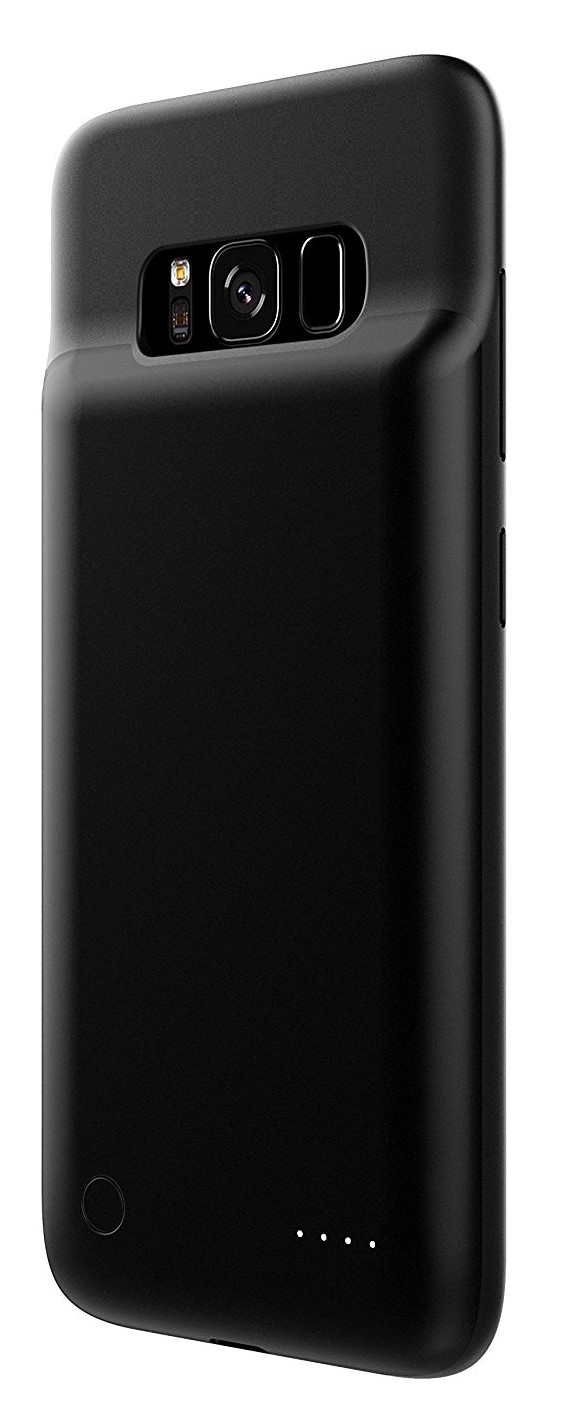
Pantheon’s charging case stands apart from the rest of the pack for a couple of reasons, most notably its slim design. It’s clear to see where the battery is housed in this case, with the battery bump jutting out just below the camera on the back. Overall, Pantheon has managed to maintain a slim profile while packing in 4000mAh of the battery power.
Better yet, this case is compatible with Samsung’s Fast Charge features, so you’ll be able to charge your Galaxy S8 faster. You’ll find the battery check button on the back with 4 LEDs to indicate how much charge is left. Pantheon offers a money-back guarantee for the first 12 months if you run into any issues.
See at Amazon
Vproof Power Bank Cover (5000mAh)

So if you were to search for battery cases for the Galaxy S8 on Amazon, you’ll find a seemingly endless list of lesser-known brands offering essentially the exact same battery case for about the same price. So instead of linking to five nearly identical products, we’ll point to one of the better reviewed of the bunch from Vproof.
Offering a 5000mAh battery, this case is as beefy as you would expect it to be but in exchange it offers an extra 24+ hours of talk time (if you still do that) or up to 13 hours of added web browsing. It’s designed with ample cutouts around the speakers, charging ports and headphone jack so the bulkiness won’t interfere with your phone’s functionality (aside from the NFC issue mentioned above). There’s protection for your phone around the corners, but the case sits pretty flush with your phone’s screen so you’ll want to be aware of that going in.
Vproof also offers a 12-month hassle-free warranty as well which is always nice.
See at Amazon
Planning to pick up a battery case?
Do any of these battery cases stand out to you? Which one are you getting? Let us know in the comments!
Will my iPhone or iPad get iOS 11?
Apple unveiled iOS 11 during its WWDC 17 keynote on Monday 5 June and revealed several key new features coming to iPad and iPhone. But will your phone or tablet be able to run the new software when it arrives around September time?
Well, if you have an iPhone from the iPhone 5s and above you should be okay. In addition, you should be fine if you own an iPad mini 2 or iPad Air and above. Even the sixth-generation iPod touch gets a bit of iOS 11 love.
- Apple iPad Pro 10.5 preview: A new iPad brings new tricks
Here’s a list of all the supported devices, just so you can double check whether your iPhone, iPad or iPod touch will be able to run iOS 11 when it arrives in the “Fall”:
iPhone
- iPhone 7
- iPhone 7 Plus
- iPhone 6s
- iPhone 6s Plus
- iPhone 6
- iPhone 6s Plus
- iPhone SE
- iPhone 5s
The three rumoured iPhones – the iPhone 7s, iPhone 7s Plus and iPhone 8 tipped for a September announcement – will no doubt ship with iOS 11 pre-installed.
iPad
- 12.9-inch iPad Pro (second-gen)
- 10.5-inch iPad Pro
- 12.9-inch iPad Pro (first-gen)
- 9.7-inch iPad Pro
- iPad (fifth-gen)
- iPad Air 2
- iPad Air
- iPad mini 4
- iPad mini 3
- iPad mini 2
iPod touch
- iPod touch (sixth-gen)
iOS 11 will add several key new features, including split screen multitasking for iPad, new Maps and navigation talents and an all-new App Store design. You can read about the new features here: Apple iOS 11: 11 new features coming to your iPhone and iPad
A developers beta build of the software is now available, while a public beta version of iOS 11 will be made available in late June.
Apple iPad Pro 10.5 vs iPad Pro 9.7: Should you upgrade?
Apple unveiled several new devices at WWDC 2017, one of which was an update in specs to the iPad Pro 12.9, while another was a slightly redesigned and upgraded successor to the iPad Pro 9.7.
We have put the specs of the new, larger, iPad Pro 10.5 against the older iPad Pro 9.7 to see what the differences are and what changes have been made. Should you upgrade your 9.7-inch iPad Pro to the 10.5-incher? And which should you opt for if you’re choosing between the two smaller iPad Pros?
- Apple iPad Pro 10.5 preview
- Apple iPad Pro 9.7 review
Apple iPad Pro 10.5 vs iPad Pro 9.7: Design
- iPad Pro 10.5 is larger and heavier
- Both come in additional rose gold colour
- Both offer four-speaker setup and Smart Connector
The Apple iPad Pro 9.7 measures 240 x 169.6 x 6.1mm and weighs 437g, which is identical to the older iPad Air 2. It comes in four colours, features Touch ID within the Home button and it is a thin, light, well-proportioned and well-balanced tablet.
The Apple iPad Pro 10.5 on the other hand, is a little larger and heavier than its predecessor, measuring 250.6 x 174.1 x 6.1mm and weighing 469g. It too comes in four colours, comprising space grey, silver, gold and rose gold, and it features the same design as the model it replaces only with a 40 per cent reduction in the bezels around the display.
Both the Apple iPad Pro 9.7 and the iPad Pro 10.5 feature a four-speaker setup, a Smart Connector on the rear and compatibility with the Apple Pencil and Apple Smart Keyboard for working on the move.
- Apple iPad Pro 10.5 vs iPad Pro 12.9: What’s the difference?
Apple iPad Pro 10.5 vs iPad Pro 9.7: Display
- iPad Pro 10.5 has 20 per cent larger display
- Brighter, less reflective display on iPad Pro 10.5
- Support for higher refresh rate of 120Hz on iPad Pro 10.5
The Apple iPad Pro 9.7 and iPad Pro 10.5 both sit in the middle of the iPad line up when it comes to size. The older model has a 9.7-inch display, while the newer model opts for a 20 per cent larger 10.5-inch display, meaning both are sandwiched between the 7.9-inch screen of the iPad mini and the 12.9-inch size of the larger iPad Pro.
The iPad Pro 9.7 has a resolution of 2048 x 1536 pixels, while the iPad Pro 10.5 has a 2224 x 1668 resolution, resulting in the same pixel densities of 264ppi. The two devices also offer Apple’s True Tone display, adapting the colour and intensity of the display to match the light in your environment, while a fingerprint-resistant and anti-reflective coating is also present and a P3 wide colour gamut.
The iPad Pro 10.5 doesn’t stop there though. Apple claims it offers the most advanced display in the world and it is said to be brighter, less reflective and more responsive thanks to the support for the faster 120Hz refresh rate. This means that while the iPad Pro 9.7’s screen is excellent, the 10.5-inch device is likely to offer noticeable improvements, especially in terms of a smoother and more fluid experience from both your finger and Apple Pencil.
- What is Apple’s True Tone display?
Apple iPad Pro 10.5 vs iPad Pro 9.7: Camera
- iPad Pro 10.5 has improved front and rear cameras
- Flash available for front and rear on both
- Both capable of recording 4K video from rear
The iPad Pro 9.7 offers the same cameras as the iPhone 6S. There is a 12-megapixel rear sensor capable of 4K video recording and a 5-megapixel front-facing snapper. A True Tone flash is also present on the rear and a Retina flash is featured on the front, again like the iPhone 6S.
The iPad Pro 10.5 on the other hand, features the same cameras as the iPhone 7, meaning improvements over the iPad Pro 9.7. A 12-megapixel rear sensor is still present but advancements have been made. It offers a Quad-LED True Tone flash, f/1.8 aperture and optical image stabilisation to name but a few.
On the front, the resolution sees a bump to 7-megapixels on the iPad Pro 10.5, though like the iPad Pro 9.7, a Retina Flash is present again. It is capable of 1080p video recording however, while the iPad Pro 9.7 tops out at 720p.
Regardless of what you think about using an iPad as a camera, the iPad Pro 9.7 is a great performer so the iPad Pro 10.5 is likely to be even better.
Apple iPad Pro 10.5 vs iPad Pro 9.7: Hardware
- More storage options with iPad Pro 10.5
- Faster processor with iPad Pro 10.5
- Same sound capabilities on both models
The Apple iPad Pro 9.7 features the A9X chip with M9 motion coprocessor under its hood and when it launched, it was as quick and fast as tablets came. Storage options comprise 32GB, 128GB and 256GB, for both Wi-Fi and Cellular and there is no microSD support, as is the case with all Apple devices.
The iPad Pro 10.5 upgrades these specs though, as you would expect. It comes with the A10X Fusion processor with M10 motion coprocessor and Apple has said it will be 30 per cent faster in performance and 40 per cent faster in graphics than its smaller predecessor. Storage options are also different, with the 10.5-incher offered in 64GB, 256GB and 512GB variants.
Both the iPad Pro 9.7 and the iPad Pro 10.5 are said to offer up to 10 hours of battery life and they both offer that four-speaker setup meaning a more rounded sound compared to the slightly tinny audio produced by the much older Air 2.
Apple iPad Pro 10.5 vs iPad Pro 9.7: Software
- Both run iOS 10
Both the Apple iPad Pro 9.7 and the iPad Pro 10.5 run on iOS 10, meaning the software experience will be almost identical across these two models until iOS 11 launches in September.
We are presuming all the new and exciting features announced for iOS 11, such as Drag and Drop, easier split-screen functionality and the Files system will come to both the iPad Pro 9.7 and the iPad Pro 10.5. It’s worth mentioning that because of the faster refresh rate on the new model, the experience is likely to be smoother and quicker than on the older model however so bear that in mind.
- Apple iOS 10 tips and tricks
Apple iPad Pro 10.5 vs iPad Pro 9.7: Price
- iPad Pro 9.7 is around £80 cheaper
- iPad Pro 9.7 discontinued from Apple
The Apple iPad Pro 9.7 had a starting price of £549 stretching to £849 for the highest storage capacity and Wi-Fi and Cellular when it first arrived. It has since been discontinued from Apple, though it can still be bought on other sites, such as Amazon, for around £535.
The iPad Pro 10.5 is more expensive, starting at £619 and hitting £1019 for the largest storage capacity and Wi-Fi and Cellular. Remember that the highest storage capacity is double that of the iPad Pro 9.7, hence the huge price difference at the top end.
Apple iPad Pro 10.5 vs iPad Pro 9.7: Conclusion
The iPad Pro 9.7-inch is an excellent tablet that brought a number of improvements over the Air 2 including sound, Apple Pencil compatibility, camera and processing power. When it launched, it was Apple’s highest-specced tablet yet, though it did come at a price and now the same applies to the iPad Pro 10.5.
The succeeding model offers a bump in hardware, a bump in storage, but more perhaps more importantly, big advancements in display. The bezels have been reduced resulting in a larger screen size without too much of an increase in footprint, while the support for the faster refresh rate should make a big difference to overall experience.
If you’re in the market for an iPad and you’re choosing between these two devices, the 10.5-inch model is a no brainer. If you’re considering upgrading from the iPad Pro 9.7 to the iPad Pro 10.5, you are likely to notice a difference in both performance and display experience but whether you think they warrant the splurge is your call to make.
- Apple iPad Pro 9.7 review: The tablet to beat all tablets
- Apple iPad Pro 10.5 preview: A new iPad brings new tricks
- Which iPad is best for you?
Cozmo preview: The Anki robot friend comes to the UK at last
Anki’s Cozmo robot has been a double-edged sword for UK families. It offers some exciting features, has huge buzz online and is peerless in terms of its interactions. However, it is only available in the US.
Until today, that is. Anki just announced the date and price for Cozmo coming this side of the pond. It launches in Argos and on the anki.com site on 15th September for £199.99.
Not only that, but there will be a special edition “Liquid Metal” version of Cozmo available at the same time. We had an exclusive hands on with Cozmo’s new metal brother in Anki’s London offices.
The first thing that strikes you about the new Cozmo is how shiny and metallic it is. In place of (what we’ll now call) Classic Cozmo’s matt white decals are a range of metallic finishes that accentuate Comzo’s curves.
In grey Cozmo looks more like he means business. The press release calls it Liquid Metal but this Cozmo looks like he takes a lead from gun metal. Either way, in the hand or on the table the new Cozmo looks great.
While this is only a refresh of the exterior, spending more time with Cozmo reveals that he has come a long way since the launch version we tried at the end of last year. Not only have updates improved performance and smoothed the user experience but he has some new tricks now too.
Pick Cozmo up and shake him and he’ll get dizzy. If Cozmo spots a dog or a cat he will react to what he sees. He will also play hide and seek with you if you catch him in the right mood. He can even catch hiccups.
These enhancements comes via the free Cozmo app. Here you can see how you are progressing with Cozmo, download updates and spend sparks to unlock new abilities.
This is all great, but there’s no hiding the fact that Cozmo isn’t cheap. At £199.99 in the UK, families are going to have to be really convinced this is more than a passing fad to invest.
Here, Cozmo has some very neat tricks up his sleeve. Chief among these is the SDK. This not only let’s you programme him with special moves but you can access his full robotic repertoire. Unlike 80s tech toys like Big Track or the BBC Turtle, Cozmo is controlled through his personality and emotions.
This takes children into proper A.I. and robotics territory. Much like the Kinect SDK granted access to high end visual recognition, Cozmo’s SDK does the same with robotics. In fact, universities are already buying Cozmo’s be the box load to use as part of their robotics curriculum.
First Impressions
If you have children keen to get into programming, Cozmo is a great way to get them started. In a quick test we were shown, Cozmo was hooked up to the Twitter API and could tweet pictures from his camera. All this was achieved with just a few lines of code in less than an hour.
Whether you go for the Classic white Cozmo or his new grey brother, this is one tech toy that will keep the family not just entertained but educated as well.
Hyperloop One reveals its plans for connecting Europe
One of Hyperloop One’s smartest ideas was the Global Challenge, a “competition” where cities could pitch for the honor of hosting a Hyperloop. From the suggestions, the company then produced a shortlist of routes that were both technically feasible and economically viable. We’ve already seen the candidate cities in the US, and now the company has revealed its thinking for Hyperloop corridors across Europe.
There are nine potential routes being considered on that side of the Atlantic, running from a 90km hop to connect Estonia and Finland, through to a 1,991km pan-German route. The UK, which has a love / hate relationship with rail travel, gets three proposed routes: one to connect its Northern Cities, one to connect the North and South, and one to connect Scotland with Wales.
| Corsica – Sardinia | 451km |
| Estonia – Finland | 90km |
| Germany | 1,991km |
| Poland | 415km |
| Spain – Morocco | 629km |
| The Netherlands | 428km |
| UK North-South Connector | 666km |
| UK Northern Arc | 545km |
| UK Scotland – Wales | 1,060km |
Several of the routes, including ones between Estonia and Finland, Corsica to Sardinia and Spain – Morocco, all cross bodies of water. The company has, on several occasions, spoke of its love of tunnels, and plans to use them extensively in construction. Although rather than using tunneling machines, which can be slow, submerged box tunnels or archimedes bridges may be cheaper and faster to build.
But that’s probably a series of engineering challenges that go above and beyond simply getting the Hyperloop itself working. Perhaps the company would be wise to ensure its system works on more conventional journeys before getting into the tunnel business. Perhaps, by that point, Elon Musk will have some expertise that’s relevant to everyone’s interests.

