


Since 2008, Apple’s App Store has paid more than $70 billion to developers
Why it matters to you
As Apple pays out more for developers, you could see higher-quality apps being released in the App Store.

Apple announced today that its global developer community has earned over $70 billion since the App Store’s launch in 2008. This brings Apple to a new record-breaking number after app developers earned over $50 billion last July.
The high earnings don’t come as a shock — after all, Apple saw $240 million in App Store sales on the first day of 2017 alone.
Developers create apps — from lighthearted games to personal finance tools — for consumers in 155 different countries for the App Store. Within the last year alone, Apple said app downloads have grown over 70 percent. The growth is attributed to the release of hits like Pokémon Go, another record-breaking milestone for the App Store.
Aside from the gaming category, lifestyle along with health and fitness apps have also grown more than 70 percent, with photo and video at 90 percent growth.
“People everywhere love apps and our customers are downloading them in record numbers,” said Philip Schiller, Apple’s senior vice president of Worldwide Marketing, in a statement.
The App Store’s active paid subscriptions also attribute to the rise in numbers since subscription business models became available to developers. With customers binge-watching on streaming services such as Netflix and Hulu, active paid subscriptions are up 58 percent.
Apple is consistently hitting higher numbers with the App Store — it has since been trying to improve the overall experience for developers to keep the influx of apps rolling in. While the 70/30 revenue model still remains, with developers receiving 70 percent and Apple taking 30 percent of App Store sales, the submission process has been simplified. Developers now, for example, only have to submit one screenshot for their app across all devices such as the iPhone and the iPad rather than multiple.
As Apple’s WWDC 2017 quickly approaches, there could be more announcements on whether or not more changes will be made for developers to help the App Store continue to exceed its current metrics.
How to find your lost Android, iPhone, or other smartphone
Update: We included Google’s new Find My Device service and a word on Factory Reset Protection. By Carlos Vega.
So you’ve lost your phone. We’ve all been there. It was just in your pocket a minute ago — and now it’s gone, lost to the phone fairies, forgotten between the seats of your couch, or misplaced somewhere during your busy day. Maybe it’s just in your other coat, or maybe it’s already in the hands of someone who found it on the sidewalk. Either way, all you want to do is get it back.
Thankfully, there are plenty of ways to get a hold of your missing phone. If it’s a smartphone (or even a tablet) running iOS, Android, or even Windows Phone, chances are good it already has the software needed to hunt it down — or there’s an app you can install to track your phone. Here’s our guide on how to find your phone or a similar device, including the old-fashioned way if you still own an aging flip phone.
Smartphones
If your lost phone happens to be a smartphone, all three of the major smartphone platform providers (Apple, Google, and Microsoft) now include phone retrieval technology in their smartphones, just in case you ever end up losing it but forget to install a “find my phone” app. Usually, the way these apps work is through the account associated with your device. For Android devices this is your Google account, for iPhones this is your iCloud account, and for Windows Phones this is your Microsoft account. All three allow you to remotely lock and wipe your phone, make it ring, and set up special messages to alert whoever finds it.
Of course, these features are only as good as your phone’s battery. If your smartphone dies, it’s about as easy to find as your wallet or anything else you might misplace.
We also recommend caution when communicating with anyone who has found your smartphone. Be careful to avoid giving away any personal information, such as your home address, until you know you’re dealing with someone you can trust. Stick with sending phone numbers or email addresses to communicate how the good Samaritan can return your phone. Here’s how each of the three operating systems work.
How to find a lost Android phone
Android not only offers Google’s proprietary service for finding and managing your device remotely, but also a number of third-party apps designed for finding your smartphone. The easiest to use is Find My Device, which is built directly into your Android smartphone through Google Play Services — it can also be used in a browser or downloaded from the Google Play Store. Most devices running Android 2.3 or later should be able to use this feature. Using the feature is as easy as searching “Where is my phone” in Google, which will prompt the service to start looking for your smartphone. We’ve previously written about Find My Device and its ability to call you, set up a new password, and make your phone ring from afar, along with the variety of other functions it uses for notification purposes. While you can configure Find My Device ahead of time, the service should be available in the event you lose or misplace your phone. It will use Wi-Fi or GPS to help you hunt down your device.
To verify your Android smartphone has the Find My Device feature turned on, go to Settings > Google > Security and make sure Remotely locate this device and Allow remote lock and erase are turned on in the Android Device Manager section.
If you can’t find your smartphone, you can always wipe it to prevent sensitive information from getting into the wrong hands. Your device will need an internet connection, however, and enough juice to communicate with you. In Android 5.0 Lollipop, Google also introduced Factory Reset Protection (FRP). It’s designed to prevent would-be thieves from being able to steal your phone, wipe it, and then use it or sell it. If you factory reset a phone with FRP enabled and try to set it up as a new device, you’ll be prompted to enter the user name and password for the last Google account that was registered on the device, and if you can’t, the phone will remain locked.
There are also third-party apps that you can install to help you find your phone. Cerberus Anti-theft is a great app that can be installed remotely, allowing you to obtain more information regarding the whereabouts of your phone. It provides a number of additional features, such as more granular control on how you track your device, screenshots of what your device is doing, photos from the camera to possibly catch the would-be thief, and other, more detailed notifications that Find My Device doesn’t offer. If your device is rooted, there are even more features available to prevent someone from resetting or turning off your device until you can recover it.
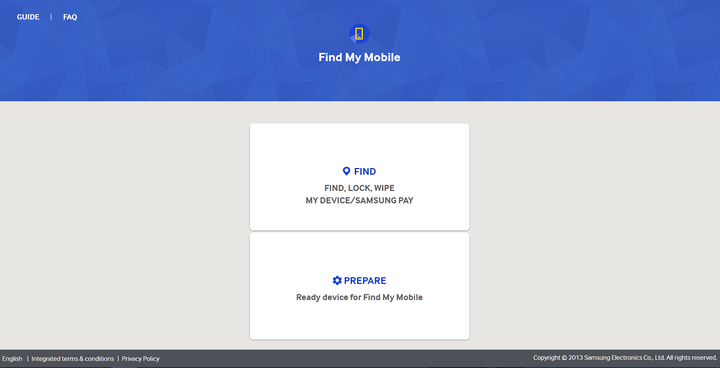
Another option for select Samsung smartphones is the Find My Mobile service. It can be used to locate a missing phone, lock it down, or wipe it completely. You’ll need a Samsung account, though, and the Remote Controls options enabled on your phone. To check and see if Find My Mobile is available for your smartphone, go to Settings > Security. If you see Find My Mobile in the menu, you can use the service; enable the Remote Controls options via Settings > Security > Find My Mobile > Remote controls.

How to find your lost Android, iPhone, or other smartphone
Update: We included Google’s new Find My Device service and a word on Factory Reset Protection. By Carlos Vega.
So you’ve lost your phone. We’ve all been there. It was just in your pocket a minute ago — and now it’s gone, lost to the phone fairies, forgotten between the seats of your couch, or misplaced somewhere during your busy day. Maybe it’s just in your other coat, or maybe it’s already in the hands of someone who found it on the sidewalk. Either way, all you want to do is get it back.
Thankfully, there are plenty of ways to get a hold of your missing phone. If it’s a smartphone (or even a tablet) running iOS, Android, or even Windows Phone, chances are good it already has the software needed to hunt it down — or there’s an app you can install to track your phone. Here’s our guide on how to find your phone or a similar device, including the old-fashioned way if you still own an aging flip phone.
Smartphones
If your lost phone happens to be a smartphone, all three of the major smartphone platform providers (Apple, Google, and Microsoft) now include phone retrieval technology in their smartphones, just in case you ever end up losing it but forget to install a “find my phone” app. Usually, the way these apps work is through the account associated with your device. For Android devices this is your Google account, for iPhones this is your iCloud account, and for Windows Phones this is your Microsoft account. All three allow you to remotely lock and wipe your phone, make it ring, and set up special messages to alert whoever finds it.
Of course, these features are only as good as your phone’s battery. If your smartphone dies, it’s about as easy to find as your wallet or anything else you might misplace.
We also recommend caution when communicating with anyone who has found your smartphone. Be careful to avoid giving away any personal information, such as your home address, until you know you’re dealing with someone you can trust. Stick with sending phone numbers or email addresses to communicate how the good Samaritan can return your phone. Here’s how each of the three operating systems work.
How to find a lost Android phone
Android not only offers Google’s proprietary service for finding and managing your device remotely, but also a number of third-party apps designed for finding your smartphone. The easiest to use is Find My Device, which is built directly into your Android smartphone through Google Play Services — it can also be used in a browser or downloaded from the Google Play Store. Most devices running Android 2.3 or later should be able to use this feature. Using the feature is as easy as searching “Where is my phone” in Google, which will prompt the service to start looking for your smartphone. We’ve previously written about Find My Device and its ability to call you, set up a new password, and make your phone ring from afar, along with the variety of other functions it uses for notification purposes. While you can configure Find My Device ahead of time, the service should be available in the event you lose or misplace your phone. It will use Wi-Fi or GPS to help you hunt down your device.
To verify your Android smartphone has the Find My Device feature turned on, go to Settings > Google > Security and make sure Remotely locate this device and Allow remote lock and erase are turned on in the Android Device Manager section.
If you can’t find your smartphone, you can always wipe it to prevent sensitive information from getting into the wrong hands. Your device will need an internet connection, however, and enough juice to communicate with you. In Android 5.0 Lollipop, Google also introduced Factory Reset Protection (FRP). It’s designed to prevent would-be thieves from being able to steal your phone, wipe it, and then use it or sell it. If you factory reset a phone with FRP enabled and try to set it up as a new device, you’ll be prompted to enter the user name and password for the last Google account that was registered on the device, and if you can’t, the phone will remain locked.
There are also third-party apps that you can install to help you find your phone. Cerberus Anti-theft is a great app that can be installed remotely, allowing you to obtain more information regarding the whereabouts of your phone. It provides a number of additional features, such as more granular control on how you track your device, screenshots of what your device is doing, photos from the camera to possibly catch the would-be thief, and other, more detailed notifications that Find My Device doesn’t offer. If your device is rooted, there are even more features available to prevent someone from resetting or turning off your device until you can recover it.
Another option for select Samsung smartphones is the Find My Mobile service. It can be used to locate a missing phone, lock it down, or wipe it completely. You’ll need a Samsung account, though, and the Remote Controls options enabled on your phone. To check and see if Find My Mobile is available for your smartphone, go to Settings > Security. If you see Find My Mobile in the menu, you can use the service; enable the Remote Controls options via Settings > Security > Find My Mobile > Remote controls.
Your next notebook will run for days thanks to Qualcomm — not Intel
For the longest time — as in, forever – most notebooks have run some version of Windows on an Intel processor. A few machines have run with AMD inside rather than Intel, and MacBooks have run MacOS instead of Windows. But in general, your choices were limited to machines that ran hot, didn’t last all that long away from a plug, took a long time to boot up, and were connected to the internet on a part-time basis.
Smartphones have changed all that, however. They turn on instantly, last a long time on a single battery charge, and are always connected. And it’s the mobile ARM processor that’s made all that possible. Intel has chased the smartphone ever since, introducing features like Intel Rapid Start in a partially successful quest to make PCs feel as responsive as smartphones.
Now, there’s a version of Windows 10 that runs on ARM processors, specifically on Qualcomm’s latest system-on-chip (SoC), the Snapdragon 835. The combination promises significantly longer battery life on machines that start up as fast as smartphones, and packs in a LTE modem that keeps it connected to the internet on a full-time basis.
That’s a nice vision of the future of truly mobile computing, but is it real? We’ve been down this road before, with Microsoft’s Windows RT platform that showed up on its original Surface tablet, and was then promptly put to death. What makes us think that this time around, Microsoft’s initiative will make a difference in how we use our Windows 10 machines?
Yes, things really are different this time around
If we want to predict if Windows 10 on ARM has a chance of being successful, then we need to discuss exactly why Windows RT was such a failure. There are two main reasons why, and we’re already seeing Microsoft, Qualcomm, and PC makers doing some things differently that could make instant-on, long-lasting, and always-connected Windows 10 notebooks a reality.
Windows 10 on ARM will run all 16 million of the Windows desktop applications that people have come to know and love.
First, Windows 10 on ARM will run all 16 million of the Windows desktop applications that people have come to know and love. The full version of Office 2016, Adobe’s professional suite of creativity applications, and niche software like AutoCAD will run on the platform this time around. Windows RT was limited to only the paltry apps in the Windows Store, in addition to a ported version of Office 2013. That wasn’t good enough.
Second, it’s not just Microsoft working on the project. Qualcomm is fully on board, and at least three influential PC makers are already slated to make ARM-based Windows 10 systems. This forms an interesting alliance. Qualcomm wants to sell more processors, and the PC makers want to sell budget computers without paying for expensive Intel hardware. Everyone involved has reason to make Windows 10 work on ARM, and work well.
What will ARM-based notebooks look like?
This time around, ARM-based Windows 10 machines will offer real benefits that you’re going to love, without major drawbacks.
To begin with, ARM processors use less power than Intel processors, which makes sense. They were designed for smartphones, which are all about squeezing as much battery life as possible out of much smaller battery capacities, while still providing decent performance. According to Qualcomm, ARM-based Windows 10 notebooks will provide up to 50 percent more battery life, and will last for 20 hours on average. It will turn the PC into a device you don’t need charged every day.
Next, devices running ARM processors are instant-on. People demand that their smartphones wake up instantly — push the button, and they’re ready to go. The iPad and Android tablets have done this forever. Intel, Microsoft, and PC builders have made some headway into building notebooks that respond quickly, but their efforts are most visible in high-end hardware. People who buy budget computers – in other words, most people – must wait.

Better still, ARM-based systems use very little power when in standby mode. Again, Windows notebooks have improved here, but smartphones remain the king of standby power. While a good notebook can last a week or more in standby, the Google Pixel smartphone can last 19 days. This, too, will help make ARM-powered Windows PCs last for days on a charge.
Finally, ARM-based systems run cooler. That will enable exclusively fanless designs that run completely silently and won’t require unsightly venting and won’t subject their users to blasts of hot air. Some Intel-based systems are fanless as well, but they typically need to throttle performance more aggressively to keep things cool, and most such devices are expensive.
ARM-based notebooks running Windows 10 will be thin and sleek, and they won’t weigh much. Many of them will be 2-in-1 devices, and allow the screen to be used independently as a tablet. In other words, they’ll probably look a lot like iPads, Android tablets, and Chromebooks – but they’ll run Windows 10, instead.
What about the performance penalty?
Windows 10 on ARM won’t match the performance of Intel’s latest Core processors, or AMD’s Ryzen. Aside from the fact those companies build more powerful, more power-hungry chips than Qualcomm, the way software is written is also an issue.
Windows is coded for the x86 instruction set, which is what Intel and AMD chips understand. To make Windows 10 work on ARM hardware, Microsoft has written a comprehensive emulation layer. That is certainly going to result in a performance penalty. The size of the penalty is the biggest unanswered question. No one’s going to want a Qualcomm-powered Windows notebook if it feels slow.
The real impact will be on low-end Windows notebooks, where ARM’s advantages are more important.
Also, some of the largest and most complex applications, like Adobe’s professional video editing application, Premiere, and AutoCAD, which is used for rendering 3D images, already demand high-end, quad-core Intel Core i7 processors, lots of RAM, and fast GPUs for any kind of performance. Today’s ARM processors aren’t yet capable of matching Intel’s performance running these kinds of apps.
However, high-end PCs aren’t the target. The real impact will be on low-end Windows notebooks, where ARM’s advantages are more important. What this means for you is that you will finally be able to use all your favorite Windows productivity, media consumption, and communications apps on a machine that can really last a full day on a single charge. You won’t have to wait for it to boot up, and you won’t have to worry about finding a Wi-Fi connection.
Windows 10 on ARM is a big deal
So, does Windows 10 on ARM matter? Yes, we think it does. It solves some problems that have plagued Windows notebooks for a long time, and it will likely do so for hundreds less than similar Intel-powered notebooks.
In the meantime, you’ll still have those powerful Intel-based Windows 10 machines to choose from if you need to do 3D rendering in AutoCAD or play the latest games in VR and at high frame rates.

Companies like Nvidia will keep working on initiatives like GeForce GTX with Max-Q Design to bring increasing levels of gaming performance to even more mobile devices. Gaming may in fact be the greatest weakness of Windows 10 on ARM, as it’s doubtful that games will run well on Qualcomm hardware, particularly after translated through emulation.
For most people, though, Windows 10 on ARM will make for a better, more affordable experience, and it leaves plenty of room for Intel and others at the higher ends of the market. Choice is a good thing, and that’s what makes this new platform so important.
While the timing of production notebooks powered by Qualcomm is still an open question, they’ll seriously disrupt the PC arena whenever they arrive. Unlike Windows RT, which could only run the more limited Windows Store applications, Windows 10 on ARM looks like the real deal.
Courts in Florida grapple over Fifth Amendment as it applies to passcodes
Why it matters to you
Can your smartphone passcode and the secrets it protects be used against you in a court of law? A pair of recent rulings did little to answer that question.
Generally speaking, locking your smartphone with a PIN or passphrase is a good idea. It hides your social media, budgeting, and finance app data from prying friends and family, and it is a simple safeguard against theft.
But in some United States courts, passwords can be a liability.
The Miami Herald reports that Christopher Wheeler, a child abuse suspect, has been held in criminal contempt and sentenced to 180 days in jail for refusing to reveal his iPhone’s passcode. That is despite the man’s claims that the password he provided, which did not work, was correct.
“I swear, under oath, I’ve given them the password,” Wheeler told a Florida circuit court judge on Thursday.
Wheeler, who was arrested on accusations he hit and scratched his young daughter, was charged with child abuse in March. Detectives believe that his phone contains pictures of the child’s injury, which could help prove the case.
A judge authorized a search warrant for Wheeler’s iPhone, but police were unable to get in. Wheeler will be allowed to post bond pending an appeal, or set free if he provides a working passcode.
In a separate Florida case, a judge declined to hold in contempt a man accused of extortion for refusing to unlock his iPhone.

maxkabakov/123RF
The man, Wesley Victor, had been ordered by a judge to hand over the passcode of phones suspected of containing incriminating text messages. He and his girlfriend, reality TV star Hencha Voigt, are accused of threatening to release sex videos stolen from social media icon YesJulz in exchange for $18,000.
Victor claimed he could not recall the password, and Miami-Dade Circuit Judge Charles Johnson ruled that there was no way to prove that he remembered his PIN code more than 10 months after his initial arrest.
According to the Fifth Amendment, defendants have the right not to say anything that could be used against them. But recent court decisions have muddied the waters.
Both Wheeler and Victor were ordered to give up their passwords under a Florida precedent that let police force a voyeur to give up his passcode. The state Court of Appeals ruled that defendants can sometimes be compelled to give up passcodes based on the “foregone conclusion” doctrine of the Fifth Amendment, which states that if police can compel a defendant can testify if they’re reasonably certain of what they’re going to find.
The Florida Supreme Court has yet to take up the issue.
Some legal experts argue that smartphones should be exempt from the doctrine, arguing that passcode demands lead to “fishing expeditions” — phone searches without clear objectives. Short of final world from the Supreme Court, though, little seems poised to change.
“[It’s] the law in Florida at this point,” Johnson said, citing the Court of Appeals judgement in the case of Voigt.
Experience WebVR on your VR headset by default, starting with Firefox 55
Why it matters to you
Exploring the virtual reality confines of the web will be a bit easier with Firefox 55.
Virtual reality continues to make headway, showing up on more systems and providing an ever-increasing number of experiences. Companies keep working to bring VR into more of our computing environments and one such effort is making our web browsers work with VR.
WebVR is a growing standard that aims to let everyone experience VR with any chosen browser. All WebVR requires is a VR headset and a compatible browser, and Mozilla announced on Thursday that WebVR support will be the default in Firefox 55.
Firefox 55 is scheduled for release on August 8 and it will have WebVR turned on automatically for users with Oculus Rift or HTC Vive VR systems. This will let those users experience all of the new web-based VR experiences that developers around the world are creating.
WebVR will work with WebGL to create powerful and efficient 3D experiences, allowing Firefox to become another VR publishing platform. To help developers create WebVR experiences, Mozilla is also inviting them to check one of the available frameworks, such as A-Frame and React VR.
Mozilla first introduced WebVR support in Firefox eight months ago and, in the meantime, created a workshop and developed cross-vendor collaboration. These should help the company push WebVR forward. Into the future, Mozilla will continue to work with other companies in ensuring compliance with the WebVR standard, to make sure that users get a consistent experience no matter which browser they use.
Some WebVR examples you can check out are adding 360-degree video to a site, exploring a museum, walking through Cambodian temples, and more. Developers can head over the A-Frame school to begin learning how to leverage WebVR to create cross-platform VR experiences. The bottom line is this: If you made an investment in a VR system, then there should be no shortage of experiences to make it worthwhile.
You’re not hallucinating. That dolphin really is using a huge underwater tablet
Why it matters to you
Just how smart are dolphins? Smart enough to use a giant underwater tablet that scientists developed to test the aquatic mammals’ intelligence.
The question “Are dolphins smart enough to use a smartphone?” sounds like part of a conversation two stoned first-year marine biology students might have in a dorm room at 1 in the morning. In fact, it’s the basis for a major collaborative project between researchers at Rockefeller University and Hunter College, who are working side by side with the National Aquarium in Baltimore.
They’ve developed a giant, 8-foot-long underwater touchscreen device for dolphins that allows the aquatic mammals to make choices regarding a number of activities by selecting options using a keyboard and some dolphin-friendly apps. The setup even comes with underwater speakers, microphones, and cameras.
“The ‘why’ is always first,” Marcelo Magnasco, professor and head of the Laboratory of Integrative Neuroscience at Rockefeller University, told Digital Trends. “We want to probe the minds of dolphins. Since dolphins are highly ‘trainable,’ we want to avoid any means of interacting with them that involves explicitly training them. We don’t want to put words — or fish — in their mouths. [Instead] we want a set of tools that are engaging enough that dolphins participate in the activities because they want to.”
It’s still early stages in the research, but the team has already developed a Whack-a-Mole-style app, which one of the younger dolphins has shown interest and expertise in playing.
“Many years ago, I did a study which provided dolphins with a much simpler underwater keyboard that provided them with some choice and control, and the dolphins demonstrated self-organized learning,” said Diana Reiss, a dolphin cognition and communication research scientist and professor in the department of psychology at Hunter College. “They began to incorporate the novel whistles they acquired into their own repertoire, and appeared to use them in behaviorally appropriate contexts — like whistling a novel signal they acquired for ‘ball’ when interacting or approaching a ball. But the keyboard and technology available then was primitive, and we can go much further now with the new touchpad in terms of interactively tracking the dolphins’ behavior visually and acoustically.”
Over time, the researchers hope to discover more information regarding dolphin whistle communication, and their semantic content. “We’ve just begun what will be many years of research,” Magnasco said.
We’ll watch this space with interest. But we’re saying right now that if the test subjects wind up using their giant iPad for nothing more than constantly playing Bejeweled, we’re reevaluating those stories about dolphin intelligence!
Qualcomm Quick Charge 4 Plus is 15 percent faster, 30 percent more efficient
Why it matters to you
If your next smartphone has Qualcomm Quick Charge 4.0 Plus, you can expect it to charge much more quickly and efficiently than the competition.
Qualcomm, the engineering powerhouse behind the Snapdragon chips in billions of devices, makes more than just processors. Take its Quick Charge platform, for example — it juices phones and tablets much quicker than a standard charger. Qualcomm announced Quick Charge’s newest iteration — Quick Charge 4 — six months ago, and on Thursday took the wraps off a revision — Quick Charge 4 Plus — with a few extras.
“When Quick Charge 4 was announced, it promised to bring even faster charging than its predecessor, allowing a device to go from empty to 50 percent in just 15 minutes,” Qualcomm said. “But we haven’t been resting on our accomplishments since then. In fact, since that time we developed new enhancements and created a special program for those device and accessory manufacturers who design their products with these new features included.”
A few of those Quick Charge 4 Plus features include Dual Charge, which leverages a second power-management chip to divide the current charge and reduce charge time. Qualcomm’s intelligent thermal balancing moves current via the coolest path, and new advanced safety features monitor the case and connector temperature levels simultaneously to prevent overheating, short-circuiting, and damage to the USB-C connector.

It is a step up from Quick Charge 4.0, which featured a 20 percent improvement in charging speed and a 30 percent improvement in energy efficiency. That translated to about five hours of extra battery in five minutes of charging, or 50 percent of a battery’s capacity in 15 minutes.
Qualcomm said the rapid charging tech is fully compatible with both the USB Type-C and USB Power delivery specifications ratified by the USB-Implementers Forum, the industry body that standardizes USB technologies. Previous implementations of Qualcomm’s tech ran afoul of spec by manipulating voltage to reduce recharge times and employing workarounds to set charging speed. Qualcomm said that Quick Charge 4.0, in contrast, is fully compliant.
Devices that incorporate all three features of Quick Charge 4.0 Plus have the potential to charge up to 15 percent faster, or 30 percent more efficiently when compared to Quick Charge 4. The Nubia Z17, a Snapdragon 835 phone with a 3,200mAh battery, will be the first smartphone to include it.
Qualcomm’s Quick Charge 4 Plus technology isn’t limited to phones. Accessories such as wall adapters, car chargers, portable battery banks, and USB hubs can qualify for Quick Charge 4, and they’ll be backward compatible with Quick Charge 3.0 and Quick Charge 2.0.
“With Quick Charge 4+, Qualcomm Technologies once again shows our leadership in charging technology,” Qualcomm said. “Quick Charge 4+ continues the fast charging innovation, providing design flexibility for manufacturers, and a diverse ecosystem of certified products for consumers.”
Qualcomm Quick Charge 4 Plus is 15 percent faster, 30 percent more efficient
Why it matters to you
If your next smartphone has Qualcomm Quick Charge 4.0 Plus, you can expect it to charge much more quickly and efficiently than the competition.
Qualcomm, the engineering powerhouse behind the Snapdragon chips in billions of devices, makes more than just processors. Take its Quick Charge platform, for example — it juices phones and tablets much quicker than a standard charger. Qualcomm announced Quick Charge’s newest iteration — Quick Charge 4 — six months ago, and on Thursday took the wraps off a revision — Quick Charge 4 Plus — with a few extras.
“When Quick Charge 4 was announced, it promised to bring even faster charging than its predecessor, allowing a device to go from empty to 50 percent in just 15 minutes,” Qualcomm said. “But we haven’t been resting on our accomplishments since then. In fact, since that time we developed new enhancements and created a special program for those device and accessory manufacturers who design their products with these new features included.”
A few of those Quick Charge 4 Plus features include Dual Charge, which leverages a second power-management chip to divide the current charge and reduce charge time. Qualcomm’s intelligent thermal balancing moves current via the coolest path, and new advanced safety features monitor the case and connector temperature levels simultaneously to prevent overheating, short-circuiting, and damage to the USB-C connector.

It is a step up from Quick Charge 4.0, which featured a 20 percent improvement in charging speed and a 30 percent improvement in energy efficiency. That translated to about five hours of extra battery in five minutes of charging, or 50 percent of a battery’s capacity in 15 minutes.
Qualcomm said the rapid charging tech is fully compatible with both the USB Type-C and USB Power delivery specifications ratified by the USB-Implementers Forum, the industry body that standardizes USB technologies. Previous implementations of Qualcomm’s tech ran afoul of spec by manipulating voltage to reduce recharge times and employing workarounds to set charging speed. Qualcomm said that Quick Charge 4.0, in contrast, is fully compliant.
Devices that incorporate all three features of Quick Charge 4.0 Plus have the potential to charge up to 15 percent faster, or 30 percent more efficiently when compared to Quick Charge 4. The Nubia Z17, a Snapdragon 835 phone with a 3,200mAh battery, will be the first smartphone to include it.
Qualcomm’s Quick Charge 4 Plus technology isn’t limited to phones. Accessories such as wall adapters, car chargers, portable battery banks, and USB hubs can qualify for Quick Charge 4, and they’ll be backward compatible with Quick Charge 3.0 and Quick Charge 2.0.
“With Quick Charge 4+, Qualcomm Technologies once again shows our leadership in charging technology,” Qualcomm said. “Quick Charge 4+ continues the fast charging innovation, providing design flexibility for manufacturers, and a diverse ecosystem of certified products for consumers.”
Best Android Tablets of 2017
Update, May 2017: The Samsung Galaxy Tab S3 remains the best Android tablet you can buy right now.
- Best overall
- Best on a budget
- Best for enthusiasts
Best overall
Samsung Galaxy Tab S3

See at Best Buy
The two most important things to have in a full-size Android tablet are a great screen and software that uses every inch of it. That’s what makes the Samsung Galaxy Tab S3 the best Android tablet.
An amazing screen from Samsung is no surprise. The 9.7-inch 2048×1536 Super AMOLED on the Tab S3 carries on the tradition, and it’s simply the best display on a tablet. Android and Samsung mesh to provide a great software experience and the new S Pen and its 4096-level pressure sensitivity makes taking notes or producing digital artwork a breeze.
Bottom line: The Galaxy Tab S3 is the best tablet Samsung has ever made, as well as the best Android Tablet you can buy.
One more thing: The internal hardware is also top notch and will keep up with everything you would want to do.
Why the Galaxy Tab S3 is the best
It’s exactly what we want from a tablet.
In 2017, a tablet is no longer just a bigger version of a phone. They have to pull extra duty and be a media player, a book reader, a web browser, and a work tool without any complaints or complications. Some tablets are great at some of these things, but the Tabs S3 is great at all of them.
Working, whether it’s on a presentation for your boss or a paper for your professor, is very different on a tablet than it is on a more conventional computer. Apps are designed to be more simple and easy to use with a touch screen, while omitting many of the battery-hungry features you would find in their desktop counterparts. The biggest hurdle has always been finding a way to organize the things you’re doing on your screen while you’re doing them. Samsung has had this figured out for a while and with the debut of native features with Android Nougat, you’ll be able to run your apps just how you like to run them.
The S Pen takes things over the top. A tablet with a wonderful screen, a custom-fit keyboard and cover, and powerful hardware is made better with a fully capable digital pen. The excellent Wacom integration makes taking notes or using photoshop a fluid and enjoyable experience that you won’t find with any other tablet on the market.
Budget power
NVIDIA Shield Tablet K1

See at Amazon
The Shield Tablet is a gaming powerhouse featuring NVIDIA’s cutting-edge 2.2 GHz Tegra K1 processor, but the Shield Tablet’s software is what really sets it apart. Built right into the notification tray, for example, is the ability to stream what’s on your screen to Twitch. Remote access software combined with the optional hardware gamepad allow you to play games that are running on your PC.
Alternatively, the GeForce Now cloud gaming service lets you do the same with games and computers hosted by NVIDIA. You really can have a great AAA gaming experience on a tablet.
Bottom line: Even for those that aren’t hardcore gamers, the NVIDIA Shield Tablet is a powerful tablet and offers excellent value for the price.
One more thing: The Shield Tablet has also been updated to Android 7.0, so you’ll have some of the same software benefits as our top pick!
For the enthusiast
Pixel C

See at Google
We liked the Pixel C when it first arrived at the end of 2015. We thought the design was striking and the NVIDIA Tegra X1 processor handled everything well. We really loved the crisp display and thought the package represented the Pixel brand very well. It reached its full potential with Android 7.0 and the native multi-window display feature.
Enthusiasts will love the Pixel C because the hardware is open and unlockable. Third-party Android builds or Linux builds or something nobody has thought of yet can be flashed to the tablet with no worries and the path back is as easy as downloading the software from Google.
Bottom line: The community will continue support for the Pixel C long after it officially ends because of its open hardware and bootloader.
One more thing: Because this is a Google hardware product, the Pixel C will be among the first Android tablets to be updated with new features.
Conclusion
Like most things, there is no one Android tablet that’s right for everyone. That’s one of the big reasons Google was able to break Apple’s dominance in mobile computing — it offers a choice for just about everyone. Whether you want the stylish look and thin profile of the Samsung Galaxy Tab S3 or the high-powered yet low-priced NVIDIA Shield K1 — or anything in between — someone is making a tablet that will work for you.
Our pick with the Galaxy Tab S3 is tough to beat. Great construction, an awesome screen, and Samsung’s unique S Pen experience put it at the top of our list.
Best overall
Samsung Galaxy Tab S3
See at Best Buy
The two most important things to have in a full-size Android tablet are a great screen and software that uses every inch of it. That’s what makes the Samsung Galaxy Tab S3 the best Android tablet.
An amazing screen from Samsung is no surprise. The 9.7-inch 2048×1536 Super AMOLED on the Tab S3 carrys on the tradition, and it’s simply the best display on a tablet. Android and Samsung mesh to provide a great software experience and the new S Pen and its 4096-level pressure sensitivity makes taking notes or producing digital artwork a breeze.
Bottom line: The Galaxy Tab S3 is the best tablet Samsung has ever made, as well as the best Android Tablet you can buy.
One more thing: The internal hardware is also top notch and will keep up with everything you would want to do.
 AIVAnet