


Gear VR Protip: How to watch Netflix laying down

Watching Netflix laying down is an easy process.
Netflix on Gear VR allows you to binge away, all within the confines of your Gear VR headset. Many folx enjoy catching their shows just before bed, and you don’t have to change up that pattern just because you are watching your favorites while in VR. Being able to lay out in bed, and go ahead and watch away might seem like a pipe dream, but it’s entirely doable, and shouldn’t take more than just a minute or two.
Read more at VRHeads.com..cta .large
Google Assistant inside Allo can now converse in French and Spanish
Google Assistant is learning new languages.


Just a week after adding a few new features, Google’s smart chat app Allo is also picking up new language skills. You can now talk to Google Assistant inside Allo in French and Spanish, and it will respond in that language along with all of the smarts you expect from the Assistant.
French and Spanish join English, Hindi, Portuguese and Japanese as supported languages in Allo, which is a nice group that continues to grow. While users are surely taking advantage of many of Allo’s features in more languages than that, now having the big selling point of the Google Assistant in the chats is a big improvement.
The updated languages are rolling out now, and may take a few days to arrive for everyone in the Allo app.
How to make a backup of any app installed on your phone

Finding old versions of apps can be tough, but backing them up yourself isn’t!
While most of the time we’re all looking for the best ways to back up the data from our apps and games, it can be pretty handy to back up the app itself, too.
Unless an app is pulled for security reasons, when you download an app from Google Play you’ll always be able to download the latest version from the store. It doesn’t matter if the app is abandoned or even if the developer made it unavailable; you always have access to the newest version if you ever downloaded it. For example, if you installed the original Flappy Bird game from Google play, you’ll find it under the library tab in the My Apps section of Google Play, but a search doesn’t show it and if an account that never installed it follows the link, they’re told it’s unavailable.

If an app is always going to be available through Google Play, you might be asking why anyone would bother to back it up. You’ll find the answer in just about every Google Play review — because Android runs on so many different devices and has so many versions in use, it’s not uncommon to see something about the “latest update not working”. It’s frustrating to update an app you use all the time and have the update not work as well as the previous version, then not being able to downgrade it because the Play Store only has the latest version. If you have the previous version of the app on your SD card (for example) it’s easy to go back. That sure beats not being able to use the app while you wait for another update.
The best part of it all is that this is a lot easier than you think. You don’t need any cables or to type anything at all. You just need a file manager app.
Not every file manager app will have the app backup feature, but several very popular ones do. I use the ambiguously named File Manager (it used to be Clean File Manager if you remember trying it) and I know ES File Explorer and Astro File Manager also have the feature, so if your favorite doesn’t, you can just pick one of these to check it out.
More: Best file manager app for Android
If you dig into the tools part of the settings, you’ll see an entry for backing up apps. Different file managers may use different terminology, but they all work the same way. You tap the listing, then pick an app from the file window that appears, then tell the file manager app where to copy a backup. This works for any app you downloaded and installed yourself, no matter where you downloaded it from.
It might not work for pre-installed apps. The short version is that it depends on which folder the app was installed to and how it was installed. If you see the app in the list the file manager gives you, you can make a copy of it.
Reinstalling an old app
This is super easy, too. Just open the file manager (any file manager works for this part) and tap the icon of the app. The installer window will open and ask you to enable unknown sources if you haven’t already so you’ll need to do that, then it installs it as normal. Sometimes you’ll need to uninstall the existing version first (which will erase your data for the app, so look into backing it up) then install from your SD card or phone storage.
A few things to remember when you do this:
- Don’t expect support from the developers. You need to be using the latest version if you need the devs to help you.
- Some online features can be broken. An update may have changed the way the app talks to the cloud so things might not work the way they used to.
- You’re not supposed to be sharing it. Even free apps are usually licensed to you in a way that says you’re not allowed to share it with anyone else.
Hopefully, you won;t have to do this very often, but when you need to it’s great that it’s so easy!
Questions?
Let us know in the comments below or ask Jerry in the forums!
For or against, this is the one net neutrality video you should probably watch
Three years ago, John Oliver of Last Week Tonight made an impassioned plea for people to throw their support behind a movement that would eventually enshrine U.S. net neutrality rules under so-called Title II protections, which would classify internet service providers as public utilities and regulate them accordingly.
Now that Ajit Pai, the new chairman of the FCC, has made clear his own intention to repeal Title II and roll back many of the protections afforded consumers from ISP malfeasance, Last Week Tonight is back with another entreaty to get people involved in the process all over again, while educating everyone on what net neutrality is, and isn’t.
If nothing else, the 20-minute video provides a fairly well-rounded recap of what’s happened in the world of internet regulation over the last three years, and why now more than ever it’s important to keep the open internet actually open.
Oliver has also purchased the domain gofccyourself.com that forwards to a form you can fill out to show your support for Title II.
After the rallying cry, the FCC claimed that its had been subject to a distributed denial of service (DDoS) attack, which brought down the website and prevented people from submitting their thoughts about the open internet proposal.
Samsung renews deal to use McAfee security software on Galaxy S8, smart TVs and PCs
Yes, people do still care about security apps on their phones.
Samsung and McAfee have announced that they have extended their collaboration to put McAfee’s security software across a wide range of Samsung’s devices, including the new Galaxy S8 and S8+, smart TVs and PCs. The deal brings the McAfee LiveSafe application to Samsung PCs with a 60-day free trial, McAfee Security anti-malware software on Samsung TVs and the McAfee VirusScan app on the Galaxy S8 and S8+.
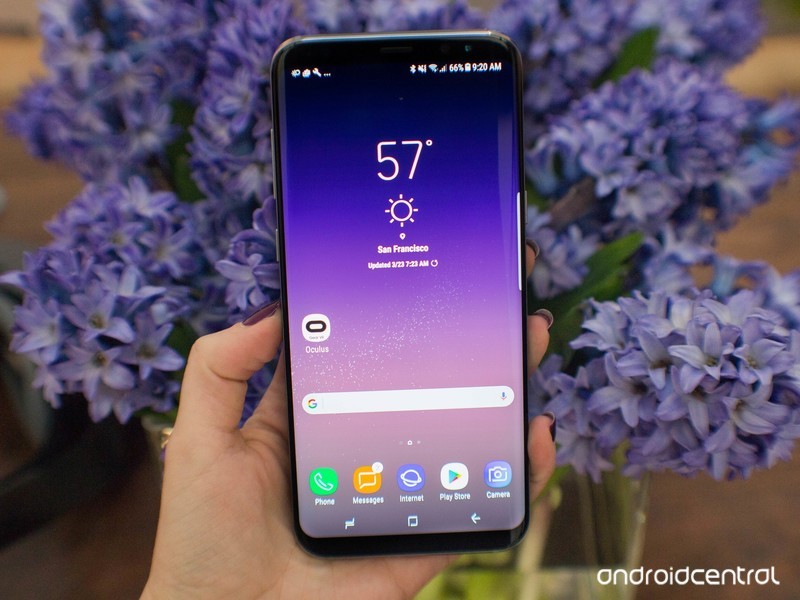
It’s easy to point to these apps and say that you don’t really need anti-malware protection on your Galaxy S8 or especially on your smart TV, but for some there’s still a deep worry about security on mobile devices and the inclusion of this type of app can be a selling point. At a minimum, many will see the McAfee VirusScan app on their phone as a “belt and suspenders” situation where you might as well have it just in case because they don’t trust their ability to keep their phone safe.
Readers of Android Central will know that the best way to keep your phone safe is to only download apps from the Google Play Store, only install apps that you trust and don’t download files from websites that you didn’t go looking for. Together with Google’s built-in malware detection in Android you should be plenty safe if you think about what you do on your phone.
But regardless of whether you feel you’re being safe or not, you’re going to get McAfee VirusScan on your Galaxy S8.
Samsung Galaxy S8 and S8+
- Galaxy S8 and S8+ review!
- Galaxy S8 and S8+ specs
- Everything you need to know about the Galaxy S8’s cameras
- Get to know Samsung Bixby
- Join our Galaxy S8 forums
Verizon
AT&T
T-Mobile
Sprint
Press release:
McAfee Extends Partnership with Samsung to Safeguard Samsung PCs, Galaxy S8 Smartphones and Smart TVs Worldwide
New Collaborations Allow Consumers to Connect with Confidence using McAfee Protection
Santa Clara, Calif. – May 9, 2017 – McAfee today announced further collaboration with Samsung to provide pre-installed security software protection on Samsung Smart TVs, Samsung PCs, and the Samsung Galaxy S8 smartphone line worldwide. With this collaboration, McAfee is delivering on its vision to provide protection for connected devices.
“Protecting every connected device in your home is absolutely essential today,” said John Giamatteo, executive vice president, consumer business group, McAfee. “That’s because if one device is attacked, it puts your entire home network at risk. While that level of protection might sound like a lot of effort, McAfee makes sure that it’s easy. We believe there is power in working with partners like Samsung to build world-class security into devices like smart TVs, PCs, and smartphones so that these devices are protected right out of the box.”
According to a recent McAfee survey, nearly 44 per cent of consumers are worried about their personal financial information being stolen while 38 per cent are worried about identity theft. These consumer fears underscore the need for robust cross-device security. McAfee protection addresses growing concerns like these across multiple devices.
“As the connected world of devices continues to expand into consumers’ homes, Samsung users can feel comfortable knowing that their devices are protected with the latest security solutions,” said Henry Lee, VP of Mobile Security Technologies, and the Mobile Communications Business at Samsung Electronics. “We understand the importance of building security in devices from the start and are proud to offer solutions that provide convenience while keeping our customers safe.”
Availability of McAfee LiveSafe on Samsung PCs
The McAfee LiveSafe cross-device security product is currently shipping worldwide as pre-installed software on all Samsung PCs produced, starting in 2017. It will be available in other countries gradually. Samsung PC users can enjoy a 60-day free trial and after the trial period, will receive a special offer.
Availability of McAfee Security for Samsung TVs
McAfee Security for TV anti-malware technology is currently available in the U.S and Korea for Samsung Smart TV customers and additional countries will be added throughout the first half of 2017. No additional purchase is necessary.
Availability of McAfee VirusScan on Galaxy S8
McAfee VirusScan anti-malware technology will ship as a pre-installed solution for Samsung Galaxy S8 starting in April of 2017, and is available in Samsung Galaxy S7, S7 edge, S6, S6 edge and Galaxy Note 5**. No additional purchase is necessary.
Magic Leap settles sex discrimination lawsuit with former employee
Magic Leap created some serious buzz back in 2014 when Google, Qualcomm and other tech giants lined up to heavily invest in its mysterious mixed reality headset. Unfortunately, the tech may not live up to its own hype. Making things even worse, the company was sued for sex discrimination this past February by former employee Tannen Campbell, who, ironically, was hired to help create a more female-friendly product. While no specific terms have been revealed, the company filed a notice of settlement May 8th; the suit should be officially dismissed by June 2nd.
Campbell initially sued Magic Leap for “hostile environment sex discrimination and retaliation,” citing anecdotes that paint Magic Leap as having a misogynist culture. The lawsuit says that the company does not value women for their technical skills, while it also stereotypes them as homemakers, wives and sex objects. The suit alleges that Magic Leap’s management are aware of the gender-based hostility within the company. It describes a 50-slide presentation Tannen created about gender diversity in the workplace that was cancelled six times, a “Female Brain Trust Initiative” that was only window dressing and an app that was to be bundled with the company’s headset in which the sole female character was only shown groveling at a male protagonist’s feet.
It’s not just reports of sexism, either. The lawsuit also claims that when IT support lead Euen Thompson was asked a question during a tutorial session for new hires, he reportedly said that women always have trouble with computers. He then followed up with, “In IT We have a saying; stay away from the Three Os: Orientals, Old People and Ovaries.”
While a settlement isn’t a legal admission of guilt, it’s hard to see Magic Leap as doing anything here except damage control around a typically privileged tech startup culture. Creating an augmented reality system to rival that of even Microsoft’s Hololens is likely tough, and an environment that only supports its white male employees won’t make it any easier.
Via: The Verge
Source: Court Documents, Scribd
Apple Music’s new documentary shows Harry Styles getting a haircut
Boy-band heartthrob Harry Styles is the latest artist to get the Apple Music documentary treatment — Harry Styles: Behind the Album lands on May 15th exclusively on Apple Music. The doc follows Styles, a former member of the British pop group One Direction, as he puts together his debut solo album (and gets at least one major haircut).
Moving forward. @Harry_Styles: #BehindTheAlbum
May 15.
Only on Apple Music. pic.twitter.com/7WC7j6233k— Apple Music (@AppleMusic) May 9, 2017
Apple Music has been steadily expanding its slate of exclusive, original content, especially when it comes to video. The app is getting a redesign this year that puts video front-and-center, and Apple has already secured shows like Carpool Karaoke and Planet of the Apps, plus documentaries about Cash Money Records and Bad Boy Records. Apple Music’s lineup of exclusive programming includes Taylor Swift’s 1989 tour, a series about new artists called Up Next, and documentaries about Clive Davis and the iconic 808 drum machine.
The Harry Styles announcement represents a mainstream, coordinated approach to Apple Music’s video content and marketing: The company tweeted about the documentary as Styles performed on Today for the first time ever as a solo artist. Fans apparently camped out for days to see his debut.
Apple is probably hoping they’ll do the same, at least virtually, for his Apple Music documentary.
Source: @AppleMusic
Apple Maps Transit Directions Now Available in Singapore
As Apple prepares to open its first retail store in Singapore, the company has also expanded Apple Maps feature availability in the city-state, enabling transit directions.
Transit information may still be in the process of rolling out to all customers, but according to the iOS section of Apple’s Singaporean website, and a feature availability list, transit directions are live in Singapore.
Apple Maps now allows users to get directions for the Mass Rapid Transit (MRT) system that spans across most of Singapore using the “Transport” tab within the app. Each MRT line is color-coded for simple navigation.
Along with transit directions, Apple Maps in Singapore is also gaining points of interest, a feature designed to highlight notable buildings, parks, and other landmarks.
Transit directions have been available since iOS 9 launched in 2015, and while availability was limited at launch, Apple has been slowly expanding transit information to various countries around the world.
More than 10 countries now have access to transit directions, and the feature has also expanded to many locations in the United States. A full list of where Transit directions are available can be found on Apple’s website.
Tags: Apple Maps, transit, Singapore
Discuss this article in our forums
A hunger for chicken nuggets broke Twitter’s retweet record
When Ellen DeGeneres’ Oscars selfie (read: Samsung promo) broke the record for the most retweeted Twitter post ever, it raised a question: what, if anything could top that? Breaded chicken can, apparently. Twitter has confirmed that high school student Carter Wilkerson’s tweet asking for help scoring free Wendy’s chicken nuggets has broken the retweet record, racking up over 3.43 million shares as we write this. As with the Oscars photo, though, he didn’t achieve this through purely grassroots support — a corporate pile-on helped him reach the milestone.
Just two days after Wilkerson’s initial plea (which came after Wendy’s told him he’d need 18 million retweets for a year of free nuggets), companies and celebrities started sharing the tweet. Apple, Google, Microsoft, T-Mobile and United were among the first, while stars like Breaking Bad’s Aaron Paul, CNN’s Jake Tapper and electronic musician Zedd also got in on the action. Wilkerson even appeared on DeGeneres’ show, creating a surreal moment where the record holder was giving a boost to her challenger. In other words, you still need corporate backing and a lot of mainstream media exposure to get that many retweets under your belt.
Not that there’s much reason to complain about the end result. Although Wilkerson is clearly short of his 18 million goal, Wendy’s is both giving him his free “nuggs” and, more importantly, donating $100,000 to the Dave Thomas Foundation for Adoption. Has this call for retweets been spun into a publicity stunt? Absolutely — but it’s hard to object too loudly when a half-serious tweet leads to a charity contribution.
.@carterjwm is now the most retweeted tweet of all-time. That’s good for the nuggets, and $100k to @DTFA. Consider it done. #nuggsforcarter pic.twitter.com/k6uhsJiP4E
— Wendy’s (@Wendys) May 9, 2017
HELP ME PLEASE. A MAN NEEDS HIS NUGGS pic.twitter.com/4SrfHmEMo3
— Carter Wilkerson (@carterjwm) April 6, 2017
Source: Twitter Blog, Carter Wilkerson (Twitter), Wendy’s (Twitter)
Amazon’s Echo family can now make calls and send messages
One of the most notable new features introduced alongside Amazon’s new Echo Show is the ability to make calls with Alexa, something that’s been rumored for a while now. And the good news is that this feature isn’t limited to just the Echo Show. When it rolls out later today (via an update to the Alexa iOS and Android apps), you’ll be able to use all existing Echo hardware to place voice calls, video calls and send messages. You’ll obviously need an Echo Show for video calling, but the support for voice calling and messaging is pretty robust.
If you have an Echo, Echo Dot or Echo Show, you can initiate calls (including video calls with the Show) and send messages to anyone else in your address book who has turned on Alexa calling. The recipients of your calls don’t even need to have an Echo — they just need to have the Alexa app installed on their phone and turn on the feature. If you have an Echo and receive a call, Alexa will alert you and a green ring will be displayed on your device. From there, you can tell Alexa to pick up the call or ignore it. As for messages, you’ll hear a chime when one arrives and the green light ring will appear on your device; you can then ask Alexa to play the message back to you.
The last calling feature is something Amazon’s calling “Drop In” — this makes the Echo Show basically work as a video intercom that you can activate at any time, whether the devices are in different places in your house or totally different locations entirely. Obviously, you’ll only want to enable Drop In with contacts you trust and don’t mind popping up on your Echo Show at any time.
With this, Amazon has basically turned the entire Echo ecosystem into a pretty robust speakerphone. Ironic considering how badly the Fire Phone flopped, but this feature makes perfect sense for the Echo hardware. When Google first unveiled Home almost one year ago, the company said you’d eventually be able to send text messages with your voice — but that feature still hasn’t materialized.
The feature is even more timely given that Microsoft and Harmon Kardon just announced a Cortana-powered voice speaker yesterday. The Invoke won’t arrive until the fall, however, which gives Amazon plenty of time to press its advantage in the growing voice-activated speaker market.
Update, 12:05PM ET: We’ve confirmed with Amazon that calling will be enabled today through an update to the iOS and Android Alexa apps.
Source: Amazon
 AIVAnet