


MIT creates 3D-printed robot inspired by the goldbug beetle
Someday, robots, planes, cars and other machines might have sensors all over their bodies, turning them into a huge touchscreen that recognizes your input. For that to happen, though, scientists have to develop sensor-rich robotic skin that can react to its environment, is affordable and is easy to make. That’s what a group of MIT researchers want to achieve and the reason why they developed a device inspired by the golden tortoise beetle, an insect that changes color when poked.
To create their contraption, the team turned to 3D printing. They used a custom 3D printer called MultiFab to make the T-shaped gizmo, which has a small circular part that changes color when the T’s crossbars stretch. MultiFab did everything, from printing the device’s thin, sensor-laden plastic skin to depositing and curing the liquid that serves as its semiconductor.
Project chief Subramanian Sundaram said:
“In nature, networks of sensors and interconnects are called sensorimotor pathways. We were trying to see whether we could replicate sensorimotor pathways inside a 3-D-printed object. So we considered the simplest organism we could find.”
The researchers discuss the whole creation process and its technical details on MIT’s website if you want to know more. Take note that this is just an initial demonstration of the idea, though, and they plan to continue developing their technology. Bottom line is that printable electronic skins could lead not just to touchscreen everything. They could also give rise to devices with unusual structures, since they could be folded into complex 3D shapes. Some printable robots may even be able to assemble themselves, making them even more autonomous than anything we’ve ever seen before.
Source: MIT
Xbox One launch title ‘Ryse’ is free to play next month
April is fast approaching, which means another handful of games will be free to play on Xbox One through the Games with Gold program. During the course of next month, four titles — two for Xbox One and two for Xbox 360 — will be free to download. The most notable of the group, Ryse: Son of Rome, will be available for players to download during the entire month of April. If you’ll recall, Ryse was an Xbox One launch title back in 2013.
If zombies are more your thing, you can download The Walking Dead: Season Two for free between April 16th and May 15th on Xbox One. For Xbox 360 users, Darksiders and Assassin’s Creed: Revelations will both be available to grab at no cost. Darksiders will be available April 1-15 while you can get this particular installment of Assassin’s Creed from April 16-30. Of course, thanks to backwards compatibility on the Xbox One, those two 360 titles will be available to current-gen console owners as well.
Source: Major Nelson, Xbox Wire
New 9.7-Inch iPad and Red iPhone 7 and 7 Plus Now Available to Order
Apple has just begun accepting orders for the new 9.7-inch iPad and (PRODUCT)RED iPhone 7 and 7 Plus on its online store in the United States and dozens of other countries and regions around the world. (PRODUCT)RED iPhones are also available for in-store pickup at select Apple Stores starting today.
The new 9.7-inch iPad is equipped with a faster Apple A9 chip and brighter Retina display compared to the iPad Air 2, which has been discontinued. It is also somewhat thicker and heavier than the iPad Air 2 since it lacks a fully laminated display with anti-reflective coating in order to keep costs down.
The tablet’s tech specs are otherwise identical to the iPad Air 2, including a display resolution of 2,048‑by‑1,536 at 264 PPI, 8-megapixel rear iSight camera, 1.2-megapixel front FaceTime camera, two speakers, Lightning connector, 3.5mm headphone jack, Touch ID with Apple Pay, and Bluetooth 4.2.
The new 9.7-inch iPad starts at $329 for a 32GB model with Wi-Fi, making it the cheapest new tablet that Apple has ever sold. Apple also offers a 128GB model with Wi-Fi for $429, while cellular-capable 32GB and 128GB models are available for $459 and $559 respectively in Silver, Gold, and Space Gray.
The tablet is now available to order on Apple’s website in the United States, Australia, Canada, China, France, Germany, Hong Kong, Italy, Japan, Netherlands, Spain, Sweden, Switzerland, and the United Kingdom. Denmark, India, Mexico, Norway, Russia, Turkey, and other countries will follow in April.
Apple said the new 9.7-inch iPad will be available to purchase in Apple Retail Stores, through select carriers, and at Apple Authorized Resellers starting next week in the United States and more than 20 other countries. The first online orders are estimated for delivery between March 31 and April 5.

Apple’s special edition (PRODUCT)RED iPhone 7 and iPhone 7 Plus models are also now available to order on Apple’s website in 128GB and 256GB storage capacities for $749/$849 and $869/$969 respectively. Initial orders are slated for delivery on Tuesday, March 28 in the United States.
(PRODUCT)RED iPhones have a vibrant red finish complemented by a silver Apple logo and white front bezels. Apple said the models are in recognition of more than 10 years of partnership between Apple and (RED), which gives customers a way to contribute to the Global Fund in support of HIV/AIDS programs in Africa.
If you want a red iPhone today, try your local Apple Store. It’s in stock right now around the world. pic.twitter.com/hJt8o5sXF7
— Joe Rossignol (@rsgnl) March 24, 2017
The special edition iPhone joins the current (PRODUCT)RED lineup, which is available to purchase year-round, including the full iPod line of products, Beats Solo3 Wireless On-Ear Headphones, Beats Pill+ Portable Speaker, the iPhone 7 Smart Battery Case, and a range of accessories for iPhone, iPad, and Apple Watch.
The new (PRODUCT)RED iPhones are available as early as today at many Apple Retail Stores, authorized resellers, and carrier stores. Apple said the new models will begin shipping to customers by the end of March in the United States and more than 40 countries and regions around the world.
Related Roundups: iPad, iPhone 7
Tags: (PRODUCT)RED, Apple retail
Buyer’s Guide: 9.7″ iPad Pro (Caution)
Discuss this article in our forums
YouTube automates sound effect captions with AI
YouTube has used algorithms to automatically caption speech for eight years now in an effort to make its billions of videos more accessible for the deaf and hard of hearing. While the feature was pretty rough at first, it has significantly improved it over time, getting “closer and closer to human transcription error rates,” Google said in its developers blog. Since speech is just one part of the audio picture, though, YouTube has launched automatic sound effect captioning for the first time.
For now, the system can just show three classes of sounds: Applause, music and laughter. “These were among the most frequent manually captioned sounds, and they can add meaningful context for viewers who are deaf and hard of hearing,” the company wrote.
As with the automatic captions, Google uses machine learning to pick out sounds and display them as text. It developed a “deep neural network (DNN)” model for ambient sound, and trained it with “thousands of hours of videos” to get the best results. The toughest part, it wrote in a technical blog, was separating and displaying events that tend to occur at the same, like laughter and applause.
You can see what that looks like in the clip from America’s Got Talent below. The sound effects are merged with the automatic speech recognition and “shown as part of the standard automatic captions,” much as you’d see in a close-captioned TV show.
YouTube’s team said its aware that the captions are “simplistic,” but adding features will be easier as it has built a solid back end foundation. In the future, it’ll introduce common sounds like barking, knocking or ringing. That will pose new challenges, as the AI will need to figure out if a ringing sound is coming from an alarm, phone or doorbell, for example.
It’ll be worth the effort, though, as Google says that two-thirds of participants in a study found that sound effect captions enhance the video experience. And while it’s bound to make mistakes no matter how good it gets (even humans are only about 95 percent accurate), users think that the odd error won’t detract from the benefits.
Via: MIT Technology Review
Source: YouTube Developers Blog, Google Research
Airspace rights still unclear after drone lawsuit dismissed
Where exactly you’re entitled to fly your drone in the US without fear of it being blasted out of the sky continues to be a legal gray area, after a judge dismissed another case brought against self-proclaimed “drone slayer” William Merideth. The Kentucky resident was originally charged in 2015 for firing a gun within city limits, shooting down David Boggs’ Phantom 3 quadcopter in the process. The charge was dropped after a judge ruled the drone invaded Merideth’s privacy since it was over his land, but Boggs subsequently sued Merideth in federal court seeking damages of $1,500 to cover the cost of the Phantom 3. This case was recently dismissed on something of a technicality, though, leaving a key legal question around airspace rights unanswered.
Senior US District Judge Thomas B. Russell was effectively asked to rule whether the flight over Merideth’s property constituted aerial trespassing — a decision that could’ve arguably set a precedent for any similar cases in the future. Though airspace is under federal regulation, Russell reasoned that as the foundation of the case was a claim for damages, it was a matter for Kentucky state law. Also in his formal opinion, the judge questions whether the case raises any “significant federal issues,” and notes that although the courts can enforce regulations, they don’t set them. Thus, Russell granted Merideth’s motion to dismiss.
It didn’t help that the Federal Aviation Administration (FAA) “has not sought to enforce any such regulations in this case,” despite having previously stated that shooting down a drone is a federal crime. The FAA requires all drones over 0.55 pounds to be registered and has set various rules regarding flight: Pilots must keep their drones within a direct line of sight, stay under 3000 feet, and stay clear of crowds, sports venues and airports, among other things. There is also a separate set for commercial operators and new rules are being considered all the time, but the FAA has yet to weigh in on this relatively important case and what rights pilots and landowners have within federal airspace.
As Ars Technica notes, the case most relevant to these questions dates all the way back to 1946, when the US Supreme Court ruled that a farmer could claim property rights up to a height of 83 feet. The situation was altogether different, though. The farm in question was located close to an Air Force runway and its commercial chicken operation had to be abandoned as the roar of military aircraft passing over was causing chickens to die of fright. As aircraft were often breaching the minimum safe altitude of 83 feet above the property, they were considered to be trespassing on private land.
Via: Ars Technica
Source: US District Court at Louisville
HTC U Ultra review

Research Center:
HTC U Ultra
HTC is a company that’s in an almost constant state of transition. It was one of the first to release a smartphone machined from a single block of aluminum, and a firm at the forefront of audio engineering with its BoomSound sound system. But times change.
The U Ultra, the premium option in HTC’s new “U” lineup, eschews metal for glass. It packs a secondary screen that’s meant to put timely reminders front and center, and a Siri-like AI-powered assistant that tries to predict what you need before you need it. It’s minimalist, curved, and gorgeous from every angle.
The U Ultra is HTC’s latest attempt to claw its way back among the world’s top smartphone makers. In that respect, the U Ultra isn’t a bad first attempt. Unfortunately, it’s not a particularly good one, either.
It’s soooo shiny
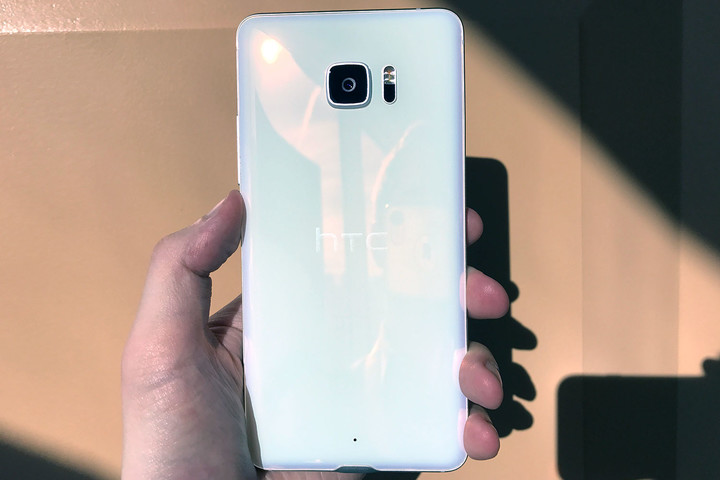
The HTC U Ultra is the shiniest smartphone I’ve ever held.
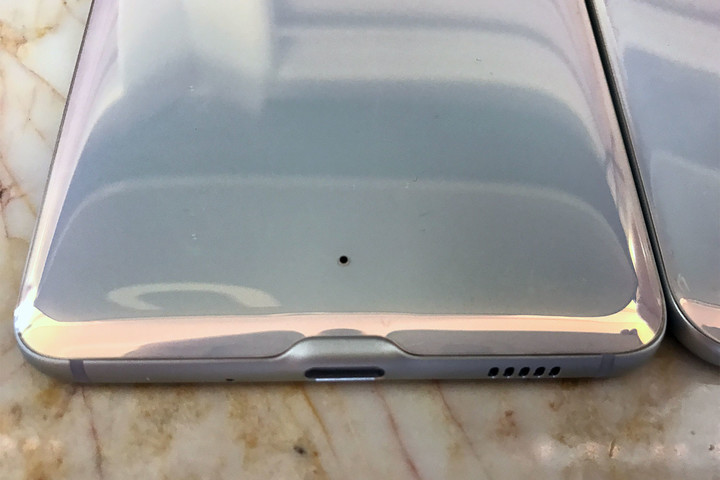
That’s no exaggeration. The glass back cover, which is specially machined from what the company calls a “liquid surface” and contorted into a 3D contoured shape, shimmers in the light. It’s reflective enough to use as a mirror.
 Kyle Wiggers/Digital Trends
 Kyle Wiggers/Digital Trends
 Kyle Wiggers/Digital Trends
 Kyle Wiggers/Digital Trends
So naturally, it’s a fingerprint magnet. Glass being glass, oily stains show up as obviously on the U Ultra’s body as Cabernet on a white dress, and it’s dreadfully hard to clean. In our experience, the best a vigorous shirt-polishing and pants-rubbing can do is smear the fingerprints together, which typically ends up making matters worse.
The HTC U Ultra crushes day-to-day tasks with ease.
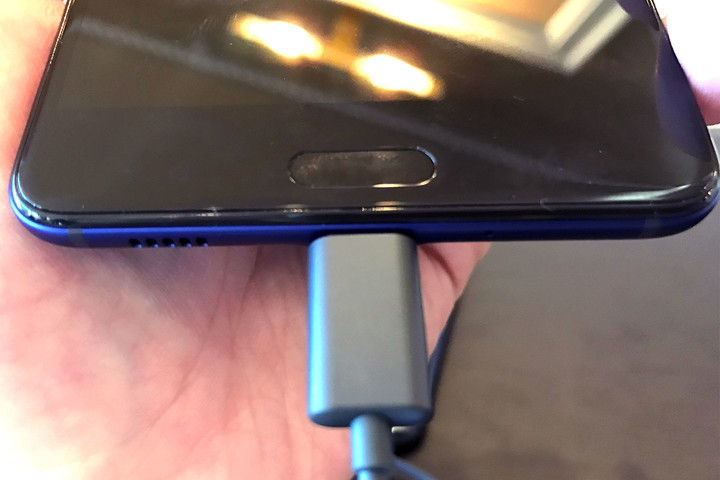
HTC opted to stick the phone’s fingerprint sensor on the front rather than the rear, between two touch-sensitive navigation buttons. The power button is on the right-hand edge. Indeed, short of the U Ultra’s bulging, cubic camera housing, a laser auto focus module and LED flash, and a tiny cutout for a noise-canceling microphone, there isn’t much to see.
When the phone’s switched off, it’s tough to tell where the bezel ends or the screen begins. That all changes when you switch it on — or, more appropriately, figure out how to switch it on. HTC made the odd decision of placing the U Ultra’s power button beneath its volume rocker, making tapping the wrong switch frustratingly easy. The power button’s ridged surface helps matters somewhat, but it’s hard to fight intuition.
Two screens aren’t always better than one
That’s all forgiven when the U Ultra springs to life. The towering 5.7-inch Quad HD Super LCD 5 screen shielded by Gorilla Glass 5, boasts the same resolution as Lenovo’s Moto Z Force and ZTE’s Axon 7. Text looks crisp, pictures look bright, and YouTube videos pop like a picture book.

Kyle Wiggers/Digital Trends
That said, the U Ultra’s screen falls short in other areas. Even at full brightness, it’s dimmer than the iPhone 6S’s screen. Colors seem accurate enough to the naked eye, straight on, but not from any angle — tilt the HTC U Ultra a little to the side, and blues and reds appear washed out. Unsurprisingly, the U Ultra’s LCD tech doesn’t come close to the vibrancy of the AMOLED panels on Google’s Pixel or the ZTE Axon 7.
The screen is also weirdly unresponsive to the point where in-app menus and buttons don’t respond to repeated touches. The U Ultra’s setup menu gave us an inordinate amount of trouble — the button to add an email account to the the email client flat-out didn’t work.
A secondary screen sounds like a good idea in theory, but it’s a different story in practice.
The U Ultra, much like LG’s V10 and V20, features a smaller, monochrome (160 x 1,040 pixels) panel above the primary screen. Rather than perform stand-in duty for the big color touchscreen beneath it, though, the secondary screen handles notifications, incoming messages, and app alerts that’d otherwise take up prime real estate. Swiping along the side reveals programmable app shortcuts, music playback controls, a six-day local weather forecast, and a “quick reminder” feature.
It sounds like a good idea in theory, but it’s a different story in practice. Notifications more than a few words long, like text messages and Slack alerts, get cut off. You have to click an arrow button to see them on the primary screen. On secondary screen’s default setting, it doesn’t shut off – even when you’re using the color touchscreen.
More: HTC wants U! Everything you need to know about the HTC U Ultra and U Play
More often than not, the secondary screen is more distracting than helpful — especially when an alert is scrolling ticker-style from the screen’s right-hand corner to the left.
Average audio, despite BoomSound tech
True to HTC’s roots, the U Ultra packs a stereo sound system that the company claims delivers better sound than the competition. Unfortunately, that’s not exactly true.
HTC’s BoomSound technology, a label that used to refer to stereo speakers with astoundingly good bass, makes an appearance in name only, here. The U Ultra’s twin speakers, one near the bottom and one in the earpiece, don’t achieve anywhere near the Axon 7’s richness or depth. The maximum volume is louder than what the Pixel or iPhone 6S can achieve, but given the distortion and tinny sound the speakers tend to exhibit, you won’t want to throw out your Bluetooth speaker anytime soon.
Kyle Wiggers/Digital Trends
The U Ultra’s microphones impressed us, though. A quad-mic array captures omnidirectional audio for better recordings.
One thing you won’t find on the U Ultra is a 3.5mm audio jack. It’s not an unprecedented move — Apple’s iPhone 7 is infamously jack-free, as is Lenovo’s Moto Z — and the continuation of a trend HTC started with last year’s Bolt. It’s nonetheless an annoyance for folks who’ve long carried a par of analog, jack-of-all-trades headphones that don’t natively support USB Type-C audio.
The camera’s results tended to be underwhelming.
HTC explains it away with the included USonic earphones, a rebranded version of the in-ear headphones included with the HTC Bolt and 10 Evo.
Here’s how they work: The earbuds, which look like ordinary, run-of-the-mill models you find packed with any smartphone, tap dual microphones — one that sits on the inside of your ear canal and one that’s exposed to the open air — to generate a detailed profile of your ear’s anatomy. HTC’s software applies the resulting audio profile to music, movies, YouTube videos, and more.
The U Ultra’s app guides you through the process. First, you plug the proprietary headphones into the phone’s USB Type-C connector. Then, you start a scan within the phone’s BoomSound settings menu. The speakers within the headphones emit a brief, two-second tone, and the mics record the response. Once the testing process finishes, you’re presented with a bar graph that shows the difference between “enhanced” audio levels — i.e., those tuned by the Bolt’s custom software — and unadjusted levels.
With the U Ultra’s custom profile enabled, audio is perceptibly clearer and louder, but we’re not convinced that it justifies the U Ultra’s lack of a headphone jack.
Sure, you get better-than-average audio out of the USB-dependent USonic earbuds, but a pair of $600 Sennheiser 3.5mm headphones would crush them in any music test. And having to lug an adapter around — one that, it’s worth noting, precludes charging — is a massive pain in the rear no matter the benefits.
Solid performance and battery life
Powering all those notifications, animations, and sound is Qualcomm’s powerful Snapdragon 821 chip. The U Ultra crushes day-to-day tasks with ease, generally speaking. It launches Chrome tabs in milliseconds flat, and crunches overflowing Gmail inboxes. Lengthy Word documents didn’t slow it down, nor did high-resolution Instagram and Google Photos albums.

Kyle Wiggers/Digital Trends
A generous 4GB of RAM keeps apps humming in the background, and there isn’t perceptible lag in scrolling through notifications and alerts. Oddly, performance tends to dip unexpectedly. The U Ultra sometimes hesitates for a moment after waking from sleep, and swiping between home screens isn’t consistently smooth.
A non-removable, 3,000mAh battery supplies the U Ultra’s power. It supports Qualcomm’s Quick Charge 3.0 technology, which can charge the U Ultra up to 80 percent in 35 minutes.
In our experience, the U Ultra lasts about a day and a half. With brightness set to automatic and Wi-Fi, Bluetooth, and cellular data enabled, we managed to get through an eight-hour workday’s worth of emails, social media updates, Slack messages, and app updates with about 40 percent power to spare.
HTC U Ultra Compared To
LG G6

Meizu Pro 6 Plus

Xiaomi Mi5S Plus

Xiaomi Mi Mix

Huawei Mate 9

ASUS Zenfone 3 Deluxe Special…

HTC Bolt

Samsung Galaxy Note 7
LG V20
Samsung Galaxy Note 5

Huawei Nexus 6P
LG V10

Motorola Moto X Style Pure Edition
Samsung Galaxy Note 4

Samsung Galaxy Note 3
Hectic days were a different story. A weekend afternoon of web browsing, video viewing, and picture taking drained the U Ultra’s reserves about 10 percent in half an hour. A subsequent hour browsing Facebook ate away an additional 7 percent.
That’s all to say that the U Ultra will easily last a day for most people, but like any smartphone, pushing it to its limits will result in dips.
Average cameras don’t cut it
HTC made a big deal about the U Ultra’s cameras. The company eschewed the trend of dual-sensor shooters, instead sticking with its in-house UltraPixel tech. With the exception of phase-detection autofocus, the U Ultra’s camera is unchanged from the HTC 10’s shooter.
The U Ultra’s 12-megapixel model has a f/1.8 aperture, a laser autofocus module, and an optical image stabilization (OIS) system that mitigates the effects of shaky hands and bumpy car rides. A dual-tone LED module, meanwhile, handles illumination.
We noticed a persistent film-like haziness in sunny outdoor shots.
The results tended to be underwhelming. We noticed a persistent film-like haziness in sunny outdoor shots. A bright blue sky in New York City lacked contrast and color. Interior shots in natural light tended to register warmer on the spectrum than snaps from the Google Pixel and iPhone 7, a problem most most obvious on skin. In a couple of shots from around the Digital Trends office, faces looked an unhealthy shade of orange.
That said, the camera was quick to lock focus, honing in on even dimly lit subjects without much fuss. Its low light performance was rather good. In a dimly lit storage closet packed to the brim with cardboard boxes, the U Ultra managed to resolve fine shadow details and edges with relative ease.
Videos captured with the rear-facing camera came out crisp, thanks to OIS. Even at the maximum resolution of 4K and 30 FPS, clips were smooth, stable, and free of the jitter sometimes exhibited by poorly calibrated sensors.

Kyle Wiggers/Digital Trends
The front-facing camera is more of the same. The whopping 16-megapixel UltraPixel produces much more detailed selfies than the front-facing camera on the Pixel and LG’s G6, and with greater depth of color. There’s a panorama mode for selfies, and a special low-light feature combines four pixels by reducing the resolution to 4MP. It’s a worthwhile tradeoff, in our testing — an impromptu series of nighttime selfies came out crisp and clear.
The U Ultra’s camera app, dubbed HTC Camera, offers additional filters and settings. “Zoe” mode lets you capture photos in three combinations: A sequence of burst shots and three-second video clip, or a longer video and a series of burst shots in the first three seconds. There’s a panorama mode and hyperlapse mode, and a Pro mode that lets you customize parameters to an even greater degree. You can manually set white balance, ISO, contrast, and exposure, and you can capture in RAW, a file format that gives you greater control over a pic’s color and contrast.
Simple software
Over the past few years, HTC has moved away from bloatware. The latest version of its Sense software, an overlay atop Android 7.0 Nougat, doesn’t feel intrusive. We weren’t pleased with the U Ultra’s repeated prompts to get us to sign up for an HTC account, but short of a few proprietary apps and settings, the U Ultra’s brand of Android comes pretty close to the vanilla experience.
The Sense Companion is the most obvious of HTC’s tweaks. It’s HTC’s artificially intelligent assistant, and it ships alongside the Google Assistant. Unlike the Google Assistant and Apple’s Siri, the Sense Companion isn’t a voice assistant. Instead, it taps a variety of signals including your location, activity level, and calendar in order to anticipate your needs.
The latest version of its Sense software, an overlay atop Android 7.0 Nougat, doesn’t feel intrusive.
If your battery’s at 50 percent and you have a long-distance flight ahead of you, for example, then Sense Companion will remind you to charge your smartphone. If it’s lunchtime, it’ll plop a link to a highly rated nearby restaurant on your lockscreen. If the U Ultra’s running low on storage, it’ll recommend deleting old files.
We haven’t had much time to let the Sense Companion learn our routines — HTC delayed the app until the second week in March. But in our limited time with the digital assistant, we found its recommendations genuinely useful, and never obtrusive. On a snowy winter morning, it reminded me to wear a coat. On a weekend afternoon in New York City’s midtown, it recommended a list of notable attractions.
The U Ultra’s other “smart” feature is gesture recognition, which lets you interact with the phone using swipes and motions. While the screen is off, you can flip the U Ultra to mute it, or pick it up to lower the volume. When it’s in a pocket or bag, it’ll increase ring volume automatically.

Kyle Wiggers/Digital Trends
Motion Launch gestures let you perform simple actions by waving U Ultra in the air. You can wake up the lock screen, launch BlinkFeed, the camera, or the home widget panel.
The U Ultra’s other software is standard. BlinkFeed is still a swipe away, Boost+ optimizes the U Ultra’s performance, HTC’s Themes app lets you make the phone your own, and there are a few other pre-installed apps that you can delete.
Luckily, they don’t eat up too much of the U Ultra’s 64GB of storage, and about 53GB is available for use. There’s also a MicroSD slot supports cards up to 2TB in capacity.
HTC is pretty good about software updates. A company rep told Digital Trends that the U Ultra will receive regular security updates in the coming months, and HTC’s typically sticks to its word. The company has been exceptionally transparent about the upgrade process and it’s committed to delivering major updates within a 90-day period.
Availability and pricing
The unlocked variant of the U Ultra, which is compatible with AT&T and T-Mobile in the U.S. ships from HTC.com, Amazon, and eBay for $750. It’s available in black, pink, white, and blue. It comes in 64GB and 128GB configurations.
There’s no other way to put it: The price tag is steep. The U Ultra is $100 more than the cheapest iPhone 7, Pixel, and LG G6. It costs significantly more than the $400 ZTE Axon 7 and the $440 OnePlus 3T, which offer similar specs and better cameras.
Warranty information
HTC offers one of the best warranties in town. When you buy the U Ultra, you get 12 months of the company’s “Uh-Oh” protection at no extra charge. The service includes a screen replacement if you shatter either of the phone’s displays, and a guarantee on water damage.
It’s really easy to get repairs or replacements, too. With Uh-Oh protection, you can call customers support or chat with a representative online, and once you’ve discussed the problem, you can get a replacement within one business day.
If you opt for an advanced exchange, HTC will put a $600 hold on your credit card until it receives the damaged unit. Alternatively, you can send in your damaged phone with a prepaid label and get a replacement device two days after HTC gets your broken one.
Our Take
The U Ultra was HTC’s chance to burst out of the gate with something spectacular, and to the company’s credit, it mounted a valiant effort. The U Ultra’s secondary screen frees up space for other tasks, the BoomSound audio profiles improve audio quality, and the front camera’s surprisingly adept at taking selfies. However, the U Ultra’s steep $750 asking price make its missteps hard to forgive.
Is there a better alternative?
Yes. The iPhone 7, LG G6, and Google Pixel, all of which start at $650, offer better screens and cameras. The $400 ZTE Axon 7 throws in louder speakers, and the $440 OnePlus 3T offers a better camera.
There are cheaper options to consider, too. We liked the Hauwei Honor 8’s aesthetics and dual camera features.
The DT Accessory Pack
HTC U Ultra Case
$7.99
HTC U Leather Ultra Leather Wallet Case
$7.59
How long will it last?
The U Ultra ships running Android 7.0 Nougat, a version behind the recently released Android 7.1, but HTC assures us that an update is in the works. Furthermore, the company said that the U Ultra will receive regular security and maintenance updates going forward.
The U Ultra should last you about two years before an upgrade is warranted. It’s not waterproof, though.
Should you buy it?
No. At $750, the U Ultra is a difficult sell. The secondary display is a nuisance, and the BoomSound speakers are underwhelming. The camera falls short of what the competition can achieve, as does the screen. While HTC’s AI-powered Sense Companion is nice to have, it’s not exactly a selling point. The phone is simply overpriced.
You can get better looking phones with better cameras and features for the same price or less. There’s nothing horribly wrong with the U Ultra, but it’s not worth recommending in light of the competition.
Motorcyclists, here’s a smart glove that’ll ensure you never get lost again
Why it matters to you
It could be a decent solution for motorcyclists fed up with trying to follow turn-by-turn data on their smartphone.
If you’re a motorcyclist that enjoys longer rides to new places, there’s a good chance that you mount your smartphone on your handlebars and fire up a maps app to find your way. But for some this is not an ideal solution. Atlanta biker Steve Friedlander, for one, found that the display could sometimes be hard to see, whether because of harsh light or the shaking from bumps in the road.
“Sometimes I would drive my car instead of riding just because I needed GPS,” Friedlander told Digital Trends.
The problem inspired him to develop the TurnPoint, a smart glove with a Bluetooth LE device that pulls data from your smartphone to show turn-by-turn directions via 18 super-bright LED lights. The circular device is removable and slots into the top side of the left glove so it’s easy to see.
Friedlander said the LEDs notify the rider 1) of the distance to the next turn, 2) when they arrive at the turn, and 3) which way to turn.
This means you can receive all the information you need at a glance, pretty much without taking your eyes off the road, making for a safer ride.
And there’s more. The glove incorporates a switch-like feature that lets you use your fingertips to control the connection between the device and your phone. Touch your thumb and pointer finger together and an LED sequence lights up on the TurnPoint device indicating the distance and direction to the next turn. This not only prevents the LEDs from becoming a distraction, but also lets you actively check for the next turn, and even helps to preserve the TurnPoint’s battery life, which currently stands at around eight hours on a single charge.
The design is also set to include additional fingertip switches for functions such as displaying a compass and showing battery life.
More: Want to wear a brake light on your head? Cosmo Connected is your answer
The TurnPoint is a Kickstarter project that’s looking for $125,000 of funding. Friedlander, who has more than 20 years of experience in UX design, engineering, and consumer gadget development, has already built working prototypes of the glove-based device, the glove, and the app.
An early-bird deals offers the complete TurnPoint package for $149, that’s a decent $100 saving off the expected retail price of $249. Shipping is currently to U.S. addresses only, with a January 2018 delivery date expected.
Best app deals of the day! 6 paid iPhone apps for free for a limited time
Everyone likes apps, but sometimes the best ones are a bit expensive. Now and then, developers make paid apps free for a limited time, but you have to snatch them up while you have the chance. Here are the latest and greatest apps on sale in the iOS App Store.
These apps normally cost money, and this sale lasts for a limited time only. If you go to the App Store and it says the app costs money, that means the deal has expired and you will be charged.
More: 200 Awesome iPhone Apps | The best Android apps for almost any occasion
Life Hacks

We live in the age of life-hacking. The concept, which denotes a kind of upbeat, engineer-like approach to maximizing one’s personal productivity, is captured in this app.
Available on:
iOS
Wake Alarm Clock

Meet Wake, the beautiful and intuitive alarm for iPhone & iPad. Slap to snooze, flip your phone over to turn off alarms, or Shake to wake. Get up your way with Wake.
Available on:
iOS
BTC-E bitcoin price alerts

This app shows current BTC, LTC, MNC, PPC and other digital currencies exchange rates on BTC-E.com. You can monitor price changes and receive free push notifications to your iPhone and Apple Watch.
Available on:
iOS
VideoBang

VideoBang is designed to send and receive your video files with “.mov” and “.mp4” formats from one device to another. You may play the video selected from your album that you recorded, or any you’ve received from another device.
Available on:
iOS
Gif Me!

Gif Me! is the best way to create and share short video in animated GIF or MP4. It’s easy: capture a small moment with your built-in camera, and share it on social networks. You can apply an image filter, too.
Available on:
iOS
Hands-free Browser

Getting your hands dirty? With this app you can surf the web without touching the screen. It’s fantastic for reading recipes while you cook, following repair instructions with greasy hands, working out, and more.
Available on:
iOS
Hydrogen-powered train with zero emissions completes test run in Germany
Why it matters to you
You could one day be riding on a train that’s entirely silent and produces nothing but water vapor as an emission.
A train powered by a hydrogen fuel cell has completed its first test run in Germany, showing the viability of the technology to operate without waste. Following more planned tests, the train is expected to begin commercial operation later this year, on the Buxtehude-Bremervörde-Bremerhaven-Cuxhaven line in Lower Saxony, Germany.
There is much speculation about what the future of mass transit may be. Some suggest automated cars, others more outlandish technology like the Hyperloop. However, more environmentally friendly alternatives to traditional transport systems, like zero-emission trains, could be another avenue entirely and it’s one that sustainable rail developer Alstom is banking on with its Coradia iLint design.
#Alstom revealed to the world the first zero-emission and hydrogen powered passenger train. Learn how it works! pic.twitter.com/oaaj4zbLzK
— Alstom (@Alstom) September 26, 2016
The iLint train uses an onboard fuel cell design which uses a combination of stored hydrogen and oxygen drawn from the local atmosphere to generate electricity. That electricity can propel the train up to 87 miles per hour, with excess power being funneled into large-scale lithium-ion batteries for later usee. The train also makes use of energy recovery systems to improve the efficiency of the electrical systems.
More: The inventor behind the Maglev train is back with a Hyperloop for launching space vehicles
This makes the train completely sustainable, producing only water and steam as emissions and requiring no electrification of the track. The train even produces almost no noise, since there is no combustion to contend with.
All of this makes the Coradia iLint design an incredibly versatile transit option, capable of operating within densely populated areas without causing pollution – noise and otherwise.
This latest test saw the train reach just shy of 50 miles per hour, so it will require further testing to make sure that it’s safe at higher speeds, but this is a step in the right direction for the design.
“This test run is a significant milestone in environmental protection and technical innovation,” said Didier Pfleger, vice president of Alstom in Germany and Austria (via the Telegraph).
“With the Coradia iLint and its fuel cell technology, Alstom is the first railway manufacturer to offer a zero-emission alternative for mass transit trains.”
Do you think hydrogen fuel-cell trains could be the future of zero emission mass transit?
The 20 best keyboards for every iPad, from the Mini to the Pro
There are multiple components to note when you first unpack an iPad, from the device itself and a power adapter, to the user manual and a USB cable, but a keyboard isn’t one of them. The iPad’s functionality has grown since its initial inception in 2010, yet many users still find Apple’s tablet somewhat incomplete despite all the critical acclaim and the perpetually-swirling rumors.
As Apple’s signature tablet line outgrows its reputation for being simply a device to consume entertainment, there’s a growing need for a physical QWERTY keyboard for the iPad. Thankfully, there are tons of great keyboards designed to connect to your iPad via Bluetooth for increased mobile productivity.
More: The 15 best iPad accessories to make more of your Apple tablet
We admit, finding the perfect keyboard can be exhausting, given the fact that most third-party keyboards are poorly designed or overly expensive, but there are some quality options, if you know where to look. Here are our nominations for the iPad Keyboard Hall of Fame (if there is such a thing).
Best keyboards for the iPad Pro (12.9-inch)
Apple Smart Keyboard for 12.9-inch iPad Pro ($170)

What better keyboard for your shiny new iPad Pro than the keyboard specifically made by Apple for the iPad Pro? In classic Apple fashion, the Smart Keyboard features a slim and sleek design with keys that are well-spaced and easy to type on. You won’t get much travel or feedback, though. It doubles as a stand for your device, and doesn’t add too much extra bulk, which makes it perfect for when use on the go.
It’s important to note that this keyboard does not connect via Bluetooth, however. Instead, it uses Apple’s new proprietary Smart connector, located on the side of the iPad. This means that you’ll never have to manually charge the keyboard — it draws power straight from the iPad. How convenient!
Buy one now from:
Apple Best Buy
Logitech Create Keyboard Case ($121)
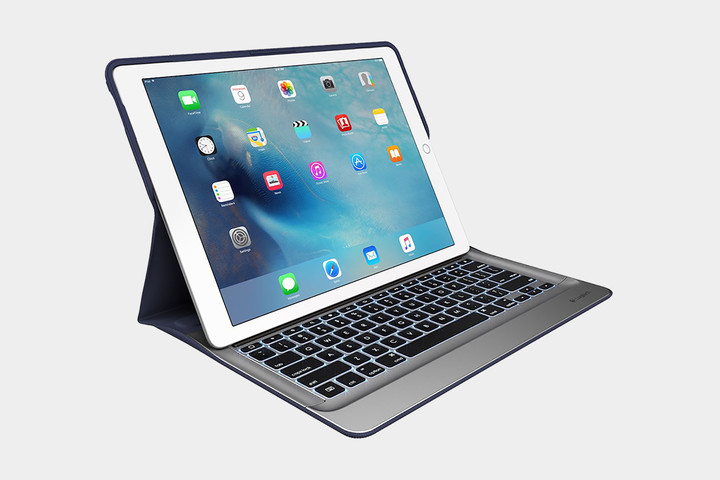
Why use Bluetooth if you have the Smart connector anyway? The Logitech Create also makes use of the Smart connector on the iPad Pro, meaning you won’t have to charge it. It also offers a backlit keyboard, one that features buttons for making light adjustment and controlling media. Because of the size of the iPad Pro, Logitech was even able to squeeze in an extra line of keys for shortcuts. While this case was not designed by Apple, the look of the Logitech Create fits in line with Apple’s design language. It’s slim, simple, and beautiful.
Buy one now from:
Amazon
Razer Mechanical Keyboard Case ($168)

The Razer mechanical keyboard is the first keyboard with mechanical key switches built for a mobile device. The keys have good travel and make a satisfying click. There’s a metal kickstand, too, so that you can adjust the angle of the iPad Pro to any position you want. The case itself is detachable and made of polycarbonate, which provides not only convenience but strength as well. This keyboard has a lot going for it, but we must acknowledge a few caveats. The kickstand is useful, but it gives the iPad Pro a large footprint, which could be a problem when using a small workstation. Some people also found that the hinge is not built to last and the key next to the right arrow key, which brings up the on-screen keyboard, is a little too easy to press by mistake. If you crave a mechanical keyboard for the 12.9-inch iPad Pro, however, this will scratch your itch.
Buy one now from:
Razer Amazon
Best keyboards for the iPad Pro (9.7-inch)
Apple Smart Keyboard for 9.7-inch iPad Pro ($150)

Yeah, yeah, we included this for the larger iPad Pro, but it’s also great for the 9.7-inch model. The smaller version offers more or less the same features, but it’s obviously a little more compact. Like its larger sibling, it’s extremely sleek — closed up you would be forgiven for thinking it’s just a case rather than a keyboard case. It also offers automatic charging through the Smart Connector. The smaller size does mean that it’s a bit more cramped, though.
Buy one now from:
Apple Best Buy
Ottertooth Ultra-Thin Aluminum Portfolio Case ($40)

Sure, this one’s a little cheaper than Apple’s case, but there is a trade-off, besides general quality — it’s Bluetooth-based. Apart from that though, this keyboard looks really good alongside the iPad Pro, and doubles as a stand and case. Not only that, but it can run for 150 hours on a single charge, and only takes 2 to 3 hours to juice up. It also comes in a few different colors, so you can choose the keyboard case that will best fit your look.
Buy one now from:
Amazon
Brydge Keyboard ($130)

Brydge wants to bring the MacBook experience to your iPad Air. The Brydge keyboard is made from high-grade aluminum that’s designed to blend perfectly with the iPad’s body. It’s rigid and strong, but it’s also extremely light, weighing just 18 ounces. The iPad is secured via two clips, one on each side, making it easy to connect and remove from the keyboard. The hinge is strong and you can adjust your iPad to find the best angle for you. One of the main attractions of this keyboard is the backlit keys, which come with three levels of brightness and are handy when working in low-light situations. You’ll also be happy to know that the Brydge keyboard has 1.2 millimeters of key travel. It feels a lot like a MacBook keyboard, so you can type easier, faster, and more confidently than with many other iPad keyboard cases. It’s available for the 12.9-inch iPad Pro as well, and it comes in silver, space gray, and gold.
Buy one now from:
Brydge Amazon
Best keyboards for the iPad Mini 3 and Mini 4
Zagg Folio Tablet Keyboard and Case($45)

Acting as a durable case as well as a keyboard, this Zagg case and keyboard is perfect for protecting your device without adding too much bulk. One of the great things about this case is that it allows you to change the viewing angle, just like a normal laptop. As far as typing goes, the keys on this keyboard are well-spaced, making it quite comfortable to type on. While it does offer a Micro USB port for charging, you’ll rarely have to make use of that port, as the keyboard lasts several months on a single charge. When you’re on the go, you can also rest easy knowing that you likely won’t drop your iPad, as the case offers a textured finish and a little extra grip.
Buy one now from:
Amazon
Fintie Blade X1 Keyboard Case ($27)

Looking for something a little more affordable? This case from Fintie comes in at only a little more than $30. Sure, it won’t be of the highest quality, but it will be fine for those who only occasionally need a keyboard. The case boasts a slim and lightweight design, while still managing to offer enough protection in case you do happen to drop your device. A little worried about buying such a cheap keyboard? Well, the Amazon reviews speak for themselves — this case flaunts a respectable 4-star rating based on more than 70 reviews.
Buy one now from:
Amazon
Best keyboards for the iPad Mini and Mini 2
Logitech Ultrathin Keyboard for iPad Mini ($60)

The Logitech Ultrathin Keyboard has made our best-of list in more than one iPad category for a reason — it’s a true typists’ keyboard. The iPad Mini is by no means ideal for typists considering its size, but the Logitech’s Bluetooth keyboard layout provides adequate key spacing and travel. It also has an aluminum outer casing that nicely compliments your iPad Mini, whether you opt for the black or white option.
Moreover, the keyboard is affordable, and it conveniently cradles your tablet using powerful magnetic clips and a recessed groove that rests behind the keyboard for optimal viewing at multiple angles. The keyboard even makes use of the iPad’s sleep-wake function and features a rechargeable battery designed to last up to six months on a single charge, assuming you only use it for less than two hours a day. Designated buttons for cutting, pasting, and other essential tasks also add to its appeal. The keyboard comes in an assortment of color combinations for the tech-savvy fashionista in all of us.
Buy one now from:
Amazon
ClamCase for iPad Mini ($79)
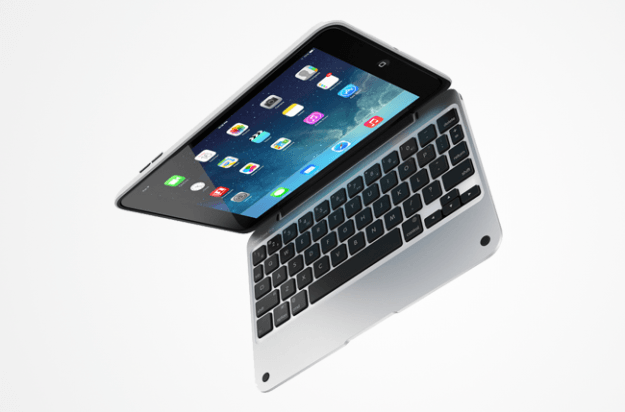
Like its larger counterpart, the ClamCase for the iPad Mini represents a more expensive alternative to the Logitech Ultrathin option. It’s constructed of an aluminum enclosure and a polycarbonate shell designed to parallel the MacBook Pro. The streamlined device conveniently attaches to the Mini with a 360-degree hinge, which allows you to swivel the tablet completely around and presents a wide array of viewing angles, whether you prefer to use the device while in laptop or tablet mode.
The full-size keyboard layout accommodates your palms and masters key travel, while honing in on the iPad Mini’s sleep-wake functionality and one-touch Bluetooth pairing. It weighs nearly a pound, making it one of the heavier options on our list, but it also comes cheaper than the version designed for full-size iPads. And who doesn’t like island-style keys and an auto-off feature for when the keyboard is not in use? Nobody, that’s who.
Buy one now from:
Amazon
Best keyboards for the iPad Air 2
Belkin QODE Ultimate Pro for iPad Air 2 ($100)
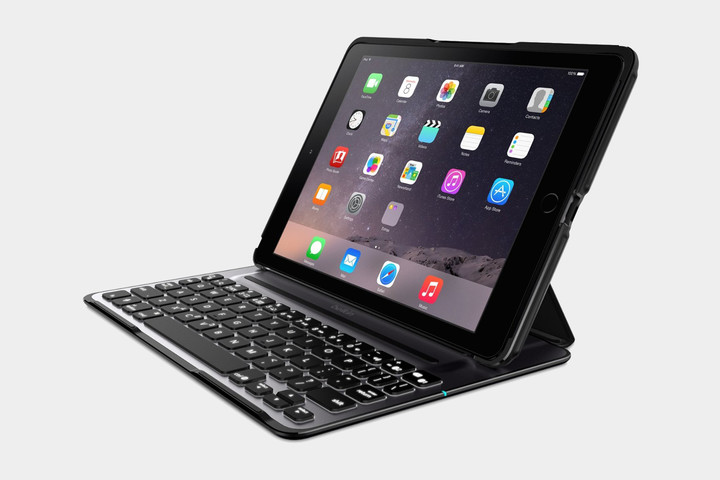
This is the second Belkin QODE keyboard on the list, and for good reason. One of the things that sets this keyboard apart from most others is that it can be used in either portrait or horizontal orientation, which is a rarity among iPad keyboards. The keyboard is backlit and offers three backlit levels, meaning you don’t need to burn your eyes with light from your keyboard when you’re up late typing. The keyboard, like other QODE keyboards, also doubles as a stand, ensuring you can use your iPad like a laptop. In fact, to help you out in case you do use your iPad like a laptop, the case even features rubber feet that prevent your device from slipping on your desk.
Buy one now from:
Amazon
Logitech Type+ for iPad Air 2($75)

The Logitech Type+ for iPad Air 2 aims to be not only a great keyboard, but also a protective one. It offers a slightly wider keyboard than many other iPad Air 2 keyboards currently on the market, giving you more room to type and hopefully minimizing typos. It also offers auto wake-sleep features, meaning your iPad will automatically wake when you open up the keyboard. Similarly, when you close it, it will put the device to sleep. Furthermore, the keyboard features an array of iOS keyboard shortcuts, which can help you do what you need to as quickly as possible.
Buy one now from:
Amazon
New Trent Airbender Bluetooth Keyboard ($37)

The Airbender is an interesting case that is only compatible with the iPad Air and iPad Air 2. There’s much more hardware to this keyboard than some of the other ones we’ve recommended, however, which will bring the iPad’s total weight to 2 pounds when installed. The rotational, hinge design gives you 360-degree viewing angles, so that you can orient it any way that you want to. Another great feature is the folding handle at the bottom of the case, which can give the keyboard a stable tilt that’s perfect for typing. The spacious chiclet keys also make for a great, tactile typing experience. The Bluetooth connection is reliable, too, allowing for easy pairing and consistent connectivity from up to 30 feet away. The keyboard is even detachable, so it can act as a regular iPad case.
Buy one now from:
New Trent Amazon
Best keyboards for the iPad Air
Logitech Fabric Skin Folio Keyboard ($55)

Calling a keyboard “Fabric skin” might be an oxymoron. Even so, it seems that just about every image of the iPad Air has a cup of coffee or glass of water in the background. And what happens, let’s say, if that glass of liquid spills onto your iPad Air? Enter, Logitech’s Fabric Skin Folio Keyboard.
The full-size keyboard is lighter and leaner than Logitech’s past keyboard and case efforts. It conveniently provides a water-repellent exterior that covers both the front and back of the iPad when closed. The rechargeable keyboard also doubles as a dual-view stand that holds the iPad upright or flat. It features automatic wake-sleep functionality in a similar fashion to most popular cases. The device even lasts nearly three months on a full charge, while providing iOS shortcut keys for copy, paste, undo, and other time-saving actions. The design may feel minimal and lightweight with its wipe-clean keys and thin design, but it still manages to protect against a broader swath of elements with minimal fuss and plenty of style.
Buy one now from:
Amazon
ZAGG folio case with backlit keyboard ($46)

With the look and feel of a laptop, ZAGG’s flagship keyboard offering is the only folio option on our list with an attractive, backlit design. The full-size keyboard case, available in either black or white, allows users to choose between a melange of different backlight colors and brightness options. In addition, it offers a smattering of viewing angles, using the built-in hinge.
Measuring just a little more than a ¼-inch, it’s also one of the smallest Bluetooth keyboards on the market. It touts roughly six months of battery life between charges and a bevy of special function keys designed to make the most out of your iPad Air. The sleep-wake function also comes standard, and the leather-textured cover offers admirable full-body protection against the common scuffs and scrapes your device is likely to procure during the course of its lifetime. ZAGG’s keyboard may not offer the same level of adjustment as other keyboards, nor is there an option for positioning the screen in portrait mode, but sometimes adequate lighting and protection are enough.
Buy one now from:
Amazon
Belkin QODE Ultimate Wireless Keyboard ($50)

Belkin’s folio case is one of many offerings advertised to give your iPad Air the aesthetic look and feel of a commonplace laptop. Boasting nearly twice the battery life as ZAGG’s aforementioned offering, the device nearly eliminates the need to fumble for an outlet while traveling. Even so, Belkin’s high-end model lives up to its ultimate name by providing decent spacing and key travel in an aircraft-grade, aluminum casing retrofitted with three neodymium magnets for the utmost stability and precise angling.
Furthermore, the full-size keyboard doubles as a stand and folds out of the way for normal handheld use, while moonlighting as a protective case. Built-in sensors also automatically turn the keyboard off when not in use, thus extending battery life and the longevity of the keyboard. The keys are incredibly responsive as well, even if they’re a bit thicker than need be.
Buy one now from:
Amazon
Best Keyboards for 2nd, 3rd, and 4th-gen iPad
Belkin QODE Ultimate Wireless Keyboard ($71)

Lightweight and versatile, Belkin’s high-end model provides a keyboard that is big enough to get work done, yet minimal enough to take just about anywhere. The folio-case is aptly designed for those who want a laptop experience — one with three viewing angles and large keys — but within a minimalist build. The keyboard provides an aluminum case that doubles as both a screen protector and a stand, allowing you to type in landscape or portrait orientation. Many Bluetooth keyboards offer the function, but few do it as well as Belkin.
The device also offers decent key travel and spacing even with its ultra-thin approach. It has an exterior design aimed to directly channel your iPad’s sound toward you and offers 160 hours of battery life on a single charge. The keyboard may not have many unique features, but its maneuvering capabilities and spacious design make it one of the best available for the rock-bottom price.
Buy one now from:
Amazon
Logitech Ultrathin keyboard Cover for iPad ($69)
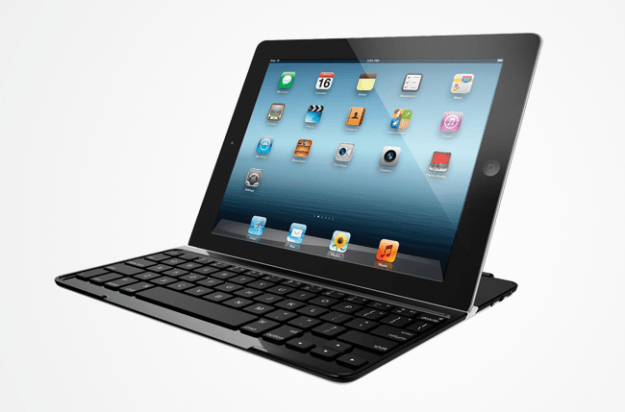
Not everyone needs bells and whistles — and Logitech is aware of that. The company’s Bluetooth keyboard does little more than needed. It quickly attaches to your device via a magnetic hinge, which allows you to use your device in either portrait or landscape viewing modes.
The full-size keyboard feels somewhat cramped due to the size of the tablet, but it makes up for the space crunch with six months of battery life. It also has an aluminum cover that makes use of your iPad’s sleep and wake functions, when the keyboard isn’t in use. The metal backing looks enough like the iPad’s own aluminum finish that the two pieces of hardware blend aesthetically. You can choose black or red color options, keeping things classy even when you’re getting work done. At little more than a ¼-inch thick, you can easily stow the keyboard alongside your tablet for quick access on the go.
Buy one now from:
Amazon
ZAGG Keys Profolio + Keyboard Case ($55)

By now, you’ve surely noticed more than a few keyboards that simultaneously double as cases. However, few of them offer backlighting in the way Zagg’s Keys Profolio Keyboard Case does. The device allows you to choose from seven different color options and adjust the underlying light for the optimal brightness.
Moreover, the full-size keyboard touts more than 30 days of battery life — when used less than two hours a day — and a magnetic closure for quickly securing your iPad to the keyboard when on the go. Special function keys also allow you to perform essential commands directly on the keyboard, while a leather-adorned cover ensures your device is always protected against the everyday elements. Though heavier and a bit thicker than most offerings on our list at nearly an inch thick, it excels when it comes to its responsive island-style keys and its unique ability to operate in low-light settings with ease. However, hallmark functionality doesn’t always come cheap.
Buy one now from:
Amazon
ClamCase Pro ($100)

To the untrained eye, the ClamCase Pro may make your iPad look like a MacBook Pro. It’s no wonder, considering that the ClamCase Pro’s aluminum enclosure and polycarbonate shell transform the look and feel of your iPad into something akin to Apple’s most recent MacBook Pro models.
At three pounds and $170, the full-size keyboard is as expensive as it is heavy. However, the size of this keyboard provides terrific key spacing. Additionally, the device has specialized keys for commonly-used features and it comes with a 360-degree hinge designed for unparalleled versatility when it comes to viewing angles and stand functionality. The keyboard is adorned with an island-style keyboard and one-touch Bluetooth pairing, along with sleep-wake functionality and a battery crafted to last months on a single charge. Again, the added weight makes it rather bulky, but durability and stylish aesthetics don’t always result in a minimal design. It’s an acceptable trade off.
Buy one now from:
Amazon
 AIVAnet