


Apple Releases Revised Version of iTunes 12.6, Eliminates Strange ‘Profile Page’ Toggle
Apple today released a revised version of iTunes 12.6, which appears to eliminate a hidden option that may have accidentally been built into the software release.
Shortly after the original release of iTunes 12.6 on Tuesday, a reddit user discovered a “Show on Profile Page” toggle on a Playlist edit page.
The toggle didn’t appear to do anything because there’s currently no individual profile page feature in iTunes, and now the non-functional feature has been eliminated from the 12.6 iTunes release, suggesting it was added by mistake and could be destined for some kind of future iTunes profile addition.
It is entirely unclear what a Profile Page might entail, but reddit users speculated that it could be for a future social network or a Spotify-style searchable playlist database.
The new iTunes 12.6 update can be downloaded from the Mac App Store for free. It includes a “Rent once, watch anywhere” feature that lets iTunes users watch iTunes movie rentals across all devices with the as-of-yet unreleased iOS 10.3 and tvOS 10.2 updates.
Prior to the iTunes 12.6 update, iTunes movies could only be watched on a single device at a time. A movie rented on a Mac transferred to an iPhone would remove the movie from the Mac’s iTunes Library, while a movie rented on an iOS device or Apple TV could not previously be transferred to other devices.
We don’t yet know when the iTunes 12.6 update will become functional, as it is reliant on iOS 10.3 and tvOS 10.2, but those who are running the betas can use the cross-rental feature. The iOS 10.3 and tvOS 10.2 software updates could come at any time.
Discuss this article in our forums
MacRumors Giveaway: Win a Colony Organizer and Leather Sleeve From Quell & Company
For this week’s giveaway, we’ve teamed up with Quell & Company to offer MacRumors readers a chance to win a Colony Organizer and a Leather Sleeve for their iOS and Mac devices.
The Colony Organizer, priced at $60, is essentially a charging dock for your iPhone and iPad, designed to securely and stylishly hold your devices while they charge. Made from Maple or Walnut wood, the Colony Organizer can hold up to four devices and two charging cables between its series of pegs, keeping them neatly stored away on a desk or surface while charging.
Charging cords (not included) run up through a center cutout in the organizer, and a felt base protects your devices from any scratches or damage. Micro suction pads on the base ensure that it’s stable, so it’s not going to fall over or slip off of your desk even when loaded with iPhones and iPads. It’s compatible with the iPhone 5 and later, all Lightning-based iPads, the 12-inch MacBook, and the Apple Watch.

Quell & Company’s Leather Sleeve, priced at $95, is designed to work with the 12-inch MacBook or any 9.7-inch iPad, including Apple’s newly released $329 model. The Leather Sleeve, as the name suggests, is made from a high quality black leather lined with felt.

It features a zippered main pocket that fits your Apple device, along with three front pockets that can be used for other accessories like the Apple Pencil, charging cables, and even an iPhone.

Quell & Company is offering a Colony Organizer and a Leather Sleeve to three MacRumors readers, who will be able to pick the color (organizer) and size (sleeve) of their choosing. To enter to win, use the Rafflecopter widget below and enter an email address. Email addresses will be used solely for contact purposes to reach the winner and send the prize. You can earn additional entries by subscribing to our weekly newsletter, subscribing to our YouTube channel, following us on Twitter, or visiting the MacRumors Facebook page.
Due to the complexities of international laws regarding giveaways, only U.S. residents who are 18 years of age or older are eligible to enter. To offer feedback or get more information on the giveaway restrictions, please refer to our Site Feedback section, as that is where discussion of the rules will be redirected.
a Rafflecopter giveawayThe contest will run from today (March 24) at 11:00 a.m. Pacific Time through 11:00 a.m. Pacific Time on March 31. The winners will be chosen randomly on March 31 and will be contacted by email. The winners will have 48 hours to respond and provide a shipping address before new winners are chosen.
Along with the giveaway, Quell & Company is offering an exclusive 20 percent discount on all of its products for MacRumors readers. To get the discount, enter the code “macrumors” when checking out on the site. The discount will be available for one week.
Tags: giveaway, Quell & Co
Discuss this article in our forums
Moto G5 Plus initial review: The best value on the market
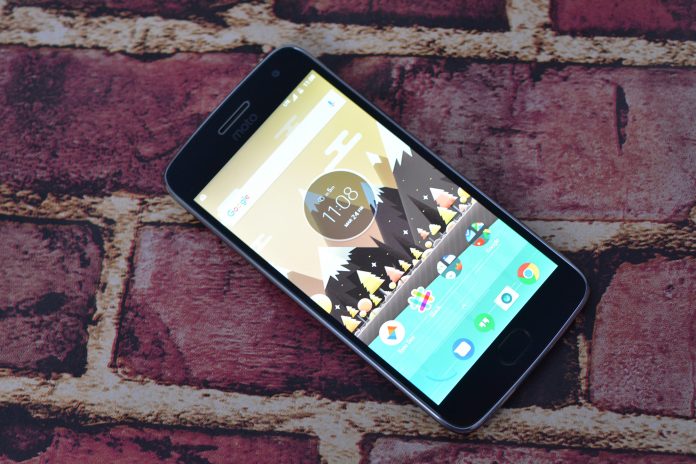
Phones are in an interesting place right now. While we have amazing, feature-rich flagships like the LG G6 and Samsung Galaxy S8 that push the boundaries of what we thought possible, not everyone wants to spend $600+ on a phone.
But, you don’t have to spend that kind of money to get a really good phone anymore. Motorola has an ad campaign right now that says there haven’t been any big innovations in phones for years now, but I think they’re wrong. Innovation has been going on and where you can see it more than anywhere is in the budget market.
That is where the Moto G5 Plus sits. As the name indicates, this is the fifth iteration of the Moto G lineup. The Moto G lineup started as a low-cost alternative to the Moto X lineup which stripped away some features but kept the core principals of what Motorola wanted to present to customers: Close to stock Android, decent build quality, and a curved back design.
Lenovo owns Motorola now, but the mission stays the same. The newest Moto G starts at $230 (our review device is the more expensive $300 version) and you get a really, really good phone for your money. This is strictly my opinion, but the Moto G5 Plus might be the best value in cell phones right now, taking the title from OnePlus 3T. While these are two different devices aimed at two different segments of customers, they both accomplish the same thing: Incredible phones with incredible value.
So far, I’ve spent one week with the Moto G5 Plus. Generally, I believe it takes at least two weeks to conduct a full review of a device. For that reason, we’ve marked this review as an initial review and will continue to update it with information as we see fit.
Body and Build Quality
When the newest Moto G was announced, one of the biggest criticisms I saw on social media was about the body. This year Lenovo/Motorola decided to go with a metal back, plastic sides, and a glass front. Those who thought that the Moto G would be “like every other phone on the market” had a valid fear. One of the things that set the Moto G of past apart was the plastic, rounded back that offered awesome grip and looked pretty good doing it.
 Moto G4
And sure, there are a ton of phones out there that use metal for the back of its devices, but I don’t see an issue with that. We can have a ton of devices all made out of the same things while keeping their uniqueness. I truly think that the Moto G5 Plus is one of the most unique devices I’ve ever used for a couple reasons we’ll get to in a bit, but the metal back doesn’t detract at all, in fact, I love it. It feels wonderful in the hand and gives a sense of a premium device.
Above and below the metal on the back are small plastic bands that wrap around to the sides of the device. I can only assume this is a manufacturing answer to giving proper room for the antennas. We’ve seen antenna bands on devices, most notably the Apple iPhone, but there are none here. The plastic matches the design of the metal back and you can only tell where they meet to due a groove so small I can’t even get my fingernail into it.
 Buttons that are clicky-enough sit on the right side of the device, while the top holds the combo microSD card/SIM card slot. Aside from that, the sides and top are bare. The bottom sees a micro USB port, headphone jack, and microphone. To say I was disappointed to see a micro USB charging port on a device, even a budget device, released in 2017 would be accurate. We’ve reached out to Motorola for comment on why exactly (waiting to hear back), but I assume it was a cost-cutting issue.
 C’mon, Moto.
The front of the device holds a very capable 5.2″ 1080p display. The bezels are big, not only on the sides but the chin and forehead too. Luckily the chin makes use of that space with an extremely fast fingerprint sensor. The sensor is more like the Moto Z and OnePlus 3 rather than the iPhone where you actually have to press it to activate. Meaning that all you need to do is rest your finger on the sensor, and you’re in.
I’m a fan of this approach since its one less movable part to break. The earpiece doubles as a speaker, which is nice, but I do wish it was a bit louder. But hey, front-firing is always better than the speaker being placed on the bottom of the device, or God forbid, on the rear of the device, so kudos to Moto.
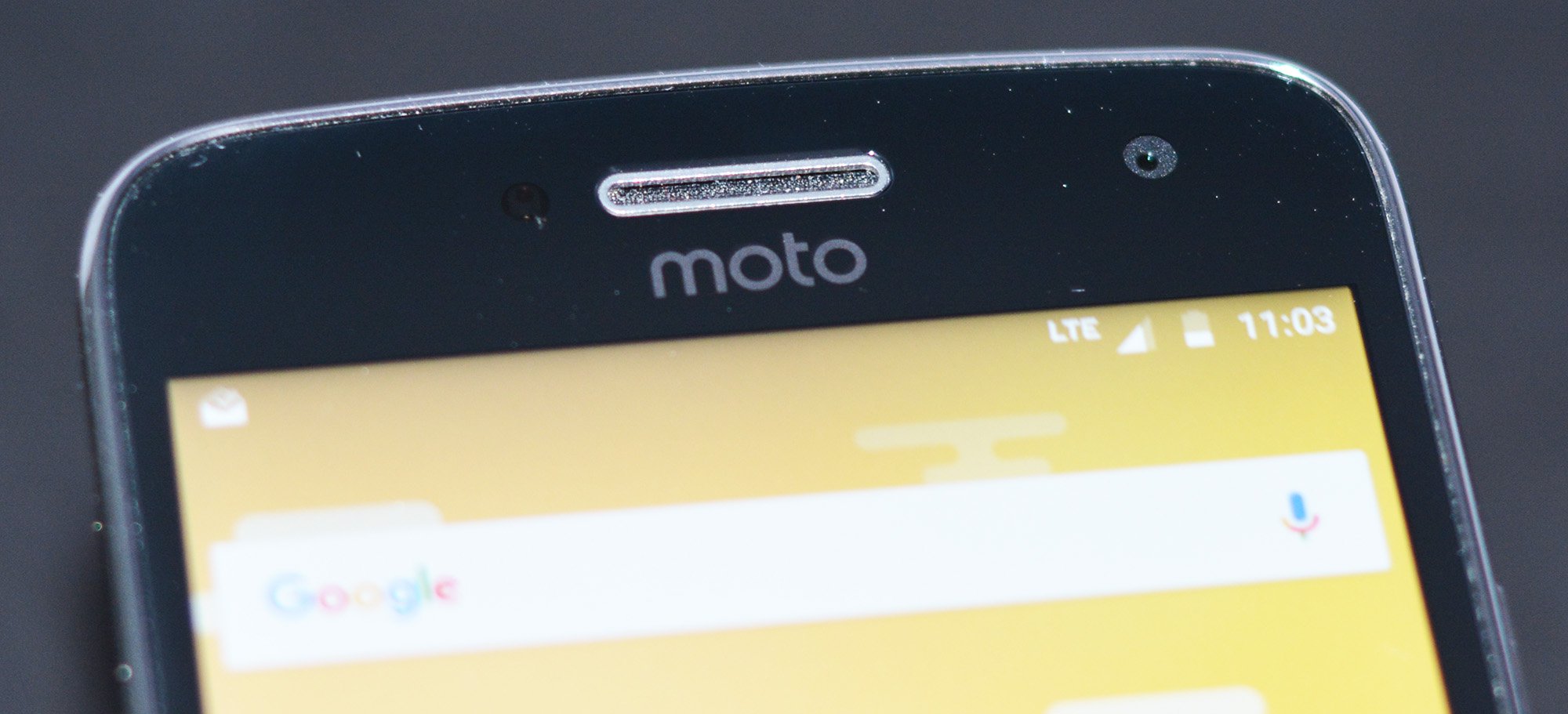 My take away from the device construction is that Motorola knocked it out of the park. The Moto G5 Plus feels like a device that costs at least another $100 dollars more than what it’s actually priced at.
It does feel a bit thick and wide to me, but I’m coming from that previously mentioned OnePlus 3T which excels at being thin and light. The phone is light enough (5.5 ounces) that it won’t fatigue your fingers or wrist, but there are other devices out there which are even lighter.
Software
Android keeps getting better and better, which means Motorola’s software keeps getting better and better too. That’s the advantage of using a near-stock build of Android. Another advantage is fast updates but after the disappointingly long wait for Nougat on the Moto Z lineup, I won’t recommend this device if quick updates are important to you.
Luckily, Motorola kept the ship steady with the Moto G5 Plus. We again see the near-stock build of Android with some really smart and convenient improvements.
If you’ve followed the Pixel at all, you’ll know that the device shipped with fingerprint scanner gestures that allowed it to lower the notification window with a quick swipe down of the scanner. We’ve seen other devices like the Honor 8 have the ability to open apps through single or long pressed of its fingerprint scanner. The Moto G5 Plus might have my favorite new feature of all of them.
Welcome to one-button navigation. It might not be a revolutionary idea. It might exist on other devices (although I don’t know any) but it’s the one thing I’m going to miss when I send this phone back to Motorola. A swipe to the right equals a press of the back button, tapping the fingerprint scanner is the same as a press of the home button, and a swipe to the left opens the multitasking window. It’s freaking brilliant and I love it. I want it on every phone from here until they come out with something better. The learning curve was minimal and it just makes sense.
 The famous Motorola round widget on your home screen has only gotten better. It now gives smart updates, such as how long until it rains or how long it will rain for (you know you’re in for it when it says “rain for the next 91 minutes”). Not to bury the lede here but the launcher that comes default on the device has the same swipe up gesture to open the applications window as the Pixel Launcher. I normally mess around with the default launcher on a phone before throwing Nova on it, but this has a lot of things I like and I think if I kept the phone, I would actually keep the default launcher.
Under the hood, the Moto G5 Plus is running Android 7.0 with the January security update. It runs pretty much flawlessly. The Snapdragon 625 processor feels more like a flagship processor in the G5 Plus due to the complete lack of unnecessary processes running the background like you’ll find on heavier skins. I never have stutters (it’s only been a week so this is something we’ll keep an eye on) and app load times, while a hair slower, are comparable to the Snapdragon 821 on my OnePlus 3T.
Returning this year are all of the smart gestures you’ve come to expect from Motorola like chopping twice to turn on the flashlight or twisting the device to turn on the camera. We also see the return of the best lockscreen in the game. You still get previews of your notifications with the ability to open or dismiss them right from the lockscreen. Unfortunately, the panel in the Moto G5 Plus is an IPS LCD so you don’t get the same power-saving advantages you would if it was an AMOLED display, but the name of the game is convenience and Motorola continues to deliver there.
Android Nougat has been out for over six months now, but many still haven’t seen the software in action. Fragmentation is still an issue. Marshmallow is only on 31% devices while Nougat is on almost 3% of devices and that still kind of blows me away. In 2017 the easiest way to get a software upgrade is just to buy a new device every year and that is really sad. Luckily, Motorola is making it cheap on you to do so, but OEMs must do better going forward.
If you’re unfamiliar with Nougat, there are a lot of nice quality of life improvements like bundled notifications, quick reply in the notification window and native multi-window. Add this in with the under the hood API changes, power saving efforts, and other things I am not smart enough to understand, and you have a really excellent OS to install on your device. Motorola’s strategy for a long time now has been not to screw with Android, just make it better. Luckily it has continued that way of thinking because the software on the Moto G5 Plus is excellent.
Performance
Even though I touched on performance a bit in the software section, I want to go a little bit more in-depth here. Just to give you an idea of what we’re working with, here are the important specs of the Moto G5 Plus
- Display: 5.3″ 1920 x 1080 IPS LCD
- Processor: Qualcomm Snapdragon 625, Octa-core 2.0GHz
- RAM: 4GB
- Storage: 64GB (expandable)
- Battery: 3000mAh
- Rear Camera: 12MP, f/1.7, dual LED flash
- Front Camera: 5MP, f/2.2
- Operating System: Android 7.0 Nougat, January Security Update
As we mentioned before, we’re working with the more expensive of the two Moto G5 Plus versions. The cheaper $230 version has 32GB of storage (expandable) and 2GB of RAM, while our unit has 64GB of storage (expandable) and 4GB of RAM. While I haven’t tested the two devices side-by-side, I would recommend spending the extra $70 to get more RAM and storage. If you plan to keep the device long-term, future-proof your purchase by spending a little bit more.
Zero lag. You don’t often find it on devices these days, in fact, I think the only device I’ve ever seen it on was the Pixel XL, but you will here. At least, in the week I’ve been reviewing the device, I’ve seen none.
 Where I generally get frustrated the most is scrolling through Reddit. Whether it be touch latency or just the OS causing slowdowns, most phones have a problem scrolling through lists. Taking an extra second while loading an app or pulling information I can forgive, but in 2017 I should be able to move my finger across the screen and have the phone respond directly to that. The Moto G5 Plus has so far been perfect in that regard.
Loading times and graphical performance have been just fine. This isn’t the powerhouse that the Snapdragon 835 will be, you’ll do fine in games. I don’t play a ton, my daughter does. While watching her I noticed no slowdowns, no real dropped frames or lagging. Is she playing the most graphics intensive games? No, but generally people who are picking up this device (aside from maybe young teens) won’t be either.
The Snapdragon 625 chip in the Moto G5 Plus isn’t sexy. Sexy is the latest and greatest. The Snapdragon 835 is debuting this year and its what everyone wants. People are dissing the LG G6 because it “only” has a Snapdragon 821. The 821 came out in the second half of last year and powers phones like the OnePlus 3T and Pixel (XL). It’s a fantastic chip that will power through everything out there.
But, the Snapdragon 625? It’s awesome. Sure, it’s probably equivalent to the processing power of flagships of a year or two ago, but it has all the power efficiency gains of the last couple of years too. And this thing is a beast when it comes to battery life. Six hours of on screen time comes easy. Two days of regular use comes easy. I’ve had this phone for seven days and I’ve charged it three times. It isn’t the battery life champ that the Moto Z Play is, but it’s damn good and in the upper echelon of devices. And when you’re getting low, the included Turbo Charger delivers on its promise of giving you an extra few hours of usage after just 15 minutes of charging.
So far the performance section sounds like a love letter to Motorola, but not all that glitters is gold. One of the biggest omissions in the Moto G5 Plus is NFC. I get that this is a budget device but the lack of NFC when Google, Samsung, and LG are all pushing contactless payments is really, really silly.
Camera
Every piece of literature ever produced (slight exaggeration) about the Moto G5 Plus has placed emphasis on the camera. Motorola wants you to feel comfortable buying its $300 device even though budget phones get a bad rap for having subpar main cameras.
Well…I wish I could say I was more impressed. The spec sheets lists a 12MP camera with a f/1.7 aperture on the rear with a 5MP shooter on the front at f/2.2. There’s no optical image stabilization to be found and that hurts the Moto G5 Plus in low-light situations. A lot.
 Daylight pictures are fine. In fact, with HDR mode, not only do pictures look good, but they’re taken fast and reliably. You’re not going to see Pixel or iPhone-like quality, but these will still be perfect for social media or pinning to your home screen as your background.
Where the Moto G5 Plus falls flat is in darker situations. You’ll see a lot of the same issues that plague other budget devices: grain, overly dark areas with no contrast, and soft corners. Low-light photography seems to be an issue that continues to plague all but the most expensive of devices.
Sure, you can use pro-mode to pull more detail out of your shots at night, but most people aren’t going to go through all of that. They want to pull a camera out of their pocket, twist their wrist and shoot.
Here are a few samples from our time with the G5 Plus, but keep an eye on our Instagram account for more over the next few weeks.
1 of 6



Faces blurred to protect anonymity



Conclusion
The Moto G5 Plus has had an unassuming release. You probably haven’t seen much advertising outside maybe an Amazon ad or two. There hasn’t been a ton of buzz about the phone due to it being released between the LG G6 and the Samsung Galaxy S8 along with its budget price tag. But, that should change.
If you’re looking to spend $300 or less on a phone, this should be your only choice. There are no better phones on the market at this price point than the Moto G5 Plus. And it’s not even close. If you want to increase your budget, go get a OnePlus 3T for the more premium materials, USB type-C, NFC, and Dash Charging, but I think the Moto G5 Plus offers the best value on the market right now.
 I would like to see Motorola focus on low-light photography more in the future. I think (I don’t know, but I think) the issue with low-light photography has more to do with software than hardware. If I’m right, I hope Google and Motorola can team up to make improvements to all of Android. Raise the bar everywhere, not just with Motorola devices. NFC is a silly omission, but one most people can live without and the bezels are enormous for 2017 expectations.
But, the phone is just damn good. I haven’t wanted to put it down since I picked it up and the one-button navigation has changed the way that I think about using my phone. Seriously, someone please enable this for the OnePlus 3T. I need it in my life and once you use it, you won’t want to go back either.
You have a few options if you want to pick of the Moto G5 Plus. Amazon has teamed up with Motorola once again to offer the device at a reduced price, but you’ll have to deal with ads on your lockscreen and occasionally in your notification window. If you don’t care about such things, it’s an easy way to save $60.
- Moto G5 Plus 32GB/2GB with ads: $184
- Moto G5 Plus 32GB/2GB without ads: $229
- Moto G5 Plus 64GB/4GB with ads: $239
- Moto G5 Plus 64GB/4GB without ads: $299
All of the devices release on 3/31 but you can hit the links above to pre-order now, if you so choose.
HTC U Ultra review
Buy now from HTC
It’s no secret that HTC has had a rough go of it for the past few years, despite offering solid flagship devices renowned for their beautiful design, build quality, and fantastic audio experience. With that said, it unfortunately has been a case of “more of the same” when it comes to the company’s flagships, which is one of the reasons for their lackluster performance in the market.
- Is the U Ultra what HTC needs right now?
- HTC U Ultra: The top features you should know
Now, last year’s HTC 10 did bring a beautiful design and a few neat features to the table, but the phone was ultimately more of an evolution than a revolution.
HTC is hoping to change that with the all-new U series of smartphones, launched back in January at CES. With the high-end offering, called the U Ultra, HTC has changed things up by not only releasing a high-end smartphone much earlier than usual, but also by completely revamping the design and build quality, along with new features like a secondary display. HTC has a lot riding on the success of this device, but does it deliver? Find out, in our in-depth review of the HTC U Ultra!
Design
The U Ultra is HTC’s biggest phone so far, but figuratively and literally. This is a behemoth of a device that eclipses most of the bigger flagships like the LG V20, Pixel XL, and iPhone 7 Plus. If you’re looking for an apt size comparison, you will have to think back to the Google Nexus 6.
Related Articles
LG V20 review: a premium phone that will delight audiophiles
October 31, 2016
Google Pixel XL review: a Pixel’s perspective
October 27, 2016
One-handed use is almost entirely out of the question
Of course, the large overall footprint is because of the 5.7-inch display that is accompanied by another secondary ticker display, but not helping is the rather significant bezels along the sides of the display, coupled with the large top and bottom chin. Granted, many don’t mind large smartphones nowadays, but the HTC U Ultra does seem to be bigger than it should be, and one-handed use is almost entirely out of the question.

Below the display is a solid state home button that doubles as a fingerprint scanner. It’s as fast and accurate as expected, but the capacitive navigation keys that flank it are not without issue. First, they sit far too low towards the bottom edge of the phone, and their imprint is quite small as well. This makes them very difficult to tap with any accuracy, and it became quite frustrating to keep missing the buttons completely because of how low and small they were.
HTC is known for paying attention to build quality, and that continues to be true with the HTC U Ultra
As mentioned, HTC is known for paying attention to factors like build quality, and that continues to be true with the HTC U Ultra, despite the device featuring a completely new build when compared to their previous smartphones. Granted, while this design and build may be new to HTC, it isn’t something we haven’t already seen, with the company also making the jump to a metal and glass unibody construction.

The cleanest the U Ultra will ever be is when you first take it out of the box
To stand out from the crowd, the back does come with a unique and extremely reflective mirror-like finish that looks fantastic and definitely catches the eye when the phone is actually clean. Unfortunately, the cleanest the HTC U Ultra will ever be is when you first take it out of the box. A primarily glass construction is already prone to smudges, but the reflective surface makes it even more of a fingerprint and dust magnet. The area around the camera protrusion seems to be particularly affected by dust collection, and it is almost futile to try and keep it clean.

Speaking of the camera bulge, that is one of a couple of odd choices HTC has made with the U Ultra, with the second being the lack of a headphone jack. The device isn’t particularly thin, which makes the presence of a camera bulge hard to justify, especially when considering how significant the protrusion actually is. It is also definitely thick enough to house a headphone jack, and the only possible reason for its omission could be for HTC to push their USonic USB Type-C earbuds that is included in the box. You will have to get your own adapter though, if you are planning to use your regular headphones.
Display

The U Ultra’s display is absolutely amazing
There are quite a few positives about the HTC U Ultra, and the display is definitely one of them. The device comes with a 5.7-inch Super LCD5 display with a Quad HD resolution which looks absolutely amazing. It is a very sharp and vibrant display with a lot of contrast, and the brightness is good enough to allow for comfortable outdoor viewing.
The only glaring problem with the screen is that there is some very noticeable light bleed the comes from the upper left corner, right below the front-facing camera. Of course, this doesn’t detract from the quality of the display or the overall viewing experience, but it is something that is quite difficult to unsee.

The U Ultra also comes with a secondary ticker display, and to be completely honest, this is essentially a carbon copy of the second display found with the LG V20. It performs the exact same functions, such as the ability to show you incoming notifications, the weather information, house shortcuts to your favorite apps and contacts, play music, and show any upcoming calendar events.
The secondary display is essentially a carbon copy of the V20’s
It also works when the main display is off, and displays notifications, basic time and date info, and gives you access to some system settings like Wi-Fi, Bluetooth, and the camera. Instead of being always-on, an auto-wake functionality is built in so whenever you pick up the phone, you will be able to quickly glance at any notifications you may have missed or see any other important information without having to wake the main display.

Although it borrows a lot of the features of the LG secondary display, it does feel a little underutilized at times in the case of the U Ultra. For example, if you are watching a video, playing a game, or using the camera, the secondary display becomes a blank black bar, save for when you receive any notifications. This makes it feel like wasted space when it doesn’t have an use inside certain apps.
Performance

Under the hood, the HTC U Ultra comes with a quad-core Qualcomm Snapdragon 821 processor, backed by the Adreno 530 GPU and 4 GB of RAM. This is the processing package of choice for most current generation flagships, including the LG G6. Real world performance of the U Ultra doesn’t hold any surprises.
See also:
LG G6 review: it flies… like a G6!
2 weeks ago
Everything is as smooth and fluid as expected, the touch response is excellent, and it is quick and easy to open, close, and switch between applications. The device also handles gaming extremely well, with there being no noticeable issues with lag or dropped frames. While the software package contributes to the smooth performance of the U Ultra, this processing package continues to impress.


Hardware

64 GB and 128 GB are the in-built storage options available with the HTC U Ultra, but if it is a concern, you do get expandable storage via microSD card up to an additional 256 GB. However, keep in mind that in markets where the dual-SIM variant of the phone is available, users will have to make the choice between dual-SIM capabilities and expandable storage, with the secondary SIM slot doubling as the microSD card slot.
Related: Best dual-SIM Android phones
When it comes to external audio, the U Ultra features a similar setup to what was seen with their 2016 flagship, the HTC 10. You get a tweeter and woofer combo with a front-facing speaker going where the earpiece is located and another speaker at the bottom of the phone. It gets plenty loud, but the quality you get will depend on the equalizer setting you decide to use. Oddly enough, the “theater mode” sounds much better the “music mode” regardless of what you are listening to, with a much fuller and deeper sound on offer with the former.

When it comes to the battery, you’d expect a massive one when considering the size of the phone. While the 3,000 mAh capacity of the HTC U Ultra battery is respectable, it does seem small given how big this device is. For comparison, phones like the Samsung Galaxy S7 Edge and the OnePlus 3T have smaller bodies but pack significantly larger batteries.
Related Articles
OnePlus 3T review
January 31, 2017
Samsung Galaxy S7 edge review
March 14, 2016
All this won’t make a difference if the battery still manages to impress, but that is unfortunately not the case. You will get anywhere between 3 and 4 hours of screen-on time with average usage, and that should be enough to allow for a full day of use for most. Any heavier usage will require you to charge the device halfway through the day, but if that is the case, you do get to take advantage of fast-charging technology that will have you up and running in no time. You don’t get wireless charging capabilities though, despite HTC moving from metal construction to glass.


Camera

The U Ultra’s camera setup really does impress
One of the reasons for HTC’s failure to connect with smartphone consumers was because of their previous flagships featuring lackluster camera performance, so it’s great to see that the camera setup of the U Ultra is another really strong aspect of this smartphone. You get a 12 MP “UltraPixel” rear camera with a large 1.55 micron pixel size, f/1.8 aperture, laser and phase detection autofocus, and optical image stabilization. The front-facing 16 MP shooter is no slouch either, and is capable of taking excellent selfies.
The camera application is clean and easy to use, and offers a handful of shooting modes, including a Pro mode that comes with the ability to shoot in RAW. Of course, you won’t have to venture outside of the camera’s already fantastic Auto mode all that often.

The camera is quick to launch, fast to focus and snap photos, and the photos it takes are quite good. The image quality is at par with the camera of the Google Pixel, and just like the latter, the U Ultra camera shoots with HDR mode enabled by default. The photos are crisp and clear, color reproduction is pleasant, and it does quite well with handling exposure even in high contrast situations.
Further reading: The best Android smartphone cameras
Unsurprisingly, there is a noticeable increase in noise when taking shots in low-light conditions, but the overall level of detail and clarity is still quite good, courtesy of the larger pixel size and the built-in OIS, that also lets the camera take photos very fast in these situations.

Where it does start to get weird is when there are a lot of prominent light sources in the shot, like street lamps or traffic lights. You end up with photos that have a bunch of random floating light particles, and this is something that you can actually see on the viewfinder itself as you are taking the shot. While I first believed that this may be because of an unclean camera sensor, that doesn’t seem to be the case. Also, since the floating lights appear on the viewfinder before taking a shot, the issue is likely hardware related, instead of being a problem with any software-based post processing.

This is somewhat reminiscent of the halo effect that Google’s Pixel smartphones suffered from, While it is difficult to pinpoint exactly what’s causing this issue with the U Ultra, the extremely reflective backing could be the culprit, other than there being something physically wrong with the sensor itself. In any case, it is hopefully something that HTC can actually address.
Software

On the software side of things, the HTC U Ultra is running the latest version of HTC Sense on top of Android 7.0 Nougat. While the HTC Sense UI may be starting to feel a little dated at this point, it remains one of the cleanest software skins out there. All the usual features like BlinkFeed and the highly customizable Theme engine return, but you still get a lightweight, stock-like look and feel. Since the U Ultra will be sold completely unlocked, you also won’t have to deal with any unnecessary carrier bloatware.


The new addition to HTC’s software package is the Sense Companion, which is their own take on an AI Assistant. It is supposed to provide suggestions and reminders based on your personal usage and location, but despite having this service enabled throughout my time with this phone, I haven’t received a single suggestion yet. This is also said to feature built-in voice recognition, but there isn’t any to be found from what I’ve seen thus far. You are definitely better off using Google Assistant which is also built in, since the Sense Companion doesn’t seem to do anything beyond, or even as much as, what Google is already doing for you.
Specifications
| Display | Main: 5.7-inch Super LCD5 2560 x 1440 resolution 513 ppi Secondary: 2.05-inch LCD |
| Processor | 64-bit quad-core 2.15 GHz Qualcomm Snapdragon 821 |
| GPU | Adreno 530 |
| RAM | 4 GB |
| Storage | 64/128 GB |
| MicroSD | Yes, expandable up to 2 TB |
| Cameras | Main: 12 MP UltraPixel 2 with 1.55μm pixel size, f/1.8 aperture, laser autofocus, PDAF, OIS, dual-tone LED
Front: 16 MP with UltraPixel mode |
| Battery | 3,000 mAh Non-removable Quick Charge 3.0 |
| Connectivity | Wi-Fi: 802.11 a/b/g/n/ac Bluetooth 4.2 NFC GPS + GLONASS USB Type-C (USB 3.1) |
| SIM | Nano SIM |
| Sensors | Ambient light sensor Proximity sensor Motion G-sensor Compass sensor Gyro sensor Magnetic sensor Fingerprint sensor Sensor Hub for activity tracking |
| Sound | HTC USonic HTC BoomSound Hi-Fi edition 3D Audio recording with 4 microphones Hi-Res audio stereo recording Hi-Res audio certified Noise cancellation |
| Software | Android 7.0 Nougat HTC Sense |
| Dimensions and weight | 162.41 x 79.79 x 3.6-7.99 mm 170 g |
Gallery

Pricing and final thoughts

Just to be clear, this is not a bad phone by any stretch of the imagination. In this day and age, it is getting harder and harder to find a phone that is truly poor, but we’ve also gotten to the point where factors like unique features and value for money are what make for compelling smartphones, and unfortunately, the HTC U Ultra doesn’t quite fit the bill.
The small battery and the lack of a headphone jack are questionable choices at best
The phone comes with high-end specifications, a really eye catching design, and a solid camera, but the small battery and the lack of a headphone jack are questionable choices at best. It is also missing features that are becoming increasingly standard, like wireless charging and dust/water resistance. That would all be fine if not for the $750 price tag that is extremely hard to justify, and makes the phone far less accessible to consumers. It is a price point that only diehard HTC fans would be willing to bear, and while this may the phone for U, it certainly isn’t the one for me.
Buy now from HTC
What are your thoughts on the HTC U Ultra? We’d love to hear what you think in the comments below!
Guess Connect Touch: Our First Take
The gorgeous Guess Connect Touch will make you love rose gold again, but the good thing is that if it doesn’t, there’s a wide choice of alternatives.
Are you at the point where you don’t want to see another rose gold tech product? We’ve had iPhones, Tag Heuer Carrera Connected watches, and many others in the hue, after all. Don’t be too hasty, because we were suffering from rose gold overload as well, until we put the new Guess Connect Touch smartwatch on. It comes in rose gold and blue, and we fell instantly in love. Maybe it was the glitzy surroundings of Baselworld 2017 where we first saw the watch, the eye-catching design, or maybe it just went well with our shirt at the time; either way it’s a head-turning combination that has reignited our love for the color.
There are eight different Guess-designed watch faces, each with unique ambient modes.
Guess is no stranger to wearable tech. It started out working with Martian several years ago to create hybrid smart watches, and has recently brought Amazon’s Alexa voice control to the range. The Guess Connect Touch is its first full smartwatch, utilizing Google’s new Android Wear 2.0 operating system, and combining it with a wide range of body styles for men and women. Guess really understands one watch style isn’t enough.
There are six 44mm styles for men, six 41mm models for women, and another four 41mm models that are considered unisex. The main difference between the unisex and women’s watches is the addition of clear crystal stones around the bezel on the latter. The unisex versions have a polished look instead. Guess also makes 10 different alternative straps for women, and five for men, increasing the customization options even further. It doesn’t end there either, as there are eight different Guess-designed watch faces, each with unique ambient modes. All are based on analog watch faces, and there are five designs for women, and three for men.
Fashion brand knowledge
Do you see a theme here? Guess has definitely thought about women with the Connect Touch, and it’s no surprise due to women making up 70 percent of its global customer base. Why so many choices? Guess doesn’t expect you to only own one watch. “Fashionable girls have a wardrobe of watches,” Annie Santo, Guess Watches vice president of Global Marketing, told Digital Trends, adding that having a different watch for different outfits is highly desirable.

Andy Boxall / Digital Trends
Built using Qualcomm’s Snapdragon 2100 platform and Android Wear 2.0, the Connect Touch is as up to date as smartwatches get. It also has Google Assistant onboard. However, it doesn’t have GPS, 4G LTE, or a heart rate sensor. This is a relatively simple smartwatch that focuses on style rather than technology. However, the touchscreen was bright and responsive, and Android Wear 2.0 is a vast improvement over the first version, meaning it’s still a perfectly capable smart device.
While we loved the rose gold version, it’s impossible to deny its flashiness, and it may not go with all outfits. Luckily, Guess’s range is extensive, and a solid black version caught our eye, along with a women’s version in silver with a denim strap. Guess as a brand is synonymous with denim, and the combination looked great. We tried on the rose gold model, and it was lightweight and comfortable — exactly what we want for everyday wear.
Competitively priced
More fashion and luxury brands are launching smartwatches, and prices can vary wildly. Does the Guess name mean the Connect Touch is unobtainable? No, the 41mm versions will start at $300 and the 44mm models at $350 when they launch around September or October this year. Many luxury smartwatches cost three or four times that amount, yet don’t always look as good, making the Connect Touch very tempting.
More: Our first take review of the Montblanc Summit smartwatch
What we really like is that if you’re reading this and hating the rose gold and blue look — incidentally, the color scheme has been Guess’s best seller for three years on its analog range of watches — it doesn’t matter. It’s easy to choose another one, because Guess is approaching the Connect Touch like a fashion brand, not a technology company, and that’s excellent news for us.
Highs:
- Wide choice of style
- Versions for men and women
- Android Wear 2.0
- Competitively priced
Lows:
- Missing specs like GPS available on comparable smartwatches
Quark VR releases video teaser for wireless HTC Vive kit
Why it matters to you
Quark VR could be the company to deliver wireless virtual reality — and apparently its tech works with multiple varieties of headset.
Quark VR has released a video teaser showcasing its prototype for a wireless HTC Vive virtual reality headset. The short clip shows the company’s co-founder and CEO, Krasi Nikolov, using the headset without being tethered to a computer.
The company’s plans to offer a method of using the Vive headset without wires were first revealed in September 2016, when it was confirmed that Quark was collaborating with Valve. At the time, the team pledged to show a working prototype before the end of the year — but this teaser seems to suggest that a full reveal is inbound.
In the teaser, the Vive headset is connected to a single-board computer and an accompanying battery pack, which are attached to a belt around the waist for the wearer’s convenience. Based on the current prototype, this set-up allows for over two hours of gameplay on a single charge.
More: Rift-exclusive Mission: ISS simulates life on the International Space Station
Quark’s wireless VR solution works by streaming content from the user’s PC to the single-board computer on their person. As a result, it’s possible to stream the same experience to multiple headsets, which could prove to have applications outside of personal usage.
VR hardware is still prohibitively expensive for many users, so there are already various different attempts to offer access to VR content in a public setting — and it’s easy to see how Quark’s technology could benefit such an enterprise. Several VR arcades are apparently already testing out the software for themselves.
However, Quark is promising functionality that is even more compelling for its next update, as it will apparently demonstrate wireless multiplayer using different headsets. While the Oculus Rift isn’t mentioned by name, it seems to be a likely candidate for the company’s research. If Quark’s software is as “hardware agnostic” as it’s claimed to be, this could be a very useful project for the VR industry at large.
Hush now: New gene-silencing drug cuts cholesterol by half in clinical trial
Why it matters to you
Fighting cholesterol can be tricky, but this new drug targets the condition at its source.
Nearly 32 percent of adults in the United States have high cholesterol and just less than a third of those have their condition under control, according to the Centers for Disease Control and Prevention. Although Americans have made progress over the last 15 years, the condition is still well above healthy levels.
But a new treatment may help tackle the condition at the source by silencing a gene that contributes to high cholesterol. In clinical trials, a drug known as inclisiran, developed by researchers from Imperial College London, reduced cholesterol by up to 51 percent.
Through RNA interference, inclisiran works by binding to messenger RNA and causing their message to degrade. “By breaking the link the message between the gene and translating the message into a protein, you silence the gene,” Kosh Ray, Imperial College professor and lead author of the study published in the New England Journal of Medicine, told Digital Trends.
More: New gene-edited pigs may now be resistant to billion-dollar disease
In the study, Ray and his team administered inclisiran or a placebo to almost 500 patients with high levels of low-density lipoprotein (aka bad) cholesterol, which has been shown to increase the risk of heart attacks and strokes. Many of the patients received both inclisiran and statins. After just one month, the subjects who received inclisiran showed a decline in cholesterol levels by up to 51 percent.
Ray explained why the combined statin and inclisiran doses worked so effectively: “The point about statins and why this is better is compliance,” he said. “If patients on statins do not comply with daily regimens they have huge variation in LDL cholesterol so less average reduction over time so less benefit . When we gave our drug patients were locked down to sustained reductions in LDL over time so compliance is not an issue. Even monoclonal antibodies to PCSK9 do not go to the source so if you forget your injection every two weeks the LDL goes up.”
Slim and powerful Acer Aspire U5 all-in-one PC is now $200 off through March 29
Laptops are hugely popular for their portability and convenience, but traditional desktop PCs are still ideal for homes and offices as the larger displays, full keyboards, and optical mice are more comfortable for long-term use. Desktop computers can be bulky, however, with tower cases taking up room on your desk and a mess of cables congesting your workspace. Newer all-in-one PCs like the slim Acer Aspire U5 solve this trade-off with desktop hardware built right into the monitor unit, and for a limited time you can take $200 off of the Aspire U5 AU5-620-UR53 when you buy it directly from the Acer Store.
Although it bridges the gap between slim laptops and full-sized desktop PCs, the Acer Aspire U5 doesn’t sacrifice power for size. This all-in-one PC runs on an Intel 2.5GHz dual-core i5-4200M processor which provides plenty of juice for work and entertainment. The dedicated Nvidia GeForce GTX 850M graphics card with 2GB of video memory easily handles those late-night gaming sessions, while 8GB of internal RAM gives you extra power for multitasking and can be expanded to 16GB if you need a boost.
More: Save up to $80 on these name-brand headphones with our deal roundup
 The Aspire U5 features a 23-inch IPS screen with a Full HD resolution of 1920 x 1080. Unlike standard desktop monitors, this all-in-one PC’s integrated display doubles as a 10-point multitouch screen for added convenience, and two stereo speakers provide built-in sound. A 1TB hard drive offers considerable storage space for your files and programs while five USB ports — two 3.0 and three 2.0 — give you plenty of options for transferring data and hooking up peripherals. A mouse and keyboard are included as well.
The Acer Aspire U5 all-in-one is normally $900 from the Acer Store but a limited-time $200 discount brings the price down to $700 until Wednesday, March 29 as part of Acer’s ongoing March Madness sale.
Buy it from the Acer Store for $700
Save some cash with a refurbished 15-inch MacBook Pro with Touch Bar
Why it matters to you
If you’ve been hankering for a 15-inch MacBook Pro with Touch Bar but the price has held you back, consider a refurbished machine.
Apple’s 2016 refresh of its MacBook Pro line was notable for the new Touch Bar OLED touchscreen input device and a design that significantly reduced the machine’s thickness. One thing that didn’t change is the premium nature of the MacBook Pro line, including in terms of pricing.
If the $2,399 starting price of the 15-inch MacBook Pro with Touch Bar is a little salty for you, then you may have another option that could make things a little more affordable. Apple has now added the largest model of the new MacBook Pros to its line of refurbished machines, offering up some real savings, as 9to5Mac reports.
More: Apple’s new MacBook Pro has an OLED touch bar that changes with your apps
Some people have an aversion to used PCs, which might be a bit shortsighted considering that manufacturer refurbished machines can be just as reliable as machines coming straight off of the assembly line. In many cases, refurbished machines have received a close inspection by qualified technicians, ensuring that they’re at least as good as new.
Apple’s stands behind its own refurbished machines with a full one-year limited warranty, and the firm will even let you give that refurbished MacBook Pro a try with a 14-day return policy. These are the same basic benefits afforded to Apple’s new machines, demonstrating the company’s confidence that you’re making a quality purchase.
Most important, perhaps, are the savings you can realize by going with a refurbished MacBook Pro. Current 15-inch options include:
- 15-inch MacBook Pro with 2.7GHz Intel Core i7 quad-core, 16GB LPDDR3-2133MHz RAM, 512GB SSD, Radeon Pro 455: Normally $2,799, refurbished price $2,379.
- 15-inch MacBook Pro with 2.6GHz Intel Core i7 quad-core, 16GB LPDDR3-2133MHz RAM, 256GB SSD, Radeon Pro 450: Normally $2,399, refurbished price $2,039.
- 15-inch MacBook Pro with 2.6GHz Intel Core i7 quad-core, 16GB LPDDR3-2133MHz RAM, 512GB SSD, Radeon Pro 450: Normally $2,599, refurbished price $2,209.
That’s just a selection of the refurbished 15-inch MacBook Pro machines that Apple currently has on offer. The list changes regularly, and so you’ll want to make sure to bookmark that page and check in often for the best deals. If you’ve been wanting to pick up a new machine but the retail price has been holding you back, then maybe a refurb is exactly what you’ve been waiting for.
Super Mario Run for Android: Everything you need to know
Super Mario has finally arrived on Android! Here we go!

After a long wait, Super Mario Run is finally available for Android from the Google Play Store. It’s Nintendo’s second game released for Android after Fire Emblem Heroes and its third official app after Miitomo. It’s essentially Nintendo’s take on the endless runner genre on mobile, featuring Mario and all his pals.
Super Mario Run is a free download. You can play through the entire first world — boss level included — in World Tour mode for free before you need to shell out $9.99 to unlock the rest of the game. There are three ways to play the game: World Tour, Toad Rally, and kingdom building. You’re required to kind of cycle through all three modes as you play in order to progress in each one: you need to beat World Tour levels to unlock new levels for Toad Rally, and you need to succeed at Toad Rally to impress Toads and build up your kingdom.
But first and foremost, you need to master the core gameplay.
How do I get started?
When you open the game for the first time, you’ll be asked to select a region; after this, you’ll be asked to link your My Nintendo account, if you have one. We suggest signing up for My Nintendo if you don’t already have an account: It unlocks some free in-game content, most notably Toad as a playable character. You can also sign up with Twitter or Facebook. After you’ve signed up and agreed to the Terms and Conditions, you’re ready to play!
Signing up for a My Nintendo account unlocks Toad as a playable character.
From there, the game runs you through the tutorial level, where you learn the basics of how to control Mario and how the game mechanics work. Everything is shown to you step by step, so even though you know you tap to jump, you must wait until it teaches you how to jump in the tutorial. All told, the tutorial takes under a minute to complete before we’re thrown into the main story of the game
(Spoiler alert: it involves King Bowser kidnapping Princess Peach).
What are the controls?

The first thing you need to know: Mario runs automatically. You don’t have to — nor do you get to — manually direct him forwards or backwards. He also automatically jumps over small obstacles like blocks or enemies, small gaps in the path, and low-height Warp Pipes.
But just because Mario automatically jumps over enemies and most obstacles doesn’t mean he’s invincible. Mario can still get injured or die if you’re not strategic with your jumps. However, Super Mario Run uses the same bubble save that was introduced in New Super Mario Bros.. You start each level with two bubbles giving you three ‘lives’, as it were.
How to jump manually
Just because Mario automatically runs and jumps over small enemies and obstacles doesn’t mean this game’s a sleeper. You certainly need to master all the ways you can control Mario’s jumps yourself to stomp enemies, hit blocks, collect coins, and get to out-of-reach areas:
- To jump normally, tap the screen
- To get a high jump, press and hold your finger on the screen
- To spin in mid-air, touch and hold your finger on the screen, and then tap the screen while in mid-air
- To reverse jump off a wall, tap when Mario is about to hit a wall
- To stall in mid-air, touch the screen and swipe to the left. One to master for grabbing challenge coins.
- To do a vaulting jump, tap when Mario is vaulting over an enemy. This also lets you stomp the enemy.
More stylish jumps will also impress more toads during Toad Rally challenges. Those include linking consecutive wall jumps, vaulting jumps, rolling jumps, climbing jumps, and stomping consecutive enemies.
What do the action objects do?
Pause Blocks stop Mario. When you step on one, Mario stops moving, the screen catches up, and the game timer pauses, allowing you to time to determine when and where you want to move next. These often show up when you have a couple of options to choose from: Should you jump to the higher platform or stay on the lower level? When you’ve made your decision, tap the screen to start moving again.
Launch Blocks launch Mario in the direction shown on the block’s arrow. Simply running across a launch block does nothing; to trigger it, you’ll have to tap the screen as you cross it. If you tap on a reverse Launch Block, Mario will jump backwards.
Coin Arrows are transparent blocks that reveal coin paths once Mario touches them. These often point you along the preferred path, and can also help you maximize your coin collection in Toad Rally.
Springboards catapult Mario in a specific direction through the air. This can be useful for climbing walls and getting to out-of-reach places.
Red Rings make red coins appear. Red coins are special high-value coins that only appear for a limited amount of time — usually about five seconds. Make sure to run through a Red Ring whenever you see one!
Super Stars will turn you into an invincible coin-collecting machine. They are hidden amongst bricks (usually ones that are hard to reach), so be sure to jump into bricks to smash them! The Super Star power-up acts as a magnet, drawing coins toward you as you run: Big time fun.
Switches control hidden blocks: Some levels have blocks that only appear when you jump on a switch. These will help you reach greater heights, avoid death, and collect Challenge Coins, but be careful! The platforms will expire, so you’ll need to hurry or else they might disappear beneath you.
P Switches turn blocks into blue coins for a limited period of time. Jump on a blue P Switch to snap up as many blue coins as you can before they disappear.
Time Extenders add a few extra seconds on the clock. Time Extenders are invaluable on some levels, so be sure to grab one whenever you see it.
What about Boss Battles?

At the end of each world, you’ll have to face off against a boss. First, you’ll have to complete a level run in a castle or an airship, but instead of finishing the level by grabbing a flagpole, you’ll meet up with a Big Boss like Bowser or Boom Boom.
Each has slightly different weaknesses, and you’ll have to use your smarts and skills to defeat each one. If you’ve played previous Mario titles, you should know what to do, but if you need a few hints:
-
Bowser can be defeated when you drop an axe onto the bridge he is standing on.
-
Boom Boom needs a little head-bouncing finesse.
-
Make sure your character is fully powered up before entering a boss battle. That way, you have a little wiggle-room when it comes to making mistakes. After all, it ain’t easy to jump over Bowser’s spike shell.
-
After defeating the boss, you’ll unlock the next world.
What is Toad Rally mode?

Toad Rally is the multiplayer mode in Super Mario Run. You compete against other players online in a head-to-head competition of speed, accuracy, and style. You race against a ghost version of your opponent while each of you play through a level. The number of coins you gather and fancy jumps you pull off during the race determines who wins the round.
As you complete worlds in the World Tour, you unlock new color of Toads. For example, you’ll unlock blue Toads once you complete World 1, purple when you complete World 2 and so on. You need to collect certain colors of toads to unlock new characters, so pay attention to what toads are up for grab in each rally.
If you win a rally, you’ll convince Toads to join your kingdom — but if you lose, a certain number of them will leave.
Perform trick jumps to impress Toads
The more stylish you are during Toad Rally, the more Toads you’ll impress. You’ll know if you’re gaining Toads by the thumbs up icon that will flash on the screen every time you do a stylish jump such as a rolling jump, linking consecutive wall jumps, or by vault jumping past enemies. If you’re really impressing the Toads, you may see some of them populate the bottom of your screen as your audience.
But be careful, because if you die you’ll lose your Toad fans. How many Toads you impress during the run will factor into your final score, so if it’s an especially tight coin collecting race it might just come down to who impressed the most Toads. Since all these Toad Rally runs occur on levels you’ve unlocked during the World Tour, you will want to remember your best lines and any secret areas with oodles of coins so you can get the upper hand on your opponent.
Coin Rush
As you collect coins through the level, you fill up your Coin Rush meter. Once it’s full, you unleash a coin-collecting frenzy, with coins shooting out of any nearby pipes and Coin Arrows doubled for the duration of the bonus. You can fill the Coin Rush meter by collecting coins (including Challenge Coins) and pulling off sweet tricks as you go.
What about kingdom building?

The final aspect of the game is building up your Mushroom Kingdom. All the coins you collect in Super Mario Run can be used to build and deck out your kingdom with mini-games, decorations and other bonus objects. You buy buildings and decorations from the shop (or unlock them as gifts from the Gift Box) and then place them in designated spots on your land.
You can place up to eight buildings and 12 decorations to your kingdom to start, although there will be opportunities to expand your Kingdom as you collect more toads and level up your Kingdom.
Castle mini-games
One of the coolest things you can add to your Kingdom is mini-game huts. You buy these special bonus buildings from the shop, which in turn let you play bonus games once every eight hours. Bonus houses are a quick way to earn coins and Toad Rally tickets.
How can I unlock the other characters?
There are 10 unlockable characters in Super Mario Run: Mario, Luigi, Princess Peach, Toad, Toadette, and five different Yoshi (the classic green Yoshi we all know and love, along with red, yellow, purple, and blue). Besides Mario, each character can be unlocked by completing a task, or by reaching a certain number of Toads in your kingdom. For example, you unlock Toad by connecting your Nintendo account within the app, Princess Peach is unlocked by beating the World Tour levels, while Luigi and the Yoshis are unlocked by collecting specific Toads in the Toad Rally.
Each character has a special ability: Luigi can jump higher than any other character, Princess Peach can float a la Super Mario Bros. 2, Toad can run faster than all other characters, and Yoshi has his flailing floating jump that you may remember best from Super Smash Bros..
Any other questions?
Super Mario Run is ultimately all about mastering each level. There are three different sets of Challenge Coins to collect, and you’re constantly replaying the same levels in Toad Rally as you lure Toads to your Kingdom and collect coins. After a couple of hours playing through the game you should be well on your way to mastering the controls.
Got any questions, comments or tips to share? let us know in the comments!
Android Gaming

- Best Android games
- Best free Android games
- Best games with no in-app purchases
- Best action games for Android
- Best RPGs for Android
- All the Android gaming news!
 AIVAnet