


Elon Musk’s Neuralink will plug AI into your brain
Somewhere between rolling out new Teslas, launching re-usable rockets and digging a tunnel under Los Angeles, Elon Musk managed to start yet another new company. According to a Wall Street Journal report, Musk’s latest project is called Neuralink and its goal is to explore technology that can make direct connections between a human brain and a computer.
As the Journal reports, Musk has an “active role” in the California-based neuroscience startup, which aims to create cranial computers for treating diseases and, eventually, for building human-computer hybrids. During a conference last summer, Musk floated the idea that humans will need a boost of computer-assisted artificial intelligence if we hope to remain competitive as our machines get smarter.
Neuralink is registered in California as a medical research company and has reportedly already hired several high profile academics in the field of neuroscience: flexible electrodes and nano technology expert Dr. Venessa Tolosa; UCSF professor Philip Sabes, who also participated in the Musk-sponsored Beneficial AI conference; and Boston University professor Timothy Gardner, who studies neural pathways and in the brains of songbirds.
Like Tesla or SpaceX, the company plans to present a working prototype to prove the technology is safe and viable before moving on to the more ambitious goal of increasing the performance of the human race. In this case, the prototype will likely be brain implants that can treat diseases like epilepsy, Parkinson’s or depression. Musk himself told Vanity Fair that he believes the technology for “a meaningful partial-brain interface” is only “roughly four or five years away.” But even if that proves successful, there’s still a long way to go before we’re plugging an AI directly into our brains.
Source: Wall Street Journal
Formula 0.0001: Nanoscale grand prix features the world’s smallest cars
Why it matters to you
Some very interesting things are happening at nanoscale. This upcoming car race features four vehicles 500,000 times thinner then a line drawn by a ball point pen.
What could be more exciting than watching the souped-up vehicles of Formula One or NASCAR racing around a track? How about another car race, only one in which the vehicles are around 100 times smaller than a DNA molecule, 30,000 times thinner than the width of a human hair, and 1 million times smaller than a millimeter?
Welcome to an upcoming contest physically taking place in Toulouse, France, but streaming live over the internet courtesy of the magic of YouTube. Called the Nanocar Race, the event will pit four single-molecule, human-controlled “vehicles” up against one another in a race to the death … or at least the end of a 0.0001 millimeter length of track.
More: World’s tightest knot could lead to materials breakthroughs
“We started out by thinking about designing a molecule with wheels, and eventually we started realizing that it would be possible to drive it,” CNRS senior researcher Christian Joachim, one of the brains behind the project, told Digital Trends. “That’s when we thought about creating a competition.”
Four teams from around the world will compete in the final race, since that is the number that can be tracked at the same time using the lab’s adapted scanning microscope. Propulsion for each of the cars is provided courtesy of tiny electrical pulses from microscope tips, while human operators will also be needed to handle the two turns the mini-speedsters need to make.
“It’s a real experiment in real time,” Joachim continued. “It’s like launching a rocket. We considered both streaming it live or recording it and then showing it after. We asked all of the team, as well as our sponsors, and everyone thought we should take the risk of doing this in real time.”
If you’re interested, you can tune in and watch the whole thing live on YouTube on the Nanocar Race channel on April 28. It’s a truly unique concept, and while some may scoff at the idea of turning serious nanoscale research into a sporting competition, there’s no doubt that the idea has already captured people’s imaginations.
“The nanocar is just one part of the work we’re doing with single molecules,” Joachim said. “There are two or three trends at the nanoscale right now: the other two being getting molecules to calculate and to transmit information. Nobody cares. But if you say that you can make a molecule into a car? Suddenly people get excited. It seems that mechanics are a more accessible entry point than electronics.”
We think you’d have to be pretty small-minded not to get excited.
A new report from Nokia warns infected smartphones are more common than thought
Why it matters to you
Smartphone security is not as bulletproof as previously thought so be sure to install an anti-virus app on your phone.
Smartphone viruses may not be a security threat you hear about every day, but they are far more common than you might think. According to Nokia on Wednesday, it found that there was an 83 percent rise in monthly smartphone infections in the second half of 2016.
In a survey of 100 million devices across Europe, North America, Asia-Pacific, and the Middle East, the rate of infections in mobile networks peaked at 1.35 percent in October and averaged about 1.08 percent in the second half of 2016. That was up from 0.66 percent in the first half of the year or 63 percent.
More: New Android malware disguises itself as a Chrome update
About 81 percent of infections were on Android devices, 15 percent on Windows devices, and four percent on iPhones and other mobile devices.
The monthly rate of infections on smartphones was 0.9 percent in the second half, up 83 percent from 0.49 percent of devices in the first half. Over the entire year, infections rose a whopping 400 percent.
About 81 percent of infections were on Android devices, 15 percent on Windows devices, and four percent on iPhones and other mobile devices.
More: At urging of aides, President Trump gives up his personal smartphone
The Nokia report joins a growing body of evidence that mobile malware is on the rise.
Google’s Android Security 2016 Year in Review found that Android device infections reached 0.64 percent in the first quarter of 2016 and 0.77 percent in the second quarter — a growth of 0.77 percent. From there, the infection rate moved to 0.67 percent in the third quarter and 0.71 percent in the fourth quarter.
Google said that since 2014, infections on Android have been less than one percent, and it noted that users were 10 times more likely to download malware from outside Google Play than inside its store in 2016.
According to Kaspersky Labs, the number of malicious installations nearly tripled compared to 2015. About 40 million attacks were attempted by mobile malware, and mobile advertising Trojans — viruses capable of aggressively displaying ads on infected devices and secretly installing other applications — were largely responsible, accounting for 16 of the top 20 malicious apps.
Mobile ransomware trojans — apps that disable device with demand messages — were among the most aggressive. More than 153,000 unique users were targeted last year, an increase of 1.6 times compared to 2015. And Kaspersky Labs detected over 260,000 unique varieties over the course of its investigation.
The takeaway? Exercise common sense when installing an unfamiliar app and consider one of the many third-party security suites available across mobile devices.
Samsung patent hints at Gear smartwatch with display around the bezel
Why it matters to you
We’re seeing flexible displays pop up everywhere, but they could actually be quite useful to smartwatches and other wearables with unique form factors.
Flexible displays have been popping up in Samsung’s phones for a few years now, and even some of the company’s smartwatches. But we haven’t seen one quite like this before. A patent application filed by Samsung that surfaced last week, retrieved by Patently Mobile, shows a watch with a secondary display running along the side of the body.
The screen occupies space along the bezel that is typically used as a rotating dial on Gear smartwatches for quickly changing apps and other functions. In the application, the strip relays basic information, like date, time, and weather. It runs most of the way around the watch, with a space in the middle omitted to house the driver circuit board.
More: Samsung Gear S3 review
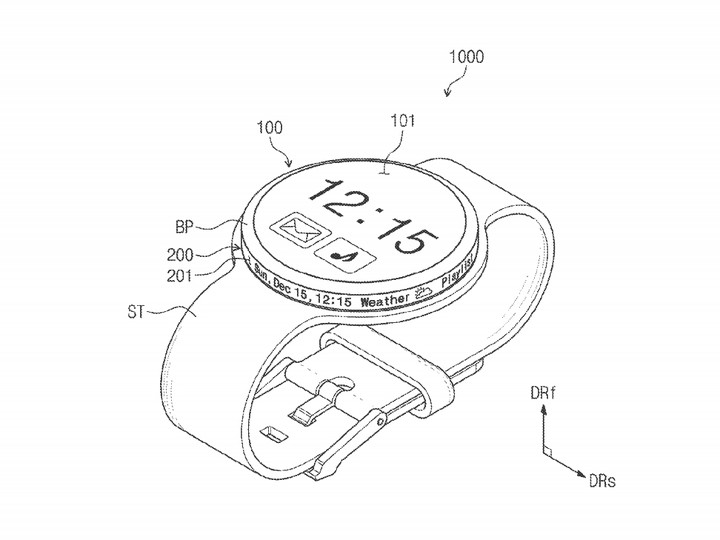
U.S. Patent and Trademark Office
The patent notes that, in this particular application, the display can only be rotated 90 degrees. It is also split into two sections — upper and lower — for an undisclosed purpose, though the diagrams often show them acting together as one panel.
As space comes at a premium when designing a device so compact and complex, it is understandable that Samsung would look to smartwatches as the next class of devices that could benefit from the recent advances made in flexible display technology.
The application itself was filed in September 2015 and published last week. While patents are no guarantee of the future, it wouldn’t be surprising to see Samsung bring this idea to term in the next Gear iteration. It could help the device stand out in a crowded market.
Patently Mobile goes on to note that the secondary display could also serve as a test bed for another, future idea Samsung is considering — a bracelet with a screen that almost fully wraps around the user’s wrist. Once proven, the tech employed here might function at a much larger scale in the unique form factor of a bracelet. Apple has also shown interest in such a design, which indicates a possible direction forward for the smartwatch industry. The question is, how long until that vision can be realized?
10 Moto G5 Plus tips to help you master your new phone
The latest installment in everyone’s favorite Android budget line will be an irresistible bargain for many. Sporting a shiny new look, the Moto G5 Plus offers a range of improvements over its predecessor, including a new processor and support for NFC.
More: Keep your Moto G5 Plus safe from harm with one of these cases
Lenovo has made the smart decision to go with almost stock Android 7.0 Nougat, mercifully free of bloat. If you’re looking to get to grips with your new phone, we’ve got a range of Moto G5 Plus tips to help you. These tips will also work for the standard Moto G5.
How to use the fingerprint scanner to navigate


The fingerprint scanner is below the screen on the front of the G5 Plus, but it can be used for more than scanning fingerprints. You can also swipe left on the fingerprint scanner to go back, swipe right to open recent apps, or tap to go to the home screen. Turn this on in the Moto app under Actions > One button nav. It will remove the usual on-screen navigation buttons.
How to turn on the flashlight

This is handy for turning on the flashlight on your Moto G5 Plus one-handed. Open the Moto app and tap Actions > Chop Twice for Flashlight. Now, if you do a double chop gesture the flashlight will switch on. Double chop again to turn it off.
How to use split screen

This feature is baked into Android 7.0 Nougat and it allows you to have two apps on screen at once. To try it simply open an app and then press and hold the recent apps or multitasking button. The open app will shrink to take up half of that 5.2-inch screen and you can select another app from your recent apps list to occupy the other half. To exit, simply drag the resize bar all the way up or down, or tap and hold the recent apps button again.
How to shrink the screen

You can swipe from the navigation bar at the bottom of the screen to shrink the screen for easier one-handed use. The option is in the Moto app in Actions > Swipe to shrink screen. Tap anywhere on the unused part of the screen and it will go full screen again.
How to use System UI Tuner

Pull down the notification shade and tap and hold on the settings gear icon for a few seconds until you see the message “Congrats! System UI Tuner has been added to Settings.” If you go to Settings and scroll down, you’ll see System UI Tuner has appeared below Developer options. It allows you to customize the status bar, so you can toggle off icons that you don’t want to appear there. There are a few other bits and pieces you can tweak, including a split screen gesture and do not disturb customization.
How to use Moto Display

This feature allows you to see things like the time, date, and remaining battery without fully waking up your display. This is a familiar feature on some flagships, so it’s nice to see it as an option on the Moto G5 Plus. To turn it on, open the Moto app and choose Display, then pick the settings you want.
How to take a screenshot

It’s easy to capture a screenshot on the Moto G5 Plus. All you have to do is hold down the Power and Volume down buttons together. You should see a short animation and hear a capture sound. You’ll find screenshots in their own folder in your gallery app.
How to quickly launch the camera

Open the Moto app and tap Actions > Twist for Quick Capture. With this on, you can twist your wrist twice to automatically launch the camera.
How to take photos by tapping anywhere

It’s horribly annoying when you line up the perfect group selfie shot and realize that you can’t quite reach the onscreen shutter button. Thankfully, you can set the Moto G5 Plus camera app to snap a shot whenever you tap anywhere on screen. Open the camera app and swipe left to right to reveal the settings panel. Under Photo you should see Shutter type and you can choose Tap anywhere.
How to lock focus on a subject

The Moto G5 Plus has a 12-megapixel camera that by default has auto-focus enabled, which seems to work quickly and accurately. However, there will be times when you want to choose a subject to focus on. To do so, open the camera app and simply tap and hold on the subject until you see a small padlock icon appear on the reticle in the middle of the screen. It will now try to stay focused on that subject, even if it moves. You can turn the lock off by tapping on the screen.
This $36,000 safe is what Bruce Wayne would use for his watch collection
Having spent some time at the Baselworld 2017 watch show this year, it’s very easy to see how people spend so much money on fancy watches. Models worth hundreds of thousands are shockingly commonplace. If you’ve already invested in several, how will you keep them safe, sound, and in perfect working order? Just putting them in an ordinary safe obviously isn’t good enough.
What you want is a Bluetooth-connected, leather-covered safe from German company Chronovision. It winds your (non-smart) watches for you, and comes in a size large enough that the floor in your house may not be able to support it. It’s the safe Batman would choose to store his watch collection.
More: Our first take review of the Guess Connect Touch
The compartments that store the watches aren’t just for show, they serve a purpose. It’s essential for many watches to be properly maintained, which means not letting them run out of power. Self-winding watches require movement to wind themselves up, which is usually from your arm when it’s being worn; but that’s not always an option if the watch is worth the same as a normal house, or you have a sizeable collection. That’s why you need a watch winder. Each spins round in the right direction, at the right speed, and for the right amount of time to wind your watch, without it ever leaving the safe.
Bluetooth-connected
Chronovision’s ChronoSync app contains a massive database of watches, complete with the correct winding profile for each one, and each winder module can be programmed individually. If your watch isn’t listed, all the attributes can be manually entered. For the ultimate visual experience, all the winders can be set to work at the same time, resulting in a spinning paradise of watches inside. Because it’s Bluetooth-connected, you can do all this while relaxing on the couch with a glass of (presumably expensive) wine.

Andy Boxall/Digital Trends
The app also controls the lighting inside the safe, and the tech continues on the outside, with a super secure fingerprint reader to unlock the door, and a hidden key lock behind the scanner in case of a power failure. All the internal parts of the safe are customizable too, including the finish, color, and materials used in the build.
The cost of all this luxury? A mere $36,000 for the version you see here, which was made specially for the show. A lot of money for a safe, but when the collection it contains could potentially be worth 10, 50, or 100 times that — it’s a worthy investment. If you have just one watch that needs regular winding up, Chronovision also sells the Chronovision One, a single, modular watch winder for about $540.
This $36,000 safe is what Bruce Wayne would use for his watch collection
Having spent some time at the Baselworld 2017 watch show this year, it’s very easy to see how people spend so much money on fancy watches. Models worth hundreds of thousands are shockingly commonplace. If you’ve already invested in several, how will you keep them safe, sound, and in perfect working order? Just putting them in an ordinary safe obviously isn’t good enough.
What you want is a Bluetooth-connected, leather-covered safe from German company Chronovision. It winds your (non-smart) watches for you, and comes in a size large enough that the floor in your house may not be able to support it. It’s the safe Batman would choose to store his watch collection.
More: Our first take review of the Guess Connect Touch
The compartments that store the watches aren’t just for show, they serve a purpose. It’s essential for many watches to be properly maintained, which means not letting them run out of power. Self-winding watches require movement to wind themselves up, which is usually from your arm when it’s being worn; but that’s not always an option if the watch is worth the same as a normal house, or you have a sizeable collection. That’s why you need a watch winder. Each spins round in the right direction, at the right speed, and for the right amount of time to wind your watch, without it ever leaving the safe.
Bluetooth-connected
Chronovision’s ChronoSync app contains a massive database of watches, complete with the correct winding profile for each one, and each winder module can be programmed individually. If your watch isn’t listed, all the attributes can be manually entered. For the ultimate visual experience, all the winders can be set to work at the same time, resulting in a spinning paradise of watches inside. Because it’s Bluetooth-connected, you can do all this while relaxing on the couch with a glass of (presumably expensive) wine.

Andy Boxall/Digital Trends
The app also controls the lighting inside the safe, and the tech continues on the outside, with a super secure fingerprint reader to unlock the door, and a hidden key lock behind the scanner in case of a power failure. All the internal parts of the safe are customizable too, including the finish, color, and materials used in the build.
The cost of all this luxury? A mere $36,000 for the version you see here, which was made specially for the show. A lot of money for a safe, but when the collection it contains could potentially be worth 10, 50, or 100 times that — it’s a worthy investment. If you have just one watch that needs regular winding up, Chronovision also sells the Chronovision One, a single, modular watch winder for about $540.
How to change your wallpaper and login screen in Windows 10
Windows 10 ditched the live tiles oft-associated with Windows 8 — well, sort of — and brought back the iconic Start menu last found in Windows 7. With something old and something new, Windows 10 is well-positioned to become the go-to operating system for most users, even if Windows 7 stills holds the lion’s share of the market. Regardless, what if you want to add a little of your own flavor to Microsoft’s latest operating system?
Perhaps one of the biggest differences between Windows 10 and earlier OS iterations is that you can personalize your computer’s login page and desktop. Unlike with other versions of Windows, however, the method for accomplishing these tasks isn’t as straightforward as you might think. To help with personalization, we’ve created this walkthrough for changing the image on your desktop and login screen.
Step 1: Navigating to the Windows 10 Personalization settings window
First, navigate to the Settings menu by clicking the Action Center icon in the lower-right corner of the screen. Then, click All Settings and select the Personalization icon to bring up the desktop’s visual options.
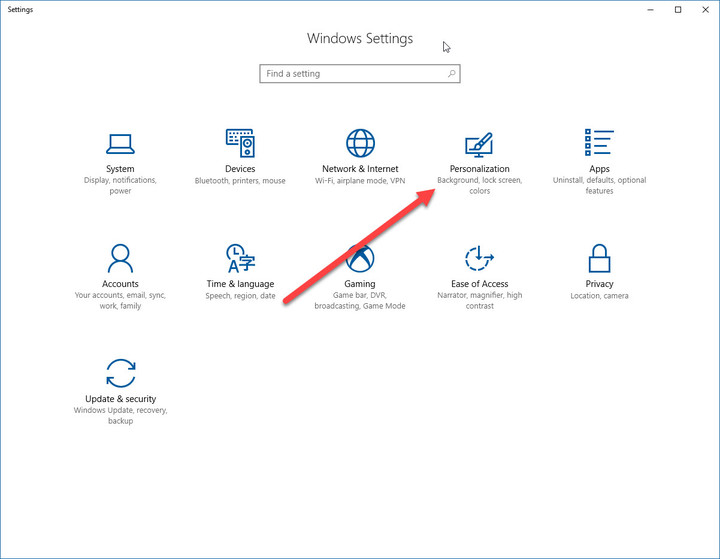
Windows 10 users also have the ability to right-click on the desktop to quickly reach the Personalization menu. Simply right-click anywhere on your desktop and click Personalize, and the intended section should open in the Windows Settings app. Once the window appears, follow Steps 2a and 2b below to successfully change your background and login screen.
More: Microsoft celebrates Windows 10 Anniversary update with new ninja cat backgrounds
Step 2a: Changing the background image
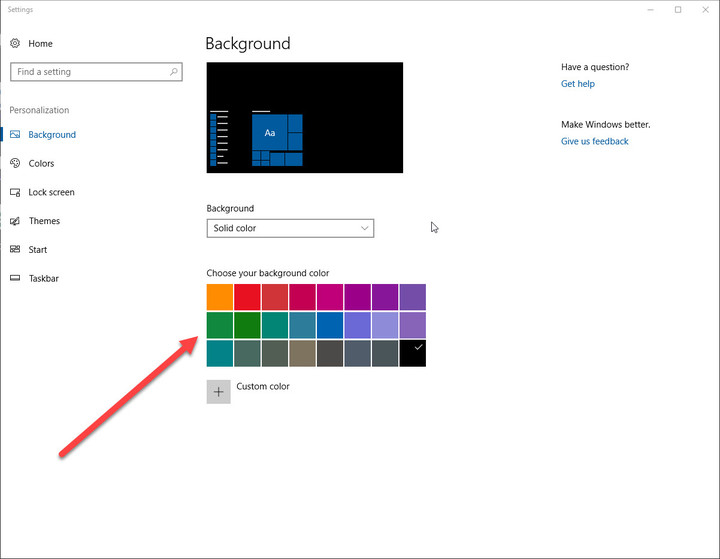
The first tab in the Personalization window is the Background tab, which allows you to change your desktop image to a saved picture, a solid color, or a slide show of various images. Atfer selecting the Picture option, you can choose your desktop picture by clicking Browse and selecting a picture from your computer’s hard drive or from a small selection of themed images.
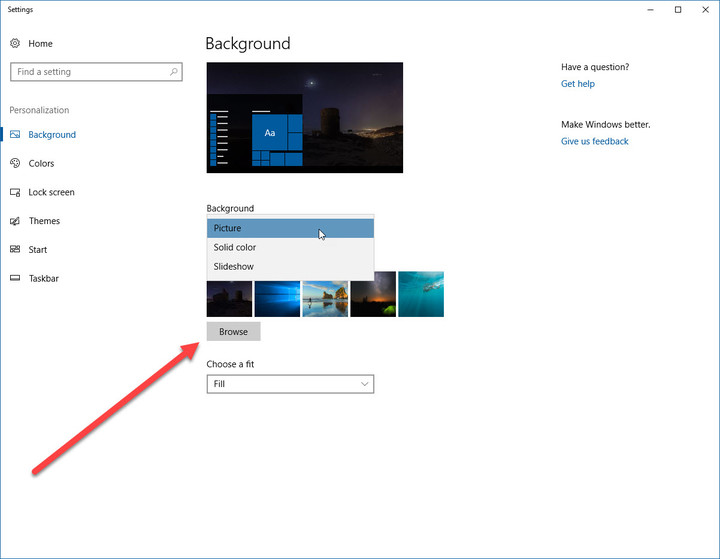
If you’re selecting a folder for the Slide Show option, then you can click Browse and select a folder with pictures you would like your machine to cycle through. Once you’ve selected a folder, then you can choose how long you want each picture to be on your screen before cycling to the next picture.
Keep in mind that if you a have monitors, then a different picture will be selected for each monitor and each one will also cycle through your images. For both a picture or a slideshow, you can choose to fit the image to the screen, stretch it, or select from one of several other options that ensure your pictures will appear the way you’d like them to on your particular display(s).
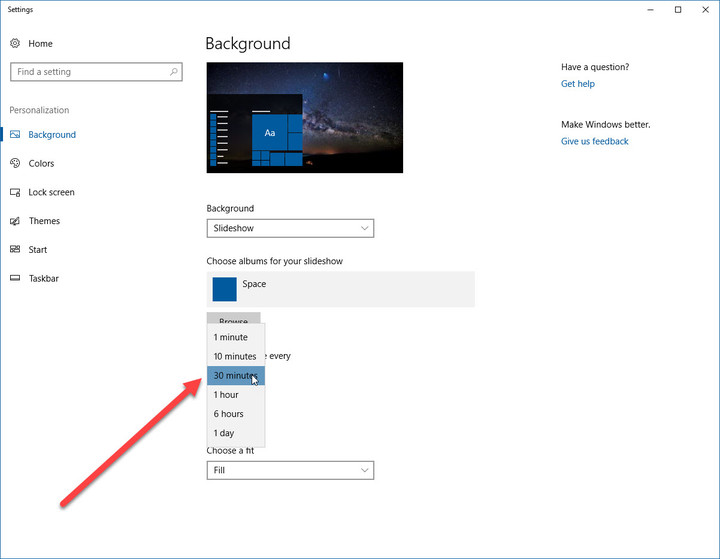
Finally, you can also select a solid color as your background, either from a palette or by creating your own custom color.
New Surface Book and Surface Pro machines may not be coming this spring
Why it matters to you
If you’ve been holding out for a new Surface Book or Surface Pro 5, then you might need to wait a little longer.
Industry pundits have predicted for quite some time now that Microsoft would be introducing new Surface Book and Surface Pro models sometime this spring. In fact, many have expected a spring hardware event in the same vein as Microsoft’s October events where machines like the Surface Book and Surface Studio were introduced.
As it turns out, that might not be happening. While new Surface machines are expected at some point, that might not be happening so soon, as ZDNet’s Microsoft watcher Mary Jo Foley reports.
More: What will the Surface Pro 5 look like? Here are the rumors
In fact, Microsoft hasn’t announced a “spring hardware event” of any kind so far. And if there is an event, as sources have told Foley there will be, it’s possible that it could focus mostly on Windows 10 Creators Update. If it’s indeed a hardware event, then it’s unclear what hardware Microsoft will show off.
As Foley puts it, “Recently, however, I’ve heard from a couple of contacts that Surface Book 2 is not going to be announced here … I’m not sure whether Surface Pro 5 will debut at the still-unannounced spring hardware launch either.” The reasoning behind the lack of new Surface Book variant appears to be simply a delay in finishing the machine, and recent rumors of Microsoft pivoting the Surface Book away from the 2-in-1 form factor also seems to be unlikely.
Furthermore, Microsoft could be aiming for the stars with the next Surface iteration. The company has a number of split-screen and foldable tablet patents in the works, and so perhaps it’s going to be introducing something that creates another new market segment. Certainly, Microsoft has had a habit lately of using Surface primarily to drive innovation in the Windows 10 PC ecosystem in entirely new directions.
In any case, it’s seeming less likely as time goes on that we’ll be seeing a new Surface Book early in 2017, and a new Surface Pro 5 is also unlikely. Microsoft has done a great job of keeping such things secret, however, and so anything’s possible. Creators Update is expected to roll out on April 11, 2017, however, and so if Microsoft is going to schedule any kind of event that leverages the new update, then the firm will need to send out invitations soon.
This drone is inspired by one of the most deadly hunters in the insect kingdom
Why it matters to you
This microdrone borrows from one of nature’s most efficient predators to (hopefully) become one of tech’s most efficient drones.
If you’re a company called Animal Dynamics looking for inspiration for a new type of drone, you naturally go in search of the most awesome flying creature in the animal kingdom. That creature? According to Chief Security Officer Adrian Thomas, who is also a professor of Biomechanics in the Department of Zoology at Oxford University, it may well be the not-so-humble dragonfly.
“If you’re going to look at what the most efficient and effective flyer in the insect world it’s likely to be the greatest predator — and that’s exactly what the dragonfly is,” Thomas told Digital Trends. “Dragonflies catch and eat everything from wasps and hornets to every other insect you can think of. The reason they can do that is because they’ve evolved their flight apparatus over 300 million years of air-to-air combat.”
More: ‘Morphing wing’ drone capable of landing just like a bird
Eschewing copter blades for flapping wings, the “Skeeter” drone is set to be publicly demoed in 2018. The project is funded by the U.K.’s Ministry of Defence, via the Defence Science and Technology Lab (DSTL).

“Flapping winged drones have two major advantages over existing multi-copter drones,” Thomas continued. “The first is that the response rate is at the wing-beat frequency, which gives it very, very rapid response to turbulence. It can fly in strong gusts of wind without being knocked around. The second advantage is that the rapid response rate is only very loosely dependent on the wing loading, which is the primary thing that determines the endurance that any these hovering vehicles have. For a regular quadcopter, to increase the endurance you have to make the propellers bigger, which results in a direct tradeoff between endurance and the ability to cope with turbulence. That doesn’t apply to flapping wing drones.”
If that wasn’t good enough, the use of wings instead of motors will allow the Skeeter drone to glide on thermals, and even perform a graceful landing if there is a sudden loss of power.
“If at some point we get delivery drones, they’ll need to be able to interact with the customer in a safe way,” Thomas said, regarding real-world applications. “Being able to glide into a landing at a relatively low speed — so you don’t have a flying lawnmower interacting with the customer — can only be a good thing. That sort of use-case would be very interesting, although there are plenty of other things you could do with this.”
The final Skeeter drone is set to be around 120mm in size (although the design can apparently easily scale), weigh less than 20 grams, including camera and navigation sensors, and have a top speed of around 45 kilometers per hour. That’s not all Animal Dynamics has planned, either.
“As a company, we’re interested in all the various different ways that natural systems have evolved to produce locomotion and motility at a much higher performance and efficiency than traditional engineering solutions,” CEO Alex Caccia told Digital Trends. “In addition to our Skeeter drone, we’re also working on a flapping propulsion vehicle for water, as well as looking at leg-based locomotion. The company’s not really about biomimetics; it’s about looking at the underlying physics that resulted in these extraordinary natural efficiency gains, and figuring out ways we can develop systems that use them to their full potential.”
 AIVAnet