


Netflix teases its Brad Pitt film ‘War Machine’
If it wasn’t already clear that Netflix has enough clout to get the biggest names in entertainment, it is now. The streaming service has posted its first teaser for War Machine, a satire of the war in Afghanistan starring a slew of major actors including Brad Pitt (whose company Plan B is involved), Tilda Swinton, Topher Grace, Anthony Michael Hall and Keith Stanfield. The clip offers a good hint as to what to expect from the movie: General McMahon (Pitt) has to fight the war while grappling with the government, the press and the gritty realities of battle.
The movie arrives on May 26th, or well after its originally hoped-for 2016 debut. However, it’s still a coup for Netflix, which also tapped Plan B for The OA and Okja. The company is no stranger to offering well-received movies and even scored an Oscar for its The White Helmets documentary, but projects like War Machine take that ambition to a new level. It’s now offering exclusives that compete directly with the top-tier movies you’d see in a theater, and might just be in the running for the most prestigious awards.
Source: Netflix (YouTube)
Nintendo finally gives us a glimpse at the Switch eShop
The launch of Nintendo’s very hyped (and very strange) Switch is only a couple of days away. And we’re only just now getting our first look at its digital storefront the Switch eShop. If you’ve touched an electronic device at all in the last few years, the interface should seem pretty familiar. It’s clean and simple, with sidebar shortcuts for search, new and upcoming releases and a place to enter download codes. On the right games are listed as a grid of cards with cover art and prices. It’s not all that different from any other app store really, and looks quite a bit like the Google Play store. And you’ll find most of the features you’d expect from a modern console — like a wishlist and the ability to download games in sleep mode — baked in.
The eShop has it’s own permanent button on the console’s dashboard, but you can also find it in the news feed. When you first turn on the Switch it presents you with updates and information from Nintendo, including announcements for new releases or promotional sales. And with a quick tap you can go from reading about the latest indie smash to buying it and downloading it.
If you already have a Nintendo Network ID you can link it to your Switch and any funds sitting in your wallet left over from 3DS or Wii U purchases will be added to your account. Sadly, you will have to fire up a computer to do that, there’s no way to merge your various Nintendo IDs from the Switch itself.
Right now it the eShop is a little barebones, for example filtering options are limited to price and genre. And it’s worrying late for Nintendo to be showing off its primary interface buying games online. As our review says, there’s a lot of potential here, but we’ve still got a lot of unanswered questions about the Switch.
Source: Nintendo (YouTube)
Prisma lets you create your own photo filters
If you like to use filters in photo apps, you’ve probably had that moment where the available filters weren’t quite what you were looking for. Wouldn’t it be nice if you could craft your own? Prisma thinks so. It’s updating its service with an option to create your own styles — specifically, you’re training the machine learning system to generate what you want. It’s not the same as making a filter in-app, but it could go a long way toward giving your photos a personal touch.
There’s an upgrade even if you’re in no rush to customize your snapshots. Prisma is launching a filter store in both its Android and iOS apps to greatly expand the number of styles on offer. All of the visuals in the store will be free, the company says. This is more about picking the exact filters you want, and making it easy for the company to add new filters without forcing them down everyone’s throats. Prisma will add styles every week to start, but the eventual goal is to add them on a daily basis. Ultimately, you’ll see user reviews and sharing as well.
The combined features suggest that Prisma might have found an important hook to keep you coming back. While the AI-guided filters are still its cornerstone, the custom filters and store promise constant novelty — there will always be an incentive to come back, even if it’s just to experiment with a style you’ll only use once.
Source: Prisma, App Store
Epic Games shows the potential of high-end augmented reality
Epic Games has a reputation for bringing bizarre demos to its GDC keynotes. The company loves to show developers what Unreal Engine can do, not just in gaming but other genres as well. As such, Epic Games has now demoed “Project Raven,” which makes it possible for content creators to blend real-time visual effects with live-action shots. The technology, created in partnership with Chevrolet and video production company The Mill, was designed to convey the promise of high-end augmented reality.
In typical TV or film shoots, Epic Games says, a single computer-generated frame takes hours to render and requires days of tweaking before it can resemble a “photoreal” image. With Project Raven, directors can add these types of visuals to their digital environments instantly, thanks to Unreal Engine and a proprietary virtual production tool developed by The Mill. To put this tech on display, Epic Games showed what it’s like to change the color of a 2017 Camaro ZL1 in real time, all while the car is speeding through its own short movie.
While today the focus was a Chevrolet product, Project Raven could be beneficial on a much larger scale in the future. That’s particularly true for filmmakers, advertising agencies and others who work with computer-generated imagery. These new capabilities will hit Epic’s platform later this year, though the company wasn’t clear on when, exactly, that might happen. On a consumer level, the company made an experience for Google’s Project Tango that lets users get a 360-degree view of a Camaro ZL1, configure it to their liking and see what it would look like using the 3D depth-sensing features from Lenovo’s Phab 2 Pro.
Unfortunately, the Tango app is only only for internal use right now, but Epic says that augmented reality is something that it is very interested in. “We want to go beyond gameplay for AR, it’s more about what’s unreal and real,” Epic Games CTO Kim Libreri told Engadget about the idea behind Project Raven. “The engine is always gonna be a great gaming engine. What we’re really seeing is the gamification of everything else [and] it’s gonna be hugely disruptive.”
Click here to catch up on the latest news from GDC 2017!
‘MindGamers’ clip shows off the dangers of wireless neural networks
The upcoming science fiction film MindGamers has an intriguing hook: 1,000 audience members are going to wear cognitive headbands to monitor their brain activity during a screening. And when it’s over, researchers will go over the results of the “mass mind state” they gathered. It’s apparently the first time such a large-scale collection of mind activity has been attempted, and it could potentially lead to new insights around human cognition. If you’re in Los Angeles or New York City on March 28th, you can sign up to wear a headband on the film’s site. You can also grab a ticket to watch the experience live in other locations via Fathom Events.
The film, which stars Sam Neill, centers on a group of students who discover a way to link minds together through a wireless neural network. While they think it could help humanity, things inevitably go wrong. We got a look MindGamers’ trailer last month, but below you can check out an exclusive clip showing off one of the grittier uses for connecting minds.
Source: MindGamers
The Oculus Rift and Touch bundle is now $200 cheaper
We’re just a few weeks away from the one-year anniversary of Oculus shipping the Rift to consumers, so now would be a good time for the company to drop some news. And here it is. Starting today, Oculus will begin selling Rift and Touch bundles on its store for $598 — about a $200 price cut. On their own, the Rift headset is now $499 while the Touch controllers are $99, meaning that each saw a price drop of $100. Oh, and the cost of an extra Oculus sensor is now $59, which is $20 less than before.
“Oculus’ mission is to drive VR to the mass market,” said Jason Rubin, Oculus’ VP of content. “There are two fundamental things that we need to push on to do that.” The first, he says, is content, which is why Facebook has spent over $250 million on developers to create thousands of games and experiences for the VR platform (we saw several upcoming titles just a few days ago). The second, however, is to lower the price. “This is how technology moves forward,” says Rubin. “Prices drop so more people can afford it.”
But what if you already bought a Touch, like yesterday? Are you hosed? Not necessarily. Rubin says that if you bought one within the last 30 days, you can apply for a $50 store credit, and a similar offer might be on the table for the Rift, too. As for if the Rift and Touch will ever be sold together by default, Rubin says it still makes sense to keep them separate for now, especially since the Touch was just introduced a few months ago. “But in the long run, we do consider them as one package.”
“We know the price drop is just the first step,” says Rubin. “Our goal is to get the most people into VR. The more people in VR, the better it is.”
Click here to catch up on the latest news from GDC 2017!
Snapchat Has Reportedly Worked on App-Connected Drone and 360-Degree Camera
Camera-focused company Snap is said to have worked on a drone that would connect to the iOS and Android Snapchat app and let users take photos and videos from aerial angles, according to sources speaking with The New York Times. Details about the drone and any of its other capabilities remain under wraps, but the work is said to help Snap “bolster” its repositioning and rebranding as a modern-day camera company.
In a separate report by TechCrunch, Snap is believed to also have investigated and built a 360-degree camera, going so far as to bring in a camera developer with expertise in the field to hone in on the best hardware options for such a product. The 360-degree camera project is said to be in the “early phases.” For both projects, sources mentioned that it remains unclear if consumer-ready versions will ever hit the market, or how much they might cost.
The foldable DJI Mavic Pro Drone and Samsung Gear 360 Camera
The question driving Snap’s hardware ambitions is: What can’t your phone camera do? It can’t take first-person, hands-free video, so Snap built Spectacles. It can’t fly. And it can’t capture what’s around you in all directions at once. People often stick their camera phones in the air and do a slow pan to show off where they are. A 360 camera could do a much better job of making friends feel like they’re there with you.
The company is said to have a specific strategy for mergers and acquisitions that uses new startups to “gather information” about technologies it lacks expertise in, sometimes acquiring the companies and sometimes not. An example is given describing when Snap met with drone startup Lily before the latter company eventually shut down, and now rumors suggesting Snap’s entry into the drone market have begun circling.
Snap has previously met with startups with the implication that it might acquire them, when in reality it’s goal has been to gather information about new markets and technologies where it could compete, according to one source familiar with Snap’s M&A procedures.
In some cases, it has made acquisitions after these meetings. But in other cases, “they talked to a bunch of people and got them to tell them a bunch of stuff. Snap shows a little bit of leg and tries to be flirty to see what they can get” the source said.
Additionally, it was reported that Snap has “preliminarily discussed” other consumer products that would enhance its mobile app, including a durable GoPro-like camera, and another that would let users take 3D images.
The reports of new products from Snap follow the launch of its Spectacles sunglasses, which let users take 10-second videos from a camera mounted within a pair of glasses, providing freedom of movement with their hands. According to TechCrunch’s sources, the company is pursuing work on a second version of Spectacles, but the lack of “meaningful revenue” from the first iteration may pause those plans.
Market watchers are paying close attention to Snap today, as the company gets ready for the debut of its initial public offering on the U.S. stock market later in the afternoon.
Tag: Snapchat
Discuss this article in our forums
Huawei Watch 2 hands-on: not too classy, but packed with features
The original Huawei Watch is one of the most popular Android Wear devices to date, and for good reason. While it may be a tad on the chunky side, users flocked to the Huawei Watch because of its classy design and solid performance.
Now Huawei has just unveiled its successor (well, successors) to the original Watch here at MWC, and they certainly have a high bar to clear. Join us as we go hands-on with the Huawei Watch 2!
See also:
Huawei Watch 2 and Watch 2 Classic officially unveiled at MWC 2017
3 days ago
In case you haven’t read our previous Huawei Watch 2 coverage, there are two different variants this time around – the Huawei Watch 2 and Huawei Watch 2 Classic. Today we’re taking a look at the Watch 2, which is the version with LTE connectivity and a fitness-focused design. The Watch 2 Classic is, well, the classier version and offers Bluetooth and Wi-Fi connectivity. Aside from aesthetics and LTE support, these are pretty much the same watches.
The flimsy, low-quality silicone strap on the Watch 2 is a little concerning
Based on looks alone, most people probably wouldn’t be able to tell that this is device is even in the Huawei Watch family. The Watch 2 Classic is more of a direct successor to the original Watch, while the standard Watch 2 is for the sporty, outdoorsy type. The silicone band on the Watch 2 has actually been pretty overwhelming thus far; it’s sort of flimsy and feels like it’s going to break after extended use, which is slightly concerning as the original Huawei Watch was built so well.

The Watch 2 sports two physical buttons on the right side of the casing – the bottom button is programmable and can launch straight into a fitness application, and the top-most button will open up your app drawer or take you to the home screen. Unlike the LG Watch Sport and Watch Style, the Watch 2 doesn’t feature a rotating crown for navigation, meaning all of your navigation on the watch will be done via taps and swipes.
- LG Watch Sport and Watch Style review
- Samsung Gear S3 review
This may be fine for some people, but the crown on the LG watches and rotating bezel on the Samsung Gear S3 has spoiled us in this area. Especially after using the latest offerings from LG, we feel like we’re taking a step back in terms of navigation.

Both the Watch 2 and Watch 2 Classic are packed with the latest and greatest specs
If you are going to be swiping all around the interface, at least you have a nice display to work with. Both the Watch 2 and Watch 2 Classic feature 1.2-inch AMOLED displays with a resolution of 390 x 390, resulting in a pixel density of 326ppi. Under the hood, they’re packing the latest Snapdragon Wear 2100 processor, 768MB of RAM and 4GB of storage if you’d like to store music on the watch itself. Both devices also have 420mAh batteries, which Huawei says will be able to get you two full days of normal use on a single charge.
On the bezel of the display, you’ll notice Huawei has included etched-in number designations. This isn’t the first watch to adopt this design cue, but we can’t say we’re huge fans of it. It sort of makes us feel obligated to use an analog face.

In case the pictures don’t relay the message properly, the Watch 2 is a pretty bulky device, and for good reason. Huawei packed a lot of tech in these watches. Both come with an optical heart rate sensor, a built-in GPS, and even an IP68 rating for dust and water resistance.
Related:
Which smartwatches will get updated to Android Wear 2.0?
2 weeks ago
The Huawei Watch 2 and Watch 2 Classic are two of the first smartwatches to run Android Wear 2.0, and you can find our full review of the big 2.0 update right here. We’ll have to give you our a more detailed look at Wear 2.0 in our full review, but so far, performance on the Watch 2 has been pretty impressive. We haven’t experienced and lags or stutters in the interface.

Oh, one other thing. The Huawei Watch 2 (not the Watch 2 Classic) sports LTE connectivity, meaning you can use it to make calls, send and receive texts and do plenty of other things without needing your phone. We haven’t had the chance to throw a SIM card in our Watch 2 yet (we’re still in Barcelona, after all), but we’ll give you a full rundown in our review.

But we want to know what you think about the Huawei Watch 2 and Watch 2 Classic. Will one of these devices be your next smartwatch, or are you passing on Huawei’s offerings this time around? Be sure to let us know your thoughts in the comments below.
Android Authority is on the show floor at MWC 2017, bringing you all the new news as it happens. Head here to check out all our MWC 2017 coverage!
Next: Hands-on with the Huawei P10 at MWC
AOL appears to be killing third-party access to AOL Instant Messenger
Why it matters to you
You might have to stop using your third-party AIM client, and switch to the company’s own official app to stay connected.
AOL Instant Messenger (AIM) will be familiar to anyone who’s been using PCs for a while. There was a time when AOL was the leading internet service provider, and AIM was among the most popular instant messaging tools for keeping in touch with friends and family.
Fast forward to today, and while AOL still exists, it’s just a shadow of its former self. And AIM has also fallen by the wayside, enough so that the company is turning off the service used by third-party clients, as Ars Technical reports.
More: Simplicity breeds success: the lasting impact of AOL Instant Messenger
For quite some time, there have been two ways to use AIM as an instant messaging service. You could install AOL’s own messaging app, which runs on Windows, MacOS, iOS, and Android. That method still exists and likely will do so for at least the foreseeable future.
The other method was to install one of a number of third-party clients for your platform and access the service that way. A number of options existed, including Adium, Trillium, and Pidgin, some of the more popular options.
Those third-party apps require the use of AOL’s OSCAR chat protocol, however. Without it, there’s no way to pass messages to and from the AIM service. And as one user discovered and posted on Twitter, AOL is starting to cut apps off from its messaging service by turning off OSCAR support.
Just got this AIM message. Anyone else still using AIM out there? pic.twitter.com/2WpR1lTwmH
— Cyrus Farivar (@cfarivar) February 28, 2017
Speculation suggests that AOL is cutting its losses due to low usage of AIM, which costs the company real money to maintain. AOL hasn’t made any official announcements yet, but it’s possible that we might be experiencing the end of an era if the AIM service is indeed starting to ramp down.
Microsoft adds more intelligence to make Office 365 safer and easier to use
Why it matters to you
Office 365 will now help you create a PowerPoint presentation and edit your Word documents, but only if you’re an Office Insider.
There was a time when Microsoft’s business was primarily based on Windows with some Office productivity suite activity on the side. Now, the company is into cloud services, hardware, gaming, and a number of other business, and yet Office remains vital to its productivity strategy.
That’s likely why the company continues to improve Office, while simultaneously pushing the apps to other platforms. For February 2017, Microsoft is injecting some of its machine intelligence work into Office and making a number of tasks easier and more efficient.
More: Microsoft’s Office Insider now has its very own Insider Fast Ring
First up is a feature that Microsoft originally introduced at its Ignite 2016 event in September 2016. Specifically, QuickStarter for PowerPoint helps users create new presentations by creating a set of default slides.
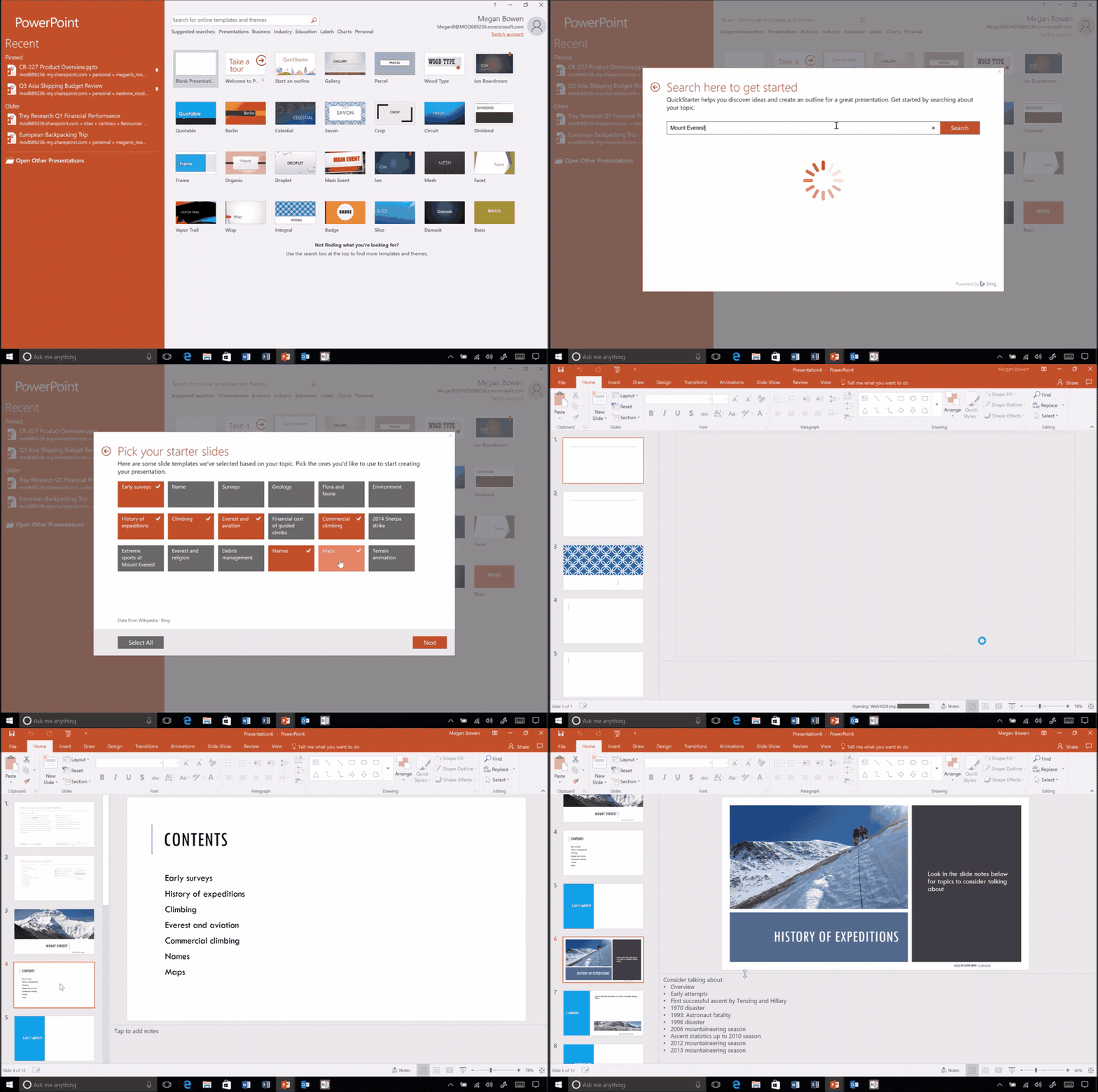
Type in a topic, and QuickStarter creates a curated outlined, some recommendations on categories, associated Creative Commons images, and research suggestions. QuickStarter is available in PowerPoint 2016 for Office Insiders in the Fast ring.
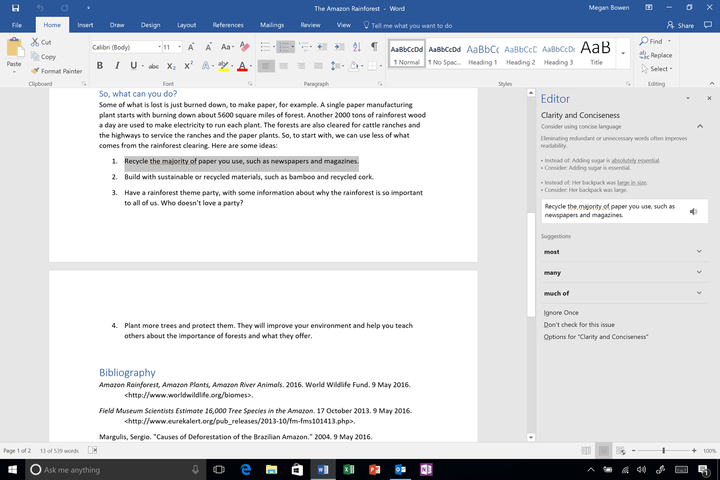
Next up are some enhancements to the Word 2016 Editor feature, which provides real-time writing assistance to users. The new Editor pane provides more information in terms of advanced spelling, grammar, and style recommendations, and enables users to scan entire documents in one place. The Editor pane replaces the old Spelling & Grammar pane, and is available to the Office Insider Fast ring.
Microsoft also provided a review of some new functionality that’s been released in the past few months. Office 2016 for Mac now supports the Touch Bar on 2016 MacBook Pro machines, providing task-specific virtual function keys. And Cortana can now scan Outlook.com and Office 365 email messages for promised tasks and automatically generate reminders that show up in Windows 10.
More: Microsoft’s digital assistant Cortana will now remind you to keep your promises
Finally, Microsoft has improved security in Office 365 with a few new features. First up is Office 365 Secure Score, a security analytics tool that helps organizations understand their security configurations and what actions to take to improve security and reduce risk. Office 365 Intelligence keeps organizations aware of potential cyber threats and provides information from the Microsoft Intelligence Security Graph.
Overall, Microsoft’s February 2017 set of updates to its Office productivity suite is all about leveraging the company’s machine intelligence capabilities to make working in Office easier and more secure. Note that a few of the newest features are only available to Office Insiders, and you can sign up here to participate in that preview program.

