


Microsoft releases public version of Visio Online for Office 365 commercial users
Why it matters to you
Commercial Office 365 users can now collaborate on Visio documents without installing the full Windows application.
Microsoft Visio is the diagramming and flowcharting component of the company’s Office line of productivity apps, although it has been a stand-alone product throughout its time with Microsoft. It has also historically been a Windows-only product, making its way into the Office lineup when Microsoft acquired Visio Corporation in 2000.
Microsoft expanded Visio a bit as part of its general cross-platform strategy, making it available first to iOS. Now, Microsoft has pushed out yet another version of Visio, this time making Visio Online widely available for the first time.
More: Try the latest Office features before everyone else with Microsoft Office Insider
A preview version of Visio Online was first made available to a select group of Office 365 users in November and Microsoft utilized their feedback in launching the current version. Like the previous version, the public release is free and aimed primarily at allowing users of the full Visio for Windows application to view and collaborate on Visio diagrams on any platform that can run a web browser.

In order to use Visio Online, you need to be an Office 365 commercial user running one of the following versions:
- Office 365 Business, Business Essentials, and Business Premium
- Office 365 Education and Education E5
- Office 365 Enterprise E1, E3, E5, or K1
- Office 365 Government E1, E3, E5, or K1
- OneDrive for Business Plan 1 or 2
Because Visio Online is just a viewer, you will need to create your Visio diagrams in the full version and then share them using OneDrive for Business or SharePoint Online. Once they are available online, then you can also share them using the Visio Online version. The Visio for iPad app works similarly to Visio Online, letting users view diagrams and search for text and shapes.
Microsoft is also releasing a set of Visio Javascript application programming interfaces (APIs) aimed at extending Visio One to other apps. Developers can use the APIs to gain access to Visio Online diagrams in SharePoint Online pages, interacting with Visio diagram elements, expose diagram data, create visual markups, and more.
Interested parties can find out more about developing for Visio Online at the Office Dev Center and users can visit the Visio UserVoice page to provide feedback. Visio Online is available to most Office 365 commercial users starting on Wednesday.
DT Daily MWC 2017: Top Tech awards, Snake on the Nokia 3310, and more

Day three of Mobile World Congress 2017 was dominated by our awards, but we still found time to have some fun with the new Nokia 3310 feature phone and try out the new Nokia smartphones. It turns out, the famous old brand has learned some new tricks.
The day began by presenting our awards to the winners. LG took the best of show with the LG G6 smartphone, a device that has pulled off a very special trick — it has fitted a big screen into a genuinely compact body. The unique 18:9 aspect ratio screen gave LG the chance to play around with some really fun interface effects, which even has picture enhancing tech from your TV inside to make watching video a real pleasure.
More: 5G is nothing but hype at the moment
Huawei’s P10 took best phone, Samsung’s Galaxy Tab S3 took best tablet, the Huawei Watch 2 was given best wearable, the incredible LiFi technology won the cool tech prize, the Kado Wallet took best accessory, and the cute and fun Nokia 3310 won best gadget.
We got hold of the Nokia 3310 to try it out. Not because it’s a high-tech masterpiece, but because it has a revamped version of the classic Snake game. Our mobile team went head to head against each other to see who could score the highest, all the while marveling at the little phone, that manages to capture the nostalgia associated with the original perfectly, but with the right modern touches to make it worth considering today.
Then it was time to check out the new Nokia phones, the Nokia 3, Nokia 5, and Nokia 6. This new range comes with standard Android 7.0 installed, and the promise of regular updates for security and features. That’s something many other manufacturers don’t always adopt. We like the look and feel of the Nokia hardware, too, and were particularly taken with the Nokia 5, which combines the best features with the most pleasant design.
Tomorrow is the last day of MWC 2017, but we’ve still got plenty of cool tech to show you, so join us again tomorrow.
DT Daily MWC 2017: Top Tech awards, Snake on the Nokia 3310, and more

Day three of Mobile World Congress 2017 was dominated by our awards, but we still found time to have some fun with the new Nokia 3310 feature phone and try out the new Nokia smartphones. It turns out, the famous old brand has learned some new tricks.
The day began by presenting our awards to the winners. LG took the best of show with the LG G6 smartphone, a device that has pulled off a very special trick — it has fitted a big screen into a genuinely compact body. The unique 18:9 aspect ratio screen gave LG the chance to play around with some really fun interface effects, which even has picture enhancing tech from your TV inside to make watching video a real pleasure.
More: 5G is nothing but hype at the moment
Huawei’s P10 took best phone, Samsung’s Galaxy Tab S3 took best tablet, the Huawei Watch 2 was given best wearable, the incredible LiFi technology won the cool tech prize, the Kado Wallet took best accessory, and the cute and fun Nokia 3310 won best gadget.
We got hold of the Nokia 3310 to try it out. Not because it’s a high-tech masterpiece, but because it has a revamped version of the classic Snake game. Our mobile team went head to head against each other to see who could score the highest, all the while marveling at the little phone, that manages to capture the nostalgia associated with the original perfectly, but with the right modern touches to make it worth considering today.
Then it was time to check out the new Nokia phones, the Nokia 3, Nokia 5, and Nokia 6. This new range comes with standard Android 7.0 installed, and the promise of regular updates for security and features. That’s something many other manufacturers don’t always adopt. We like the look and feel of the Nokia hardware, too, and were particularly taken with the Nokia 5, which combines the best features with the most pleasant design.
Tomorrow is the last day of MWC 2017, but we’ve still got plenty of cool tech to show you, so join us again tomorrow.
Best mobile accessories of MWC 2017

The halls of the Fira Gran Via exhibition center in Barcelona are packed to the brim with every imaginable flavor of tech at MWC. After a few days of exploration, we’ve uncovered some of the gems in the mobile accessory scene. Some are available now, some will be hitting the market in the next few months, but all are worth keeping an eye on. These are the best mobile accessories of MWC 2017.
More: Our favorite phone accessories from CES 2017
Kado Wallet
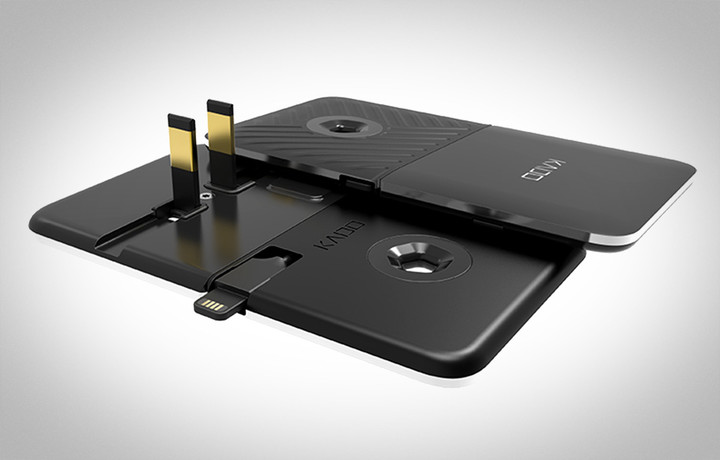
This incredibly svelte phone charger scooped our mobile accessory award this year and with good reason. It’s less than a fifth of an inch thick, and its other dimensions make it not much bigger than a credit card, so you can slip it into your wallet. The design features two squares that slot together. On one side, two prongs fold out, so you can plug it into a wall outlet, and on the other there’s a 2-foot cable to plug into your phone. When it’s not in use, the cable is coiled snugly in a groove to keep that slender profile. Slide the two halves apart and there’s a USB to plug into your laptop or desktop for data transfer. The Kado Wallet will be available this summer for around $40 to $50.
Read more about the Kado Wallet.
Tapdo

Here’s a little handy Bluetooth button with a fingerprint sensor built into it. Tapdo allows you to assign different apps and functions to specific fingerprints and even different parts of your finger. That means you can, for example, set it up so the tip of your index finger launches your music app, the middle turns the volume up, and the bottom part of your finger turns it down. There’s vibration feedback, so it’s easy to use without looking. It’s a smart alternative application for biometric technology. Tapdo launches on Kickstarter in March and will cost around $105.
Read more about Tapdo.
Giroptic iO

If you want to capture video in 360 degrees, then the Giroptic iO camera for iPhone will interest you. Paired with the Giroptic app it enables you to shoot 360-degree videos, photos, and live streams. It has a Lightning connector built in and clips snugly onto the end of your iPhone. It features two 195-degree optics and an F/1.8 aperture. There are also stereo microphones built in to capture audio. Video is captured at 30 fps and a resolution of 1920 x 960 pixels. It won’t kill your iPhone battery because it also has its own 915mAh battery, which can be charged via the MicroUSB port. You can buy the Giroptic iO now for $250.
Timebox Mini
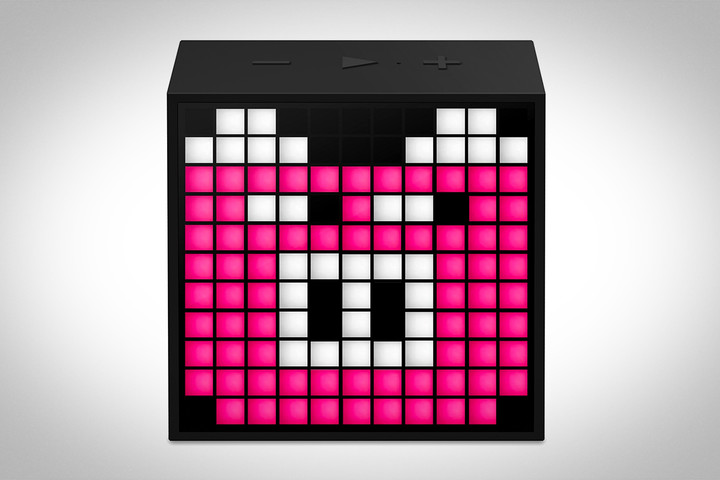
This is cute, eye-catching accessory packs in a unique blend of features and functions. It has 121 full RGB LEDs in the front that can be programmed with the companion app for Android or iOS to display your preferred pixel art or animations. It’s also a speaker that can be used to take calls or play music. There are some built-in games and a pixel chat function, as well as a stopwatch, scoreboard function, and a few other bits and pieces. There’s a 2,500Ah battery inside and you get a charging cable in the box with it. You can buy it now for $50.
Sandisk A1 256GB MicroSD Card
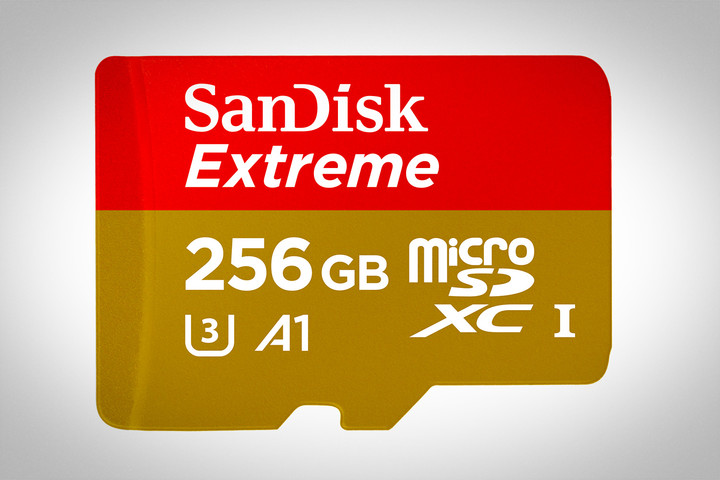
At first glance, a MicroSD card is hard to get excited about, but this card boasts a staggering 256GB of space. It’s also one of the first cards to score an A1 rating from the SD card association, which means that it’s ideal for Android 6 or 7 users looking to use it as adoptable storage. This A1 spec means it can manage random read input-output access per second (IOPS) of 1,500 and write IOPS of 500. In other words, it can open apps and games at lightning pace, much faster than standard class 10 cards. WE saw a side-by-side comparison at the show and it loaded a game several seconds faster than a standard class 10 card. It will be available from the end of March, but unfortunately it will cost $200.
26 photo apps to supercharge your iPhone camera
There’s an old adage amongst photographers that goes, “The best camera is the one you have with you.” The point being that when the perfect scene pops up, any camera is better than no camera at all. And since most of us carry our smartphones with us everywhere we go, the best camera we have is often an iPhone. Moreover, the camera on the newly-launched iPhone 7 and 7 Plus — and those adorning nearly all recent iPhone models — are nearly as powerful as the point-and-shoots of yesteryear, with a massive selection of sophisticated apps that render them even more versatile.
More: Photo editing apps you can get for free
Check out this list of our favorite photography apps for iOS, whether you’re looking for a way to shoot, edit, or organize your photos with the touch of your finger and a little intuitiveness.
Camera+ ($3)

Even with the latest iOS update, Apple’s native camera app is rather anemic when it comes to features. Thankfully, Camera+ provides a wider range of exposure controls and advanced tools such as continuous flash, frontal flash, touch-focus adjustment, 6x digital zoom, a timer, and preset filters. The well-organized interface also makes it a breeze to utilize, whether snapping or sharing shots on social media.
Download now from:
iTunes
ProCamera ($5)

When iOS 8 launched, rather than updating the existing ProCamera app, developer Cocologics decided to go ahead and make an entirely new app. The new app — now optimized for iOS 10 — still sports a minimalist interface, with a host sophisticated features for setting exposure time, tint, ISO sensitivity, and more. It even features a night camera and full-resolution previews in addition to robust exposure control and more than 70 unique filters and effects.
Download now from:
iTunes
Pro HDR ($2)

ProHDR is probably one of the most fully-featured apps we’ve encountered in the HDR category. The interface isn’t quite as slick as VividHDR, but it offers you a wider range of control over exposure adjustments and tone-mapping settings. It also features an array of beautiful preset filters for you to use, if you’re into that sort of thing, along with options for digitally zooming, cropping, captioning, and setting a self timer, among other features.
Download now from:
iTunes
Adobe Photoshop Express

When it comes to photo editing software, nobody does it better than Adobe. Though the mobile version of their renowned desktop software offers a smaller work space than most apps, it’s still one of the most capable after-effects programs you can buy. Popular Photoshop features such as layers, selection tools, and adjustments all make an appearance, as do options for adding text, applying effects, and blending images. Unfortunately, many features are locked behind in-app purchases, so be ready to spend some dough if Express is your photo editor of choice.
Download it now from:
iTunes
Adobe Lightroom

Although many of Lightroom’s tools require a newer model of iPhone to run, it remains one of the most feature-rich apps on our list, particular for photographers who want to edit their workflow while on the move. The app automatically syncs images with its desktop counterpart – whether you’re using images shot on your smartphone or raw images from a DSLR – allowing you to quickly edit, enhance, and share your photos using a variety of familiar tools. With iOS 10, Lightroom now supports RAW image capture and editing.
Download it now from:
iTunes
Medium app’s new Series posts are like Snapchat stories for binge readers
Why it matters to you
Medium’s new mobile blog posts take a feature popularized by Snapchat and repurpose it for serious readers in search of immersive stories.
Medium is adding a major new update to its mobile apps for iOS and Android in the form of serialized posts.
The new “Series” feature lets users create mobile stories using text, images, photos, and GIFS, with video coming soon. Readers can swipe through the posts card by card in the vein of a Snapchat story — a social sharing function that has also been copied by Instagram and its parent company Facebook. But Series differs from the stories you’d find on those platforms, mainly because a serialized story on Medium ditches temporality. In that sense, it also resembles the Moments tool currently available on Twitter (of which Medium chief Evan Williams is a co-founder).
More: 22 fast and fluid news apps for iPhone and Android

Instead, the blogging platform is hoping the immersive nature of the function (full-screen, vertical visuals, tilt-to-view movement controls) will revolutionize the way users engage with its app. Its arrival comes during a time of flux for the company, as it moves away from its ad-driven past toward a (possible) subscription-based model.
Whereas Series presents stories in the chronological mobile storytelling format popularized by Snapchat, it also offers an altogether different concept, summed up in its promo video: a story that doesn’t have to end.In fact, the app’s emoji-like interaction option for readers — a clap icon that appears at the end of a series, and tallies responses — is aimed at encouraging creators to update posts that receive positive feedback.
Therefore, in its bid to alter the way people use its app, Series presents a way to get readers coming back for more. This is reflected in the functionality of the format, which lets you set push notifications that alert you every time a new instalment is added to a Series, and saves your place in the post when you stop reading.
“Series are built for phones, using the constraints of the mobile screen to design a more powerful and dynamic storytelling format,” a Medium spokesperson told Digital Trends via email.
A number of public figures and popular Medium contributors have already uploaded Series posts, including philanthropist Melinda Gates, Bernie Sanders, and writer and cartoonist Jeff Lewonczyk.
At present only iOS users can create serialized posts via the Medium app, although the feature is available to all logged-in users on the web. Both iOS and Android users can access Series posts by downloading or updating to the most recent version of the Medium app. Here, you’ll find a new Series tab that includes stories from people you follow and featured posts picked by the platform’s editorial team.
Scientists prove it’s possible to build a DNA computer
Scientists at the University of Manchester, led by Professor Ross D. King, have created a new DNA-based computing device. If you think of DNA as being the code for generating life, then it’s not hard to see it as capable of performing other tasks. Just as the four key proteins of DNA can be combined to tell white blood cells to attack infections or grow hair, they could also theoretically be used to analyze massive amounts of climate data… or you know, render a disturbingly realistic Nazi to shoot in the face.
Current computers use a finite number of processors to perform these sorts of operations. A device that uses DNA molecules can grow more of itself to perform many calculations simultaneously, seemingly without limit. Quantum computers, still in their infancy, can also process concurrently, but still need specific set ups to do so, which limits their usefulness. DNA computers have no such constraint.
“Imagine a computer is searching a maze and comes to a choice point, one path leading left, the other right,” Professor King told Popular Mechanics, “Electronic computers need to choose which path to follow first. But our new computer doesn’t need to choose, for it can replicate itself and follow both paths at the same time, thus finding the answer faster.”
If your Macbook used DNA molecules instead of silicon, for example, it would have a ton more processing power and use far less energy. Obviously Apple isn’t going to be cramming DNA in its Macbook Pro refresh anytime soon, but the University of Manchester’s work is is a big step towards faster, more efficient computing devices in the future.
Via: Popular Mechanics
Source: University of Manchester
Watch the 2017 Game Developers Choice Awards right here!
They may not be on the same scale as the Oscars, but the Game Developers Choice Awards and Independent Games Festival Awards are happening tonight in San Francisco. The events are going to be hosted by Double Fine CEO Tim Schaefer and Tacoma Games’ Nina Freeman, respectively, in an evening where the best AAA and indie developers will be recognized for their work. Will Super Mario Run win the award for Best Mobile/Handheld Game? Tune in to find out at 6:30PM PT/9:30PM ET; there’s a livestream below, otherwise you can go to the GDC’s Twitch or YouTube page.
Source: Twitch (GDC)
Upgrade your network with a sleek Netgear R6300v2 smart Wi-Fi router, now $70
Although often overlooked, routers are important pieces of tech that most of us rely on for our daily work and online leisure activities. Not only can a quality router give you more control over your network while enhancing the power and speed of your Wi-Fi, it can save you money on monthly equipment rental fees if you are using the basic router supplied by your ISP. If you are considering an affordable quality router for your home or office, consider the $70 Netgear R6300v2.
The Netgear R6300v2 is a smart router that offers a dual-band AC1750 connection for a total throughput of 1,750Mbps — 450Mbps on the 2.4GHz band for simple tasks like web browsing and 1,300Mbps on the 5GHz band for larger jobs, such as streaming and online gaming. The 800Mhz dual-core processor and 256MB of RAM work together to handle more than 12 simultaneous connections, making the R6300v2 a solid option for larger home or office networks with numerous clients. Netgear’s Beamforming+ feature offers faster streaming for less buffering and lag, even with high-definition video.
More: Eliminate wireless dead zones with the $30 Netgear AC750 Wi-Fi range extender
 On the reverse side, the Netgear R6300v2 features four Ethernet LAN ports for wired connections along with a high-speed USB 3.0 port. Another USB 2.0 port is located on the side for devices that use the older standard, allowing all devices on your local network to interface with any connected drives or printers via ReadySHARE. The Netgear genie app provides a user-friendly mobile interface for remotely setting up and managing your network with ease.
PCWorld named the Netgear R6300v2 one of the fastest routers they’ve ever reviewed, and its reliable performance and attractive appearance should make it a welcome addition to any home or office. The Netgear R6300v2 smart router goes for as high as $160 at some online retailers, but Amazon is currently offering it for just $70.
Buy it on Amazon for $70
Outlook 2016 for Mac supports Google Calendar and Contacts for Office Insiders
Why it matters to you
Microsoft gives you another reason to become an Office Insider, with enhanced Google account support for Outlook 2016 for Mac.
Office 2016 for Mac has gone a long way to bringing Mac users the same experience as those running on Microsoft’s own Windows platform. Gone are the days of Office for Mac having its own user interface and feature set, and now Mac owners can even take part in the same Office Insider preview program as Windows users.
Outlook 2016 has seen as much of an overhaul as any Office application for MacOS and now Microsoft is bringing enhanced support for Google Calendar and Contacts to the Mac. If you’re a part of the Office Insider Fast Ring community, then the most recent update lets you use more of what Google has to offer in the way of managing your time and relationships.
More: Microsoft’s Office Insider now has its very own Insider Fast Ring
Up until now, Outlook 2016 for Mac only supported connecting to and managing Gmail accounts. That meant Mac users could get access to their Google email, but nothing else. Now, Microsoft is adding the ability to sync Google Calendar and Contact accounts as well, with the same add, delete, and time and location editing functionality as was previously available only with Outlook.

In addition, Outlook 2016 for Mac also now supports some Gmail-specific Outlook.com, Office 365, and Exchange email features as well. First is the new Focused Inbox functionality that breaks email messages into “Focused” and “Other” tabs based on what Microsoft’s machine intelligence decides is important and urgent email. Outlook 2016 for Mac also now supports the same rich experiences for travel reservations and package deliveries that have been arriving for other Microsoft email clients.

As is often the case, you will need to be an Office Insider in the Fast Ring to gain the earliest access to these new features. You can sign up to be an Office Insider by opening Outlook 2016 for Mac, going to Help > Check for Updates, and following these instructions. Not everyone will gain immediate access to the complete Google account support right away, however, as Microsoft will be monitoring the experience and inviting specific users. You will be prompted to add the support when you are added to the list.

