


Microsoft adds Wake functionality on LAN support to its Surface line
Why it matters to you
Anyone that uses a compatible Surface can take advantage of Wake on LAN support to fit updates and maintenance into their schedule.
Microsoft has announced the introduction of Wake on LAN support for certain devices in its Surface line of 2-in-1 tablets. This functionality is already being rolled out, but users will need to download and install a driver in order to use it.
Wake on LAN allows Surface devices that are connected to a wired network and AC power to be woken from connected standby remotely. This means that users can install updates or perform other kinds of maintenance when the device is not in use, ensuring that it will be ready for action when they need it to be.
The post on Microsoft’s TechNet blog announcing the new feature confirms compatibility with Wake on LAN functionality offered by separate software packages. Microsoft’s own System Center Configuration Manager is cited as one program that can utilize the Surface line’s new capabilities.
More: What will the Surface Pro 5 look like? Here are the rumors
Users can outfit their Surface with this new functionality by installing the SurfaceWOL.msi package, which can be downloaded from the Surface Tools for IT page in the Microsoft Download Center. The package installs a driver granting Wake on LAN compatibility for devices like the Surface Ethernet Adapter, the Surface Dock, and the Surface Docking Station, and also makes adjustments to the necessary connected standby settings.
To install the package, the Surface device in question needs to be running version 1607 or higher of the Windows 10 Anniversary Update. The Surface Book, Surface 3, Surface Pro 3, and Surface Pro 4 are all able to take advantage of this functionality.
Wake on LAN support will perhaps be most useful for enterprise users who need to keep a fleet of devices up to date, but many personal users will find it handy, too. It can be very frustrating to try and use your device, only to find it’s in the middle of an update, but this feature can help prevent that scenario.
First Spectacles, then Snap in 360? Leak suggests 360 camera is on the radar
Why it matters to you
As Snap goes public, leaks are becoming more commonplace, giving us more insight to the company’s long-term plans.
Snapchat arguably made camera glasses popular when they rebranded as a hardware company called Snap and launched Spectacles late in 2016 but sources suggest that the company’s experimenting is far from over. According to three anonymous sources that work closely with the company, Snap is exploring the possibility of creating a 360 camera.
The speculation comes a day after the New York Times suggested the company is working on a camera drone. Both leaks come during the week Snap Inc. officially went public on the New York Stock Exchange, trading up at 48.4 percent, according to Reuters.
More: Snapchat’s bright yellow Spectacles kiosks could be on the verge of going global
According to the leak, Snap recently brought in 360 camera experts to pitch potential new hardware for the company. Of course, an early pitch does not necessarily mean a 360 Snap camera is a sure thing, but it’s an indicator of what the company is thinking, at least.
When Snapchat rebranded under Snap Inc. in 2016, the group described themselves as a camera company, not the social media platform Snapchat is known for. Along with the recent leaks suggesting that both 360 and camera drones are on the company’s radar, Snap also met with several startups to discuss possible acquisitions. One of those talks was with the Lily drone, which later closed down despite $34 million in pre-orders.
Both 360 and drone tech are rising in popularity, but many companies are still struggling to churn a profit off the tech. After launching its first 360 camera last year, Nikon recently reported the camera was not selling as well as the company first anticipated.
For drones, Parrot last year laid off nearly 200 employees, adjusting their focus to commercial rather than consumer drones. 3D Robotics moved from a drone hardware company to a software one, after being unable to compete with the prices from Chinese drone manufacturer DJI. Designing a drone is also not an easy task and quite different from developing cameras, as action cam giant GoPro learned after needing to recall its first drone, which is now back on the market.
While neither leak is a sure thing, the information offers a glimpse at what Snap is considering in the future.
How to delete and retrieve deleted emails on any iPhone or iPad
So you’ve deleted an email you didn’t mean to, and now you can’t find it? Well, first of all, don’t panic. It’s actually quite easy to recover deleted emails on your iOS device. If you want to do a bit of housekeeping, and clear your clogged inbox, then we will walk you through some simple steps on how to delete your emails more efficiently. First, let’s go through deleting emails. After all, email inboxes can get pretty messy after a while.
More: How to send email to SMS (text)
Deleting emails on an iPhone or iPad in Apple’s Mail app
How to delete an email while viewing it
Open the Mail app, and select the email you want to read.
Tap the trash icon at the bottom of the toolbar.
How to delete several emails at once
In your inbox, press Edit in the upper-right corner.
Select the emails you want to delete.
Tap the trash can in the lower-right corner.
How to delete an email using 3D Touch
Note: This method will only work if you have an iPhone 6S or later.
In your inbox, press down on the email you want to delete.
While you are in peek mode, *swipe left until the email disappears.
* If your account’s default settings allow you to archive messages when swiping left, then swiping right will allow you to trash your email. You can change this by going to Settings > Mail > Swipe Options.
How to recover emails on an iPhone or iPad in Apple’s mail app
If you delete an email accidentally, there are a few ways you can track it down and put it back in your inbox.
How to recover several emails from the trash
While in your inbox, tap the back button, with the name of the account you are in, to see all your mailboxes.
Scroll down to the email account you want to recover your emails from, and tap Trash.
Tap Edit in the upper-right corner.
Select the emails you want to recover, and tap Move at the bottom.
Tap Inbox to move the email back to your inbox.
How to recover an email while viewing it
While in your inbox, tap the back button, with the name of the account you are in, to go back to all your mailboxes.
Scroll down to the email account you want to recover your emails from, and tap Trash.
Select the email you want to recover.
While in the email, tap the Folder icon in the lower-left corner, beside the flag.
Tap Inbox to move the email back to your inbox.
How to recover emails by shaking your phone
Shaking your device will allow you to recover an email, but it has to be done immediately after you delete the email in question. That said, it’s a great method if you deleted an email by mistake. It will also save you time because you won’t have to exit your inbox and search the trash for the email in question.
 After you delete an email, perform a shake to undo.
After you shake your device, select Undo in the resulting pop-up window.
Researcher applying game theory to identify electronic election tampering
Why it matters to you
Future elections might be safeguarded against electronic tampering if a new game theory algorithm works out.
The election process lies at the heart of free and open political societies, allowing citizens to elect their leaders and in many cases directly influence the laws that are written and enforced. Free, open, and honest elections are therefore vital, and election tampering and fraud have been concerns for as long as elections have been held.
Today, electronic voting machines have opened up a new avenue for subverting elections, one that trades outward physical violence for hidden attacks that can be just as damaging. In response, one researcher is using game theory to develop an algorithm that can identify potential tampering, Phys.org reports.
More: Recount on the way amid hacking fears, questions about electronic votes
Yevgeniy Vorobeychik, an assistant professor of computer science and computer engineering at Vanderbilt University is looking first at why attackers target voting machines, and then at the required methods and potential solutions. As a gaming theory expert, Vorobeychik is working on developing an algorithm that can monitor voting machines during the election process or audit them afterward and prior to certification.
Vorobeychik and his team are testing the algorithm and extensions of it against data gathered during the 2016 U.S. election. His theory suggests that anyone looking to subvert an election would be careful to target only individual machines or those placed in specific districts, creating near ties in those districts where the opposition’s candidate would otherwise likely win the vote.
As he puts it, “The new extension more realistically models the attacks on voting systems that would actually happen. It’s easy enough for humans to just work with a list of districts in order of importance to, say, a presidential election. It’s harder to figure out how to randomize that list to best determine which districts would be targeted. Turns out it helps a tremendous deal to have a computer.”
The algorithm was tested against the 2002 French presidential election, where nothing of concern was discovered. Now, the algorithm is looking at results from Michigan in the 2016 U.S. presidential election which, according to the researchers, had a “suspicious swing.”
Essentially, the algorithm allows computers to do the tedious and labor-intensive work of pulling random districts that might be attractive for tampering and check for discrepancies. In addition, the process by which the algorithm would conduct its analysis would be unpredictable, which would be a better match for the techniques that could be used by attackers.
According to Vorobeychik, “With game theory, you can systematically address attacks and their consequences. If there are a million people who voted illegally, you want to know that and mitigate it. How you deal with that is going to be up to the authorities, but they need to detect it first.” By using game theory and assuming the worst-case scenario of an agent that uses a similar algorithm, Vorobeychik hopes to cut off election tampering at the pass.
6 quirky, fun Chinese phones we found at MWC 2017

The halls of Mobile World Congress are filled with smartphones, wearables, and all manner of other cool mobile tech; but we always love discovering all the new phones that may not get the recognition they deserve. This year we were spoiled with choice, so we put six of our favorites into a roundup, which encompasses some brands you may know already, such as ZTE and Meizu, along with some you may not. Here are some of the other fun phones that caught our eye at MWC 2017.
More: Best mobile accessories of MWC 2017
Gionee A1 Plus
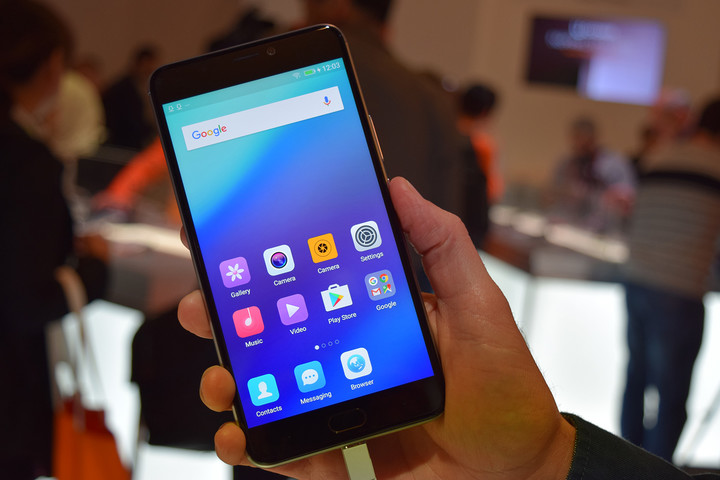
Gionee is becoming a regular fixture at Mobile World Congress, and this year it returned with two phones, the A1 and A1 Plus. The latter is the most technically impressive, with a pair of 16-megapixel cameras on the back, and a giant 20-megapixel camera for selfies. It’s that camera which has some of the coolest features, such as generating the bokeh blurred background effect to improve portrait shots.
The phone packs a large 4,550mAh battery, and a MediaTek P25 processor, plus some fast charging technology for the battery. It feels solidly made, and the design is attractive, but it doesn’t break new ground. The software let the device down, with the camera app reacting slowly and some overall slowness. The lag may be cured by the time it goes on sale, which will happen in April. You’ll be able to get it in select markets for 500 euros, which is around $530.
Ulefone Armor 2
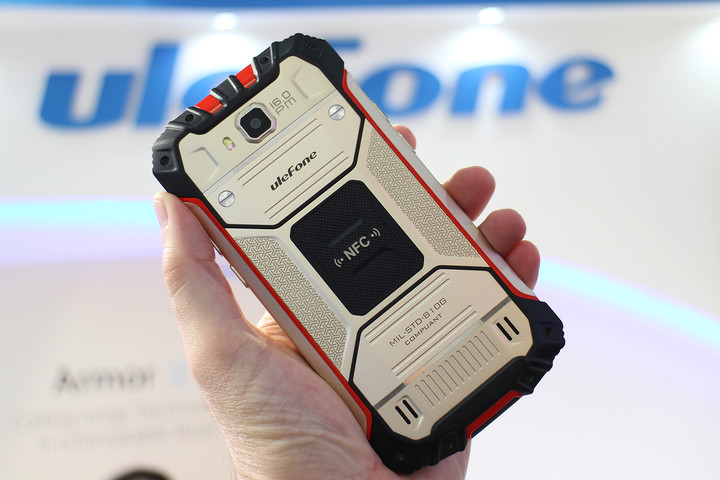
Likely to be a name that’s new to many, Ulefone showed the Armor 2 at MWC 2017, a super-tough phone that’ll be out in June or July this year. The good news is that unlike many phones sold online or via importers, it has a wide range of bands for great international support — including for those needed to work in the United States.
It’s a monster, too, and really earns its name. The body is made from metal and plastic, and the device will have IP68 water and dust resistance, plus there are physical buttons under the screen and down the sides to make it easy to use while wearing gloves or if the phone is wet. The plan is to put the new MediaTek Helio P25 processor inside, a massive 6GB of RAM, and talk of a very special fingerprint sensor.
Meizu M5S
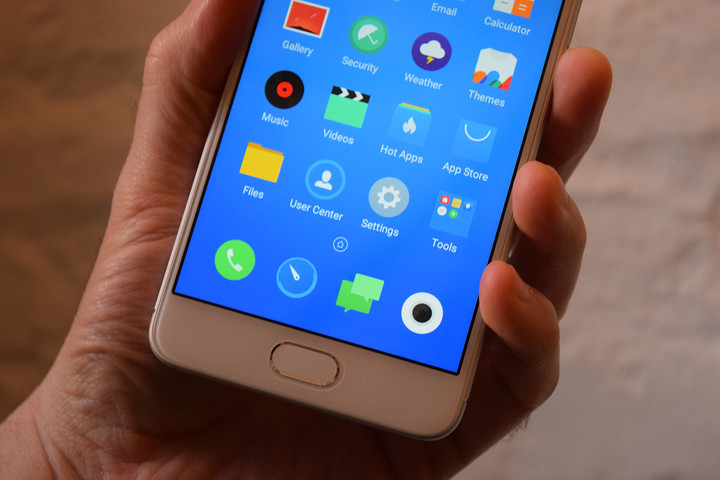
Announced just before Mobile World Congress opened, this was the first opportunity for Meizu to show off the M5S, a mid-range Android smartphone that uses the company’s own Flyme user interface over the top. It’s considerably more compact than several other phones on our list, with a 5.2-inch screen, that sadly only has a 1,280 x 720 pixel resolution.
The rest of the specification includes a 13-megapixel rear camera, a 5-megapixel camera, and a 1.3GHz MediaTek processor. Meizu’s fast fingerprint sensor is onboard, the body is made from metal, and styled like most other Meizu phones. Which means it does look like an iPhone, but that’s not always a terrible thing. The price hasn’t been announced yet, but it’s out soon.
ZTE Blade V8 Mini

Dual-cameras are about as trendy as smartphone tech gets, so it’s great to see them incorporated on low-cost phones; and while we don’t know how much the new ZTE Blade V8 Mini will be, it’s certainly going to be cheaper than the $230 Blade V8 Pro. The body contains a 5-inch, 1,280 x 720 pixel screen and has a fingerprint sensor on the back — another surprise for a budget phone — plus a Qualcomm Snapdragon 435 chip.
The dual cameras recreate the blurred background effect, and we gave it a quick try. How good they looked depended on the environment, but we did manage to take some good-looking shots, while the software itself was easy to use. The Blade V8 Mini will hit Europe and parts of Asia in March.
Nubia N1 Lite
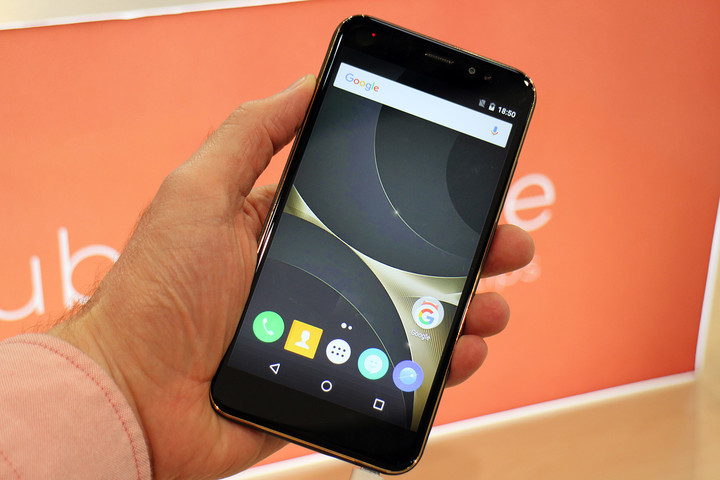
Nubia may be best known for expensive flagship phones like the Z11, but it also makes low-cost phones like the N1 Lite. It’s a large device with a 5.5-inch display, but the resolution is 1,280 x 720 pixels, and while it has Android installed, the version we tried had version 6.0 rather than the latest 7.0 Nougat release.
The good news is there’s a fingerprint sensor on the back, while the cameras have 8 megapixels on the rear and 5 megapixels on the front. The specification may not be that exciting, but the large 3,000mAh battery should keep all this running for a few days before needing a recharge. The price has yet to be confirmed, but the N1 Mini should be on sale internationally in March.
Doogee Shoot 1
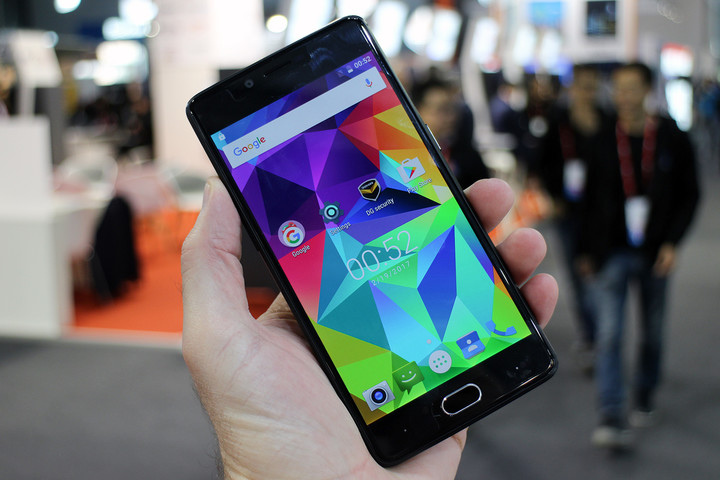
Never heard of Doogee? We’re not that surprised, but it’s another company on our list that proves dual cameras on smartphones are the in-thing with its Shoot 1 phone. Except it’s doing it at a really low price: You can pick up the Shoot 1 for just $130 through importer GearBest if you want to give it a try.
For this, you get a pair of rear cameras — one with 13-megapixels and the other with 8-megapixels, which are made by Samsung — a Sharp 5.5-inch screen with a 1,920 x 1080 pixel resolution, plus a MediaTek octa-core chip. The downside is the software, which is Android 6.0 Marshmallow, and a little bit slow and awkward on the model we tried. Still, it’s hard to argue when the phone is so cheap.
Asus has three cards in the works based on Nvidia’s GeForce GTX 1080 Ti
Why it matters to you
Here is a look at what Asus plans to provide regarding Nvidia’s new GeForce GTX 1080 TI graphics card design.
On Wednesday, Asus jumped on Twitter to tease PC gamers about new graphics cards based on the GeForce GTX 1080 Ti chip. At the time, the provided link led to the company’s front page but didn’t cough up any information about the new products. Now the link works and leads to the new Asus Republic of Gamers Strix GeForce GTX 1080 Ti OC Edition card. It’s joined by the new Asus Turbo GeForce GTX 1080 Ti and a Founders Edition card too.
Here are the specs of all three:
GTX1080TI-FE
ROG-STRIX-GTX1080TI-O11G-GAMING
TURBO-GTX1080TI-11G
Architecture:
Pascal
Pascal
Pascal
CUDA cores:
3,584
3,584
3,584
Base speed:
1,480MHz
—-
—-
Boost speed:
1,582MHz
—-
—-
Texture mapping units:
224
224
224
Render output units:
88
88
88
Memory:
11GB GDDR5X
11GB GDDR5X
11GB GDDR5X
Memory interface:
352-bit
352-bit
352-bit
Memory clock:
5,505MHz
5,505MHz
5,505MHz
Memory bandwidth:
484GB/s
484GB/s
484GB/s
Max digital resolution:
7,680 x 4,320
7.680 x 4,320
7,680 x 4,320
Ports:
1x HDMI 2.0b
3x DisplayPort 1.4
—-
2x HDMI 2.0b
2x DisplayPort 1.4
1x DVI-D
Power connector:
1x 8-pin
1x 6-pin
1x 8-pin
1x 6-pin
1x 8-pin
1x 6-pin(?)
Size:
10.5 x 4.37 x 1.5 inches
10.5 x 4.37 x 1.5 inches (?)
10.5 x 4.37 x 1.5 inches
Width:
2-Slot
2-Slot
2-Slot
As the chart shows, Asus had yet to reveal the speeds of its two ROG and Turbo cards when this article went live. Other details were missing too that we filled in, such as the physical size of the Founders Edition and ROG cards, and a likely extra 6-pin connector on the Turbo card.
The Founders Edition model is the baseline GeForce GTX 1080 Ti we’ve come to know and love since its unveiling on February 28. It is 35 percent faster than the GTX 1080 and it provides more PC gaming performance than Nvidia’s $1,200 Titan X monster. The Asus model comes packed with the company’s GPU Tweak II utility and a year’s worth of Xsplit Gamecaster Premium. It also appears to rely on Nvidia’s stock fan design.
More: Nvidia introduces GTX 1080 Ti with 11GB of video memory at $699, pre-orders available March 2
The ROG Strix OC Edition is a different story. It’s cooled by three fans featuring the company’s patented wing-blade design, IP5X dust resistance, and FanConnect II technology to keep the card cool under pressure. The card also provides a Fan Profile Switch so that customers can instantly switch from performance mode to low-noise operation.
In addition to performance, the new ROG Strix card spices up the desktop’s appearance too. The card is outfitted with RGB LED lighting, which can be customized and synchronized with other compatible ROG devices and motherboards using the company’s Aura Sync utility.
Finally, we have the Turbo GTX 1080 TI card packing a dual-ball bearing fan. It’s not as extreme as the ROG Strix model, providing a customizable backlit logo so users can display their own unique touch within the system. Other ingredients include the GPU Tweak II utility, a year’s worth of Xsplit Gamecaster Premium, and enough ports to support VR without then need for disconnecting other HDMI-based devices.
Currently, the prices are unknown. However, pre-orders for the GTX 1080 Ti went live on Thursday, followed by a general availability on March 10.
Google Assistant is now available on hundreds of millions of Android phones
Google Assistant is rolling out to millions of Android phones without the need for a carrier or manufacturer update, and that’s a big deal.
From just two handsets to hundreds, Google has lifted the device restriction on its AI helper, Google Assistant.
Announced earlier this week, Google Assistant will replace Google Now and Now on Tap on any device running Android 6.0 and above that supports Google Play Services. That doesn’t sound like a lot, but it is: nearly 32% of all Android phones are running Marshmallow or Nougat, which translates into nearly 500 million devices (if there are 1.5 billion active devices that can connect to the Play Store).
To access Google Assistant, one simply needs to hold down the home button on their device — the same method as accessing Google Now. The transition will take a few days to complete, since it involves receiving an updated version of Google Play Services, but once it rolls out it will be the single biggest update to Android in years that didn’t have to be approved by a phone manufacturer or carrier. That’s because Assistant fundamentally changes the way one uses an Android phone, shifting much of the interaction from text to voice.
Google Assistant, in addition to being on phones, is available on Android Wear 2.0 devices, Google Home, and, soon, Android TV through the NVIDIA Shield.
How to set up and customize Google Assistant on your phone
Island Delta review: Grab your Gravity Gun and Go!
Island Delta is a fun action-puzzler game that defies gravity.

It’s been a long time since we last saw a gravity gun prominently featured in a game, first introduced to the gaming world in Valve’s Half Life 2. And while Island Delta is a far cry from anything resembling Half Life, it does a good job mixing physics-based puzzles and action adventure into an entertaining (and only slightly frustrating) experience.
Set in a retro-futuristic world, the story follows our heroes, Zoe and Baxter, as they try to break into the volcano lair of the megalomaniac Doctor Gunderson and rescue their kidnaped robotic pal Harold. Armed with a pair of Grav-i-Rays, you switch between controlling Zoe and Baxter as the two work their way through the lair, with Zoe going after Dr. Gunderson and Baxter sneaking around sabotaging the island by blowing things up.


Developed by Mantisbite out of Finland and published by Noodlecake, Island Delta was originally released for iOS in late 2016, released on Android in February. The game is exceptionally polished with a great visual style and cleverly designed levels and enemies. Featuring a fixed third-person camera, you control your character using a virtual joystick, tapping on objects or enemies to grab them with your gravity gun and tap on a wall or another enemy to launch them across the room.
There’s few things more satisfying than launching enemies into one another, or tossing guards into bottomless pits or bubbling lava.
The first few levels introduce much of the gameplay mechanics and strategies you’ll need to employ to make it through the 30 levels that are spread throughout three chapters. Island Delta’s best moments are the clever puzzles using boxes and buttons, which will instantly remind you of another Valve title, Portal. Enemies are somewhat unbalanced — the most basic enemies can be easily destroyed, while later ones take more than one hit to knock out or are unaffected by the gravity gun. Still, there’s few things more satisfying than launching enemies into one another, or tossing guards into bottomless pits or bubbling lava.


In the later levels, things get a bit too hectic as puzzles are layered on with unending waves of enemies which you must also contend with. For example, in Chapter 2 Level 8 you must avoid the shocks of a tesla coil, fiery floor panels, grenade-launching turrets as well as laser-shooting robots all while solving a puzzle to lower an elevator lift. Sure it provides a good challenge, but that’s only because it’s basically throwing everything it’s got at you. There’s no penalty for dying, so if you get stuck on a level you can replay the level over and over again until you figure out what you’re missing.
One missed opportunity I found was the computer hacking mini games which are scattered throughout the game. The first time they’re introduced you think that this will be another puzzle element that will get trickier the further you progress through the game. Sadly, this mechanic is not developed or improved on at all, each one feeling pretty much identical to the last. On one hand, it’s a nice break from the much more challenging aspects of the level, but it does feel like it’s missing the same level of upped challenge found throughout the rest of the game.


As polished and complete as this game feels, at times a bug will pop up and force you to restart a level. I’ve accidentally launched an object I needed way outside the boundaries of the level — and on a few occasions somehow managed to transport myself out of the level and into the black abyss. These were rare occurrences, though, and were equally funny as they were frustrating. Other issues arise due to the floating virtual joystick and the tap controls for grabbing and throwing objects. If you’re not careful when carrying an enemy you may accidentally put them down instead of launching them at the wall, which sets yourself up to take damage. You may also accidentally trigger the joystick at weird moments, causing your character to walk right into an enemy’s blast. It’s just something you learn to avoid as you play via trial and error.
Each level includes five hidden databanks, which adds some replayability to the mix — collect them all to unlock bonus levels.
Available from the Google Play Store for $2.99, Island Delta plays like a premium game and features no disruptive ads or in-app purchases to deal with. The story here is fairly basic, but is boosted by the characters’ entertaining banter. While it shouldn’t take too long for a competent gamer to play through the entire game, each level does feature five databanks to find and collect, which are scattered throughout each level and occasionally hidden in secret areas. This helps with the game’s replayability, as you can go back and get five stars on each level to unlock bonus levels.
Overall, Island Delta provides some good clean fun and some really challenging puzzles in the later levels. It’s not perfect, and occasionally attempts to do too much at one time, but those issues are easy to overlook given the great level design and entertaining gameplay.
Download: Island Delta ($2.99)
Android Gaming

- Best Android games
- Best free Android games
- Best games with no in-app purchases
- Best action games for Android
- Best RPGs for Android
- All the Android gaming news!
Survios’ ‘Sprint Vector’ lets your run in VR without getting sick
Locomotion and speed are two of the hardest problems to solve in virtual reality — get either one wrong, and players are going to get sick. That’s why so many VR experiences use teleportation as their primary movement mechanic. It’s a safe, slow way to let players explore large game worlds. It’s become a bit of a standard, but you won’t find it anywhere in Survios’ next title. Sprint Vector is a fast-paced racing game that lets players sprint through obstacle courses at super-human speeds. The idea balks at the idea of the safe, slow VR environment, but somehow avoids inflicting simulator sickness on the player. The key? Turns out it was making hands the new feet.
Hand based locomotion is nothing new in virtual reality, but it’s not usual an analogue for walking or running. In Lone Echo, players use their feet to explore a weightless environment. In The Climb, one scales a mountain. These applications of arm movement feel natural because they’re identical to what one would physically do in those situations. Sprint Vector’s movement system isn’t, but somehow, it still works. To run, players extend an arm forward, hold down the trigger, and pull back for the length of the stride before letting go. They they do that with the other, alternating back and forth to accelerate through a neon race course at breakneck speeds.
Everything I know about VR tells me this shouldn’t work, but when I tried an early build of the game at GDC 2017, it did. Gliding through corridors, vaulting over walls and gliding through the air all felt almost natural. When I strafed in the opposite direction I was looking, I felt a little bit dizzy, but never at all sick. Yet I know for experience that if I had performed the same actions at the same in-game speed using a thumbstick, I would have been extremely uncomfortable.

I asked Survios about it, and was told that momentum plays a large part in it. Accelerating with a joystick would be too instant, but if the player uses their arms, they’re pushing themselves and gaining more speed with each push. Once they get up to high speed, they’ve eased into the experience and created enough forward momentum to keep the movement headed largely in one direction, without any sharp turns or inversions to upturn the stomach. In a way, it feels like cross-country skiing more than running, but it’s a movement system that works.
Still, it might be the most dangerous standing VR experience I ever played — not because I feel like i’m going to get sick or fall down, but because the movement system largely amounts to frantically flailing your arms in multiple directions. In the state the game is now, I’d be afraid to play it in my house out of fear for hitting my wife or punching a bookshelf. The game is just so fast paced, it’s easy to lose track of how much you’ve drifted in the real world from your starting point.
If players have enough space when the final game comes out, though, the risk might be worth it. Not only is Sprint Vector extremely fun, but it’s a fresh VR experience. One that breaks free from the crutch of teleportation. Its movement engine won’t work for every genre, but it’s a great experiment in finding better ways to move around in virtual worlds without actually moving around. Unfortunately, there’s no word when the game will be available to consumers. Right now, the game is just an early prototype — but it shows a lot of promise.
Click here to catch up on the latest news from GDC 2017!
Ad-averse Tesla will run a fan-made commercial
Tesla doesn’t need to advertise — thanks to word-of-mouth and Elon Musk’s 7.5 million strong Twitter account, it sold 400,000 Model 3 electric cars without anyone even taking a test drive. However, a fifth-grader named Bria noticed that despite the lack of ads, “many people make homemade commercials for Tesla and some of them are very good.” She suggested the idea of a contest, with Tesla airing the winning commercial, and Musk replied “that sounds like a great idea. We’ll do it!”
Thank you for the lovely letter. That sounds like a great idea. We’ll do it! https://t.co/ss2WmkOGyk
— Elon Musk (@elonmusk) March 2, 2017
Bria is a green Tesla fan from Michigan who’s “sad” that Tesla’s can’t be sold in the state thanks to dealer laws. She learned about the EVs from her father, a professor and writer for InsideEVs.com, and watched “a bunch of awesome fan-made commercials” about the car. She’s likely referring to a homemade ad that shows a petroleum-based dystopia saved by a Tesla Model S and another with a boy using the EV as a makeshift spaceship (below).
Must said he would work with the two film-school grads that produced the latter commercial (he’s also behind SpaceX, a company that produces actual spaceships). Though Tesla hasn’t done any ads, it has produced lovely promo videos, including one for its autopilot.
Tesla doesn’t need advertising because it’s products are in high demand and there are a limited number of consumers who can afford its pricey Model S and Model X luxury EVs. As for the cheaper Model 3, it seems like it’s going to take years before Tesla will need to entice customers to buy one. However, part of Tesla’s draw is its green-tinted, socially-responsible halo. That was tarnished recently thanks to a sexism lawsuit and complaints about forced overtime, so a fan-centric ad contest is not a bad idea to build up some goodwill again.
Via: Reuters
Source: Elon Musk (Twitter)

