


Attack on Slack: Google beefs up its Hangouts services, Meet and Chat
Why it matters to you
Google’s new Hangouts Meet and Hangouts Chat platforms will challenge Slack in a bid for corporate chat dominance.
Hangouts, Google’s multi-platform messaging app, has played second fiddle to the newer, shinier Allo messenger since the latter’s debut last September. That is not surprising — counting Google’s other relatively new Duo messenger, the company has six chat apps. Google’s size aside, it’s difficult for any company to pay equal attention to members of a growing family.
At Google’s Cloud Next conference in San Francisco on Thursday, though, the company paid Hangouts the attention it deserved.
Hangouts Meet and Hangouts Chat are the next generation of Hangouts. They are the first Google messaging apps aimed exclusively at the business sector, and the search giant’s effective take on Slack, Microsoft Teams, and the other inter-office chat platforms that have begun to sprout up like wildflowers in recent months.
Hangouts Chat
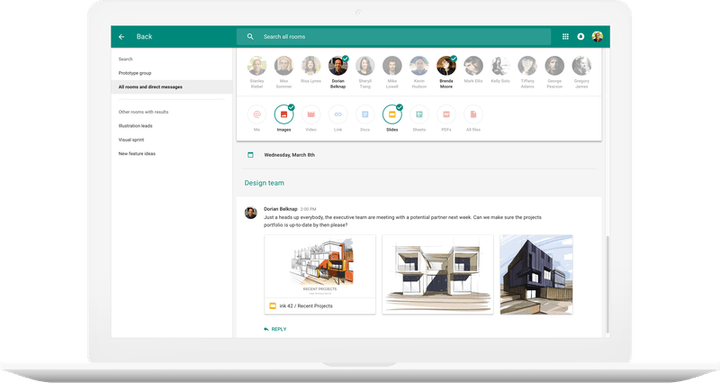
Hangouts Chat, a stand-alone new service that is separate from the existing Hangouts, looks a little like Slack in form and function, but there is no mistaking its lineage. It inherits Hangouts’ one-on-one chat tab, plus its native compatibility with the web, Android, and iOS.
New dedicated, virtual chat rooms offer an easy way to rope in multiple users, and a powerful new search function that can filter by rooms, people, links, and file types mentioned in the course of conversation. Hangouts Chat supports Google Docs and Sheets — you can assign document permissions automatically based on the users who created it. And a native viewer lets participants view photos and videos directly in conversations.
Chat is extensible, too. It boasts @meet, an intelligent bot that uses natural language processing and machine learning to automatically schedule meetings with Google Calendar. And it supports “app scripts” that will allow third-party partners like Asana, Box, Prosperworks, and Zendesk to roll out Hangouts’ chat bots and integrations of their own.
Hangouts Meet

Hangouts Chat is only the first part of Google’s one-two enterprise punch. The company detailed the aforementioned Hangouts Meet, a lightweight video chat service for inter-office meetings.
Hangouts Meet supports up to 30 users in a call, and, if you browse the web with Chrome or Firefox, doesn’t need a browser plugin. Microsoft’s Edge and Apple’s Safari will require a plugin until they gain support for the Web RTC standard.
Perhaps more crucially, Hangouts Meet makes joining meetings a cinch — participants don’t need an account, plugin, or download to join, and can dial in from a conference room, laptop, or the Hangouts Meet app. Invitations integrate with Google Calendar — tapping the calendar entry from an iPhone or Android phone opens the Hangouts Meet app with the number and meeting ID ready to dial. Folks who haven’t been invited can ‘knock’ and ask to join.
Hangouts Chat won’t be available widely, just yet — it will initially roll out to companies in Google’s “early adopter” program. And mum is the word on Hangouts Meet.
Hangouts is finally completing its transition to an enterprise communication platform
Google’s long-winding road of trying to figure out what exactly Hangouts should be looks to be finding a nice stopping point.
With a set of massive changes planned for the near future, Hangouts is set to find a proper place as an enterprise-focused communications platform. Google just announced sweeping changes to its G Suite enterprise tools, and chief among them is big improvements and restructuring of Hangouts to work best for business.
It breaks down into two distinct products that Google calls “an evolved Hangouts purpose-built for teams,” called Hangouts Meet and Hangouts Chat, that are new integrated pieces of G Suite and also a direct shot at Slack and Microsoft Teams.

Hangouts Meet is solely a video messaging experience aimed at making it easy as possible to get remote workers in the same room together. Google claims its Hangouts Meet experience is even smoother, faster and lighter on computer resources, letting you run 30-person video conferences. As before you can start conferences by just sending a link — and people can dial in from phones if needed. Meet of course integrates with G Suite accounts to pull in information from Calendar so everyone’s on the same page.

Hangouts Chat is a complete overhaul of the Hangouts experience, bringing in much of the design and smarts we see today on the consumer side with Allo. Hangouts Chat lets your company create direct message and group chats for projects or teams, once again including G Suite integration for sharing files from Drive and Docs, including photos and videos directly in the conversation. Powerful search keeps everything within reach.
Google then of course sprinkles in some AI to Hangouts Chat, including the ability to support third-party bots and scripts right in-line with conversations. There’s also a headline feature called “@meet,” a Google-powered bot that processes natural language to automatically schedule meetings via Meet and Calendar. The revised interface and features of Hangouts Chat will be found on the web, Android and iOS with native clients for each platform.
To round out today’s business-focused announcements, the G Suite enterprise tools are also getting big upgrades to Google Drive, a new add-ons platform for Gmail and a final price and general availability for the collaborative Jamboard screen at $4999.

So where does this leave Hangouts for consumers? The end may be near.
This full-on refresh of Hangouts is exciting from the perspective that Google has clearly ignored the aging and bifurcated platform for years, but what does this mean for individuals who want to keep using the chat and video call platform? Google naturally is focusing on the business aspects here, but there is no mention of what this may mean for the future of Hangouts as a consumer-ready app.
We’ve seen the slow — but steady — progression of new design and features for chat and video move from Hangouts to Allo, Duo and Android Messages, and with these sweeping business-only Hangouts changes, this could signal that the final move of Hangouts out of the consumer space is near. A Google statement given to The Verge indicates that there will be a free tier for anyone to use, but doesn’t clarify what restrictions or features will be implemented and how (if at all) it will be tuned to consumer functions — we don’t want to be using a free tier of an enterprise app, we want a proper consumer version.
If Google does decide to open up this new design and some features to regular Google users, it’d be a real treat for all of us who have dealt with the lackluster Hangouts experience for years.
Plex now lets you to hook up to your media library in the cloud

If you’ve got media on Dropbox, Google Drive, or Microsoft OneDrive, you can now easily access it all with Plex Cloud.
Have you ever used Plex? The ridiculously easy to set up a localized media server that turns your living room television into a veritable entertainment hub? The company has announced it’s officially making Plex Cloud available to Plex Pass users.
Plex Cloud was previously an invite-only beta, but after four months of development, the service now lets everyone connect to any existing cloud storage services, including Dropbox, Google Drive, and Microsoft OneDrive. You can sync these up with your Plex Pass to create an always-on Plex Media Server that runs on the cloud, instead of relying on a dedicated computer or network-attached storage of some sort.
Not sure what Plex is, but think you’d like to find out? Here’s a quick primer on what differentiates the service from Kodi, the other feature-rich media suite.
Do you use Plex? Why or why not? Let us know in the comments below!
Gmail add-ons will soon be easier to use
Gmail add-ons are handy for adding quick access to tools you would ordinarily have to leave the email app to employ. At its Cloud Next conference today, Google announced that it’s changing how you’ll access those features. Right now, Gmail third-party add-ons are typically installed through a browser extension, but soon users will be able to browse and activate them just like those additional tools you can tack on to Google’s other apps like Docs and Sheets.
Today, Google introduced a developer preview of the new functionality that will offer access to whatever the add-on does across desktop, Android and iOS Gmail apps. This also means that you’ll only have to install the add-on once and it will be available when you’re in the office or need to complete a task from your mobile device. Those browser extensions that you may already be using don’t really translate to the standalone Gmail apps.
The company says that Gmail users can expect to install add-ons from the G Suite Marketplace “later this year.” It has already been working with some companies to develop a few business-focused integrations that include easy QuickBooks invoicing and access to SalesForce contacts. While these may not be too enticing for us regular Gmail users, it’s highly likely some more consumer-facing tools will arrive soon enough.
Via: TechCrunch
Source: Google
Google refines Drive for large businesses
Google today unveiled a suite of new tools designed to help big businesses communicate and coordinate in Drive. The first improvement is Drive File Stream, which allows users to access their entire Drive without going through the file-syncing process. It essentially creates an “intelligent cache” of all the data, Google Cloud VP of apps Prabhakar Raghavan tells VentureBeat.
“This means that all of your company data can be accessed directly from your laptop, even if you don’t have much space left on your hard drive,” Google explains. File Stream is live via the Early Adopter Program right now.
Additionally, Google has moved Team Drives out of beta testing, allowing participating businesses everywhere to manage a large number of files, easily add and remove new team members, and keep information secure. Today, Team Drives are available to all G Suite Business, Education, and Enterprise customers.
Meanwhile, Google’s machine-intelligence-powered Quick Access system is getting its start on iOS and Android today. Quick Access puts the files you’re most likely to need front-and-center in your Team Drive, using the same tech behind Gmail’s Smart Reply function. It should come to desktops “soon.”
Google has also beefed up the admin tools in its Vault for Drive service. Admins are able to manage and secure all of the files in individual employee Drives and in Team Drives.
“These new features let admins set retention policies that automatically keep what they need and get rid of what they don’t,” Google says. “For example, you might need to place a legal hold on files that are critical to a certain legal case.”
Source: Google
Google is ready to take over your office chat with Hangouts
Google’s work of transitioning Hangouts from being its default chat app to a more business focus is nearly complete. First up is the formally announced Hangouts Meet. Sound familiar? That’s because it semi-officially arrived at the first of the month. Now Google is ready to take it wide. At its core, Meet is all about making video conferencing faster and easier. That comes down to not needing any special software or logins for video chat — just a shared link. No WiFi? No problem because people can dial in with a dedicated phone number too. So long as their organization is a G Suite Enterprise customer, of course. Meet will support video calls with up to 30 people.
Next is Hangouts Chat, which is all about threaded conversations and pulling from G Suite services like Google Docs. There’s even an internal bot (@meet) that can automatically schedule meetings that’ll work with everyone’s schedule via Google Calendar integration. Given the ubiquity of Google Cloud services among businesses and even the website you’re reading right now, chances are that you could see this turning up in your workplace sometime soon.

Source: The Keyword blog
Retinal implant could add years to your eyesight
Scientists have been struggling to fight retinal degeneration in an elegant way. The most practical solution so far involves external devices that send wires to the back of your eyes. There might be a much more graceful approach before long, however. Researchers have developed an implant whose light-sensitive material could at least partially restore retinas and preserve your eyesight. Their invention combines a biocompatible substance (in this case, silk) with a conductive polymer and an organic semiconductor to send electricity to nerve cells whenever the implant is subjected to typical environmental light. Previous attempts at photovoltaic devices like this have required either exceptionally bright light or unusual light wavelengths to work, so this would be far more practical in the real world.
Early experiments are promising, although they do reveal some limits. Rats with the implants don’t show any improvement over their afflicted peers in low light (since the light-sensitive material isn’t kicking in), but their response to brighter light is nearly as good as that of a healthy animal. And since the materials are organic-friendly, the rats kept the implants in place for 6 months with no inflamed tissue.
Don’t get too excited by the discovery. The scientists aren’t entirely clear how the electrical charges turn into nerve responses, for one thing. And as Ars Technica explains, there’s also the question of how much vision the implants are actually restoring. The rats may be responsive to light, but that doesn’t mean that they have the eyesight they did before retinal degeneration kicked in. Look at it this way, though: even if a future human implant only offered a partial fix, it could give basic visual cues to people who might otherwise go blind.
Via: Ars Technica
Source: Nature
Once-banned Vigilante app now warns of nearby emergencies
Late last year, Sp0n released a Vigilante mobile app that was supposed to warn you of nearby crimes and emergencies. Or rather, it tried to release the app — Apple quickly pulled the title after worrying that the name and focus encouraged users to thrust themselves into dangerous situations. After a few months of retooling, however, it’s back. The newly rebadged Citizen for Android and iOS will still warn you when someone nearby has reported an emergency to 911, but the emphasis this time is on safety. If there’s a robbery in progress down the street, you’re encouraged to avoid it. If you are caught up in an incident, however, you’ll have tools at your disposal.
You can watch live video from others if you’re content to stay away, but you can also stream yourself if you’re not in any immediate danger. It’s also possible to chat with fellow users about a given incident, filling in details that others might have missed. To the developers, this is all about promoting transparency — Citizen not only lets you know what’s happening in your neighborhood, but encourages eyewitnesses to document incidents to catch criminals and prevent police abuse.
Citizen is only available in New York City right now, albeit for a good reason: the creators are working with city officials and community leaders to make sure the app reflects their advice. Will it fare better than Vigilante? It’s hard to say. Sp0n does appear to have learned some lessons from Vigilante, and it has the backing of Def Jam Records’ Russell Simmons, who says he has been “working closely” on the project. However, that livestreaming option may tempt people to get closer than they should. Also, the app’s ability to show historical emergency data could inadvertently reinforce stereotypes about the safety of certain neighborhoods, even if the practical risk is very low. Still, this could prove invaluable to both avoiding violence and holding people to account.
Via: Russell Simmons (Twitter)
Source: Citizen (Medium)
Google’s 4K digital whiteboard will retail for $5,000 in May
Google announced pricing and availability for its upcoming 4k digital whiteboard, dubbed the Jamboard, during its Next cloud computing conference in San Francisco on Thursday. The company first unveiled the device back in October and expects it to reach store shelves sometime in May.
The Jamboard is basically a 55-inch smart TV that you can draw on. It allows for up to 16 simultaneous touch points, is Google Cast-enabled, has a built-in camera and NFC as well as Handwriting and shape recognition. It performs the same essential function as Microsoft’s recently announced Surface Hub, but does so at a fraction of the price. While the Jamboard will set you back $5,000 (plus a $600 annual “support fee”), the Surface Hub is slated to start at $9,000 and range up to a whopping $21,000 for the 84-inch model.
Source: TechCrunch
Plex turns any cloud folder into an instant media server
After a slightly rocky beta test, Plex’s new cloud-based media server is now ready for public consumption. Rather than relying on a media server PC or a networked storage drive, Plex Cloud allows users to stream their own media libraries from Dropbox, Google Drive or OneDrive to any device with a decent internet connection and the Plex app.
Because Plex skips the need for server hardware, setup is pretty straightforward: users only need to link their Plex Pass account ($4.99 per month or $39.99 per year) to one of those three preferred cloud storage providers and then upload their music, video or photo libraries to get started. How much content you can upload obviously depends on how much cloud storage you’ve ponied up for on your service of choice, but Plex’s extensive app ecosystem will get your cloud-based content streaming to everything from set-top boxes and smart TVs to game consoles, mobile devices and wireless speakers.
Plex Cloud is available now for all Plex Pass users, which also adds a range of other features like a free HDTV DVR, library sharing and more. Users should note, however, that pirated content is technically prohibited on all of the cloud storage services that are compatible with Plex Cloud, so there may still be issues even if you legally own physical copies of the media in your cloud library.
Source: Plex

