


Lost in navigation: Sat-navs switch off parts of our brain, study suggests
Why it matters to you
By changing the way our brains function, technology affects us in often unseen ways.
London’s taxi drivers have to pass a grueling test to earn a license, memorizing the ins and outs of central London. Research has shown that certain regions of the aspiring drivers’ brains actually expand as they study the roads, what’s known as “the Knowledge.” Now, a new paper published in the journal Nature Communications suggests that drivers who use technology like satellite navigation (sat-nav) systems don’t necessarily benefit from this boost because sat-navs effectively turn off parts of our brain.
In the University College London study, researchers took brain scans of 24 participants as they virtually navigated around central London. Their primary focus was the hippocampus and the prefrontal cortex, brain regions that account for things like memory, navigation, planning, and decision-making.
The scans showed that participants who navigated the simulation manually — i.e., without the aid of a sat-nav — had increased activity in the hippocampus and prefrontal cortex when they experienced new and unknown streets. This activity increased with the number of route options. However, participants using sat-navs showed no added brain activity.
More: Smart glove gives bikers turn-by-turn navigation
“Entering a junction such as Seven Dials in London, where seven streets meet, would enhance activity in the hippocampus, whereas a dead-end would drive down its activity. If you are having a hard time navigating the mass of streets in a city, you are likely putting high demands on your hippocampus and prefrontal cortex,” Hugo Spiers, senior author of the study, said in a news release.
“Our results fit with models in which the hippocampus simulates journeys on future possible paths while the prefrontal cortex helps us to plan which ones will get us to our destination,” he continued. “When we have technology telling us which way to go, however, these parts of the brain simply don’t respond to the street network. In that sense our brain has switched off its interest in the streets around us.”
‘Tom Clancy’s ShadowBreak’ brings tactical first-person shooting to mobile devices
Why it matters to you
Tom Clancy’s ShadowBreak offers fans of the series the chance to play a game exclusively on mobile devices for the first time.
Ubisoft’s Tom Clancy franchise has typically been associated with powerful PCs and traditional consoles, but the publisher has announced a new game that will arrive exclusively to mobile devices. Tom Clancy’s ShadowBreak mixes together the first-person shooting of Hitman: Sniper with a healthy dose of strategy.
ShadowBreak is structured into 3-minute matches, with players positioning and deploying troops to attack the enemy indirectly while simultaneously moving their character into position to snipe soldiers on the ground — as well as take out the enemy’s snipers. The game will feature a competitive multiplayer mode, which should give way to tense, white-knuckle (or fingertip) matches like those we’ve seen from the Sniper Elite series.
More : ‘Tom Clancy’s Ghost Recon: Wildlands’ review
Though it combines elements of both the first-person shooter and real-time strategy genres, Ubisoft wants ShadowBreak to still be enjoyable for those who aren’t particularly skilled in one or the other of them.
“If you’re a great marksman with an inferior troop loadout, you’re still going to have a strong avenue to victory,” said creative director A.J. Morales. “If you’re not as strong in your shooter prowess, but have superior troops and strategy, you’ve still got a great shot at the win.”
Each player selects “up to four” units to take with them in a match, and both their personal appearance and equipment loadout are fully customizable. Weapons can be augmented with additional items, which are acquired through the ever-popular “reward crates” seen in games like Overwatch. Ubisoft will continue to support the game with additional weapons, locations, and modes after its launch.
Tom Clancy’s ShadowBreak is the latest game to use the famous author’s name following the release of Tom Clancy’s Ghost Recon Wildlands in March and Tom Clancy’s The Division in 2016. The game launches later this year on iOS and Android devices. It had a “soft launch” on Wednesday in Canada, as well.
Xerox brings touch interfaces, apps, and personalization to office printing
Why it matters to you
Xerox is rolling out 29 printers that take a new approach to how work gets done in the office.
You may not give a second thought to the printer or scanner in your office until it breaks down, but Xerox is hoping it can make your next print or copy job a bit more enjoyable — maybe even put a smile on your face, like all those happy people in the above video. In an effort to redefine an entire product category, the company is launching 29 new printers and multifunction devices that share a renewed approach to how users will interact with them. All of the devices are built around Xerox’s ConnectKey suite of technologies that brings cloud-connected, app-based, touchscreen interfaces to office document production and management.
The printers are split across two product lines, called VersaLink and AltaLink. The VersaLink line is designed for the lower-volume needs of small businesses and distributed teams and includes 19 printers and multifunction printers (MFPs). AltaLink offers 10 additional MFPs geared toward larger-volume work. Within both lineups, Xerox says it has a solution for virtually any workspace, from a small office to an enterprise-level organization. All of the printers also offer a variety of security features to both protect data and guard against unauthorized use.
More: The best inkjet printer you can buy
A key focus for Xerox was unifying the user experience across each product. Tablet-like touchscreens built into the printers present a familiar interface to users, with personalization options that can be customized down to the level of an individual user. One-touch integration with popular cloud services like Dropbox and Google Drive further improves ease of use.
Finally, Xerox is also opening its operating system to third-party app developers, as well as offering a number of its own apps that will streamline document production. We’re not sure if this means you could soon be playing Angry Birds on your office printer, but it should help with the creation and management of things like patient medical records, real estate contracts, and retail invoicing, according to Xerox.
Two VersaLink printers are already shipping, with the full range of both VersaLink and AltaLink models expected to be available sometime in the first half of 2017.
Circle this date: Google Calendar app is finally optimized for iPad
Why it matters to you
If you’ve been holding out for an iPad-optimized version of Google Calendar, we’ve got some good news: It’s finally here.
Better late than never. On Wednesday, Google launched a new version of Google Calendar, its popular web-based planner, for Apple’s iPad.
It’s basically like the Google Calendar app for iPhone, but optimized for the iPad’s larger screen. Bigger icons make dragging and dropping calendar appointments a little easier, and enlarged text simplifies the process of adding new appointments.
More: Your fitness goals from Google Fit and Apple Health now show up in Google Calendar
It’s a little more intuitive, too, than the built-in Calendar app for iOS — especially when it comes to syncing Google Calendars. Normally, syncing multiple Google Calendars requires supplying your Google Credentials to Apple’s Calendar settings, signing into your Google account, and checking the individual boxes beside the calendars you want to sync with your device. With the new Google Calendar for iOS, you only have to sign in once.

Otherwise, the new Google Calendar for iPad boasts all of Calendar’s existing features. One of those is Smart Scheduling, which suggests meeting times and available rooms based on participant’s availability and room preferences. Goals, meanwhile, intelligently schedules goals that you want to achieve in the upcoming weeks and months — if you set a goal to go running at 6:30 a.m. every other morning but don’t actually start running until 7:15 a.m., Google will reschedule future events automatically.
More: Learn to keep your calendar organized with our best Google-Fu
The new Calendar app is built into iOS Spotlight search — you can search for appointments and meetings from the iPad’s home screen. And it ships with a new Today View Widget that shows upcoming events in Notification Center (and in the future, on the lock screen).
The release of Calendar for iPad comes on the heels of fitness app integration. In January, Google linked Apple’s Health app and Google’s own Fit to Google Calendar. Fitness goals you’ve scheduled in either show up in Google Calendar, and once you accomplish them, marks the events as done.
More: How to sync multiple Google Calendars with your iOS device
In April, Google Calendar gained support for reminders on desktop. When you set a reminder with apps like Inbox by Gmail, Google Keep, Google Now, and through the Google Calendar app, it will sync with the web client. Unlike calendar entries, reminders are present until they’re complete, and appear at the top of your calendar each day.
Laser-toting drone could hack secure computers via their flatbed scanner
Why it matters to you
Even disconnecting your computer from the internet isn’t enough to stop it being hacked. Here’s one method you could be attacked by — and how to defend against it.
Like some geeky, tech-savvy version of the Circle of Life song from The Lion King, there’s a never-ending feedback loop between the ingenuity of hackers and security-minded researchers’ attempts to think one step ahead of them.
The latest example comes courtesy of researchers from the Cyber Security Research Center at Israel’s Ben-Gurion University, who have conceived of a method by which hackers could bypass firewalls and intrusion-detection systems by hacking flatbed scanners using a laser-toting drone.
“This work presents a way in which an organization’s scanner can be used as a gateway for the purpose of communication under the radar with previously installed malware, even on isolated networks, with an outside attacker using a laser,” Ben Nassi, a graduate student at the Cyber Security Research Center, who was a co-author on a paper describing the method, told Digital Trends. “In addition, it shows how trying to hide the scanner from the line of sight won’t help because an Internet of Things device that’s located nearby can be hijacked and used as a means to module the command to the scanner.”
More: Meet Danger Drone, a flying computer designed to hack into all your unprotected devices
The method is effective from a distance of 900 meters using lasers that can be easily purchased online from places like eBay. Using the technique, the researchers were able to achieve data transmission rates of 25-50 milliseconds per bit. No, that’s not going to match your broadband download speed, but it’s enough to send commands that could control a bot on an isolated “air-gapped” system, meaning one that’s not otherwise connected to the outside world.
The attack does require that malware is first installed on a system somehow, but after that it could be commanded in certain terrifying ways — such as Nassi’s uncomfortable examples of “shutdown system” or “launch missile.”
So if simply moving your flatbed scanner out of line of sight won’t work, what does he suggest as a possible solution? “We suggest you disconnect the scanner from the network and use via a proxy computer that will be monitored by a model that has learned to identify the attack,” he continued. “That way anyone trying to send a message to the organization will be detected and prevented.”
While this may seem extra-cautious, when you’re dealing with computer systems that can potentially cause massive amounts of damage — either by controlling systems we rely on or through the leaking of sensitive data — you really can’t be too careful.
We bet you’ll never look at your innocuous flatbed scanner the same way again!
Laser-toting drone could hack secure computers via their flatbed scanner
Why it matters to you
Even disconnecting your computer from the internet isn’t enough to stop it being hacked. Here’s one method you could be attacked by — and how to defend against it.
Like some geeky, tech-savvy version of the Circle of Life song from The Lion King, there’s a never-ending feedback loop between the ingenuity of hackers and security-minded researchers’ attempts to think one step ahead of them.
The latest example comes courtesy of researchers from the Cyber Security Research Center at Israel’s Ben-Gurion University, who have conceived of a method by which hackers could bypass firewalls and intrusion-detection systems by hacking flatbed scanners using a laser-toting drone.
“This work presents a way in which an organization’s scanner can be used as a gateway for the purpose of communication under the radar with previously installed malware, even on isolated networks, with an outside attacker using a laser,” Ben Nassi, a graduate student at the Cyber Security Research Center, who was a co-author on a paper describing the method, told Digital Trends. “In addition, it shows how trying to hide the scanner from the line of sight won’t help because an Internet of Things device that’s located nearby can be hijacked and used as a means to module the command to the scanner.”
More: Meet Danger Drone, a flying computer designed to hack into all your unprotected devices
The method is effective from a distance of 900 meters using lasers that can be easily purchased online from places like eBay. Using the technique, the researchers were able to achieve data transmission rates of 25-50 milliseconds per bit. No, that’s not going to match your broadband download speed, but it’s enough to send commands that could control a bot on an isolated “air-gapped” system, meaning one that’s not otherwise connected to the outside world.
The attack does require that malware is first installed on a system somehow, but after that it could be commanded in certain terrifying ways — such as Nassi’s uncomfortable examples of “shutdown system” or “launch missile.”
So if simply moving your flatbed scanner out of line of sight won’t work, what does he suggest as a possible solution? “We suggest you disconnect the scanner from the network and use via a proxy computer that will be monitored by a model that has learned to identify the attack,” he continued. “That way anyone trying to send a message to the organization will be detected and prevented.”
While this may seem extra-cautious, when you’re dealing with computer systems that can potentially cause massive amounts of damage — either by controlling systems we rely on or through the leaking of sensitive data — you really can’t be too careful.
We bet you’ll never look at your innocuous flatbed scanner the same way again!
Korean researchers dream of mind-controlled turtles and say, ‘Why not?’
Why it matters to you
By accessing an animal’s instincts, researchers may be able to guide their behaviors without physically invasive operations.
Researchers from the Korea Advanced Institute of Science and Technology (KAIST) are developing a technology that enables humans to control turtles with their minds. The human-turtle interface combines features from brain-computer interfaces and computer-brain interfaces, which send signals from brains to computers and computers to brains respectively.
Over the past few years, handful of labs have demonstrated remote control of animals, typically insects. However, these techniques are usually invasive and require operations, such as implanting electrodes in the animal’s brain or nervous system.

Korea Advanced Institute of Science and Technology (KAIST)
Led by Phill-Seung Lee of the Mechanical Engineering Department and Sungho Jo of the Computing Schoo, the KAIST concept aims to guide the animal subject by tapping into its instincts, including its fight-or-flight response.
Turtles make for ideal subjects due to their relatively high cognitive capacity, ability to differentiate between varying wavelengths of light, and instinctual escape behaviors. For example, turtles predictably move toward white light and away from obstacles in their environment.
More: Progress in brain-computer interface gives paralyzed patients more control
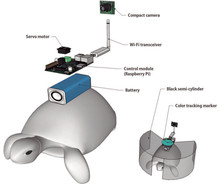
The turtle wears a “cyborg system” on its shell that consists of a camera, Wi-Fi transceiver, Raspberry Pi control module, battery, and a blinder that swings from left to right to obstruct the turtle’s view. The human operator wears a brain-computer interface system that picks up signals from the brain to move the blinder accordingly.
By watching a feed from the turtle’s camera, the human operator can guide the turtle simply by thinking about moving. The system picks up on the three mental states of left, right, and idle movement. If the human operator thinks “left,” the blinder will swing to the turtles right side, causing the turtle to move away from the obstruction.
Though the immediate applications of a mind-controlled turtle seem a little far-fetched, the researchers think their technology could be used to inform positioning and augmented reality systems, offering support for rescue, reconnaissance, and surveillance missions.
Korean researchers dream of mind-controlled turtles and say, ‘Why not?’
Why it matters to you
By accessing an animal’s instincts, researchers may be able to guide their behaviors without physically invasive operations.
Researchers from the Korea Advanced Institute of Science and Technology (KAIST) are developing a technology that enables humans to control turtles with their minds. The human-turtle interface combines features from brain-computer interfaces and computer-brain interfaces, which send signals from brains to computers and computers to brains respectively.
Over the past few years, handful of labs have demonstrated remote control of animals, typically insects. However, these techniques are usually invasive and require operations, such as implanting electrodes in the animal’s brain or nervous system.
Korea Advanced Institute of Science and Technology (KAIST)
Led by Phill-Seung Lee of the Mechanical Engineering Department and Sungho Jo of the Computing Schoo, the KAIST concept aims to guide the animal subject by tapping into its instincts, including its fight-or-flight response.
Turtles make for ideal subjects due to their relatively high cognitive capacity, ability to differentiate between varying wavelengths of light, and instinctual escape behaviors. For example, turtles predictably move toward white light and away from obstacles in their environment.
More: Progress in brain-computer interface gives paralyzed patients more control
The turtle wears a “cyborg system” on its shell that consists of a camera, Wi-Fi transceiver, Raspberry Pi control module, battery, and a blinder that swings from left to right to obstruct the turtle’s view. The human operator wears a brain-computer interface system that picks up signals from the brain to move the blinder accordingly.
By watching a feed from the turtle’s camera, the human operator can guide the turtle simply by thinking about moving. The system picks up on the three mental states of left, right, and idle movement. If the human operator thinks “left,” the blinder will swing to the turtles right side, causing the turtle to move away from the obstruction.
Though the immediate applications of a mind-controlled turtle seem a little far-fetched, the researchers think their technology could be used to inform positioning and augmented reality systems, offering support for rescue, reconnaissance, and surveillance missions.
Samsung’s new mesh Wi-Fi system aims to pull double-duty as a smart home hub
Why it matters to you
Everyone has a router and now a lot of people have smart home devices. Samsung’s move to meld smart home hub and router functionality could be one we’ll see from more manufacturers in the future.
Aiming to get in on the smart Wi-Fi market, Samsung announced its own home router system complete with mesh network support, and a host of unique features — including support for your smart home devices.
The Samsung Connect Home Smart Wi-Fi System launches in competition with the Google Wifi, and Eero mesh networks, and shares a few important features. Namely, it will be available as a three-pack, so you can blanket your home with powerful Wi-Fi connectivity, and it boasts a slim, attractive profile.
More: Everything we saw at Samsung’s big Galaxy S8 Unpacked event
In addition to all of that, Samsung took one step further and built in a SmartThings hub, through which you can control many of your smart home devices. Using the Samsung Connect app, you will be able to control a wide variety of compatible smart home products from your Connect Home system, including Phillips Hue Lights and the Ring Video Doorbell.
There will be two versions available at launch, the Home version and the Home Pro version. The standard Home model which will feature a single or three pack of the Samsung Connect Home router nodes sporting 2×2 MU-MIMO antennae with support for 802.11 a/b/g/n/ac. While the Home Pro version will sport 4×4 MU-MIMO antennae and a much faster processor coming in at 1.7GHz compared to the standard Home version’s 710MHz processor.
More: The Galaxy S8 and S8 plus are super slick, but are they truly big breakthroughs?
Each node in either version will reportedly cover about 1,500 square feet with a powerful Wi-Fi signal, but that range will vary significantly depending on the layout of your home or apartment.
We don’t have a release date or pricing just yet, but it’s likely we’ll see them sometime in 2017, possibly after the launch of Samsung’s new flagship smartphone, the Galaxy S8.
The new Search app for iOS app includes Gboard, Google’s third-party keyboard
Why it matters to you
The new Google Search app with Gboard makes it easier to find emoji, GIFs, and more.
Android may be Google’s operating system, but that doesn’t mean the search giant’s ignoring its second-largest market: Apple’s iOS. This week, Google rolled out a string of updates to one of its most popular iPhone products: Search.
Starting this week, the Google Search app for iOS now includes Google’s third-party Gboard as part of its download — you will see the option to enable Gboard in the Google app’s settings.
More: Google updates iPhone Search app with a smarter Google Now and customized alerts
Gboard, Google’s third-party keyboard for iOS, already boasts an impressive number of features. The headlining feature is a built-in Google Search bar that lets you send weather forecasts, videos, images, news, restaurant recommendations, emojis, GIFs, and anything else Google’s servers manage to find. Gboard’s support for glide typing lets you compose replies by swiping a finger across the keyboard (a faster alternative to tapping out the letters individually). And voice transcription’s on board, too.

The new Search app for iOS also boasts “Trending on Google,” a widget that features breaking news and other topics based on trending searches across Google. Tapping on an item launches the Google app, so you can read more.
Apple’s 3D Touch features heavily in the new update. A 3D Touch on the Search app’s icon surfaces up options to start a voice, image, or incognito search, and a tap on the ‘G’ icon at the bottom of the screen quickly starts a new search. A 3D Touch on the search results themselves, meanwhile, shows a preview of the content in question.
More: The new and improved Google app makes it easier to keep track of recommendations, reminders, and interests
The new widget’s easy to add. Tapping on the Edit button from the button of the Notification Center brings it up, as does a 3D Touch.
Increasingly, Google’s Search app is becoming a one-stop shop for the search giant’s services.
Two years ago, Google rolled out an update that added conversational voice. Basically, it put voice questions in context — asking, “What’s the weather like?” and immediately following up with, “How about this weekend?” will show results tailored to the second query.
Last year, Google rolled out a streamlined Search app that broke results into two categories: Current Topics and Upcoming Events. News, sports, weather, and other topics populated the former and info about calendar appointments and important emails took up the latter.
 AIVAnet