


Google’s Family Link app lets parents manage their kids’ devices
Why it matters to you
Google’s Family Link makes managing kids’ phone usage easier for parents.
Worried about what your kids are up to on the internet? Google’s made an app for that. Family Link, a new, free service for Android, lets parents manage the content of their kids’ devices.
Family Link, which is launching in limited beta on March 15 ahead of a broader launch this year, lets kids access Google services like Gmail, Maps, Chrome, and Photos. But it ties their devices to their parents’ devices, and parents get notifications about virtually everything their kids do.
More: Access denied: Our favorite, free parental control software
If they try to download an app or visit a site, parents receive a notification that they can approve or deny. They get detailed analytics of what apps their kids are using, and even a rundown of which services they spend time with.
Once parents download the Family Link app to the child’s phone and their respective smartphones, they can allow or block access to any app on the child’s device, or limit the amount of time they can spend with a specific service. Ratings and information from the Entertainment Software Rating Board (ESRB) and Google’s own internal review board help to indicate the age-appropriateness of apps’ content (Maps is rated “G,” for example).
Family Link includes broader device controls, too, like a feature that limits kids to a certain amount of screen time each day. Parents can set “blackout periods” during which kids won’t be able to access their devices (think dinner or bedtime), and a Lock Devices Now option instantly locks a child’s device.

More: Kids: Your illicit Chrome and Chromebook use may soon come to an end
Some Google apps offer more granular controls than others. Chrome, for example, allows three different levels of access: Unfiltered, SafeSearch (which filters websites and pages Google’s filters deem “inappropriate”), and restricted (where the child is only allowed to visit a list of sites the parent specifies). And most of Google services are available to kids.
YouTube is the exception to the rule. Family Link directs kids to YouTube Kids, Google’s child-friendly version of YouTube with built-in age controls and restrictions.
Family Link isn’t Google’s first attempt at kid-friendly controls in Android. In Android 4.3 Jelly Bean, it introduced Restricted Profiles, which locked down potentially harmful features. But it was largely an all-or-nothing affair — kids were prevented from using Gmail, for instance, and couldn’t back up photos to Google’s cloud services.
More: Facebook users in France posting photos of their kids could face fines, jail time
Targeting services at the 13-and-under crowd is a difficult business. The Children’s Online Privacy Protection Act restricts the kinds of information companies can collect from users 12 and under, and requires parental consent before children can share personal information such as their location, gender, or image of themselves.
Google thinks Family Link could be part of the solution.
“There’s always a concern if [kids] are going to stumble into some dark alley on the internet,” Amar Gandhi, Google’s director of product management told Mashable. “This is a problem we think Google can solve. A lot of the people who worked on this project are parents. We never think tech is a substitute for parenting, but we do think technology can help.”
U.S. will charge two Russian spies and two hackers in 2014 Yahoo breach
Why it matters to you
The U.S. is trying to hold those responsible for the Yahoo hack accountable, but it’s likely only one of the four charged will see court time here.
The U.S. Department of Justice will charge two Russian spies and two hackers with targeting Yahoo and breaching more than 500 million users’ accounts, The Washington Post reports. Yahoo had previously accused “state-sponsored” hackers of carrying out the attack.
A source within the department said the charges will amount to the largest hacking case ever brought by the U.S. government. These charges include hacking, wire fraud, trade secret theft, and economic espionage.
The two spies have been named by The Washington Post as Igor Sushchin and Dmitry Dokuchaev, who both work for FSB, the Russian equivalent of the FBI’s Cyber Division investigating cybercrimes.
Dokuchaev, who used the pseudonym “Forb”, was actually arrested by Russian authorities in December for treason over reportedly handing information to the CIA. He allegedly agreed to carry out work for the FSB to avoid prosecution. Sushchin is believed to be his senior in the FSB.
More: Yahoo knew about its huge email hack two years ago
As for the two other hackers, one is named as Alexsey Belan, who is on the FBI’s most-wanted list for cybercrime. He remains in Russia and has been charged twice before by the U.S. The second hacker is Karim Baratov, who was arrested on Tuesday in Canada.
While the U.S. may decide to charge the four Russians, it’s unlikely that all four would ever be brought to court here with the exception of Baratov. The U.S. does not have an extradition treaty with Russia. The charges are intended as a deterrent.
This lack of agreement has protected many alleged Russian hackers in various cases from being prosecuted but there have been cases of Russians traveling to other countries where there is indeed an extradition treaty with the U.S.
The Yahoo hack was disclosed late in 2016 but it took place in 2014. It was considered one of the largest breaches in history until the company was forced to disclose yet another breach from 2013 where 1 billion accounts were compromised. The blunders ultimately led to Yahoo’s sale price to Verizon being slashed.
It’s unknown if the 2013 and 2014 hacks are related or were carried out by the same culprits.
Human, all too human: Study shows that lifelike, emotional AI seems to creep people out
Why it matters to you
The uncanny valley poses a big challenge for roboticists and AI developers who want to make lifelike machines.
In 1970, roboticist Masahiro Mori coined the term “uncanny valley” to explain how machines will suddenly and drastically creep a lot of people out as they become more humanlike. Eventually, as the robots are refined, they’ll emerge from the valley and be met with more positive responses, but the valley has nonetheless been established as an obstacle for developers who want to create lifelike androids.
Though Mori’s uncanny valley is concerned with a replica’s physical form, new research suggests that there’s also a valley to be overcome when it comes to a bot’s intellect.
In a paper published this month in the journal Cognition, researchers Jan-Phillip Stein and Peter Ohler present what they’ve termed the “uncanny valley of the mind,” in which participants reported being feelings of unease when faced with relatively intelligent avatars.
In their study, Stein and Ohler asked 92 participants to wear a virtual reality headset and watch the same scene of avatars making small talk. However, the participants were given one of four different scenarios. One group was told the avatars were human-controlled and that the conversations were scripted. Another group was told the avatars were human-controlled and that the conversations were created by an artificial intelligence. A third group was told the avatars were computer-controlled and that the conversation was scripted. The final group was told the avatars were computer-controlled and that the conversations were created by AI.

J.-P.Stein, P. Ohler., Cognition 160 (March 2017) © Elsevier B.V.
The last group reported an eerier response from watching the scene than the other participants. Even though the characters and the scenes were the same, the thought that a natural-sounding dialogue was created by a computer seemed to creep people out.
“You would think that after the friendly and chatty dialogue, there couldn’t be such a strong sense of unease towards these virtual entities, and yet some of our students reported strong discomfort as the characters moved closer to them,” Stein told Digital Trends.
More: Oxford scientists are building robots that ‘wear’ artificial skin before it’s transplanted
Stein suggested that the reason for such unease could come from the participants feeling challenged about what makes us unique as humans.
“You could call it ethical taboo or an injury to narcissism,” he said. “People regard some concepts as distinctively human…and dislike it when other beings conquer these domains. It makes them feel that they’ve lost part of their superiority, and I believe that this basically means a loss of control. ‘What if the machine doesn’t feel like obeying me?’
“Something that we regard as intrinsically human is taken away,” he added, “and at the same time, we might have to worry about the immediate consequences to our safety. Hard not to feel a little tingly about that.”
To avoid the classical (physical) uncanny valley, roboticists sometimes develop replicas that are obviously not human, such as by making them look overly cute, cartoonish, or by revealing their inner wires and mechanics. Stein suggested developers could also create emotionally aware technology to seem distinctively robotic.
Windows 10 customers can reserve a seat in the upcoming Creators Update rollout
Why it matters to you
Microsoft’s new scheme enables customers to reserve their spot in the Creators Update rollout so they’re not still waiting two months later.
Microsoft is eagerly anticipated Creators Update for Windows 10 is coming soon, and the company is now providing customers with a chance to grab a reserved spot in the rollout. To find out how, users simply head into the Settings app and click on the Windows Update option. If the latest patches are installed, users will see a message about Creators Update.
Keep in mind that as of this publication, Creators Update isn’t immediately available to install. Instead, the company provides a “Yes, show me how” link leading to a web page thanking the user for taking an interest in Creators Update. When the upgrade will actually be made available is unknown, but it isn’t slated to be finalized until the end of March, so don’t expect a notification anytime soon.
More: Windows 10 Creators Update is getting close, if the just-released build is any indication
“We’re finalizing the update and will be ready to share it with you soon,” Microsoft states. “When the update is ready for your device, you’ll receive a notification asking you to review your privacy settings before downloading the update.”
Windows 10 Creators Update will likely arrive sometime during April. This release is significant in that it brings Microsoft’s Windows Mixed Reality platform (formerly known as Windows Holographic) to the masses. It will enable virtual reality and augmented reality experiences through the use of third-party mixed reality headsets. Microsoft is essentially pushing the desktop to be more of an interactive experience.
Of course, interested customers can choose to jump into the Windows Insiders club to get an early taste of what’s to come in Windows 10. Members began receiving Creators Update bits late last year, such as immediate access to the Paint 3D Preview app that moves beyond the flat 2D creation tools found in the original Paint program. Users can create and/or incorporate 3D objects into their scene, and upload/download 3D objects from Microsoft’s dedicated online portal.
Creators Update also beefs up the PC gaming experience on Windows 10. A new Gaming section will be added to the Settings app for modifying the Game Bar, GameDVR, and Broadcasting features. It will also sport a new Game Mode setting that supposedly turns off unnecessary services in the background to boost performance. Some of the supported PC games include Battlefield 3, Paragon, Rocket League, The Elder Scrolls Online, The Sims 4, and more.
Microsoft’s new Creators Update ploy in the Settings app may be the company’s way of seating eager customers in the front lines when the update finally begins to roll out next month. Microsoft’s Anniversary Update officially went live on August 2, 2016, but many customers didn’t see the upgrade until November. Thus, the new Settings teaser may be a way of getting users who actually want the update immediately to reserve their spot in the initial wave.
There’s definitely lots to be excited about in Creators Update. Microsoft may make an even bolder push in the coming weeks using notifications and other means to get customers excited enough to reserve their spot in the rollout.
Turn (almost) any bike into an electric bike with the UrbanX wheel
Why it matters to you
UrbanX lets you own an electric bike without compromising on design.
If you’re in the mood — but not the market — for a conventional electric bicycle, a new Kickstarter campaign might have you covered with UrbanX, a wheel that converts almost any standard bike into an ebike.
“During my years in the e-bike trading business, I learned that customers have their own unique idea of the perfect ebike design, and most cyclists have their own favorite bikes lying at home,” Eric Chow, UrbanX founder and CTO, told Digital Trends. “So I thought, ‘Why not make a kit that is easy enough for anyone to install without any skills needed, that would help customers save their money, help the planet saves resources, and help the customer get their very special ebike to their own best taste?’”
More: Carvon’s next-gen electric skateboards boast all-wheel drive, can hit 35 mph
UrbanX boasts 350 watts of power, a 20 MPH top speed, and 30-mile range on a single battery, according to the company. They’ve packed that into just 15 pounds. Perhaps most impressive of all is the company’s claim that it takes just 60 seconds to attach the UrbanX. “Simplicity is one of the key features that we emphasize from the beginning,” Chow said.
To be sure, you’ll need to detach your original wheel, attach the UrbanX in its place, secure the throttle to the handlebar, and then connect the wheel to the throttle cable — so one minute might be a bit optimistic, but the transition should still be quick.
With UrbanX attached, the bike can function in three modes: full-electric, hybrid pedal assist, and as a traditional bike. An UrbanX app also offers distance, speed, and battery life tracking.
Chow said the UrbanX doesn’t yet fit fatbikes.
A limited number of UrbanX Booster Throttle versions (350w motor, 20 MPH top speed) are available on Kickstarter for $399. The cheaper models (240w motor, 15 MPH top speed) are available for $299. At the time of publishing this article just over 100 backers have pledged over $48,250 with 40 days to go.
Fossil’s Android Wear 2.0 updates now arriving for 3 models
Getting the latest software can help you love your smartwatch again.
Fossil hasn’t made too many splashes since it first had attention around its original Q Founder smartwatch release, but now it’s rolling out Android Wear 2.0 to its 3 compatible models. The second-gen Q Founder is getting the update, as are the Q Marshal and Q Wander.

Once updated, the three Fossil watches will work identically to the LG Watch Sport (minus the hardware differences, of course), including the Google Assistant, new navigation system, standalone apps, notifications and Google Fit fitness tracking. The one difference here will be Fossil’s exclusive watch faces, which will carry over to add a bit more style to your wrist.
More: Android Wear 2.0 review
If you’re using an Android Wear watch that isn’t a Fossil and haven’t yet received the 2.0 update, you can see a complete list of what models will be updated right here. Over 20 different smartwatches will be getting the update.
Android Wear
- Everything you need to know about Android Wear 2.0
- LG Watch Sport review
- LG Watch Style review
- These watches will get Android Wear 2.0
- Discuss Android Wear in the forums!
Press release:
Fossil +Android Wear 2.0
Android Wear 2.0 is coming to Fossil touchscreen display smartwatches. Android Wear 2.0, the biggest update since its launch in 2014, expands your smartwatch experience through customizable dials, user-friendly notifications and messaging, downloadable third-party apps, and help from your Google Assistant*. This launch will start rolling out onto Fossil Q Wander, Q Marshal, and Q Founder 2.0 today.
“We know our customers want innovative ways to stay connected and to be able to customize the exact features that mean something to their lives,” says Jill Elliott, Chief Creative Officer of Fossil Brand. ” The Android 2.0 update offers both iOS and Android users alike limitless new options for their touchscreen smartwatches: the ability to customize their watch face with applications that fit their personal life, a more conversational notification experience and intuitive, real-time activity tracking.”
We entered the market because, as creatives, we felt there was a void of beautifully designed smartwatches where users could customize the technology to their unique lifestyle. With the features outlined below, this update ultimately reinforces our efforts to allow users to stay connected to the information that’s most important to them.
STANDALONE APPS
- Both iOS and Android users can now benefit from third-party standalone apps with enhanced functionality.
- Information at a glance is given a whole new meaning: users can customize their watch faces with the information they use the most and create app shortcuts to play music, call a car, or check their latest fitness goals.
- Apps can now quickly be downloaded through the on-watch Google Play Store.
- Android Wear 2.0 brings the Google Assistant* to your watch. Simply hold the power button on your watch or say “Ok Google”. Users can ask about the weather, play music, or ask for directions.
USER NAVIGATION & DESIGN
- Android Wear 2.0 features a new design from top to bottom including a more user-friendly navigation experience.
- The user interface is now darker which makes it easier for the user to read and improves battery life.
- Now, regardless of whether you have iOS or Android phone, users can customize the style (including exclusive Fossil Q watch faces) and information on their watch, and updates make it easier than ever for users to swipe from one watch face to another.
- There are three new ways to respond to text messages. This update allows the user to be more conversational—you can see the whole text and respond with a variety of choices including a watch keyboard, handwriting, or Smart Reply.
FITNESS
- Android Wear 2.0 comes with an improved workout experience through Google Fit.
- Track runs, bike rides, strength training (i.e pull-ups, push-ups), and more.
- Users can now measure calories, pace, distance, and additional exercises based on settings.
- As long as connection to cellular activity or Wifi-users can stay motivated while working out by streaming music right from your watch.
NVIDIA Shield TV is still the best Android TV box
There are a number of ways to get Android TV into your living room. This one truly is the best, though.
For those who are completely immersed in the Android ecosystem — and, frankly, even for those of us in mixed marriages — Android TV may well be one of the best-kept secrets Google has. The question, then, is how do you get Android TV? If it’s already built into your TV, great. That’s maybe my favorite way to use it.
But if you’re looking for a standalone Android TV box, there’s only one you need to consider. And that’s the NVIDIA Shield TV.
More: Subscribe to Modern Dad on YouTube!
Andrew touched on most of the reasons why in the full Android Central review. And since then the Shield TV has only solidified its place at the top of the Android TV heap. It handles 4K video without a hiccup. It has a pretty vast gaming library. It has access to Amazon Video — one of the only Android TV instances to do so. It’s got USB storage. It’s got a good remote. It’s got ethernet. It’ll work as a Plex server. (Huzzah!)
And, yes, it’s more expensive than other Android TV options. But I’ve used them all. This is the only Android TV box you should consider.
See at Amazon
Modern Dad
- Subscribe on YouTube
- Snapchat
- See the gear
OnePlus 3T colette edition arrives in all black, only 250 made for €479

It’s the same phone you know, now in dramatically limited quantity.
We’re all familiar with stock shortages when it comes to OnePlus phones, but this new collaboration is seriously exclusive. OnePlus has partnered with world-renowed boutique colette to create a special OnePlus 3T colette edition, which is matte black and with 128GB storage and a subtle “colette” engraving on the back.
The phones will also come with OnePlus Bullets headphones, a $20 set that are a really nice for the money.
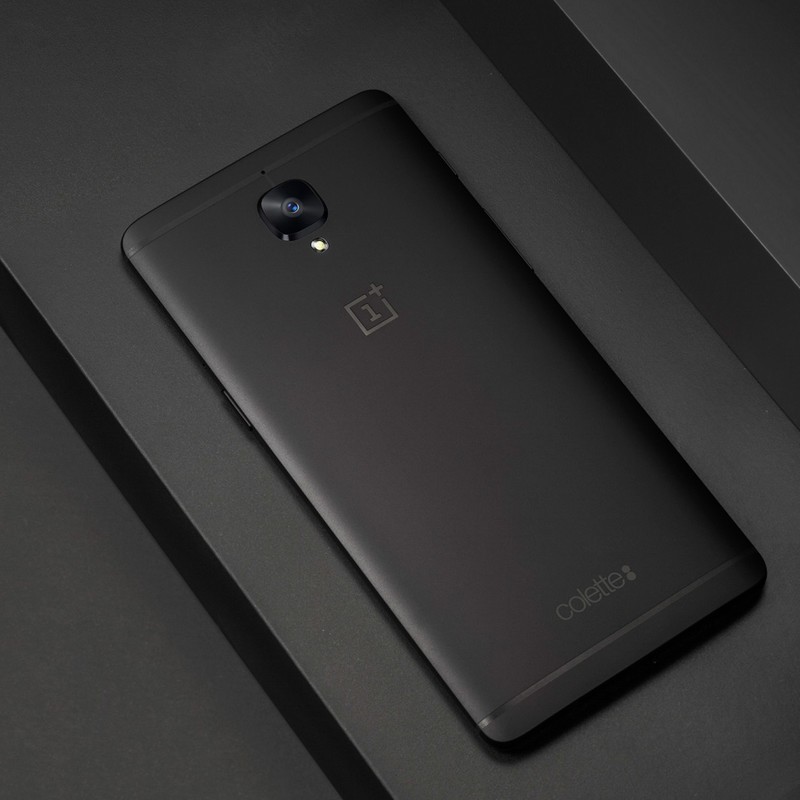
Just how exclusive are we talking here? OnePlus has only made 250 of these special edition phones to commemorate colette’s 20th anniversary. That’s a seriously small group of people who will get their hands on this slick-looking version of the really solid OnePlus 3T.
Alright, so it all sounds great to you and you want to buy a colette edition … where can you get one of the 250 made? You’ll have to be in Paris on March 21, and head to the colette store, just a short walk from The Louvre, for the 11:00 a.m. launch. First come, first served.
OnePlus 3T and OnePlus 3
- OnePlus 3T review: Rekindling a love story
- OnePlus 3T vs. OnePlus 3: What’s the difference?
- OnePlus 3T specs
- Latest OnePlus 3 news
- Discuss OnePlus 3T and 3 in the forums
OnePlus
Amazon
Press release:
OnePlus Collaborates with colette to Release Limited-edition Black OnePlus 3T
Exclusive OnePlus 3T colette edition combines refined design, powerful performance and Dash Charge to celebrate concept store’s 20th anniversary
PARIS – March 15, 2017 – OnePlus today announced it is partnering with famed concept store colette to release a special all-black edition of its premium flagship smartphone, the OnePlus 3T colette edition. In celebration of colette’s 20th anniversary, OnePlus will host a pop-up shop at the colette store in Paris on March 21. Only 250 of this limited-edition version of the OnePlus 3T will be available for sale at the one-day pop-up shop.
“We are constantly striving to provide OnePlus users with the very best in software and hardware. Now we’re introducing this striking black version of the OnePlus 3T with colette, highlighting our focus on beautiful design and the strictest attention to detail,” said OnePlus founder and CEO Pete Lau. “Our friends at colette understand refinement and good taste better than anybody, so we’re very proud to be partnering with them to offer this special edition of our flagship phone.”
“OnePlus is an exciting brand that is challenging the way people look at smartphones. We’re happy to be partnering with OnePlus to offer this special edition of the OnePlus 3T for colette’s 20th anniversary. The OnePlus 3T colette edition is a gorgeous phone that is sure to draw a lot of attention,” said Sarah Andelman, co-founder of colette.
The OnePlus 3T has widely been regarded as one of the top smartphones of the past year, receiving numerous awards and recognition from media and fans alike. It combines industry-leading features like Dash Charge, which gives users a day’s power in half an hour, with 128 GB of storage, 6 GB of RAM, a Qualcomm® Snapdragon™ 821 processor and the refined Android experience of OxygenOS. Now, OnePlus is offering this limited-edition smartphone for users who have been craving the sleekest and most stunning OnePlus device to date.
To celebrate the 20th anniversary of the world-renowned colette store, OnePlus has teamed up with the iconic fashion boutique to specially engrave 250 units of the all-black OnePlus 3T phones with the colette logo. For fans lucky enough to get their hands on this phone during the pop-up experience at colette’s retail store in Paris on March 21, OnePlus will be offering a free set of the Bullets V2 earphones with each purchase.
Collaboration between OnePlus and colette extends back to 2015, when OnePlus held pop-up experiences at colette upon the highly anticipated launch of the OnePlus 2 and the OnePlus X. Last year they partnered on a pop-up shop for the OnePlus 3 launch. Each pop-up experience at colette has attracted queues of hundreds of fans eager to get their hands on the latest OnePlus smartphone.
The exclusive, colette-engraved black edition of the OnePlus 3T (128 GB) is only available starting at 11:00 am (GMT +1) on March 21 at the colette store at 213 Rue Saint Honoré, 75001 Paris, France. Only 250 units will be available and will retail for EUR 479.
Microsoft’s Arrow Launcher picks up tablet support in latest update

Arrow Launcher, an experimental launcher from Microsoft’s Garage division, has picked up another big update. The biggest feature coming along in this update is tablet support, but there are a number of other little handy additions like more backup and restore options, a horizontal layout option for the apps page, and more wallpapers from Bing.
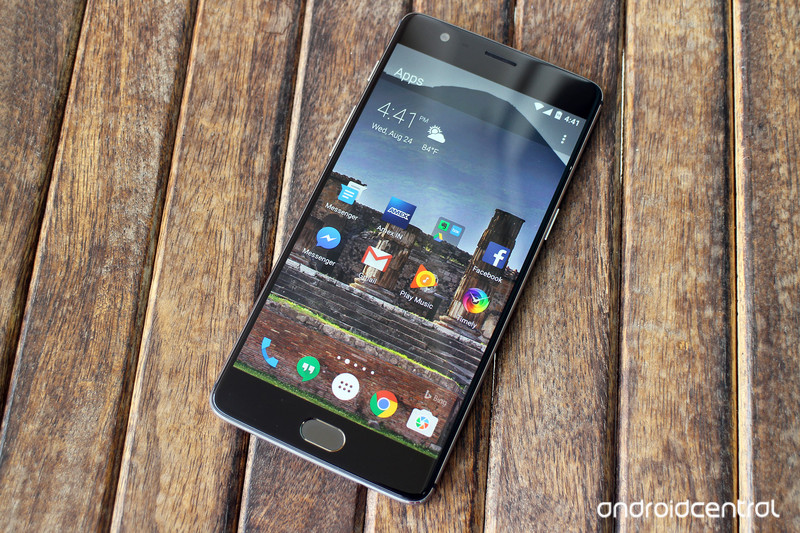
Here’s a full look at what’s new in Arrow Launcher version 3.1:
- Tablet support: a very popular request since Arrow’s first release — and now it’s here!
- Horizontal layout option for the “all apps” page!
- More beautiful Bing wallpapers.
- Backup & restore: more backup options available.
- Ability to hide headers.
- Ability to configure the utility page: show/hide, choose card color (transparent or solid white)
- Carousel scrolling mode.
This follows up from a similarly large update that hit the launcher in late February, which brought big performance gains and a new utility page for pinning your most commonly used functions. To check out all of what’s new in this latest update, you can grab Arrow Launcher version 3.1 from Google Play now.
Google Family Link finally brings broad parental controls to Android phones
Parents will soon have new tools to manage their child’s phone access.
Google is making a huge step toward letting families manage Google accounts and phones of children in the house, moving well beyond Google Play Family Library. Family Link is Google’s new system for parents to create Google accounts for minors (under 13 years old, officially) who technically can’t have their own accounts, and when attached to an Android phone the parents get all sorts of great tools to manage their use.


With an Android phone running Nougat — which is hardly a given right now — and a Family Link account, parents will be able to approve or deny app installs, see how the child is using their phone and even explicitly limit their screen and overall device use time. Parents can set daily screen-on time limits for their child, and even force the phone to be remotely locked at a specific time — for example, disabling the phone overnight from 9 p.m. to 7 a.m. every day. What Family Link doesn’t do, at this point, is provide kid-friendly versions of Google apps, or the ability to lock specific apps (like Hangouts or Chrome).
These are great tools that should have been here a long time ago.
Family Link is currently invite-only and parents can enroll in the early access program to take a look when it comes available. Google says the features are just getting solidified now and parents who participate in the program will be able to offer feedback about how Family Link can improve before a wider launch.
This is a fantastic step in the right direction to making Android far more compatible with families who have young children who want (or honestly, need) phones but really shouldn’t have unfettered access to an Android smartphone just yet. Many parents have simply worked together their own system using “normal” Google accounts, various apps and different software solutions, but going forward Family Link will easily be the go-to solution for parents just starting out giving children their first account and phone.
Android Nougat
- Android 7.0 Nougat: Everything you need to know
- Will my phone get Android Nougat?
- Google Pixel + Pixel XL review
- All Android Nougat news
- How to manually update your Nexus or Pixel
- Join the Discussion
 AIVAnet