


Foursquare is getting better at selling your location data
Foursquare may have fallen off your radar, but it’s far from dead — rather, it has morphed into a business analytics juggernaut, selling its location data and API to businesses like Capital One, Twitter and Microsoft. Now, it’s pulling those services into one place with Foursquare Analytics, a Google Analytics-style dashboard that measures foot traffic instead of browsing data. It has launched the service with beta partners Taco Bell, TGI Fridays, H&M, Lowe’s and Equinox Fitness.
“Foursquare Analytics allows brick-and-mortar retailers and restaurant chains to understand how their own company and an entire category are performing based on actual, measurable, real-world visits — and much more quickly than any option out there,” writes CEO Jeff Glueck in a Medium post.
The company relies on users to opt in to its granular location data services, so the app must have enough interesting features to motivate folks to install and use it. At the same time, it has to have rock-solid security and anonymization features, as it essentially knows your precise location at any given moment. Finally, it has to compile that data into something useful for brands, retailers and other businesses.
To do that, it draws on data not just from Foursquare and its ancillary apps like Swarm, but also hundreds of other apps that use its “Places” database, including those from Snapchat, Twitter and Apple. The company can then “accurately measure” visits to 93 million business locations worldwide, and normalize foot traffic data to reflect the US population.
Citing retailer T.J. Maxx as an example, Foursquare said it can tell businesses how often consumers visit their stores, how old they are, in which cities stores are most popular, and even which other brand’s stores consumers visited before their store. This kind of granular data is extremely valuable to businesses, and the speed at which Foursquare can deliver it is unmatched.
However, it does raise questions (again) about Foursquare’s privacy. Though the company promises that it fastidiously safeguards it’s users’ privacy, it doesn’t take many data points to guess who someone is. As one analyst told the New Yorker, “just show me where your phone is between midnight and eight o’clock, and I’ve pretty much figured out who you are.”
Source: Foursquare
Apple Watch Gets New Striped Woven Nylon, Classic Buckle, and Standalone Nike Sport Bands
As has been expected, Apple today debuted a new Spring 2017 lineup of Apple Watch bands that introduces all-new options like Striped Woven Nylon, sold-separately Nike Sport bands, and new colors for Hermès. Every band is available to order today on Apple.com.
Striped Woven Nylon bands now come in Berry, Tahoe Blue, Orange, Red, and Pollen. There’s also an all-new Midnight Blue Woven Nylon band, but it lacks the new stripe pattern.
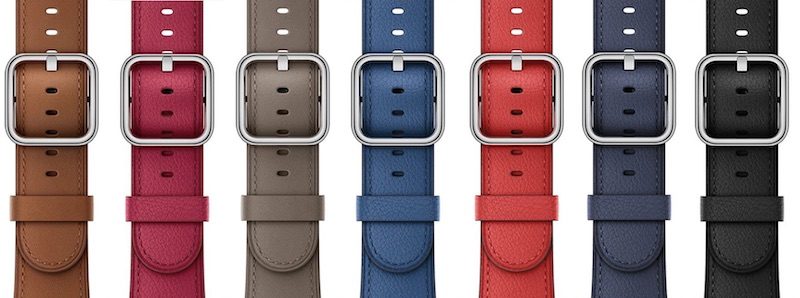
New Sport band colors include Pebble, Azure and Camellia, and the Classic Buckle has gotten a small buckle redesign and now comes in Sapphire, Berry, and Taupe.
Users can also finally buy the Nike Sport Band separately in Anthracite/Black, Pure Platinum/White, and Volt/Black. The company is introducing new collections of Nike Bands as well, including a 38mm and 42mm Space Grey Aluminum Case with Anthracite/Black Sport Band and 38mm and 42mm Silver Aluminum Case with Pure Platinum/White Sport Band.

Apple Watch Hermès is gaining new colors: 38mm Double Tour in Bleu Zéphyr Epsom leather, 38mm Double Buckle Cuff in Fauve Barenia leather, 42mm Single Tour in Lime Epsom leather, and 42mm Single Tour in Colvert Swift leather. One new addition to the Hermès collections has been made and it includes the Apple Watch Series 2 with the 38mm Double Buckle Cuff in Fauve Barenia calfskin leather.
For first time Apple Watch owners, Apple has simplified collections down to bundles that only include Sport Bands, Nike Sport Bands, and the Milanese Loop. This means that bundles including Woven Nylon, Link Bracelet, and Classic Buckle options will no longer be offered, and anyone who wants these bands will have to purchase them separately after they have their Apple Watch.
Pricing for all the bands has not changed with today’s announcement: Sport Bands and Woven Nylon cost $49, Classic Buckles cost $149, and the Hermès Bands run for $339 (Single Tour), $489 (Double Tour), and $689 (Double Buckle Cuff). All can be ordered on the Apple Store today.
Related Roundups: Apple Watch Series 2, watchOS 3
Tag: Apple Watch bands
Buyer’s Guide: Apple Watch (Neutral)
Discuss this article in our forums
Apple Launches New Silicone and Leather iPhone 7 Case Colors
Apple this morning made its iPhone 7 silicone and leather cases available in a handful of new colors.
The colors of the new silicone cases (above, left to right) are described as Azure, Camellia, and Pebble, priced at $35 for iPhone 7 models and $39 for iPhone 7 Plus.

Elsewhere, the leather case options have expanded to include shades of Sapphire, Taupe, and Berry, costing $45 for iPhone 7 and $49 for iPhone 7 Plus.
In addition to the iPhone 7 cases, a new iPhone SE leather case in Saddle Brown is available for $39. All of the cases can be ordered on Apple’s online store as of this morning.
Related Roundup: iPhone 7
Discuss this article in our forums
Apple Discontinues iPad Mini 2
Apple today discontinued the iPad mini 2, which launched in November 2013 and was most recently sold for $269 in the United States. Apple’s cheapest tablet is now the new 9.7-inch iPad, which starts at $329, while those preferring the 7.9-inch size can purchase the iPad mini 4 with 128GB of storage for $399.
Apple’s tablet lineup has now been narrowed down to the iPad Pro in 9.7-inch and 12.9-inch sizes, a low-cost 9.7-inch iPad, and the iPad mini 4. Rumors suggest Apple is also readying a new 10.5-inch iPad Pro with an edge-to-edge display, which could be unveiled at a future Spring event, WWDC 2017, or even later.
Related Roundup: iPad mini 4 (2015)
Tag: Apple retail
Buyer’s Guide: iPad Mini (Caution)
Discuss this article in our forums
Never gonna give floppies up: Floppotron takes on Rick Astley
Why it matters to you
If you miss the days of grinding floppy drives and clunking HDDs, then the Floppotron makes for a great nostalgic flashback, with its own soundtrack to boot.
If you want to “Rickroll” someone in retro style, what better way than with YouTube’s very own “Floppotron.” The monstrous creation of retro technologies, most notably a number of 5.25 inch floppy drives, has now taken on the Rick Astley classic, Never Gonna Give you Up.
It’s been almost a year since YouTuber Paweł Zadrozniak first debuted the Floppotron, an array of floppy drives, scanners, hard drives and an ATMega microcontroller. When forced to actuate at an appropriate frequency, each drive can make specific sounds that, when combined together, can make a variety of tunes.
Their latest rendition is of the classic Rick Astley track which was used so successfully over the past decade to “Rickroll” people – that is, trick them into viewing the video when expecting something else. It’s an internet staple and it’s more surprising that it’s taken Zadrozniak this long to take a crack at it.
More: Still got a floppy drive in your desktop? Here’s one way to make it useful again
However he has been rather busy with other tunes. The Floppotron has also taken a swing at other internet classics like Smash Mouth’s All Star – which was recently played with Windows XP error noises, too.
Perhaps the most fitting of all its projects though is the Portal – Still Alive theme, which it nails perfectly. The retro feel to the sound seems just right for this sort of tune.
In total the Floppotron is built from 64 floppy drives, eight hard drives and two scanners. Why so many? In short, volume. While each individual drive can produce unique notes, they can only make so much noise by themselves, hence Zadrozniak created banks of drives, so that when a louder note was required, he has the mechanical oomph to deliver it.
Each channel of eight floppy drives is connected to a single eight-channel controller, which controls the “voice” of the drives and how many will output the sound. The scanners and hard drives have their own controllers, all of which translate commands from the main Arduino board which interfaces with the PC that controls the Floppotron.
If you’d like to learn more about its construction or the Python that handles the software side of the equation, Zadrozniak has a thorough breakdown on his blog.
Latest Windows 10 Insider preview build fixes Microsoft Edge bugs and others
Why it matters to you
Microsoft is keeping its Insider users updated regularly, making sure everything is ready for the next big Windows 10 update for all users.
The next update for Windows 10 Insiders will help fix up a number of bugs that are faced by Windows users the world over. Available for anyone on the Fast Ring, Preview Build 15063 specifically shores up problems with Microsoft Edge and an outstanding issue with the .Net Framework 3.5 release.
Microsoft has had a lot of success with its Insider rings over the past few years, having its biggest fans act as external beta testers to iron out bugs and problems before new builds of Windows reach the public. The latest Insider Build looks to do much the same, though there are a few outstanding issues which Microsoft says it is aware of.
There were two big changes for PC users in this release. The first is a fix for a reliability issue from Build 15061 that affected Microsoft Edge and caused it to hang. That’s been cleared up, as well as a problem where localized files and registry keys for additional language packs would not be installed when the .Net Framework 3.5 was enabled.
More: With Windows 10 Creators Update around the corner, Microsoft keeps fixing bugs
But of course, Windows 10 isn’t just an operating system for PCs any more, it’s also a mobile OS. The fixes for that branch of the system are more numerous and affect things like inbox apps failing to launch, a bug that caused background tasks not to run properly, a problem that would see call, text, and email history lost after a device reboot, and another where speech packs would not install correctly.
All of those and a few more have been fixed up in the new Insider Build, though Microsoft has pointed out in its release notes that there are a few outstanding issues. Language pack installs have been disabled for the next week; a particular error message may require manually deleting a registry key, though that fix is not guaranteed; some apps and games may crash due to advertising ID issues from a previous build, and there remains an issue where reboot prompts are not being shown correctly after downloading an update.
Microsft also acknowledged that it was releasing a lot of builds recently, but that it appreciated the enthusiasm and feedback of the Insider user base.
Skip the pre-made stickers, make your own with PicsArt’s latest editing tool
Why it matters to you
Sticker fans, you can now create your own stickers to easily paste yourself or your creations into a photograph.
Snapchat may have brought photo stickers into the spotlight, but photo editing app PicsArt is making them personal. On March 21, the popular image editor launched a new tool that allows users to create their own custom stickers, then export them for use on Facebook, Instagram, iMessage, Messenger and other social media and messaging apps.


The new suite of editing tools means users can create their own stickers from their own images or one of the app’s six million free-to-edit photos. Stickers can also be designed using PicsArt’s illustration tools, making it possible to use custom drawings as well as photos. This feature is based off an earlier release of tools that let users cut out sections of an image; PicsArt adjusted that feature to now allow cutouts of custom stickers that can easily be re-used across multiple projects.
More: Edit. Share. Repeat. PicsArt adds new chat feature to encourage remixing photos
“Stickers have become the universal form of communication and are a great way to annotate other images,” PicsArt CEO Hovhannes Avoyan said in a press release. “Since we launched our Cutout tool with powerful and accurate edge detection, our users have been making more and more cutouts and using them like stickers. Now, more than 450,000 cutouts are created in PicsArt every day – that’s over two million per week. Today’s launch encourages even more sticker creation by providing users with a rich set of tools for creating, sharing and discovering stickers.”
After downloading the updated app (on both iOS and Android), PicsArt users can access the new tools by tapping the pink plus sign and choosing the sticker options. The stickers can start from a blank canvas and drawing tools or a photograph. Outline tools tells the app which portions of the image to leave in that new sticker.
PicsArt’s latest feature makes it possible to turn yourself, your pets, your drawings or whatever you can imagine (or photograph) into a re-usable sticker. The custom stickers also join a new sticker gallery where users can download and share other stickers.
The latest sticker tools join the more than 3,000 editing options inside PicsArt, which now has 90 million monthly active users. The updates are available to download on both iOS and Android platforms.
Huawei P10 vs. LG G6: Battle of the big-brand flagships
Samsung sat out of this year’s Mobile World Congress, leaving Huawei and LG free to compete solely against each other. Huawei announced the P10 and P10 Plus, the latest in its P series of devices, and LG launched the G6, the successor to last year’s failed G5.
While both smartphones offer killer features, which is superior? Check out a full list of specifications for each of the phones, as well as a quick breakdown of how their features compare to one another.
More: LG G6 vs. iPhone 7 Plus: How does the hottest new Android compare to Apple’s best?
Specs
Huawei P10

LG G6

Size
145.3 x 69.3 x 7 mm (5.72 x 2.73 x 0.28 inches)
148.9 x 71.9 x 7.9 mm (5.8 x 2.83 x 0.31 inches)
Weight
5.11 ounces (145 grams)
5.75 ounces (162 grams)
Screen
5.1-inch IPS-NEO LCD capacitive touchscreen
5.7-inch IPS LCD capacitive touchscreen, Dolby Vision/HDR10 compliant
Resolution
1,080 x 1,920 pixels (432 ppi)
1,440 pixels x 2,880 (564 ppi)
OS
Android 7.0 Nougat (EMUI 5.1)
Android 7.1 Nougat (UX 6.0)
Storage
64GB
32GB (64GB in select regions)
MicroSD card slot
Yes
Yes
NFC support
Yes
Yes
Processor
Kirin 960 2.4 GHz Octa-core
Qualcomm Snapdragon 821
RAM
4GB
4GB
Connectivity
LTE, GSM, HSPA, 802.11a/b/g/n/ac Wi-Fi
LTE, GSM, HSPA, 802.11a/b/g/n/ac Wi-Fi
Camera
20-megapixel and 12-megapixel monochrome and color rear cameras with OIS, 8-megapixel front
13-megapixel dual rear with OIS, 5-megapixel front
Video
2160p@30fps, 1080p@60fps
2160p@30fps, 1080p@30/60fps
Bluetooth
Yes, version 4.2
Yes, version 4.2
Fingerprint sensor
Yes
Yes
Other sensors
Gyroscope, accelerometer, proximity, compass
Gyroscope, accelerometer, proximity, compass, barometer
Water resistant
No
Yes, IP68 rated
Battery
3,200mAh
3,300mAh
Ports
USB Type-C, 3.5mm headphone jack
USB Type-C, 3.5mm headphone jack
Marketplace
Google Play Store
Google Play Store
Color offerings
Ceramic White, Dazzling Blue, Dazzling Gold, Prestige Gold, Graphite Black, Mystic Silver, Rose Gold, Greenery
Mystic White, Astro Black, Ice Platinum
Availability
None in USA
AT&T, Verizon, Sprint, T-Mobile
Price
650 euros ($694)
$672 on Verizon
DT review
Hands-on
Hands-on
Power and productivity

As both phones are flagship offerings, neither holds a serious advantage in terms of specs. The P10, however, features a Kirin 960 octa-core processor, powered by four ARM Cortex A73 cores alongside four A53 cores. Combined with a Mali-G71 GPU — which is based on the new Bifrost architecture — the Kirin system-on-a-chip is capable of maintaining peak performance for longer than the G6’s Snapdragon 821 chip, making it ideal for tasks such as gaming and video streaming. The Snapdragon is no slouch, though, and it’s the best Qualcomm can offer until the 835 version arrives soon. Qualcomm chips typically outperform Kirin chips in benchmarks, though real-world use is similar.
More: LG G6: Our First Take
Both smartphones sport 4GB of RAM and 32 to 64GB of storage. The LG G6 offers wireless charging and 32GB of storage in the U.S. variant, but South Korea and some Asian markets get a quad-Digital-to-Analog Converter for high-quality audio as well as 64GB of internal storage. Europe, sadly, gets neither of these features.
Thankfully, both support storage expansion via MicroSD card slots, and they have nearly identical battery capacities, though the G6’s 3,300mAh battery barely outstrips the P10’s 3,200mAh counterpart.
Winner: Huawei P10
Design and display

While Huawei looks to break new ground with a vibrant selection of colors curated by Pantone, LG finds success with a radical new look, opting for a nearly bezel-free and glass-and-steel design.
The P10, crafted mostly out of ceramic and aluminum, features a textured “hyper-diamond cut” that really shines (literally) on certain models, and its modest 5.1-inch screen is a nice departure from the ginormous phablet-style displays with which many smartphones are equipped. The phone’s side panels are also on the flat side, giving it a more distinguished feel, and the camera lenses are flush with the frame.
More: Huawei P10: Our first take
The G6, on the other hand, boasts a 4-to-1 screen-to-body ratio, a result of the 5.7-inch Quad HD screen’s 18:9 aspect ratio. Eliminating the bezel (mostly) allows the G6 to fit snugly into most people’s palms, creating a comfortable experience as it has a smaller frame than most 5.5-inch phones. Texting and navigating with one hand is easy, considering the size of the screen. The G6 also supports a higher resolution (1,440 x 2,880 pixels) than the P10 (1,080 x 1,920 pixels), packing in far more pixels per inch. Still, the P10’s IPS-NEO display ensures that images will look just as good when viewed from an angle.
Winner: LG G6
Software

While both phones run Android Nougat, LG has an edge as the G6 runs the more recent 7.1 version of the operating system. LG also built many of the default apps to interact specifically with the G6’s 18:9 screen, essentially dividing the screen into two squares. It’s a neat trick that cleans up much of the Android UX — particularly when multitasking — and automatically modifies app icons so that they’re all the same shape and size.
More: 6 pro tips to taking amazing portrait photos with the Huawei P10
The P10 also runs Nougat, except with Huawei’s EMUI 5.1 over the top. This extension, which helped make the Mate 9 far more user-friendly than its predecessors, adds some new features. For example, the fingerprint sensor on the back of the phone can be used to navigate the phone. EMUI also modifies memory usage to help apps launch faster, though, so that’s a plus.
Still, the win goes to the G6 for offering a cleaner and more useful user experience.
Winner: LG G6
Camera

Like the Mate 9, the P10 is equipped with three separate cameras — two on the back, and one in front. All three are built by German camera company Leica, which lends a sense of legitimacy to photographs taken with the phone. A 20-megapixel monochrome sensor sits beside a 12-megapixel color sensor, which itself boasts a f/2.2 aperture and optical image stabilization. Both rear cameras feature bokeh control, and the new Portrait Mode utilizes advanced facial recognition mapping (190 points in 3D space) to adjust lighting, even while people are moving around. The front camera, a more-than-respectable 8-megapixels, boasts a sensor that improves brightness and widens the camera’s dynamic range.
More: LG G6 video teardown, and safety testing lab tour
That said, the G6 can hold its own, thanks to the dual 13-megapixel lenses on the back of the phone. What’s unique is that one of the lenses is wide-angle, allowing you to capture far more in a shot than most smartphone cameras. The 5-megapixel selfie camera isn’t too shabby, either. The G6’s camera UI is also unique and more useful as you can see your gallery of photos and take new ones at the same time.
Ultimately this decision comes down to personal preference — if you’d rather have the wide-angle lens, the G6 is for you. But if you’re more of a black-and-white or portrait photographer, then go for the P10.
Winner: Tie
Price and availability

Both phones are set for release in the coming months, but the P10 won’t be available in the United States. There’s still hope for Huawei devotees — after all, the Mate 9 released saw a U.S. release in January — but for now, only the G6 is likely to be available domestically. The newest iteration of LG’s flagship series is set to arrive at the end of March, and so far we know it will cost $672 on Verizon. Expect the price to be similar from other carriers.
Winner: LG G6
Overall Winner: LG G6
Huawei’s 10th phone in the P-series is truly extraordinary, from its powerful processor to its trio of high-quality cameras. Unfortunately, the lack of domestic availability bumps it down a notch, while LG’s G6 excels across the board, especially with its nearly bezel-less design.
The G6’s bigger, brighter display is sure to impress, while its clean UI makes multitasking easier. You can’t go wrong with either choice, but for the foreseeable future, you can’t go with the P10 at all in the U.S. That makes the G6 our winner.
Zocdoc’s new AI-powered search knows what you mean when you search ‘hemroids’
Why it matters to you
Medical jargon can be intimidating. That’s why Zocdoc has engineered a system that makes sense of it.
It’s not easy finding a new doctor. Whether the motivation is a big move to a foreign city or the simple swapping of insurance coverage, there’s a better way to find an MD than the yellow pages. It’s a search engine called Zocdoc, and starting on Tuesday, it will begin tapping machine learning to help surface physicians even better than it did before.
Zocdoc’s new feature is Patient-Powered Search, a “more intuitive” search experience that’s “built […] to bridge the gap between health care industry and human speak.” In simpler terms, it’s an AI-powered search bar that interprets what you type to help you find the specialist you need. Enter “hurt wrist,” for instance, and Zocdoc will recommend local orthopedic surgeons. “Post-election stress disorder” will serve up a list of psychologists. And searches for “stomach” and “tonsil” will show gastroenterologists and ENTs, respectively.
More: Maintain your health and mind with these 15 medical apps
Patient-Powered Search corrects for common errors, too — the misspelled “hemroids” is interpreted as hemorrhoids, and “gyno” is entered as OB-GYN.
It’s filling a growing need. According to the Center for Disease Control and Prevention, nine in 10 Americans struggle to understand jargon-filled health information. “Patients [are] at a disadvantage, making it difficult to decipher what type of appointment they need or which specialist they should see to treat a specific symptom or condition,” a Zocdoc spokesperson said. “This disconnect between medical speak and patients’ own […] language […] can frustrate, intimidate, or even deter patients in their searches.”

The secret is a machine learning algorithm derived from online medical literature, Zocdoc’s millions of users, and the more than 50 specialties and 1,000 different procedures that make up the app’s database of services. Zocdoc’s team developed a natural language processing model that can interpret human colloquialisms and “map” them, in effect, to specialties, visit reasons, and procedure types. Zocdoc calls it “semantic search.”
Patient-Powered Search’s machine learning algorithm works in tandem with “string-matching” technology that surfaces the most relevant results. A secondary AI, meanwhile, factors patient behavior into search results, automatically adjusting the ranking of selections based on popularity, trends, and other factors.
More: 100 awesome Android apps that will turn your phone into a jack-of-all-trades
The end result is a measurable step up from the old system, a Zocdoc spokesperson said. Before People-Powered Search, users had to know the appropriate specialty for a given procedure and use precise medical terminology to describe their condition. Then, they had to select a specialist from a lengthy drop-down menu and select a procedure or reason for the visit from a pre-vetted list.
“[Zocdoc’s search feature] was working for millions of patients, but we knew we needed to evolve our search experience to one that was more dynamic, intuitive, and oriented around the patient,” a Zocdoc spokesperson said. “Patient-Powered Search lays an important foundation for the future.”
Patient-Powered Search is rolling out to Zocdoc’s mobile site and smartphone app this week.
The first five things you need to know about Mass Effect: Andromeda

There is plenty to do in Mass Effect: Andromeda, so be ready to dive in.
The Mass Effect franchise has officially returned with the fourth installment in the series, and everything here is very shiny and new. A new galaxy, new set of characters, and plenty of new content to delve into. Don’t be worried if you’re a returning fan though, there are plenty of nods to the original trilogy, and this includes the alien races you know and love.
With a game as expansive as Mass Effect: Andromeda, knowing what to keep an eye out for early is a good call. That’s why we’ve got 5 tips to help you get started exploring the Andromeda galaxy.
Scan all the things
You have a handy little scanner right on your arm which can be activated by dressing the down button on the directional pad. This allows you to scan your surroundings and see if there is anything hiding from your view. Do this. Do it often, and do it everytime that you enter a new area. Even during the initial planetside mission there is tons to see and explore. While you won’t be able to access everything at the get go, you can still tag it for your eventual return.
Scanning the environment is such a small thing, but it really does make a difference. Since unscanned items pop up in bright orange, it makes it easier to find important items or alien technology you might otherwise miss. You can also use it to scan enemies whether they are alive or dead, which can be particularly handy when you’re just getting started. Scanning unfamiliar tech and aliens will also net you research points which are used to unlock technologies in the game, and you want those technologies.
Cover is your friend

There are some games where you can stride around like a tank, blowing the face off of anything you come across without paying a price for that audacity. This, is not one of those games. Cover is important, you will need cover, or you will die. Repeatedly. I would know, because I learned this lesson the hard way. Taking cover will allow you to heal from your wounds, flank an enemy while they can’t see you, and get a better read on what you are dealing with.
To break it down further, humans are not a dominant species in the Andromeda galaxy. There are more of them than there are of you, and sprinting around shooting sounds fun until you die three times in a row because there are seven aliens shooting at you simultaneously. Use cover if you want to survive.
Keep an eye out for containers
You shouldn’t be surprised, but there are plenty of loot containers to be found scattered through the worlds you’ll be exploring. Be sure to keep an eye out for them, because not all loot containers are made equal and some of them have some lucky items in store for you. The loot containers will have items that relate directly to the race that left it behind. This means on an Angaran world, you’re going to find Angara loot of one kind or another. What you find is also randomized, using a dynamic loot generation, so you won’t get the same result if you die and return to a specific box.
Salvage containers look like boxes left behind, and alien orbs scattered about. Generally they look a little bit broken, or mussed up, and are filled with salvage only usable for trading to merchants for credits. The boxes you really want are the normal containers, which look like boxes. More or less. Depending on the rarity, you can find anything from components for weapons to the weapon itself. By grabbing every container you see, you can ensure that you have a solid stock for selling to merchants, and using later for crafting.
Stay aware of your surroundings

While the planets you’ll be exploring are the hope of a future for mankind, they are still a bit hostile at times and if you aren’t paying attention to what is going on it’s very easy to wind up dead. This is because the planets are covered in various hazards of varying severity. While the level 1 hazards can damage your health and be a nuisance, level 3 and 4 hazards can kill you quite quickly. It is worth mentioning high level hazards are usually indicative of an area that is currently off limits until you have progressed further.
For the most part, hazards are pretty easy to see. Green smoky haze, fire, ice, geysers, and lava are all examples of hazards that you will run into during your exploration. To avoid being wounded by the hazard, just avoid the hazard. The hazard level is also shown at the bottom left of your HUD, so that you are aware when you are entering a dangerous area unwittingly.
What are your tips?
There is tons to do, and plenty to explore within Mass Effect: Andromeda, but these tips should help you to get a running start when it comes to exploring the Andromeda galaxy. Find rare items, get the perks you need, and remember that you are in hostile territory and you should have the hang of things in no time flat. Just remember that this is just the beginning, and there will be plenty more to explore and discover. Do you have a tip for those just starting Mass Effect: Andromeda? Be sure to drop us a line in the comments below and let us know.
See on Amazon
PlayStation 4

- PS4 vs. PS4 Slim vs. PS4 Pro: Which should you buy?
- PlayStation VR Review
- Playing PS4 games through your phone is awesome
See on Amazon
 AIVAnet