


Modders are recreating ‘Red Dead Redemption’ inside ‘Grand Theft Auto V’
Why it matters to you
If you can’t wait for Red Dead Redemption 2, this modding project might be able to occupy some of your time over the summer.
Gamers are hungry for more Red Dead Redemption, as evidenced by the enormous response to last year’s announcement that a sequel was in development. As fans anticipate the follow-up’s debut this fall, a group of dedicated players has set about recreating its predecessor’s map within Grand Theft Auto V.
This ambitious set of modders, helmed by an individual known as Mr. Leisurewear, announced the project over the weekend, according to a report from Gamespot. The Xbox 360 version of Red Dead Redemption is being picked apart and reconstructed for use with third-party multiplayer clients designed for Grand Theft Auto V.
Rockstar makes a lot of money selling in-game currency to GTA Online players, so the project won’t be compatible with the game’s official online offering. The studio takes a stern stance on modifications that could counteract the advantages of buying in-game currency, so the modders are steering clear.
More: Red Dead Redemption 2: Everything we know
It’s not just the Red Dead Redemption map that’s being recreated and inserted into Grand Theft Auto V. The group intends to reconstruct environmental elements like the game’s day-to-night cycle, and there are even plans to reproduce certain gameplay mechanics.
The team is currently looking for programmers who could help with the process of recreating this content within the framework of Grand Theft Auto V. The game’s Dead Eye slow-motion targeting is listed as a top priority, but there’s also a mention of the various mini-games that were peppered throughout Red Dead Redemption, like five-finger filet, arm wrestling, and poker.
It’s anticipated that a beta version of the map will be released some time this summer, although there’s no word whether that will include any of the gameplay mechanics and other content that’s being worked on. In any case, that timing should work out well for players who are eager to get their hands on Red Dead Redemption 2, which is scheduled to release in late 2017.
Google makes searching on Android better with new Shortcuts feature
Google has introduced yet another way to search on Android.
There is no shortage of ways to find things on an Android device. If you’ve bought a phone in the last couple of years, it’s more than likely you have a Google search bar on your main homescreen — Google requires it as part of its certification process — and some phones, including its Nexus and Pixel line, have the Artist Formerly Known As Google Now, now known merely as the Feed, to the left of the main homescreen.

Well, Google still thinks searching for specific topics is too difficult, because it’s introducing a new Shortcuts menu within the Feed that’s meant to simplify the process of getting in-depth information.
Getting up-to-the-minute info is as easy as a single tap. With shortcuts right on the home screen, you now have access to in-depth experiences across sports, eat & drink, entertainment and weather. Need to know whether to bring a raincoat tomorrow? Want the score to last night’s basketball game? Looking for what’s on TV tonight or who’s nominated for best supporting actress? Shortcuts on Google will get you there.
Android users will find dozens of other useful shortcuts too—translate, nearby attractions, flights, hotels, internet speed test, currency converter, and more. Plus, if you’re looking for fun, there are shortcuts like tic-tac-toe, roll a die, animal sounds, solitaire, and always a Google favorite: I’m feeling curious.
What’s interesting about this is that Shortcuts presumably makes it easier to get sports scores, movie times and other pieces of information people often search for. But it’s also putting web apps like Google Translate and Google Trips — experiences that are available as native apps on Android — front and center in the experience.
The feature is rolling out first to Android, iOS and mobile web users U.S., with more countries expected to come in the next few months.
What do you think of Shortcuts? Is it useful, or just another set of icons cluttering up the Feed?
Android Nougat
- Android 7.0 Nougat: Everything you need to know
- Will my phone get Android Nougat?
- Google Pixel + Pixel XL review
- All Android Nougat news
- How to manually update your Nexus or Pixel
- Join the Discussion
You can now buy the HTC Ultra in Canada for a cool grand
The HTC U Ultra has come to Canada at a steep price.
There were a number of beautiful photos of the HTC U Ultra I could have chosen for this post, because the phone is very nicely made. Its reflective glass shimmers in the light in a way that no other does. It’s also $749 USD.

Now, Canadians can get in on the fun, with the U Ultra available unlocked through HTC’s website for a cool grand. That’s $999 CAD.
Available in three choice colors — blue, white, and black — the phone has all the makings of a great flagship, but as Andrew Martonik points out in his review, there just aren’t many reasons to buy one over the many cheaper and better alternatives:
HTC continues to get the basics right with flagships. The U Ultra has a great screen, amazing build quality and stunning design. You get just about every spec inside you’d expect, and the day-to-day performance as a result is fantastic with a super-smooth software experience. Unfortunately, HTC’s camera performance once again lags behind the pack, its secondary display is all but useless and there’s no headphone jack or waterproofing — all in a phone that’s charging a premium price of $999 CAD.

If you can get over those things, the HTC U Ultra is still a great device with some awesome HTC-built software.
See at HTC
Win a Galaxy S8 from Android Central! Enter now!

The Samsung Galaxy S8 will be revealed soon, so now is the perfect time to give one away to an Android Central reader.
Samsung ended its Mobile World Congress presentation with envelopes telling everyone to come to NYC on March 29th for the unveiling of the Galaxy S8. That date is just around the corner now so what better time to hold a contest and give Android Central readers a chance to win the new S8? Let’s get to it!
THE PRIZE: One Android Central reader will be taking home a brand new Samsung Galaxy S8, when it’s released!
THE GIVEAWAY: Head down to the widget at the bottom of this page. There are multiple ways to enter, each with varying point values. Complete all of the tasks for maximum entries and your best shot at winning! Keep in mind that all winning entries are verified and if the task was not completed or cannot be verified, a new winner will be chosen. The prize does not include service, and we cannot guarantee that the device will work on all carriers. International winners will be responsible for any customs fees incurred during shipping.
The giveaway is open until April 4th, and the winner will be announced right here shortly after the close date. Good luck!
Android Central is giving away a Samsung Galaxy S8! Enter now!
Samsung Galaxy S8 and S8 Plus
- Latest Galaxy S8 rumors!
- Galaxy S8 announcement coming March 29 in NYC
- Galaxy S8 release date set for April 28
- Join our Galaxy S8 forums
Best accessories for the LG G6

Purchase accessories for your LG G6 today so you’re ready to go on day one!
The LG G6 doesn’t officially ship until April 7, but that doesn’t mean you can’t start stocking up on great accessories for your phone. Case manufacturers get early access to the latest devices so they can perfectly craft their products to fit a phone’s dimensions, so you can buy with confidence knowing these cases were specifically designed for your new phone.
We’ve also included a few other essential accessories you should definitely consider.
- Spigen Rugged Armor
- SUPCASE Full-body Rugged Holster Case
- Tronsmart Dual USB Car Charger w/ Quick Charge 3.0 technology
- Spigen Tempered Glass Screen Protector
- Samsung EVO+ 256GB
- Anker Micro-USB to USB-C adapter (2 pack)
Spigen Rugged Armor

Spigen’s Rugged Armor case is always a great option to protect your new phone, so of course we’re going to recommend it for your LG G6.
This one-piece case offers great protection for your phone while keeping a mostly sleek and slim profile. Made of flexible and durable TPU material that makes it easy to install, it’s got a premium look to it with carbon fiber textures at the top and bottom on the back. Featuring cutouts around the camera and fingerprint scanner on the back, and with tactile buttons for the volume control on the side, this case feels natural in hand while ensuring all your phone’s functionality remains intact.
For a stylish case that offers quality protection, get the Spigen Rugged Armor case for your G6.
See at Amazon
SUPCASE Full body Rugged Holster Case for LG G6

If keeping your new investment in good condition is important, you’ll want to slap a rugged case on your phone. SUPCASE provides some of the sturdiest cases you’ll find for smartphones, so you can buy with confidence here.
SUPCASE offers full protection for your phone, with a front plate that includes a built-in screen protector and port covers for the headphone jack and charging port. Made from a combination of TPU and polycarbonate materials, your phone will be protected from anything life throws your way.
Ideal for heavy use and outdoorsmen, it also ships with a 360-degree swiveling belt clip holster so your phone is always within arms reach.
See at Amazon
Tronsmart Dual USB Car Charger w/ Quick Charge 3.0 technology

Tronsmart’s car charger with a built-in USB-C cable is a great option for keeping your LG G6 juiced while on the road.
The built-in USB-C cable is convenient, since you’ll never need to remember your cable each time you drive. The included USB Type-A port is handy for charging another device at the same time via Quick Charge 2.0 or 3.0.
If you need a car charger that to keep your LG G6 charged when you’re on the go, check out the Tronsmart 33W dual USB charger.
See at Amazon
Spigen Tempered Glass Screen Protector

Spigen’s tempered glass screen protectors are available in a very affordable two-pack, which will let you keep that brand new LG G6 screen protected right out of the box.
This screen protector will cover the entirety of the screen while still remaining case friendly. This is a dry install screen protector with everything you need for a clean, dust-free installation on your first attempt included in the package. You can buy with confidence knowing that Spigen offers a lifetime warranty for any product defects.
See at Amazon
Samsung EVO+ 256GB microSD card

The LG G6 offers storage expansion up to 2TB via microSD. While a 2TB microSD card doesn’t yet exist, it’s good to know that this phone is virtually future-proof when it comes to storage.
For now, your best bet for expanding your phone’s storage is Samsung’s 256GB EVO+ microSD card. Featuring read speeds of up to 95MB/sec and write speeds up to 90MB/sec, this card is plenty fast enough to handle storing all the photos and videos you take with your G6, while also letting you load up all your favorite media so you have your favorite music and movies with you on the go.
At over $150, it might be too pricey for some, and that’s ok. Check out our other MicroSD card recommendations for your Android phone.
See at Amazon
Anker Micro-USB to USB-C adapter (2-pack)

If the LG G6 is your first Android phone that relies on USB-C charging cables, chances are you’ve got a stockpile of Micro-USB cables laying around that are about to become fairly obsolete. If you want to be able to use your old Micro-USB cables with the G6, you’ll want to pick up this two-pack of Anker adapters. They’re cheap and will get the job done, especially if you’ve got chargers or devices that have integrated cables you can’t easily swap out.
See at Amazon
LG G6
- LG G6 review!
- LG G6 specs
- LG G6 vs. Google Pixel: The two best cameras right now
- Everything you need to know about the G6’s cameras
- LG forums
Verizon
Sprint
T-Mobile
AT&T
B&H
The best streaming video box for most people is a Roku
Sure, we tend to prefer Android TV around here. But beyond that, the best all-around streaming video box for most people absolutely is the Roku.
So you’re cutting the cable TV cord. Good for you. And we’ve already established that the NVIDIA Shield TV is the best Android TV box. But what if you don’t want to dive that far into Android? (Crazy, I know.) Which streaming box is the best? Easy answer. For most folks, Roku is going to be the best bang for your buck.
Subscribe to Modern Dad on YouTube!
First: Why a Roku? It pretty much has every streaming service available. (Everything except Apple content because Apple is why we can’t have nice things.) It’s got PlayStation Vue. Sling. Amazon. Google. Netflix. Chromecast. YouTube. So many different “channels” that for as long as I’ve had a Roku I feel like I’ve barely scratched the surface. (DirecTV Now is listed as coming eventually.)
Why a Roku Ultra, though, when there are sticks for a third of the cost? You get what you pay for. Yeah, the stick is cheap and can do a decent job, but if you want 4K resolution and HDR and USB media and a better remote and private listening and … Basically it’s way more future proof, and tended to handle the streams for me better. If you just want a test of how all this works, fine. A stick will do. But if you’re serious about it, it’s worth spending the extra money.
See at Amazon
Modern Dad
- Subscribe on YouTube
- Snapchat
- See the gear
Amazon Echo vs Google Home: Which works best with Philips Hue
Making the lights dim when you proclaim “It’s movie time” to everyone in your house is kinda awesome.
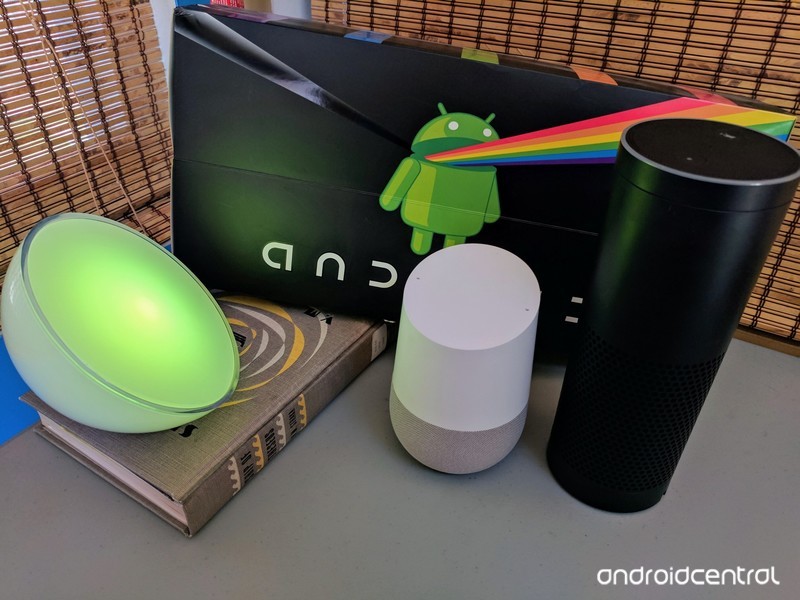
There are a lot of fantastic things you can do with smart lighting, from subtle adjustments to mood and awareness to crazy color raves when you want to freak the dog out. It’s a convenience for most, but it’s becoming less expensive to set up in your home every day and well-worth checking out if you can.
A big part of that smarter experience can be control with your voice, and while Google Home and Amazon Echo both support the ability to control lights with your voice, the details are very different. Here’s what you need to know!
Set up
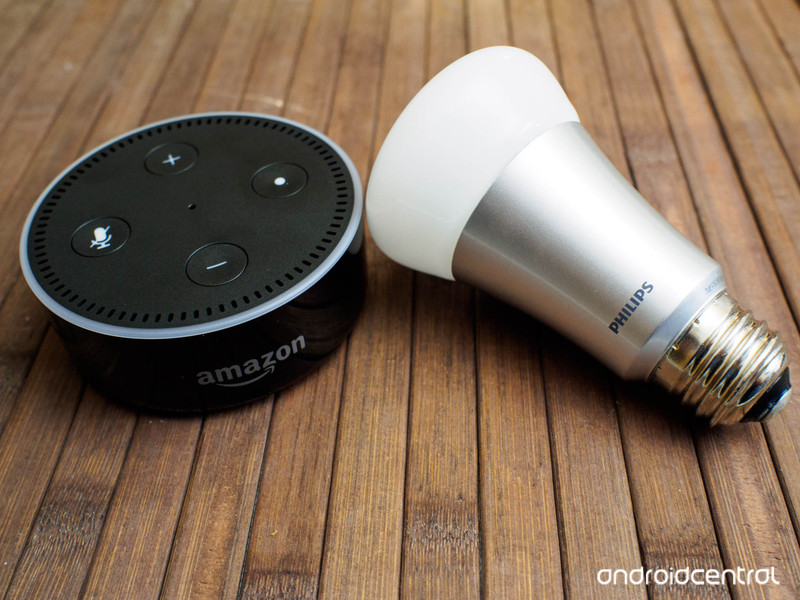
Philips Hue bulbs, which are my favorite of the connected bulbs, offer an API for just about any app to reach in and give commands to your lights once you’ve given approval. As a result, both Google Home and Amazon Echo offer similar initial connection steps. You use the app on your phone to connect to the Hue bridge, which involves tapping the little button on the box near your router, and moments later you can control individual Hue lights through these services.
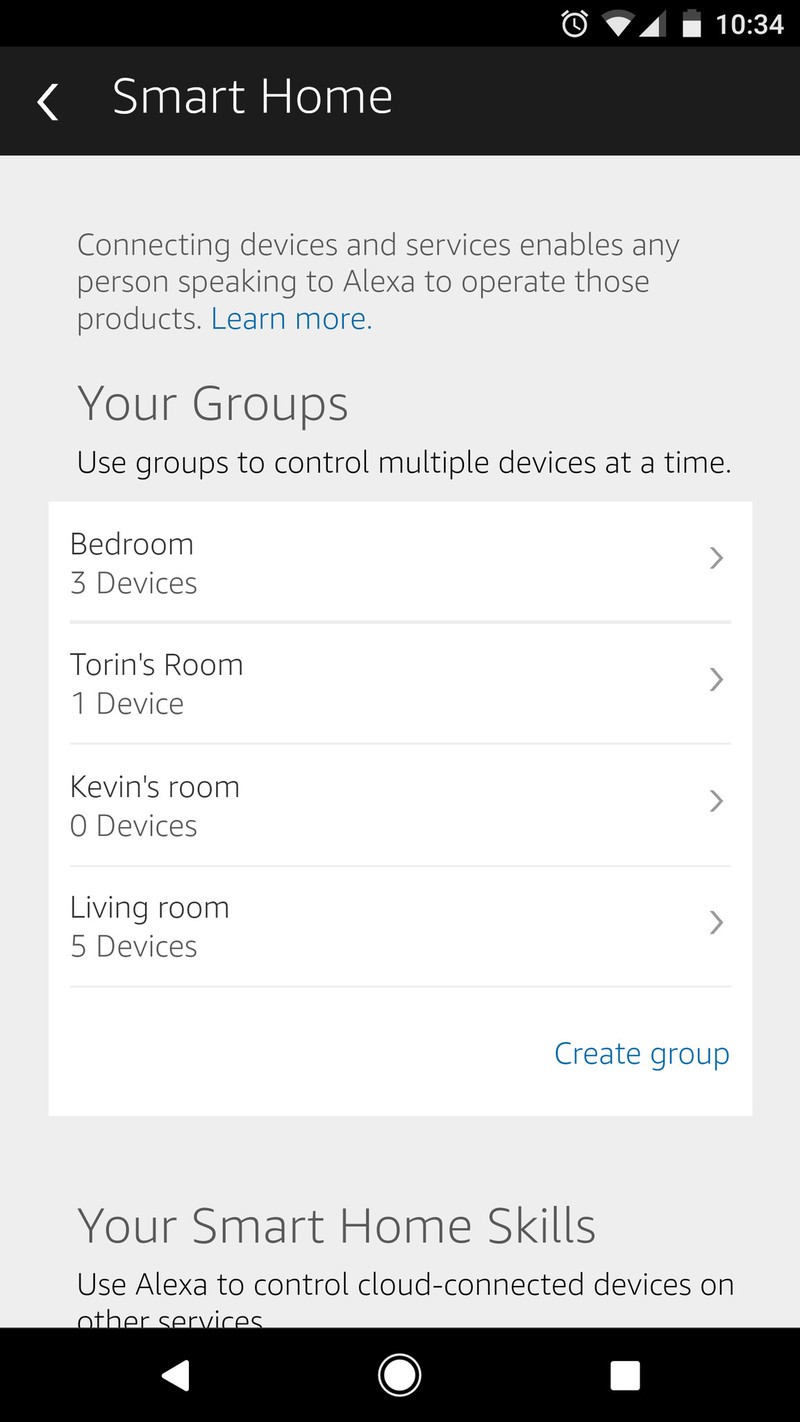
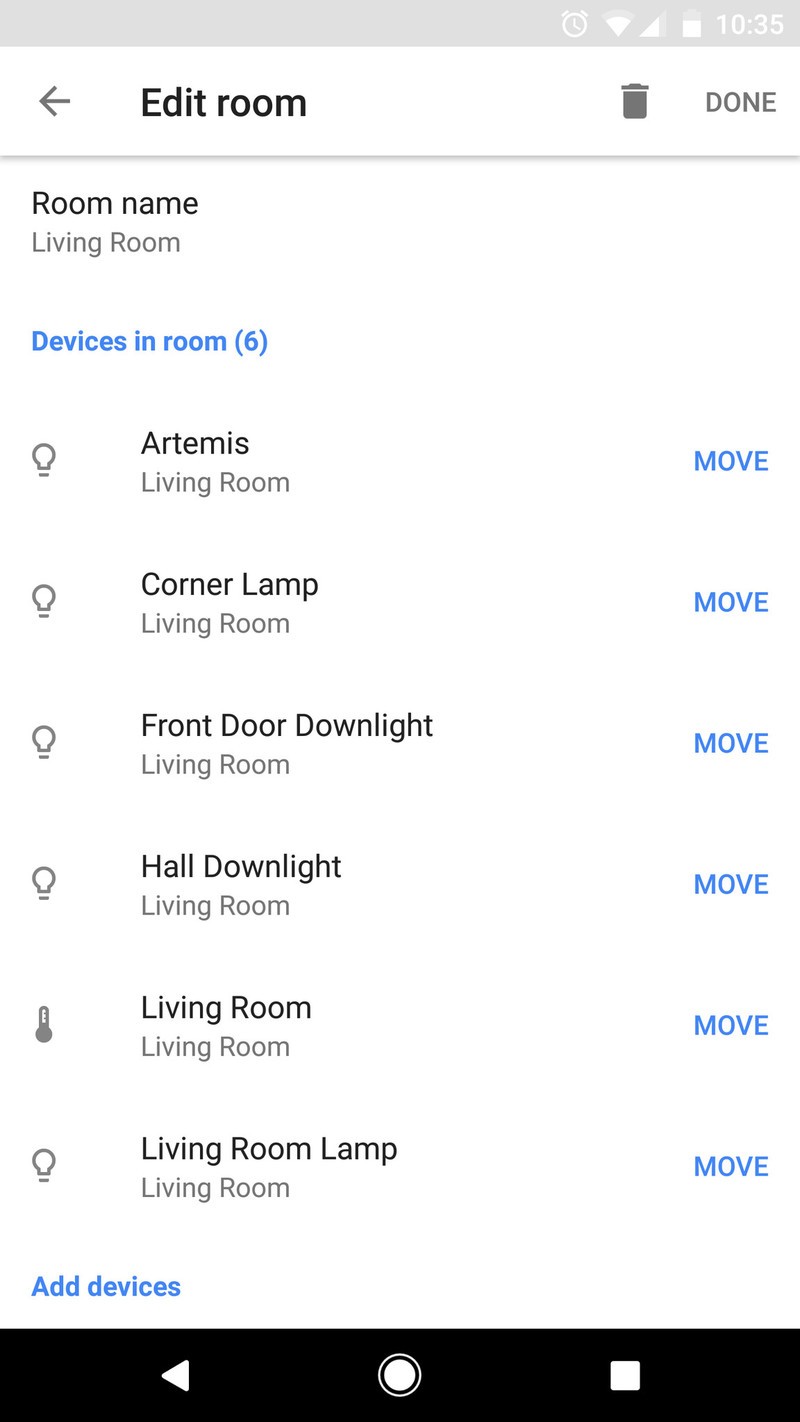
Once you’ve made that connection, things are wildly different. Amazon has its own system in the Alexa app for organizing smart home hardware into individual rooms, so you can say things like “turn off the bedroom lights” and have everything assigned to that room turn off. This isn’t a huge deal, unless you have a lot of Hue lights and have already organized your bulbs by room in the Hue app. None of that information is imported by Alexa, so you have to basically set all of your lights up a second time.
Google Home, on the other hand, imports your room selections from the Hue app and adds them to the Home app. It also offers a simple tool from within the app for quickly moving lights to other rooms, instead of just a set of register/unregister check boxes. It’s a great deal more user-friendly, especially if you’ve already spent a lot of time setting up your lights and exploring how you want those lights to work in your home.
Using your voice
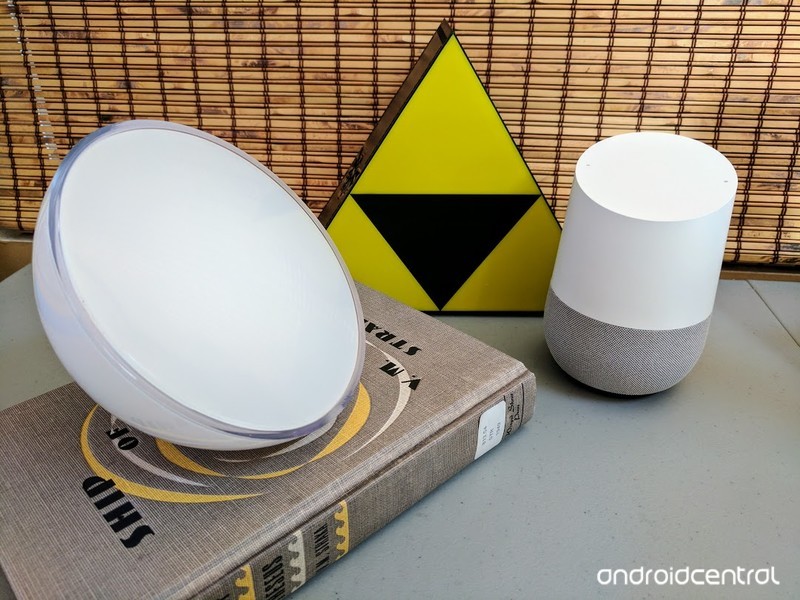
Google and Amazon both earn high marks for performance when it comes to actually controlling the lights. There’s no performance drop when compared to using the Hue app, and voice recognition on both Echo and Home is exceptional, so misfires are rare. That having been said, it’s clear Google Home is a great deal more integrated with Hue than Echo is right now.
If you want to control whole rooms for brightness and darkness, the experiences between these two connected speakers is essentially identical. If you want to control individual bulbs and you’ve assigned personal names to those bulbs, you’ll find Google Home is much better at finding the right single bulb and adjusting it as you see fit. The same goes for color changing; Google Home will quickly turn your lights whichever color you ask, where as Amazon Echo is really only built for on and off and dimming right now.
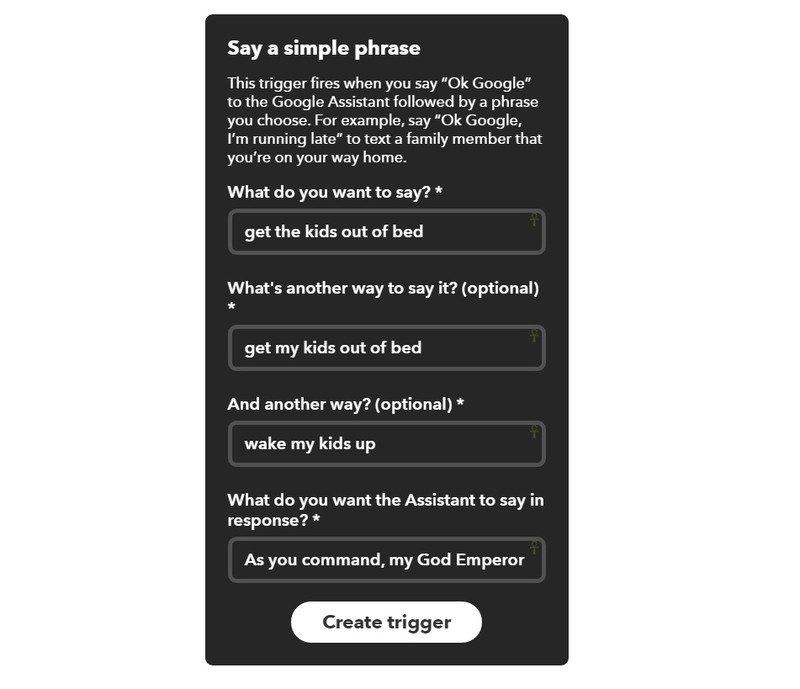
Neither connected speaker can replicate every single feature in the Philips Hue app, but through IFTTT, Google Home gets a great deal closer. The IFTTT channel for Google Home lets you create multiple phrases for individual commands, so you can be very flexible and occasionally downright silly with the things you want to do with these speakers.
On Google Home, I can say “OK Google, get those kids out of bed!” and have IFTTT start a multicolor light show in their rooms. With an Echo, I’d have to say “Alexa, trigger get those kids out of bed!” to accomplish the same. One is clearly not as natural as the other.
Which is better? Google Home
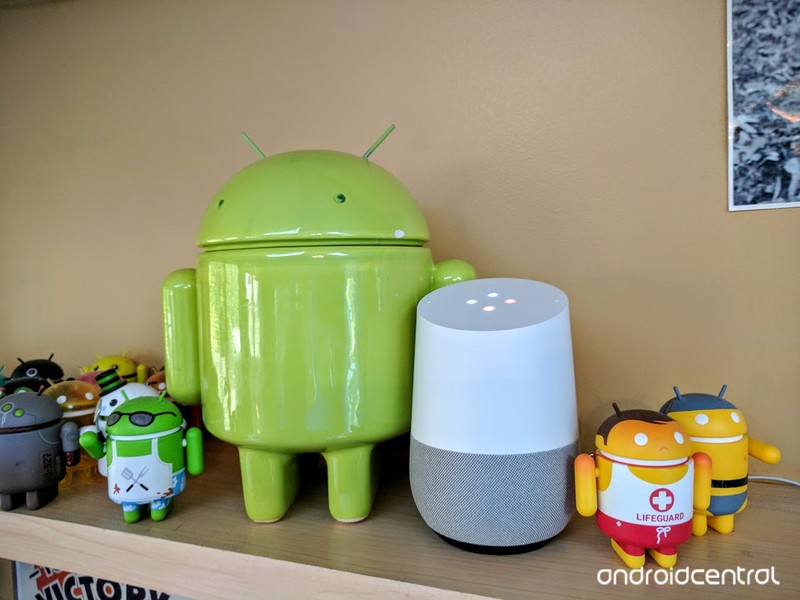
Google Home
If your goal is to add natural language commands to your Philips Hue bulbs with as little compromise as possible on features, it couldn’t be more clear Google Home is what you want right now. It’s just plain better for multiple users in a house full of Hue bulbs right now.
See at Best Buy
Amazon Echo
That having been said, if you’re new to smart lighting or you only really want to control rooms with your voice, Alexa gets the job done. Amazon has also demonstrated an ability to rapidly improve Alexa when necessary, so it’s possible these issues won’t be around for very long.
See at Amazon
27 best internet optical illusions, you won’t believe your eyes
Every now and then an image appears online which has people heartily debating its authenticity, arguing about its colour or asking how it came about in the first place.
There are also some amazing pictures that look like one thing but turn out to be something quite different.
We’ve gathered together a collection of the best from around the ‘net – pictures that’ll have you scratching your head, questioning your eyesight and generally feeling perplexed by their existence.
White and gold or black and blue? That dress
Wired
Back in the hazy days of 2015, a certain dress took the internet by storm and had everyone debating about whether it was white and gold or black and blue.
The simple garment was the perfect example of an optical illusion that was no illusion at all. It was, in fact, just a scientific demonstration of how the eye sees things differently in varying light sources and how our brains all handle this interpretation in ways that are unique to us.
The non-red strawberries
Motherboard
Like the white and gold/black and blue dress, these strawberries are an optical illusion caused by something known as colour constancy, which is a feature of the way we perceive colours under varying light conditions.
This picture has NO red pixels. Great demo of color constancy (ht Akiyoshi Kitaoka) pic.twitter.com/pZHvbB6QHE
— Matt Lieberman (@social_brains) 27 February 2017
There is no red in the picture and yet our brains clearly interpret the red of the strawberries as still being there – assuming you’re seeing them under a blue light source and extrapolating accordingly.
The shiny legs
kingkayden
This is an unusual illusion, at first glance you’ll probably spy a pair legs that seem to be covered in oil, but given a second to look again and you’ll see they’re actually spattered with white paint.
are these legs shiny and oily or are they legs with white paint on them pic.twitter.com/7Z8e8F1JCZ
— kayden (@kingkayden) 26 October 2016
The car seat/iPad conundrum
9gag
Sometimes an illusion can be as simple as a pattern blended into another in the same way that camouflage works.
This photo was posted on 9gag with the headline “Just spent 30 mins searching for my Dad’s iPad” – can you spot the hidden tablet in the photo?
The four-eyed man
Skarmavbild
As far as optical illusions go, this one is both simple and painful. Whoever thought two pairs of eyes and two mouths would be enough to break your brain and make it painful to focus?
The infinite chocolate bar
Pigeon Toes
This tasty illusion apparently shows a way to get never-ending blocks of chocolate out of a single bar. Alas, it’s all a trick and simply involves a shorter and shorter bar. Still pretty clever stuff!
The unnaturally long train track
Youtube
In another Tweet-storm, yet another optical illusion based on an everyday object appears to confound logic and physics. One wooden train track block is apparently longer than the other, yet when put on top of the other, they’re the same length. How?
My toddler’s train track is freaking me out right now. What is going on here?! pic.twitter.com/9o8bVWF5KO
— marc blank-settle (@MarcSettle) 6 April 2016
The solution to this apparent mystery is contained within the replies to the initial Tweet, but we’ll let you enjoy it in the meantime.
The negative lady
Metro
This illusion requires you to stare at the white dot on the woman’s nose on the left for 15 seconds, then look to the right of the image at the blank space. You should see a flicker of the full colour photo of the woman.
This is down to the way our brains interpret imagery and colours and in this case is known as “negative afterimage”, which was explained by Dr Juno Kim from the University of NSW School of Optometry and Vision Science to Daily Mail Australia:
“The code for all the hues we can experience in the light spectrum – this information is relayed from the back of the eye to the brain via three opponent neuron channels.
“When you look at something that, for example, is yellow for a long period of time, you stimulate the cells that are positively sensitive to yellow – so in the yellow and blue channel.
“The cells’ activity increases and after a bit of time the activity fatigues and declines.
“When you then direct your gaze at a uniform background – let’s say a grey wall – then what happens is that the cell doesn’t return to its resting activity, it goes much lower than that.
“It’s that decline – the weakening of the yellow code – that codes for the opposite colour to become stronger, so you’ll see blue.”
Underwater jumping girl
Imgur
This photo appeared on Imgur and caused a bit of a splash. A little girl appears to be jumping into a swimming pool while simultaneously blowing bubbles like she’s already underneath the surface.
Commenters quickly pointed out that her hair is dry and the apparent air bubbles could just be droplets of water from the splashing, but no conclusion was reached as to what was actually happening.
The revolving snakes
Google+
This one is a simple trick of the eye. This is not an animated picture, it’s a static file that shows a mass of intertwined snakes. But if you stare at different sections you’ll see the snakes writhing and squirming.
The spinning dancer
Brainden
Some have suggested that this dancer will spin in different directions depending on what side of your brain you’re using.
In fact it’s just down to how your brain interprets the picture and you can see this in action by splitting the image into two versions. Just cover each part with your hand to see it spin the other way.
At first glance you might see the dancer spin clockwise and in the next moment the opposite direction.
Imgur
Duck or rabbit?
Imgur
This optical illusion has taken on many different forms since it first found its way into publication in a book “Philosophical investigations” by Ludwig Wittgenstein in 1953.
Here it is suggested that there are ambiguous images that can be seen in two (or more) different ways.
In this instance, the drawing could be a rabbit or a duck or both and what you see first will be down to your perception of the world or based solely on suggestion – the duck and rabbit axis in this version make it easier to quickly decipher both variations.
Floating speaker
Buzzfeed
This photograph taken on the beach seems to show the speaker on a floating platform. No doubt down to our brain interpreting the shadow of the flag blowing in the wind as the shadow of the speaker’s platform and microphone instead.
Another classic illusion caused by our brains trying to decipher the scene before us.
The cuddle
ibigdan
There are a few of these sorts of optical illusions on the web – a simple image of two people embracing throws your brain into confusion where the couple are at strange angles and it’s hard to immediately decipher which head (or other body part) belongs to which person.
Owl coffee
doodlewhale
Here Stuart Rutherford managed to magic an owl’s face inside his coffee mug by simply dropping a couple of Hula Hoops into the mix.
Who’d a thunk dunking a couple of Hula Hoops in your coffee would be so beautiful pic.twitter.com/lsTgnvUc
— Stuart Rutherford (@doodlewhale) 26 September 2012
Ambiguous cylinder illusion
Kokichi Sugihara
One of the finalists for the “Best Illusion of the Year Contest” makes for pretty mind-bending viewing.
Here Kokichi Sugihara places a set of cylinders in front of a mirror. The reflection shows a different shape until the object is revolved and then we see the opposite. It’s best viewed in the video below.
If you’re left scratching your head after watching that video, you can see a breakdown of how it works here:
The magic eye shark
Blake Lively
In the 1990’s, Magic Eye was an extremely popular series of books which allowed people to see 3D images by focussing on an otherwise 2D image – usually in the form of a non-descriptive pattern.
Last year Blake Lively posted an image to her Instagram account showing a Magic Eye-like image to help promote her shark movie “The Shallows”.
If you’re struggling, the official Magic Eye website has instructions on how to view the 3D images but basically you’re trying to focus through the image while looking at it (or blurring your vision until it becomes clear).
Common sense crossing
Erik Johansson
Erik Johansson is a Swedish photographer and a whizz with Photoshop who likes to take real photographs and turn them into surreal optical illusions.
Common sense crossing is just one of his many works and one that we find particularly messes with our eyes!
Helicopter takes off without moving
Chris Fay
At first glance you’d be forgiven for thinking that this helicopter was using some sort of new military stealth technology to take off without spinning its propellers.
In fact it’s just an illusion created by matching the video camera’s shutter speed to the rotation speed of the rotors.
Hyper-realistic drawings
Howard Lee
Magnificent artist Howard Lee creates hyper-realistic drawings that are so brilliant it’s hard to tell them from the real thing.
This talent for creating optical illusions is demonstrated in his Youtube video which shows him cutting, bashing and setting fire to the real versions of his creations.
3D drawings
Stefan Pabst/Designstack
Stefan Pabst is yet another talented artist with the ability to create optical illusions from drawings, paintings and sketches. In a series of works he creates the illusion of three-dimensional images on flat paper surfaces.
Warning, contains spiders.
Pizza delivery man
Papa John’s
Every now and then advertising companies do something clever that captures our imagination. Something as simple an optical illusion can be enough to help a brand stick in our minds.
This advert from Papa John’s pizza was deemed clever enough to win an award at the Cannes International Advertising Awards and simply featured a mini pizza delivery man on a bit of card that could be put on someone’s front door so when they looked through the viewing hole they saw the man on the other side.
Making the impossible seem plausible
Honda
In another advertising campaign, Honda produced a video featuring a range of optical illusions to help sell their new CR-V – all aimed at helping to promote a big car experience but with a smaller economy vehicle.
Anamorphic graffiti
Sergio Odeith
Incredible street artist Sergio Odeith turns everyday corners in the real world into incredible three dimensional artworks with ultra-realistic anamorphic graffiti painted across different surfaces to give the illusion of a depth that doesn’t exist.
Letters leaping out of walls, creatures lurking in corners, other worlds coming to life in the corner of a forgotten space. His works play havoc with the eye and create marvellous murals that are a pleasure to behold.
The bridge to nowhere
Martin Ystenes
The Storseisundet bridge is one of the largest bridges in Norway and photograph from the right angle it gives the impression of being a bit of road that comes to an abrupt and dangerous end some 75 feet above the ground.
However, the bridge is actually a cantilever design with a curve to it that simply makes it arc away into the distance.
The flying weightlifter
allthingsgym
Lesman Paredes was pretty happy with his performance at the Junior Weightlifting Championships in 2015 so much so that after completing a 230kg clean and jerk he can be seen taking off from the ground.
Alas, this is not the case of Superman finally revealing himself to the world, but simply a combination of bouncy surface underfoot, heavy weights being dropped after a successful lift and a well-timed super celebratory jump. Unsurprisingly, the photo was later subjected to a Reddit photoshop battle.
You can see it all in action in this video:
Anamorphic advertising artwork
Ray Bans
In 2013, eyewear manufacturer Ray-Ban teamed up with optical illusion masters Brusspup to create an ad campaign which included anamorphic illustrations which look like real three-dimensional objects from the right angle.
The globe and baseball are the standout pieces of this artwork and we think they’re thoroughly impressive. For more optical illusion goodness, check out Brusspup’s Youtube channel.
Watch plant roots grow in extreme close-up 3D
You’ve probably never seen growing plants this way before. A team of researchers from the Institute of Science and Technology in Austria have filmed Arabidopsis thaliana (a flowering weed) roots as they grew in extreme close-up 3D. The team did so to demonstrate a method they developed that uses a microscope with lasers and fluorescent lights to automatically track moving minuscule objects invisible to the naked eye. They also used a special lighting system to keep the plants alive during the whole process, so the setup can capture the roots’ cells as they grow and split.
In addition to the lasers and lights, the team placed the plants on a rotating plate to figure out how they’re affected by gravity in the cellular scale. Its results will help scientists figure out the best way to grow plants in space. The team’s method, however, works with organisms other than plants: they even used it to watch cells move around in zebrafish embryos. While they unfortunately didn’t share footage of that experiment, you can watch root cells grow in the video below.
Source: Science
Engadget giveaway: Win a smart home package courtesy of Stringify!
If you’ve been piecing together a smart home setup one connected device at a time, you’ll be happy to know that Stringify can help you create smart sequences at the tap of a button or at just the right time of day. While you can link smart devices and even wearables, the app’s abilities also tie in to online services such as Google Drive, RSS feeds and push notifications. If you have a Withings connected scale, you can set up a “flow” that automatically populates a spreadsheet with new weight readings. Want to set the mood for bedtime? You can have the lights dim slowly once it gets to a certain hour, with the temperature lowered and even have some snoozy jams playing on your connected speaker — automatically. This week, Stringify has provided us with a respectable smart home starter kit for one lucky reader, including a Sonos Play:1, LIFX bulbs, a Samsung SmartThings Hub with sensors and an Echo Dot. All you need to do is head to the Rafflecopter widget below for up to three chances at winning. Already have some devices you’d like to tie together? The Stringify app is free on iOS and Android if you want to check it out.
a Rafflecopter giveaway
- Entries are handled through the Rafflecopter widget above. Comments are no longer accepted as valid methods of entry. You may enter without any obligation to social media accounts, though we may offer them as opportunities for extra entries. Your email address is required so we can get in touch with you if you win, but it will not be given to third parties.
- Contest is open to all residents of the 50 States, the District of Columbia, and Canada (excluding Quebec), 18 or older! Sorry, we don’t make this rule (we hate excluding anyone), so direct your anger at our lawyers and contest laws if you have to be mad.
- Winners will be chosen randomly. One (1) winner will receive one (1) Amazon Echo Dot, one (1) Sonos Play:1 speaker, one (1) LIFX bulb starter kit and one (1) SmartThings home monitoring kit (approximately $600 value).
- If you are chosen, you will be notified by email. Winners must respond within three days of being contacted. If you do not respond within that period, another winner will be chosen. Make sure that the account you use to enter the contest includes your real name and a contact email. We do not track any of this information for marketing or third-party purposes.
- This unit is purely for promotional giveaway. Engadget and AOL are not held liable to honor warranties, exchanges or customer service.
- The full list of rules, in all its legalese glory, can be found here.
- Entries can be submitted until March 22nd at 11:59PM ET. Good luck!
 AIVAnet