


Android O isn’t available in the Android Beta Program yet, will likely join in mid-May
Everyone with a Pixel or modern Nexus will get their opportunity to use Android O soon.
With Android O entering Developer Preview status, this is our first opportunity to download and run a preview version of the latest OS. Unfortunately for those who became accustomed to simply enrolling in the Android Beta Program and getting builds over-the-air, this first Developer Preview of Android O isn’t available in the Beta Program.
If you want Android O right now, your only way to get it will be through manually flashing an image of the Developer Preview.

And that is a great indication of who should actually be using the first publicly-available build of Android O: developers who need the system image to start working on updating their apps for the new platform version. When Google feels it’s stable enough to push out to Beta Program users, which tend to be more of the realm of enthusiasts eager to see the new interface and features, an update will arrive to everyone who opts into the Android Beta Program.
More: How to manually update your Pixel or Nexus
Most of us should just be patient and wait for the Android Beta Program update.
Considering that Google just released an updated version of Android 7.1.2 to the Beta Program, this timeline of waiting until after the first Developer Preview makes sense — even though the first Developer Preview of Android N did land on the Android Beta Program the same day as the flashable image last year.
Google’s timeline for the Android O Developer Preview lists mid-May for the Dev Preview 2, and specifically calls it a “beta” launch to the Dev Preview 1’s “alpha” state. There’s a great chance this means that the Android Beta Program will get in on the Android O fun with this release. It is set to coincide with Google I/O 2017, naturally.
But we don’t know for sure yet. We’ll just have to wait and see. For now, if you want to try your hand at Android O on a non-critical device, you’ll need to manually flash the system image yourself.
For the vast majority of us who will plan to wait for the Android Beta Program release, expectations are that it will be available for the Pixel, Pixel XL, Nexus 6P, Nexus 5X, Pixel C and Nexus Player once released.
Android O

- Everything new in Android O
- Should you put Android O on your phone?
- How to install the Android O Developer Preview
- Android O isn’t in the Android Beta Program yet
- Join the Discussion
How to get Android O on your Pixel or Nexus (and how to roll back to Nougat)

Here’s how to get the Android O Developer Preview on your Nexus or Pixel device.
The Android O Developer Preview is here, and if you’re one such developer (or just a person who doesn’t listen to good advice!) here’s how to install it onto your phone or tablet.
Which devices support the Android O Developer Preview?
The preview is supported on the following phones and tablets:
- Pixel
- Pixel XL
- Pixel C
- Nexus 6P
- Nexus 5X
- Nexus Player
What you need to know beforehand
The Android O Developer Preview is being released only as a factory image, which means you can’t just go to Android’s beta page and get the update as an over-the-air release. This is because O, in its current form, is very early, and isn’t intended to be installed by the general population — just by developers.
In order to update a phone or tablet to Android O, you need to first unlock your bootloader.
Before we go into these steps, it is strongly recommended that you have previous knowledge of working with the Android SDK (software development kit) and Terminal (OS X or Linux) or Command Prompt (Windows), as it is possible to harm your device if something were to go wrong in the following process.
You’ll need to download an updated Android SDK that has the latest Android O tools and images, and you can grab it from the Android Development website and follow their instructions on how to install it correctly. For the following process all you will need is the adb and fastboot files which are located in the Platform Tools folder.
Additionally, all the following commands are written as they would be in Terminal on a Linux or OS X platform. If you are following this guide and using a Windows machine, you will not need to use the “./” seen in the guide.
Enable developer settings and USB debugging
Before you begin, you’ll need to have a compatible Nexus or Pixel device running Android 7.x Nougat.
Go to your Settings and scroll down to About Phone/Tablet
Tap on the Build number seven times until the dialog box says you are now a developer
Go back to the Settings menu and you should find a new option called Developer options. Click into the Developer options
Make sure that the developer options are turned on and that USB debugging is checked on
Make sure Enable OEM unlock is checked.
Plug your device into your computer and click “OK” on the dialog box asking you to Allow USB debugging while connected to the computer. You can also select to always allow access on that computer
If done correctly, this will be everything you will need to do on your phone or tablet for the moment.
Unlocking your bootloader

Nexus devices and Pixel phones bought from Google directly have a bootloader you can unlock. If you want to manually flash software, you’ll need to do this.
To do this you must first boot into your bootloader. You can either manually turn off your phone or tablet and hold down the power button and the volume down button to enter your device’s Bootloader Menu or you can enter the following commands into your terminal or command prompt.
Run the following command to make sure your device is properly connected to your computer. If it returns a string of characters it means that you are all set to start updating your device.
./adb devices
Now to enter into the Bootloader menu just run the following command.
./adb reboot bootloader
At the bottom of the screen there will be several things listed including the lock state of the device. This should say locked unless you have unlocked your bootloader in the past and never went back and locked it again.
To unlock your bootloader, which is required only when flashing a stock firmware image (not sideloading and update, which we’ll get to soon), you must enter the following commands. Remember that when unlocking your Nexus’ bootloader it will factory reset your device, so you will lose everything stored on it. If you have not yet backed up anything important on your device you can hit the power button while Start is highlighted in the Bootloader menu and this will boot you back into your device like normal. Now back to unlocking your bootloader.
Use the command:
./fastboot flashing unlock
A dialog will appear on the device asking if you are sure about unlocking. Again this will factory reset your device, so if you want to back out of the process you just need to select no with the power button. If you are ready to unlock your bootloader you press the volume up button and then the power button to confirm that you wish to unlock your bootloader.
./fastboot reboot-bootloader
It is recommended to reboot the bootloader just to give itself a check to make sure everything is working correctly before moving onto the next step.
Flashing the stock firmware image
Now that your bootloader is unlocked, it’s time to flash the Android O image. To find the system images, head on over to the Factory Images page, find your device, and download the latest factory image available. It is easiest to then uncompress the file in the Platform Tools folder where the adb and fastboot files are so that you don’t have to type the path to the different files when flashing the firmware. (Or if you know that you can drag a file into a terminal window to copy the path, just do that.)
To begin, make sure you are still in the bootloader menu on your device and double check that your bootloader is in fact unlocked.
First, make sure that your computer is communicating correctly with your phone or tablet. As long as your device’s serial number comes back as a connected device you are ready to begin updating your device.
./fastboot devices
Now it is time to flash the updated bootloader with the following command.
./fastboot flash bootloader [bootloader file].img
You will not see anything on the screen of your device but there should be a dialog in your terminal or command prompt. When it is done flashing the bootloader you should reboot back into the bootloader as to make sure everything is still working correctly.
./fastboot reboot-bootloader
Next you flash the updated radios. This step is only necessary if you are updating the firmware of a phone or tablet that has cellular radios built into it.
./fastboot flash radio [radio file].img
./fastboot reboot-bootloader
Finally, it’s time to flash the actual system image to your phone or tablet.
Warning: The following line of code will wipe your device. If you do **not* want your device to be wiped, remove the “-w” from the command. The update should still take just fine, and it will not wipe your user data.
./fastboot -w update [image file].zip
When this is done, your phone will restart itself and boot up normally. As this process clears all data from your device, it will take slightly longer for your device to boot up into Android O for the first time. Once you have been greeted with the device setup walkthrough process, you know you have successfully flashed a new version of the firmware.
If you do not want to enter the commands manually there are scripts included inside the compressed folder containing the system image that will do most but not all of the heavy lifting for you. The flash-all script files will automate the flashing of the bootloader, radios (if needed), and the system image. The problem with this process is that you must first make sure that your phone is in the bootloader menu and its bootloader must be unlocked before starting the script. Of course if these are not already done the script will fail to run and nothing will happen.
How to revert back to Nougat from the Android O Developer Preview

So you ignored our advice (or you’re a developer who needs his or her phone or tablet back) and need to re-install Nougat. That’s pretty easy! All you need to do is find the right system image compatible with your handset or slate and run the same procedures as above but with the Android Nougat image.
When finding your Nougat image, make sure you are downloading the correct one that corresponds with your device. If you’re running a Verizon or Rogers Pixel, for instance, you’ll have to make sure you download the right one.
Problems? Confused?
If you’re having issues or want to ask a question, come join us in our forums for all the tips, tricks and advice you can handle!
Android O

- Everything new in Android O
- Should you put Android O on your phone?
- How to install the Android O Developer Preview
- Android O isn’t in the Android Beta Program yet
- Join the Discussion
Android O Dev Preview 2 won’t land until mid-May, with final release in Q3
Google is increasingly transparent about its software releases.
With the Developer Preview program, we get a super early look at what Google’s working on in Android O — the only downside is it takes several months then to get all of the information. With the release of Android O Developer Preview 1 we don’t have a complete look at all of Android O’s new features, but we do have a timeline for when updates to the Dev Preview program will land.

As you can see, we’re looking at a considerable wait before our second release — the timeline pegs it for mid-May, conveniently coinciding with Google I/O 2017 where we expect to learn more about the core features of the OS rather than just heavily developer-focused changes. This would be a good bet for when the Android Beta Program could get on board, depending on how stable the release is.
The first big update to Android O will land in mid-May, likely at Google I/O.
We then have to wait about a month for a third Developer Preview release in mid-June, which coincides with Google finalizing the new APIs in Android O so developers can lock in changes to their apps to make sure they’re ready for the final release. We’ll get a quick tune-up Developer Preview 4 sometime about a month later, and then the waiting game starts for the final full announcement in Q3 2017 — likely coinciding with a Pixel 2 launch.
So that means we all have a nice long road ahead of speculation and playing with far-from-finished software on our Pixels and Nexuses. And if you want to get into the future a little but don’t have an extra device to sacrifice for the cause, consider waiting until we get to at least Developer Preview 2 — you’ll be glad you waited.
Android O

- Everything new in Android O
- Should you put Android O on your phone?
- How to install the Android O Developer Preview
- Android O isn’t in the Android Beta Program yet
- Join the Discussion
Mint SIM vs. Cricket Wireless: Which is better for you?
How does Mint SIM stack up against Cricket Wireless? Here’s our comparison!
Mint SIM and Cricket Wireless are mobile virtual network operators or MVNOs for short. At the end of the day, they’re “alternative carriers”, meaning that they’re not the Big Four (AT&T, T-Mobile, Verizon, Sprint).
Switching to an MVNO can save you money because they simply lease coverage from one of the larger networks and resell it to customers. Plans are often prepaid, so you don’t have to worry about overages.
Let’s take a look at two major players — Mint SIM and Cricket Wireless — and see how they compare to one another.
- Mint SIM background
- Cricket Wireless background
- Mint SIM plans
- Cricket plans
- Best phones available from Cricket
- Which should you go with?
Mint SIM background
Who owns it? Ultra Mobile
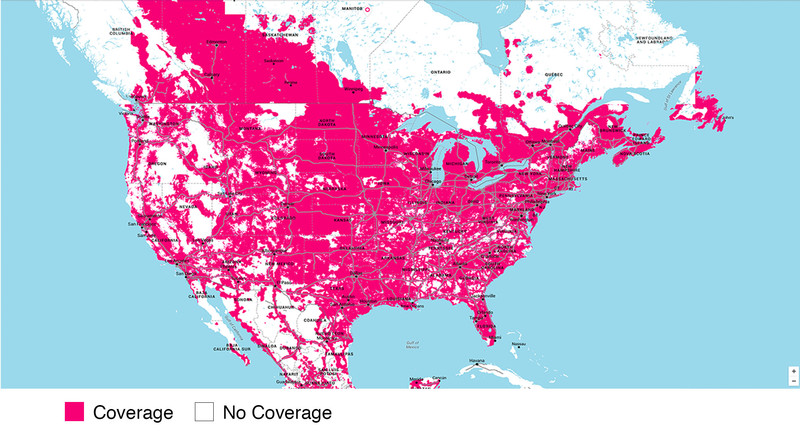
Which network does it use? T-Mobile 4G LTE
How long has it been around? Since 2016
Tethering allowed? Yes
Cheapest plan: $35 for 1 month: 2GB 4G LTE, unlimited nationwide talk, text, and 2G data
Cricket Wireless background

Who owns it? AT&T
Which network does it use? AT&T 4G LTE
How long has it been around? Since 1999
Tethering allowed? Yes, $10/month
Cheapest plan: $30/month: 1GB 4G LTE, unlimited talk, text, and 2G data
Mint SIM plans
Mint SIM doesn’t operate with traditional contracts. You pay upfront for your term, which can be 1 month, 3 months, 6 months, or 12 months, with “buying in bulk” saving you more money in the long run. All plans include unlimited nationwide talk, text, and data, though you only get so much 4G LTE per month. Unlimited international texting is included in all plans.
| 1 month | $35 | $50 | $60 |
| 3 months | $23/month ($69 upfront) | $33/month ($99 upfront) | $39.67/month ($119 upfront) |
| 6 months | $19.83/month ($119 upfront) | $28.17/month ($169 upfront) | $34.83/month ($209 upfront) |
| 12 months | $16.58/month ($199 upfront) | $24.92/month ($299 upfront) | $33.25/month ($399 upfront) |

Advertisement
Add-ons
As far as add-ons are concerned, Mint SIM’s selection is very slim:
Extra data:
- 1GB/month: $10
- 3GB/month: $20
International credit:
Mint SIM’s plans contain no international calling, though unlimited international texting is included. You can add international calling credit to your account in $5, $10, or $20 increments.
You can see a list of international rates here.
Cricket plans
All Cricket Wireless plans include unlimited talk, text, and data, but your 4G LTE access is metered and you can choose how much you want, per month. There are no annual contracts with Cricket; you pay on a month-to-month basis.
| Price (monthly) | $30 | $40 | $50 | $60 |
| With Auto Pay | $25 | $35 | $45 | $55 |
| Extras | Eligible for Group Save Discount | International texting, roaming in Canada and Mexico, eligible for Group Save Discount | International texting, roaming in Canada and Mexico, eligible for Group Save Discount |
Add-ons
1GB of 4G LTE data:
$10/month. All remaining data expires at the end of your monthly plan cycle.
Tethering:
Turn your phone into a mobile Wi-Fi hotspot for $10/month. Uses data from your monthly high-speed allowance. Not all phones are compatible, so double-check first.
Cricket Protect:
For $7/month, Cricket protect covers you if your phone is lost, stolen, accidentally damaged physically or by liquid. You’re also covered for in-warranty exchanges and out-of-warranty mechanical/electrical problems. Deductibles vary from $10 to $250, depending on your phone model.
Click here for more info.
Deezer free trial:
Get a free trial to the music streaming service. Length of free trial is at least 15 days and depends on when you sign up and when your next monthly bill date falls. After the free trial, it’s $6/month.
Terms and conditions
Group Save Discount: Cricket gives you a monthly discount for each line you add to your account. Each line must have a plan of at least $40 a month. Lines with the $30 per month plan are ineligible.
- 2 lines: $10 monthly discount
- 3 lines: $20 monthly discount
- 4 lines: $30 monthly discount
- 5 lines: $40 monthly discount
- Up to $100 in total monthly savings
International texting: This only covered text messages to select countries and does not cover picture or video messaging.
Mexico and Canada roaming: Calling and texting while in Mexico and Canada are included, as well as calling between the U.S., Mexico, and Canada. Usage in Canada and Mexico cannot exceed 50% for texts, voice minutes, and data usage sent, received, or used. For example, if you send 100 texts in a month, no more than 50 can be sent to or received from Mexico and Canada.
Best phones available from Cricket Wireless
You can bring an unlocked phone to Cricket Wireless; just check compatibility first. If you don’t have a phone to bring, we recommend the following:
- Samsung Galaxy S7: $649.99
- iPhone 7 32GB: $649.99
- iPhone 7 128GB: $749.99
- iPhone 7 Plus 32GB: $769.99
- iPhone 7 Plus: 128GB: $869.99
- Samsung Galaxy S6: $499.99
Which should I go with? Mint SIM
From a purely price-conscious perspective, Mint SIM is the better option, especially if you have an unlocked phone of your own. T-Mobile’s network is solid and Mint SIM’s plans are straightforward. So long as you sign up for 3 months or longer at a time, you get a lot more data for your money.
If discounted phones and roaming in Canada and Mexico are important to you, then you’ll have to go with Cricket (if you’re choosing between the two). It just sucks that Cricket charges $10 a month for tethering, while Mint SIM offers it for free.

T-Mobile HTC One M9 Nougat update rolling out now
Better late than never, we always say.
The HTC One M9 on T-Mobile has started to receive its Nougat update, landing over three months after the unlocked model. No matter the timing, owners of the carrier version of the One M9 will be happy to see a large update land two years after the phone was released.

The update to Nougat comes in at a hefty 1.06GB, so be ready to download it over Wi-Fi and probably plug in to a charger for the whole process. If the update doesn’t hit you right away, don’t be alarmed — these things often take a little time to roll out to everyone.
Once you get your Nougat update, be sure to hop into the HTC One M9 forums to let everyone know how it’s going or get help with any issues you may be having!
Android Nougat
- Android 7.0 Nougat: Everything you need to know
- Will my phone get Android Nougat?
- Google Pixel + Pixel XL review
- All Android Nougat news
- How to manually update your Nexus or Pixel
- Join the Discussion
The hidden depth of mobile puzzle game ‘Where Cards Fall’
We’re sitting in a circle on the floor of a decadent San Francisco hotel lobby, crowds of people milling around the couches and stairways. The young men of Snowman, the studio behind Alto’s Adventure, watch as Sam Rosenthal sets up a small iPad, preparing to show off his latest game, Where Cards Fall. Rosenthal is the co-founder of the Game Band, a small Los Angeles studio working with Snowman to bring its new project to iOS, Apple TV and Steam this autumn.
Rosenthal flips through a slideshow of character designs, explaining the premise as he goes. Where Cards Fall is a top-down, 3D puzzle game that has players build houses of cards to navigate tricky environments. It follows a handful of teenagers over the course of 10 years, from adolescence to college and finally adulthood. The art is cartoonish yet polished, as if the designs of Oxenfree had been transformed into 3D.
Where Cards Fall is primarily a mobile game, but its mechanics and story are deeper than the genre generally suggests. This is why The Game Band teamed up with Snowman, a studio with a history of tapping into the potential of the mobile market.
In Where Cards Fall, the suburbs are filled with rolling hill-like platforms pockmarked with the tops of buildings that look perfect for leaping. Eventually, Rosenthal explains, the characters will leave this area for the cities and eventually the clouds, which are filled with floating houses, winged towns and towering skyscrapers.
For now, though, we’re sticking to the suburbs, just 45 minutes into the main game.
Rosenthal loads up the demo and a blaring alarm noise emanates from the iPad. Once the jarring sounds fade away, light music fills the air, a mellow yet bouncy jazz keyboard. A high-school-age character shuffles out of bed in a cheery digital world.
“We’re beginning with a section that most of us can relate to: being late for school in the morning,” Rosenthal says. “We like to play a bit with walk cycles and animations — we drastically reduced the speed here to make you really feel like ‘Oh, I’m groggy in the morning and not getting it together.’ But yeah, the game begins inside of the house of cards. I’ll take you outside in a second.”
The main character stumbles around the house, pulling on a bright oversize sweater and tight jeans, short brown hair sticking up wildly. I ask what the character’s name is.
I don’t realize it’s a loaded question.
“We actually don’t have a name for the main character, and there’s a reason for that,” Rosenthal says, tapping and dragging away on the screen. “All of our characters are nameless, because we want to tell a story with no dialogue at all to try to make it feel as universal as possible. But with the main character — this is something we haven’t actually talked about too much yet — but we specifically designed the character to be gender ambiguous so that players can figure out what they think they want the main character to be.
“There’s scenes in the game that will be a little bit more gender specific, like the dance and such, and we just let you dress up however you want, take whoever you want. Whatever is in your mind is what we’ll honor in the game.”

“I see that now,” I say. Looking again, the main character is perfectly ambiguous. I mention I had just assumed it was a girl.
“To be honest, it totally just came from our playtesters,” Rosenthal says. “We designed the character originally as a different design, and all of our girl playtesters were saying ‘she’ and all of our guys were saying ‘he,’ and we decided to run with that design.”
Rosenthal taps outside of the house, and the character opens the door. He touches the screen and the character moves toward his finger; he drags it and the character follows the path he’s laid out. The keyboard music keeps bopping away, light and contented.
Each platform will have its own unique control mechanic: haptic feedback and 3D touch on the iPhone, possible Touch Bar integration on the Macbook Pro and the ability to play the entire game with the Siri Remote on Apple TV. With the Apple Pencil, players are able to draw a path for their characters to walk down, winding up walkways and around corners. It’s specific, direct control. The game itself is seamless, with no distinct levels, which means it supports various play styles — quick bursts on mobile or longer play sessions at home.
On-screen, Rosenthal’s character is standing in the middle of a friendly, sunny day. He needs to get the character to a high-up platform, which means it’s time to start building some houses.

“The houses of cards do a lot of different things in this game,” Rosenthal says. “Their most primary function is that they can become platforms. You create platforms by spreading out a pile, and when I let go, it turns into a house of cards.”
Using his pointer finger and thumb, he picks up a pile of black-backed cards and positions it on the ground. He lets go and a house pops up with a quick shuffling sound, fully formed and ready to move into. But this isn’t The Sims, and Rosenthal isn’t building houses just for people to live in.
“I’ll use this as a bridge now to get further ahead.” He jumps to the newly formed rooftop and onto an adjacent platform farther up the path. “I can knock ’em down too. I’ll just pinch here.” He squeezes the house with his forefinger and thumb and, with a crinkling sound, it collapses back into a black pile.
“One neat thing about them is that I can also make them different sizes,” Rosenthal explains. “So if I pinch a little bit smaller, I get a smaller house of cards too.” He builds a house in the middle of a large gap. “But this isn’t going to help me just yet, because it’s still not tall enough. So I’ll put a little chimney on it with the other cards I have, and use that to cross.”
He pinches, drags and positions a small pile of cards on top of the existing house. It’s just enough to allow the main character to cross the gap.
With a shuffling sound, Rosenthal pinches his cards back into a pile. He pulls up a new stack of cards — the white markings on the back of this one are slightly different from the others he’s been using. It’s a flat-top, more industrial-style building.

“This is a different type of structure; you can see that with the icon on it,” Rosenthal says. There’s a quick swoosh-swoosh as he minimizes and expands a handful of buildings, creating makeshift bridges and adorable houses at the same time. He crosses another gap, his character jumping seamlessly from one platform to the next. The jazzy music hums in the background, picking up more sounds as we progress, adding tingling synthetic chimes and percussion.
He pauses the main character on a rooftop and says, “So this level isn’t as daunting as it seems. I just have to take it piece by piece.” He moves piles of cards around the map, shrinking and expanding them into different sizes, stacking them on top of one another.
Rosenthal sees the paths clearly; he knows exactly where to go. This game is his creation, after all. Every move is obvious to him, and he navigates the game like a magician, seeing opportunities I can’t. Where Cards Fall is a decidedly tricky puzzle game, asking players to visualize complicated paths forward and make the most of their physical resources.
From across the circle, Snowman producer Eli Cymet chimes in:
“What I really like about it — and I’ve talked to Sam about this a little bit before — is that when people see screenshots or trailers, I think there’s an inclination to say, ‘Oh, this is kind of like Monument Valley.’ And certainly that’s a comparison we’re honored to hear, but more actually for us it’s kind of like Portal. Because you have to sort of just look at a space and imagine what the movement through that space might be, in your head, and then use the tools you have to create that movement.”

Rosenthal agrees.
“Yeah, it’s very much a game about spatial awareness and imagining what a space could be. We play with that with the story too. The main character ends up being an architect, which is a profession that very much deals with that as well.”
He roams around the level, building more card houses, walking into a coffee shop and hanging out for a quiet moment on a bench, surveying the town. Eventually, a school bus comes into view.
“Now we’re starting to see what’s actually going on here. You’re going to school,” Rosenthal says. “A lot of the time in Where Cards Fall, the aim of the characters isn’t necessarily clear right at first. We want it to feel like the act of remembering. The puzzle-solving helps with that, but also, when we remember things, I think sometimes we remember what we’re doing before why we’re doing it. It’s kind of meant to seem like that.”
I’m not sure why — perhaps the mention of “school” quietly activates a long-neglected region of my brain — but I choose this moment, as the demo is wrapping up, to ask if there’s a way to die in Where Cards Fall.
“No death at all,” Rosenthal says. “It’s actually a really fun and interesting design challenge to work on a game where we couldn’t use that as an escape. I always feel like it’s important to justify any mechanic we include in the game, and if the characters are dying, we’d have to explain in the story why they’re dying all the time. We didn’t want to do that.”

Where Cards Fall prides itself on minimalism and player input. The main character is ambiguous, allowing anyone to project their own psyche onto the model; the world itself is open to exploration without fear of death or a shrinking timer, letting players run wild while they build their card houses. There are no discrete levels and no on-screen prompts directing players along the way.
However, the whole thing comes together beautifully, buoyed by a solid foundation: the puzzles themselves. No matter how fluidly Rosenthal flies through the suburbs, it’s clear that these spatial riddles are complicated, requiring multiple steps and the ability to plan ahead. This is a tricky game.
At one point in the middle of the playthrough, Rosenthal pauses for a moment and laughs. “This demo typically takes about half an hour, but I’m just blazing through it.”
He pinches and flicks and builds another card house. A new character opens the door from the inside. With a pinch, he collapses the structure and carries on.
Adidas will knit you a $200 sweater while you wait
In the sneaker industry, it normally takes around 12 to 18 months for a new clothing design to make it to store shelves. Adidas wants to shorten that wait to a matter of hours. To that end, the German fitness apparel company has opened a pop-up shop in Berlin that enables customers to design, manufacture and buy a customized merino wool sweater for 200€ ($215).

The process starts when the customer enters a darkened room where dozens of different designs and patterns are projected onto their chests. The customer picks their favorites, then adjust the color combinations on an adjacent touchscreen. To get the size right, the buyer can choose between the standard S/M/L sizing, or strip down to their skivvies for a 3D laser scan fitting. Once the order is in, the sweaters are machine knitted in the store, then hand-finished, laundered, dried and packaged for pickup — all within four hours.

This isn’t the first time that Adidas has tried to speed up its merchandise manufacturing. The company employs robots extensively throughout its operations and has dabbled in 3D printing. The “Knit for You” store has been open for a couple months now and reportedly sells around 10 sweaters a day on busy days. Adidas is currently looking at the store’s performance to determine if it will expand the service to other locations.
Source: Reuters
New Apple iPad 9.7 vs iPad Air 2: What’s the difference?
Apple has quietly released a new iPad on its online store. Simply called iPad, the new model replaces the iPad Air 2 as Apple’s standard tablet offering, sitting above the iPad Mini 4 and below the two iPad Pro models.
But while Apple may not be officially selling the iPad Air 2 through its online store, you can still pick it up at other retailers, so it remains a relevant product.
We have put the specs of the new iPad 9.7-inch against the iPad Air 2 to see what the differences are and what changes have been made for Apple to introduce a revised version of the rather successful Air 2.
- Apple iPad Air 2 review
- Apple iPad Pro 9.7 review
New Apple iPad 9.7 vs iPad Air 2: Design
- New iPad is slightly heavier than iPad Air 2
- No Rose Gold colour option for new iPad
- Both tablets have same dimensions
The Apple iPad Air 2 measures 240 x 169.5 x 6.1mm and weighs 437g. It comes in three colours and it features Touch ID within the Home button. It’s thinner than its own Air predecessor, lighter, and it offers a solid design that is lovely.
The new Apple iPad 9.7 has the same design as the Air 2, and on the face of it, you’d assume they would be exactly the same. However the new iPad has put on a bit of weight, coming in at 469g on the scales for the Wi-Fi only model – making it heavier than the iPad Pro 9.7 at the same time – and 478g for the Wi-Fi and 4G LTE variant. In the real world, this weight difference likely won’t make much difference to your experience, but it’s something worth noting.
The extra weight of the new iPad is represented by a slightly thicker frame, coming at 7.5mm compared to the iPad Air 2’s svelte 6.1mm, however both tablets are the same when it comes to height and width. They also have the same Touch ID sensor in the home button and same aluminium build.
Apple has continued to reserve the Rose Gold colour finish for its Pro models, as the new iPad 9.7 is only available in the same Space Grey, Gold and Silver finishes as the iPad Air 2.
- Apple iPad Pro 9.7 vs iPad Pro 12.9: What’s the difference?
New Apple iPad 9.7 vs iPad Air 2: Display
- Both have 9.7-inch displays
- New iPad has brighter Retina display
The Apple iPad Air 2 sits in the middle of the iPad line up when it comes to size. It has a 9.7-inch display in comparison to the 7.9-inch screen of the iPad mini and the 12.9-inch size of the larger iPad Pro.
The iPad Air 2 has a resolution of 2048 x 1536, which means it offers a pixel density of 264ppi. That’s the same as the original Air but the Air 2 comes with an anti-reflective screen, as well as a bump in contrast and colour. The latter aren’t hugely noticeable but the anti-reflective technology makes a big difference and overall the Air 2’s display is great.
The new iPad 9.7 has the same resolution as the Air 2, but Apple claims its now brighter, although fails to mention just how much brighter. We’ll have to wait until a proper side-by-side comparison to see if there’s any discernible difference.
Once again, Apple has reserved the more premium screen features for its Pro models. There’s no True Tone display on the new iPad 9.7 and no anti-reflective coating.
We’d expect the new iPad 9.7’s real world performance to largely emulate the performance of the iPad Air 2, which is no bad thing as the iPad Air 2 has one of the best displays on the market in its price bracket.
- What is Apple’s True Tone display?
New Apple iPad 9.7 vs iPad Air 2: Camera
- Both tablets have same front and rear cameras
- 8-megapixel rear camera with autofocus
- 1.2-megapixel front-facing FaceTime HD camera
The Apple iPad Air 2 features a 1.2-megapixel front camera, coupled with an 8-megapixel rear camera. As tablets aren’t as commonly used for taking shots as smartphones, this is more than adequate. It’s the same cameras as found on the iPhone 5S which means that while the iPad Air 2’s cameras are good, they aren’t as good as the iPhone 6S and therefore the iPad Pro 9.7.
Apple hasn’t made any changes to the cameras for the new iPad 9.7, again holding back from giving it the higher quality cameras found on the iPad Pro models.
Regardless of what you think about using an iPad as a camera, the iPad Air 2 performs well. If you really want to take photos using your tablet, the Air 2 and therefore the new iPad 9.7 will hold you in good stead.
- Apple iPad Pro 12.9 vs iPad Air 2: What’s the difference?
New Apple iPad 9.7 vs iPad Air 2: Hardware
- New iPad gets A9 processor
- Same internal storage options
The Apple iPad Air 2 comes with the A8X chip and the M8 motion co-processor. This is supported by 2GB of RAM and there are internal storage options of 32GB and 128GB with no microSD support, as is the way with all Apple devices.
The new iPad 9.7-inch meanwhile has been given a slightly faster 64-bit A9 processor. It’s not quite on the same level as the A9X processor found in the iPad Pro, but it should provide a noticeable increase in performance over the iPad Air 2.
The new iPad 9.7 gets the same 32GB and 128GB storage options as the outgoing Air 2 and of course, there’s no microSD support. Apple has once again stuck to its dual speaker setup for the new iPad, so while sound quality will be good, it won’t be as powerful as the four speaker setup on the iPad Pro.
New Apple iPad 9.7 vs iPad Air 2: Software
- Both run iOS 10
Both the Apple iPad Air 2 and the new iPad 9.7 run on iOS 10, meaning the software experience will be almost identical across these two models.
The new model doesn’t come with any additional features, such as Apple Pencil compatibility, so in this instance the two will be completely identical.
- Apple iOS 10 review
New Apple iPad 9.7 vs iPad Air 2: Price
- New iPad 9.7 is £40 cheaper
The Apple iPad Air 2 starts at £379 and goes up to £499, depending on which storage capacity you choose and whether you opt for Wi-Fi only or Wi-Fi and Cellular.
The new iPad 9.7 on the other hand, has a starting price of £339, stretching to £469 for the highest storage capacity and Wi-Fi and Cellular.
New Apple iPad 9.7 vs iPad Air 2: Conclusion
The iPad Air 2 is a great tablet, and based on our experiences with it, we can have no problem with recommending the new iPad 9.7 before even testing it. The inclusion of an updated processor is a welcome one, and the fact Apple has left pretty much everything else unchanged, we can conjure up a good idea of how the new model will perform.
The fact that Apple has managed to update the iPad, and bring down its price is something not to be sniffed at. If you were putting off buying an iPad because you felt it was too expensive to join Apple’s ecosystem, now could be the best time yet.
- Apple iPad Pro 9.7 review: The tablet to beat all tablets
- Apple iPad Air 2 review: Lighter, faster, thinner, better
- Which iPad is best for you?
Google vows to pull ads from extreme videos and sites
Google has detailed new safeguards to ensure brands don’t have their adverts served against extremist content. The measures follow a wave of complaints and advertising withdrawals by the UK government, Audi and L’Oreal, among others, triggered by a Times investigation which revealed a number of adverts being shown alongside harmful and inappropriate videos on YouTube. In a blog post, Google said it would be taking “a tougher stance” and “removing ads more effectively” from content that is attacking people based on their race, religion or gender. It also promised to hire “significant numbers” of new staff to review “questionable content.”
Google will also introduce new tools for advertisers. These include account-level controls so that brands can avoid specific sites and channels. The company will tighten its default settings too so that ads are shown against content “that meets a higher level of brand safety.” Companies will still have access to a broader range of videos, but they’ll need to opt in. Google also mentioned new controls “to make it easier for brands to exclude higher risk content and fine-tune where they want their ads to appear.” It stopped short of explaining how these will work, however.
The company says it will get to the heart of the problem and address infringing content on YouTube too. “We won’t stop at taking down ads,” Philipp Schindler, Google’s chief business officer said. “The YouTube team is taking a hard look at our existing community guidelines to determine what content is allowed on the platform — not just what content can be monetized.” Google, of course, can’t control what’s published on the wider web, but it can specify where ads are shown via its advertising network. With YouTube, however, the company has end-to-end control, and has a responsibility to moderate the content that’s available to users.
“Recently, we had a number of cases where brands’ ads appeared on content that was not aligned with their values. For this, we deeply apologize.”
Google was summoned to the Cabinet Office last week after the UK government discovered its ads, including blood donation and Army recruitment campaigns, were being shown against extremist content. Matthew Brittin, chief of Google’s European operations, apologised at the Advertising Week Europe conference. He said: “I want to start by saying sorry. We apologise. When anything like that happens, we don’t want it to happen and you don’t want it to happen. We take responsibility for it.”
YouTube is already under fire for blocking LGBTQ+ videos with its Restricted Mode filter. It’s since apologised and promised to “fix” the problem, but not before viewers and channel owners have expressed their disproval. There’s also a debate around Felix “PewDiePie” Kjellberg and his controversial brand of comedy, which has included anti-Semitic jokes in the past. The YouTube star was dropped from Disney’s Maker Studios following a report by the Wall Street Journal, which highlighted a video where Kjellberg hires two men through Fiverr to hold a sign saying “Death to all Jews.” It’s triggered a larger discussion about a subset of YouTube’s creators, the content they’re uploading and its impact on viewers.
Google is one of many companies being criticized for its platform policing. The UK’s Home Affairs select committee grilled Facebook, Twitter and Google about their moderation practises earlier this month, branding them with a “terrible reputation.” Germany’s Ministry of Justice drew a similar conclusion last week, attacking Facebook and Google over their failures to deal with hate speech. These companies have long argued that it’s a difficult problem to solve, due to the sheer volume of content online, and insisted that their tools work most of the time. For a growing number of people, however, it seems this response just isn’t good enough.
Source: Google (Blog Post)
Three caught up in another embarassing data breach
A technical issue has given some Three customers access to another person’s account information, including their name, address, phone number and call history. The scale of the problem isn’t clear, but it’s likely to be small. Three says it’s received “less than 20” reports so far from customers, and is now investigating the matter. As the Guardian reports, the mistake has allowed a number of Three customers to view other people’s personal information after logging in to their account online.
A spokesperson for Three said: “We are aware of a small number of customers who may have been able to view the mobile account details of other three users using My3. No financial details were viewable during this time and we are investigating the matter.” For those affected, it represents a breach of their personal information. Mark Tommo Thompson discovered his involvement after he was called by a stranger who discovered they had access to his details. Posting on Three’s Facebook page, he described it as a “shocking breach of data privacy,” and demanded to know how many other people were able to view this information.
The system snafu follows an equally embarrassing data breach affecting 130,000 Three customers last year. Thieves used a stolen employee login to access basic account details, but no financial information, such as bank details, passwords, pin numbers, or credit and debit card numbers. Three men were arrested after they tried to use this information to obtain smartphones through the company’s standard upgrade system. At the time, Three CEO David Dyson said in a statement: “We believe the primary purpose of this was not to steal customer information but was criminal activity to acquire new handsets fraudulently.” The company has contacted everyone who might be affected, and the legal case is still ongoing.
 AIVAnet