


Get a lifetime of tech training for $89
Figuring out which skills to try and learn can be difficult. What is popular when you start learning may not be what is popular when you are done, so why not learn a bunch of different topics at your own pace? Whether you are interested in animation and 3D, networking and security, game designing or other topics, wouldn’t it be nice to be able to switch your focus between them all as you see fit? Well, you can.
Save 96% right now! Learn More
That’s right, with a lifetime single user subscription to the Virtual Training Company you’ll have instant access to more than 1,000 online courses on a variety of popular topics and skills. This allows you to move between them as you see fit, and use your time to accomplish the courses.

- Get lifetime access to 1,026 courses on any topic available at the time of purchase
- Learn from industry experts in their respective fields
- Download work files to supplement the course
- Access courses from laptops, tablets, & mobile
Use coupon code ACLEARN10 for an additional $10 off! Learn More
Normally, access like this would set you back $2,500, but right now you can pack a small fraction of that.
For a limited time, you can grab all of this for just $89, which is a savings of 96%. Use coupon code ACLEARN10 at checkout for an additional $10 off, bringing your price further down to $79!
If you are looking to have a lifetime of access to all this information you won’t want to miss out, so be sure to make your purchase now!
Samsung Galaxy S8 and S8+ hands-on preview
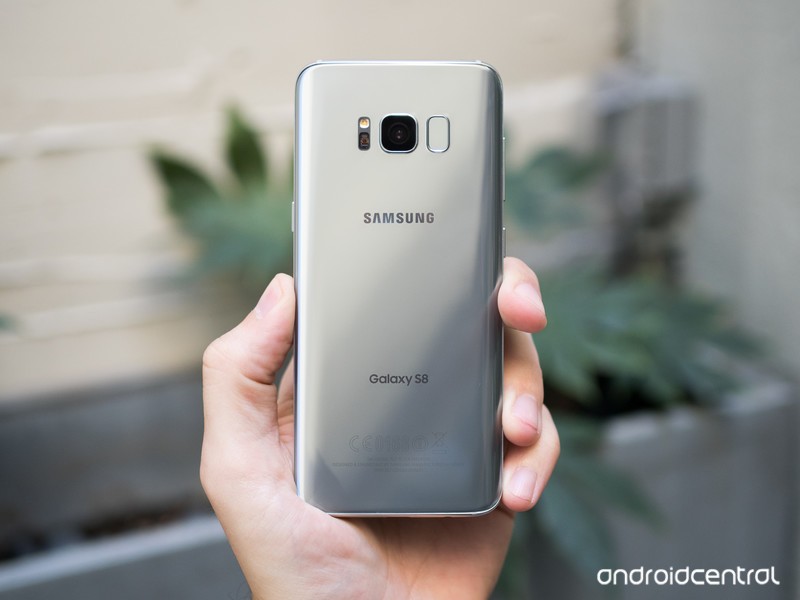
What do you do when you’re already on top?
Despite 2016’s late stumble with that phone, Samsung is still on top of the Android world. Part of that is due to its extreme popularity in the mid- and low-end phones that sell in dramatic numbers around the world, but it all falls under the halo of the flagship Galaxy S line. Last year’s Galaxy S7 was (and still is) a great phone that cut back on gimmicks to just provide a fantastic overall experience that did just about everything the market wanted. There weren’t many shortcomings to speak of — so how do you keep people interested, without giving up the things that brought you so much success?
For fear of looking like it’s standing still, Samsung took a proven platform and refined it, keeping everything that made the Galaxy S7 and S7 edge so popular while adding a handful of big features that will keep people interested. The Galaxy S8 and S8+ are undeniably successors to the Samsung Galaxy S line in terms of looks, but make legitimately good moves toward usability. The same goes for the software, where a couple of big features and design changes lay on top of a familiar interface to the hundreds of millions of current Galaxy owners.
It can be tough to stay on top for long, but Samsung wants to keep pushing even though it’s ahead. The Galaxy S8 and S8+ are how it does it — here are our first impressions of the phones.
Get up to speed
Galaxy S8 and S8+ Hands-on video
The latest flagships from Samsung are easily the biggest Android phones of the year in terms of influence and sales at the top end of the market, and that means there’s a whole lot you’ll want to learn. Kick it all off with our hands-on preview video, then read along for more details on what Samsung has to offer in 2017!

Gorgeous refresh
Galaxy S8 and S8+ Hardware
“Cool new Galaxy!” is a thing people say today, much in the same way they’d remark if you were carrying a fresh iPhone the day you took it out of its box. The brand identity of Samsung’s last two generations of Galaxy S line cannot be overlooked, and it isn’t taking this for granted. That’s undoubtedly why the Galaxy S8 and S8+ look so similar to their predecessors, even if it’s frustrating to the smartphone nerds among us who want to see altogether new designs year after year.
This is a distinctly ‘Samsung’ design, simply refined for 2017.
At a glance, from any given angle you’d be hard-pressed to immediately pick out the “new” phone between the Galaxy S8 and S7 series of devices. Yes the Galaxy S8 and S8+ are gorgeous phones, but they use the same recipe as 2016 — with just a slightly different proportion of the ingredients. Finely milled metal and curved glass are mixed together, and in 2017 there’s simply a whole lot more glass.
83% of the front of the Galaxy S8 is usable screen real estate, which as you can see in the photos means there’s minimal bezel to speak of on the left and right sides of the display. Even the top and bottom have shrunk, nearing the point on the top bezel where you can’t go much smaller assuming you want a front-facing camera, sensors and call speaker. That top bezel is so thin that Samsung even sacrificed its bold SAMSUNG branding that has graced the top of every previous Galaxy S phone — leaving the silkscreen logo on the back to stand alone. On the bottom, the home button and capacitive navigation keys have been abandoned — perhaps the only part of this design that is a clear departure from previous Galaxy S phones.
The shrinking bezels align with the change in display aspect ratio foreshadowed by the LG G6 — Samsung has moved to a super-tall 18.5:9 aspect ratio, making the Galaxy S8 actually narrower than the Galaxy S7, but notably taller thanks to its diagonal screen measurement of 5.8-inches to the GS7’s 5.1-inches. The display corners are also curved, just like the LG G6 … which doesn’t add much but a neat bit of symmetry to the curved corners of the phone. But even with much smaller bezels, both the Galaxy S8 and S8+ are still quite tall compared to traditional 16:9 phones — the GS8+, in particular, seemed tough to manage in one hand in my brief time with it.
The screens are bigger, taller and equally curved on both models.
2017 also marks the death of “edge” branding within the Galaxy line, as both the Galaxy S8 and S8+ are technically edge phones, sporting dual-curved displays of the more subtle variety closer to the Galaxy Note 7 than the more dramatic Galaxy S7 edge. And with this distinction gone, it means the two models are nearly identical — with only the size of the screen (5.8-inch vs. 6.2-inch) and battery (3000mAh vs. 3500mAh) being differentiators.
Whether flat or curved, these displays look fantastic — and you shouldn’t be surprised at this point that Samsung can make an industry-leading AMOLED panel. Not having spent a large amount of time with it I can’t speak to its visibility in fringe situations like harsh sunlight or very dim areas, but based on what I have seen I have no doubts about its abilities. In both screen sizes the resolution is “QHD+” which means 2960×1440 — so that’s 400 pixels taller than your typical 2560×1440 screen.
More: Complete Galaxy S8 and S8+ specs
The hardware is simply wonderful, even if it isn’t a massive departure from 2016.
What metal remains in the bodies of the Galaxy S8 and S8+ has been polished to a sheen rather than left in a more raw state, making for a more seamless look from the slick glass to the now-slick metal. The change is most dramatic on the black and silver color variations, in which there’s little differentiation in the colors between the two materials. The colors all around are more subdued yet iterative takes on the Galaxy S7’s available palette, with black, gold, silver and blue making a return — the one new color, “orchid grey,” is a subtle purple-grey combo that’s simply wonderful.
The Galaxy S8 and S8+ are really beautiful pieces of technology in either size, but much has remained the same from the Galaxy S7 and Galaxy S6. Within the proper proportions, the volume and power buttons have stayed put on the sides, and the combination of a headset jack, data port (now USB-C, of course) and speaker are on the bottom.
For everything that was added, Samsung didn’t take away a single hardware spec or feature.
The core tenets of what Samsung calls the “Galaxy foundation” are still here as well. That means you’re getting an SD card slot, IP68 waterproofing and biometric security — all table stakes for Samsung at this point. A core point of that foundation is also the camera experience, which is big point of strength for Samsung. The Galaxy S8 and S8+ have the same camera hardware as last year, meaning we’re looking at a 12MP “Dual Pixel” arrangement with an f/1.7 lens, leaving any improvement in quality to the new ISP (image signal processor) of the new Qualcomm and Exynos SoCs in the phones, as well as software improvements. Samsung says it has improved blur reduction simply by changing the processing, and as we’ve seen recently with the LG G6 and Google Pixel, a whole lot can be done in software nowadays.
Samsung has to prove that camera processing improvements alone are enough.
On the other side of the phone, the camera is a complete overhaul. Samsung moved to a new 8MP sensor with a bright f/1.7 lens that finally includes auto focus, something that you very rarely see even on high-end phones. A welcomed improvement that will make each and every selfie look better.
The Galaxy S8’s hardware runs the risk of not moving the needle those who haven’t necessarily been drawn to the Galaxy S6 and S7 in the past, but it’s clear at this point that there are hundreds of millions of people who over the years have decided they do indeed like the modern Galaxy styling. Samsung managed to make the Galaxy S8 bigger without making it unmanageable, and the Galaxy S8+ is a secondary option that gives people who want more screen the full experience in a larger footprint. All the while, these phones didn’t lose a single feature the original Galaxy S7 and S7 edge had.

More of the same
Galaxy S8 and S8+ Software and experience
In continuing with its messaging about the “Galaxy foundation,” Samsung isn’t really playing the specs game anymore — at least, it isn’t marketing the specs game. The Galaxy S8 and S8+ have the specs you need, but Samsung isn’t adding more just for the sake of more — the focus is on providing the experience people expect from a top-end phone. You’re getting top-of-the line processors in the Qualcomm Snapdragon 835 or Exynos 8895 and double the base storage to 64GB — but at the same time, it’s staying put at 4GB of RAM and battery capacities that haven’t increased from the Galaxy S7 generation.
To most people, the amount of RAM and precise size of the battery don’t really matter — what does matter is performance, and there’s a great chance that with either the Snapdragon 835 or Exynos 8895 paired with 4GB will do great. And doubling the base storage to 64GB while keeping the SD card slot is a nod to helping you store everything today and in a year when your apps and media appetite grow.
See everything new in the Galaxy S8’s software!
Samsung always packs a ton of features in its software, and the Galaxy S8 and S8+ are no exception. To get up to speed with everything that’s new in the software, be sure to read our full breakdown here!
Read our complete Galaxy S8 software breakdown!
And on the software side, Samsung is working with a known quantity, building on Android 7.0 Nougat that looks and acts much the same as the updates that have rolled out to the Galaxy S7 and S7 edge. (I was also told the intention is to launch with Android 7.1 — we’ll see how that works out.) That means you’re going to find mostly white and grey interface elements, along with pops of color throughout for icons and big touch points. The launcher has dropped an app drawer button but retained the drawer itself using a swipe-up gesture, just like Google’s Pixel Launcher, and that kinda of subtlety can be found throughout the interface with a bit more transparency used all around in place of explicitly huge buttons.
Samsung’s software is good, clean and fast. Let’s hope carriers don’t mess it up too much.
Samsung is, for the first time, using an on-screen navigation bar with soft keys, which is something I’d bet Google is happy about — this basically leaves HTC as the final “big” name that doesn’t at least give you an option for on-screen buttons. To help soothe those who felt so attached to the physical home button you’ll still find the home button present on the always-on display you can push to bring up the lock screen. Samsung achieves this without “accidental” touches by using pressure-sensitive technology to make you press harder to activate the button on the always-on display.
It isn’t clear that Samsung intends to use this pressure sensitivity anywhere else in the interface, though, and during my brief time with the phones in the company of Samsung representatives nobody even mentioned the feature. The second part of the equation is a much-improved haptic feedback engine that gives you more of a physical feeling when pressing the button — very similarly to Apple’s new iPhone 7 home button and MacBook Pro trackpad. The pressure sensitivity and improved haptic feedback are welcomed additions, but it feels a bit odd to not see the functionality expand beyond the home button. Maybe that’s a sleeper feature waiting to be enabled in the future.
Pressure sensitivity and improved haptics are great — but they aren’t used throughout the interface yet.
The Galaxy S8 and S8+’s tiny bezels necessitated the move to on-screen buttons, which also means it had to move its fingerprint sensor to the back of the phone. Rumor has it that Samsung wanted to get some sort of under-glass fingerprint sensing into the Galaxy S8, and when the technology wasn’t ready … well, we got this. The fingerprint sensor is placed next to the camera, which on these extra-tall phones is way up there. Those who hold their phone in their left hand are in double trouble as they have to reach up and around the camera lens to access it. It’s likely to make it even harder to keep the camera lens clean, and Samsung’s camera software even has a warning reminding you to clean your lens when it notices it’s dirty.
Thanks to the precarious placement of the sensor, it makes sense that Samsung is really high on its iris scanning technology. Whether it’s through a change of hardware or software, the iris scanner is much faster than the Galaxy Note 7’s, which is a welcomed change. Of course I was using it in good lighting and for a short amount of time, but it recognized quickly and unlocked right away. Now, how will it do when viewing my eyes from the side, at night and while I’m walking down the street? Undoubtedly it will have less precision than just touching the fingerprint sensor. This is one that will take more real-world use to see how it does over time.
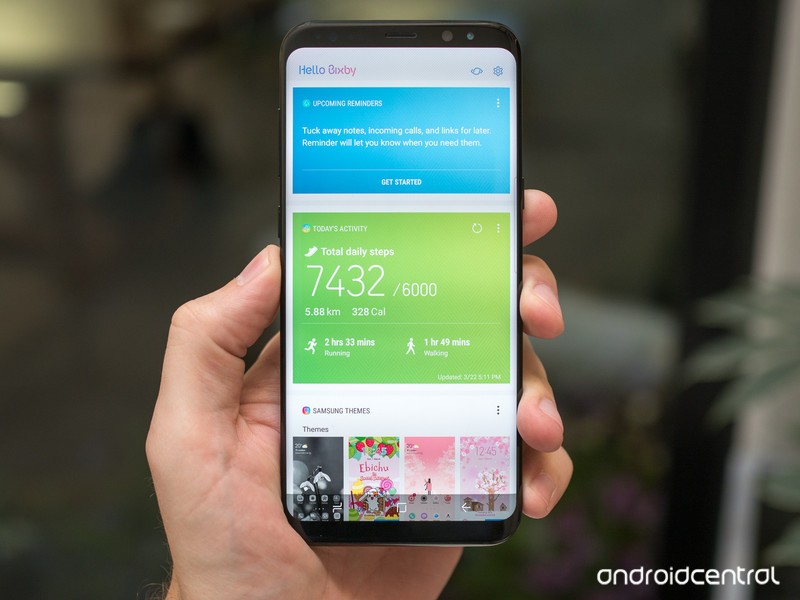
Bixby
Voice is viewed as the next big thing right now, and not to be left out Samsung created Bixby — and it was so excited about it there was actually a pre-announcement before the Galaxy S8. It’s easy to initially think that because Bixby is a voice interface that it competes with Google Assistant and Alexa, but Samsung actually sees it entirely differently.
Bixby isn’t an AI assistant per se, but a new way to interact with all parts of your phone.
While Bixby does do some predictive intelligence, it isn’t so much an “assistant” as it is a new way to interact with your phone via voice in order to replace touch entirely. Bixby is designed to be an ever-present voice layer that you can talk to at any time and have it navigate the phone’s interface for you. For example, while in the Gallery app you can hold down the “Bixby button” — a hard key underneath the volume keys — and say “show me my photos from Barcelona” to get results. When viewing an image, you could say “apply a black and white filter, and rotate it to the left.” These are things you could do with touch, but you can speak to Bixby instead and have it do the actions for you — be it because you don’t have the ability to touch the screen at that moment, or you just don’t know how to do the function with touch.
Beyond being able to navigate through every corner of “a handful” of Samsung’s own apps, the company is really bullish on Bixby because of the way it handles contextual and incomplete information. Bixby knows where you are when you request something, and can act accordingly rather than starting from scratch. If it doesn’t completely understand your request, Bixby is also able to get you part of the way there rather than failing entirely and requiring another complete request.
If Samsung thinks people have trouble using its apps, maybe it should just make its apps easier to use.
Now, skeptics would say that if your interface is so hard to use with touch that you need a voice assistant to replicate those movements for you … well, maybe your interface should be simpler. And, as a generally skeptical person myself, I agree entirely. While I immediately see the value in using Bixby for accessibility and the handful of times when you actually just can’t touch the display, I see no reason why I would stand there, holding my phone, and choose to press the Bixby button to ask it to do something in the app I’m currently looking at. It would be useful in an informative tutorial sense, but ideally I would want to learn for myself how to do things with touch rather than relying on Bixby to navigate apps for me.
It’s clear there’s an intense amount of time and engineering being put behind Bixby, but right now it’s a neat demo of voice technology and that’s about it. The fact that Bixby supports over 50 languages is fantastic, and the demoes I saw did work, but I’m not quite seeing the real-world value of telling Bixby to do things rather than just using apps myself. If Samsung thinks people have trouble using its apps, maybe it should just make its apps easier to use.
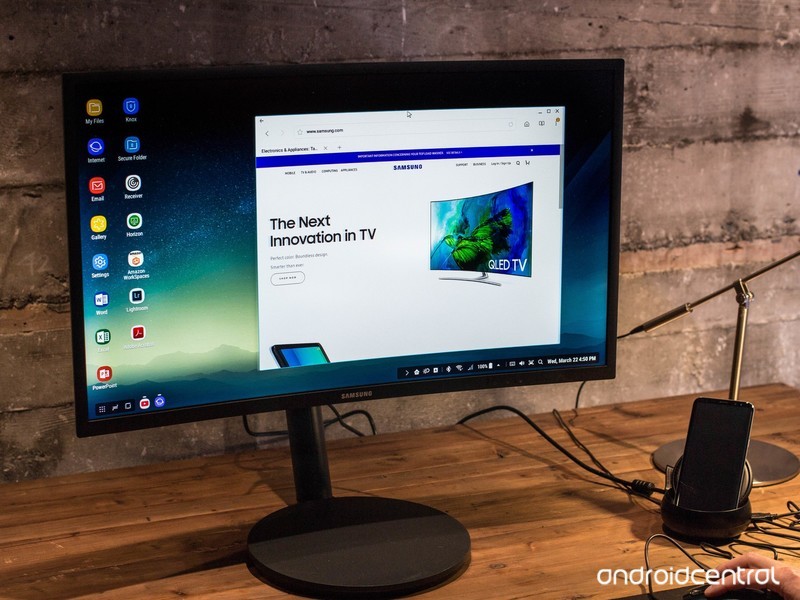
DeX
DeX is the first big software feature differentiator on the Galaxy S8 and S8+, and it’s one that leaked the least going into the phone’s release. It lets your Galaxy S8 or S8+ dock into a little breakout box that connects to a traditional computer monitor, keyboard and mouse to bring your phone’s power to a bigger screen for vastly improved productivity. When docked, the monitor will display a desktop-like representation of your phone screen (rather than a tablet view, as some would guess), with app icons along the left, a “start” menu of sorts with commonly used apps and a full status bar in the bottom-right corner.
The Galaxy S8 definitely has enough power for DeX, the questions are all about app support.
Android has long supported external keyboards and mice, so that’s not a problem at all here. But app support is a real question. Samsung says it has designed its own apps to work in fully resizable windows, and has also struck deals with Adobe and Microsoft to make sure apps like Lightroom, Word, Excel and Powerpoint (still the mobile apps, mind you) look good on the big screen and can also be resized.
It wasn’t hard to see the utility of plugging in a phone to this setup and instantly browsing in Samsung’s own Internet browser while typing in a Word window and even replying to text messages. The question is, how long will it take for other app developers to get on board and make sure their apps run great on DeX? That’s going to make a big difference in how much people will consider using this.
Then, of course, is the next question of how often you’re going to be in a situation in which it makes sense to use DeX connected to a keyboard, mouse and monitor rather than just using a computer that’s likely already attached to those peripherals. While DeX running on the power of a Galaxy S8 or S8+ would absolutely do the job for casual users … those are precisely the type of users who don’t want to have a keyboard, mouse and monitor. They just want a laptop — and probably a Chromebook at that.
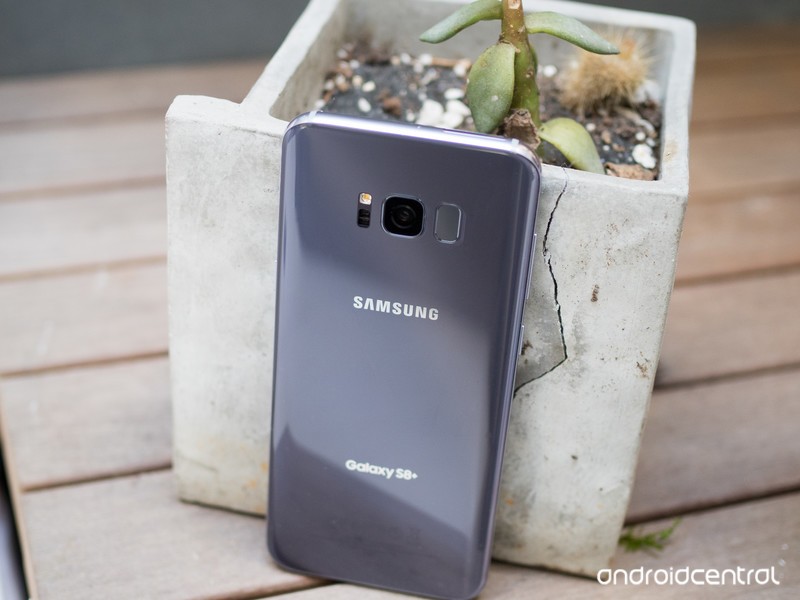
Another winner, it seems
More Galaxy S8 to explore
We’ve only just scratched the surface on the Galaxy S8 and S8+. With the phones going up for pre-order on March 30 and released on April 21, we have a few weeks to wait before they’re broadly available and can start to truly dive deeply into all of their features.
But even without seeing the phones for a deep evaluation, there’s a whole lot to be excited about. Samsung continues to make some of the most gorgeous and perfectly executed hardware in the industry today, punctuated by a fantastic display that is now surrounded by even smaller bezels. You get more screen than ever before, and can choose between two sizes of phones with no differentiation in specs or capabilities aside from the battery capacity.
Samsung added to the experience without taking away a single piece of what made the Galaxy S7 great.
A year on from the all-around hit of the Galaxy S7 and S7 edge, Samsung added the latest top-end processors, more base storage, new iris scanning capabilities, the foundation for whole-phone voice control and a new desktop docking system. At the same time, it didn’t take away a single feature that made the Galaxy S7 series great — you still get waterproofing, an SD card slot, fast charging, wireless charging, a known great camera and integration with Samsung’s vast ecosystem of products and services.
Even if you (understandably) aren’t entirely sold on Bixby’s abilities or the idea of using DeX to replace your desktop computer, you can absolutely look past those features to see a fantastic overall phone. Fringe features aside, Samsung is still absolutely nailing the basics with the Galaxy S8 and S8+, providing the features and performance you expect out of a high-end phone while also giving you a great hardware that’s wonderful to both see and hold. As always you’re going to pay handsomely for Samsung’s top-of-the-line experience, but as was the case last year you’re going to get your money’s worth here.
Samsung Galaxy S8 and S8+
- Latest Galaxy S8 rumors!
- Galaxy S8 announcement coming March 29 in NYC
- Galaxy S8 release date set for April 28
- Join our Galaxy S8 forums
Samsung Galaxy S8 and S8+ specs: Everything you need in a phone today

See what makes the latest flagships from Samsung run like they do.
For the past couple of generations, Samsung has been able to fit everything we’re asking for into a phone. It gets top-end specs and features into sleek and relatively compact devices, and that’s the case again with the Galaxy S8 and S8+. Though many of these hardware features were found on the Galaxy S7, you’ll find that the Galaxy S8 simply added to the equation without dropping anything in the process.
Here’s the complete spec sheet for the Galaxy S8 and Galaxy S8+.
| Operating System | Android 7.0 Nougat | Android 7.0 Nougat |
| Display | 5.8-inch AMOLED2960x1440 (570 ppi) | 6.2-inch AMOLED2960x1440 (529 ppi) |
| Processor | Qualcomm Snapdragon 835or Samsung Exynos 8895 | Qualcomm Snapdragon 835or Samsung Exynos 8895 |
| Storage | 64GB (UFS 2.1) | 64GB (UFS 2.1) |
| Expandable | microSD up to 256GB | microSD up to 256GB |
| RAM | 4GB | 4GB |
| Rear Camera | 12MP Dual Pixel, f/1.71.4-micron pixelsOIS | 12MP Dual Pixel, f/1.71.4-micron pixelsOIS |
| Front Camera | 8MP, f/1.7auto focus | 8MP, f/1.7auto focus |
| Connectivity | Wi-Fi 802.11ac MIMOBluetooth 5.0NFC, GPS, Glonass, Galileo, BeiDouLTE Cat.16 | Wi-Fi 802.11ac MIMOBluetooth 5.0NFC, GPS, Glonass, Galileo BeiDouLTE Cat.16 |
| Charging | USB-CFast chargingQi wirelessPowermat wireless | USB-CFast chargingQi wirelessPowermat wireless |
| Battery | 3000mAh | 3500mAh |
| Water resistance | IP68 rating | IP68 rating |
| Security | One-touch fingerprint sensorIris scannerSamsung KNOX | One-touch fingerprint sensorIris scannerSamsung KNOX |
| Dimensions | 148.9 x 68.1 x 8 mm | 159.5 x 73.4 x 8.1 mm |
| Weight | 155 g | 173 g |
Samsung Galaxy S8 and S8+
- Latest Galaxy S8 rumors!
- Galaxy S8 announcement coming March 29 in NYC
- Galaxy S8 release date set for April 28
- Join our Galaxy S8 forums
Samsung Galaxy S8 vs. LG G6: Tall, skinny and very similar
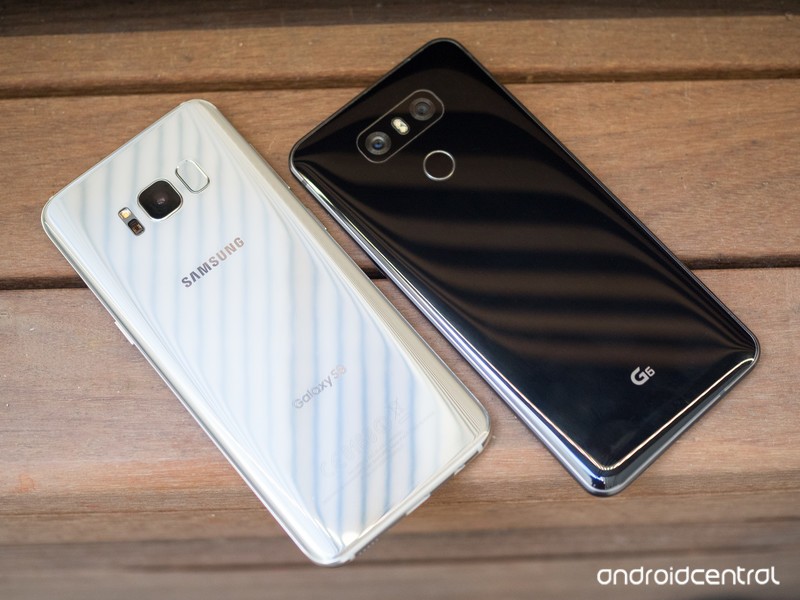
The tall phone showdown we’ve all been waiting for.
LG was able to get its new G6 out the door before Samsung, but it launched into a world full of Galaxy S8 leaks and expectations. Now that we have the real deal in our hands, we can set the top-end phone from LG right up against its direct competition in the Galaxy S8 to see just how they compare — from overarching looks down to minute spec differences and feature distinctions.
Hardware, specs and features
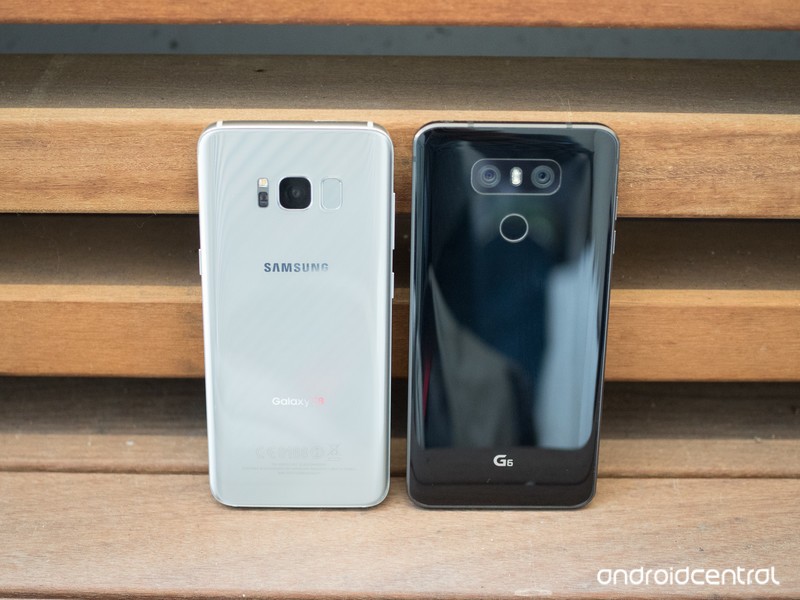
After attempting a bunch of different design and material strategies, LG has settled on something with the G6 very similar to Samsung. The metal frame with a glass back is a formula that has worked for Samsung (and many others, it should be said), though LG puts its own twist on things with a much thicker metal frame and minimal curves. The Galaxy S8 in turn has much less exposed metal thanks to more dramatic curved glass on the back and a subtle curve to the screen as well, and even the metal that is there is polished up to look more like the glass that surrounds it.
More: Complete Galaxy S8 specs
Metal and glass is all the rage, and these phones do it well.
The Galaxy S8’s screen is imperceptibly larger at 5.8-inches to the LG G6’s 5.7-inch, and they both exhibit the same rounded edges on all four corners. The screens themselves are both great, but Samsung’s AMOLED panels really do lead the industry in terms of brightness and colors — LG’s LCD is just fine, though, and if you like more accurate colors you may even prefer it. The Galaxy S8’s curved screen edges, while smaller than previous “edge” phones, may still not be your thing — it’s worth touching one in a store before buying if you’re on the fence.
Thanks to its slightly taller 18.5:9 aspect ratio and curved screen edges the Galaxy S8 is actually just under 4 mm narrower than the G6, though they’re the same height and thickness. Narrower is better from a usability standpoint, but you also have to factor in that the hefty metal frame of the G6 is a bit easier to grasp than the smooth, rounded glassy exterior of the Galaxy S8. The LG G6’s thick metal should also make it less susceptible to scratches and cracks throughout its lifespan.
The hardware is remarkably similar between these two phones.
The big hardware specs and features are mostly shared between the two phones. You get 4GB of RAM, an SD card slot, waterproofing, fast charging, wireless charging, the aforementioned QHD+ displays, USB-C, a single speaker and a headphone jack. The newer Galaxy S8 has a newer processor, with the Snapdragon 835 or Exynos 8895 powering it, and also has the leg up in terms of offering wireless charging and 64GB of base storage everywhere around the world — those features are exclusive to certain markets for LG.
LG takes a win with a 10% larger battery at 3300mAh to the Galaxy S8’s 3000mAh, but also in its fingerprint sensor placement being in a much easier-to-reach location. Samsung is hoping you’ll use its iris scanner technology, which the LG G6 doesn’t have, but right now fingerprint sensors are the way to go and LG’s is just downright easier to reach and use.
Software and experience
Samsung and LG have converged in software in the past generation as well. LG has gone cleaner and simpler with its interface, using primarily white and blue along with pops of colors for icons in particular. That’s been the style for Samsung with its latest updates to Marshmallow and Nougat on the Galaxy S7, and that’s still in play with the Galaxy S8. Both companies are all-in on squircle icons, too — including adding squircle frames and resizing your downloaded apps for consistency.
There are plenty of tiny differences in the way the default apps on both phones operate, but both sets are easy on the eyes and simple enough to figure out. You can, of course, install whatever default apps you want on either one, and most people will do so if they feel strongly enough about such things. The only real points of differentiation are the ecosystems for each — Samsung focuses more on its own Galaxy ecosystem of accessories and apps, whereas LG often defaults to Google’s or isn’t as pushy with its own features like LG Health.
Both phones get the basics done, and have features you’re more likely to ignore than anything.
The Galaxy S8 has a couple tricks up its sleeve with the Bixby voice interface and DeX desktop dock, though those have yet to prove to be big selling points at this moment. You can easily argue [that Google Assistant])(/google-assistant) — available on both phones — is more useful than Bixby helping you navigate through a handful of Samsung apps, and DeX is a great idea but is likely to only be a solution to a problem for a very niche set of users.
More important to the overall buying decision of a modern smartphone is its camera. LG has seriously impressed us with its camera performance, both in terms of its main camera setting a standard for all other flagships but also with its additional wide-angle lens for unique shooting opportunities. Samsung has stuck with the same 12MP f/1.7 setup from the Galaxy S7, and though it was coming from a position of strength we’ll have to see how well it improved its software and processing to challenge the G6’s excellent photo performance.
Bottom line
There are fewer points of differentiation between the Galaxy S8 and LG G6 than with the leading flagships from these companies in any year prior. In my view, that isn’t bad — it means no matter which you choose, you’re getting a base set of specs and features that everyone is looking for, and that’s good for everyone.
You’ll still find plenty between the Galaxy S8 and LG G6 to make an educated decision, though. The Galaxy S8 has a sleeker body and a far more recognizable Galaxy brand behind it, as well as the built-in benefit of Samsung’s vast ecosystem of services and accessory support. The LG G6 offers a larger battery, a known great (and unique) camera setup and is likely going to retail for a bit less than the GS8.
You’re going to get a great phone no matter which one you choose, so take a look at the fine points and find the specific features that appeal to you when making a phone buying decision.
Samsung Galaxy S8 and S8+
- Latest Galaxy S8 rumors!
- Galaxy S8 announcement coming March 29 in NYC
- Galaxy S8 release date set for April 28
- Join our Galaxy S8 forums
Samsung has fixed the biggest problem with the Gear 360
You might as well forget the original Gear 360 ever existed.

Samsung has refreshed the Gear 360 with a design that eliminates the one real problem with the original — stitching. This new design shrinks the top sphere by moving some of the important bits down to the handle, which means the two fisheye lenses are now much closer together. Closer 8.4 megapixel sensors means the software doesn’t have to work so hard to make the two images come together as a single sphere, which means your Gear 360 photos and videos won’t have that weird seam splitting the world in half.
Actually, there’s quite a bit different about this new Gear 360. Lets dig in!
While the original Gear 360 offered a neat tripod you could add to the bottom of the least pocketable 360-degree camera ever, the new Gear 360 has a base that can’t be removed. Samsung moved the battery and display from the sphere into the base, leaving the top to just the sensors and buttons. Instead of a tripod, you get a rubbery base that is wider at the bottom than the top so it’s not as easy to knock over accidentally. That base offers a standard camera screw mount, so you can attach this camera to just about anything and start recording.
Not only are you getting a sphere without stitch lines but the image and video quality will be greatly enhanced.
The sensors have been upgraded so the cameras can capture video in 4K at 24fps and photos at 15MP, which means not only are you getting a sphere without stitch lines but the image and video quality will be greatly enhanced. If you want to do more than just capture and publish, the camera can also stream 360-degree video to YouTube from both a mobile and a PC connection. We don’t have any compare samples to share just yet, but the demos shown at the reveal looked much better than the original Gear 360.
Speaking of a mobile connection, this new Gear 360 is compatible with any Samsung phone running Android 5.0 or greater, as well as anything running iOS 10 or greater. Want to know where support is for the rest of the Android ecosystem? So would we, but it’s Samsung so SSDD. Basically, don’t count on an update adding support for anything other than new Samsung hardware.
Samsung Galaxy S8 and S8+
- Latest Galaxy S8 rumors!
- Galaxy S8 announcement coming March 29 in NYC
- Galaxy S8 release date set for April 28
- Join our Galaxy S8 forums
Galaxy S8 software: Simpler, smarter, and definitely Samsung

The Galaxy S8 comes with some of the S Pen’s features, its own virtual assistant, and even its own desktop operating system. But are those things really necessary?
Gone are the days of Samsung’s overly saturated blue-hued interface. You no longer have to deal with backward navigation keys, either, not if you don’t want to. The newly retrofitted version of Samsung’s software on the Galaxy S8 is cleaner and easier on the eyes. Finally, it all feels so cohesive.
But as Google’s Android is getting better and more feature-filled by the version number, do the manufacturers behind Android smartphones really need to put their own spin on things? No, but Samsung is going to do it anyway, in addition to selling you on the necessity of its virtual assistant and built-in animated GIF-making abilities. Despite all the strides Samsung has made in overhauling its interface design, it’s still bundling in stuff with its smartphones, not all of which you’ll end up using.

It’s nice
A simpler user interface
The interface you’ll see on the Galaxy S8 and S8+ is a remnant of the Galaxy Note 7’s software, though it also made a cameo on the Galaxy Tab S3. It’s different than what came standard on last year’s Galaxy S7, which was still very blue in some places. It was obvious Samsung was still transitioning.
The Nougat version of Samsung’s UI tells a different story, however; a novella, if you will, of a company that’s finally figured it out. The interface is white and black, with gray hues speckled throughout. It’s the equivalent of wearing a brightly colored blazer on top of an all-black outfit, except that the blazer is the actual chassis of the Galaxy S8. The interface is simple and subdued so that the hardware can stand out, essentially justifying the cost of the device.
Various snapshots of the Galaxy S8’s user interface.
The Galaxy S8 runs Nougat, though it’s unclear if it will eventually ship with Android 7.0 or 7.1. (Software on the units we used said 7.0, while we were told to expect 7.1 on retail units.) You’ll have access to many of the same features as your stock Android-wielding pals, including direct replies in the notification shade and customizable quick settings, though Samsung’s already offered that for some time. The Galaxy S8 also marks the permanent installment of the Edge panels, in addition to the return of the Secure Folder, Game Launcher, and Samsung Pay.

No more hard navigation buttons.
Samsung’s new software has also adopted the on-screen navigation bar in use by most other companies, though not without putting its own spin on it. In order to make longtime Samsung fans feel at home the on-screen home button triggers improved haptic feedback that feels more like a “real” button than typical haptics that use a simple vibration motor, not unlike what Apple’s doing on the iPhone 7. It’s satisfying, particularly if you relied on the tactile feel of the home button on older Galaxy devices.
This isn’t a perfect replacement for the physical button, but on the whole it’s better.
You won’t be able to unlock the Galaxy S8 with a simple press of the home button, of course, because the fingerprint sensor has been moved to the back of the phone next to the camera. This is where it starts to get confusing in terms of actually reaching up there … but that’s something for you to figure out when you hold the phone.
Regardless, you now get all of the benefits of on-screen navigation on the Galaxy — including saving bezel space, but also having buttons that can rotate, change and hide depending on what’s on the screen. Thankfully, you can also choose how you want your navigation buttons displayed — whether you prefer to have the back button on the left side, or stick with Samsung’s typical (backward) setup. It’s nice to see Samsung finally offer the choice.

B-I-X-B-Y
Meet Bixby
Bixby is a major part of the Galaxy S8’s marketing story, and it’s not supposed to be a competitor for Google Assistant. Bixby is not a search engine; it’s an assistant, one you can command to help you navigate your interface. Eventually, Bixby will know more about you and the way you use your smartphone, and it will adjust accordingly. The idea is that Bixby should be able to predict what’s coming before you even ask it to.
Does this work? We don’t know yet, as the Galaxy S8 units in our demonstration were offline. But we do know it’s a major part of the Galaxy S8 and S8+, especially if you consider there’s a dedicated hardware button on the device you can press to activate.


Bixby also comes with a shelf, akin to Google Now. It lives on the leftmost side of the Home screen, and it integrates with the apps you have installed. Bixby’s feed will keep you privy of appointments, the weather, and how you’re performing in S Health. It morphs contextually depending on your location and the time of day, and you can curate what shows up in the feed.
You can curate what shows up in the feed based on the apps and services you have installed.
You can continue to utilize Google’s voice assistant alongside Bixby as long as you don’t mind a bit of overlap. I’ll be curious to see how calling out to Google and Bixby in tandem works out, as well as which one plays the nicest with third-party apps. Overall, I imagine it’ll be difficult to ignore Bixby’s assistant on the Galaxy S8 if you choose not to use it, considering the blatant hardware button dedicated to its existence.
More on Samsung Bixby

Extra features
A few borrowed S Pen abilities
The Galaxy Note 7 will forever live on in our hearts as the phablet smartphone that could have been. It’ll be a while until that fiery scandal is laid to rest, and though I like that the Galaxy S8 now carries the torch for some of the features that had made the Note 7 so verifiably neat, some of them don’t seem worth using unless there’s a stylus involved.
Take the Samsung Notes app, for instance, which definitely seems out of place on the Galaxy S8. I can see why Samsung included it — bigger display! — but it’s not fun to use without the S Pen. A cheap stylus won’t do, either.
You’ll like using Smart select, though, which is another a remnant leftover from the Note 7. It makes it significantly easier to grab a cropped screenshot. There is also an animated GIF feature you can use to capture a few seconds of a homemade movie or YouTube video.

Security
(Re-)introducing iris recognition
Samsung has always attempted to herald itself as the secure Android platform; the one that you can rely on when Google is having trouble getting its act straight. In this instance, it’s pushing the Galaxy S8’s iris recognition abilities, which took me a while to figure out and wasn’t as futuristic-seeming as the movies had promised. It’s not the fastest unlock feature — I mean, it’s fast at detecting my irises, but I still had to let the Galaxy S8 know I wanted to unlock it before it started scanning.
There are other ways to unlock the phone, too. You can use the fingerprint scanner on the back, which is harder to reach for on the taller Galaxy S8+, or set up the iris scanner, which is yet another remnant of the Note 7. It’s just as quick to use as it was on its predecessor, though I’m curious to truly time each of the various security methods to see which one is the fastest. If my future smartphone is going to have all these newfangled security features, I want them to be fast!

For millennials
New features in the camera app
The Galaxy S8’s camera interface has been slightly tweaked again, this time in an effort to covertly add a few new features. A slight tilt of the shutter button to the left or right will adjust the exposure; a swipe to the right will bring up the various camera modes; a swipe to the left will engage the video mode.
You may also notice a cuddly little teddy bear icon visible on the camera interface. Tapping this will bring up various augmented reality effects you can use inside the Samsung camera app. They’re silly, they’re fun, and they’re absolutely reminiscent of Snapchat’s filters. If you use the Samsung camera app to give yourself rabbit ears, it won’t translate too well to Snapchat because of that app’s finicky import feature. But you can use the filters everywhere else, including Instagram Stories.
More on the Galaxy S8 camera

Extra stuff
Samsung DeX
The Samsung DeX capabilities require separately sold hardware to work in the first place, but it’s an interesting look at what Samsung is attempting under the hood of its Android devices. In this instance, it’s equipped the Galaxy S8 and S8+ with computer-like abilities, so that you can plug in the phone into a dock of sorts and “unlock” a half-baked desktop operating system.
The dock offers two USB ports and Bluetooth connectivity for peripherals, and it charges the Galaxy S8 while it’s in use. But its operating system is proprietary and doesn’t work with any Windows or Mac apps. There are a few name brand apps you can use with DeX, like Microsoft Office and Adobe Photoshop, but they’ve been optimized for the Galaxy S8’s mobile processor.
More on the Samsung DeX dock

Samsung Galaxy S8
Coming soon
The smartphone show isn’t just about putting the best device forward; it’s about the message it transmits to others who see you using that phone. Will part of that messaging include Bixby? Unlike Apple’s Siri and Amazon’s Alexa, probably not. I imagine the question most people will ask instead is, “Hey, is that the phone that blows up?”
In all seriousness, I wonder if perhaps I’d feel differently towards the software on the Galaxy S8 if it weren’t for the fiery battery fiasco that preceded it. The new features that come with it are mostly fine additions, but they seem so underwhelming following all that drama. Why do I want another device assistant, when Google keeps selling me on its Assistant? And if I continue to wield Samsung devices, do I have to subscribe into that ecosystem to keep reaping the benefits? There are surely answers to all of these questions, but we’ll have to hang tight until the Galaxy S8 goes on sale April 21.
Samsung Galaxy S8 and S8+
- Latest Galaxy S8 rumors!
- Galaxy S8 announcement coming March 29 in NYC
- Galaxy S8 release date set for April 28
- Join our Galaxy S8 forums
What is Bixby and is it like Google Assistant?

Bixby isn’t a search engine. It’s the Galaxy S8’s live-in assistant.
Virtual assistants are all the rage, and with the success of services like Google Assistant and Amazon Alexa, it’s no surprise that other companies want a go at it, too. Samsung’s trying its hand in the AI space with the launch of Bixby, the virtual assistant that comes baked in the Galaxy S8 and S8+.
Unlike the competition, Bixby isn’t a search engine. It’s an assistant that’s there to help you navigate through the phone itself. Samsung’s invested quite a few resources into Bixby and its capabilities, and plans to make it a major part of the Galaxy S8’s marketing story. If you’re wondering what’s in store, here’s what we learned about Bixby from our brief time with it on Samsung’s new flagship smartphone.
What Bixby aims to do

Earlier this month, Samsung made a point to lay out what Bixby is and how it will live alongside the rest of the virtual assistants making headway in the tech world. Bixby was heralded as a “conceptually new philosophy to the problem [of virtual interaction],” Samsung wrote. “It is the machine that needs to learn and adapt to us.”
“A conceptually new philosophy to the problem of virtual interaction.”
That’s a powerful statement, but that’s exactly Bixby’s aim: to learn what you like to do with your smartphone, and then adapt itself to cater to those particular actions. It’s not a search engine like Google Assistant; it is an assistant, and it can navigate around your smartphone the way that you normally would with your own fingertips. Bixby will support almost every task you ask it to do, like cropping a photo, applying a filter, or sharing it with your favorite social network. Eventually, you’ll be able to talk Bixby through your process without looking at the screen at all.

Bixby stands by in anticipation of your next command.
Bixby is also supposed to complete tasks, even if you don’t shout out the entire command. The idea is that as it’s learning what you do with your device, it’s also learning how to stay three steps ahead in anticipating what’s next. And if it doesn’t understand everything that you asked, it can get you most of the way there instead of failing and asking you to try again.
What we’ve seen it do
Bixby’s primary method of contact requires you to press and hold the physical “Bixby button,” which resides on the left side of the Galaxy S8 and S8+ — essentially, your own “push to talk” for artificial intelligence. Samsung did say that Bixby would work with hot word detection, but most of the devices laid out for our demonstration were offline. Regardless, if you don’t feel like drawing attention to yourself by shouting out “BIXBY!” in the middle of the grocery store, that’s what the hardware button is for.
If you don’t feel like shouting out “Bixby!”, that’s what the hardware button is for.
Bixby also offers its own live feed of sorts, akin to Google Now. It’s a bit redundant alongside Google’s offerings, though it does sort of lay out the kind of data it’s aggregating on you. You can check in on things by scrolling to the left-most home screen of Samsung’s launcher like you would on the Pixel Launcher. It’s not entirely clear how Bixby pulls in all the information — whether it’s hooking into apps, or whether it’s only limited to the apps that have opted in — but we do know it looks at location data to find the context of where you are, to offer you actions based on whether you’re at home or at work.
When is it available?

There is quite a bit of nuance behind Samsung’s Bixby. We’ll be curious to see how it fares against Google Assistant in the long run — particularly after millions of Galaxy S8 and S8+ phones are sold and Bixby gets put to use.
Samsung Galaxy S8 and S8+
- Latest Galaxy S8 rumors!
- Galaxy S8 announcement coming March 29 in NYC
- Galaxy S8 release date set for April 28
- Join our Galaxy S8 forums
Should you buy the Galaxy S8 or the Galaxy S8+?

The Galaxy S8 and Galaxy S8+ are great phones, but the differences this year as narrower than ever. If you have to choose one, which would it be?
Are the Galaxy S8 and Galaxy S8+ two distinct phones, or one phone in two sizes? Last year, there were clear demarcations in Samsung two-phone strategy; in 2017, that delineation is a bit more diffuse.
This is especially true because both phones are basically just massive AMOLED panels covered by curved glass and surrounded by metal. Gone is the distinction between flat and curved screen, between value and premium. The most important, and popular, high-end Android phones in the world are now separated merely by 0.4 inches in diagonal screen real estate and 16.6% of additional battery.
So, who should buy the Galaxy S8 and who should opt for the slightly larger, longer-lasting Galaxy S8+? Let’s take a look.
First, the specs
| Operating System | Android 7.0 Nougat | Android 7.0 Nougat |
| Display | 5.8-inch AMOLED2960x1440 (570 ppi) | 6.2-inch AMOLED2960x1440 (529 ppi) |
| Processor | Qualcomm Snapdragon 835or Samsung Exynos 8895 | Qualcomm Snapdragon 835or Samsung Exynos 8895 |
| Storage | 64GB (UFS 2.1) | 64GB (UFS 2.1) |
| Expandable | microSD up to 256GB | microSD up to 256GB |
| RAM | 4GB | 4GB |
| Rear Camera | 12MP Dual Pixel, f/1.71.4-micron pixelsOIS | 12MP Dual Pixel, f/1.71.4-micron pixelsOIS |
| Front Camera | 8MP, f/1.7auto focus | 8MP, f/1.7auto focus |
| Connectivity | Wi-Fi 802.11ac MIMOBluetooth 5.0NFC, GPS, Glonass, Galileo, BeiDouLTE Cat.16 | Wi-Fi 802.11ac MIMOBluetooth 5.0NFC, GPS, Glonass, Galileo BeiDouLTE Cat.16 |
| Charging | USB-CFast chargingQi wirelessPowermat wireless | USB-CFast chargingQi wirelessPowermat wireless |
| Battery | 3000mAh | 3500mAh |
| Water resistance | IP68 rating | IP68 rating |
| Security | One-touch fingerprint sensorIris scannerSamsung KNOX | One-touch fingerprint sensorIris scannerSamsung KNOX |
| Dimensions | 148.9 x 68.1 x 8 mm | 159.5 x 73.4 x 8.1 mm |
| Weight | 155 g | 173 g |
As you can see, the only notable differences between the phones are in the screen size, battery size, and overall footprint: the Galaxy S8+ is 10.6 mm taller and 5.3 mm wider than the Galaxy S8, to accommodate the 6.2-inch screen over the other’s 5.8 inches, and has a battery 500mAh larger. It also weighs a scant 18 grams more, at 178g.
A few words on size
Unlike previous Galaxy devices, this year’s models have a strange-sounding 18.5:9 aspect ratio. In real-world terms, all that means is that they’re unusually tall, and at first feel odd to the average smartphone user accustomed to a particular weight distribution. The change also means that the screens can have larger surface areas without necessarily needing to be widened, something that we see in its extreme with the larger Galaxy S8+.
Who should buy the Galaxy S8+?

Because of what we said above, those looking into the Galaxy S8+ should keep in mind that the phone is unwieldy in its tallness, and the fingerprint sensor, which is already difficult to reach on the regular Galaxy S8, uncomfortable to access.
If battery if your primary concern, the Galaxy S8+ is your safe choice.
But in that compromise you get a phone that is, in relation to other phones with 6.2-inch screens, relatively compact. While 16:9 media will either need to play with bars on the sides, or be cropped slightly to fit the new aspect ratio, there aren’t many other phones on the market right now that offer the sheer level of screen-to-body efficiency as the Galaxy S8+. This is practically a small tablet in the frame of a moderately-sized phone — and some will gravitate to it just for this.

The Galaxy S8+, with its bigger body, also fits a larger battery: inside is a 3,500mAh cell that matches the Galaxy Note 7 (RIP), and comes in 3% smaller than the Galaxy S7 edge. Still, with a more efficient chip, this will be the longest-lasting Galaxy device to date (barring some unforeseen hardware anomaly), and therefore the one to get if uptime is paramount.
Of course, with those extra powers come extra dollars, and the Galaxy S8+ will be at least $100 more expensive than its smaller counterpart. Last year, the Galaxy S7 edge justified its additional expense, but with both the Galaxy S8 and S8+ sporting curved glass screens and big, high-resolution displays, it may be more difficult to do so in 2017.
Who should buy the Galaxy S8?

Most people. Everyone. You.
Last year, the Galaxy S7 edge had clear advantages over the S7. This year, not so much.
We don’t want to undermine the attractiveness of the Galaxy S8+ — it’s a great big phone with lots going for it — but unless you absolutely need the additional battery capacity, the Galaxy S8 is the phone to go for.
Not only is it more much compact and one hand-friendly than the S8+, but it’s cheaper. And the Galaxy S8’s fingerprint sensor, despite being located in an awkward position around back, is not as difficult to reach.

Last year, the Galaxy S7 had clear disadvantages over the S7 edge: it was considerably smaller, and lacked a curved display. And while the compact phone was easy to use in one hand, it was to many people too small to fulfil the phablet aspirations so many early adopters crave. The Galaxy S8 checks all of those boxes, sharing the same basic platform as its larger counterpart.
A 5.8-inch display is larger than nearly every Android phone on the market right now, but Samsung manages to do so without increasing the overall size of the phone beyond a typical 5.2- or 5.3-inch device. (Of course, a 5.8-inch phone in an 18.5:9 aspect ratio isn’t exactly 5.8 inches diagonally, but it’s close enough that we shouldn’t quibble.)
Wrapping it up

This year, both the Galaxy S8 and Galaxy S8+ are fantastic phones. Really, they are largely without compromise. But it’s clear from the get-go that there are fewer reasons than ever to spring for the more-expensive Plus variant, especially since, at 5.8 inches, the regular Galaxy S8 has more than enough screen real estate for most people.
The person who should buy the Galaxy S8+ is someone who needs his or her phone to last as long as possible, who may not have access to a charger — wireless or wired — throughout the day. Or, it’s someone who requires as much screen real estate as possible, perhaps to replace a small tablet.
For everyone else, we recommend the Galaxy S8.
Everything you need to know about the Galaxy S8 and S8+
Samsung Galaxy S8 and S8+
- Latest Galaxy S8 rumors!
- Galaxy S8 announcement coming March 29 in NYC
- Galaxy S8 release date set for April 28
- Join our Galaxy S8 forums
Everything you need to know about the Galaxy S8’s cameras

The 12-megapixel ‘Dual Pixel’ rear-facing camera is back and paired with a better front-facing camera and a tweaked camera interface.
Samsung doesn’t seem to be making too much of a spectacle of the Galaxy S8 and Galaxy S8+’s main camera, and that’s likely because it hasn’t changed the hardware. The flagship duo come equipped with the same camera hardware as their predecessors: a 12-megapixel “Dual Pixel” sensor that was often heralded as the best before the Google Pixel.
But regardless of the reprise, there are some new camera features to check out in Samsung’s new smartphones. Let’s take a look at the new additions, including new photo processing, a better front-facing camera, Snapchat-like features, and a slightly tweaked camera interface that makes it easier to multitask between camera modes.
Rear camera

The Galaxy S8 and S8+ feature a 12-megapixel “Dual Pixel” rear-facing camera with an f/1.7 lens. Like its predecessor, the Galaxy S7, it’s equipped with OIS (optical image stabilization) and PDAF (phase-detect auto focus), as well as auto HDR and a manual mode that enables you to shoot in RAW.
There are no new camera modes.
There are no new camera modes to the Galaxy S8, but you’ll see all the usual suspects in the interface, including a Panorama mode, Selective focus mode (akin to the iPhone 7’s Portrait mode), and Hyperlapse mode. The same live colored filters made popular in older Samsung phones are included here, too, and there’s also a new feature that brings Snapchat-like augmented reality filters to the viewfinder. You can use them as you’re recording video or while snapping photos. I’m not sure if the filters will work with multiple people in the shot (like some of Snapchat’s filters do), but they did work on Mr. Mobile.
A few snapshots of the Galaxy S8’s camera interface.
The camera app interface also remains relatively unchanged. It’s simple to use; a quick swipe to the left starts up the video recording mode, and a swipe to the right brings you to the different camera modes. There is a slight tweak this time around in that you can tilt the shutter button to the left or right to adjust the overall exposure before snapping a photo.
We obviously haven’t used the camera in any sort of extended period where we can evaluate its quality, but this will of course be the biggest question. How much has Samsung improved in software to make a step up over last year’s quality? Though the Galaxy S7’s camera was really good, in this industry if you’re standing still you’re falling behind — new camera firmware and improved processing from the new ISP (image signal processor) should improve things, but we don’t know how much yet.
Front camera

You can use the silly Snapchat-like features here, too.
The Galaxy S8 and S8+’s front-facing camera is a complete revamp: 8 megapixels with auto focus and an f/1.7 lens. You’ll get decent low light photos just as you would with the rear-facing camera, and the Galaxy S8 will have a simpler time attempting to keep your face in focus — most phones today, even in the high end, still don’t have auto focus on the front-facer. You can use the silly Snapchat-like features here, too, and there is a beauty mode that buffs out your imperfections and makes you look like the freshly airbrushed model you wish you could be. The filter also works on your friends in group selfies.
There’s so much more to the Samsung Galaxy S8 and S8+ than just its cameras. Be sure to read our full rundown of the devices and breakdowns of the various features from Samsung’s latest flagship family!
Samsung Galaxy S8 and S8+
- Latest Galaxy S8 rumors!
- Galaxy S8 announcement coming March 29 in NYC
- Galaxy S8 release date set for April 28
- Join our Galaxy S8 forums
Samsung announces Galaxy S8 and S8+: Here’s everything you need to know

We knew this was coming, but now it’s all official.
A continuous flow of leaks and speculation came to an end today as Samsung announced the Galaxy S8 and Galaxy S8+ on stage at its event New York City. Naturally the released confirmed plenty of what everyone speculated to be true about the latest flagships from Samsung, but there are a few details and subtleties we didn’t know until now.
Here’s everything you need to know about the Samsung Galaxy S8 and Galaxy S8+.
Get to know the Galaxy S8 and S8+
The two phones, which are only differentiated by their screen size and battery capacity, come in at 5.8-inches and 6.2-inches with extra-tall 18.5:9 aspect ratio displays. That battery difference is pretty subtle: 3500mAh for the Galaxy S8+ and 3000mAh for the standard Galaxy S8.
Though the batteries haven’t increased in size from the Galaxy S7 and S7 edge, the hope is that the improved efficiency of the new 10 nm processor inside will provide some help — that’ll be the Qualcomm Snapdragon 835 or the Samsung Exynos 8895, depending on the region. The processor is backed up by 4GB of RAM, an increase to 64GB of storage, and of course a microSD card slot. Waterproofing and wireless charging are still here as well, plus a new USB-C port on the bottom. The rear camera is unchanged in terms of its 12MP sensor and f/1.7 lens, but will have improved processing thanks to new software and a new ISP (image signal processor).
Read: Samsung Galaxy S8 hands-on preview
The overall design for the phones is identical on both sizes, and is still shimmering glass and metal much like the previous generation. It’s punctuated by the long edges of the displays curving subtly off the side, more so like the Galaxy Note 7 than the more dramatic Galaxy S7 edge — and to that point, there is no “edge” model here, as both phones sport the curves.
The displays have a new 18.5:9 aspect ratio with a QHD+ resolution, meaning they’re extra tall while staying relatively narrow. Samsung has also moved to on-screen buttons and reduced bezel size dramatically in order to fit as much screen into the body as possible. That necessitated the movement of the fingerprint sensor to the back of the phones, where it sits somewhat-awkwardly next to the camera lens. Iris scanning makes its return in a new-and-improved version from the Note 7 to hopefully pick up the slack.
Get familiar with all of the Galaxy S8’s specs
Samsung is trying to drive a narrative that we’ve moved beyond specs (and you can definitely argue that we have), but the enthusiasts will always want to know the details of what’s powering the latest phones. You get just about everything in here that you’d expect — basically, think of a Galaxy S7, and bump up a few areas to 2017 standards. That means you’re getting 4GB of RAM, 64GB storage with an SD card slot, QHD+ resolution AMOLED displays, USB-C, fast charging, wireless charging and the latest Qualcomm or Samsung processor inside.
As for the two different models, the Galaxy S8 and S8+ are identical internally aside from the batteries and of course screen sizes.
Complete Galaxy S8 and S8+ specs
Explaining the Galaxy S8’s camera setup
On the face of it, the spec hounds among us won’t be satisfied with the fact that Samsung has stuck with the same camera hardware from the Galaxy S7 in the new Galaxy S8. Yes that means we’re looking at a 12MP “Dual Pixel” camera with an f/1.7 lens — but remember that the software and ISP (image signal processor) have been improved since last year, and this was arguably the best camera of 2016. Let’s see how it all comes together.
On the other side, Samsung has completely revamped the front-facing camera to an 8MP unit with auto focus — all the better for your selfies of all types.
Everything you need to know about the Galaxy S8’s cameras
All of the new software features in the Galaxy S8
As Samsung often does, we got a good sneak peak at the Galaxy S8’s software experience in the form of the Android Nougat update for the Galaxy S7 and S7 edge. What you’ll find on the Galaxy S8 is very similar in terms of its design, core apps and behaviors, but you’ll also find a new launcher layout, new icons, on-screen buttons and of course a bunch of new features. Not the least of which being Bixby, DeX, S Pen-styled note taking features and more.
Get to know the Galaxy S8’s software
This is what we know about the Bixby voice assistant
Even though Samsung came out and announced its Bixby voice assistant before the Galaxy S8 was even released, we still don’t know all of the details here. But we do have the gist of the situation: Bixby isn’t so much a head-to-head competitor with Google Assistant](/google-assistant) and Amazon Alexa, but instead an assistant for the phone itself. That means Bixby is designed to help you — via voice — navigate throughout the Galaxy S8’s software.
Right now Bixby is only enabled for a handful of Samsung’s own apps, but what it can do in those apps is very interesting. It can basically respond to any command and perform actions within whatever app you’re using as if you tapped though the software yourself. Samsung also claims Bixby can fail more gracefully when it doesn’t understand your query entirely, getting you through the answer as far as it can before asking for more information. Samsung is betting this is the next interface paradigm, and it’s exciting to watch the developments on the Galaxy S8.
What is Bixby and is it like Google Assistant?
This is Samsung’s DeX desktop dock for the Galaxy S8
Far on the other end of interaction from Bixby is the new “DeX” desktop docking system for the Galaxy S8. It’s a little piece of hardware no larger than a wireless charger that lets you plug in your Galaxy S8, attaching it to a keyboard, mouse and monitor to transform it into a desktop-like environment. The Galaxy S8’s interface scales up gracefully to fill the large monitor, and Samsung’s own apps have been designed to be resized and operated with a keyboard and mouse.
Samsung has also struck deals with Adobe and Microsoft to bring their most popular apps to the big screen — the only question is how it works with other non-optimized apps, and who will invest in these docks and this setup to use DeX on a regular basis.
5 things to know about the Samsung Galaxy S8’s DeX dock
Compare the Galaxy S8 today’s hot devices
Plenty of people will just pick up the Galaxy S8 or S8+ because Samsung is the brand they know, but many of us will comparing it head to head with other leading devices. To help you make up your mind on which phone is right for you, we’ve compared the Galaxy S8 and Galaxy S8+ to the likes of the Pixel and Pixel XL, LG G6 and of course the iPhone 7 and 7 Plus.
Galaxy S8 and S8+ vs. Pixel and Pixel XL: Two ways to do a flagshipGalaxy S8 vs. LG G6: Tall, skinny and very similarGalaxy S8 vs. iPhone 7: Battle of the platforms
Which one should you buy?
So now that you have all the information, which one should you buy? You have a big phone and a bigger phone; one with a big battery and a bigger battery. There are so few differences between the Galaxy S flagships this year that it comes down to size and battery preference alone, and that may make your decision even harder.
Should you buy a Galaxy S8 or a Galaxy S8+?
When and where you can buy a Galaxy S8
Here’s what we know: the Galaxy S8 and S8+ will go up for pre-order from just about any carrier and retailer you can think of starting March 30. They will subsequently become available in stores and online for everyone on April 21. In the U.S., you’ll have your choice of the Galaxy S8 or Galaxy S8+, both in 64GB storage configuration, in one of three colors: black, gold or orchid grey.
Samsung has a pre-order incentive for those who want to drop the money early, offering up a new Gear VR with Controller for free. Other retailers are sure to get in on the freebie game as well, so keep your eyes peeled for good deals.
Where to buy the Galaxy S8 and S8+ in the U.S.
Samsung Galaxy S8 and S8+
- Latest Galaxy S8 rumors!
- Galaxy S8 announcement coming March 29 in NYC
- Galaxy S8 release date set for April 28
- Join our Galaxy S8 forums
 AIVAnet