


Google’s Duo chat app expands beyond video calls
Google loves to put out messaging apps, and until now, Duo was the one for making video calls. That changes today, according to a tweet from Google exec Amit Fulay. Duo users can also use the app to make voice calls. The feature, which debuted in Brazil earlier this month, is now available worldwide, although Google hopes it’ll be especially popular in areas where high-bandwidth internet access isn’t always available.
Duo was introduced last year as a bare-bones competitor to more full-featured calling apps like FaceTime. It’s designed to work for anyone with a smartphone across a variety of network connections. Duo, along with chat platform Allo, are part of Google’s new messaging strategy, and they will be the main consumer-focused apps going forward. Duo is now the mandatory video-calling app on Android devices, pushing out Google’s previous app, Hangouts. But, if you’re a Hangouts fan, Google insists it’s not going anywhere. As an optional download on the Play Store, it will now focus more on business and enterprise users.
Via: TechCrunch
Source: Twitter
What is Facebook Stories and how does it work?
It’s official. Facebook just became Snapchat.
You’ve all seen these types of headlines: Facebook adds Snapchat-like blah blah blah; Facebook continues assault on Snapchat; Facebook is turning into a Snapchat clone; and so on. Those stories aren’t lying. Facebook, which once tried to buy Snapchat, has been heavily copying the app in order to appease a younger, more mobile audience. And the most recent update to the Facebook app is yet another example.
- What’s the point of Snapchat and how does it work?
- What is Facebook Live, how does it work, and which devices support it?
Facebook has launched Facebook Stories. It’s an update to the iOS and Android app that adds three new features: an effects-filled camera that sits a swipe over from the news feed; a spot for disappearing stories; and a way to share media straight from your camera. So, yes, once and for all… Facebook just became Snapchat. If you just want to know how Facebook Stories works, here’s what you need to know.
What is Facebook Stories?
Stories row
The Facebook app has updated with a new feature, called Facebook Stories, which lets you “share multiple photos and videos as part of a visual collection atop news feed”. When you add a photo or video to your story, it appears in the new Stories section at the top of news feed. Your profile picture will also appear in this row at the top of your friends’ news feeds, and they can tap it to see your story for 24 hours.
Camera effects
Facebook also updated its camera just for Facebook Stories. Tap on the camera icon on the top left corner (or swipe right from news feed) to try it out. It offers masks, frames, and interactive filters that you can be applied to photos and videos. There’s even “reactive effects” that let you interact with dynamic objects (like falling snow) and style effects so you can apply a Picasso-style filter to your video in real time.
Direct sharing
If you want to share photos and videos with specific friends rather than via a story, Facebook offers a “Direct” option that’s designed for sharing “individual photos and videos with specific friends for a limited time”. When you use Direct, your friends will be able to view your photo or video once and replay it or write a reply. Once the conversation on the photo or video ends, it is no longer visible in Direct.
How do you post to Facebook Stories?
To post to Facebook Stories, follow these steps:
- Tap on the “Your Story” icon in the Stories bar at the top of news feed.
- Alternatively, you can tap the camera icon in the top left of your screen or swipe right from news feed.
- Tap the record button to take a photo or tap and hold it to record a video. You can also upload from your camera roll.
- If you want to save a photo or video, tap the download icon.
- Tap Your Story to add to your story, and then tap the send button.
How do you add camera effects?
If you want to add effects to your photos or videos before posting to Facebook Stories, follow these steps:
- Tap on the “Your Story” icon in the Stories bar at the top of news feed.
- Tap the record button to take a photo, or tap and hold it to record a video. You can also upload from your camera roll.
- Swipe up or tap the effects icon to add frames, masks, or camera effects.
- You can also tap the Aa icon to add a caption or tap the doodle icon to doodle.
- Tap Your Story to add to your story and then tap the send button.
How do you view Facebook Stories?
To view someone’s story, follow these steps:
- Tap a friend’s profile picture in the Stories section at the top of your news feed. They will be able to see you have viewed their story.
- While viewing a story, you can tap on the left of the screen to move backwards or tap on the right of the screen to move forwards. You can also tap and hold to pause a story.
How do you reply to a story on Facebook?
If you want to reply to someone’s story, follow these steps:
- While you’re viewing a story, tap “Write a direct reply to [their name]”. Direct replies can be found in the Direct section of the Facebook app and can only be seen by you and the recipient.
How does Facebook Direct work?
When a friend sends you a direct photo or video, or replies to your story on Facebook, you can view and reply in the Direct section of the Facebook app. To use Direct, follow these steps:
- To open Direct, tap the Direct button in the Facebook Stories row.
- To view the photo or video, tap the blurred preview image.
- To reply with a message, tap “Reply to [Friend’s Name]”
- To exit the photo or video, tap the X in the corner.
When will Facebook Stories be available?
Facebook Stores is now rolling out globally to the main Facebook app for Android and iOS.
Want to know more?
Check out Facebook’s blog post and Camera help hub for more details.
‘Planescape: Torment’ remaster arrives on April 11th
For many veteran gamers, Planescape: Torment was a definitive role-playing title — it combined an unusual setting with a deep story, memorable dialogue and gameplay mechanics that still hold up. If you’re one of those fans, you won’t have long to wait to relieve that experience on modern hardware. Beamdog, Hasbro and Wizards of the Coast have revealed that they’re launching Planescape: Torment Enhanced Edition on April 11th. As with most better remastering efforts, this involves more than a little spit and polish to make the game run on newer hardware.
The rework polishes the game with a 4K-friendly interface on Macs and Windows PCs, a remastered soundtrack and interface tweaks (such as area zooming and quick looting) that reflect 18 years of progress. It even has the help of lead Torment designer Chris Avellone, who’s curating various fixes and upgrades to create his ideal vision of the game. This is also the first version of the RPG built for mobile, with both Android and iOS versions arriving the same day. Suffice it to say that you’ll want a tablet if you go that route, since there’s a lot of info to juggle at the same time.
Beamdog is releasing the computer versions of Planescape through its own store, GOG, the Mac App Store and Steam for $20. On mobile, you’ll be paying $10 through either the App Store or Google Play. We’d say the price is reasonable in either case. Beamdog estimates that a typical playthrough will last for 50 or more hours, and there’s a distinct chance you’ll be happy whether you’re nostalgic for Torment or just want to sink your teeth into a classic Dungeons & Dragons experience.
Via: PC Gamer
Source: Beamdog
Apple Rejecting Apps With Pricing Info Like ‘Free’ in App Title
Apple has started blocking developers from promoting their apps by using a price in the app’s name, reports VentureBeat. For approximately the last month, apps that use “free” or other pricing information in their metadata have been blocked in iTunes Connect submissions.
Apps that use “Free” in their titles are receiving the following rejection notice after being submitted for review:
Your app’s name, icons, screenshots, or previews to be displayed on the App Store include references to your app’s price, which is not considered a part of these metadata items.
Please remove any references to your app’s price from your app’s name, including any references to your app being free or discounted. If you would like to advertise changes to your app’s price, it would be appropriate to include this information in the app description. Changes to your app’s price can be made in the Pricing and Availability section of iTunes Connect.
An Apple spokesperson VentureBeat contacted confirmed the changes but declined to offer any additional information.
Given that there are still dozens of apps in the App Store that use “Free” in their title, such as Disney’s “Where’s My Water? Free” or “Doodle Jump FREE,” it appears this is a new policy that will affect app submissions going forward. It’s not clear if Apple will make apps that are already in the App Store implement a title change.

In related App Store news, Apple appears to have mistakenly approved Metadata, an app that sends a notification when a U.S. drone strike is reported in the news.
The app, which had previously been rejected a dozen times before, was approved this morning and then pulled just hours later, suggesting its temporary approval was an accident. Previously, the app was approved in 2014 and was in the App Store for almost a year before being removed.
Tag: App Store
Discuss this article in our forums
Apple Pay Expands to Taiwan
Apple Pay is rolling out to Taiwanese customers starting today, reports The China Post. Seven banks in Taiwan are supporting Apple Pay at launch according to Apple’s Taiwanese Apple Pay website, including Cathay United Bank, CTBC Bank, E. Sun Commercial Bank, Standard Chartered Bank, Taipei Fubon Commercial Bank, Taishin International Bank, and Union Bank of Taiwan.
Apple Pay is available to all Visa and MasterCard holders who bank with the above listed institutions. The payments service will work at all retailers where contactless payments are accepted, including Far Eastern Department Stores, Carrefour, PXMart, Sogo, and The Breeze Center. FamilyMart stores are also accepting Apple Pay, but only for users who bank with Taishin International.
Cards can be added to Apple Pay by tapping the “Add Credit or Debit Card” option in the Wallet app on a device running iOS 8.1 or later. Apple Pay works with the iPhone 7 or later or the iPhone 5 or later when using an iPhone paired with an Apple Watch. Apple Pay in apps and on the web is also available on iPads with Touch ID, including the iPad, iPad mini 3, iPad mini 4, and both iPad Pro models.
Since its 2014 debut, Apple Pay has been slowly rolling out around the world. Rumors suggest Apple Pay will soon expand to several additional countries, including Italy, Belgium, Germany, and South Korea.
Along with Taiwan, Apple Pay is also available in the U.S., the UK, China, Australia, Canada, Switzerland, France, Hong Kong, Russia, Singapore, Japan, New Zealand, Spain, and Ireland.
Related Roundup: Apple Pay
Discuss this article in our forums
Veldt Luxture: Our first take
A luxury hybrid smartwatch that instead of simply collecting activity data, may use it to help improve our lives.
One thing we always dislike about activity trackers is the lack of actionable feedback. They take our data, show us what has been happening, but very rarely tell us what it means and how we can improve our well being, fitness, or life in general. Veldt, a Japanese brand, may have the answer with its Luxture hybrid smartwatch and its Life Rhythm feature, which places the emphasis on changing our lives for the better with the data it collects.
More: Tag Heuer Connected Modular 45: Our first take
The Luxture is still a prototype and the companion app is still in development, but the plan is very clear. The watch will use various sensors to track movement, steps, sleep, and UV exposure, plus it’ll monitor your calendar activity through your phone. Each day you tell the app how you’re feeling, either after exercise, after waking up in the morning, or after your day has finished. Using all this data, the app will gradually begin to understand what schedule and activities make you feel great, and which ones don’t.
 Andy Boxall/Digital Trends
 Andy Boxall/Digital Trends
 Andy Boxall/Digital Trends
 Andy Boxall/Digital Trends
This will require dedication from you, but the results are likely to be worth it. Rather than simply telling you how much sleep you’ve had over the past week, the Veldt Luxture will tell you how much sleep you should have from now on to feel your best. Everyone’s ideal sleep pattern is different, and can be affected by activity during the day, so it’s not always going to be the same every night. The potential for telling us if we’ve had enough sunlight is interesting too, both for skin protection and for our vitamin D levels.
You’ll hardly know it’s on your wrist, and it looks more like jewelry than a sporty lifestyle product.
Notifications will also appear on the Luxture. However, because there’s no screen, they’re presented using an LED lighting system around the edge of the dial. Colors can be customized to represent certain people or events, while other data is fixed — blue lights for rain in the weather app, for example. It’s subtle enough that it’s not intrusive, and the many color variations really enhance the look of the watch. The final version will have an NFC chip built into the strap, ready for use with mobile payments and ticketing systems, without putting strain on the battery.
The Veldt Luxture is very slim at 11.8mm, compact, and lightweight. You’ll hardly know it’s on your wrist, and it looks more like jewelry than a sporty lifestyle product. Sapphire crystal covers the face and the wireless charging system on the back, and best of all the battery is expected to last for about a week. Veldt’s making the Luxture’s style and design as much of a feature as Life Rhythm, and the watch comes in various colors and styles. Our favorite is the red and black model.
One of the models has a dial made from stone slate, which is then machined down and added to the strap too. It’s still flexible so it won’t crack, and looks superb, plus it’s really unusual. Veldt’s other watch, the larger Serendipity, is available with straps and dials that have been hand-painted by a Kyoto-based artist, making each one unique. We’d expect similar styles to eventually reach the Luxture.
The Veldt Luxture has the chance to cure a massive activity tracking pain point, but at the moment, the benefits are only going to be available to a select few, due to the expected high price. It’s not final yet, but a Luxture model made from highest quality materials may cost up to $2,000. The Serendipity model is priced between $1,080 and $1,680, so it’s in-line with the company’s current product. Thankfully, Veldt told us it may launch a model at around $500, using less premium materials, in the future.
More: Kronaby Hybrid smartwatch: Our first take
For now, Veldt expects to have the Luxture on sale sometime in the winter this year. However, do remember this is a prototype seen here, and plans may change between now and then.
Highs:
- Focus on lifestyle improvement over fitness tracking
- Luxury design
- Premium materials
- Wireless charging
Lows:
- Expensive
- Still a prototype
Microsoft’s Office 365 update for March focuses on Excel, OneNote, and Visio
Why it matters to you
You’ll be able to work better with equations in OneNoe and work better together in Excel with Office 365’s update.
Microsoft appears more aggressive in rolling out new features to its Office line of productivity software. That is likely driven by two factors, the existence of cross-platform mobile apps that tend to be updated on a regular basis and the Office Insider program that gives the company a ready group of testers.
Now, we can rely on monthly Office updates that add new features and Microsoft has built a pattern of blogging about those new features along with its latest Office products. For March, the company released a new feature to Excel, some OneNote improvements, and better Visio integration.
More: Make some serious cash finding bugs with Microsoft’s Office Insider Bug Bounty program
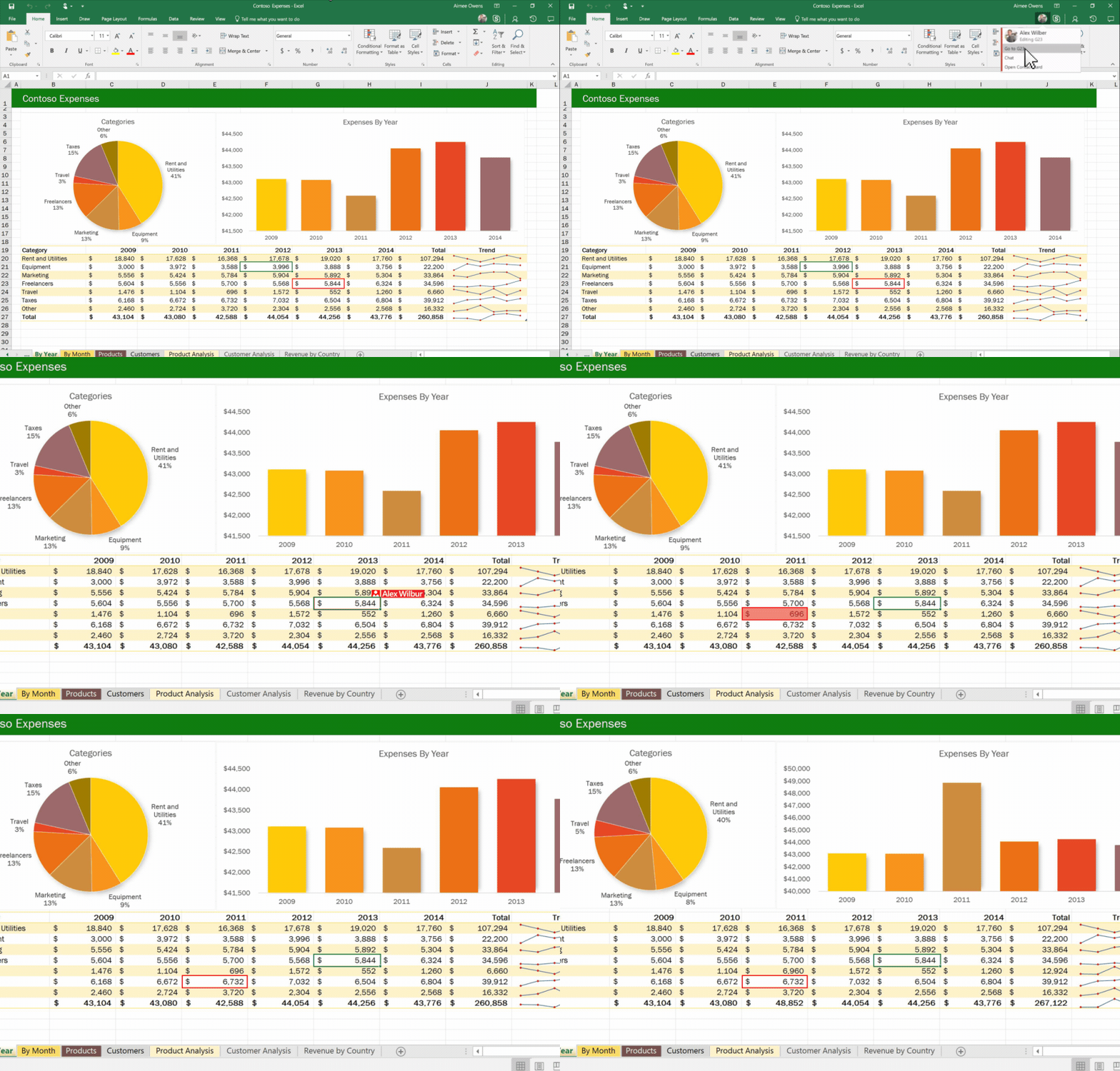
First up is Excel 2016 for Windows, which is getting co-authoring support in the latest Office Insider Fast ring build to better enable teams to work together on crunching numbers. The feature lets users know who is already working in a spreadsheet and to make changes that are viewable by all co-authors within seconds. Excel co-authoring is already available for everyone using Excel Online and Excel for Android and Windows Mobile. Office for iOS Office Insiders have access to co-authoring and it is coming to Excel for the Mac as well.
Next is OneNote, which is receiving the ability to graph handwritten equations, as well as manipulate variables and see the effects immediately. The new equation-inking feature also helps students learn the steps required to solve equation systems. The new OneNote functionality is available in OneNote for Windows 10 for all Office 365 subscribers.

OneNote for Windows 10 is also getting an Accessibility Checker that will highlight issues that make content hard to use for people with visual impairments, along with recommendations on fixing them. Other OneNote improvements include the addition of Windows Ink support and a Draw tab to OneNote Online using Microsoft Edge and Internet Explorer, Google Chrome, Apple Safari, and Firefox. Both of these features are available for all users.

Finally, in terms of Office app improvements, Microsoft added new Excel and PowerPoint integrations to its Visio application. The new Data Visualizer templates make it easy to create flowcharts directly from Excel with just a few clicks. The new Slide Snippets pane lets users grab diagrams or snippets, add titles, and then export them as PowerPoint slides, complete with Morph transition support. The Data Visualizer feature is available in Visio 2016 for Office Insider Slow users, and Slide Snippets is available in Visio 2016 for all Office 365 subscribers.

Microsoft also highlighted the release of its Microsoft Bookings app for Office 365 Business Premium subscribers, which lets them schedule and management customer appointments. And Microsoft Teams also received its general availability, with the company specifically noting its availability for Office 365 Education users.
Office 365 continues to be an important business line for Microsoft and as usual, its monthly updates continue to ramp up productivity. You do need to be an Office Insider to be the first to make use of the newest features and you can sign up here.
A Dark Room is free in the Google Play Store and you should check it out!
Who doesn’t love a free game? Get A Dark Room today from the Google Play Store!
Thanks to Google’s ‘new’ plan to offer some paid apps for free on a weekly basis, you can now get A Dark Room for free from the Google Play Store. It’s a text-driven adventure game that might seem unassuming or boring when you first start out… but just you wait.

The game starts in a black room, signaled by a black screen. “The room is freezing.” You start a fire and suddenly the screen brightens up a bit. “A ragged stranger stumbles through the door and collapses in a corner.” Well, it beats being alone in the middle of nowhere.
Your goal is to keep the fire going and collect supplies, as more lost wanderers stumble across your encampment as it slowly grows village. I’ll leave it for you to discover from there, since this is one of those games you just need to experience for yourself. I’d compare it to Reigns in terms of its simple gameplay and unique style of storytelling, except solely relying on text and your own imagination.
A Dark Room features no ads, no micro transactions, no permissions and no data usages. It’s only available for free for the next 7 days before it jumps back to its regular $.99 price, so don’t miss out!
Android Gaming

- Best Android games
- Best free Android games
- Best games with no in-app purchases
- Best action games for Android
- Best RPGs for Android
- All the Android gaming news!
Watch as Google walks you through the new wonders of Android O
Don’t feel like reading up? Watch Google’s Android O video for its developers instead.
Developers, get excited! There’s a new version of Android on the horizon and it is chock full of new and exciting features to integrate into your apps. Users, you can get excited, too, because these new features mean better apps and an overall better experience on Android.
To get developers revved up and into the trenches of the Android SDK, Google published an Android O Developer Preview video. Sit back, relax, and bring a pen and some paper (or a Chromebook with a comfortable keyboard) to take notes. The video will teach you about new changes to Android, including background restrictions and notifications channels.
Bungie just released the first Destiny 2 teaser trailer – watch it here
Destiny 2 already has a trailer.
A day after developer Bungie and publisher Activision announced the sequel to Destiny, we now have a cinematic teaser trailer for the upcoming shooter, though it doesn’t reveal any new information about the game’s release date or platforms. The teaser shows a up close of Cayde-6, who is talking and drinking at a bar, but at the end, the frame pans out to show Cayde-6 in the middle of a battle.
The battle appears to be the ruins of the Last City, but that’s not confirmed. All we know for sure is that Destiny 2 is the name of the upcoming MMO/first-person shooter hybrid, and it will be released this autumn. Oh, and based on this trailer, it looks like Destiny 2 will feature some humor, where as the original Destiny, which launched for PS3, PS4, Xbox 360, and Xbox One, had a much more grim tone.
- Best upcoming PS4 games to look forward to in 2017
- Destiny review (2014)
PlayStation’s YouTube also confirmed that Destiny 2 will feature PS4 exclusive content. A promotional poster for the game, which was leaked by an Italian site Lega earlier this week, mentioned the game should release in September 2017 and that a beta would launch first for PS4.
We’ll probably learn more about Destiny 2 at E3 in June. Bungie said it will release the full Destiny 2 “reveal trailer” on 30 March.
 AIVAnet