


Apple’s iOS 10.3 update is finally rolling out to the iPhone, iPad, and more
Why it matters to you
Apple’s iOS 10.3 update packs loads of improvements for all your related devices.
After months of anticipation, the newest version of Apple’s iOS operating system — iOS 10.3 — is finally here. In tow with the upgrade is Find My AirPods, a new filesystem, CarPlay improvements, and more.
Here is what you can expect.
Find My AirPods
One of the most significant additions is Find My AirPods, a feature which makes tracking down a pair of Apple’s wireless AirPod earbuds easier than ever.
Unlike Find My iPhone, which uses a missing handset’s GPS, Find my AirPods by querying the device to which your AirPods were last paired (if they were connected to a Mac, for instance, it will request the computer’s location). It will use that to log the earbuds’ location and serve up the info in the Find My iPhone app.
A new file system
The new version of iOS boasts an entirely new file system: Apple File System (APFS). Announced at the company’s Worldwide Developer Conference in 2016, it is designed to scale across devices like the iPhone, iPad, Apple Watch, and more.
Apple File System replaces the 31-year-old hierarchical file system (HFS) for iOS devices — a file system originally designed for floppy and hard disks. It packs better encryption, efficient compression, and a native screenshot feature that can restore files on a Mac or iOS device.
More: Apple’s Find My AirPods features makes it nearly impossible to lose your ‘buds
APFS is also designed to be low latency, which should translate to improved read and write speeds. At WWDC last year, Apple showed how APFS saved time on a file copy compared to HFS.
Thanks to the way APFS calculates available storage, some users might see a slight bump in available storage.
Verizon iCloud calling, Apple ID, and CarPlay improvements
If you’re on Verizon, you will be happy to hear that iOS 10.3 supports iCloud calling features. Once you have installed the update, you will be able to make and receive voice calls on your Mac, iPad, iPod touch, and even Apple Watch.
In the Settings app, there is a new section for Apple ID profiles. You will see your contact information, security settings, payment information, App Store settings, Family Sharing settings, and more on a single page. You will also see every Apple device where you are signed in.
More: When iOS 10.3 ships, developers will gain ability to respond to App Store reviews
CarPlay users get an improved interface. Now, they will see three of the most recent apps in a dock aligned with the left-hand side of the screen — previously, CarPlay users had to return to the home screen to switch applications.
Miscellaneous improvements
That is not all that’s in tow with iOS 10.3. A new section at the top of the iCloud settings page makes it easier to see how your storage space is being used. A new weather layer in Apple’s Maps apps shows the local forecast. Transition animations have been spruced and sped up. And a podcast widget helps keep track of new and existing subscriptions.
Other improvements include the ability to play movies you rented on one iOS device on another device and a tool that allows app developers to respond to user reviews on the app store.
The new version of iOS is rolling to supported iPhones (iPhone 7 and 7 Plus, iPhone 6S and 6S Plus, iPhone 6 and 6 Plus, iPhone SE, iPhone 5S, and iPhone 5C), iPads (iPad Pro 12.9-inch, iPad Pro 9.7-inch, iPad Air 2, iPad Air, iPad 4th generation, iPad mini 4, iPad mini 3, iPad mini 3), iPod touch (sixth generation), Apple TV, and Apple Watch devices gradually. But if you’re the impatient type, check our guide on how to install iOS 10.
Microsoft patent is for a 2-in-1 featuring multiples displays with hidden borders
Why it matters to you
Anyone looking forward to innovative new Microsoft Surface products will be happy to see that the company keeps coming up with new ideas.
There’s a great deal of uncertainty around Microsoft’s plans for its next Surface devices. The Surface Book and Surface Pro 4 replacements appear to be delayed, and the much-rumored Surface Phone remains something of a unicorn.
However, there’s no doubt that Microsoft continues to look hard at new and potentially innovative concepts for its hardware line. One of the company’s latest patents, for a 2-in-1 with dual touchscreens, is a testament to the company’s forward-looking nature, as Hexus reports.
More: New Surface Book and Surface Pro machines may not be coming this spring
This isn’t the first time that Microsoft submitted a patent application for a device with a foldable display. From this latest patent’s images, however, it appears that this concept is aimed more at a tablet-sized device than a phone. Other possibilities include a companion display that could work with a smartphone or tablet to provide more screen real estate.
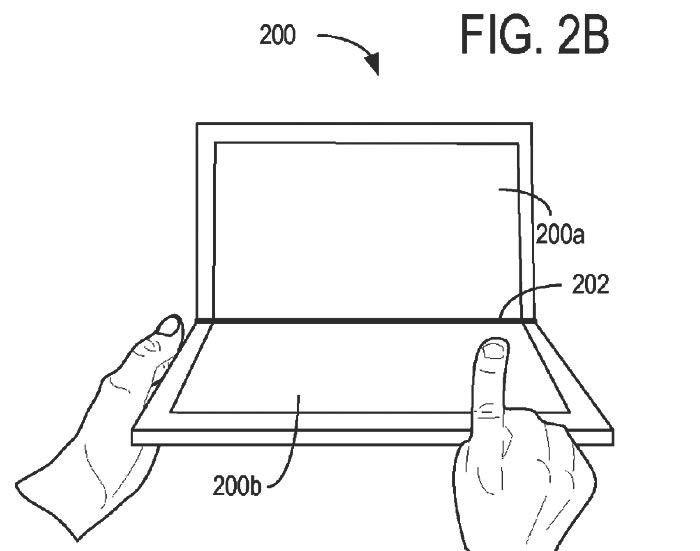
Another possibility is that multiple devices could combine to create larger screen surfaces, something that would be enhanced by using extremely thin or nonexistent bezels. In fact, much of the patent’s copy is devoted to describing a display that uses multiple panels bonded together in such a way that the user’s eyes are diverted away from any seams between displays.
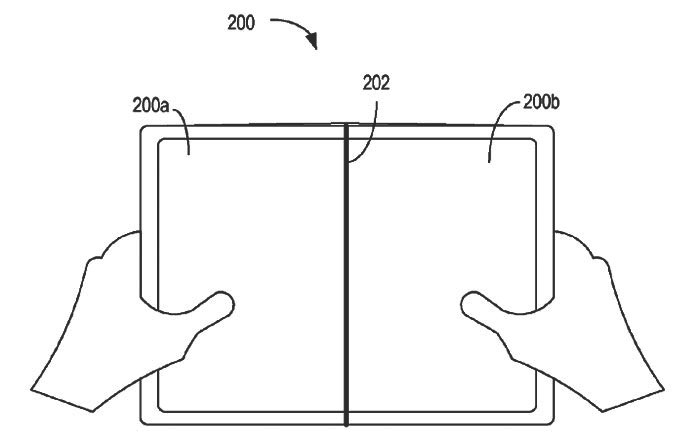
For example, the document states, “To direct light from the curved display panels to the user’s eye, display device includes one or more redirecting optimal elements, including but not limited to a prism array, a cylinder Fresnel lens, a cylinder diffractive lens… .” The purpose of such a complex design is to “further obscure the support structure,” which means to create the illusion that multiple displays are actually a single unit.

Many patents that are filed never result in marketable products, of course, so there’s no guarantee this technology will ever see the light of day. However, Microsoft has a history recently of introducing some highly innovative and forward-looking hardware, and recent delays in the release of the next Surface machines fail to change that fact.
How to find lost AirPods with Apple’s new Find My AirPods feature
Apple has released the iOS 10.3 software update for iPhone and iPad, and it introduced a new feature called Find My AirPods.
Find My AirPods makes it easier to keep track of the Apple AirPods wireless earphones. It works with AirPods that are connected to an iOS device via Bluetooth, meaning it can only locate AirPods that are nearby, but if your AirPods were lost out of range of an iPhone, it does offer up some location clues. Here’s everything you need to know, including how the feature works and its limitations.
- Apple AirPods firmware update: How to check install latest version
- How to turn on Apple’s Night Shift mode and adjust the colour on Macs
How does Find My AirPods work?
Find My iPhone app
If you haven’t already, download the Find My iPhone app on your iOS device, or locate the feature from iCloud.com. Find My AirPods is a new function within Find My iPhone. If your AirPods are not in their case but are connected to an iPhone, they will appear on the Find My iPhone map (just like an iPad, iPhone, Apple Watch, or Mac). If your AirPods haven’t been used recently, they’ll be marked “offline”.
Locating lost AirPods (nearby)
If you have misplaced your AirPods somewhere nearby, Find My AirPods can locate it by playing a chirping sound that gets louder.
- Open Find My iPhone on an iOS device (or from iCloud.com).
- Tap AirPods in the list.
- Tap Actions.
- Tap Play Sound. If only one AirPod is missing, you can mute the sound coming from the AirPod you haven’t lost.
- To stop the sound once the AirPods are found, tap Stop Playing.
Locating lost AirPods (far away)
If your AirPods aren’t connected to your iPhone, they cannot play a sound. But you can still use Find My AirPods to figure out their last-known location. The last place they were connected to an iPhone over Bluetooth will be displayed in the Find My iPhone app. Just tap the little car icon to get Apple Maps directions for the last-known location.
Is that it?
Yes. Just remember your AirPods cannot play the chirping sound while they’re in the case. Also, Apple does offer AirPods replacements if one is lost and can’t be found. It costs $69 to replace a single AirPod or to replace the AirPods Charging Case.
Destiny 2 confirmed: Bungie and Activision tease new game’s logo
Destiny is officially getting a sequel.
Developer Bungie and publisher Activision have announced a sequel to Destiny via Destiny’s official Twitter account. The tweet showed an image of the sequel’s logo – with a numeral two in Helvetica behind the word Destiny. It is the same logo that surfaced last week, thanks to a promotional poster for the game, which was leaked by an Italian site Lega. That poster mentioned a release date of 8 September 2017.
pic.twitter.com/n1M4zdGE5K
— Destiny The Game (@DestinyTheGame) March 27, 2017
The poster also said a beta would launch first for PlayStation 4, though Bungie and Activision haven’t confirmed those additional details yet. All we know is that Destiny 2 is the name of the upcoming MMO/first-person shooter hybrid, and it will be released this autumn, three years after the original Destiny, which launched on 9 September 2014 for PlayStation 3, PS4, Xbox 360, and Xbox One.
- Destiny review (2014)
The game offers four expansions, which released throughout 2014, 2015, and 2016, as well as other paid add-ons and free content updates. For instance, Destiny’s latest and final major content update, called Age of Triumph, is scheduled to release tomorrow on 28 March.
We’ll probably learn more about Destiny 2 at E3 in June.
Is the co-founder of Android about to announce this new smartphone?
Andy Rubin – a former Google executive who once oversaw the development of Android – just teased an unknown device.
Here’s the situation: Rubin, who left Google in 2014 after nine years, announced in January that he was starting a new company, called Essential, and that this company would be developing a high-end smartphone with an edge-to-edge display and minimal bezels. Now, via Twitter, he has teased what seems to be the first smartphone from Essential – and, as he already hinted, it has almost no bezel.
But that’s pretty much all we know. From the picture he tweeted, we can see that the phone has a speaker cutout at the top and maybe a volume rocker on the side of the device. Some reports have speculated that the phone seems to be running a version of Android, which makes since considering the phone is coming from Rubin’s own company, but that detail has not been confirmed yet by Essential.
I’m really excited about how this is shaping up. Eager to get it in more people’s hands… pic.twitter.com/LRzQCFSKTm
— Andy Rubin (@Arubin) March 27, 2017
Again, there’s little to go on from here. But we will keep you posted when we learn more.
Scientists turn spinach into a farm for human heart cells
In the future, you might not have to resort to exotic materials to create heart cells — you could just raid your grocery store’s produce section. Scientists have invented a process that turns spinach leaves into farms for functioning human heart cells. The team started by pumping a detergent solution through the spinach, stripping it of its plant cells and turning it into a ghostly shell made mostly of cellulose. After that, they cultured heart cells on the remaining structure, sending both fluids and microscopic beads through the vegetable’s now-empty veins in order to feed the new cells.
The result is a safe and potentially ideal bed for growing heart tissue. Existing approaches to generating heart cells, such as 3D printing, aren’t good at replicating the extremely complex network of veins needed to grow cells — spinach already has that. And when cellulose is bio-compatible, you don’t have to worry about hostile interactions between the heart cells and their host.
As is often the case with this kind of research, it’ll be a long while before this method is ready for practical use. If it pans out, though, it could lead to an affordable and eco-friendly of growing replacement tissue for heart attack patients. You could potentially apply this to other body replacements, too — the researchers suggest that wood’s structure might be helpful for generating bone. They’ve already applied this method to parsley, peanut hairy roots and sweet wormwood, so it’s more a question of finding use cases than overcoming technical hurdles.
Via: Ars Technica
Source: WPI, ScienceDirect
Dell’s 8K monitor is available for $5,000
Dell introduced its 31.5-inch 8K monitor at CES, which the company claims is the world’s first consumer screen to meet such a ridiculous resolution. While it took a backseat to the artist-aimed Canvas at the tech show, the Ultrasharp 32 is finally available on Dell’s online store for initial shipping in mid-April. Assuming you’ve got a spare $5,000 to spend.
Of course, you probably won’t plunk down that cash to use your fancy 8K monitor for high-end gaming or a VR ride. As we pointed out when we first saw it, the Ultrasharp 32’s 7,680 by 4,320 pixels and 100 percent Adobe RGB and sRGB color support will most benefit artists and photographers that need to view and edit massive files. It has a maximum 33.2MP resolution and 280 PPI density, but you’ll need to pipe in the visuals over two DisplayPort 1.3 ports, so make sure your machine has a pair freed up.

Sure, $5,000 is a hefty pricetag for visuals, but it’s a far cry from the $130,000 professional use-only 82-inch TV Sharp debuted in September 2015 . While LG and Samsung both introduced consumer-facing 8K-ready televisions at CES, they didn’t come with cost estimates or release dates. Dell’s Ultrasharp may be the only 8K ultra high resolution screen on the market for awhile.
Via: PetaPixel
Source: Dell online store
Gigantic drones may be the key to low-cost air shipping
Wonder why some companies still ship products on boats instead of speedy aircraft? It’s because air freight is much more expensive — the costs of the crew and fuel quickly add up. Natilus, however, thinks drones might offer a solution. The startup is prepping enormous, 200ft-long drones (roughly the size of a Boeing 777) that would haul up to 200,000lbs of cargo over the ocean. They’d theoretically reduce the cost of air freight in half by eliminating the crew and improving fuel efficiency. And while the drone likely wouldn’t be cleared to fly over populated areas, that wouldn’t matter — it’s designed to land on water and unload its goods at a seaport.
The idea is ambitious, to say the least, but there is a practical roadmap for making it a reality. A 30-foot prototype is poised to fly near San Francisco this summer. If that goes well, the next steps are finishing a full-scale prototype (due in 2020) and taking customers.
The main obstacle? Funding. As Fast Company explains, Natilus is currently a tiny company with three regular employees and under $1 million to its name. It’s going to need a lot of interest from investors to make its drones a reality. Thankfully, that might not be too hard. If the project works as planned, it could cut overseas shipping times down to less than a day without leading to absurd costs. You’d be more likely to get your online orders quickly, and it would be more practical to ship time-sensitive products like food.
Via: Fast Company
Source: Natilus
How to Use Theater Mode on the Apple Watch in watchOS 3.2
Introduced in watchOS 3.2, Theater Mode is a simple but useful feature that’s designed to prevent the Apple Watch’s screen from activating when you raise your wrist.
It’s useful in situations where the bright screen can be a distraction, such as a movie or a play, and it’s also useful for those who like to sleep with their Apple Watches.
Subscribe to the MacRumors YouTube channel for more videos.
Activating Theater Mode
Theater Mode is available as an option in the Apple Watch Control Center, so toggling it on and off is simple.

Raise your wrist to activate the Apple Watch screen or press the Digital Crown.
Swipe up from the bottom of the Apple Watch to bring up Control Center.
Swipe up again to access the icon that looks like a pair of theater masks.
Tap the masks.
A screen will pop up explaining theater mode. Tap again to activate it.
While Theater Mode is active, you’ll see an the icon at the top of the Apple Watch whenever you view the screen. To turn it off, open up the Control Center again and tap the Theater Mode button.
How Theater Mode Works
When Theater Mode is enabled, the screen will remain dark when you raise your wrist instead of lighting up. It will also stay dark when a notification is received, but you’ll still know if you get an incoming text or other alert because haptic feedback remains on.
Accessing Notifications While Theater Mode is On
You’ll continue to get a tap whenever there’s an incoming notification when Theater Mode is turned on, and to view it, you’ll need to press the Digital Crown or tap on the screen.
Tapping, pressing the Digital Crown, or pressing the side button is also how you check the time when Theater Mode is enabled.
Related Roundups: Apple Watch Series 2, watchOS 3
Buyer’s Guide: Apple Watch (Neutral)
Discuss this article in our forums
Analyst Suggests Third-Generation Apple Watch Will Include Cellular Connectivity
Based on supply chain analysis following a trip to Asia, Susquehanna Financial Group analyst Christopher Rolland (via Barron’s) believes Apple’s third-generation Apple Watch may introduce cellular connectivity, a feature that’s been long rumored for the device.
Specifically, Rolland suggests the 2017 Apple Watch will include a SIM card for LTE connectivity and that the next-generation device will be promoted alongside the AirPods.
We understand a model of the next Apple watch will include a SIM card, and therefore is likely to support LTE. We understand some issues remain, including battery life and form factor size, but significant progress has been made. Apple may be employing VOIP and data across a CAT-M1 connection for superior battery life.
Apple will tout interoperability with the company’s AirPods (now on back order till May) to make and receive phone calls (perhaps a small win for Maxim with amps in each ear bud). Positive QCOM, MXIM.
Apple has likely been working to add a cellular modem to the Apple Watch for several years, but has been unable to do so due to excessive battery drain. In early 2016, rumors suggested the second-generation Apple Watch would include cellular connectivity, but that didn’t pan out.
Mid-2016 rumors indicated Apple was researching low-power cellular chips for future versions of the Apple Watch, but was unable to make it work for the second-generation device, so the technology could potentially be ready for inclusion in a 2017 Apple Watch.
The addition of standalone cellular connectivity would further untether the Apple Watch from the iPhone, a process that started with the introduction of GPS in the Apple Watch Series 2. With a cellular connection, Apple Watch owners would not need an iPhone nearby to do things like make phone calls and stream Apple Music content, but a separate data plan would likely be needed.
Other Apple Watch 3 rumors have pointed towards a modest update that focuses mainly on under-the-hood hardware improvements to boost performance and battery life, and while we haven’t heard much information on a third-generation device, a refresh could come alongside the iPhone 8 in September.
Today’s report from Rolland also touches on some previously mentioned 2017 rumors, suggesting all three rumored iPhone models will feature wireless charging capabilities and will be charged through pads manufactured by Pegatron and Foxconn. “There is some skepticism regarding charging efficiency,” writes Rolland, “as it may take 3 hours to receive a full charge.”
While long-range contactless wireless charging was originally rumored to be included in the 2017 iPhone, later information has centered on inductive charging methods, which would require a separate charging mat or other similar charging device.
The analyst also believes Apple will eliminate the Home button in the iPhone 8, but the Lightning port will stay. He suggests there has been “serious consideration” for removing the Lightning port in 2018, however.
Rolland does not have an established track record for predicting Apple’s product plans, but the information he’s shared today is not outlandish and echoes past rumors. Still, cellular connectivity for the Apple Watch has been rumored multiple times in the past, so it’s worth viewing today’s note with some skepticism until additional information is available.
Related Roundups: Apple Watch Series 2, watchOS 3, iPhone 8 (2017)
Tag: Susquehanna
Buyer’s Guide: Apple Watch (Neutral)
Discuss this article in our forums
 AIVAnet