


Amazon considers opening augmented reality furniture stores
Amazon’s retail plans could extend well beyond books and groceries. New York Times sources hear that the internet giant is “exploring” the possibility of appliance and furniture stores with a technological angle. You’d use augmented or virtual reality to see how items would look in your own home, making it easier to pull the trigger on that new couch or stove. And there’s a chance that Amazon might challenge some of its tech rivals more directly in retail, too.
Reportedly, Amazon is mulling an electronics store that would be similar in concept to Apple’s shops. While Amazon’s bookstores already carry some of its devices, these would have a “heavy emphasis” on hardware and services like Echo speakers and Prime Video.
The Times is quick to point out that talking about stores isn’t the same as definitive plans. There’s a chance that Amazon will scrap the ideas if they prove to be unworkable. Even if that happens, this still shows just how much Amazon’s philosophy has changed over the years. It was originally known for rendering physical stores obsolete — now, it seems bent on reinvigorating retail by using its internet expertise as an advantage. The furniture and electronics stores in particular would represent an admission that shoppers still want hands-on time with products when possible, even if they’re happy to purchase online.
Source: New York Times
NASA picks 10 smallsat missions to explore the Solar System
Some missions don’t require big spacecraft to accomplish. Take for example, these 10 projects under NASA’s Planetary Science Deep Space SmallSat Studies (PSDS3) program. The agency picked 10 projects from PSDS3 to develop mission concepts that use small satellites to study different celestial bodies in the Solar System. NASA awarded the projects a total of $3.6 million to get their concept planning started, but it’ll take some time before they’re ready for take off. Small satellites are spacecraft that weigh less than 400 pounds, and could be as big as a fridge or as small as a single CubeSat unit that measures 4 cubic inches.
Two of the projects focus on Venus. One team plans to build a 66-pound probe to measure noble gases and their isotopes, while the other wants to use a 12-unit CubeSat to measure its atmosphere’s ultraviolet absorption and nightglow emissions. A team from the Smithsonian Astrophysical Observatory wants to send a 12-unit CubeSat to map the elemental composition of the moon. Another group from NASA’s Goddard Space Flight Center plans to launch a 12-unit CubeSat of their own to investigate the lunar hydrogen cycle.
A team from Johns Hopkins University wants to send a small satellite with deployable seismometer to rendezvous with an asteroid and explore both its surface and interior structure. Meanwhile, a team from Lockheed Martin wants to put together a constellation of 6-unit CubeSats to assess asteroids’ physical structure.
Purdue University plans to build a 12-unit CubeSat that can take high-resolution photos and study the surface material composition of Martian moons Phobos and Deimos. Anthony Colaprete from NASA Ames wants to send a 24-unit CubeSat to the red planet in order to understand its daily climate variability. Hampton University’s team aims to send a probe to Uranus to study its atmosphere. Finally, a group from Southwest Research Institute wants to use a small satellite to explore Jupiter’s magnetosphere.
These smallsats could provide preliminary data needed for much bigger projects in the future. They’re also not as expensive to launch, since they’re typically loaded as auxiliary payloads. Jim Green, director of the Planetary Science Division at NASA Headquarters in Washington, explains:
“These small but mighty satellites have the potential to enable transformational science. They will provide valuable information to assist in planning future Announcements of Opportunity, and to guide NASA’s development of small spacecraft technologies for deep space science investigation.”
Source: NASA JPL
36 must-have Pebble Time apps, watch faces, and games for your wrist
The Pebble was one of the first major smartwatches to hit the market, long before the Apple Watch and Android Wear secured a spot on our wrists. The Pebble Time launched a new look, with the same great battery life, a color display, and rounded bezels. Several new models have followed since then, along with a slew of apps spanning several distinct categories. Here, we’ve picked the ones that we think showcase the versatility and potential of the Pebble series.
More: Pebble acquisition could help Fitbit build a successful smartwatch
To find any of the many watch faces listed below, simply open your Pebble app for Android or iOS, and search for the app’s name. The watch faces can be found in the “watch faces” section, while everything else is in the “app” category. While the watch faces are compatible with all operating systems, keep in mind that some Pebble Time apps require additional third-party OS apps, and may only work on Android or iOS.
Watch faces
These watch faces all offer great style. Pick the ones you think will best complement your Pebble Time’s look and feel.
Straight

Straight is just as the name sounds: This smartwatch face cuts to the chase with a clear, simple, easy way to tell the time, date, and weather.
BCD Minimalist

Simply reading an analog or digital output of time is too easy for some. Luckily, there’s a binary watch face option out there for individuals who are so inclined.
TH3
 It’s hard to make an analog watch look good on a square display, but TH3 manages to accomplish it with its sleek clock that comes in a plethora of colors.
Tick Tock Weather
 Tick Tock Weather is perhaps the most immersive watch face for the Pebble Time. It doesn’t just tell you the time and weather, it shows you, with cartoonish animations that blend beautifully with the Pebble Time’s design.
Forecast Weather
 Forecast Weather is another weather-based watch face that channels your inner meteorologist. It shows weather, time, and date at-a-glance; but it can also reveal in-depth historical data, forecasts, barometric pressure, and other info from your local weather station.
Daily Steps

The Daily Steps watch face makes keeping up with your fitness activity as simple as checking the time. Rather than having to load an app every time you want to view your daily metrics, this watch face illustrates your activity alongside a 24-hour clock. The watch face even makes it possible to compare today’s activity with that of the previous day.
Timely

Timely shows all your important information at a glance. It showcases the time and date, as well as your watch’s battery status, connection, and charging indicator. The watch face’s best feature, however, is its monthly calendar. All the display items, date format, and style are configurable via the settings menu, rendering Timely one of most versatile watch faces available.
Mario Time

This Mario watch face is as fun as it is functional. Mario jumps every minute, hitting the boxes and changing the time, and the background changes from black to blue to reflect the time of day. The watch face can also show the weather and battery level, as well as as the battery level of your smartphone via a companion app for iOS and Android.
Daily
What do you turn to on a daily basis? These apps for the Pebble are the “super useful” ones that help make your day-to-day life that little bit easier.
Glance
 If you own a Pebble and an Android device, you have to use Glance — enough said. This app offers dozens of features from weather to custom watch faces and more. It’s now updated for the Pebble Time’s color interface.
Uber
 Uber is the must-have taxi app that now lives on your wrist. Hail a ride, track its arrival, and get all the info about your trip right from your Pebble.
Pandora

With the Pandora app, all of your favorite artists are just a touch away. It allows you to easily search by genre, artist, or song, so you can find a tune for virtually any occasion.
ESPN
 ESPN has updated its app for the new Pebble Time, throwing in a crisper, more colorful display to get game highlights, track game day scores, and more.
Wikipedia Nearby
 Wikipedia boasts a wealth of information, and this app brings a location-based Wikipedia to your wrist. Learn about interesting nearby landmarks while waiting for the bus, or discover something you never knew before.
Tools and Utilities
It may not look like a Swiss Army Knife, but these tools and utilities for your Pebble Time can add a ton of functionality for the smartwatch.
QuickAuth
 One great way to add a level of security to your accounts is to get two-factor security, requiring a secondary code when you log in. This Pebble Time app supports Google, among other two-factor solutions, and is a must have for convenience and added account security.
Pebble Dialer
 Pebble Dialer is a quick and easy way to manage incoming and outgoing calls from your Pebble, with some extra features and options compared to the Pebble Time’s default experience.
Radar
 Radar is a fun, but somewhat versatile app that lets you see where in the world other Pebble owners are at that moment, perhaps for an impromptu dance party (or probably just bragging rights about being a fellow Pebbler.)
Timer

Timer is actually the most “liked” Pebble utility. Yes, it’s just a timer; however, with wearables, there are plenty of situations in which a timer is exactly what you need. From gauging per minute miles to timing breaks between sets, sometimes you don’t need to reinvent the wheel to make a widely useful tool.
PebbSpeed
 Some drivers drift over the speed limit without noticing it — at least until the police pull their cars over. PebbSpeed is a friendly reminder while driving that you’re reaching or exceeding the speed limit for the road you’re on. It uses your smartphone’s GPS to calculate the speed.
Watchnote
 Watchnote remains one of the most popular note-taking apps out there for tablets, PCs, and now, even your Pebble Time. This version of the app can track reminders, read notes, go over grocery lists, and carry out a host of other actions.
Alarms++

Need your Pebble to wake you up? Alarms++ enables you to set up to 32 different alarms. You can specify the days of the week with descriptions for the alarms, set one-time alarms, and even set alarm descriptions using your voice. You can even set it so that it requires a specific key sequence to dismiss your alarm, if you find it hard to wake up in the morning.
Notifications
Keeping up with important information is easy thanks to the Pebble. While the app already forwards email and text messages, some apps help take things a step further.
Cards for Pebble
 Pebble Cards is a completely customizable card system sort of like Google Now, but for your smartwatch. It offers important information and notifications based on your personal preferences.
Deliveries
 Wondering where your packages are? Deliveries supports package tracking numbers from all the major parcel companies and will tell you where your package’s location, when it will arrive, and any other important information — all without digging up the tracking ID from a website.
Pebbler

Everyone needs to get their Twitter fix, and for some, this is even possible from your wrist now. Pebbler will let Pebble Time owners get their latest notifications on Twitter from people they follow, or even from special customized lists of keywords or user accounts.
Awear

If you want an instant communication app, then Awear is for you. Awear requires you to install a companion app on your Android phone, but doing so allows for instant two-way communication. Not only does it allow you to respond to messages, but you can also mark your SMS, emails, and Hangout messages as read. There are calendar notifications and daily weather forecasts, too.
Remotes
The Pebble Time’s connection to your phone enables a number of remote control options from your smartwatch for music and more.
Music Boss
 Music Boss is the most powerful music companion app for Android users of the Pebble Time. It supports playing your smartphone’s own music files, but it also works with Google’s cloud music service too, meaning you’ll always have something worth listening to from your smartphone.
Leaf

As IoT-like services like smart lights and smart thermostats take over, it’s a no-brainer that there is an app for the Google Nest smart thermometer. This app can control vacation mode, set fan and cooling modes, and check up on most features available from a Nest.
Toggles
 Easily control your Android smartphone’s volume, Wi-Fi, Bluetooth, and other important settings with Toggles. This app gives one-touch access to these settings, as well as a view of remaining battery life and active connections.
Dashboard
Dashboard is a brilliant app that lets you see your Android phone’s status and control different features directly on your Pebble. You can see your network’s signal strength, your phone’s battery level, and even how much free space you have left on your smartphone. There are also toggles for turning on both Wi-Fi and data, along with a handy “Find phone” feature that prompts your phone to sound off in the event you can’t locate it.
Health & Fitness
Whether it’s for keeping track of runs or the score for the game, there are tons of apps related to health and fitness activities.
Runtastic
 Runtastic is one of the best fitness companions for Pebble Time owners who like to run. It connects to the Runtastic service you probably already know on your smartphone, adding the extra convenience of marking laps and tracking performance from your wrist.
Morpheuz
 Morpheuz takes advantage of the Pebble Time’s internal accelerometer in order to track your movements while you sleep each night, revealing sleep patterns and determining the best time to wake you up for the day ahead.
121GYM

The 121Gym app is full of helpful accessories and comes programmed with more than 200 exercises. The app can also suggest exercises, track reps, and even be used as a timer between sets.
Runkeeper

Runkeeper is one of the most respected and well-known fitness apps for the Pebble. This companion app works with the app installed on your smartphone, and it’s available for both iOS and Android. With Runkeeper, you can track your runs, hikes, and more using the GPS feature baked into the Pebble.
Misfit

Misfit is an app that can track not only your fitness activities, but your sleep as well. You can see your fitness and sleep history, and you can set goals that suit your individual fitness level. If you’re the owner of a Pebble Time Round, then you’ll also be happy to know that this app is compatible for the latter device, so you can enjoy one of the best fitness trackers available for the Pebble.
Games
Yes, even the tiny Pebble has games, so you can waste time without even taking out your smartphone.
Pebtris

Don’t hold the uncreative name against Pebtris. Heavy-handed jeu de mots aside, this app is the modern equivalent of the classic puzzle game with which everyone is familiar.
Tiny Bird
 We all know Flappy Bird, but do you know about Tiny Bird? This miniaturized version of the game is really, really hard to play, but it’s worth taking on the challenge while waiting for your stop on the subway.
Pixel Miner

Pixel Miner is a cute, unique game for the Pebble, now in rich colors for the new Pebble Time. This app for your smartwatch is all about mining as many pixels per second as possible, selling treasures, and killing tons of time.
Track two sleep cycles at once with the non-invasive Sleeptracker
Why it matters to you
Sleep affects everything we do. Sleeptracker helps make it better.
Everyone knows the importance of a good night’s sleep, but not everyone gets one. Sleep sets the stage for both physical and mental performance throughout the next day. However, even when people think they are getting enough rest, our bodies tell another story. Beautyrest’s new Sleeptracker monitor gives users a new level of understanding and offers simple solutions.
Unlike other monitors, Sleeptracker is a non-invasive solution that lays beneath a mattress to make any bed a smart bed. Up to two individuals can have a broad range of factors tracked simultaneously. Since there is nothing making contact with the users, there is nothing to keep them awake.
More: PangeaBed says its copper-infused mattresses will help you sleep cooler
“As one of the most trusted and recognizable bedding brands nationwide, we are proud to embrace the smart home movement with technology that provides a deeper understanding of how we sleep,” said Jim Gallman, Executive Vice President of Beautyrest Marketing. “The Beautyrest Sleeptracker monitor allows consumers to optimize their sleep habits and make improvements that can have dramatic implications for their overall quality of life.”
By pairing Sleeptracker with the matching app, the monitor provides an in-depth look at each user’s sleep cycle. They can check out their current behaviors, compare them to biometrical similar users, or access personalized tips for better performance the next day. Despite monitoring through a mattress, Sleeptracker is 90 percent accurate measuring both heart rate and breathing. This allows it to capture a minute-by-minute snapshot from light sleep to REM. The free companion app is available on both Google Play and the App Store.
Other features help set Sleeptracker apart from other monitors. If a user is prone to unexpected naps, the monitor can be set to automatically detect and monitor this data. It can also integrate with Amazon Echo. When it detects a light stage o sleep to wake users up, it can connect through Echo to any other connected device.
The Beautyrest Sleeptracker is currently available from Amazon for $199.
Lyft’s round-up program donates part of your fare to charity
Lyft has been positioning itself as the anti-Uber in light of its rival’s mounting controversies, and it’s determined to underscore that point. The ridesharing service has introduced a Round Up & Donate program that, as the name suggests, rounds up your fare and donates the difference to charity. Opt in and every ride will contribute some pennies to a good cause, whether it’s the environment, equality or veterans. It’s not going to contribute nearly as much as a straighforward donation, of course, but this could quickly add up if you’re a regular Lyft passenger.
The initiative is currently in a test form and will take a few weeks to reach everyone.
To some extent, this is about polishing Lyft’s own less-than-perfect image. It’s not immune to driver disputes and legal standoffs over background checks. Even so, the differences between Lyft and Uber are becoming harder to ignore. Between the new donation program and an existing tipping option, you’re bound to notice Lyft’s emphasis on kindness — even if you see it as a cynical marketing ploy, it could still make a big difference the next time you hail a car.
Via: TechCrunch
Source: Lyft
Score up to 48 percent off these popular Lenovo laptops for a limited time
If you’re a Lenovo fan, Amazon currently has some deals that are sure to impress. First up is the Lenovo Thinkpad Yoga 11E Touchscreen Convertible Ultrabook, which can be had for $300 (48 percent off). Next is the Lenovo ThinkPad 13 Chromebook, which has been marked down 30 percent to $209.
More: The Best Laptop You Can Buy

The Yoga 11E Ultrabook is both robust and powerful, able to resist drops from up to 90 centimeters. The convertible laptop is built with post-consumer recycled material and has a rubber bumper around the top cover that absorbs the force of side bumps, plus tough corners that are 50-percent stronger to reduce potential damage if dropped at an angle. The laptop even undergoes military-specification tests for high pressure, humidity, vibration, temperature shock, fungus, and dust.
Under the hood, the laptop has a reliable Intel N3150 Quad-Core 1.6GHz processor, 4GB DDR3 memory, and a SATA 128GB solid state drive. It features an 11.6-inch HD LED-backlit Touchscreen IPS display with 1366 by 768 resolution to showcase movies and games in stunning clarity. It comes with preloaded education software and integrated apps, and provides up to 11.5 hours of battery life.
The Lenovo Thinkpad Yoga 11E Touchscreen Convertible Ultrabook normally retails for $580 but is currently slashed in price to only $300 on Amazon.
 The Lenovo ThinkPad 13 Chromebook is ultrafast, ultrathin, and ultra-portable. It weighs in at only 3.2 pounds and is 0.78-inches thin, making it easy for you to be productive on the go. Add to that the up to 10 hours of battery life on a single charge and USB Type-C that charges the machine and your peripherals, while providing video and data I/O. The laptop features a Celeron processor, 4GB soldered memory, 16GB storage, and integrated Intel HD Graphics 510. The machine also undergoes military-level testing.
Running Chrome OS, it allows you to do everything through Google apps, eliminating the need for individual programs. Finally, the portable laptop has a 13.3-inch HD display with 1366 by 768 resolution, a low-light sensitive 720p HD webcam with wide-angle viewing and face-tracking, and dual noise-canceling microphones. Lenovo makes the laptop even easier to use by incorporating convenient multimedia keys for quick and easy access to microphone, speaker, and camera controls.
The Lenovo ThinkPad 13 Chromebook regularly retails for $300 but is currently discounted to only $209 on Amazon (30 percent off).
Buy for $300 now on Amazon
From the Editor’s Desk: Is Android O a boring release?
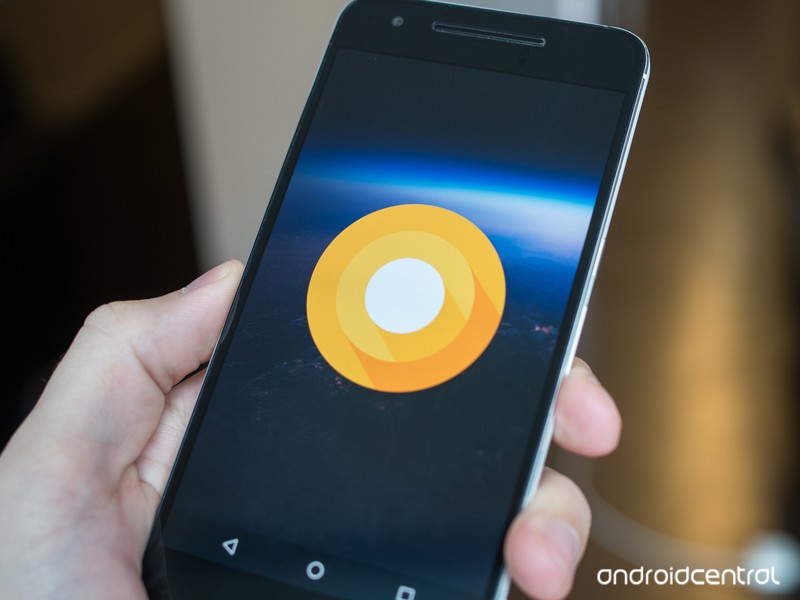
The lack of new whizbang user-facing features in O is a sign of Android’s maturity, but that doesn’t mean we won’t see big surprises for non-phone devices.
The big Android story of the week was Android O. Based on what we know about O so far, it would appear to be one of those Android releases, like KitKat or Marshmallow that tunes things up, adds under-the-hood enhancements and builds on already solid foundations.
There are important features for developers, like background app limits, which could significantly improve Android battery life. And new things for users, like native app badge support (finally!) and notification channels. But on the whole, normal Android owners could be forgiven for not really caring about O just yet. That’s understandable. Few phones will get the update this year, if the OS’s track record is any indicator.
Instead, Android O is what you’ll see for the first time next year on your Galaxy S9 or LG G7 or Huawei P11.
The fact that we’re not seeing any huge, sweeping user-facing changes since Nougat speaks to a couple of things. First, Android is a mature, stable OS, and Google isn’t tearing anything down and rebuilding it just for the sake of novelty. Despite ongoing issues moving the billion-plus ecosystem off older OS versions, Android is working pretty well. Even longstanding security weaknesses are starting to be addressed.
That’s not to say Android is going to stand still. O is still a very important release for developers, which is why they’re getting an early look at what’s coming. Eventually it’ll be time to shake things up — with a big new release more akin to the changes of ICS or Lollipop, but that time hasn’t yet arrived.
Read this excellent Jerrytorial to learn how Google might significantly change things up Android P and beyond, with the new Fuschia kernel.
The O Preview is important for developers, with more user-facing features likely to break cover at I/O.
It’s also worth pointing out that what we have in this very first developer preview isn’t anything close to a final, stable build. Dave Burke himself says in this blog post that new features are coming, and the likely venue for that is Google I/O this May.
Tablets are going to be a big piece of the puzzle. Google has struggled with tablets and convertibles, a category which fits between two current areas of strength — smartphones and Chromebooks. This is the weird, hard-to-define space that the rumored Andromeda OS, a new thing combining parts of Android and Chrome, may live. As the Pixel C heads towards unsupported status for new OS updates (in November 2017), Google essentially has to release a new tablet this year. It’s going to be very interesting to see what form that takes, and I suspect the parts of Android O that we haven’t yet seen could form a major part of that.
Aside from all that, the smartphone side of things will continue to tick along, in a year when phone hardware finally becomes interesting again. If recent Galaxy S8 leaks are any indicator, this next round of flagships will look and feel more futuristic than ever — an advance in smartphone design that comes along only once every few years.
So even if Android O isn’t the most exciting release ever for phones, there’s still plenty to look forward to.
Other odds and ends for a working Sunday:
- Great take from Jerry here on the mess that is Google’s messaging strategy. How long before another one drops off (or joins!) that list.
- Reminder that there’s just no way Android O is going to be anything other than Oreo
- Next week is Galaxy S8 week, and we’ll have everything you need to know right here on Wednesday afternoon.
- I’ll be heading out to London for a few days this coming week for Samsung Unpacked and a few other things (stay tuned!) I expect to find it much the same as I left it a couple of weeks ago. London’s shrugged off far worse.
‘StarCraft: Remastered’ upgrades a real-time strategy classic
Blizzard is legendary for keeping old games alive, but it’s going the extra mile this time around. The studio has unveiled StarCraft: Remastered, an overhaul that drags the 1998 real-time strategy game (including the Brood War expansion) into the modern era. It’s getting the obligatory fresh coat of paint, including higher-resolution graphics (with support for 4K resolution), improved audio and support for Blizzard’s current game launcher and multiplayer network. However, the team is also using this as an excuse to ‘fix’ the game by adding content and features you take for granted. There will be reasons to play even if you’ve played the classic title to death.
In the single-player campaign, you’ll see new artwork to help improve the storytelling. Multiplayer fans will see features that have been a staple of newer Blizzard titles, including “advanced” matchmaking, ladder play and social features. You’ll also have cloud saves for everything from your solo progress to custom maps and key bindings. About the only thing that won’t change is the core gameplay.
The revamp will be available sometime in the summer for both Mac and Windows users, with a price to be set later. You won’t have to wait that long to walk down memory lane, however. Blizzard is patching the original Brood War — yes, a 19-year-old title — to improve Windows compatibility and add features like rebinding and an eSports-friendly observer mode. And when the update is ready, StarCraft Anthology (including both the original game and Brood War) will be free.
Yes, this is another instance of a developer hopping on the remaster bandwagon. It’s a relatively easy way to make money from nostalgic gamers, and Blizzard has plenty of those given its track record. With that said, Blizzard has a better reason than most to revisit history. There was a 12-year gap between the original game and its sequel — many of those who cut their teeth on StarCraft II were too young to have played the first game when new, and the technological gap is so vast that the first game was quickly becoming unplayable. This gives younger players a chance to see what they missed, and lets veterans return even on a cutting-edge PC.
Via: Kotaku
Source: Blizzard
 AIVAnet