


Pressto’s Button piggybacks free cellular data to revolutionize the Internet of Things
Pressto can send unlimited, short messages for free, from anywhere in the world, and that could have a big impact on the Internet of Things.
The Internet of Things, or IoT as it’s commonly referred to, has been widely heralded as the biggest thing to happen to enterprise, manufacturing, and yes, even the humble family home. That’s because when “things” can talk to one another automatically — without the intervention of us dumb humans — magic happens.
When the things use Wi-Fi or Bluetooth — or protocols like Z-Wave and ZigBee — to chat amongst themselves, there’s no cost to this communication. But when mobile networks like 4G or LTE are needed, it’s a much more expensive proposition. For IoT devices that don’t have fixed installations, e.g. a dashcam in a car, there’s no other option: Customers will have to pay a carrier for the data transmission. For a specific class of IoT device however, that is about to change, big time.
IoT devices running on 4G or LTE is like hitting a mosquito with a sledgehammer.
Enter Pressto, a £40 (about $49 US) Amazon Dash lookalike, created by Swiss-based Myriad Group, a company whose roots in wireless telecom go back to 2001. Don’t let the Pressto’s similarity to Amazon’s one-click product ordering gimmick fool you: You can configure what the Pressto does using an online dashboard. Button presses initiate recipes, which at the moment are pretty basic. Recipes can send emails or post data to a server. The emails can contain a maximum of three types of data: A map showing the button’s location, today’s weather forecast, and the raw data generated by the button in JSON format.
If you’re yawning right about now, stay with us. The Pressto is actually a proof-of-concept device built on Myriad’s IoT platform, ThingStream.io, and uses the little-known Unstructured Supplementary Service Data (USSD) protocol to send short, 182-character messages to the Pressto server, across cellular networks.
More: A button for every order: Amazon has more than 250 Dash buttons for sale
Here’s the kicker: Not only can the Pressto send an unlimited amount of these short messages for free, the device works anywhere in the world that has a GSM network, costs very little to build from off-the-shelf components, consumes hardly any power, requires no carrier accounts or contracts, and there are no roaming charges. In fact, the only ongoing charge for using a Pressto is $5 a year. Even Amazon’s IoT version of the Dash can’t make that claim.
Put simply, Pressto just became the only device that can communicate with the internet, from anywhere, without the need of a paid carrier relationship, over existing GSM cellular networks.

Simon Cohen/Digital Trends
Myriad CMO, Bruce Jackson explains why the Pressto and its use of USSD changes everything. “A lot of people think of IoT services like Google Home or Alexa that are pretty rich, heavy-bandwidth applications,” he told Digital Trends. “But if you look at the whole spectrum of things you might like to do, there are loads of things that require relatively small amounts of data to be sent.” This is where Myriad’s repurposing of the USSD protocol comes into play. “USSD is a really good bearer for taking that kind of data,” Jackson said, and the evidence does seem overwhelming. Here’s a quick snapshot of what USSD can do. Think of USSD as a network engineer’s version of SMS. It has the same constraints on payload (182 characters per message), but with some awesome extra perks.
USSD messages are point-to-point. They originate with the sending device (in this case the Pressto button) and terminate at the destination (in this case, the Pressto servers). SMS messages make a stop along the way at your carrier’s SMSC (Short Message Service Center), where a copy of the message will reside for zero to four days, depending on the carrier. If you’re roaming, the number of copies increases with the number of carriers involved in getting the SMS message back to your home network. For privacy, USSD is much better.
Just like HTTP, USSD uses sessions. Once a device initiates a session with another device, that session will remain open until either the sender or receiver closes the session. In developing countries, the session-based nature of USSD is used for Facebook access on feature phones, via a menu system.
USSD is fast, with a latency that can be measured in milliseconds in some cases.
It’s low-power. The Pressto’s built-in rechargeable 800mAh battery is good for about six months between charges, even if the button is pressed several times an hour.
It’s free. While there are a few smaller carriers who charge for USSD messages, as a rule, most don’t. It’s legacy as a protocol used at the core of a network, rather than a subscriber-facing function like SMS, keeps it from being treated as a chargeable service.
Is there any other way to do the same thing?
The full implications of the Pressto button and ThingStream.io — the IoT platform built by Myriad that powers it — don’t become apparent until you consider the current state of the mobile connectivity marketplace.
Until now, if you wanted to create an IoT device that could communicate from anywhere, you’d need to create a relationship with a carrier that included roaming, acquire the necessary SIM cards, and then keep an eye on your business model to make sure the cost of communication didn’t outweigh the benefits. This can get so expensive, businesses have already gone to some unusual lengths to control it.
A device that has no internet connection of its own is able to communicate with a remote server for free.
“You would be amazed at the number of IoT devices in North America that are being done with SIM cards from European operators,” Jackson said, pointing out a reality in the current carrier environment: It’s often cheaper to buy data from overseas carriers and take the additional hit of roaming charges, than it is to buy data domestically.
For bandwidth-intense applications like voice or video, these carrier agreements still make sense. But when it comes to the low-bandwidth, low-power communications needed to run the millions of IoT devices that are now pouring into the market — like industrial sensors or switches — they can feel like overkill. These devices don’t need 4G or LTE — even the aging 3G standard is like hitting a mosquito with a sledgehammer — but where can you turn?
“People are looking at LoRa and Sigfox because there’s no great solution for it,” Jackson said. He’s referring to two new platforms, France’s SigFox, and LoRa, an alliance that wants to standardize “carrier-grade IoT communication,” both of which are slowly rolling out low-bandwidth alternatives to traditional carriers. Neither SigFox nor LoRa have anywhere near the size of the existing GSM network footprint, they both require investments on the network and client sides, and naturally there are charges to use them, even if these charges are more proportional to the data used than with GSM carriers.


Aaron Allsbrook, CTO of ClearBlade, lamented this situation recently, pointing to the challenge of connecting simple devices like lights and temperature sensors to the internet. “A lot of people think it’s difficult because of carriers, contracts, data charges, and because of roaming,” Jackson said. “We want to demonstrate that for a lot of applications that’s not true. We’ve built [Pressto] as a technology demonstration platform to show people it works.”
Can’t anyone do this?
Well, no, not exactly. Because USSD is a core GSM network technology, you’d need a carrier to let you link your USSD gateway servers via VPN to their core network architecture. Jackson claims that this is no small imposition and that’s it’s only by virtue of Myriad’s long-standing relationship with its partner carrier that it was able to do this. “For all intents and purposes, we are our own network operator,” he said.
Our biggest question to Jackson was just how Pressto could essentially use carriers’ networks without charges, especially if they sensed there was potential money to be made. After all, these are the companies that in the past charged 50 cents or more just for a SMS message, and many still do when one of these SMS messages is sent to a phone in another country.
More: Wireless sensor technology is upending the garbage industry in Europe
His answer was based partly on reality and partly on wishful thinking. “This is a line of business that carriers aren’t that keen to look at,” he said. “I think they’re after something different.” He reasons that carriers have spent so much money rolling out LTE that they’ll be exclusively focused on monetizing the apps that make use of that technology’s high-bandwidth capacity. Jackson also points out that carriers’ tendency to charge for equally low-bandwidth items like SMS messages had to do with perceived value to customers, not the cost of delivery. Since USSD has an even lower impact on networks than SMS, “We would have to be amazingly successful to even register as something that anyone would take any notice of,” he said.
So how does it work?
It took a few tries, but eventually Jackson was able to furnish us with a prototype Pressto button that does exactly what it promises. After quickly setting up an email-based recipe, a press of the button produced two green flashes of the tiny LED, and two corresponding beeps. Then about 10 seconds of silence, followed by a series of three beeps and flashes. A few moments later, the email arrived.

Simon Cohen/Digital Trends
That’s not exactly the millisecond response time we were expecting, but Jackson explains that there’s a lot going on between the button press and the email being sent. Pressto uses no power whatsoever while it’s waiting for you to press its button. When you do, it has to wake up, find and sync with the nearest cell tower, send and confirm its USSD package, and then shut itself down once more. The actual USSD transmission is very quick, but it’s bookended by some much slower processes.
None of this detracts from the fact that a device that has no internet connection of its own via Wi-Fi, ZigBee, Bluetooth, or smoke signals, was nonetheless able to communicate with remote server for free, and nearly in real-time.
What’s next?
Needless to say, Myriad hopes that Pressto will be the catalyst for an entire ecosystem of low-power IoT devices that use its ThingStream.io interface. Jackson pointed out that even though the current recipes and ingredients available to Pressto owners are limited, Myriad plans to create links to automation services like IFTTT. In fact, with the existing email functionality, IFTTT can already be used with Pressto as a trigger, even if it’s not a direct link.
During our interview with Jackson, a number of possible consumer applications immediately came to mind. The first was asset tracking. At the moment, tracking tags use one or more of Bluetooth, GPS, Wi-Fi, or cellular data for communicating their whereabouts. While Bluetooth and Wi-Fi are free, their range and power demands severely limit their utility.
One application would be a panic button that works globally, doesn’t require a phone, and is instant and free to use.
Those that use cell towers for triangulation are better for power consumption, but still require data contracts with carriers to pass the information back to the user, resulting in annual fees. With what Jackson describes as a “relatively straightforward engineering change,” these trackers could use the Pressto’s USSD messaging service to drastically reduce costs.
Another application would be a panic button/locator that works globally, doesn’t require a connected phone, is instant and free to use. If the price is right, it could a be no-brainer for everyone from parents to backpackers, to search and rescue operations.
There’s even a chance it could be used to power the next generation of smartwatches. Taking a page from a now-defunct product, Microsoft’s MSN Direct collaboration with Fossil, could succeed in a world where no true killer app for smartwatches has emerged other than fitness and notifications.
The big money however, will be in the industrial IoT. Everything from pipeline monitoring to weather stations are potential use-case scenarios, and as the global GSM footprint increases, so too will the opportunities for ThingStream.io.
Qualcomm licensing blocked Samsung from selling Exynos chips

Deal dating back to 1993 is reportedly why we’re not seeing more non-Samsung phones running Exynos.
South Korea’s Fair Trade Commission has claimed that Qualcomm blocked Samsung from selling its own Exynos processors to other manufacturers through a patent licensing deal, ZDNet reports.
The deal reportedly dates back to 1993, when an agreement was reached to allow Samsung to make its own modem chips using certain CDMA patents, but only for use in its own phones. Subsequently, either Samsung or the phone maker would’ve had to pay Qualcomm licensing fees if they wanted to use an Exynos SoC in a non-Samsung phone. Talks between the two to reach an alternative agreement reportedly broke down in 2013.
Since then, non-Samsung Exynos phones have been few and far between, with the Meizu Pro 5, being a rare example.
Qualcomm’s patents are considered standards essential patents, which must be licensed under fair terms.
Qualcomm’s patents are considered standards essential patents, which must be licensed under fair terms, and the chip giant fell foul of Korea’s regulators last December, when it was handed an $865 million fine. Qualcomm is currently fighting a ruling which would require it to change its licensing terms.
While Qualcomm’s licensing terms may hold back Samsung’s semiconductor business, the group has benefitted in other areas from Qualcomm’s dominance. The past two generations of high-end Snapdragon processors have been manufactured by Samsung, and the upcoming Galaxy S8 is widely reported to have first dibs on the upcoming Snapdragon 835, giving Samsung a competitive advantage over rivals.
Qualcomm faces similar legal action in from the U.S. FTC over allegedly abusive licensing practices, and in 2015 it paid a $975 million antitrust fine in China. Apple is currently suing the firm in the U.S. and China, claiming Qualcomm has abused its position in the market.
How to set up Google Photos

Never lose a photo again, once you’ve set up Google Photos.
Having access to all of your photos at a swipe is kind of like living the dream, at least for many photographers it is. If you’re snap-happy, then you owe it to yourself to make sure that you never lose another photo again with Google Photos. This service will back up, store, and organize your photos so that as soon as you capture that moment it’s protected from accidental deletion when your phone runs out of storage space. Getting everything set up is a quick process, provided you already have a Google account, and in many cases comes preloaded on your phone.
- Why use Google Photos?
- Set up Google Photos
- Select which folders to back up to Google Photos
- Select image quality
Why use Google Photos?

While we may think of our phones as a repository for our entire lives, they have finite storage space. When you broach that limit, having your photos backed up means that you can delete them off of your phone without losing them entirely. Likewise, if your phone suffers a tragic fall, or swim in the pool, and doesn’t survive, your photos will.
By saving and uploading your photos to a personal cloud, you can share them and access them from whatever device you like. For parents especially this service becomes invaluable in ensuring that you get to keep every memory in technicolor.
Step by step instructions for setting up Google Photos
Open Google Photos.
Sign in to your Google account.
Choose desired quality setting.

Wait for your Photos to sync, and get started!
Step by step instructions for choosing device folders
Open Google Photos
Tap the overflow icon that looks like 3 lines in the upper left corner of your screen
Tap the gear icon to open Settings

Tap the first option, Back up and sync
Tap Back up device folders
Tap the toggle to choose which folders are backed up to Google Photos

Step by step instructions for choosing image upgrade quality
When setting up your Google Photos account, you also have a choice in your image upload quality. There are two options open to you, high quality, or original quality. Choosing high quality will score you unlimited storage, with photos stored at 16MP and videos stored at 1080p. Choosing original quality will count against your Google account storage, but all photos and videos are stored at the quality you shot them — including RAW files. This especially handy if you’re shooting in resolutions higher than 16MP, or in RAW.
It’s also worth noting that Pixel users get free storage of all photos and videos in original quality, without it counting against your Google account storage.
Choose your image quality while setting up Google Photos
Open Google Photos.
Follow the directions to set up an account.
When the Back up and sync page appears tap on change settings.
Choose between original and high quality for your uploads.

Change your image quality in the settings
Open Google Photos.
Tap on the overflow icon that looks like 3 horizontal lines in the upper left corner.
Tap on Settings

Tap on Back up and sync.
Tap on Upload size.
Choose your image quality to upload.
Do you use Google Photos to save all of the shots on your camera roll? Is there a part of setting up Google Photos that we missed? Do you still have questions about getting Google Photos set up and ready to go? Be sure to drop us a comment below and let us know all about it!
Samsung Galaxy Tab S3 vs. ASUS Chromebook Flip: Which one is better for productivity?

Both the Galaxy Tab S3 and the ASUS Chromebook Flip are two devices are exceptional as productivity machines. But one is better for productivity.
I’ve always been particularly dubious about whether a tablet could fulfill all my productivity needs. And that’s why I purchased an ASUS Chromebook Flip: to write copy and edit photos, and then upload all that to the internet. I need to be able to do this quickly and efficiently, which is possible on Chrome OS.
I’d hoped the Galaxy Tab S3 could have shattered those preconceived notions I had about tablets since it comes bundled with a ubiquitous pressure sensitive stylus, the S Pen. But after a week with it as my secondary productivity machine, I went crawling back to my Chromebook. There are still some elements of the Android tablet interface that make it clunky to use for work, and even though Samsung’s S Pen makes the Tab S3 such a pleasant experience, it’s not enough that I could trust it out on the road as my only productivity device.
Scrawling is nice, but typing is faster
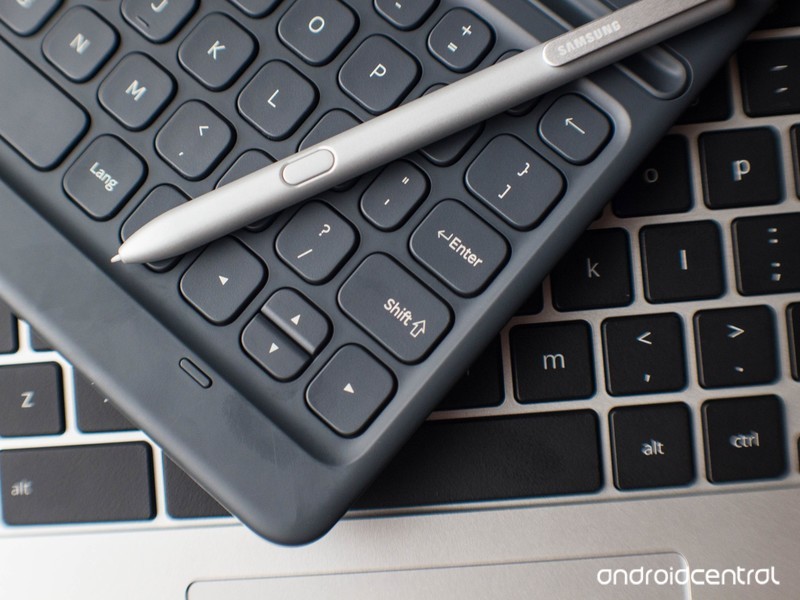
I’d much prefer to type on the Chromebook Flip than scrawl out my notes with the Tab S3.
The Galaxy Tab S3’s S Pen is incredibly convincing. It’s easy to use, to wield, and to write with. You can use it to crop parts of the screen as you need to save a screenshot, or draw on parts of the screen and save that as a diagram. You can even write on the screen while it’s off — sort of — and that’s my favorite feature because I’m constantly scrawling throughout the day. I can even launch a new Google Keep post-it to scribble down what I need — another great feature to have, particularly if you’re furiously jotting down shorthand.
But you don’t need to pay the money that’s required of the Tab S3 to get that sort of functionality from a tablet-like device. The Chromebook Flip flips into a tablet, which you can then use with a cheap stylus for diagram drawing. It’s not as good at handwriting as the S Pen, but it is better for typing marathons; its keyboard is soft and velvety, and more comfortable to use compared to the constricted layout that’s offered with the Tab S3’s optional $130 keyboard.
See at Amazon
Apps are better with a desktop

The desktop can help you get more done.
Apps are a major part of the productivity realm, and thankfully, many companies have embraced the life of the mobile worker. You can find most of the Microsoft Office suite in the Google Play Store, for instance, as well as various titles from Adobe’s camp. There are also apps for other services you might need for work, like VPN clients, chat applications, and collaborative boards. Since Chrome OS has adopted Android apps, these suites have also become available to the Chromebook ecosystem, though many of them also sport companion browser apps.
The Chromebook can use Android apps; Android tablets don’t have the flexibility of Chrome apps.
Using Android and Chromebook apps interchangeably have made me realize that I have an easier time flipping between apps on Chrome OS not only because I have a choice between the app and the web app, but there’s a desktop available for sprawling out that work. I can spread out windows and place them around as I need them to compare information between apps. I can also easily drag and drop between apps and services without having to tap a multitasking button and sifting between the apps I’m using. And though the Tab S3 employs Nougat’s excellent multi-window feature, having to set up two apps side-by-side while up against a deadline is a major stressor. I can move faster on a Chromebook.
Dealing with photos

RAW photos aren’t easy to manage on the Tab S3.
I’m sticking to the Chromebook Flip, primarily because it can handle a massive batch of those RAW files where the Tab S3 can’t.
Neither the Galaxy Tab S3 nor the Chromebook Flip are particularly outstanding at importing a massive batch of RAW photos, but I’ve found that it’s easier to develop a method to the madness with Chrome OS. I set up a virtual “My Documents” folder where I can store RAW files and import only the ones I need into an editing app like Polar. I also appreciate the physical sensation of dragging and dropping files around, which is possible on Chrome OS — even though the trackpad on the Chromebook Flip isn’t very good.
I also tend to use a microSD card in an adapter in my DSLR, so that I can mount the card inside the Chromebook. I can do the same with the Galaxy Tab S3 and its expansion slot, but the way that Android handles SD cards means that some apps won’t accept the methods of storage, and so I can’t access those files or open a batch of them in an editing app.
Which is it? The Chromebook

Which one to adopt for work?
I worry for my future as I’m realizing that I may be the last generation that’s used to a desktop-style environment; that relies on that drag-and-drop sensation in our digital lives. Is my inability to catch on to the Tab S3’s tablet interface a true folly of Android’s? Or is it that I’m just not used to interface’s mechanisms because that’s not what I’ve been conditioned to use?
The answer to that lies in another story, for another time. For now, I’m sticking to the Chromebook Flip as the secondary work machine, primarily because it can handle a massive batch of those RAW files where the Tab S3 can’t. Multitasking between windows is easier, too, and though the Chromebook doesn’t play as nicely with a stylus, I hardly found myself missing the S Pen after putting it down.
Everyone has different needs, which is what makes the variety of technology that’s available so exciting for the rest of us. My experience shouldn’t deter you if you’re looking to adopt a tablet-only lifestyle, and the Tab S3’s S Pen capabilities may be worth the price for you. If you’re an artist or a creative type who needs to physically write to be prolific, you’re likely to have a better experience with Samsung’s tablet than with a convertible Chromebook and some after-market stylus.
See Samsung Galaxy Tab S3 at Amazon
See ASUS Chromebook Flip at Amazon
Starcraft Remastered to bring 1998 original back with 4K visuals
Blizzard has announced that Starcraft is to return. It will release a remastered version of the 1998 original with widescreen, 4K graphics and new, comic book style cut screens to tell the story of how the series begun.
You won’t have too long to wait for it either, Starcraft Remastered will be available from this summer.
The new release will include the Brood War expansion, which will be graphically enhanced as well. And the original 4:3, low-res Starcraft will be available for free. Players of the ’98 edition will be able to play against Remastered gamers in multiplayer too.
Although it is almost 20 years old, the original Starcraft has remained popular, especially with eSports players in Korea. South Korean TV even televised Starcraft matches long before professional competitive gaming became the worldwide phenomenon it is today.
The new version will include online multiplayer in addition to LAN play.
The new 4K Ultra HD visuals might not be as detailed and remodelled as some might expect, but the game needs to remain true to its roots in order to present the exact same experience. Fans are told that the gameplay will remain the same and tweaking rather than completely overhauling the graphics helps ensure that.
Starcraft Remastered will be available on PC and Mac.
Samsung’s future smartwatch could have world’s first rotary dial flexible display
Samsung has filed a patent for a smartwatch with a second, flexible display on the rotary dial going around the outer edge. It would be the first display of its kind to be fitted to a watch, but since it is just a patent for now, we have to take the likelihood of it becoming real with a pinch of salt.
- Samsung Gear S3 review: Android Wear, beware, this is the smartwatch to beat
The display would be used to show small bits of information, such as the current weather, the song playing or the date, so it works in a similar fashion to the side display on Samsung’s curved screen smartphones. Interestingly, the patent notes an upper and lower display, so Samsung may be looking to fit a lot of information into a small space.
However, fitting the rotary dial with a display could limit its use. On Samsung’s current Gear smartwatches, the dial can rotate a full 360 degrees and is used to switch between apps. The rotary dial with a display can only rotate 90 degrees, and Samsung hasn’t said in the patent if it will have the same app switching capabilities.
Further details and information regarding the display’s use haven’t been published just yet, and we’re no closer to knowing if the watch and display will ever exist. Samsung filed the patent back in March 2016, so it’s only been properly thought about for a year. It’s an intriguing, if not slightly bonkers idea, but it’s good to see Samsung looking at ways to innovate the smartwatch market.
The Morning After: Monday, March 27th 2017
Hey, good morning!
Hello from Monday morning. Over the weekend, we welcome the return of a 1998 gaming classic, toured the fanciest toilet showroom you’ll ever see, and reported on a self-driving Uber crash. Oh, and in case you forgot, we will finally get to see Samsung’s next flagship smartphone later this week.
4K graphics, reworked audio and even story improvements.‘StarCraft: Remastered’ upgrades a real-time strategy classic

Blizzard is legendary for keeping old games alive, but it’s going the extra mile this time around. The studio has unveiled StarCraft: Remastered, an overhaul that drags the 1998 real-time strategy game into the modern era. It’s getting the obligatory fresh coat of paint, including higher-resolution graphics and improved audio. The team is also using this as an excuse to ‘fix’ the game by adding content and features you take for granted. Multiplayer fans will see features that have been a staple of newer Blizzard titles, including “advanced” matchmaking, ladder play and social features. You’ll also have cloud saves for everything from your solo progress to custom maps and key bindings. About the only thing that won’t change is the core gameplay.
The retailer plans to expand its non-gaming businesses.Digital downloads killed 150 GameStop stores

It’s game over for at least 150 GameStop stores. The retailer has announced that it’s shutting down 2 to 3 percent of 7,500 shops across the globe after sales and earning plummeted last year. According to The Wall Street Journal, the company was affected by the shift to digital downloads. More and more people now prefer installing their games straight from their console’s online store instead of buying physical copies, that GameStop’s sales dropped 14 percent in 2016.
Travel through space on your porcelain throne.
Toto hopes to woo you with its high-tech toilet showroom

High-functioning toilets have long been a mainstay in Asian households, but the concept is still something of a curiosity in much of the Western world. Toto, Japan’s biggest toilet maker, has attempted to market its high-tech commodes to American audiences for decades with little success. The company is trying to change all this with a brand new “experiential” showroom that launched this week in San Francisco. It’s called Concept 190, and it’s equipped with four sensor-laden bathrooms where visitors are invited to pee, poo and have a toilet experience unlike anything they’ve had before.
Automakers may have to ignore the feds’ attempts to loosen rules.
California’s new car emission standards defy the White House

The Trump administration may be rethinking car efficiency regulations, but that isn’t stopping California. The state’s Air Resources Board has finalized car emissions standards for 2022-2025 that the White House still wants to review, creating the potential for a conflict if federal officials rethink the rules.
‘Not taking risks’Uber suspends self-driving tests following an Arizona crash

Uber isn’t taking any chances in the wake of its self-driving car accident in Tempe, Arizona. The company has suspended both its Arizona testing and its Pittsburgh, Pennsylvania operations while it investigates what happened. The company has confirmed that its vehicle was in self-driving mode at the time, but adds that there were no serious injuries on either side of the collision, and “no backseat passengers” in Uber’s autonomous Volvo.
‘Hi! I’m Alexa. How may I help?’
Amazon considers opening augmented reality furniture stores

Amazon’s retail plans could extend well beyond books and groceries. New York Times sources hear that the internet giant is “exploring” the possibility of appliance and furniture stores with a technological angle. You’d use augmented or virtual reality to see how items would look in your own home, making it easier to pull the trigger on that new couch or stove. Amazon might directly challenge some of its tech rivals in retail too. Just as long as Alexa doesn’t try to sell me a sofa on interest-free credit.
But wait, there’s more…
- Germany wants to regulate a 24-hour livestream as a broadcaster
- ‘Black box’ technique may lead to more powerful AI
- NASA announces a handful of Solar System space missions
This time-lapse cell division film is not CGI
You might have paid more attention to cell division in biology class had you seen this timelapse video from filmmaker Francis Chee (below). It shows the cell division of an egg from Rana temporaria (the common frog) in such astonishing detail that it looks like a digital effect. Starting with just four cells, it divides into seemingly millions more in around 33 hours, a time that’s compressed to 23 seconds in Chee’s video.
The team didn’t just grab off-the-shelf equipment. “It was done with a custom-designed microscope based on the ‘infinity optical design’ ” that’s not available from any manufacturer, he said in the YouTube description. Chee also built the LEDs and optics used to film it, and sat the whole thing on an anti-vibration table. The final shot depended on numerous other variables like “the ambient temperature during shooting, the time at which the eggs were collected, the type of water used,” and other factors, he said.
Whatever, the final result is so bizarre it almost looks fake — the first few divisions rip the cells into smaller pieces through what looks actual voodoo. In a future video, Chee hopes to capture the next stage, in which the egg becomes an actual, wiggling tadpole. In the meantime, you can check out his channel to see other time lapse videos, including one called “Don’t watch this video if you’re scared of spiders.”
Via: No Film School
Source: Franchisee Films (YouTube)
Beats 1 is ‘the Biggest Radio Station in the World’, Says Apple Music
Apple Music executives Jimmy Iovine, Zane Lowe, Robert Kondrk, and Larry Jackson spoke to The Verge over the weekend about their work with the musician Drake and the success of Beats 1 radio station, which launched in tandem with the Apple Music app in 2015.
Republic Records told The Verge that Drake’s new album More Life was streamed 300 million times worldwide in its first week on Apple Music. It has already eclipsed his previous album, Views, which was an Apple Music exclusive and streamed around 250 million times in its first week. More Life also streamed 89.9 million times during its first 24 hours, breaking single-day album streaming records for all music services.
The numbers for Drake’s More Life are impressive in another way – the album is also available on Spotify, which has 100 million subscribers compared to Apple Music’s 20 million. The Apple Music team puts the success of the release down to Drake’s close collaboration with Beats 1 and his OVO Sound Radio show. The show has debuted several Drake records, including More Life on the most recent episode, which set the record for the most listened-to show.
“What we saw on Drake’s radio show were TV numbers,” Iovine told The Verge. “We learned so much from just building what Drake needed. He had the idea, we kind of just built and supported around him, and we’ve learned a lot from that, and the entire industry has learned a lot from that.”
Jackson called Beats 1 “the biggest radio station in the world” and boasted that there wasn’t another station in existence that has as many concurrent listeners, (although Apple declined to offer specific listener numbers).
“If you rewind back to July of 2015, and those records that rolled out like ‘Back to Back,’ — ‘Hotline Bling’ debuted on OVO Sound Radio first, ‘Charged Up’ debuted there first — all these records debuted in a space that was really still new and nascent, and [Drake] made it his own. You can glance over it, but we created this idea that was really great for him, and he took advantage of it,” Jackson said. “Drake and Oliver and [Drake’s other co-manager] Future [The Prince] were the first to do this with us.”
Zane Lowe, head of Beats 1, said that what Drake had taught him in terms of the parameters of broadcasting was remarkable. “He knows what he’s doing, and he knows his audience,” said Lowe. “And he knows it’s going to work when it’s ready. The best thing that anyone — including myself — can do is get out of the way.”
Kondrk described the relationship between Apple Music and Beats 1 like an amusement park — once users are inside the Apple Music app to listen to Beats 1, he said it was “only natural you’ll stay in it to stream the songs afterwards”.
“The music is debuting through OVO Sound Radio first, no one really ever leaves the amusement park, and that’s why the numbers make sense,” Kondrk says. “It’s a new paradigm that we’ve really created here for someone like him to come in and be a genius and take full advantage of everything we have to offer.”
Speaking more generally, Iovine reiterated his belief that Apple Music can’t become just a “utility” and that the company had to stay nimble, while working with artists like Drake was key to avoiding that distinction. “Two years ago, people would’ve thought we were crazy with what we were doing with Drake. And we are starting things with other people that in two years will look as interesting as this.”
You can read the full article over on The Verge.
Tags: Apple Music, Drake, Beats 1
Discuss this article in our forums
UK Government Seeking Access to Encrypted Messaging Apps in Wake of London Attack
Amber Rudd, the United Kingdom’s home secretary, recently mentioned that it is “completely unacceptable” that the government could not gain access to messages stored on mobile applications protected by end-to-end encryption, such as WhatsApp. Rudd is calling for the UK police and other intelligence agencies to be given access to such apps to thwart any future terrorist plots, coming in the wake of the attack in London last week (via The Guardian).
Rudd’s next step is summoning leaders of various technology companies to a meeting with the UK government on March 30 “to discuss what to do.” The home secretary mentioned that the government would be willing to pass completely new legislation focusing on encrypted messaging and mobile apps if the talks this Thursday don’t go her way. Rudd referred to WhatsApp, and similar apps, as potential “secret places” for terrorists to hide.
But she stressed it was her desire to persuade internet and social media companies to cooperate voluntarily with the government on this and also the posting of extremist material online.
Rudd added: “It is completely unacceptable. There should be no place for terrorists to hide.
“We need to make sure that organizations like WhatsApp, and there are plenty of others like that, don’t provide a secret place for terrorists to communicate with each other.”
Rudd’s focus on WhatsApp is spurned by information that Khalid Masood — the individual behind the London attacks outside Parliament — used the Facebook-owned messaging app just minutes before the attack. While police believe Masood worked alone, they are seeking as much information about him as possible, including what or who he might have messaged through WhatsApp. While the police know Masood opened WhatsApp before the attacks, it is unknown whether or not he sent or received any messages.
In a statement, WhatsApp itself said that it was “horrified” by the events in London and would be “cooperating with law enforcement” as events proceed. The situation in the United Kingdom has already drawn parallels to the Apple-FBI dispute that lasted a few months last year, with Rudd directly mentioning Apple CEO Tim Cook at one point in an interview with the BBC.
Tim Cook, the chief executive of Apple which also uses end-to-end encryption, has previously said it would be “wrong” for governments to force Apple to “build a back door” into products. But Ms Rudd said: “I would ask Tim Cook to think again about other ways of helping us work out how we can get into the situations like WhatsApp on the Apple phone.”
Apple, and those that side with the company, argued last year that it would be a slippery slope to place a backdoor into iOS for the sole purpose of assisting the government in its anti-terrorism measures. The company said that a “master key” would be able to get information from any iPad and iPhone, despite the FBI saying that all it wanted was key information from the iPhone 5c at the center of the debate.
Note: Due to the political nature of the discussion regarding this topic, the discussion thread is located in our Politics, Religion, Social Issues forum. All forum members and site visitors are welcome to read and follow the thread, but posting is limited to forum members with at least 100 posts.
Tags: WhatsApp, United Kingdom
Discuss this article in our forums
 AIVAnet