


Hydrogen-powered train with zero emissions completes test run in Germany
Why it matters to you
You could one day be riding on a train that’s entirely silent and produces nothing but water vapor as an emission.
A train powered by a hydrogen fuel cell has completed its first test run in Germany, showing the viability of the technology to operate without waste. Following more planned tests, the train is expected to begin commercial operation later this year, on the Buxtehude-Bremervörde-Bremerhaven-Cuxhaven line in Lower Saxony, Germany.
There is much speculation about what the future of mass transit may be. Some suggest automated cars, others more outlandish technology like the Hyperloop. However, more environmentally friendly alternatives to traditional transport systems, like zero-emission trains, could be another avenue entirely and it’s one that sustainable rail developer Alstom is banking on with its Coradia iLint design.
#Alstom revealed to the world the first zero-emission and hydrogen powered passenger train. Learn how it works! pic.twitter.com/oaaj4zbLzK
— Alstom (@Alstom) September 26, 2016
The iLint train uses an onboard fuel cell design which uses a combination of stored hydrogen and oxygen drawn from the local atmosphere to generate electricity. That electricity can propel the train up to 87 miles per hour, with excess power being funneled into large-scale lithium-ion batteries for later usee. The train also makes use of energy recovery systems to improve the efficiency of the electrical systems.
More: The inventor behind the Maglev train is back with a Hyperloop for launching space vehicles
This makes the train completely sustainable, producing only water and steam as emissions and requiring no electrification of the track. The train even produces almost no noise, since there is no combustion to contend with.
All of this makes the Coradia iLint design an incredibly versatile transit option, capable of operating within densely populated areas without causing pollution – noise and otherwise.
This latest test saw the train reach just shy of 50 miles per hour, so it will require further testing to make sure that it’s safe at higher speeds, but this is a step in the right direction for the design.
“This test run is a significant milestone in environmental protection and technical innovation,” said Didier Pfleger, vice president of Alstom in Germany and Austria (via the Telegraph).
“With the Coradia iLint and its fuel cell technology, Alstom is the first railway manufacturer to offer a zero-emission alternative for mass transit trains.”
Do you think hydrogen fuel-cell trains could be the future of zero emission mass transit?
The 20 best keyboards for every iPad, from the Mini to the Pro
There are multiple components to note when you first unpack an iPad, from the device itself and a power adapter, to the user manual and a USB cable, but a keyboard isn’t one of them. The iPad’s functionality has grown since its initial inception in 2010, yet many users still find Apple’s tablet somewhat incomplete despite all the critical acclaim and the perpetually-swirling rumors.
As Apple’s signature tablet line outgrows its reputation for being simply a device to consume entertainment, there’s a growing need for a physical QWERTY keyboard for the iPad. Thankfully, there are tons of great keyboards designed to connect to your iPad via Bluetooth for increased mobile productivity.
More: The 15 best iPad accessories to make more of your Apple tablet
We admit, finding the perfect keyboard can be exhausting, given the fact that most third-party keyboards are poorly designed or overly expensive, but there are some quality options, if you know where to look. Here are our nominations for the iPad Keyboard Hall of Fame (if there is such a thing).
Best keyboards for the iPad Pro (12.9-inch)
Apple Smart Keyboard for 12.9-inch iPad Pro ($170)

What better keyboard for your shiny new iPad Pro than the keyboard specifically made by Apple for the iPad Pro? In classic Apple fashion, the Smart Keyboard features a slim and sleek design with keys that are well-spaced and easy to type on. You won’t get much travel or feedback, though. It doubles as a stand for your device, and doesn’t add too much extra bulk, which makes it perfect for when use on the go.
It’s important to note that this keyboard does not connect via Bluetooth, however. Instead, it uses Apple’s new proprietary Smart connector, located on the side of the iPad. This means that you’ll never have to manually charge the keyboard — it draws power straight from the iPad. How convenient!
Buy one now from:
Apple Best Buy
Logitech Create Keyboard Case ($121)
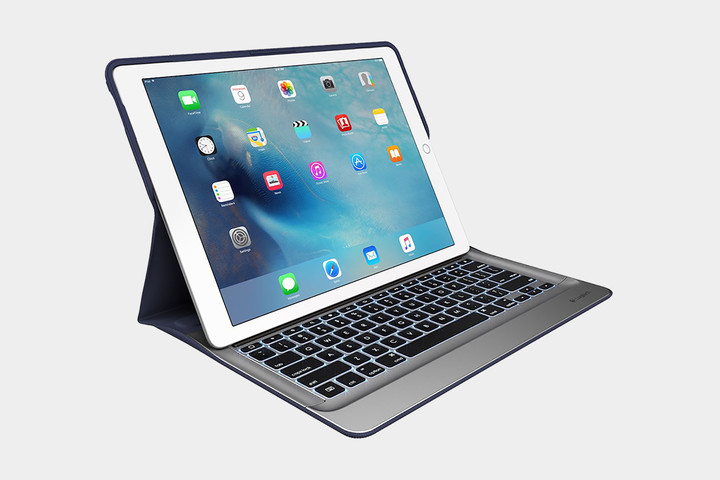
Why use Bluetooth if you have the Smart connector anyway? The Logitech Create also makes use of the Smart connector on the iPad Pro, meaning you won’t have to charge it. It also offers a backlit keyboard, one that features buttons for making light adjustment and controlling media. Because of the size of the iPad Pro, Logitech was even able to squeeze in an extra line of keys for shortcuts. While this case was not designed by Apple, the look of the Logitech Create fits in line with Apple’s design language. It’s slim, simple, and beautiful.
Buy one now from:
Amazon
Razer Mechanical Keyboard Case ($168)

The Razer mechanical keyboard is the first keyboard with mechanical key switches built for a mobile device. The keys have good travel and make a satisfying click. There’s a metal kickstand, too, so that you can adjust the angle of the iPad Pro to any position you want. The case itself is detachable and made of polycarbonate, which provides not only convenience but strength as well. This keyboard has a lot going for it, but we must acknowledge a few caveats. The kickstand is useful, but it gives the iPad Pro a large footprint, which could be a problem when using a small workstation. Some people also found that the hinge is not built to last and the key next to the right arrow key, which brings up the on-screen keyboard, is a little too easy to press by mistake. If you crave a mechanical keyboard for the 12.9-inch iPad Pro, however, this will scratch your itch.
Buy one now from:
Razer Amazon
Best keyboards for the iPad Pro (9.7-inch)
Apple Smart Keyboard for 9.7-inch iPad Pro ($150)

Yeah, yeah, we included this for the larger iPad Pro, but it’s also great for the 9.7-inch model. The smaller version offers more or less the same features, but it’s obviously a little more compact. Like its larger sibling, it’s extremely sleek — closed up you would be forgiven for thinking it’s just a case rather than a keyboard case. It also offers automatic charging through the Smart Connector. The smaller size does mean that it’s a bit more cramped, though.
Buy one now from:
Apple Best Buy
Ottertooth Ultra-Thin Aluminum Portfolio Case ($40)

Sure, this one’s a little cheaper than Apple’s case, but there is a trade-off, besides general quality — it’s Bluetooth-based. Apart from that though, this keyboard looks really good alongside the iPad Pro, and doubles as a stand and case. Not only that, but it can run for 150 hours on a single charge, and only takes 2 to 3 hours to juice up. It also comes in a few different colors, so you can choose the keyboard case that will best fit your look.
Buy one now from:
Amazon
Brydge Keyboard ($130)

Brydge wants to bring the MacBook experience to your iPad Air. The Brydge keyboard is made from high-grade aluminum that’s designed to blend perfectly with the iPad’s body. It’s rigid and strong, but it’s also extremely light, weighing just 18 ounces. The iPad is secured via two clips, one on each side, making it easy to connect and remove from the keyboard. The hinge is strong and you can adjust your iPad to find the best angle for you. One of the main attractions of this keyboard is the backlit keys, which come with three levels of brightness and are handy when working in low-light situations. You’ll also be happy to know that the Brydge keyboard has 1.2 millimeters of key travel. It feels a lot like a MacBook keyboard, so you can type easier, faster, and more confidently than with many other iPad keyboard cases. It’s available for the 12.9-inch iPad Pro as well, and it comes in silver, space gray, and gold.
Buy one now from:
Brydge Amazon
Best keyboards for the iPad Mini 3 and Mini 4
Zagg Folio Tablet Keyboard and Case($45)

Acting as a durable case as well as a keyboard, this Zagg case and keyboard is perfect for protecting your device without adding too much bulk. One of the great things about this case is that it allows you to change the viewing angle, just like a normal laptop. As far as typing goes, the keys on this keyboard are well-spaced, making it quite comfortable to type on. While it does offer a Micro USB port for charging, you’ll rarely have to make use of that port, as the keyboard lasts several months on a single charge. When you’re on the go, you can also rest easy knowing that you likely won’t drop your iPad, as the case offers a textured finish and a little extra grip.
Buy one now from:
Amazon
Fintie Blade X1 Keyboard Case ($27)

Looking for something a little more affordable? This case from Fintie comes in at only a little more than $30. Sure, it won’t be of the highest quality, but it will be fine for those who only occasionally need a keyboard. The case boasts a slim and lightweight design, while still managing to offer enough protection in case you do happen to drop your device. A little worried about buying such a cheap keyboard? Well, the Amazon reviews speak for themselves — this case flaunts a respectable 4-star rating based on more than 70 reviews.
Buy one now from:
Amazon
Best keyboards for the iPad Mini and Mini 2
Logitech Ultrathin Keyboard for iPad Mini ($60)

The Logitech Ultrathin Keyboard has made our best-of list in more than one iPad category for a reason — it’s a true typists’ keyboard. The iPad Mini is by no means ideal for typists considering its size, but the Logitech’s Bluetooth keyboard layout provides adequate key spacing and travel. It also has an aluminum outer casing that nicely compliments your iPad Mini, whether you opt for the black or white option.
Moreover, the keyboard is affordable, and it conveniently cradles your tablet using powerful magnetic clips and a recessed groove that rests behind the keyboard for optimal viewing at multiple angles. The keyboard even makes use of the iPad’s sleep-wake function and features a rechargeable battery designed to last up to six months on a single charge, assuming you only use it for less than two hours a day. Designated buttons for cutting, pasting, and other essential tasks also add to its appeal. The keyboard comes in an assortment of color combinations for the tech-savvy fashionista in all of us.
Buy one now from:
Amazon
ClamCase for iPad Mini ($79)
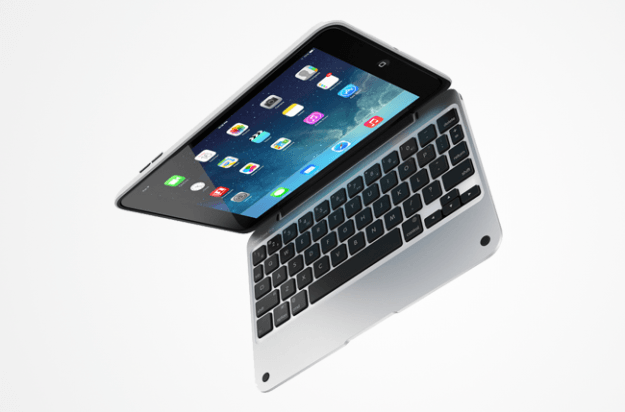
Like its larger counterpart, the ClamCase for the iPad Mini represents a more expensive alternative to the Logitech Ultrathin option. It’s constructed of an aluminum enclosure and a polycarbonate shell designed to parallel the MacBook Pro. The streamlined device conveniently attaches to the Mini with a 360-degree hinge, which allows you to swivel the tablet completely around and presents a wide array of viewing angles, whether you prefer to use the device while in laptop or tablet mode.
The full-size keyboard layout accommodates your palms and masters key travel, while honing in on the iPad Mini’s sleep-wake functionality and one-touch Bluetooth pairing. It weighs nearly a pound, making it one of the heavier options on our list, but it also comes cheaper than the version designed for full-size iPads. And who doesn’t like island-style keys and an auto-off feature for when the keyboard is not in use? Nobody, that’s who.
Buy one now from:
Amazon
Best keyboards for the iPad Air 2
Belkin QODE Ultimate Pro for iPad Air 2 ($100)
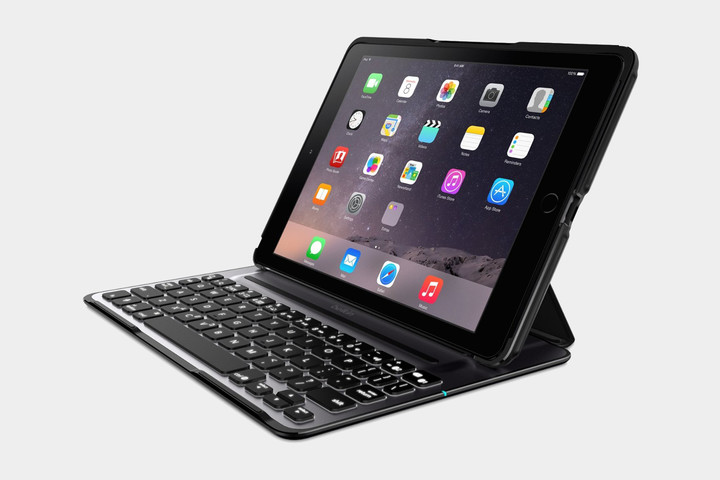
This is the second Belkin QODE keyboard on the list, and for good reason. One of the things that sets this keyboard apart from most others is that it can be used in either portrait or horizontal orientation, which is a rarity among iPad keyboards. The keyboard is backlit and offers three backlit levels, meaning you don’t need to burn your eyes with light from your keyboard when you’re up late typing. The keyboard, like other QODE keyboards, also doubles as a stand, ensuring you can use your iPad like a laptop. In fact, to help you out in case you do use your iPad like a laptop, the case even features rubber feet that prevent your device from slipping on your desk.
Buy one now from:
Amazon
Logitech Type+ for iPad Air 2($75)

The Logitech Type+ for iPad Air 2 aims to be not only a great keyboard, but also a protective one. It offers a slightly wider keyboard than many other iPad Air 2 keyboards currently on the market, giving you more room to type and hopefully minimizing typos. It also offers auto wake-sleep features, meaning your iPad will automatically wake when you open up the keyboard. Similarly, when you close it, it will put the device to sleep. Furthermore, the keyboard features an array of iOS keyboard shortcuts, which can help you do what you need to as quickly as possible.
Buy one now from:
Amazon
New Trent Airbender Bluetooth Keyboard ($37)

The Airbender is an interesting case that is only compatible with the iPad Air and iPad Air 2. There’s much more hardware to this keyboard than some of the other ones we’ve recommended, however, which will bring the iPad’s total weight to 2 pounds when installed. The rotational, hinge design gives you 360-degree viewing angles, so that you can orient it any way that you want to. Another great feature is the folding handle at the bottom of the case, which can give the keyboard a stable tilt that’s perfect for typing. The spacious chiclet keys also make for a great, tactile typing experience. The Bluetooth connection is reliable, too, allowing for easy pairing and consistent connectivity from up to 30 feet away. The keyboard is even detachable, so it can act as a regular iPad case.
Buy one now from:
New Trent Amazon
Best keyboards for the iPad Air
Logitech Fabric Skin Folio Keyboard ($55)

Calling a keyboard “Fabric skin” might be an oxymoron. Even so, it seems that just about every image of the iPad Air has a cup of coffee or glass of water in the background. And what happens, let’s say, if that glass of liquid spills onto your iPad Air? Enter, Logitech’s Fabric Skin Folio Keyboard.
The full-size keyboard is lighter and leaner than Logitech’s past keyboard and case efforts. It conveniently provides a water-repellent exterior that covers both the front and back of the iPad when closed. The rechargeable keyboard also doubles as a dual-view stand that holds the iPad upright or flat. It features automatic wake-sleep functionality in a similar fashion to most popular cases. The device even lasts nearly three months on a full charge, while providing iOS shortcut keys for copy, paste, undo, and other time-saving actions. The design may feel minimal and lightweight with its wipe-clean keys and thin design, but it still manages to protect against a broader swath of elements with minimal fuss and plenty of style.
Buy one now from:
Amazon
ZAGG folio case with backlit keyboard ($46)

With the look and feel of a laptop, ZAGG’s flagship keyboard offering is the only folio option on our list with an attractive, backlit design. The full-size keyboard case, available in either black or white, allows users to choose between a melange of different backlight colors and brightness options. In addition, it offers a smattering of viewing angles, using the built-in hinge.
Measuring just a little more than a ¼-inch, it’s also one of the smallest Bluetooth keyboards on the market. It touts roughly six months of battery life between charges and a bevy of special function keys designed to make the most out of your iPad Air. The sleep-wake function also comes standard, and the leather-textured cover offers admirable full-body protection against the common scuffs and scrapes your device is likely to procure during the course of its lifetime. ZAGG’s keyboard may not offer the same level of adjustment as other keyboards, nor is there an option for positioning the screen in portrait mode, but sometimes adequate lighting and protection are enough.
Buy one now from:
Amazon
Belkin QODE Ultimate Wireless Keyboard ($50)

Belkin’s folio case is one of many offerings advertised to give your iPad Air the aesthetic look and feel of a commonplace laptop. Boasting nearly twice the battery life as ZAGG’s aforementioned offering, the device nearly eliminates the need to fumble for an outlet while traveling. Even so, Belkin’s high-end model lives up to its ultimate name by providing decent spacing and key travel in an aircraft-grade, aluminum casing retrofitted with three neodymium magnets for the utmost stability and precise angling.
Furthermore, the full-size keyboard doubles as a stand and folds out of the way for normal handheld use, while moonlighting as a protective case. Built-in sensors also automatically turn the keyboard off when not in use, thus extending battery life and the longevity of the keyboard. The keys are incredibly responsive as well, even if they’re a bit thicker than need be.
Buy one now from:
Amazon
Best Keyboards for 2nd, 3rd, and 4th-gen iPad
Belkin QODE Ultimate Wireless Keyboard ($71)

Lightweight and versatile, Belkin’s high-end model provides a keyboard that is big enough to get work done, yet minimal enough to take just about anywhere. The folio-case is aptly designed for those who want a laptop experience — one with three viewing angles and large keys — but within a minimalist build. The keyboard provides an aluminum case that doubles as both a screen protector and a stand, allowing you to type in landscape or portrait orientation. Many Bluetooth keyboards offer the function, but few do it as well as Belkin.
The device also offers decent key travel and spacing even with its ultra-thin approach. It has an exterior design aimed to directly channel your iPad’s sound toward you and offers 160 hours of battery life on a single charge. The keyboard may not have many unique features, but its maneuvering capabilities and spacious design make it one of the best available for the rock-bottom price.
Buy one now from:
Amazon
Logitech Ultrathin keyboard Cover for iPad ($69)
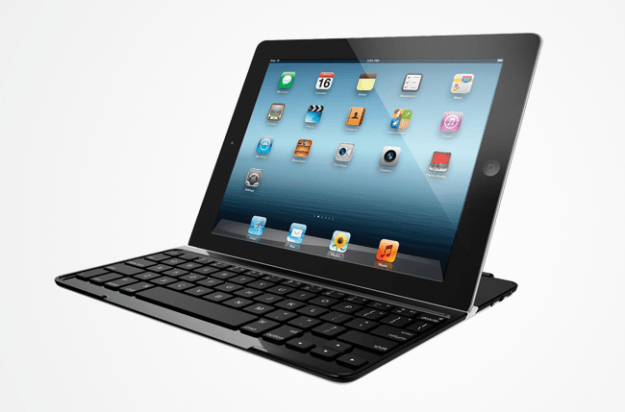
Not everyone needs bells and whistles — and Logitech is aware of that. The company’s Bluetooth keyboard does little more than needed. It quickly attaches to your device via a magnetic hinge, which allows you to use your device in either portrait or landscape viewing modes.
The full-size keyboard feels somewhat cramped due to the size of the tablet, but it makes up for the space crunch with six months of battery life. It also has an aluminum cover that makes use of your iPad’s sleep and wake functions, when the keyboard isn’t in use. The metal backing looks enough like the iPad’s own aluminum finish that the two pieces of hardware blend aesthetically. You can choose black or red color options, keeping things classy even when you’re getting work done. At little more than a ¼-inch thick, you can easily stow the keyboard alongside your tablet for quick access on the go.
Buy one now from:
Amazon
ZAGG Keys Profolio + Keyboard Case ($55)

By now, you’ve surely noticed more than a few keyboards that simultaneously double as cases. However, few of them offer backlighting in the way Zagg’s Keys Profolio Keyboard Case does. The device allows you to choose from seven different color options and adjust the underlying light for the optimal brightness.
Moreover, the full-size keyboard touts more than 30 days of battery life — when used less than two hours a day — and a magnetic closure for quickly securing your iPad to the keyboard when on the go. Special function keys also allow you to perform essential commands directly on the keyboard, while a leather-adorned cover ensures your device is always protected against the everyday elements. Though heavier and a bit thicker than most offerings on our list at nearly an inch thick, it excels when it comes to its responsive island-style keys and its unique ability to operate in low-light settings with ease. However, hallmark functionality doesn’t always come cheap.
Buy one now from:
Amazon
ClamCase Pro ($100)

To the untrained eye, the ClamCase Pro may make your iPad look like a MacBook Pro. It’s no wonder, considering that the ClamCase Pro’s aluminum enclosure and polycarbonate shell transform the look and feel of your iPad into something akin to Apple’s most recent MacBook Pro models.
At three pounds and $170, the full-size keyboard is as expensive as it is heavy. However, the size of this keyboard provides terrific key spacing. Additionally, the device has specialized keys for commonly-used features and it comes with a 360-degree hinge designed for unparalleled versatility when it comes to viewing angles and stand functionality. The keyboard is adorned with an island-style keyboard and one-touch Bluetooth pairing, along with sleep-wake functionality and a battery crafted to last months on a single charge. Again, the added weight makes it rather bulky, but durability and stylish aesthetics don’t always result in a minimal design. It’s an acceptable trade off.
Buy one now from:
Amazon
How to share photos from Google Photos

Sharing photos is easy whether you want to upload to Facebook or just share with one person.
Google Photos is a great way to store your photos and ensure that you never accidentally delete something that holds value to you. But as we all know, half of the fun of photos in the social media age is the ability to easily share them. Thankfully, Google makes things really easy to share your best photos on Instagram, or just your best friends hassle-free. We’ve got all the details for you here.
Share photos to friends and social media
The easiest way to share our photos with the world is by posting them to social media. This lets your friends and family discover them on their own time whenever they check their feeds. This method allows you to share a single photo with specific friends, or directly to social media. It’s simple, it’s easy, and it will let you have complete control over who sees your photo.
Open Google Photos
Tap on the photo that you want to share
Tap the share icon at the bottom left of your screen.
Tap on the icon for your social media of choice, or choose a person to send the photo to

Share an album
There are times that sharing a single photo just isn’t going to cut it. Whether you want to share snaps from your latest adventure or photos from a recent party, sharing an album may be the most convenient way to go about it. You get some more options when you share an album, and retain control over who can see it at all. This option may be the best idea for folks who have a dozen or more photos to share, or who want to allow friends to add more photos to the album through collaborative features.
Open Google Photos
Tap the album icon in the bottom right corner
Tap on the album you would like to share.

Tap the overflow icon in the upper right corner, it looks like 3 vertical dots.
Adjust the album sharing options and copy the link
Send the share link to those you want to share this album with.

Check to see what you’ve shared
In some cases you might want to double check who you have shared a specific album or photo with and Google has you covered. In the album section of the app, you’ll find an area called ‘Shared’. Within it are the albums and photos you have shared, along with whom you have shared those photos with. This is an easy way to check whether you’ve shared a specific photo before, and ensure you’ve shared it with all of the appropriate people.
Open Google Photos
Tap the album icon in the bottom right corner
Tap on Shared
Double check on shared content

Sharing made simple
Google Photos delivers tons of great options when it comes to sharing the moments that matter to you. It doesn’t matter whether you want to share them with just one person, a select group, or everyone following you on Instagram, Google has you covered. You can share, adjust settings, and even see who you shared past photos and albums with all from within the Google Photos app.
Are you a fan of sharing using Google Photos? Be sure to drop us a line below and tell us about it!
The Moto G5 Plus is coming to the U.S. March 31 for $229
One of the best mid-range phones of the year is coming to the U.S. at the end of March.
When we first picked up the Moto G5 Plus at Mobile World Congress, it was very clear that under Lenovo, the Plus version of Motorola’s venerable mid-range darling was meant to stand on its own in 2017. While it resembles the smaller, cheaper G5, it has a completely different build and set of internals, and it’s one of the more exciting mid-range devices to launch so far this year.
And now we know when it will hit the market.

The company has announced that the Moto G5 Plus will come to the U.S. on March 31 starting at $229 for the 2GB/32GB version. There will also be a 4GB/64GB model for $299. Pre-orders for both variants begin March 24, and the phone will be available at a variety of retailers, including Amazon, Best Buy, B&H, Costco, Flash Wireless, Fry’s, Motorola.com, Newegg, Republic Wireless, Target, Ting, and Walmart. The phone is unlocked and works with all four major U.S. carriers.
Moto G5 Plus specs
The phone will also be available through Amazon’s Prime Exclusive program, which discounts a select set of devices in exchange for a modicum of pre-loaded Amazon software and a lockscreen ad experience that pushes Amazon’s commerce agenda. We think it’s a pretty good compromise, and if you’re looking to get what appears to be the best mid-range phone of the year for less, this is likely the way to do it. If you’re into that idea, Amazon has the 2GB/32GB model for $184.99, while the 4GB/64GB version goes for $239.99, a $60 discount from the MSRP.
Motorola, on the other hand, will allow a certain amount of customization with its Moto G5 Plus (the regular Moto G5 isn’t coming to the U.S. at all) through its own e-commerce store. The phone is available in two colors, Lunar gray and Fine Gold (though a blue model has been rumored).
Will you be buying the Moto G5 Plus when it goes on sale?
See at Motorola
The Galaxy Tab S3 is worth buying just for its S Pen

Samsung has once again graced the tablet world with the presence of its S Pen. Here’s why the Galaxy Tab S3 is worth it simply for its pressure sensitive stylus.
It’s been years since a major tablet release from Samsung came bundled with a stylus. The last S Pen-equipped device was the Galaxy Note 10.1 2014 Edition (say that in one breath). But now that the Microsoft Surface and Apple iPad Pro have become mainstays with their stylus-equipped tablets, Samsung is throwing its S Pen back into the ring.
The S Pen became an attractive reason to choose a larger Galaxy Note smartphone over smaller devices, and now that technology has been bundled with the Galaxy Tab S3. If you’re considering a tablet with a stylus in tow for your next purchase, here are a few reasons to consider Samsung’s latest tablet over the competition.
It’s compatible with a ton of apps
The most important thing to know about the S Pen is that it’s compatible with any mobile application that supports the stylus input. I tested it with apps like Microsoft OneNote, Google Keep, and Adobe Draw and all three applications recognized the S Pen’s pressure sensitivity, though not all of them registered it fully. Drawings apps will be more precise than productivity-focused ones, for instance, because they’re programmed to recognize the nuance in the direction of the S Pen. The point is, you can get professional-grade work done with this tablet.
The Galaxy Tab S3 also comes with its own Samsung Notes, which is good for quick hits and jotting down random notes when other apps aren’t immediately available. But I preferred to use the S Pen with OneNote, which is where I typically scrawl notes throughout the work day. I appreciated, too, that the S Pen’s 0.7mm tip helps make it one of the most accurate styluses I’ve ever used.
Program it, however you like

Maybe you don’t want to use the actions set by default in the S Pen’s Air Command — that’s fine! You can program the Air Command menu as you like, whether to pin oft-used apps and services or to rearrange the order of some of the S Pen’s default abilities. You can add up to a maximum of ten shortcuts or as few as one — the one shortcut to rule them all.
Easily translate words

Translate the language on screen with just a hover of the S Pen.
I like to read German website and I’m continuing my education in my parent’s native language. It helps to have a built-in translation feature that doesn’t require I copy and paste text into another app, as is typically the case with using Google Translate.
On the Galaxy Tab S3, you can enable a mode that translates the language on screen with just a hover of the S Pen over the word. The feature works in most apps with clear text, including Texture, the magazine reading app. I like to use this feature when I’m reading Romanian websites because then I can translate any of the words I’m stumbling on without having to translate the entire page into English. It forces me to practice.
Make animated GIFs

Use this feature to extract text from an image.
This isn’t a necessary feature per se but it is a fun feature to have readily available. You can hover over the screen and select Smart select from the Air Command window to create an animated GIF from a non-DRM video file. It works fine with YouTube videos and most videos displayed in the tablet browser, though you won’t be able to use it inside apps like Netflix and Hulu — that’s considered copyrighted content.
You can also use Smart select to crop out a portion of the screen and save it as a separate image file. This is helpful if, for instance, you need to share quick information with coworkers through chat. You can even use this feature to extract text from an image and then paste it into another note taking app. These are helpful multitasking abilities to have built into the interface.
Write with the screen off

The Galaxy Tab S3 doesn’t actually work when its screen is off, but it does come enabled with a feature that lets you easily pen a note without having to endure unlock hell. Simply grab the S Pen, click its button, tap it to the screen, and get to writing. The note will be saved in the Samsung Notes app, where you can then export it to other applications as you need. It’s a good feature to have if you’re living a life that’s constantly on the go.
Would you like a stylus?
Would you like a stylus with your next tablet? Got any other questions about the S Pen’s abilities? Sound off in the comments!
You should probably start looking for an alternative to Hangouts
The dream of mobile messaging without SMS is dead. At least, for now.
Hangouts is dropping SMS support on May 22, according to an email sent to G Suite administrators. Starting March 27, Hangouts users will get a message explaining the change so there’s time to choose a new app. Weirdly, Google is trying to frame this feature removal as an improvement.
Last year, we announced several improvements to the most popular features of Google Hangouts, such as the new video meetings experience and better group chat messaging. As a part of that ongoing effort, we will be removing carrier SMS text messaging from Hangouts on Android after May 22, 2017.

The email continues on to explain that Google Voice users will not be affected by this change, which in turn means Project Fi users are also clear to continue using Hangouts for now, but honestly why bother? It’s not hard to see where this is going.
Perhaps most important, this change and its future consequences makes it clear Google isn’t pursuing a world where it is the universal identifier anymore.
Google wants Hangouts Meet and Hangouts Chat to be the video and messaging services for G Suite (business) customers, and for Allo and Duo to be what consumers use. It has been made clear that Google is going to stop anyone from using Hangouts — at least for now — but it couldn’t be more clear that Hangouts isn’t going to be an included app in Android for much longer.
That means the people using Hangouts simply because it’s there aren’t going to go looking for it to install it, which means the number of people that aren’t Android nerds available to you on Hangouts is going to drop rapidly. I give it a year tops after that change until it’s easier to find people on Facebook Messenger than Hangouts, which isn’t great for several reasons.

I’m not using this, and you can’t make me.
Perhaps most important, this change and its future consequences makes it clear Google isn’t pursuing a world where it is the universal identifier anymore. Hangouts was convenient because every Android user has a Google account, which meant the Gmail address offered multiple ways to quickly communicate with people. As Google shifts to messaging services that are only linked by phone numbers and fewer services that identify by email, the ubiquity of a Google account has the potential to rapidly lose its significance to those all in on the ecosystem this company has created.
Google might kill Hangouts’ text messaging feature
Google might soon begin implementing some big changes to Hangouts, now that the service’s purpose has been redefined. According to an email reportedly sent to GSuite admins, you’ll stop being able to send and receive text messages through the app on May 22nd, unless you’re a Google Voice user. The email says the big G will prepare you for it by notifying everyone who’s been using their apps to text on March 27th with details on what will happen going forward.
If you’ve designated Hangouts as the default messaging app, you’ll be asked to select another one to take its place. The prompt will take you to the Play store if you don’t have any installed, but if you do, then your messages will be transferred to app you choose. In case you’re a Google Voice user, you’ll get a notification telling you that you can’t send and receive messages with your carrier number anymore. You can still text through Hangouts, but you’ll have to use your Voice number after May 22nd.
Seeing as Mountain View has several messaging apps ready to download and use, it’s not surprising that it wants to remove some Hangouts features and add in new ones to differentiate it from the others. In the email posted in its entirety on Reddit, it says this is part of ongoing effort — Google might have more changes planned for Hangouts in the future.
Via: 9to5google
Source: thereisonlyoneme (Reddit)
Experimental music video changes every time you play it
Artists and scientists say breakthroughs are often “lucky accidents,” but one band is basing an entire music video on that premise. The song Midnight Oil from UK-based Shaking Chains uses algorithms to select semi-random bits of video from the hundreds of hours uploaded every minute on YouTube. The result is a music video that’s completely different every time you view it.
“I sought to obliquely reframe the stuff we subject ourselves to (whether beautiful, distressing, mundane, frivolous or eroticized) and algorithmically cut them into a new context,” band member Jack Hardiker tells Vice Creators.
The algorithms select footage based on keyword searches chosen by the band, though it declined to name what they are except for one — “Black Friday Fights,” the Thanksgiving brawls that happen in stores across the US over flat-screen TVs. Still, “the search terms are not fully fixed either — it’s an evolving list … the content can come from anywhere,” says Hardiker.
I sought to obliquely reframe the stuff we subject ourselves to (whether beautiful, distressing, mundane, frivolous or eroticized) and algorithmically cut them into a new context.
Once the machine selects the video, it assembles into a complete montage set to the music, just a few moments before you play it. “What follows has the potential to fascinate, or could well be routine — but each time is different,” the page reads.
The videos I watched included images like twerking, runway models, puppies and makeup videos, animal documentaries, security camera images, child beauty contests and disasters and war footage. As such, it gives a kind of strange snapshot of the current zeitgeist “through my search terms and the viewers’ attempts to make sense of the sequence,” Hardiker says.
He also notes that while they’re a new, small band, they hope the film lives on beyond the cycle of the song itself. “What might it become a year from now? It would be dependent on what’s happening a year from now, on what the internet holds for us then.” You can check it out here.
Via: Vice Creators
Source: Midnight Oil Film
SoundCloud borrows $70 million to keep going
When a startup is in the ascendancy, there’s a near-endless line of investors ready to back it in the hope of future returns. When that road to success gets riskier, the investors dry up and the business has to run to the bank because it’s the only place to get more cash. Apropos of nothing, BusinessInsider is reporting that SoundCloud has secured itself a $70 million loan from a group of financial institutions.
The “debt funding,” as it’s called, has been supplied by Kreos Capital, Davidson Technology and Ares Capital and was reportedly secured on March 10th. SoundCloud says that it will use the cash to hire staff, build technology and grow itself to be more than twice its current size by the end of 2017. It’s hoped that the moves will enable the company to become “financially sustainable” for “years to come.”
SoundCloud has had a problem with money for a while, admitting in 2015 that it would need to raise cash or risk going under. It managed to score $70 million from Twitter and then spent the bulk of 2016 hinting that it would like to be bought, thank you very much. Spotify spent a while thinking about it before deciding that it was better off steering clear.
Unfortunately, SoundCloud doesn’t necessarily look like a great investment at this point, given its numerous issues. For a start, its SoundCloud Go subscription service was reviewed poorly when it launched, with a meager library and poor design. Then there’s the fact that the majority of the tracks it hosts are user-generated content, remixes and other things you may not expect people to pay for. Between that, and the often onerous terms that come with debt financing, and it’s… it’s not looking great.
Via: TechCrunch
Source: BusinessInsider
Small Sample of iCloud Credentials Provided By Hackers Are Valid, But Questions Remain
On Wednesday we reported that Apple had become the target of a ransom threat, with hackers claiming to have access to more than 600 million iCloud accounts. A group known as the “Turkish Crime Family” said they would reset and wipe the accounts unless Apple paid them $150,000 in Bitcoin by April 7.
Apple responded to the threat by stating that there had not been any breach of its systems, and that if hackers did have access to iCloud accounts then it could only be because of compromised third-party services.
Yesterday, ZDNet said it had received a set of 54 account credentials from the hacker group for “verification” and subsequently reported that all of the accounts were valid, based on a check using Apple’s online password reset function.
The accounts include @icloud.com addresses dating back to 2011, as well as legacy @me.com and @mac.com domains from as early as 2000. The list of credentials is said to contain email addresses and plain-text passwords separated by a colon. According to Troy Hunt, data breach expert and owner of notification site Have I Been Pwned, this would suggest the data could have been aggregated from various sources.
ZDNet worked to contact each account holder via iMessage to confirm their password, and found that many of the accounts are no longer registered with Apple’s messaging platform. However, of those that could be contacted, 10 people – all based in the U.K. – confirmed that the passwords were accurate, and they have changed them as a result.
When pressed about the original source of the data, the hackers claimed that it was “handled in groups” without explaining how or why. The hackers also refused to hand over a U.S.-based sample of accounts.
All of the people with compromised accounts said that until now, they had never changed their iCloud passwords before. One person said that the password he confirmed with ZDNet was no longer in use as of about two years ago, which narrows down the possible date of a breach or multiple breaches to somewhere between 2011 and 2015.
Most of the people confirmed that they used their iCloud email address and password on other sites, such as Facebook and Twitter. However, three people said that their iCloud email address and password were unique to iCloud, and were not used on any other site. Also, two people claimed someone had tried to reset their iCloud passwords in the past day.
It’s unclear if the sample provided is representative of the wider pool of credentials the hackers claim to have, but based on its communications with the group, ZDNet suspects that its members are “naïve and inexperienced” and primarily seeking publicity.
Given that Apple has denied a breach, the account information may have been obtained from a major hacking incident, such as the one that befell Yahoo. iCloud users who have the same username and password that was used for both a hacked site and for iCloud should change their passwords immediately.
Anyone else concerned about the hacking claims should change their password and consider using two-factor authentication to secure their Apple ID credentials. Apple has said that it is “actively monitoring to prevent unauthorized access to user accounts and are working with law enforcement to identify the criminals involved”.
Tag: iCloud
Discuss this article in our forums
 AIVAnet