


Hackers Claim Access to 300 Million iCloud Accounts, Say Apple Refused to Pay $75,000 Ransom
A single hacker or group of hackers who have identified themselves as the “Turkish Crime Family” allegedly have access to at least 300 million iCloud accounts, but they are willing to delete the alleged cache of data if Apple pays a ransom by early next month, according to a report from Motherboard.
The hackers have allegedly demanded $75,000 to be paid in cryptocurrencies Bitcoin or Ethereum, or $100,000 worth of iTunes gift cards, by April 7, or they will reset a number of the iCloud accounts and remotely wipe victims’ Apple devices. The email accounts are said to include @iCloud.com and @me.com addresses.
The report said that the hackers “provided screenshots of alleged emails between the group and members of Apple’s security team,” while the hackers also shared an unlinked YouTube video that seemingly shows proof of them accessing “an elderly woman’s iCloud account” and “the ability to remotely wipe the device.”
If the screenshotted email is accurate, which it very well might not be, a member of Apple’s security team turned down the ransom, noting that Apple does “not reward cyber criminals for breaking the law.”
“We firstly kindly request you to remove the video that you have uploaded on your YouTube channel as it’s seeking unwanted attention, second of all we would like you to know that we do not reward cyber criminals for breaking the law,” a message allegedly from a member of Apple’s security team reads. (Motherboard only saw a screenshot of this message, and not the original). The alleged Apple team member then says archived communications with the hacker will be sent to the authorities.
Apple did apparently request to see a sample of the dataset, according to the report, but it is unclear if the hackers obliged.
“I just want my money and thought this would be an interesting report that a lot of Apple customers would be interested in reading and hearing,” one of the hackers said.
The report should be treated with a healthy dose of skepticism, as these allegations could be untrue, and Apple has yet to confirm or comment on the matter.
Tags: security, iCloud
Discuss this article in our forums
Virgin Media now offers up to 100 Mbps broadband as standard
Virgin Media’s slowest fibre broadband package is now faster than the top speeds offered by other mainstream UK providers. In its first tariff reshuffle in some time, Virgin is scrapping its up to 50 Mbps plan, making the up to 100 Mbps package the new entry-level tier. What’s more, there’s now a VIVID 300 plan promising top speeds of 300 Mbps, which eclipses the best competitors like BT, Sky and TalkTalk can offer (up to 76 Mbps max). Virgin first made up to 300 Mbps fibre available this time last year, but only as a special upgrade aimed at home workers. Today it becomes a more visible option for regular consumers.
Prices have gotten a little bit cheaper across the board, too. Assuming a 12-month contract length, the VIVID 100 plan is a fiver cheaper at £32.25 per month. The up to 200 Mbps VIVID 200 tier is now £37.25 per month (down from £45.25), and the gamer variant (with a slightly better up to 20 Mbps upload rate) is £42.25 per month instead of £50.25. The new VIVID 300 plan is obviously the priciest at £47.25 per month. Various deals are also available if you take a TV package in tandem.
By making 100 Mbps its slowest package and the 300 Mbps tier more visible, Virgin Media is keeping a couple of steps ahead of its rivals. Particularly BT (or should we say Openreach), which has been piloting G.fast technology for a while now, alongside increasing its fibre footprint. G.fast promises top speeds of around 300 Mbps while still using old copper wires for the last few hundred metres, meaning less upgrade work is needed to deliver it.
Source: Virgin Media
VAIO’s slick metal Windows Phone is resurrected for Android
VAIO, freed from the Sony yoke, made one ropey-looking Android phone all on its own. Then, learning several lessons, it made a gorgeous, machined slab of aluminum that, unfortunately, ran Windows Phone 10. Now, like practically all other phone makers, its changing tack, introducing the VAIO Phone A: an identical phone that’s running Android 6.0.
Launching in early April on Japanese phone carriers (if not elsewhere at the moment), the spec sheet remains largely unchanged — although VAIO has added a few more 3G radios and a second SIM card slot to make it at least a little bit more global. (Yeah, we’re eking out any signs that it might leave Japan.) It still has a full HD 5.5-inch screen, a Snapdragon 617 processor and a good three-gig dose of RAM, which is all fine, but you’ll probably be buying it for the classy looks, not the smarts inside. (There are plenty of higher-powered Android phones out there.)
VAIO Phone A launches on April 7th, in Japan alone for now, where you’ll have to cough up 24,800 yen (around $2230) for that aluminum slab. There is, at least, more demand for Android-powered phones.
Source: Engadget Japanese
Google Maps’ location-sharing feature is one you might actually use
Google has been busy beefing up Maps recently. Beyond just using it for turn-by-turn directions, you can now use Maps to remember where you parked, find reviews for nearby restaurants and avoid heavily congested areas. Today, the search giant has revealed yet another Maps feature: location-sharing. With just a few taps in the app, you can now share your real-time location with friends and family. It’s a feature that can be handy for when you’re running late to an appointment or if you simply want your buddies to keep tabs on your whereabouts.
Location-sharing isn’t a new concept; you can already do this with apps like Waze and Glympse (And yes, those who remember Latitude know this feature existed there as well). But because Maps is already a widely used product and integrated in many smartphones, the entry barrier is much lower. Sharing your location on Maps is pretty easy too; simply tap the blue dot that represents you and then tap “Share location” (This option is also accessible via a side menu). You can then select who you want to share your whereabouts to, and for how long — time-based sharing can be anywhere from 15 minutes to 3 days.
After you hit “Share,” you’ll be able to see who you’re sharing your location with on the app and, as you might expect, your friends will see your dot on their app too. You’ll also see an icon above the compass on your map to remind you that you’re sharing your location. Once your friend sees that you’re sharing your location, they can choose to reciprocate the action and share their location back to you too. Either that, or they can bring up directions on how to get to where you are.

Alternately, you can choose “Until you turn it off,” which has no time period attached. It’s an option that’s more well-suited to very close friends or family members — or at least to anyone whom you wouldn’t mind sharing where you are 24 hours a day, 7 days a week. On top of seeing this information every time you launch the app, Google says you’ll also get an email reminder every few weeks to let you know that, hey, you’re still sharing your location with this person, so make sure it’s someone you trust.
If the person you’re sharing with is not in your Google contacts, you can also copy and paste a link and share it to them via text or email. However, these links are restricted to time-based location-sharing for safety reasons — the links will expire once the time is up.
There are other features too. Say you have a friend who’s a bit of the oversharing type, and you really have no desire to see where he or she is all the time. If you want, you can also “hide” them from the map and you won’t be able to see them. You can easily “unhide” them again if you want to know where they are. Also, if you’re on Android, you can actually add someone’s location pin to your home screen, to make it easier to keep tabs on them.

Aside from your location, you can also share your trip progress by selecting “Share trip.” This essentially lets your friends know your expected arrival time and, just to let them know you’re not lying about traffic, they can follow you on your journey. Once you arrive, sharing will automatically end.
There’s some measure of risk when sharing your location, so Google took pains to say that you should only do it with someone you trust. Additionally, you always have the option of ending sharing whenever you want, and you’ll always know when you’re sharing your location with someone. “The feature is much more biased towards temporary time sharing,” says Jen Fitzpatrick, the Vice President of Google Maps, adding that it’s the default option in the app.
“Our goal is guiding and assisting users in the real world everyday,” she says. “We’re stretching people’s perceptions on what maps can do for them, and the real world tasks that we can help them with.”
Google will be rolling out this feature to Maps worldwide over the next few weeks, on both Android and iOS.
I love my child too much to put her on the internet
If I’ve done my job right, by the time my daughter leaves for college she’ll have a digital footprint measured in millimeters. That’s not because I want to erase her from public life, but because nothing good comes from being online. Having lived the majority of my life wired into the internet, I’ve realized that you should keep as much of your information away from it as possible.
My decision to shield her from the internet took place the day she was born after I’d spent hours holding her in my hands, staring down with eyes stinging from tears. I’d intended to broadcast the news of her birth to all who cared to see, so elated was I at her arrival. Thankfully, this is the modern age, so I didn’t have to go knocking on every door in the land to announce my joy: I had a 5.5-inch megaphone in my left pocket.
Does the baby have access to my ribs? It feels like they’re bars and she’s an old timey prisoner with a tin mug
— christine teigen (@chrissyteigen) February 19, 2016
In the run-up to her birth, I’d imagined myself as one of those Cool Parents on Twitter(™) who are publicly deprecating about their kids. The Ryan Reynoldses and Chrissy Teigens of this world who demonstrate that, despite having kids, they remain arch, hip and cool. I’d even planned (remember Vine?) to mark the occasion and demonstrate how hi-larious I am. While cradling my baby girl in my arms — this tiny, blind, fragile creature taking her first lungfuls of breath — I would stage-whisper “I fucked your mom*” into her ear.
My daughter’s only 6 months old and already drawing. I’d hang it on the fridge but honestly, it’s absolute garbage.
— Ryan Reynolds (@VancityReynolds) June 19, 2015
Hey, don’t judge me — mixing solemnity with arch-juvenalia is funny, as are “your mom” jokes. I wound up shooting the clip, by the way, but at the last minute decided that I wouldn’t share it with the internet. I’m glad I didn’t, because the way that things are going, exposing any aspect of ourselves online should come with a health warning.
Not only is there an issue of respecting the privacy of minors, but how those images will affect their lives when they’re all grown up. Not long after my daughter was born, I interviewed a woman who learned first-hand the cost of being “out there” in the digital sphere. As a student, she’d fallen asleep at a party, and her mischief-making friends had balanced objects on her in a game of human Buckaroo. That in itself was fine, but when her employees found her Facebook profile years later, it wound up damaging her career.
Then there’s the story of the 18-year-old Austrian who took her parents to court to get them to redact unflattering photos of her on Facebook. She felt as if her privacy had been violated by their constant “sharenting” of images as a child.
You hear a lot of talk about “culture wars,” but the internet seems more suited to a series of pointless guerrilla skirmishes. Any personal information can and will be weaponized if you find yourself becoming a target. Canadian video-games journalist Veerender Jubbal, a Sikh, took a selfie in the bathroom that wound up being photoshopped to show him wearing an explosive device. The image was then circulated around the web, suggesting that he was behind the Paris terror attacks.
These days, it is so easy to take something, strip it of its original context and broadcast it with whatever attribution you see fit. People don’t stop to think before sharing, and pernicious, false ideas so easily take hold, like so many memes. By limiting the amount of information and data available, you guard against such future harm in countless ways.

This is the only evidence that my daughter exists that is online, and that’s the way I want to keep it.
Then there’s the fact that it’s now so easy to find everyone’s dirty laundry just by Googling them, which can also be weaponized. I’m reminded of the post-facto social-media autopsies carried out on Trevor Noah and Jon Rudnitsky when they scored high-profile jobs. That’s not to defend their prior actions — but simply to say that people grow up, and the shit you do as a kid shouldn’t be held against you as an adult.
By the time my rugrat is able to get online, it’s likely that every single opinion of hers — from the quality of vegetables through to Minecraft — will be recordable. Then, imagine what’ll be like two decades later, when she’s trying to navigate a world in which our youthful indiscretions and mistakes are available with just a few taps of a keyboard? The smart and sensible thing to do is to simply keep all of that stuff away from prying eyes, so nobody can use it against you in the future.
The rules that we use are pretty common sense, but it requires you to have a short chat with your family members and close friends. First up, don’t post any images of your kid to social media, and request that others do not as well. Second, make sure that nobody asks after them by name, or references life events, such as their birthday, online. Third, any sharing must be done behind a private messenger client, and while Telegram would be my preference, WhatsApp is still the de facto standard with the family.
Unfortunately, at parties, you will become one of those tedious middle-class bores that patronizingly asks strangers not to share pictures of your kid. But given what the alternative is, it’s a small price to pay to avoid making their life a misery two decades in the future.
* I’m English, so I would have said mum rather than mom in the video.
iPhone Named World’s Most Popular Smartphone Last Year
iPhone was the world’s most popular smartphone last year, in terms of global shipments, according to research firm IHS Markit.
iPhone 6s took the top spot as the most-shipped smartphone in the world in 2016, trailed by the iPhone 7, iPhone 7 Plus, and iPhone 6s Plus, based on research from IHS Markit’s Smartphone Shipment Database, which tracks quarterly shipment data for more than 350 smartphone models.
Samsung’s Galaxy S7 edge took the fifth spot, followed by the low-cost Galaxy J3 and several other Samsung smartphones, including the Galaxy S7. Notably absent was the Galaxy Note7, which was recalled last year due to safety concerns after some units were found to have defective batteries.
Apple’s lead over Samsung is impressive given that the Galaxy S7 and Galaxy S7 edge were launched in March 2016, around six months prior to the iPhone 7 and iPhone 7 Plus in September. The mid-range Galaxy J3, Galaxy J5, and Galaxy J7 also preceded the latest iPhone models when they launched in April 2016.

The above chart makes it hard to determine exactly how many shipments each smartphone model had, but it looks like the iPhone 6s was around 60 million, while the Galaxy S7 edge and most other Samsung smartphones are around the 25 million mark. IHS declined our request for specific shipment figures.
An earlier version of the chart had the iPhone 6s Plus labeled twice. IHS Markit has corrected this mistake and sent us the new chart shown above.
Oppo’s A53, a popular smartphone in markets such as China and India, was the only smartphone not manufactured by Apple or Samsung to make the list. Huawei, the world’s third largest smartphone maker after Samsung and Apple, did not have any of the top ten smartphones shipped last year, IHS said.
Apple’s iPhone 6s was similarly declared the world’s most-shipped smartphone in the second quarter of 2016 by research firm Strategy Analytics, ahead of the iPhone 7, and if IHS Markit’s data is accurate, then Apple’s last-generation smartphone remained most popular through to the end of last year.
It is important to acknowledge that these are estimated figures, and that shipments do not necessarily reflect sales. Apple does not break out iPhone sales on a model-by-model basis in its quarterly earnings results.
Related Roundups: iPhone 6s, iPhone 7
Tag: IHS
Buyer’s Guide: iPhone (Neutral)
Discuss this article in our forums
Watch IBM’s Watson Beat AI make original music with Brooklyn R&B band Phony PPL
When you look at the artists behind your favorite songs, you never see “Chance the Rapper featuring Macbook Pro.” That’s because the computer’s role in making music is purely utilitarian, not collaborative. IBM is looking to change that by adding artificial intelligence into the mix with Watson Beat, an AI application that aims to turn your sounds and moods into beautiful music.
To get the process started, you insert a MIDI instrument into the application which turns the notes you play into digital information. You then play for 10 seconds, and Watson Beat will begin analyzing your melody. The program then presents you with six moods to choose from: amped, dark, romantic, angst, spooky, and worldly. Unlike song recommendation algorithms from Spotify and Pandora, Beat understands music theory and emotional responses to music, and also has the ability to break down the minute details of a song thanks to advanced IBM programming. So instead of recommending a song like a music streaming service, Watson Beat actually creates a new one.
More: IBM plans to build the first commercially available universal quantum computer
To see Beat in action, Digital Trends traveled to The Spacement studios in Brooklyn, NY where multi-talented R&B group Phony PPL worked with the new app. The group was fresh off an eight-show residency at Blue Note jazz club, where legends like Ray Charles and Dizzy Gillespie once graced the stage on a regular basis. The group was almost immediately wowed by the program, amazed at how quickly it responded to their basic musical input to help spark creativity in the studio.
The prospect of a computer program making music with minimal instructions got Phony PPL lead singer Elbee Thrie wondering if Watson Beat might one day help musicians better define the ineffable when it comes to emotional musical responses. “I think it would be cool if Watson had the ability to have the algorithm for modes not defined by human emotions,” Thrie said. “You can sit with [the audio] and be like: ‘how am I feeling? I’m not sad, this is another range of emotions we don’t have words for in the dictionary.’” Thrie is hoping one day Watson can help flesh out those emotions, possibly even as custom presets.
As you can see in the video above, Watson Beat is far from a novelty, and is actually indicative of a growing trend of AI-created art. “This will be the first year in which AI-generated art will achieve commercial success. An artist will use an AI-created element, like a song melody, in a piece of work that achieves mainstream recognition,” Nvidia’s Bryan Catanzaro, Vice President, Applied Deep Learning Research, told Digital Trends at this year’s Consumer Electronics Show (CES).
Watson Beat is currently only available to certain developers and artists. But IBM tells Digital Trends the app will be available to anyone by the end of the year. Before you know it, your favorite artist may be collaborating with Watson instead of Rihanna.
Check out the video of our time with Phony Ppl and IBM’s Watson Beat above.
Watch IBM’s Watson Beat AI make original music with Brooklyn R&B band Phony PPL
When you look at the artists behind your favorite songs, you never see “Chance the Rapper featuring Macbook Pro.” That’s because the computer’s role in making music is purely utilitarian, not collaborative. IBM is looking to change that by adding artificial intelligence into the mix with Watson Beat, an AI application that aims to turn your sounds and moods into beautiful music.
To get the process started, you insert a MIDI instrument into the application which turns the notes you play into digital information. You then play for 10 seconds, and Watson Beat will begin analyzing your melody. The program then presents you with six moods to choose from: amped, dark, romantic, angst, spooky, and worldly. Unlike song recommendation algorithms from Spotify and Pandora, Beat understands music theory and emotional responses to music, and also has the ability to break down the minute details of a song thanks to advanced IBM programming. So instead of recommending a song like a music streaming service, Watson Beat actually creates a new one.
More: IBM plans to build the first commercially available universal quantum computer
To see Beat in action, Digital Trends traveled to The Spacement studios in Brooklyn, NY where multi-talented R&B group Phony PPL worked with the new app. The group was fresh off an eight-show residency at Blue Note jazz club, where legends like Ray Charles and Dizzy Gillespie once graced the stage on a regular basis. The group was almost immediately wowed by the program, amazed at how quickly it responded to their basic musical input to help spark creativity in the studio.
The prospect of a computer program making music with minimal instructions got Phony PPL lead singer Elbee Thrie wondering if Watson Beat might one day help musicians better define the ineffable when it comes to emotional musical responses. “I think it would be cool if Watson had the ability to have the algorithm for modes not defined by human emotions,” Thrie said. “You can sit with [the audio] and be like: ‘how am I feeling? I’m not sad, this is another range of emotions we don’t have words for in the dictionary.’” Thrie is hoping one day Watson can help flesh out those emotions, possibly even as custom presets.
As you can see in the video above, Watson Beat is far from a novelty, and is actually indicative of a growing trend of AI-created art. “This will be the first year in which AI-generated art will achieve commercial success. An artist will use an AI-created element, like a song melody, in a piece of work that achieves mainstream recognition,” Nvidia’s Bryan Catanzaro, Vice President, Applied Deep Learning Research, told Digital Trends at this year’s Consumer Electronics Show (CES).
Watson Beat is currently only available to certain developers and artists. But IBM tells Digital Trends the app will be available to anyone by the end of the year. Before you know it, your favorite artist may be collaborating with Watson instead of Rihanna.
Check out the video of our time with Phony Ppl and IBM’s Watson Beat above.
The best Apple Watch straps you can buy right now
Apple made it very easy to change the strap on your Apple Watch Series 1 and Series 2, but it made the official straps it sells very, very expensive. Beautiful though they are, there’s no need to be limited to Apple’s range of replacement bands, regardless of how much you have to spend.
More: 10 annoying Apple Watch problems, and how to fix them
Like putting your phone inside a case, changing the strap on your watch is the quickest way to give it an entirely new look, and it’s easy to build up a collection that goes with different outfits, or for when you’re doing certain activities. The choice is huge, so we’ve gathered together a list of our favorite straps and bands for the Apple Watch here.
Official Apple straps
Apple Woven Nylon Straps ($50)
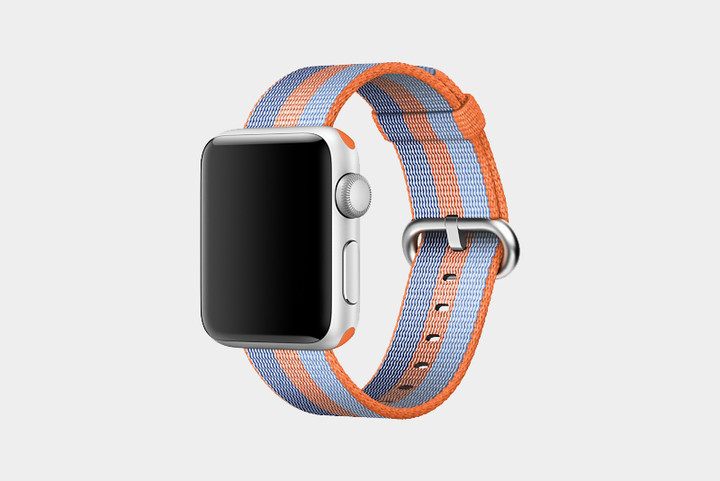
Apple’s nylon straps are some of the most colorful — and breathable — around. They’re made from more than 500 threads woven together in a pattern, and they’re bound by monofilaments that adhere four layers together to create a fabric-like material that’s comfortable both indoors and out. Moreover, Apple’s nylon bands come in an enormous (and growing) array of colors, including berry, Tahoe blue, orange, red, pollen, midnight blue, pearl, black, and scores of other color combinations.
Buy one now from:
Apple
Apple Sport Straps ($50)
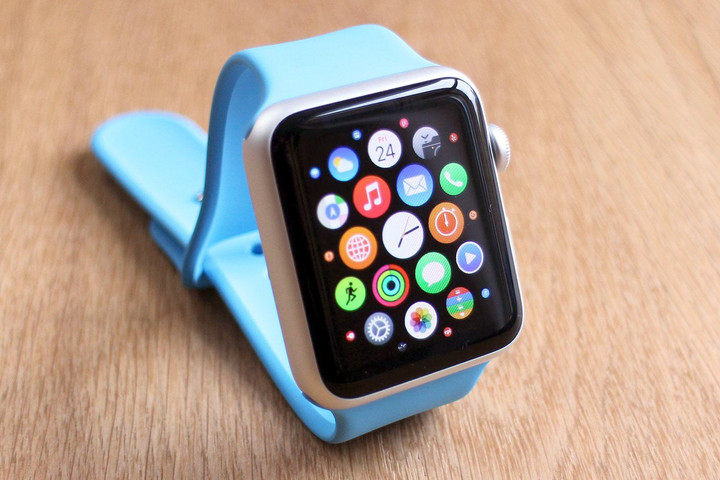
If you need something sturdier than nylon to get you through a hectic day, Apple offers the Sport Band. It’s made from a stretchy, high-performance “fluroelastomer” that’s both strong and soft to the touch. A nifty “pin-and-tuck” closure also ensures that it fits snugly around your wrist, and a smooth finish prevents unwanted pinches and rashes. The Sport Band is currently available in camellia red, pebble, azure, white, pink sand, midnight blue, black, and a host of alternative color combinations.
Buy one now from:
Apple
Apple Classic Buckle ($150)
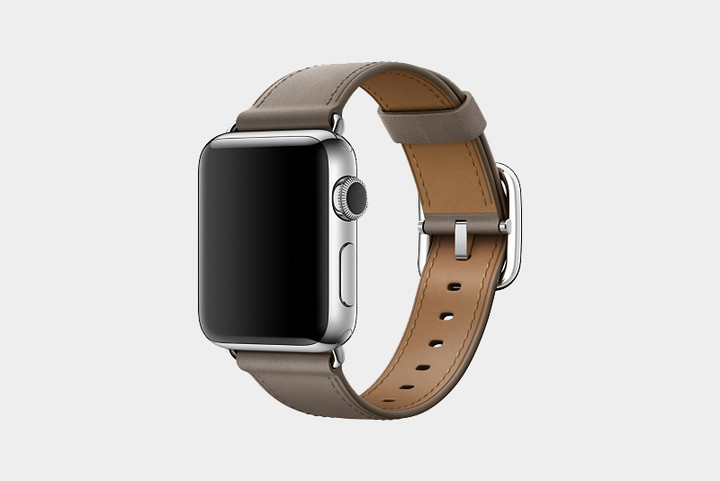
There’s arguably no material more quintessential than leather when it comes to watch straps, and Apple offers a great selection. The Cupertino-based company’s bands are made from calf leather that ages naturally over time to acquire a “patina,” which basically amounts to a gorgeous sheen. Each strap features a contrasting interior lining, color-matched stitching, and a spring-loaded buckle that makes it easier to affix the band. Apple’s leather straps come in berry, red, taupe, sapphire, saddle brown, midnight blue, and black.
If you’re the lucky owner of an Apple Watch Hermès, you get the option of fauve, fauve barenia, blue zéphyr, colvert swift, and eight other distinct colors. Double buckles currently come in blue agate Epsom, rose jaipur Epsom, etoupe Epsom, and fauve barenia.
Buy one now from:
Apple
Apple Stainless Steel ($150+)
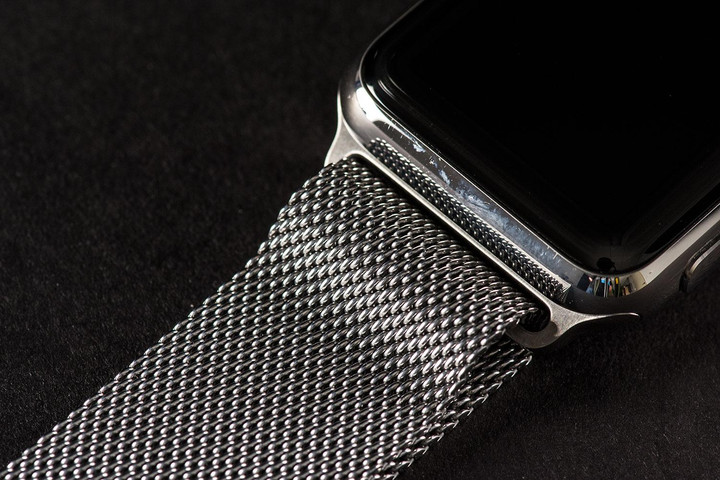
If metal is more your style, Apple has you covered. The company’s stunning Milanese loop, a modern interpretation of a design developed in Milan at the end of the 19th century, touts a stainless-steel design, wraps around your wrist, and adjusts with the help of magnets. Apple’s Link Braclet, meanwhile, features butterfly closure folds within the bracelet, allowing for a clean look. The onboard release button also makes it easy to add or remove links without special tools.
Buy one now from:
Apple
Samsung Galaxy Tab S3 review

Research Center:
Samsung Galaxy Tab S3
Android tablets do not offer a different experience from Android smartphones. It’s part of the reason why the iPad is the most popular tablet, because it provides “tablet-optimized apps” that make use of the screen’s real estate. Google made an attempt to go in this direction with Android 3.0 Honeycomb, but the company has largely backed off since. As such, app developers have found little encouragement to make a tablet version of their app on the OS.
Samsung’s trying to bring interest back with the Galaxy Tab S3. It’s a successor to the Galaxy Tab S2, which in 2015, we gave a score of 4.5 out of 5 because it was the only Android tablet that could go toe-to-toe with Apple’s iPad.
But now the climate has changed. Windows 2-in-1 tablet/laptops are rising in popularity, and so are Chromebooks, which are more ergonomic and typically affordable. Smartphones are also bigger than ever, so there’s not much of a reason to buy a tablet that offers the same experience.
While the Galaxy Tab S3 may be the best Android tablet you can buy, it fails to recognize the market it’s in. It’s expensive, doesn’t come with a keyboard, and it’s not going to replace your iPad Pro — the device Samsung is clearly going after. We wrote this review on the Tab S3, so let’s take a look at how it fares as a potential laptop replacement, a tablet, and drawing slate.
Brilliant display, dull design
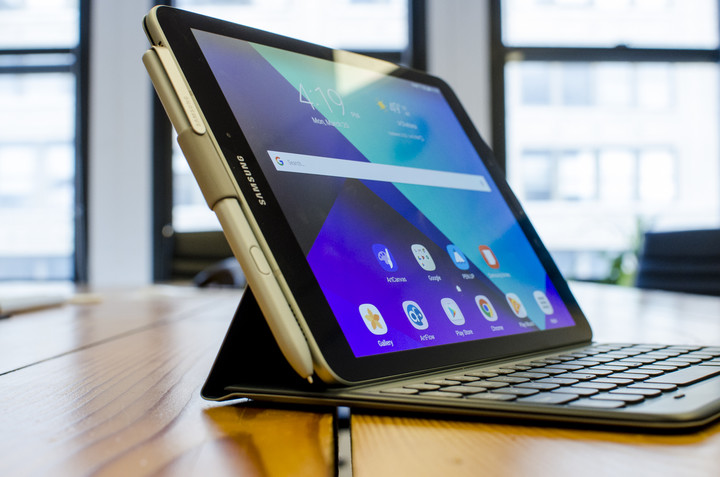
Let’s get the good stuff out of the way — the Galaxy Tab S3 has the best screen we’ve ever seen on a tablet. The brilliant, 9.7-inch Super AMOLED screen is a tad over-saturated, but it’s HDR-ready. That means it offers much-improved brightness and contrast, as well as a wider range of colors.
Sadly, it does mean you need to have HDR content to get the full experience. Netflix said it will support the format, and YouTube already does. You’ll still be more than satisfied with how it performs for non-HDR content, too. The AMOLED panel offers deep blacks and vivid colors, and the screen’s 2,048 x 1,536-pixel resolution ensures every minute detail is visible.
 Julian Chokkattu/Digital Trends
 Julian Chokkattu/Digital Trends
 Julian Chokkattu/Digital Trends
 Julian Chokkattu/Digital Trends
Unfortunately, the best screen has been paired with a boring design. Hardly much has changed from the 2015 Galaxy Tab S2, and we’re not quite sure why Samsung repeatedly goes for a look akin to an enlarged Galaxy S5. While Samsung is doing as much as it can to strip away bezels from its smartphones, it doesn’t seem to care for its tablets.
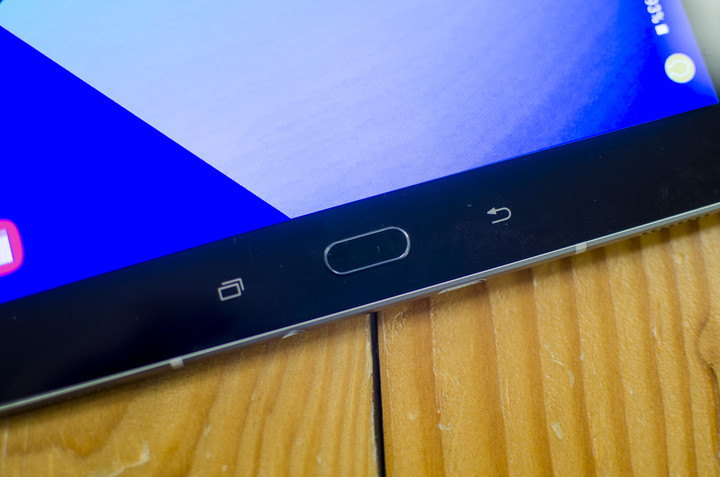
Most people predominantly use a tablet of this size in landscape mode — it’s likely why Samsung sent us the keyboard case as well. It’s baffling as to why there’s a vertical, smartphone-like design, with navigation buttons straight from the company’s smartphone lineup on the bottom bezel. While we do use keyboard shortcuts, like Alt-Tab, to navigate the Android interface, not everyone will learn to use them, and the buttons are still key in how we interact with the tablet. Their placement and orientation is unnatural.
The Galaxy Tab S3 has the best screen we’ve ever seen on a tablet.
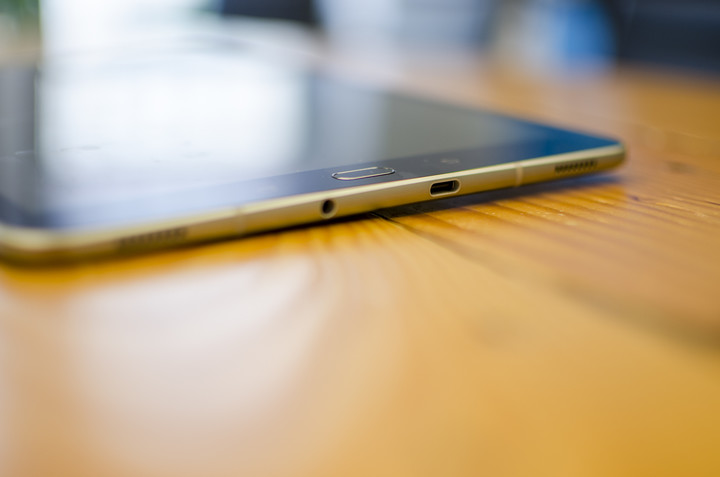
Similar to smartphones, there’s an accessible power button next to the volume rocker, but at least this placement is more intuitive. You’ll also find two top- and bottom-firing speakers on both sides of the Tab S3, similar to the iPad Pro, along with a USB Type-C port and headphone jack on the bottom.
The home button acts as a fingerprint sensor — which we’ll get to later — and the glossy, glass back design is sleek, but a serious misstep. It opens the device to an unnecessarily higher risk of damage. Do not hand this tablet to your kids, because it will shatter.
Smooth performance, and quad speakers
The Galaxy Tab S3 is powered by Qualcomm’s Snapdragon 820 — the 2016 processor of choice for many flagship smartphones like the Galaxy S7 Edge and the LG G5. It’s dated now that the Snapdragon 835 is the flagship chip, but it does the job fine, thanks to the 4GB of RAM.
We’ve seen the occasional stutter now and then, particularly when moving to the Flipboard “briefing” screen on the left of the main home screen. You can turn this off, though.
The tablet comes with 32GB of internal storage, and a MicroSD card slot lets you upgrade that up to 256GB (there’s a free 64GB MicroSD card thrown in if you pre-order the Tab S3). The MicroSD card will certainly help, because 32GB isn’t a ton of space if you’re downloading movies, games, books, or music.

Julian Chokkattu/Digital Trends
A 5-megapixel front camera offers decent quality for video calls and selfies, but the 13-megapixel rear camera allows for 4K video capture at 30 frames-per-second. Generally, we don’t recommend using your tablet to take photos or videos, and the keyboard case also counterintuitively covers the rear camera anyway. We’d prefer if Samsung made the front-facing camera better than the rear on tablets, as it’s likely used more often.
Samsung is also touting the capabilities of the quad speakers on the Tab S3, which were tuned by audio systems manufacturer AKG Acoustics. Each corner of the tablet has a speaker, and it’s far better than most speaker configurations on smartphones or other tablets.
More: What’s in a Name? Meet Bixby – the smart sidekick who’ll help you use your digital gear
While the audio can get pretty loud, it does tend to sound like a smartphone placed in a drinking glass. The bass is a little muddled and hard to make out, but generally the speakers are pretty good for a tablet. It’s not as nice as the speakers on the iPad Pro, which sound more well-rounded and balanced, though perhaps a tad quieter.
Multitasking improvements in Android
The Tab S3 runs Android 7.0 Nougat, and in classic Samsung fashion, it’s mixed in with the company’s TouchWiz user interface. TouchWiz looks surprisingly slick on Nougat, and overall we’ve had a positive experience interacting with the device.
There are many small details Samsung has added to make the Nougat interface even richer. Take multitasking as an example. Users can simply tap the multitasking icons in the Recents menu to jump right into split-screen mode. When you start a split-screen session, you can slide the divider to make one app larger than the other — that’s a standard Nougat feature. Tap the divider on the Tab S3 though, and you can either swap the placement of both apps, close the multi-tasking session, or open one of the apps as a separate window, aka a floating app.
Don’t expect a bloatware-free experience when you first set up the Tab S3.
You can move the floating app wherever you want, while still being able to interact with the other app. It’s a great way to have a video playing from YouTube, for example, while writing in Google Docs.
Be wary about the fingerprint sensor on the Tab S3. We’ve had some issues, and it’s because of how it’s placed. We set up the same fingerprint twice horizontally and vertically to ensure it worked in both orientations, but the tablet would always need two to three tries to unlock. It simply wouldn’t register the fingerprint most of the time.
Don’t expect a bloatware-free experience when you first set up the Tab S3 — there are a decent number of pre-installed apps, including ones from Microsoft, that you can’t delete. Overall, though, the interface is responsive, sleek, and smooth. In our experience, TouchWiz does bog things down and get a little slower over time, so we’ll have to see how the Tab S3 performs in the long run.
Sketching with the S Pen
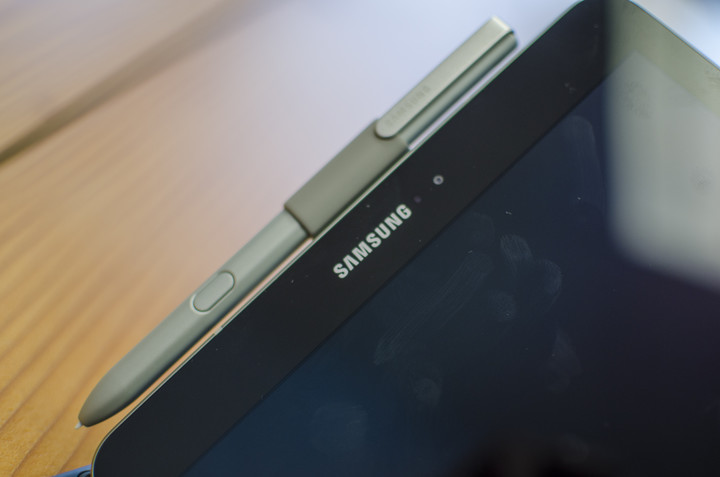
The Tab S3 comes with Samsung’s famed S Pen, which doesn’t look as nice as the one that debuted alongside the Galaxy Note 7. That’s because it’s a lot thicker, but it’s comfortable to hold as it’s similar in size and weight to a dumb pen.
It still has all the same features as the stylus from the Note 7, though you won’t be able to store it anywhere in the actual device. Samsung offers an adhesive S Pen holder you can attach to the keyboard cover. If you don’t like that method, you’ll have to carry it separately, so make sure you don’t lose it — it costs $80 separately, and that’s not cheap.
Samsung Galaxy Tab S3 Compared To

Chuwi Hi12 Windows 10 2-in-1
Lenovo Tab 2 A8

Dell Venue 8 7000

Nvidia Shield Tablet
Apple iPad Air 2

Lenovo ThinkPad 10
Apple iPad Mini 2

Microsoft Surface 2
Samsung Galaxy Tab 3 (8-inch)
Razer Edge Pro

Barnes & Noble Nook HD+
Dell Latitude 10
Dell XPS 10
Acer Iconia Tab W700
Acer Iconia Tab A700
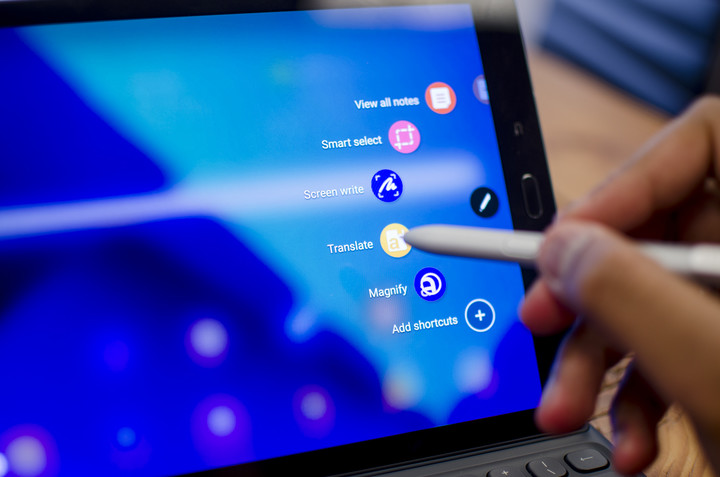
Tapping the button on the stylus opens a menu of S Pen shortcuts, such as “Create note,” “View all notes,” “Smart Select,” “Translate,” and more. Translate, for example, lets you hover the S Pen over text in apps to translate words to one of the supported languages via Google Translate. Smart Select lets you crop a part of the screen to mark or extract text from, which you can then copy to your clipboard.
You can also write notes on the screen when it’s turned off with the stylus, and when you’re done it’s immediately saved in Samsung Notes. All of these are unique and fairly useful features, and most importantly, they consistently work without issues.
There are a few ways you can draw on the tablet right off the bat, such as with Samsung Notes, though you may want to go for more robust drawing apps available on the Google Play Store, like ArtCanvas. Samsung has improved the S Pen to add a 0.7mm tip and more than 4,000 levels of pressure sensitivity, and sketching is actually quite enjoyable on the Tab S3, except for one major flaw: palm rejection.
 Julian Chokkattu/Digital Trends
 Julian Chokkattu/Digital Trends
The Tab S3 is supposed to have palm rejection technology, but in the various apps we have tried, the tablet registers all palm movement on the canvas. It’s frustrating if you’re trying to draw and have to constantly erase marks made your palm. By contrast, Apple’s iPad Pro was flawless and its palm rejection technology works like a charm.
Samsung’s poor job here is a part of the reason why we feel as though the Tab S3 should not be a choice for professionals looking to create art digitally. There are also quite a number of high-quality drawing apps on iOS, and seeing as the iPad Pro starts at the same price as the Tab S3, there’s no reason why you shouldn’t go for gold with Apple.
Good battery life
Battery life has been solid on the Tab S3. Moderate to high-use, for example, gets us 10 hours with 20 percent left. All of that’s due to the 6,000mAh battery inside, but what we’ve seen on the Tab S3 is more or less standard with most tablets.
More: Samsung Galaxy S8 rumors and news leaks
Standby time is nearly akin to the iPad Pro, as we’ve left the device on for more than 12 hours only to see it drop four percent or less. All of this largely depends on how you use the tablet — if you’re watching videos or have the screen’s brightness to high, for example, you’ll see shorter battery life.
Cramped but clicky keyboard
The keyboard is a separate accessory that will set you back $130, which is ridiculously expensive as it would bring the total price of the tablet to more than $700.
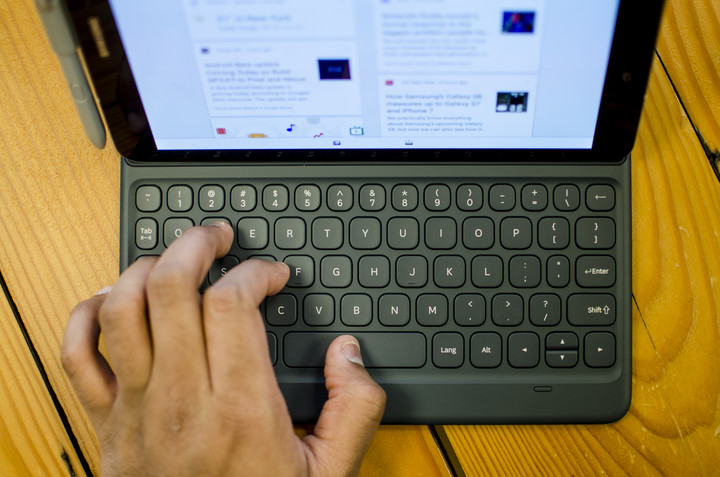
If you have large hands like me, the keyboard is going to be cramped. It’s simply too small in width and length, and typing is going to get tiring after a small period of time. I had to take breaks every so often writing this review because my fingers got more tired than usual.
Julian Chokkattu/Digital Trends
Thankfully, the keys are responsive and clicky. The keyboard itself is built well, and best of all it doesn’t need to be charged as the tablet attaches to it via pogo pins. Sadly, there seems to be only one way to keep the tablet raised with this keyboard. Our advice? Buy Samsung’s Chromebook Pro or Plus instead if you want a laptop that doubles as an Android tablet.
Warranty information and security updates
Samsung offers a standard one-year warranty from the date of purchase, and this covers any manufacturing defects in the device — but not accidental drops or water damage. The tablet’s current security update is from February, which is reasonably timely. Samsung is promising to follow through with monthly security updates for its smartphones, but we’ll have to see if that extends to its tablets as well.
Our Take
The Galaxy Tab S3 is an excellent Android tablet that offers solid performance, good audio capabilities, Android 7.0 Nougat, and good battery life, all with an excellent display to boot.
At $600, though, it’s among the priciest Android tablets you can buy, and problems arise when you look at the competition and the demographic for this tablet.
Is there a better alternative?
The DT Accessory Pack
Micro USB & USB-C Combo Cable
$20
S Pen
$80
Galaxy Tab S3 9.7″ Book Cover
$60
Galaxy Tab S3 9.7″ Keyboard Cover
$130
Yes, and no – it depends on what you want to use it for. If you’re looking for the best Android tablet you can buy, you won’t be disappointed with the Tab S3. If you’re looking for a laptop replacement — you’ll find the Samsung Chromebook Pro or Plus to be better options, as they are more ergonomic, cheaper, have built-in keyboards and styli, and can run Android apps.
If you’re an artist looking for a tablet to sketch on, you should go for the best — the iPad Pro, which starts at the same price as the Tab S3. Palm rejection technology is important, and Apple does it best.
How long will it last?
Samsung usually supports its devices with software updates for two years after release, but the Tab S3 will likely keep on chugging for some more time, perhaps another year or two before you may need to start looking at replacements.
Should you buy it?
Yes, if you are committed to Android and aren’t interested in alternatives operating systems. This is currently the best Android tablet around. Chromebooks will be better productivity tools if that’s what you’re looking for, the iPad is still the tablet of choice for artists, and Windows 2-in-1s promise laptop functionality. But if it’s Android you want, the Samsung Tab S3 is the way to go.
 AIVAnet