


Amazon Alexa adds Prime Now: How to get fast deliveries with your voice
Amazon is constantly improving its voice assistant, Alexa, and its latest feature is a “prime” example (pun intended).
The company has announced Alexa now works with its Amazon Prime Now delivery service, meaning you can now use your voice to order goods from Amazon or local stores and restaurants, and then get that order delivered to your front door within one to two hours. But there’s a few rules and limitations involves, so if you want to know more, here’s everything you need to know about this new feature.
- Buy the Amazon Echo from Amazon for £149.99
- Buy the Amazon Echo Dot from Amazon for £49.99
What is Amazon Prime Now?
Amazon Prime Now is a perk that Amazon gives to Prime members.
An Amazon Prime membership costs $99 a year (or by the month for $10 per month). With Prime Now, you can place orders for same-day delivery in several US zip codes. It offers free two-hour delivery or one-hour delivery in most areas for $7.99 per order. You can get groceries, gifts, goodies, and more – all from local stores and restaurants.
Prime Now is available in select US cities from early morning to late night, seven days a week. It is a standalone site and mobile app.
How does Amazon Prime Now work with Alexa?
Order
Amazon Alexa is available through the Amazon Echo line of speakers as well as some third-party devices. As of 21 March, you can use Alexa for hands-free shopping and fast, same-deliveries – as long as you are an Amazon Prime member and live in a Prime Now area. If all those boxes are checked, you can buy anything from the complete Prime Now retail catalogue, which includes tens of thousands of products.
You can say, “Alexa, order Pepsi from Prime Now,” and then Alexa will return results from your history or the best result from a search of the Prime Now catalogue. Once you confirm the item, Alexa will ask if you want to buy more items. Alexa will even provide recommendations for products to buy so you meet the minimum order value ($25).
Remember, Alexa already allowed users to order from Amazon, so if you would like to your to be delivered in a two-hour window, then you must specify “from Prime Now” when talking to Alexa. Amazon’s assistant will select the next available delivery window. You can add a tip for your courier in the Prime Now app or on the website.
Cancel
To cancel an order, you can simply say “Alexa, cancel my order” within eight seconds of placing the order. After eight seconds, you must use the Prime Now app to cancel an order. (Go to Your Account, then select Your Orders, and select the order you wish to cancel.) If it can be canceled, you’ll see a Cancel Delivery button. If it can’t be canceled, you need to contact Customer Service to attempt to cancel the order.
Tracking
Alexa cannot track Amazon Prime orders. You will need to visit the Prime Now app or website to track your order.
Where is Prime Now available?
You can only order from Prime Now in the following US cities:
- Atlanta, Austin, Baltimore, Berkeley, Brooklyn, Chicago, Columbus, Dallas, Houston, Indianapolis, Las Vegas, Los Angeles and Orange County, Miami, Minneapolis and St. Paul, Nashville, New York City, Northern Virginia, Orlando, Phoenix, Portland, Raleigh, Richmond, Sacramento, San Antonio, San Diego, San Francisco Bay Area, Seattle and Eastside, and Virginia Beach
Want to know more?
Check out Amazon’s FAQ page for more details.
- Amazon Alexa comes to iOS devices: How does it work and what can it do?
iTunes movie rentals finally work across multiple devices
Somehow, Apple went until 2017 before adding one of the most basic features to iTunes. You see, for the past nine years, when you’d rent a movie via the app, you’d have to watch it on the device the rental originated from. So, if you rented Manchester by the Sea on your commute, watched a few minutes and then wanted to finish bumming yourself out on your big screen at home, you were out of luck. With the latest version of iTunes (12.6) and “rent once, watch anywhere,” that’s changed.
Assuming you have iOS 10.3 installed on your iPhone or iPad, and tvOS 10.2 on your Apple TV, the feature should be ready to take for a spin. A caveat, though: As 9to5Mac notes, those OS updates are only available in public beta and developer beta channels, respectively. Once those go wide, though, the feature itself should follow suit. This isn’t a massive improvement, but hey, neither is a red iPhone 7.
Via: 9to5 Mac
Source: Apple
MGM courts millennials with new shows on Snapchat
Snap and MGM Television have inked a deal to produce original short-form shows for the social network, MGM Studios announced today. This is Snap’s first major content deal with an entertainment studio, although it’s also partnered with a variety of TV networks looking to reach Snapchat’s millennial-aged user base.
Snapchat Shows are typically standalone programs based on original or existing works that run four to five minutes. Right now, MGM Television isn’t saying what kinds of content it plans to create for Snapchat or when it will appear, but it’s possible the company will look to its current slate of reality show properties like Survivor, The Apprentice and Shark Tank for inspiration.
Snap has been steadily moving away from its social networking roots and towards becoming a mobile TV platform over the past year. It signed a deal with NBC in August to produce a mini version of The Voice and original shows from The Tonight Show Starring Jimmy Fallon and Saturday Night Live. Disney is making a recap series for The Bachelor. The BBC is bringing its nature documentary series Planet Earth II to the social network, and A+E is creating a relationship reality show called Second Chance.
Snapchat reportedly has over 100 million daily active users who view an estimated eight billion mobile videos per day. It looks like TV networks, eager to get younger audiences watching their shows, are tapping into its massive popularity. But do teens and millennials even want this content? We don’t know how many people are watching Snapchat Shows, but at least one program — the politically-themed Good Luck America — is doing well enough to get renewed, so it must be generating some amount of ad revenue for Snap.
Via: Variety
Source: Variety, MGM
First Xbox One ‘Tech Series’ controller adds tactical styling
Console players with money to burn might find their stock controllers just a little too drab one day and go hunting for a more stylish gamepad. Xbox One owners are particularly in luck, since Microsoft seems to add new color and design schemes every few months. The latest remix of the console’s standard wireless controller comes in the new Tech series, and the first in that line looks perfect for the aesthete in your life that appreciates geometric designs and military chic.
The Recon Tech Special Edition isn’t too different from the stock model, adding cool gold accents and insignias on the gamepad’s face and nice rubberized grip strips on the back. While that won’t give players an edge (or expanded functionality) like the Elite controller’s finely-tuned sensors and alt-control paddles, the Recon Tech includes the standard Wireless controller’s Bluetooth capability to hook up to Windows 10 and Samsung Gear VR.
Plus, the $70 Recon is still relatively affordable compared to the Elite’s $150 pricetag. As is typical with the Xbox One gamepad options, you’re paying a premium for style, since every other unique paint scheme (including custom jobs from the Design Lab) costs $10-$30 more than the $50 stock wireless controller.
Source: Xbox Wire
Amazon Music iOS App Now Supports CarPlay
Amazon today updated its Amazon Music app for iOS devices to version 6.4.0, adding a small but important new feature: support for CarPlay.
With the latest version of the Amazon Music app, Amazon Music subscribers who own a vehicle equipped with CarPlay can access their music directly through the CarPlay interface when an iPhone is connected to the car.
Amazon Music is available to Amazon Prime subscribers, with two million songs, playlists, and stations included in a membership.
Separate Amazon Music Unlimited subscriptions are also available for on-demand listening to “tens of millions” of songs, with pricing starting at $7.99 for Prime members ($9.99 without a Prime subscription). A lower-cost Echo-only plan is also available for $3.99 per month.
Amazon Music can be downloaded from the App Store for free. [Direct Link]
Related Roundup: CarPlay
Tags: Amazon, Amazon Music Unlimited
Discuss this article in our forums
Microsoft Universal Foldable Keyboard review

Research Center:
Microsoft Universal Foldable Keyboard
There’s no shortage of mobile keyboards in the world. Some, such as EC Technology’s Bluetooth Ultra-Slim Keyboard and the Jorno Keyboard, fold in thirds. Others, including VisionTek’s Waterproof Bluetooth Mini Keyboard and today’s review unit, Microsoft’s Universal Foldable Keyboard, fold in half. Nearly all are water resistant to some degree, and most of them support all three of the standard tablet and smartphone operating systems: Android, iOS, and Windows.
Akin to its Surface 3 and Surface 3 Pro Type Cover keyboard sibling, Microsoft’s mobile keyboard is light, compact, and easy to use. And like most Microsoft keyboards (and other peripherals), it’s well-designed and well-built, if somewhat expensive. If you shop around, you can find it for around $70. You can pick up the VisionTek model for as little as $20, though, and the iClever BK03 Ultra Slim Mini Bluetooth Keyboard, yet another competitor, sells for about $36. At nearly two-thirds of a C-note, do you get what you pay for?
Slim, sleek, and sturdy
At 4.9 inches from top to bottom by 4.9 inches across when folded (11.6 inches unfolded), and just under half an inch thick, the Universal Foldable Keyboard is about the size of a CD jewel case. Unfolded, it has a quarter-inch profile. It’s a bit larger than its close competitor (price- and quality-wise), the $100 Jorno Keyboard (3.5 by 9.9 inches). At just over six ounces, both devices weigh about the same, but the Jorno model comes with a carrying case that doubles as a stand for holding your mobile device upright while you type.

Bill Roberson/Digital Trends
Microsoft’s keyboard is encased in a plush, soft gray pleather that looks and feels elegant and appears to be fingerprint and scratch resistant. As mentioned, like most of its competitors, its water resistant, so a splash shouldn’t harm it. A magnet holds the two halves closed, so that they don’t flop open and closed in transit, and you charge it via the included microUSB cable. The jack on the keyboard is the standard size used to charge most Android phones and several other microUSB devices. Overall, the Universal Foldable Keyboard is nice to look at, and despite its petite size and light weight, it feels durable, too.
Open and go
Like several other mobile keyboards, opening the Universal Folding Keyboard turns it on, as indicated by a small LED in the upper-left corner. On the opposite corner are three other status LEDs that indicate the current operating system (OS) configuration, and you can easily switch between each OS by pressing a function key directly below the LEDs.
Microsoft’s keyboard is encased in a plush, soft gray pleather that looks and feels elegant.
Depending on the selected OS, the keyboard function keys (and several other keys) assume the appropriate roles. When switching from Windows to iOS, for instance, the Alt key becomes the Option key. The Windows key assumes the Home key role in Android, and so on.
The Universal Folding Keyboard holds configuration info for two separate Bluetooth devices. You pair it with your mobile devices and switch back and forth between them with the first two function keys. Pairing itself is straightforward in that you hold one of the Bluetooth keys until the mobile device finds it, and displays a code. Typing that code on the keyboard completes the process. Pairing worked flawlessly the first time.
Ready, set, type
If you’re used to a comfortable, full-size ergonomic keyboard with wrist support, with this and other mobile keyboards, they’ll be some adjustment time while you get use to this small, flat input device. The space in the center where it folds is particularly distracting, as are the two spacebars (one on each side of the fold) and the oversized T, N, G, H, and 7 keys. If you’re a speed typist (or even if you’re not), count on the Universal Foldable Keyboard slowing you down.

Bill Roberson/Digital Trends
That said, despite its size and other limitations, the chicklet styled keys travel comfortably with enough plunge, given the keyboard’s low profile. It’s much like typing on a Surface or another small keyboard attached to a combination laptop/tablet PC — too small if you were weaned on a full-size keyboard, but much easier than thumb typing, especially for writing lengthy emails.
Charge and forget about it
As mentioned, you can charge the Universal Foldable Keyboard with just about any microUSB cable. Not that you’ll be charging it often; Microsoft says that a full charge will last three months. We used it extensively (right out of the box without charging) for more than a week, including to type this review, without plugging it in. It doesn’t come with an AC power adaptor, but you can safely charge it from a USB port on a PC or Mac, or from your tablet or smartphone adaptor.
Warranty information
The Microsoft Universal Foldable Mouse comes with a three-year limited warranty against failure under normal use.
Our Take
The Microsoft Universal Foldable Keyboard is an excellent choice for folks that do (or want to do) a lot of composing on their smartphone or tablet. We think it would be slicker if Microsoft also provided a carrying case that seconded as a stand for holding your mobile device upright. Overall, though, we found the Universal Foldable Keyboard a highly useful, well-designed product.
Is there a better alternative?
The Microsoft Universal Foldable Mouse is light, compact, easy to use, well-built, and it has an elegant look and feel. We were especially impressed with how well the magnet holding the two halves together has just the right strength to make it easy to open and close, as well as keep it from flopping open. And it’s easy to connect to and to switch back and forth between your mobile devices.
More: Use your tablet like a laptop with $14 Anker Bluetooth Ultra-Slim Keyboard
During our review we found several mobile Bluetooth keyboards ranging from the cheap and not-very-well-built, to those comparable to Microsoft’s somewhat costly solution. One of the closer in price and features is the Jorno Keyboard that, as mentioned, comes with a carrying case that seconds as a stand for holding your smartphone or tablet upright.
Microsoft Universal Foldable Keyboard Compared To

Logitech G213 Prodigy

Steelseries Apex M500

Razer Turret

Razer Blackwidow X Chroma

Cougar Attack X3 gaming keyboard

Razer Deathstalker Chroma

Logitech Harmony Smart Keyboard…

Microsoft Sculpt Ergonomic Desktop

Logitech K400

Roccat Isku and Kone+

Microsoft Wireless Desktop 5000

Cooler Master Storm QuickFire

Logitech iPad 2 Keyboard Case by…

Cherry JK-0300

Logitech K750 Wireless Solar…
How long will it last?
By offering it with a three-year warranty, Microsoft obviously has faith in this keyboard, and it certainly feels rugged enough to last for quite some time. It doesn’t require software, so there’s nothing to update in the future. As long as you take good care of it, the Universal Folding Keyboard should last over the long hall. And hey, if it stops working in the first three years, Microsoft will replace it.
Should you buy it?
Not everybody needs a keyboard for their mobile device. If all you type is short text messages, thumbing it may be preferable to getting out the keyboard each time you need to type a few words. If, however, you compose longer emails or Word documents frequently, the Microsoft Universal Folding Keyboard, once you get used to it, should save you some time and aggravation—especially if thumb typing isn’t your strong suit.
Microsoft Universal Foldable Keyboard review

Research Center:
Microsoft Universal Foldable Keyboard
There’s no shortage of mobile keyboards in the world. Some, such as EC Technology’s Bluetooth Ultra-Slim Keyboard and the Jorno Keyboard, fold in thirds. Others, including VisionTek’s Waterproof Bluetooth Mini Keyboard and today’s review unit, Microsoft’s Universal Foldable Keyboard, fold in half. Nearly all are water resistant to some degree, and most of them support all three of the standard tablet and smartphone operating systems: Android, iOS, and Windows.
Akin to its Surface 3 and Surface 3 Pro Type Cover keyboard sibling, Microsoft’s mobile keyboard is light, compact, and easy to use. And like most Microsoft keyboards (and other peripherals), it’s well-designed and well-built, if somewhat expensive. If you shop around, you can find it for around $70. You can pick up the VisionTek model for as little as $20, though, and the iClever BK03 Ultra Slim Mini Bluetooth Keyboard, yet another competitor, sells for about $36. At nearly two-thirds of a C-note, do you get what you pay for?
Slim, sleek, and sturdy
At 4.9 inches from top to bottom by 4.9 inches across when folded (11.6 inches unfolded), and just under half an inch thick, the Universal Foldable Keyboard is about the size of a CD jewel case. Unfolded, it has a quarter-inch profile. It’s a bit larger than its close competitor (price- and quality-wise), the $100 Jorno Keyboard (3.5 by 9.9 inches). At just over six ounces, both devices weigh about the same, but the Jorno model comes with a carrying case that doubles as a stand for holding your mobile device upright while you type.

Bill Roberson/Digital Trends
Microsoft’s keyboard is encased in a plush, soft gray pleather that looks and feels elegant and appears to be fingerprint and scratch resistant. As mentioned, like most of its competitors, its water resistant, so a splash shouldn’t harm it. A magnet holds the two halves closed, so that they don’t flop open and closed in transit, and you charge it via the included microUSB cable. The jack on the keyboard is the standard size used to charge most Android phones and several other microUSB devices. Overall, the Universal Foldable Keyboard is nice to look at, and despite its petite size and light weight, it feels durable, too.
Open and go
Like several other mobile keyboards, opening the Universal Folding Keyboard turns it on, as indicated by a small LED in the upper-left corner. On the opposite corner are three other status LEDs that indicate the current operating system (OS) configuration, and you can easily switch between each OS by pressing a function key directly below the LEDs.
Microsoft’s keyboard is encased in a plush, soft gray pleather that looks and feels elegant.
Depending on the selected OS, the keyboard function keys (and several other keys) assume the appropriate roles. When switching from Windows to iOS, for instance, the Alt key becomes the Option key. The Windows key assumes the Home key role in Android, and so on.
The Universal Folding Keyboard holds configuration info for two separate Bluetooth devices. You pair it with your mobile devices and switch back and forth between them with the first two function keys. Pairing itself is straightforward in that you hold one of the Bluetooth keys until the mobile device finds it, and displays a code. Typing that code on the keyboard completes the process. Pairing worked flawlessly the first time.
Ready, set, type
If you’re used to a comfortable, full-size ergonomic keyboard with wrist support, with this and other mobile keyboards, they’ll be some adjustment time while you get use to this small, flat input device. The space in the center where it folds is particularly distracting, as are the two spacebars (one on each side of the fold) and the oversized T, N, G, H, and 7 keys. If you’re a speed typist (or even if you’re not), count on the Universal Foldable Keyboard slowing you down.

Bill Roberson/Digital Trends
That said, despite its size and other limitations, the chicklet styled keys travel comfortably with enough plunge, given the keyboard’s low profile. It’s much like typing on a Surface or another small keyboard attached to a combination laptop/tablet PC — too small if you were weaned on a full-size keyboard, but much easier than thumb typing, especially for writing lengthy emails.
Charge and forget about it
As mentioned, you can charge the Universal Foldable Keyboard with just about any microUSB cable. Not that you’ll be charging it often; Microsoft says that a full charge will last three months. We used it extensively (right out of the box without charging) for more than a week, including to type this review, without plugging it in. It doesn’t come with an AC power adaptor, but you can safely charge it from a USB port on a PC or Mac, or from your tablet or smartphone adaptor.
Warranty information
The Microsoft Universal Foldable Mouse comes with a three-year limited warranty against failure under normal use.
Our Take
The Microsoft Universal Foldable Keyboard is an excellent choice for folks that do (or want to do) a lot of composing on their smartphone or tablet. We think it would be slicker if Microsoft also provided a carrying case that seconded as a stand for holding your mobile device upright. Overall, though, we found the Universal Foldable Keyboard a highly useful, well-designed product.
Is there a better alternative?
The Microsoft Universal Foldable Mouse is light, compact, easy to use, well-built, and it has an elegant look and feel. We were especially impressed with how well the magnet holding the two halves together has just the right strength to make it easy to open and close, as well as keep it from flopping open. And it’s easy to connect to and to switch back and forth between your mobile devices.
More: Use your tablet like a laptop with $14 Anker Bluetooth Ultra-Slim Keyboard
During our review we found several mobile Bluetooth keyboards ranging from the cheap and not-very-well-built, to those comparable to Microsoft’s somewhat costly solution. One of the closer in price and features is the Jorno Keyboard that, as mentioned, comes with a carrying case that seconds as a stand for holding your smartphone or tablet upright.
Microsoft Universal Foldable Keyboard Compared To

Logitech G213 Prodigy

Steelseries Apex M500

Razer Turret

Razer Blackwidow X Chroma

Cougar Attack X3 gaming keyboard

Razer Deathstalker Chroma

Logitech Harmony Smart Keyboard…

Microsoft Sculpt Ergonomic Desktop
Logitech K400
Roccat Isku and Kone+

Microsoft Wireless Desktop 5000

Cooler Master Storm QuickFire

Logitech iPad 2 Keyboard Case by…

Cherry JK-0300

Logitech K750 Wireless Solar…
How long will it last?
By offering it with a three-year warranty, Microsoft obviously has faith in this keyboard, and it certainly feels rugged enough to last for quite some time. It doesn’t require software, so there’s nothing to update in the future. As long as you take good care of it, the Universal Folding Keyboard should last over the long hall. And hey, if it stops working in the first three years, Microsoft will replace it.
Should you buy it?
Not everybody needs a keyboard for their mobile device. If all you type is short text messages, thumbing it may be preferable to getting out the keyboard each time you need to type a few words. If, however, you compose longer emails or Word documents frequently, the Microsoft Universal Folding Keyboard, once you get used to it, should save you some time and aggravation—especially if thumb typing isn’t your strong suit.
Huawei Watch 2 Sport vs. Huawei Watch 2 Classic: Which one is right for you?
Huawei has finally taken the wraps off of the Huawei Watch 2. Unlike the first time around, however, there are actually two devices with the Huawei Watch 2 name: The Huawei Watch 2 Sport and the Huawei Watch 2 Classic. While you might assume the only differences are aesthetic, the truth is that there are also a few changes under the hood.
So which one is right for you? Turns out, the devices have some very specific use cases, which is why we’ve put together this guide.
More: Huawei Watch 2 Classic and Watch 2 Sport: Our first take
Specs
Huawei Watch 2 Sport

Huawei Watch 2 Classic

Size
48.9 x 45 x 12.6 mm (1.93 x 1.77 x 0.50-inches)
48.9 x 45 x 12.6 mm (1.93 x 1.77 x 0.50-inches)
Weight
57g (2.01oz)
60.5g (2.15oz)
Screen
1.2-inch AMOLED
1.2-inch AMOLED
Resolution
390 x 390 pixels
390 x 390 pixels
Operating System
Android Wear 2.0
Android Wear 2.0
Storage
4GB
4GB
Processor
Qualcomm Snapdragon Wear 2100
Qualcomm Snapdragon Wear 2100
RAM
768MB
768MB
LTE Support
Yes (optional)
No
Connectivity
GSM/HSPA/LTE/Wi-Fi b/g/n
Wi-Fi b/g/n
Bluetooth
Yes, version 4.1
Yes, version 4.1
GPS
Yes
Yes
Battery
420mAh
420mAh
Water Resistance
IP68
IP68
Sensors
Accelerometer, gyroscope, heart rate, barometer, compass
Accelerometer, gyroscope, heart rate, barometer, compass
Colors
Orange, Black, Grey
Titanium
DT Review
Hands-On
Hands-On
When it comes to specs, the two watches are almost identical. Both devices come with a Qualcomm Snapdragon Wear 2100 processor, which is built specifically for wearables. On top of that, they both feature 4GB of storage and 768MB of RAM, so they should be able to handle most wearable-related things you can throw at them.
The amount of storage, RAM, and the processor in these Android Wear watches are among the best you can get at the moment. Because the two watches have the same specs, this one is a tie.
Winner: Tie
Pink Trombone is a disembodied mouth that shows you how sounds are formed
Why it matters to you
Want to see how mouths are manipulated to form the various sounds that they make? This unique web app gives you a hands-on lesson.
Let’s be honest, if it weren’t for the faint whiff of NSFW material about its name, we would all click a link entitled “Pink Trombone” the moment we saw it.
A new web app created by Neil Thapen, a researcher at the Institute of Mathematics of the Academy of Sciences of the Czech Republic, it’s a pretty awesome creation: A disembodied mouth that you can manipulate to see how sounds are formed.
You probably won’t be using it to form any sounds other than guttural “Oh-ah-oo-ee-aa!” type noises but it’s an intriguing look at how the mouth’s soft and hard palate, tongue, lips, and oral and nasal cavity are manipulated to produce vowels and consonants, as well as varying pitch.
More: Startup that gives a voice to the speechless wants you as a donor
“Pink Trombone is an interactive articulatory speech synthesizer,” Thapen told Digital Trends. “That is, it creates speech by modeling — in a simplified way — the physical form and movements of the human vocal tract. Programs like this have been around for a long time, but the examples I’ve seen from academia tend to have unfriendly interfaces. I have tried to make one that is fun to use. You can move the tongue or lips around in real time with your fingers, and see what sound comes out.”

Thapen said the web app has no real connection with his day job, which is research in logic. Instead, it ties in with his hobby of game development and making “interesting things that are fun to interact with.”
“I started working on it when my daughter began to speak,” he continued. “I was reading about the physical processes involved in speech production and thought it would be interesting to implement them on the computer at the same time as she was doing it in real life. Of course, she ended up learning much faster than I did.”
If you want to try it out, you can do so by clicking the link here. As far as gaining a basic understanding of speech and phonetics, and specifically how speech organs actually work, this is the best “hands-on” education you’re likely to get.
Microsoft is currently experiencing issues with letting users log into its services
Why it matters to you
If you’re currently having issues logging into a Microsoft service, stop trying to fix your PC. Microsoft is having some system problems that are holding you back.
While the cloud and integrated cloud services can be great things in terms of linking systems and data, they do have one major weakness — they represent a single point of failure. That’s particularly true for services that use a single login to access multiple services.
As a case in point, if you’re having issues logging into a Microsoft service right now, then there may not be anything wrong with your PC, nor anything you can do to regain access to your Microsoft accounts. Rather, it’s looking like Microsoft itself is what’s holding you back, as The Verge reports.
More: 12 of the biggest problems with Windows 10, and how to fix them
Apparently, Microsoft’s infrastructure is experiencing its second major interruption so far this month, with a number of properties disallowing users from logging in. The issues seem to be either very slow access to services or the inability to log back into services that need to be recovered. Affected services include Xbox Live, Skype, OneDrive, Outlook.com, and the Windows Store.
One example of the problem occurs when trying to add a OneDrive account to Windows 10 to enable syncing. Attempt to do so return an error that the account cannot be accessed. Microsoft Xbox Live support has this to say:
“Our engineers and developers are actively continuing to work to resolve the issue causing some members to have problems finding previously purchased content or purchasing new content. Stay tuned, and thanks for your patience.”
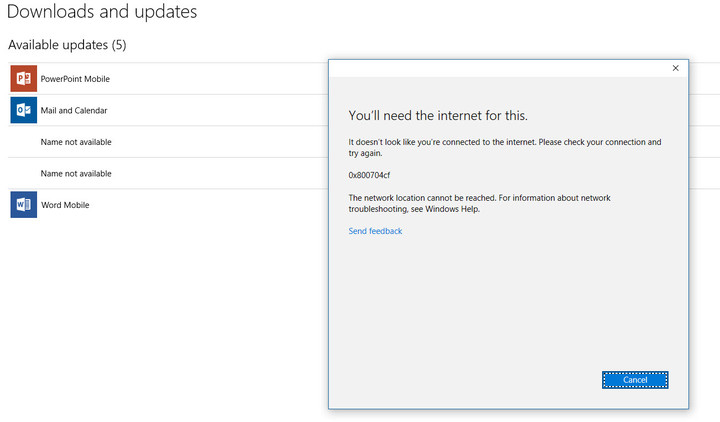
While this notice specifically applies to Xbox Live, the symptoms are occurring on some of Microsoft’s other services as well. As you can see from the screenshot below, trying to update apps in the Windows Store on a system that was already fully authorized returns an error about a missing Internet connection. If you want to be notified when the services are available, then go to the Xbox Live support page and click on the green “Notify me” button.
Mark Coppock/Digital Trends
If you’re feeling like you’re watching an episode of “The Outer Limits,” then don’t bother adjusting your PC. You’ll just have to wait for Microsoft to resolve these issues before gaining full access to your Microsoft services. In the meantime, you can spend a few minutes complaining about the vulnerabilities involved with putting all of our computing services in single baskets.
 AIVAnet