


How to use indoor maps in Google Maps

Easily navigate malls and department stores with indoor maps.
One of the more useful additions to Google Maps is the ability to navigate within malls, museums, libraries, or sports venues. The feature is accessible in 25 countries, and Google maintains a list of prominent locations for which indoor navigation is available.
If you’re looking to find the shortest route to a particular store within a mall or navigating a gargantuan museum and are in need of a layout guide, the indoor maps feature comes in handy.
How to use indoor maps in Google Maps
Open Google Maps from your app drawer or home screen.
Enter the name of the location via the Search here textbox. You should see a pin on your selected location.
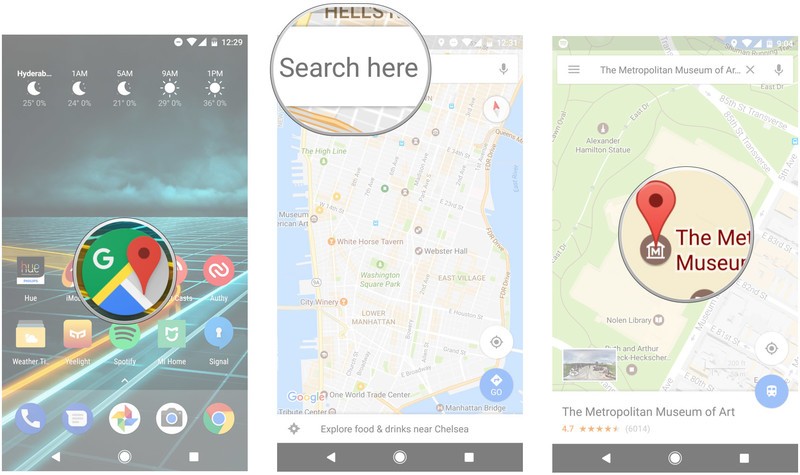
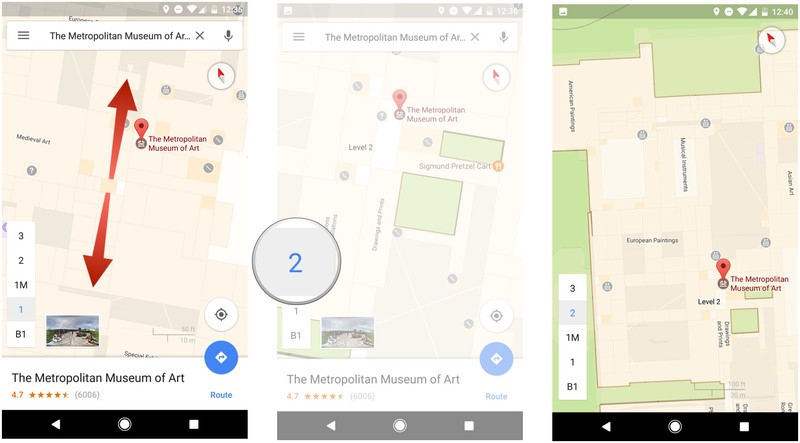
Pinch out to zoom in on the map a few times until you see the floor layout.
You can navigate the internal layout by selecting the floor markers on the bottom left of the screen.
Zoom in or out to view specific sections of the indoor map.
Do you use indoor navigation often? Let us know what you think of the feature in the comments.
 AIVAnet