


AT&T gives new DirecTV Now subscribers a year of HBO
AT&T is determined to build early momentum for DirecTV Now, and it just found another way to sweeten the pot. The telecom has launched a promo that gives you a year of HBO access if you sign up for Now’s “Go Big” or “Gotta Have It” packages as a new customer by March 30th. And that’s in addition to an existing deal that gives you a free Apple TV if you pre-pay for 3 months of service in a similar timeframe. It’s not the most tempting deal, but it might be enough to bring you over if you like HBO and want to save a bit of cash versus alternative services.
It’s hard to say whether or not this is indicative of sagging demand or just an attempt to give DirecTV Now the best possible start versus fierce competition. AT&T was quick to tout that Now had 200,000 subscribers by the end of 2016, but it’s not clear how the viewer base has grown since then. This won’t matter much if you’re just looking for a sweet deal, of course, but you can expect to see more of these promos if it turns out that DirecTV Now isn’t growing as quickly as AT&T would like.
Source: AT&T
What’s on TV: ‘Mass Effect: Andromeda’ ‘Humans’ and Dave Chappelle
Tonight, Mass Effect fans can fully dive into the series’ latest installment with Andromeda, and Netflix is premiering two Dave Chappelle stand-up performances pulled from his archives. Later in the week, the NCAA Men’s basketball tournament continues with the Sweet 16 and Elite 8, while Planet Earth II wraps up its run on BBC America before the Ultra HD Blu-ray goes on sale next week. We also have the season finale of Humans, an Are You the One spin-off and new DLC for Watch Dogs 2, while the Assassin’s Creed movie comes to Blu-ray. Look after the break to check out each day’s highlights, including trailers and let us know what you think (or what we missed).
Blu-ray & Games & Streaming
- Assassin’s Creed (4K, 3D)
- Sing (4K, 3D)
- Robocop 2 CE
- Robocop 3 CE
- Teen Witch
- Being There (Criterion)
- Live By Night
- Miss Sloane
- Mass Effect: Andromeda (PS4, PC, Xbox One)
- Toukiden 2 (PS4)
- Troll & I (PS4, Xbox One)
- Rock Band VR (PC)
- This is the Police (Xbox One, PS4)
- Watch Dogs 2 – Human Conditions DLC (Xbox One, PC)
- 88 Heroes (PS4, Xbox One)
- Zero Escape: the Nonary Games (PS4)
- Dreamfall Chapters (PS4, Xbox One)
- Berserk and the Band of the Hawk (PS4)
- Death Tales (PS4)
Monday
- The Voice, NBC, 8PM
- 24: Legacy, Fox, 8PM
- Dancing With The Stars (season premiere), ABC, 8PM
- Kevin Can Wait, CBS, 8PM
- WWE Raw, USA, 8PM
- Young & Hungry, Freeform, 8PM
- Man With a Plan, CBS, 8:30PM
- Baby Daddy, Freeform, 8:30PM
- Superior Donuts, CBS, 9PM
- Jane the Virgin, CBS, 9PM
- APB, Fox, 9PM
- Cold Case Files, A&E, 9PM
- The Twins (season premiere), Freeform, 9PM
- Cries from Syria, HBO, 10PM
- Scorpion, CBS, 10PM
- The Breaks, VH1, 10PM
- Bates Motel, A&E, 10PM
- Taken, NBC, 10PM
- Humans (season finale), AMC, 10PM
- Quantico, ABC, 10PM
- Desus & Mero, Viceland, 11PM
Tuesday
- Dave Chappelle: Deep in the Heart of Texas, Netflix, 3AM
- Dave Chappelle: The Age of Spin, Netflix, 3AM
- The Mindy Project, Hulu, 3AM
- The Voice, NBC, 8PM
- The Flash, CW, 8PM
- New Girl, Fox, 8PM
- The Game of Dating, TV One, 8PM
- WWE Smackdown, USA, 8PM
- The Fosters, Freeform, 8PM
- The Mick, Fox, 8:30PM
- Bones, Fox, 9PM
- DC’s Legends of Tomorrow, CW, 9PM
- The Challenge, MTV, 9PM
- Switched at Birth, Freeform, 9PM
- Face Off, Syfy, 9PM
- Outsiders, WGN, 9PM
- Trial & Error, NBC, 9 & 9:30PM
- The Americans, FX, 10PM
- The Partner, CNBC, 10PM
- People Icons, ABC, 10PM
- The Detour, TBS, 10PM
- Cosplay Melee (series premiere), Syfy, 10PM
- Stranded with a Million Dollars, MTV, 10PM
- Tosh.0, Comedy Central, 10PM
- Imposters, Bravo, 10PM
- Teachers (season finale), TV Land, 10PM
- Detroiters, Comedy Central, 10:30PM
- Throwing Shade (season finale), TV Land, 10:30PM
- Desus & Mero, Viceland, 11PM
Wednesday
- The Path, Hulu, 3AM
- Shots Fired, Fox, 8PM
- Blindspot, NBC, 8PM
- Catfish, MTV, 8PM
- The Goldbergs, ABC, 8PM
- Arrow, CW, 8PM
- Survivor, CBS, 8PM
- Speechless, ABC, 8:30PM
- Are You the One: All Star Challenge (series premiere), MTV, 9PM
- Empire (spring premiere), Fox, 9PM
- Criminal Minds, CBS, 9PM
- Law & Order, NBC, 9PM
- The 100, CW, 9PM
- The Magicians, Syfy, 9PM
- Major Crimes, TNT, 9PM
- The Comedy Jam (series premiere), Comedy Central, 10PM
- Designated Survivor, ABC, 10PM
- Chicago Justice, NBC, 10PM
- Criminal Minds: Beyond Borders, CBS, 10PM
- The Expanse, Syfy, 10PM
- Legion, FX, 10PM
- The Quad, BET, 10PM
- Suits, USA, 10PM
- Time: The Kalief Browder Story, Spike TV, 10PM
- Ripper Street, BBC America, 11PM
- Desus & Mero, Viceland, 11PM
Thursday
- NCAA Men’s Basketball Sweet 16, CBS/TBS, 7PM
- Grey’s Anatomy, ABC, 8PM
- The Voice, NBC, 8PM
- Superstore, NBC, 8:30PM
- Kicking & Screaming, Fox, 9PM
- Scandal, ABC, 9PM
- Review with Forrest Macneil, Comedy Central, 10PM
- The Catch, ABC, 10PM
- The Blacklist: Redemption, NBC, 10PM
- Lip Sync Battle, Spike TV, 10PM
- Baskets (season finale), FX, 10PM
- Colony, USA, 10PM
- The Blacklist, NBC, 10PM
- Nightwatch, A&E, 10PM
- Desus & Mero, Viceland, 11PM
- Nirvanna the Band the Show (Season finale), Viceland, 12AM
Friday
- Grace & Frankie (S3), Netflix, 3AM
- Ingobernable (series premiere), Netflix, 3AM
- An American Girl Story: Ivy & Julie, Amazon, 3AM
- Felipe Neto: My Life Makes No Sense, Netflix, 3AM
- The Most Hated Woman in America, Netflix, 3AM
- Bottersnikes & Gumbles (S2), Netflix, 3AM
- NCAA Men’s Basketball Sweet 16, CBS / TBS, 7PM
- Tangled: The Series (series premiere), Disney, 7:30PM
- The Originals, CW, 8PM
- Grimm, NBC, 8PM
- Dr. Ken, ABC, 8:30PM
- Tattoo Age, Viceland, 9PM
- Sleepy Hollow, Fox, 9PM
- Vice, HBO, 11PM
- Animals., HBO, 11:30PM
Saturday
- NCAA Men’s Basketball Elite 8, TBS, 6PM
- Ransom, CBS, 8PM
- Double Mommy, Lifetime, 8PM
- Planet Earth II: Cities (season finale), BBC America, 9PM
- American Jihad, Showtime, 9PM
- The Making of Planet Earth II, BBC America, 10:10PM
- Samurai Jack, Cartoon Network, 11PM
Sunday
- The Good Fight, CBS All Access, 3AM
- NCAA Men’s Basketball Tournament Elite 8, CBS, 2PM
- The Circus: Inside the Greatest Political Show on Earth, Showtime, 8PM
- Top Gear, BBC America, 8PM
- Once Upon a Time, ABC, 8PM
- The Missing, Starz, 8PM
- NCIS: LA, CBS, 8PM
- Making History, Fox, 8:30PM
- To Walk Invisible: The Bronte Sisters, PBS, 9PM
- Family Guy, Fox, 9PM
- Time After Time, ABC 9PM
- Big Little Lies, HBO, 9PM
- Madam Secretary, CBS, 9PM
- The Walking Dead, AMC, 9PM
- Black Sails, Starz, 9PM
- Homeland, Showtime, 9PM
- The Last Man on Earth, Fox, 9:30PM
- Into the Badlands, AMC, 10PM
- American Crime, ABC, 10PM
- Feud: Bette and Joan , FX, 10PM
- Shades of Blue, NBC, 10PM
- Billions, Showtime, 10PM
- Trapped, Viceland, 10PM
- Girls, HBO, 10PM
- Talking Dead, AMC, 11PM
- Crashing, HBO, 10:30PM
Drake’s ‘More Life’ Streamed 29M More Times on Apple Music Than Spotify in Last 24 Hours
Drake’s new More Life album was streamed 89.9 million times during its first 24 hours on Apple Music, breaking single-day album streaming records for all music services, Apple told The Verge.
With 89.9 million streams on Apple Music during its first 24 hours of availability, More Life was significantly more popular on Apple’s streaming service than on Spotify, where it was streamed 61.3 million times. The 61.3 million number was also a record for Spotify.
Apple Music has far fewer users than Spotify, hitting 20 million subscribers in December of 2016. Spotify recently announced that it has 50 million paying subscribers, but when counting those who listen to the company’s free tier, Spotify has over 100 million subscribers.
More Life, released on Saturday, also set records on Apple’s Beats 1 radio service, marking the biggest Beats 1 show in its history.
More Life was not an Apple Music exclusive this time around, but Drake’s previous album, Views, also set Apple Music records when it was released. Views was the first album to reach over 1 billion streams on Apple Music.
Tag: Apple Music
Discuss this article in our forums
Developer Hacks Apple Watch to Run Game Boy Emulator
Developer Gabriel O’Flaherty-Chan recently shared a project where he managed to get a Game Boy emulator he dubbed “Giovanni” running on the second-generation Apple Watch, allowing it to play Game Boy and Game Boy Color games.
According to O’Flaherty-Chan, it was a challenge finding the right balance “between framerate and performance,” but he says the end result is a “surprisingly usable emulator.” In GIFs shared in a blog post, the Apple Watch is displayed running Pokémon Yellow.
The Giovanni emulator, named after the villain in Pokémon Yellow, was built using open source code from Gambatte, an existing iOS emulator. It uses the Digital Crown and gestures for control purposes.

By allowing the user to pan on screen for directions, rotate the Digital Crown for up and down, and tap the screen for A, I was able to eliminate buttons until I was left with Select, Start, and B.
Touching the screen for movement isn’t a great interaction, but being able to use the Crown worked out a lot better than originally anticipated. Scrolling through a list of options is basically what the Crown was made for, and if the framerate was even slightly higher, the interaction could almost be better than a hardware D-pad.
As Ars Technica points out, Giovanni is not something you should expect to see in the App Store — it’s more of a proof of concept than anything else. Apple does not allow emulators on the App Store, and O’Flaherty-Chan himself says it is afflicted with bugs due to the “constraints of watchOS,” including the lack of support for OpenGL and Metal.
The Giovanni source code is, however, available on Github for anyone to download, and the blog post behind the creation of Giovanni is worth reading for anyone interested in the development process.
Tags: hack, emulator
Discuss this article in our forums
Xiaomi Mi Headphones: $30 headphones that competes with the big boys (review)

Here at AndroidGuys, we’re big fans of excellent audio. While none of us would describe ourselves as audiophiles, we can appreciate a quality pair of headphones when they cross our desks to review. You may have recently seen Scott Webster’s review of the excellent Master and Dynamic MW50s that really blew him away. Like Scott, I don’t have sophisticated tastes when it comes to headphones.
I love a good pair of earbuds or over-the-ear headphones but I refuse to dump a bunch of money into them because I can’t tell the difference most of the time. A lot of what makes headphones great for me are how they feel on my head and the materials they’re made of. I use a pair of very nice Sennheiser HD598‘s I was able to score during a sale during the Christmas season but they still cost a fair amount more than the Xiaomi headphones we’re talking about today.
You may have heard of Xiaomi in regards to cell phones. It’s a large manufacturer that makes really excellent phones like the Mi 5 and Mi Mix (yes, that’s the one that’s all screen). Xiaomi hasn’t ventured into the US market much and I can’t really find these headphones on sale much of anywhere besides the site that sent these over for us to review, Chinavasion.com.
The first thing that struck me when taking the headphones out of the box was the complete lack of branding. In fact, the only text you’ll find on these things at all are the big R and L in the corresponding ear cups to let you know which way to wear these bad boys. It’s really refreshing to see a company make a product and not slap its name all over it in three or four places. The headphones look super clean and I can’t say enough how pleased I am with the aesthetics.
 The outside of the earcups have a dotted design and the left has a pressable button. A short press of the button plays or pauses and a long press opens up Google Assistant on my OnePlus 3T. It’s a nice intersection of form and functionality. The microphone bump that sits just below the earcups is able to pick up my voice clearly and people on the other end of calls said I sounded just fine.
Above the earcups sits a soft plastic band with plenty of cushion. I’ve worn these for up to four hours at a time with zero fatigue. My only issue with this area is that when extending the bar to fit my big fat head, the plastic that houses it can come apart. You can simply push it back together but that gives you some idea of the build quality we’re working with here. Cheaper, but nice, plastics. They look good and feel good to the touch but aren’t going to stand up to long-term abuse.
 Another area where these are a miss on is how they fit. It feels like Xiaomi made the band that sits on top of your head too long. These would sit wonderfully on the round head of an emoji, but for real world, it should have been a bit more narrow.
 The headphones don’t squeeze my head at all, which is nice for comfort but can make them come off my head when whipping around to talk to someone standing behind me. Luckily the earcups are pretty deep and hold a little bit or it would be a dire situation. The cups hold these to your head and do it very comfortably. The soft leather-ish pads are extremely comfortable and are among the best I’ve ever felt.
As for how they sound, I have zero issues here. I love bass and these headphones definitely supply enough of it. I wouldn’t say they’re bass heavy like Beats, but bass is definitely accentuated. These won’t be an award winner for its massive soundstage or anything, but I do think that the instruments and voices all have their own space and don’t sound like a jumbled mess like on some cheaper headphones.
I absolutely loved listening to electronic music and podcasts with these on. The deep booming voice of Mike Rowe in his “The Way I Heard It” podcast sounds fantastic and beats in Boundless by Aero Chord are sublime.
There isn’t anything flashy about these headphones. They’re not going to make bad quality audio suddenly better and they’re not going to be turning heads because they’re so fashionable. What they will do, however, is make listening to your favorite songs and podcasts just a little bit better. While I do wish the fit was just a little bit more finely tuned, it’s nothing offensive and I routinely wear them without issue. I love the clean lines and white aesthetics that aren’t mucked up by branding or logos.
 Would I give my Sennheisers up for these? No, but I also don’t recommend going out and spending $100 extra dollars on something like that unless you have the cash to toss away. I find that the listening experience is almost as good as my HD598s and that’s pretty incredible when you take into account the price difference ($150 vs. $30)
If you want a pair of headphones that just make everything sound a little bit better, it’s hard not recommend the Xiaomi Mi Headphones. Thanks to Chinavasion for sending these over for review.
Xiaomi Redmi 4A: Hands on and first impressions
Xiaomi’s Redmi series continues to do well in India, setting sales records on the way to the company becoming the number two smartphone maker in the country. With the new Redmi 4A, Xiaomi is looking at disrupting the budget smartphone segment.
The Redmi 4A is the cheapest smartphone from the company in the market, and the company is pitching it as a successor to the Redmi 1S, not Redmi 3s like most in the media reported. To clear the air definitively, Manu Kumar Jain, Xiaomi’s Vice President, made a fleeting announcement at the launch event that the successor to Redmi 3s was coming soon – implying that this was not it.
See also:
Xiaomi launches their budget smartphone, Redmi 4A, in India
14 hours ago
I spent some time with the Redmi 4A at its India launch, and here are my initial thoughts about the same.
Xiaomi Redmi 4A Specifications
- Operating System: Android 6.0 Marshmallow with MIUI 8
- Processor: Qualcomm Snapdragon 425 (Quad-core 1.4GHz) | Adreno 308 GPU
- Display: 5-inch HD (1280 x 720) IPS display
- RAM: 2GB
- Internal Storage: 16GB; expandable up to 128GB with microSD card
- Rear Camera: 13MP | f/2.2 aperture | Single LED flash
- Front Camera: 5MP | f/2.2 aperture
- Battery: 3120mAh
- Dimensions: 139.9 x 70.4 x 8.5 mm
- Weight: 131.5 gms
Design

On first look, the Redmi 4A looks like the quintessential Xiaomi smartphone, similar to many Redmi phones that we’ve seen in the past. This one though sports a polycarbonate body with a metallic finish, although once you hold it in hand, you realize it’s all plastic.
At a thickness of only 8.5mm and sporting a 5-inch display, the Redmi 4A is a pretty compact smartphone and it sits comfortably in your hand. The device sports a hybrid SIM tray, so you can either use two SIM cards or one SIM card and a microSD card to expand storage.
Apart from the familiar Dark Grey (my pick of the three) and Gold colors, the Redmi 4A is also available in Rose Gold color variant.
Display
The Redmi 4A boasts of a 5-inch HD (1280 × 720 pixels) IPS display which offers good color reproduction and contrast. The text and UI elements look sharp, so there’s no complaint on that front.
Hardware

Under the hood, the Redmi 4A packs a quad-core Qualcomm Snapdragon 425 chipset paired with 2GB of RAM. There’s 16GB of internal storage, which can be expanded up to 128GB using a microSD card.
The performance is good enough for a budget smartphone, and multitasking and web browsing were quite smooth – although the demo unit was fresh out of the box and had no real-world baggage or multitude of third-party apps that one would have typically. Once I use the device for a longer period of time for the detailed review, we’ll learn more. That said, initial impressions were quite good and promising.
The Redmi 4A is powered by a 3120mAh battery underneath. Xiaomi claims a standby time of up to seven days which is impressive.
One of the obvious omissions on the Redmi 4A is a fingerprint sensor. While these are increasingly getting ubiquitous on even budget smartphones, it is fair to cut corners in a smartphone at this price.
Software

The Redmi 4A runs MIUI 8 which is based on Android Marshmallow. There’s support for 13 Indian languages and several India-specific enhancements.
While the Android skins are a matter of personal preference and several users prefers just stock Android, MIUI is fairly popular. MIUI 8 offers one of the more intuitive and functional UIs, and there are nifty utilities and tools that improve one’s overall Android experience.
See also:
What’s new in MIUI 8
May 10, 2016
Camera

In the photography department, the Redmi 4A offers a 13-megapixel rear snapper with f/2.2 aperture and 5-piece lens. On the front, there’s a 5-megapixel camera.
While I’ll reserve my judgement on the camera till the review, a few test shots during my hands-on in bright indoor lighting came out quite well for a phone at this price.
Summary
At ₹5,999 ($92), the Redmi 4A is a great budget smartphone that would sell quite well. It’s not an upgrade to the Redmi 3s which is a better option between the two – although the latter is also ₹1,000 expensive. And that’s why, with its price, it will be an attractive option for many. It’s an affordable package that offers decent smartphone experience without too many compromises.
Google Maps adds Parking Reminders, following in the footsteps of Apple Maps
Why it matters to you
Keeping tabs on where you parked can be hard. Luckily, Google Maps is here to make it easier for you with a new feature in Android.
You already have to keep track of so much during the day, and so your precious brain space ought not be crowded with petty information like where you parked your car. Luckily, Google Maps agrees, and is here to help. In the app’s newest beta on Android, you’ll be able to tap a little blue dot that represents your car in order to leave yourself a parking reminder. It’s an option that Apple Maps has actually had for quite some time (the iEmpire first began offering its users parking reminders last year), but better late than never, Google.
Once you’ve tapped on that familiar little blue dot, you’ll be able to enter notes and take photos that will help guide you to the exact location of your vehicle. So whether you’re in an expansive parking lot in suburbia or a winding parking garage in the middle of a big city, you’ll have the information you need to find your ride.
More: Explore 360-degree panoramas of an amazing volcanic crater in Google Maps
And if you happen to be in a metered spot, Google Maps will also let you input data on how much time you have left, setting a timer to remind you to either high-tail it back to your car, or pay the piper.
While this is all very useful, the bummer is that none of this process is actually automated. That means that while you don’t have to recall the location of your car, you will have to recall the need to manually set a reminder for yourself, and manually enter all the details. This differs from the Apple Maps feature, which does allow users to create parking reminders without having to input a ton of additional information.
As it stands, the Parking Reminders feature is just in the beta version of the Android app. But soon, it’ll probably be coming to Google Maps on iOS, too, and will debut in public form.
Big phones weighing you down? Get the compact Apple iPhone SE for just $300
Flagship smartphones seem to keep getting bigger, but the continued demand for more compact and pocket-friendly tech has kept devices like Apple’s highly-rated iPhone SE on the market. This handy phone normally costs around $400, but is now available from Best Buy for as low as $300. Just select which network you want the phone to be on — Verizon, Sprint, or AT&T — and enjoy long-term savings with a small monthly payment.
The Apple iPhone SE earned high praise from our review team who concluded that it is quite simply the best four-inch phone on the market. Don’t let the diminutive size fool you, however; the SE sports the exact same internal hardware as its larger sibling, the iPhone S6. The 64-bit A9 processor and 2GB of RAM let this small Apple punch well above its weight when it comes to speed and performance.
More: Save big with these 12 limited-time Apple Macbook Air and iPad Pro deals
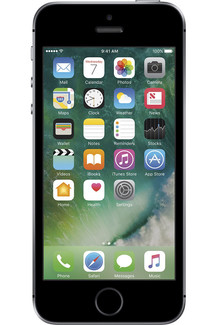 The phone itself measures in at 4.87 inches long and 2.31 inches wide. The vibrant four-inch Retina display features a resolution of 1,136 x 640 for a crisp picture, while the built-in cameras let you snap 12MP photos and record 4K video at 30 frames per second. The iPhone SE is LTE-compatible and ships with iOS 10.
You can get the 16GB Apple iPhone SE at a discount from Best Buy when you select one of these monthly plans: $10 per month for 30 months from AT&T or $12.50 per month for 24 months from Verizon or Sprint. This brings the total price of this compact phone down to $300 for a tidy savings of around $100. If you prefer more internal storage, you can choose the 64GB iPhone SE — normally a $100 upgrade — for a couple dollars more each month, which brings the total price to $350.
Note that these prices do not include a data plan for these carriers and that the carrier selection only reflects which network the phone will be locked to.
Eero WiFi System review

Research Center:
Eero WiFi System
One of the biggest recent movements in the networking industry is the introduction of mesh technology. This tech made its debut in 2016, promising a blanket of wireless connectivity that fills every inch of a home or office. These systems are typically sold in kits of two or more identical devices that can be spread out vertically and horizontally to create a connected web of coverage.
We’ve taken a close look at several solutions over the last several months, and now we have the Eero system in-house. This system hit the market in February of 2016, selling as a three-pack for $400, a two-pack for $300, and as a single unit for $200. That may seem rather expensive, but feature-packed, high-performance routers can cost up to $300 and broadcast from only a single point in the home or office.
Eero’s initial setup focuses on simplicity
The Eero kit we received was the three-pack shipped in a rectangular box. After opening the lid, the unit on the left sported a pull-off tab printed with the word “Start.” We lifted the unit out of the box to see a cardboard insert with instructions to download the Eero app from Google Play or Apple’s App Store. The unit’s power adapter was found sitting under this cardboard insert.
More: Luma Surround WiFi review
Once the app was installed on an Android device, we created a free account, positioned the first Eero unit next to the ISP’s modem, plugged the provided Ethernet cable into one of the two ports on the Eero, connected it to the modem, and fired it up. The app then proceeded to connect to the Eero unit through Bluetooth, which honestly caused us a few headaches later. However, with the initial unit, we didn’t have any problems creating the network name, password, and device location description.
 Kevin Parrish/Digital Trends
 Kevin Parrish/Digital Trends
The second unit is what caused the headaches. This was planted in the same location we used for other mesh network setups, but for some reason the Eero app said we were getting a poor connection to the first unit. To make matters worse, the app wouldn’t let us proceed with installing the second unit despite the connectivity issue, forcing us to relocate the unit. However, no matter where we planted the second unit, we received a poor connection message, even when it was seated next to the first Eero unit and modem.
Awesome customer support saved the day
After yanking out buckets of hair, we broke down and called technical support. A technician had us connect the second unit to the first unit via an Ethernet connection so that the two could communicate and verify they were connected. After that, we disconnected the second unit, placed it back into its original location in the next room, and balance returned to the Force. The third Eero unit gave us no problems whatsoever.
Eero is a good system for mainstream customers, but enthusiasts may want to look elsewhere.
So, what happened? The technician said it was a bad Bluetooth session. Based on his comments, this wasn’t the first case of bad Bluetooth connectivity, and drives home the point of relying solely on a Bluetooth connection to establish a network is not without problems. Customers should have access to a web-based interface via a wired connection just in case the setup process hits a roadblock. However, several of the mesh-based networking setups sold on the market seemingly ignore this type of user control.
When all was said and done, we had the first unit connected to the modem in the Dining Room, which is in the center of the house. We moved the second unit into Bedroom #3, and the third unit was placed in Bedroom #4. Thus, we created a straight line throughout the house instead of a C-shaped layout as we used for the Luma system.
While there is a lot of wireless activity in the Living Room, we wanted to make sure the blanket covered every aspect of the house, including Bedroom #4 that’s — one of two rooms converted from a garage. Since we don’t have a second floor, we wanted to create a large horizontal blanket.
Eero’s mobile app offers easy management
With everything set up, we headed back into the mobile app. The home screen shows the current internet speed, the active Eero units, and all the connected devices. Tap on an Eero icon and users will see details like broadcast strength (in bars), IP address, firmware version, model number, serial number, and more. Tap on a connected device icon to see its current activity, connection strength, which Eero it’s connected to, its IP address, MAC address, and so on. There’s a menu button on the home screen for accessing network settings.
As previously indicated, the Eero system isn’t exactly feature-rich when it comes to network customization. There’s no web-based interface here to dig into the gritty details, but rather a simple app for switching on/off a guest network, adding additional Eero units, getting help, and adjusting basic network settings. The app can be used to establish profiles, which can be used as makeshift parental controls.
For instance, parents can create a profile assigning a child to a specific connected device. The profile is locked to the device’s MAC address so that Eero can associate the child with the device no matter what IP address it uses. Thus, the parent can pause the child’s internet access or set a scheduled pause, blocking access at night, or during homework time.
As for the actual customizable network settings, these are rather slim. Users can use a custom DNS rather than the ones provided by the router, customize the DHCP server, assign a static IP address to a device, create port forwarding rules, and switch on/off Universal Plug and Play. Users have no control over switching channels, establishing channel widths, and so on.
More: Securifi Almond 3 Smart Home Wi-Fi system review
And that’s a shame, as users should have complete control over their network. But this isn’t the first mesh-based network we’ve seen with semi-closed settings. The whole point of systems like Eero and Luma is that customers plug-and-go without having to think about the ideal channel for 2.4GHz or which security protocol to use. For the novice user, the “advanced” settings may be more than they can chew, but experienced network tweakers will find very little meat to nibble.
Eero WiFi System Compared To

Netgear Orbi

Synology RT2600AC

Linksys Velop

Linksys WRT3200ACM

Starry Station

D-Link DIR-869 EXO AC1750

Portal Wi-Fi router

Ubiquiti Amplifi HD

HooToo TripMate Titan

TP-Link AC3150

Linksys EA9500 Max-Stream AC5400

Zyxel NBG6815 AC2200

Netgear Nighthawk X4S

Netgear Nighthawk X8

Google & TP-Link OnHub
Eero’s simplicity extends out to its appearance
Each Eero device is identical, sporting two gigabit Ethernet ports, a USB 2.0 port, and a power connector. They measure just 4.75  x 4.75 (D) x 1.34 (H) inches, making them capable of fitting in just about anywhere in the home or office. The upper casing is a shiny white with rounded edges, while the bottom half and built-in curved “feet” feel somewhat rubbery. The USB 2.0 port, according to tech support, can’t be used at the time of this publication, but will eventually serve a purpose in the future.
The whole point of systems like Eero is that customers plug-and-go without having to think about channels or security.
Inside the Eero you’ll find a dual-core processor clocked at 1.0GHz, 512MB of system memory, and 4GB of internal storage used solely by the operating system. They also each have a Bluetooth Smart Ready component, and two internal incoming and outgoing antennas providing 2.4GHz and 5GHz bands. Each unit is capable of up to 300 megabits per second on the 2.4GHz band and up to 867Mbps on the 5GHz band.
Based on the company’s FAQ, Eero seems to believe that coverage is more important than offering the fastest wireless speeds, and that makes sense. Until the mass population has a gigabit connection to the internet, crazy fast wireless speeds are unnecessary. As Eero points out, streaming Ultra HD content to a single device requires a connection at 25Mbps.
Note that the connection issues we had with setting up the second unit had nothing to do with its ability to broadcast a network signal. Instead, the problem was with the unit trying to register itself to the account through the smartphone’s Bluetooth connection.
More: Starry Station review
There’s a few other things we need to point out before we get into performance numbers. Eero supports a very basic Quality of Service capability, which may be expanded in the future to provide configurations that match specific needs for gaming, video streaming, and so on. The system does not support Point-to-Point Protocol over Ethernet (PPPoE), which is used for DSL connections. The system currently isn’t supported outside the United States either, as Eero is certified to only work on 120V power outlets.
So how does the Eero network perform?
We used four devices to check their connection speeds: one smartphone, two tablets, and a notebook. Here is what we found:
Samsung Galaxy
S7 Edge
Samsung Galaxy Tab E
Microsoft Surface 3
Lenovo Ideapad Laptop
Internal
Lenovo Ideapad Laptop
External
Eero Max 5GHz Speed:
867Mbps
867Mbps
867Mbps
867Mbps
867Mbps
Device Max 5GHz Speed:
867Mbps
450Mbps
867Mbps
Not
Measured
433Mbps
5GHz Tested Speeds:
650Mbps
150Mbps
790Mbps
Not
Measured
433Mbps
Eero Max 2.4GHz speed:
300Mbps
300Mbps
300Mbps
300Mbps
300Mbps
Device Max 2.4GHz Speed:
400Mbps
300Mbps
400Mbps
150Mbps
150Mbps
2.4 GHz Speeds:
Not
Measured
150Mbps
Not
Measured
72.2Mbps
Not
Measured
The tested speeds are based on numbers provided by Android and Windows 10. As shown above, the Samsung Galaxy S7 Edge smartphone doesn’t hit the theoretical 867Mbps Wireless AC speed, but it didn’t reach that ceiling on similar mesh-based network setups either. Meanwhile, the Samsung Galaxy Tab E tablet is bottlenecked by having only two internal antennas (1x output, 1x input). If anything, the device with the best performance was Microsoft’s Surface 3 tablet.
As for the Lenovo laptop, the 72.2Mbps speed on the 2.4Ghz band isn’t anything new. That’s because the internal Wireless N component has one antenna for output and one for input, so the width of the wireless connection is important. Eero is likely broadcasting a footpath-sized narrow connection, and we know the laptop doubles to 150Mbps when it’s connected to a wide, freeway-like connection (we saw this with Netgear’s Orbi system). The external, dual-band Wireless N adapter we connected to the Lenovo in our test was Trendnet’s AC600 Mini Wireless USB Adapter that’s capable of up to 433Mbps on 5GHz, and up to 150Mbps on 2.4GHz.
Of course, the Lenovo laptop originally hit the market in 2013. It’s not that old, but in terms of how fast technology advances, it’s way out of date. But not every customer will have a sparkly new laptop connecting to a sparkly new mesh-based wireless network. The bottleneck suffered by the Lenovo laptop is a good example of why customers need access to the roots of the network to squeeze every drop of speed out of their wireless connection.
Mesh-based networks tend to limit customization
Unfortunately, the trend to lock down most of the settings in mesh-based networking setups appears to be a common factor save for Netgear’s Orbi system. Thus, systems like Eero and Luma may not be ideal for gamers who need full control over where data packets travel across their network. And without a real QoS service to dictate what device has priority over others, even mainstream customers may experience issues streaming content on multiple devices.
Now here are the speeds and signal strengths picked up by the Samsung Galaxy S7 Edge smartphone at various locations throughout the house:
Location
Speed
Strength
Signal
Dining Room
650Mbps
100 percent
-34 dBm
Living Room
351Mbps
62 percent
-73 dBm
Front Porch
585Mbps
91 percent
-57 dBm
Bathroom Shower
468Mbps
100 percent
-46 dBm
Laundry Room
585Mbps
82 percent
-63 dBm
The dining room is ground zero, as that’s where the first unit is connected to the modem. However, the living room took the biggest performance hit because of two walls that blocked the connection. The front door is made of glass, thus the connection to the front porch stemmed from the living room unit and the unit in bedroom #3. The laundry room had a good connection due to a somewhat direct line of sight to the unit in bedroom #4.
Eero isn’t feature-rich when it comes to customizing.
As a reference, we saw different numbers with Netgear’s two-unit Orbi setup. Using the same Android device to test the connection speeds and strengths, we saw 780Mbps in the dining room, 650Mbps in the living room, 97Mbps on the front porch, and 260Mbps standing in the bathroom shower. That said, the numbers may have everything to do with the positioning of the satellite systems, as the Orbi satellite was previously placed in the living room whereas we chose to move the second Eero unit out of the living room and into bedroom #3.
For better coverage, we presume that an additional Eero unit placed in the far corner of the living room might provide connectivity in that area, and perhaps even an additional unit located in the far corner of bedroom #1 as well. The drawback to purchasing additional units is that they cost a hefty $200 each, which isn’t cheap.
Our Take
Eero appears to be a great system for customers who want a plug-and-go solution. There’s no back-end web-based interface or detailed settings to deal with, just a mobile app to manage some of the generalized details. However, PC gamers and enthusiasts who want to control every aspect of their network may want to look elsewhere, such as Netgear’s Orbi system, which provides better detailed manageability.
Is there a better alternative?
The DT Accessory Pack
Netgear Orbi Satellite
$213.49
Netgear Orbi 5-port gigabit switch
$27
Netgear USB adapter
$48.43
Honestly, we’ve tested quite a few of the new mesh-based setups and they appear to be similar in nature save for the Netgear Orbi system. We liked the Orbi specifically due to its robust customization capabilities. However, our current top pick in this arena is the Securifi Almond 3 router, which can be used as a mesh networking device even though it doesn’t ship as a kit. The Almond 3 also as a nifty built-in touchscreen and solid smart home support.
How long will it last?
Mesh-based networking appears to be here to stay. It may eventually replace the router due to the coverage capabilities of multiple units creating a web of connectivity as a single access point. It’s also better than adding a wireless extender to a network for filling dead spots because the signal has already degraded to a point when it’s picked up by the extender. Mesh networking promises full coverage no matter where users move throughout the home or office.
Should you buy it?
Only if budget is not a factor. The Eero three-pack kit is rather costly, and extending its coverage means shelling out $200 per additional unit. That’s a huge investment given that the mass availability of faster Wireless AD devices and networks will be in full swing by the end of 2017. Still, for now, the Eero is a good system for mainstream customers.
Microsoft makes the Mac-to-Surface data migration easier with its free new tool
Why it matters to you
For Mac owners eyeing a Surface from Microsoft, the company now provides an easy way to move their data and settings over to the new device.
Mac owners wanting to purchase one of Microsoft’s Surface devices now have a tool to make the data migration quick and painless. Called the Mac to Surface Assistant (DMG file), it’s freely available for moving everything over to a Surface device spanning pictures to applications to locally stored files synced with Creative Cloud, Google Drive, and Dropbox.
The latest Surface-branded devices from Microsoft are the Surface Book “with Performance Base” ($1,300 starting), the Surface Pro 4 ($700 starting), and the Surface Studio all-in-one PC ($3,000 starting). Prior to offering the new migration tool, Microsoft provided lengthy, step-by-step instructions on how to move photos, files, and mail from a Mac to its family of Surface-branded products.
More: With Windows 10 Creators Update around the corner, Microsoft keeps fixing bugs
Microsoft’s new tool is the company’s latest move to lure customers away from Apple. In addition to targeting designers and architects with the new Surface Studio all-in-one PC in October, the company also dished out a $650 trade-in discount to Mac owners to apply toward a new Surface device. Microsoft even provides a dedicated website for Apple customers who are considering a move to the Surface family.
According to Microsoft, its Surface products work great with Apple’s devices and services. The site provides a FAQ to answer questions such as syncing an iPhone to a new Surface device, where to find the migrated applications, how to use keyboard shortcuts, where to find the system settings, and more. Microsoft even talks about all the concern regarding Windows-based machines catching a nasty virus.
“Your Surface comes with Windows Defender and Windows Firewall to help protect you from malware, so you don’t need to purchase antivirus software,” the company states. “Windows Defender uses real-time protection to scan everything you download or run on your PC.”
The website introduces Windows 10 to long-time Mac users as well. The tour starts with creating a Microsoft Account, checking out the desktop and Start Menu, and learning how to get around Microsoft’s latest operating system. There are quick instructions on how to use the Surface Pen, too, followed by a detailed manual right here.
However, getting customers to jump the Apple ship may be an impossible feat. The malware-based issue surrounding Windows-based PCs is just one example, but Apple’s MacOS has also served as the main platform for Adobe’s Illustrator and Photoshop programs since the late 1980s and early 1990s. While these are currently offered for Windows along with other utilities in Adobe’s Creative Suite portfolio, Mac devices seemingly serve as “home base” for many designers and architects.
Regardless of the Windows versus MacOS debate, there are customers who may be considering a Surface device, and the new tool should make the migration process an easy move. The tool scans the Mac device and provides a simple checklist for transferring select data and settings. It requires an external drive that is larger in capacity than the storage unit used for the Mac.
 AIVAnet