


Huawei P10 vs. P10 Plus camera comparison: Tiny improvements
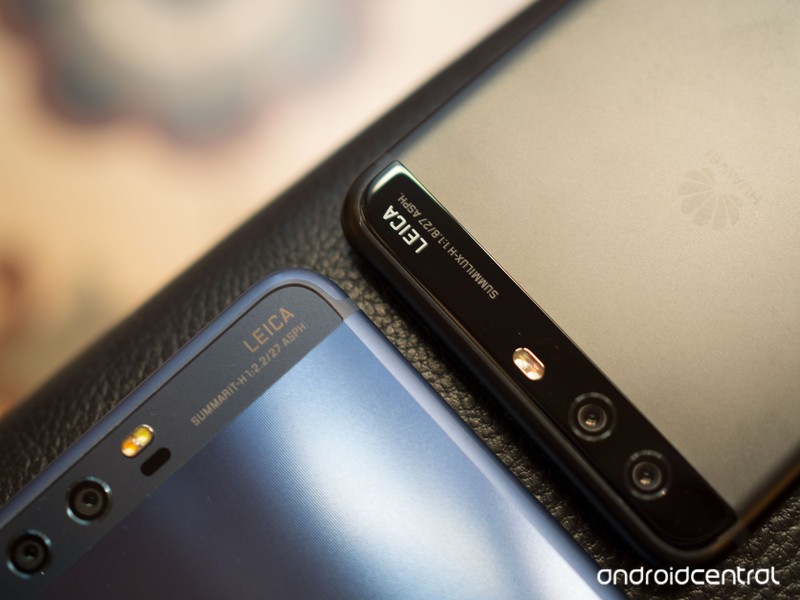
Just how much difference does the P10 Plus’s f/1.8 lens make?
In addition to a bigger, higher-res screen and the ability to max out your RAM and storage, the jump from the Huawei P10 to P10 Plus gets you Huawei’s most advanced Leica camera to date. The trusty f/2.2 Summarit-branded lens, used in the past a generation of Huawei flagships, makes way for a brighter f/1.8 Summilux aperture.
On paper that should allow for a modest improvement in photo quality across the board. A wider aperture lets you capture more quickly, resulting in less motion blur, or keep the shutter open for longer at lower ISO levels, reducing the appearance of noise.
It’s time to put these two directly to the test. Obviously the P10 Plus is the better of the two, on account of its superior optics. But the question is whether it’s worth the extra cash to upgrade.
And this comparison should also be interesting to anyone weighing up the P10 Plus against a Mate 9 or Mate 9 Pro, which use a camera system identical to the smaller P10.
Let’s get stuck in!
Note: All images in this comparison were shot in full auto mode, at 12 megapixels.
First up, daylight shots. As you might expect given the similar sensor and post-processing, daylight shots from the P10 and P10 Plus are basically identical. The biggest difference you’ll notice is the more pronounced bokeh in close-up macro shots. Elsewhere, it’s pretty much a wash, as you’ll see in our samples:




















The extremely similar daylight performance is a good thing — it means buyers who prefer a smaller screen aren’t missing out.
In low light, the differences start to show, though it’s still incredibly subtle.


In this image, shot at dusk in fading light, the shot from the P10 is actually slightly sharper. Nevertheless, things are still more or less identical here. Both cameras shot at ISO 160, with the P10 Plus choosing a faster shutter speed (1/50 vs 1/33 sec.)


In lower light, it’s still tough to separate these two. The P10 Plus has slightly sharper fine details in distance objects, but that’s about it. Both cameras shot at ISO 800, the P10 at 1/8 sec., the P10 Plus at 1/17 sec.


In this challenging shot with both bright and dark areas, neither camera excels, but the P10 Plus captures a comparable shot slightly quicker. (P10: ISO 1250, 1/4 sec., P10 Plus: ISO 800, 1/7 sec.)


Once again, the difference here isn’t so much the quality of the image, but the slight speed advantage that the P10 delivers. (P10: ISO 800, 1/17 sec., P10 Plus: ISO 640, 1/20 sec.)


To my eye the smaller P10 actually comes out ahead here — focus is slightly softer on the P10 Plus. Both images remain largely identical overall. (P10: ISO 800, 1/15 sec., P10 Plus: ISO 500, 1/20 sec.)


Another very close shot, but the P10 Plus resolves slightly more detail in the brickwork, and in the colors on the archway. (P10: ISO 800, 1/8 sec., P10 Plus: ISO 1000, 1/15 sec.)


Here, the smaller P10 takes a longer exposure; otherwise image quality is about the same. (P10: ISO 640, 1/20 sec., P10 Plus: ISO 6400, 1/30 sec.)


There’s a little more noise in the P10 shot here, especially around the tree branches, while the Plus captures a slightly clearer image. (P10: ISO 800, 1/15 sec., P10 Plus: ISO 640, 1/20 sec.)


And our final sample follows the same pattern — you’d be hard pushed to separate these two images, even the EXIF data is basically identical. (P10: ISO 1250, 1/4 sec., P10 Plus: ISO 1250, 1/4 sec.)
What does this tell us?
Ultimately, there’s really not a huge difference between the capabilities of these two cameras. Even in low light, which you’d expect to favor the P10 Plus, the larger and more expensive phone for the most part produces comparable photos. Instead of pushing for sharper fine detail in low light, or brighter night shots overall, Huawei is using that brighter lens to take photos more quickly, meaning they’re going to be less susceptible to blurring due to motion — either from your hand, or in your subject.
So the P10 Plus has the edge, but it’s an incredibly narrow lead. And so if you’re torn between these two devices, we’d be inclined to put form factor and size ahead of any concerns over camera quality.
More: Huawei P10 review
HTC’s ‘unexpected surprise’ is a U Ultra with a sapphire panel and 128GB storage

HTC’s limited edition U Ultra picks up 128GB storage and a sapphire-coated display for an additional $150.
HTC Taiwan said last week that it would share an “unexpected surprise” on March 20, and like the company’s recent launches, the reveal itself was rather underwhelming. Instead of a successor to the HTC 10, we’re being treated to a limited edition variant of the HTC U Ultra with 128GB internal memory and a sapphire screen, a product HTC referenced back in January.

The limited edition model is now up for pre-order in Taiwan in all four color options for the equivalent of $945 (NT$28,900), a $150 premium over the standard 64GB variant. Customers pre-ordering the 128GB U Ultra will also receive a $100 bundle that includes a leather flip case, a key ring, and a Quick Charge 3.0 power bank.
HTC hasn’t shared additional details, but it is likely the limited edition variant of the U Ultra is exclusive to Taiwan.
HTC U Ultra + U Play
- HTC U Ultra + U Play hands-on
- The latest U Ultra news
- HTC U Ultra specs
- HTC U Play specs
- Join our HTC U Ultra forums!
HTC
Your LG G6 will scratch, just like every other glass phone

Despite ‘reliability’ claims, the LG G6’s glass will indeed scratch like any other.
In a very common move in today’s phones, LG chose to go with glass on the back of its new G6 for the first time since the introduction of the G series back in 2012. Using glass on the back of a phone has a whole host of benefits, including allowing radios to pass through it and enable wireless charging — all the while, the glass manufactured for phones today is dramatically tougher than the panes we saw just a few years ago.
But glass isn’t perfect. It can break (with a higher propensity than metal, which is softer), but the bigger concern for most people is that the glass will indeed scratch — just like every other phone that has glass on the back.

When choosing a glass for the back of a phone, the two properties you want — scratch resistance and shatter resistance — are opposed to one another. In an attempt to make the glass harder and therefore tougher to scratch, you make the glass more brittle and susceptible to cracking. If you make the glass softer and more pliable so that it won’t break with a drop, its surface will be so soft that it will be riddled with scratches.
And instead of going with the full-on nuclear option of using a synthetic sapphire (which is not indestructible, but gets damn close), LG took a solid middle ground of choosing Gorilla Glass 5. Corning, always aiming to improve its glass offerings, makes big claims each year:
Corning® Gorilla® Glass 5 raises the bar for protection against drops higher than ever, surviving 1.6-meter drops onto rough surfaces up to 80% of the time. Plus, even though it’s our toughest cover glass yet, it still delivers the damage resistance, optical clarity, and touch sensitivity Gorilla® Glass is famous for.
Yes it raises the bar, but it isn’t perfect. We could all take extreme care of our phones, setting them down only on soft surfaces and even using a case whenever we leave the house … but that’s not how people operate. We take phones in and out of pockets, bags and purses dozens of times a day, we slide them on tables daily and yes, we even drop them from time to time.
Glass comes with trade-offs, like the slow and steady accumulation of imperfections.
The LG G6, with its perfectly flat back — even including its dual cameras — is highly likely to be scratched as it scoots around on surfaces unencumbered. And guess what: it gets scratched! Just a few weeks into using my LG G6 I have a solid handful of swirly scratches on the back. Not immediately noticeable at a glance (the fingerprints do some camouflaging), but definitely there when you tilt it to the right light — and once you see them, you will forever know that your glass has been tarnished.
If you put glass on the back of your phone, it’s going to come with trade-offs: most notably, the slow and steady accumulation of imperfections on it. The only question is whether you can manage only lasting a couple of weeks before the inevitable first scratch blemishes your pristine LG G6, and if you’re willing to deal with the slow, inevitable deterioration of the glass over the couple of years you own it.
LG G6
- LG G6 review!
- LG G6 specs
- LG G6 vs. Google Pixel: The two best cameras right now
- Everything you need to know about the G6’s cameras
- LG forums
Verizon
Sprint
T-Mobile
AT&T
B&H
Lofelt Basslet review: An expensive and fun way to feel the music

The stylish little subwoofer works impeccably in its small form, but its price point is a bit prohibitive.
Years ago, Madonna sang that it’s music that makes the people come together. But what if you don’t want to get together with other people? What if you’d rather just immerse yourself in a dance party of one?
If you have $200 to spend, you can buy yourself the Lofelt Basslet. It’s a seriously cool, stylish black band that houses a mini subwoofer. If you’re a club kid, it will blend in with all the other bright-colored flair you have on, and if you’re into moody music, the Basslet’s modern styling will pair nicely with the rest of your noir attire.
The real trick to the Basslet, however, is that it hums along to your music. It’s especially effective if you like bass guitar, or drum and bass. Any genre with a bit of a bump to it will essentially enhance its effects. I’ve been using one for the last month and, quite frankly, it’s something you’d likely blow your money on for the sheer novelty of it all.
See at Amazon
How does it work?

The Lofelt Basslet features two magnetic buttons that adjust the intensity of the miniature subwoofer.
Lofelt turned this square little wearable into a subwoofer by stuffing it with its proprietary vibrotactile LoSound engine. The little engine that can produces frequencies up to 250Hz that really are silent to the outside world, just like Lofelt claims. In fact, the only time anyone else could tell it was vibrating was when I placed it down on a table while it was buzzing. My smartphone mic couldn’t even pick it up.
This is something you’d likely blow your money on for the sheer novelty of it all.
All that’s required for the Basslet to work is a headphone jack — and a Micro-USB cable at times to recharge the device. The music you’re listening to is transmitted to the Basslet through a separate wireless connector, which plugs into the device you want to connect it to. You can then charge the Basslet by connecting it to its headphone adapter and plugging it into an external power source. In my month of testing the device off and on, I’ve only charged the Basslet a few times, though I was merely using it two or three times a week for an hour at a time. And it’s surprisingly quick to charge.
How does it feel?

The Basslet charges with the help of the dongle.
Using the Lofelt Basslet is, to put it bluntly, a bit of a trip. I used it with my MacBook, my Chromebook, and several Android devices, and I was impressed by its vibration accuracy and its ability to react to even the subtlest bass line. It worked with Spotify, Google Play Music, and SoundCloud through Google Chrome, as well as other apps that produced sound. The Basslet produces a softer hum when you turn down the volume on your device, though you can also increase the intensity by using the two buttons on the side of the wristlet.
I loved, too, that I could use the Basslet with games if I wanted.
I loved, too, that I could use the Basslet with games if I wanted. At one point, I hooked it up to my tablet to play Pokemon: The Card Game Online. Whenever there was a move against my hand, I’d get a little movement on my wrist to reinforce the penalty of being hit. It reminded me of the tangible thrill of the Nintendo 64 controller’s rumble pack back in the day.
To that end, the Basslet has made even casual music listening sessions more immersive and morning walks more active. It’s effectively a wearable peripheral, and though it’s a bit clunky to plug in both the dongle and a pair of headphones into your smartphone, the added effect can really help liven the mood.
Should you buy it?

The Lofelt Basslet is modern and utilitarian.
It’s good to see this kind of innovation making its way into wearable technology, especially considering the industries that would benefit from vibrotactile feedback, but is that positive mood swing worth $200? Only if you already have all the ingredients for a worthy entertainment setup — that includes a comfortable place to listen to music (whatever that means for you), or a virtual reality headset.
If you’re not aching to feel your music, and if you don’t care about the extra effect for virtual reality, then the Lofelt Basslet may not be worth the investment. If it’s between this and a pair of noise-cancelling headphones you don’t already have, the latter might end up seeing more utilization down the line.
See at Amazon
Guess Connect smartwatch gets an Android Wear 2.0 refresh
Guess has announced it will be launching an updated version of its Connect smartwatch at Baselworld 2017, which starts on 23 March.
The new version will run on Android Wear 2.0 as opposed to Martian on the old model, and will use Qualcomm’s new Snapdragon Wear 2100 chipset. Guess will cater for both sexes too, with the new Connect coming in 41mm and 44mm case sizes.
In fact, it’s men that will get more options, with five models available to choose from, while women will get three.
Guess hasn’t released a complete list of specs and features for the watches just yet, but has said that “over a hundred combinations of display face, colour and sub-dials are available”.
Because they run Android Wear 2.0, you’ll presumably be able to select from a wide range of digital watch faces, rather than switch out for different modules like with the recently announced Tag Heuer Connected Modular 45.
- Best upcoming smartwatches: Future wristwear to look forward to in 2017
- Tech meets fashion: 6 of the most stylish smartwatches
- Android Wear 2.0: What’s new in the major software update for watches?
One of the features of the new Connect watches Guess has revealed, is the ability to send messages directly from the watch itself, using either a keyboard or handwriting recognition. And with Google onboard, a number of standalone apps can be downloaded to use without having to connect to a smartphone, including fitness apps to track runs and cycles.
Guess hasn’t said whether the watches are waterproof or not, so we’ll leave off swimming for now. Google Assistant is also built-in to answer any questions you have and carry out a variety of functions.
We’d expect to see Android Pay mobile payments built into the new Connect watches as well, but Guess hasn’t confirmed this feature just yet either.
Baselworld 2017 takes place later this week and Pocket-lint will be at the show to bring you all the latest news in the world of wearables. We’ll hopefully be able to solidify all the remaining specs and features of the new Guess Connect watches.
Sony Xperia L1 with 5.5-inch screen coming to UK in April
Sony has announced an entry to mid-range, large-screen smartphone that offers many of the design motifs Xperia handsets are known for but won’t break the bank.
The Sony Xperia L1 is a 5.5-inch handset with a HD (720p) display.
It comes in black, white or pink colour schemes, and sports a 1.45GHz quad-core 64-bit MediaTek processor and 2GB of RAM. There is 16GB of internal storage, but that can be expanded by up to a further 256GB through microSD card.
Some regions will get a dual SIM option (unlikely UK though), while it comes with Android N out of the box.
There’s a 13-megapixel camera on the rear, 5-megapixel snapper on the front and it has Bluetooth 4.2 and NFC connectivity.
- Sony Xperia XZs vs XZ vs Xperia Z5: What’s the difference?
The battery is 2,620mAh, while Qnovo Adaptive Charging claims to extend the lifespan of the cell, no matter how many times you charge it. The charge slot is via USB Type-C.
Dimensions are 151 x 74 x 8.7mm and it weighs 180g.
Sony has added its Xperia Actions engine to the phone, the software that’s also available on the higher-end models, such as the Xperia XZ. It adapts the device to match your time and surrounds, such as dimming the display and setting the phone to “do not disturb” automatically as part of a “good night” mode.
It will be available from April. Prices will be set by networks, although we suspect it’ll come free on various contracts.
Samsung Galaxy S8 image leaks show multiple colours
The Samsung Galaxy S8 and S8 Plus launch date is right around the corner, next Wednesday 29 March to be exact, but that hasn’t stopped rumours and leaks from flooding in before the big day.
The latest refers to a number of colour finishes that the two phones will be made available in. Both Twitter tipster Evan Blass and Chinese social site Weibo have posted rendered and real life images of the two devices in Black Sky, Orchid Grey, Arctic Silver and unnamed blue colour choices.
It’s highly likely these won’t be the only colour options available for the new phones, as we’ve previously seen the S8 and S8 Plus appear in gold and violet colour finishes too, bringing the total number of colour choices up to six.
The three new colours in question could be exclusive to certain markets or certain carriers around the world, as we’ve seen with previous Samsung phones.
- Samsung Galaxy S8: Release date, rumours and everything you need to know
There is a slight difference in the pictures leaked by Evan Blass and Weibo though, as in Evan’s pictures, the colour is reserved just for the sides and back of the phone, while there are black bezels on the front. Weibo’s photos show the phones with the colour covering the entirety of the phone, including the front bezels.
We assume the actual Galaxy S8 and S8 Plus will follow the look of the real life images and be completely clad in each colour option.
The images do however once again show design features we now think about in our sleep: minimal bezels and no physical home button.
If there is anything left to know about the Samsung Galaxy S8 and Galaxy S8 Plus, and we can’t think of much we don’t know, then we’ll find out next week.
Jaybird X3 review: Affordable sports earphones without the compromise
Having spent a couple of years wowing consumers in the US with its wallet-friendly earphones, Jaybird has finally brought its popular X3 Bluetooth earphones to the UK market.
With two previous generations earning praise for their audio quality, stay-in-ability (if that’s a word), convenience and value for money, will the X3 be as good, or even better?
Jaybird X3 review: Design
- S/M/L silicone and foam tips
- Clip-on charging cradle
- Detachable, adjustable fins
- Rain/sweat resistant nano-coating
What’s great about the Jaybird X3’s design is all in the little details. The ease by which you can remove and re-attach the ear tips thanks to their stiff rubber ring lining, ensuring they hold shape to be easily slipped into place. In many earphones, it can be a struggle to get the flimsy tips to go back on again after removing them to try different sizes.
Pocket-lint
Then there are the fins designed to hold the earphones securely in your ears. They’re also easy to remove, but can be moved to fit your ears and rotated so that you can wear them over-ear or under-ear.
The earphones’ design is kind of unremarkable, but we don’t say that as a bad thing. There’s no excess bling. The earbuds are solid and relatively chunky. Sound is delivered by a driver through a protruding metal cylinder. There’s a purposeful reassurance in the durability. And, thanks to a nano-coating, they’re also resistant to sweat and rain – so you can workout or exercise in any conditions and they should survive.
They’re comfortable enough to wear for long periods, although the default medium tips do feel a little larger than those we’re used to testing. Still, this was a good thing in some ways, as it effectively sealed out ambient noise leaving us immersed in the audio rather than being distracted by what was going on around us.
More importantly, the earphones are very secure regardless of activity. They didn’t once feel like they would fall out when we were running. And while we didn’t need them, there are cord clips designed to hold the earphones really snugly to your head too.
Pocket-lint
Beyond the earphones is an inline remote control, shaped like a large pill, with buttons that are easy to reach. It features another useful inclusion: gold connection points for the proprietary charging cable. Rather than fit the earphones with the standard, space-hogging Micro-USB port, you just snap the cradle onto the inline remote, and it charges the battery. This cradle houses a Micro-USB port, so you can attach it to any existing cable you have lying around, you don’t need to try to use the very short one that comes with the earphones.
Jaybird X3 review: Features and performance
- 8-hour battery life
- Bluetooth 4.1 connectivity
Jaybird states that you should expect up to eight hours of music playing from a fully-charged battery. In our testing, we achieved close to that: our battery was down to 80 per cent after around 90 minutes of use.
Likewise, the Bluetooth connection between the X3 and our iPhone was very reliable. It never dropped, and there were no glitches even during running or kettlebell sessions.
Pocket-lint
Unlike a lot of modern sports earphones, the X3 don’t profess to be “hearables”, which means they’re purely for music listening. There are no sensors for measuring heart rate, and nothing to track your steps, pace or cadence.
It’s audio only – and no surprise, given their £109 price point. If you already have a Fitbit or Apple Watch strapped to your wrist, there’s no need for added sensors in your earphones. Instead, you just need music to drive you through your most gruelling sessions. And these can certainly do that.
Jaybird X3 review: Sound quality
- 6mm drivers
- Passive noise isolation
- Attractive, intuitive app
One of the best things from a sound perspective is the method in which you can customise the profile to suit your mood, the music you’re listening to, or your activity. It’s all done through Jaybird’s iOS or Android app.
The app offers multiple ways to customise the sound of the X3 earphones. One of those is a manual equaliser, which is attractive and simple to use. Dots on your device’s screen signal where you can adjust, while moving them changes the curves and contours of the boosted/cut frequencies with a flowing, attractive animation.
Pocket-lint
Once you have a sound you like, you can set it as a preset, then get about creating another new one. You can also choose to share your presets with the wider Jaybird community.
Likewise, you can head to the “Discover” tab to take a look (or listen) at some sound profiles created by other users. There are many, many sounds to choose from, all organised in easy-to-navigate sections based on genre, with a section of curated profiles chosen by Jaybird staffers. There’s also a featured carousel at the top of the page showing off the trending sound profiles. What that means to the average consumer is that you can have customised sound without having to mess with the equaliser yourself.
Interestingly, one of the other app features is the ability to swap left and right sides. So if you prefer to have the inline remote hanging from your left year, rather than your right, you can swap them over and still have the layers of music playing through their intended sides.
As for the sound itself, the audio is plenty loud enough. By default there’s plenty of bass to fill out the sound profile – which is pleasant and immersive rather than overpowering. Even with a flat EQ setting, every kind of music we tested was enjoyable to listen to. Whether that be Bartok’s Concerto for Orchestra, Coldplay’s latest single or heavier, bassier songs.
Pocket-lint
If there’s a criticism, it’s only that the audio isn’t the most crystal clear. But at this price what you get from the X3 is outstanding.
Verdict
The Jaybird X3 earphones are lightweight, easy to carry around, great to use while exercising, and have impressive audio that’s infinitely customisable via an intuitive app.
There’s no extras for fitness-tracking, but given the anticipated £109 price tag (due end of March 2017) we’re not surprised. Nor do we care – because earphones this good would normally cost upwards of £150.
For most people the X3 will be an ideal everyday partner – whether you’re into sports or not. Looking for affordable sports earphones without the compromise? Look no further.
Alternatives to consider…
Pocket-lint
Powerbeats 3 Wireless
Powerbeats 3 Wireless make great earphones for use during runs and workouts, and the over-ear hooks ensure they won’t leave the sides of your head in a hurry. They’re immersive and last a very long time on a single charge, comfortably outlasting most other earphones on the list. If you’re an iPhone user, the built in W1 chip makes pairing and connecting much more convenient.
Read the full review: Powerbeats 3 Wireless review: Beats and bass
Pocket-lint
Bose SoundSport Pulse
As sports headphones go, the SoundSport Pulse are among the best we’ve tested in terms of sound quality, but their design is a tiny bit clunky. They also come with a heart-rate monitor to track your pulse while you run, although you can pick up a non-HR model for £149. They have more comfortable tips, but their battery isn’t as long lasting as the Jaybirds’.
Read the full review: Bose SoundSport Pulse review: Fine sounding sports earphones
HIV breakthrough may help scientists kill sleeping virus cells
AIDS patients must endure a lifetime of drugs because the virus conceals itself in the immune system and reactivates with a vengeance once the treatment stops. However, French scientists have discovered a marker that makes it possible to identify dormant, HIV-infected T-cells from healthy ones. That could lead to drugs that target those “reservoir cells,” eradicating the virus completely and curing the patient.
Expensive HIV antiretroviral drug regiments massively knock down levels of the virus, letting patients lead relatively normal lives. However, a tiny number of the virus cells remain in around one in a million disease-fighting T-cells. Once the therapy is stopped, the virus rapidly multiplies, meaning the patient can never be totally cured.
However, while working with infected cells in a lab, the team from Montpellier University noticed a biomarker protein called CD32a that wasn’t present in healthy cells. They then studied blood samples from 12 HIV patients living under treatment and isolated cells expressing that marker. Using an antibody that sticks to CD32a, the team pulled cells expressing the protein from those samples and, as expected, they were laden with hidden HIV. “You absolutely could not have done that before now,” says lead author Monsef Benkirane.
The fact that this work has been done by such competent investigators, and the data looks good, makes me optimistic.
It turned out that almost all the T-cells expressing the same protein were “reservoir cells” loaded with the virus. By contrast, neither normal T-cells or those that carried active HIV virus (that can be killed by antiretroviral drugs) did not show the same marker.
Unfortunately, CD32a was not present on all the T-cells caching latent HIV, so drugs targeting the marker wouldn’t kill enough of the virus to cure a patient. However, it’s still a huge breakthrough, marking the first time researchers have been able to identify latent virus cells after trying since 1996. The technique could be used to augment “kick and kill” treatments that activate latent virus and then kill it with antiretroviral drugs.
Next, the Montpellier team will try to duplicate the findings on a more diverse group of patients and test tissue that HIV usually infects from the stomach and lymph nodes. Tony Fauci, director of the US National Institute of Allergies and Infectious Disease, is cautiously hopeful that it will lead to something. “The fact that this work has been done by such competent investigators, and the data looks good, makes me optimistic,” he told Nature.
Via: Amrisro
Source: CNRS (translated), Nature
Anheuser-Busch’s Alexa skill lists workouts that burn off a beer
Amazon has been expanding its Alexa “skill” plugins to broaden its uses, from streaming NPR to voice-controlling your film and music libraries. If you never expected to ask your device what workout will burn off a single beer’s worth of calories…well, we didn’t see this coming either. Brewing conglomerate Anheuser-Busch is introducing a plugin skill for Amazon’s AI system that lists exercises designed to melt precisely one Michelob ULTRA off your daily tally.
The skill, called ULTRA 95 after the number of calories you’ll be shredding per session, has 12 workouts to choose from — none of which require equipment. Some focus on building strength in a specific area, others are cardio, and of course there’s a yoga routine. All were created by trio of experts BJ Gaddour, Fitness Director at Men’s Health, Jen Ator, Fitness Director at Women’s Health, and Chris Kraft, Site Director at Runner’s World.
Alas, only folk of legal age can download ULTRA 95, so you 20-and-under kids will have to find another workout metric to gauge how long you’ll need on the elliptical to chip away at last night’s bender. ULTRA 95 is free and, like most other skills, works on any Alexa-equipped device. Stay thirsty and informed of how much exercise it takes to work off each drink, my friends.
Source: ULTRA 95 (Alexa skill)
 AIVAnet