


Samsung Galaxy Book user manual reveals some interesting tidbits
Why it matters to you
If you’re at all interested in Samsung’s upcoming Galaxy Book Windows 10 tablet, we checked out the user manual to glean some interesting details.
Samsung has a new Windows 10 tablet coming soon, replacing the Galaxy TabPro S that arrived in early 2016. The Galaxy TabPro S sported an excellent OLED display with the usual deep blacks and vibrant colors, but had a cramped keyboard, limited connectivity, and poor viewing angles.
The replacement Galaxy Book will need to address those issues, and Samsung has faced the keyboard deficiency head-on with a new design. There is some weirdness on hand, however, according to the machine’s user manual, as MSPU reports.
More: Samsung’s Galaxy Book isn’t much of a book (or a Galaxy device)
The Galaxy Book will be coming in two versions, one with a 12-inch display and one with a smaller 10.2-inch panel. Both versions will utilize similar keyboard covers, and it’s this component that seems to have some rather interesting characteristics.

First, the keyboard can be attached at different points to allow for at least three different angles, from almost straight up to a roughly 45-degree angle to laying almost flat to make the best use of the supported S Pen. Next, the keyboard contains the NFC chip, meaning that if you want to use the NFC radio for some reason, you’ll need to have the keyboard on hand. Finally, the Galaxy Book will perform more slowly when the tablet is disconnected for a reason that’s not explicitly explained.

As usual, you can find out even more about how the device works by checking out the manual. Sections on the Samsung Notes and Air Command flow apps and functionality are included, and they highlight how the S Pen interacts with the device for controlling the user interface and writing on the screen. In addition, the Samsung Flow feature enabling the tablet to be connected to a smartphone is also explained.
If you’re interested in the Galaxy Book and want to get an idea of how it works, then you can download the manual here. Samsung hasn’t yet provided availability and pricing information on the new Windows 10 tablet, but at least now you have some additional information to keep you busy in the meantime.
Hey photographers, AI is helping editors determine which photos make the cut
Why it matters to you
Getting an instant response to stock photo submissions is getting closer — AI could speed up response times by as much as 60 percent.
Artificial intelligence is now helping photo editors determine which shots make the cut. Dreamstime, a stock photography company shared on March 15 a new platform that’s learning from human editors which images fit the company’s parameters.
Dreamstime already uses AI to tag photos with relevant metadata to improve the search results. The newest machine learning software isn’t going to replace actual photo editors, Dreamstime says, but will help make the process faster by labeling submissions and continue learning from the editor’s choices.
More: AI photography studio highlights how robots are slowly hijacking nearly every profession
On the simplest level, the software can flag a photo of a person that wasn’t submitted with a model release and request the paperwork. The program can also recognize when a copyrighted logo is included in the image as well as other factors that trigger rejections. Flagging landmarks that can only be sold under an editorial license, marking duplicate submissions, and categorizing a submission as an illustration or a photograph also help speed up the process. The program then labels the images before they head to the actual photo editors.
But along with flagging potential problems, the system also recognizes a photograph’s subject and potential commercial value, Dreamstime says. As staff continues watching out for legal, aesthetic, and technical issues, the machine learning system will continue to improve the accuracy of the labels it assigns.
The company says the software will help photographers see a faster submission process, which in turn gets images selling faster. The system could cut review time by as much as 30 to 60 percent. In some cases, the computer creates an instant response.
“Constant innovation is a primary reason for our continued success in the stock image industry,” Serban Enache, the company’s CEO and co-founder, said in a press release. “With our AI solution, we have created a continually improving tool that will conduct instant image reviews, which will streamline our approval process. And we can layer on other types of metadata points such as customer behavior to build a truly intelligent solution that helps us improve the end-user experience.”
Dreamstime hopes to continue improving the program, with a goal of eventually factoring in sales data to better determine the type of images that are selling the most.
No more nagging: Family task management app helps both kids and adults
Why it matters to you
If you struggle to keep routine tasks and projects organized, this friendly tool could help.
Keeping track of your own life tasks is tough enough. Managing a family’s tasks can feel like a never-ending, impossible job. IGotThis, a new web-based task management for computers and mobile devices, lets parents set up and manage tasks for kids and for themselves. Currently in a Kickstarter campaign, IGotThis goes far beyond calendar reminders in the way it organizes tasks and keeps people accountable.
IGotThis is presented on Kickstarter primarily as a task management system for families who have kids with Attention Deficit Hyperactivity Disorder (ADHD). Digital Trends interviewed founder and program designer Rich Schramm. When we mentioned the program didn’t seem limited to “ADHD families,” Schramm said, “Oh, it’s absolutely for whole families, any kind of families. The program has planning wizards for adults for ongoing tasks like car maintenance, or to set up reminders in advance of birthdays, anniversaries, and for holidays.”
More: Are fidget toys legitimately good for your brain, or pseudoscientific snake oil?
There are three ways to set up tasks in IGotThis: quick tasks, advanced options, and planning wizards. Quick tasks require minimal information: the person, the task, and the due date and time. Advanced options include creating tasks for one or more family members, setting reminder events and frequencies, simple or complex recurrence schedules, permission-based task skipping and rescheduling, oversight notifications, and more.
“IGotThis is focused more on tasks than calendars,” Schramm said. “It’s particularly powerful for adults who have trouble keeping tasks organized.” You can set up projects and subtasks. For example, you can have a party project with subtasks for different people. Subtasks could include creating the menu, shopping, cooking, cleaning, and invitations, each of which could have subtasks of its own.
Planning wizards help you set up yearly plans. There are wizards for “US Holidays,” “Important People” for birthdays and anniversaries, and a “Life as We Know It” wizard for categories such as car maintenance, household maintenance, and taxes. You can also use location-based reminders for tasks associated with a specific place. If a family member happens to be near the dry cleaner, for example, even though the task was scheduled for someone else at a later time, a notification can go out in time to stop and pick up dry cleaning.
One of the most appealing features of IGotThis for families, and for couples, is that it can offer hope for an end to nagging. A dashboard screen gives a quick view of all scheduled tasks for the day as well as their current status. Whoever is assigned to a task is responsible for entering their progress. You can also see how successful any person in the system has been in completing the day’s tasks and how they trend over time.
The ability to track kids’ chores and homework via the dashboard can take the burden off parents who feel like they’re forever having to keep after their kids. For couples who want proof of who is (or isn’t) doing her or his part around the house, IGotThis can make the point without uncomfortable confrontations. And hey, if you just want to train yourself to be more diligent at keeping up with life tasks, the dashboard gives you quick feedback.
An additional feature in IGotThis for kids both with or without ADHD is a points and rewards system and badges. Future plans for the program include integration with home assistants, hyper-local reminders to do tasks in specific locations, and smart tasks that use machine learning and artificial intelligence algorithms to change existing tasks or recommend new tasks. There are still 19 days in the IGotThis Kickstarter campaign. The program is scheduled for delivery in May 2017.
Best VR games that don’t rely on teleportation

What are some VR games that don’t use teleportation?
If your VR legs are sturdy and you’re comfortable getting around a game without teleportation, you probably prefer standard locomotion. It’s usually more immersive, and it can really make horror games a lot scarier. If you have an iron stomach and don’t want to teleport anymore, here are the best VR games that feature natural locomotion.
Read more at VR Heads!
Get an eight-course Ethical Hacking bundle for only $39
It seems like every other day there’s another high-profile hack that puts thousands of users’ information into the hands of people who shouldn’t have it. To safeguard against these types of attacks, companies hire Ethical Hackers who expose security flaws. These Ethical Hackers are in high demand, and the profession can be quite lucrative,
Get eight Ethical Hacking courses for only $39 Learn more
Because this profession requires a broad range of knowledge, the courses needed to become an Ethical Hacker are generally quite expensive. Right now, however, Windows Central Digital Offers has a pretty amazing deal. You can get this 45-hour bundle for only $39; that’s 96% off the regular price of $1,273.

The eight courses in the bundle include:
- Ethical Hacker Bootcamp for 2017
- A to Z Ethical Hacking Course
- Learn Burp Suite for Advanced Web Penetration Testing
- Complete Ethical Hacking/Penetration Testing Course
- Intro to Ethical Hacking Certification
- Real World Hacking & Penetration Testing
- Learn Kali Linux and Hack Android Mobile Devices
- Learn Hacking/Penetration Testing Using Android From Scratch
Don’t worry about your skill level, as these eight courses take you from the basics to advanced tools used in the profession. After completing these courses, you’ll be more than ready to jump into the world of Ethical Hacking.
This Ethical Hacking bundle is 96% off! Learn more
Ready to take the plunge into a new, lucrative career? Ethical Hackers are in high demand, and this course contains everything you need to get started. Don’t wait too long, as this amazing deal won’t last forever.
Should you upgrade your headphones for PlayStation VR?

Great audio experiences are a huge part of VR.
No matter what VR headset you are using, you want to make sure you have decent headphones. That full immersion experience, where your physical world is replaced by the virtual one, has a lot to do with hearing things from all around you. Knowing that when you turn your head you’ll see something coming from the direction you just heard it is a big deal, but if you can hear the real world as well it takes away from this experience.
Killer headphones are going to be a big deal with PlayStation VR, so here’s what you should be looking for if you’re planning an upgrade.
Read more on VRHeads.com
Bootloop-affected LG G4 and V10 owners are suing LG in class-action lawsuit
Bootloops suck.
Fortunately, bootloops are a relatively rare occurrence unless you tinker with your software… or you own an LG G4 or LG V10. Bootloops were a notorious problem for these phones and at the beginning of 2016, LG acknowledged the defect and offered repairs and replacements.
Problem is, owners are claiming they didn’t work either. And now they’ve called in the lawyers.

In a new class-action lawsuit filed Wednesday in a California federal court, one of the LG G4-owning plaintiffs claims LG replaced his bootlooping G4 twice, and the third freezes constantly, “manifesting signs of the bootloop defect and unmerchantable.” The suit also claims that LG knowlingly continued to sell the LG V10 with the bootloop defect and refused to repair LG G4s that failed outside the one-year warranty.
The suit claims both the G4 and its similarly-constructed cousin the V10 had processors which were inadequately soldered to their motherboards, causing them to fail in the heat of their regular operation, causing them to lag, freeze, overheat, randomly reboot, bootloop and eventually die.
If you didn’t have your data backed up, like photos of your kids or work documents, that data was lost forever when the phone failed as well.
These onerous owners are claiming unjust enrichment, unfair trade, and breached of warranty laws, seeking not only damages and legal fees, but demanding a federal judge order a comprehensive program to repair all LG phones containing the bootloop defect and customer restitution.
Will you be joining the class action? Let us know in the comments!
LG V10
- Read our full review
- LG V10, a second opinion
- LG V10 specs
- All the latest LG V10 news
- Join the discussion in our forums
- LG V10 vs. the LG G4
Verizon
AT&T
T-Mobile
Amazon
Newer version: LG V20
How to make your own Ethernet cable

You can make your own Ethernet cable to achieve lengths that are more useful and save some money in the long run. Here’s how.
Whether you want to make some cabling of a specific length or just wish to have a little more fun than picking up Ethernet cables from your local store, it’s actually an easy and straightforward task to make your own. This process can also help you repair damaged cable in the home or at the office without having to fork out cash for replacements. To get started, here’s what you’ll need:
- Ethernet cable.
- Crimping tool.
- RJ45 modular connector.
- Cable tester.
For the cabling itself, you can pick up pre-assembled cabling that are ready to use and then cut to size or you could save some more money and pop to your local DIY store who should be able to cut some from a reel for you. You can pick up the crimping tool, modular connectors, and a cable tester in one package:
See at Amazon
The cable testing equipment isn’t required (you can easily check by connecting the cable to your PC and router), but it makes things easier because you can just reach for a nearby tool and not have to fetch a device.
Cut the cable to the length you require.

Using the crimping tool, strip away the cable jacket.
Check to see if you nipped away at the wires inside.
Spread the twisted wires out.

(The thin thread that joins the four twisted wires allows you to pull the jacket back further, but note that there may be a plastic spine in the middle that requires cutting, along with the wires.)
Straighten out the wires.

Line them up in order, using the guides below:

Looking at the underside of a connector, the copper contacts are in eight individual slots, numbered one through eight. We’re using the T568B standard, which differs slightly from the T568A standard for wiring Ethernet cables.
Slide the wires carefully into the RJ45 connector.

Insert the cable into the crimper tool and press hard to secure the connector.
The clamp within the connector should press against the cable jacket. You should not be able to test the cable using the tool or plug each end into a device and see if a connection is made.
Fear not if you don’t get the wires lined up perfectly because it can take some practice to get the hang of preventing the wires from overlapping or locking as pairs into the connector. If you make a mistake, simply cut a bit behind from where you were working, and try again.
Get half-off one season of any TV season or movie with this sweet Google Play offer
Brace yourselves: Spring TV is coming.
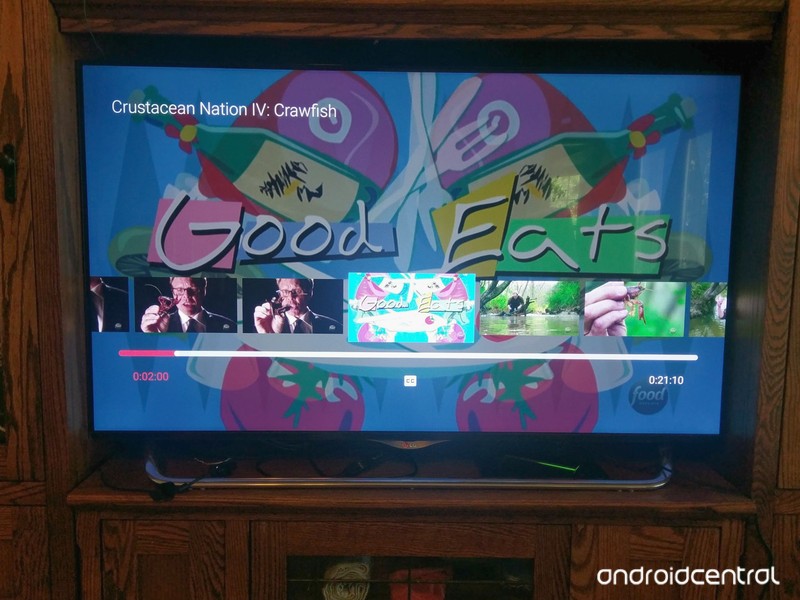
Tons of exciting new shows are hitting the airwaves this season, as are new seasons of shows we already know and love! Whether you want to catch up on The Flash before Tuesday’s Music Meister episode, cook up some nostalgia on Good Eats or you just want to grab the complete Batman The Animated Series, Google Play has you covered with a wonderful little offer on TV right now. We can also get half-off a movie while we’re in a shopping mood.
Where was this during Stella last week?!

Google Play is currently offering half-off on any single season of any TV show, HD or SD. It’s a one-time discount that uses the Redeem code N7RLS2XPXQWLE0PLCNMEKR, so choose carefully. If you want to increase your bang for your buck, it’s worth mentioning that this promo works on multi-season packs, like the complete Batman TAS we mentioned above, or on Seasons 1-5 of Game of Thrones, if you need to really catch up and missed that free SD copy of Season 5 from yesterday.
We can also get a movie half-off as well, if you need to stock up on Oscar-winners or maybe Beauty and the Beast before you go watch the new one.
This offer is good from now until April 15th, so if your show hasn’t started yet, you can just hang on to this code for the next month.
Should Google Home intervene when someone threatens self-harm?
A Google Home responds to a father and son’s mention of death. Could this have been intentional?

My husband and I have had quite an experience adapting to the Google Home in our home. We love its presence, truly, but there are continually times when we’re surprised at some of the interactions we’ve had with it.
For example, there have been several instances where we’d be chatting loudly and casually between the two of us, about something or other, when the Google Home would suddenly respond, despite the fact that neither of us had uttered the ‘OK Google’ hot key. It’s quite hilarious when it happens, though — we always laugh — and it sort of validates this running joke we share that our Google Home is actually just a roommate who lives here for free in exchange for all the knowledge it brings.
I didn’t think much of these random interactions until this week’s All About Android, where I’m a co-host. We had a (https://youtu.be/huIiSGJBhrA?t=1265) from a father who was playing a game with his son in a room where the Google Home was stationed. They had reached a part of the game narrative where they were too stuck to go on, and realized that the best way to complete the story in its entirety was to effectively kill their characters off and start anew. But then…
As we were moving on with the game, somebody spoke up and said, “I just want you to know, you’re not alone. Here’s the number for the suicide prevention hotline.”
It was our Google Home, and I think that when my son had said that we should kill ourselves, Google heard that, and that made it pop up with that message.

We already know that Google Home — and, by virtue, Amazon Echo — is constantly listening in, and that this actually a bit of an issue with owning one. And we already know that what you say could be used in a court of law. But it’s curious why it would respond in an instance where there was no specific query directed at it. Does that mean that Google Home is always listening for a chance to interject? Or does it listen for intonation in the voice; whether it’s conversational, and thus it must be conversing with it? Or, is it because even uttering the word Google will make its digital ears perk up in preparation for the next query?
Is Google Home listening, and could it act as an intermediary when someone is trying to harm herself?
For the most part, I thought it was interesting that Google Home responded after it somehow computed that someone was talking about suicide. I doubt it cared who was talking about it; it sounds like it was pre-programmed to listen for that specific phrase and reply in the event that it’s sitting idly in the room of someone who is truly considering the act. I wasn’t able to recreate this scenario at home, however, but as I was writing this article, Google Home responded. What’s triggering it?
This particular event also has me mulling over whether this is a glimpse at our robot future. Are artificially intelligent devices being programmed to be our friends? Or is this what Google merely considers an extra feature — an aid that maybe a programmer thought would be worth including considering the rates of suicide around the world?
What do you think? Has your Google Home ever responded in this manner?
Google Home
- Google Home review
- These services work with Google Home
- Google Home vs. Amazon Echo
- Join our Google Home forums!
Google Store Best Buy Target
 AIVAnet