


V-Moda Headphone Lineup: Forza vs Forza Metallo (Review)
I feel like wired earbuds are in a strange place right now. They are caught somewhere between old technology and the industry standard, sort of like Windows XP in 2011. Everyone I know owns and uses at least one set. Heck, even companies like Apple are releasing phones without 3.5 mm ports but still providing a method to connect wired earbuds. I guess my point in all this is, how far do we go when investing money into dated technology?
If I’m being honest, up until we were provided these headphones for review, I was the kind of guy that would grab a pair of $10 skull candy earbuds from Target and use them until they gave out. V-Moda has successfully turned me around with their Forza line of in-ear buds.

Forza

Forza Metallo
Design:
At first sight, the two different buds are separated by color. Although I was given orange for the Forza and silver for the Forza Metallo, there are additional color options available when ordering, none of which overlap.
Digging a little deeper into the design, there doesn’t seem to be too many differences. Both come were provided with the following list of items:
- 4 sizes of silicon buds for a near custom fit
- 3 sizes of sport fins to secure the buds during rigorous activity
- a pair of sport hooks if you prefer this style over the fins
- a pair of remix rings to attached custom models (if you ordered them)
- a shirt clip
 Sport Fin
And finally, each set comes with a case and this is where we see the real difference. The case for the Forza set comes with a mesh case. The Forza Metallo set, however, comes with a leather case with a magnetized lid, which brings some class and value to the more expensive set.
1 of 2

Metallo Case

Standard Case
Specs:
As far as I can tell, both headsets share most of the same technical specifications. Some of the notable ones are:
- 5.8mm neodymium dynamic-type Speaker Driver
- 20Hz – 40,000 Hz Frequency Response
- Sensitivity of 99dB @1kHz 1mW
- -42dB Microphone sensitivity
- 3.5mm, 24k gold plated plug set at 45 degrees
- Controls customized to support either iOS or Android (choose at checkout)
There is one advertised difference between the two. The Metallo version states that it has what they refer to as a “DiamondBack” ultra reinforced cable (up to 20x strength). I’m not sure how that is much different from the regular Forza which also advertises ultra-reinforced cable (up to 20x strength) however there is a slight difference in how the two feel and the Metallo’s are still holding shape from the packaging (which is kind of annoying).
Function:
Now that we have technical speak out of the way, let’s get to the fun stuff; how these babies perform in the real world. I was very impressed by the quality of sound that I received when using both of the headphones. All the way through the audio levels that I was comfortable exposing my eardrums to, the sound was always clear and crisp with no noticeable distortion.
The sport fins are my favorite part hands down. the 3D printing seems to be on point and the soft rubberised material is very comfortable on my ears. I did chores like cleaning the barn and running the dogs without running into any issues with the buds falling out of place. I wasn’t much for the sport clips. The material used what quite hard and they didn’t seem to hold tightly to my ears as they were supposed to.
 Controls customized for android
The built-in microphone picked up voices very well and I never had issues with cutouts or feedback. I even regularly used them for work and was advised that they sounded great. The controls are well thought out and easy to feel for. They offer a good amount of features with double pressing and long pressing options, but there is nothing here that I have not seen other manufacturers do.
Conclusion:
The Forza series of headphone have changed my opinion of how I still think they are in a strange place as far as accessories go, but, I will pay a little bit more attention to quality going forward. As far as which ones I would recommend, the basic Forza headphones should get you what you need. I do find myself using the Metallo’s more often than not but I think that has a lot more to do with me not liking the color orange as opposed to the being any better for some reason. If you really want the leather case, which by the way is about half the size of the mesh one, then go ahead and spend the extra $30, but personally, I don’t know that it would be worth it for me.
Huawei P10 and P10 Plus review
Back in April 2016, Huawei’s P9 and P9 Plus entered into a highly competitive smartphone market with high-end specifications, Leica-branded dual cameras, and a really sleek design. But that was almost a year ago, and focus has now shifted to their successors, the P10 and P10 Plus.
- Huawei P10 and P10 Plus pricing and availability: what we know so far
- Huawei P10 and P10 Plus officially announced: everything you need to know
The Huawei P10 is not a perfect ten, as enticing as that wordplay would be. But it, and its larger P10 Plus variant, come as tantalizingly close to achieving that milestone as any P series devices ever have. While the flagship Mate series typically comes in bigger and better, the more diminutive P series has been steadily closing the gap for awhile now. Join us as we find out just how good the P series has become in our full Huawei P10 and P10 Plus review!
About this review:
In an effort to bring our readers, and viewers, the most comprehensive review experience possible, the Huawei P10 and P10 Plus were reviewed by two different members of Android Authority. While we are looking at both P10 devices in this review, it should be noted that Joshua Vergara – who compiled the video review above – has primarily been using the P10 Plus as his main device since MWC. Meanwhile, I (Kris Carlon) have been using the regular P10 for the same amount of time, so both of our opinions – and thus, both of the devices – are represented in this review.
Design
The P10 and P10 Plus are pretty reminiscent of their predecessors, the P9 and P9 Plus, albeit with more rounded edges and a relocated fingerprint scanner. But there’s no denying they are also reminiscent of another phone – the iPhone 7 to be exact. Just when we thought Huawei had finally moved beyond its “iPhone clone” roots, the company has regressed a little and clearly borrowed inspiration from the iPhone 7 in its latest P series devices. The point doesn’t need laboring, but it’s worth pointing out, if for no other reason than for the fact it slightly tarnishes the originality of what is otherwise a great looking smartphone.
Related Articles
Huawei P9 Plus review
August 25, 2016
Huawei P9 review
April 22, 2016
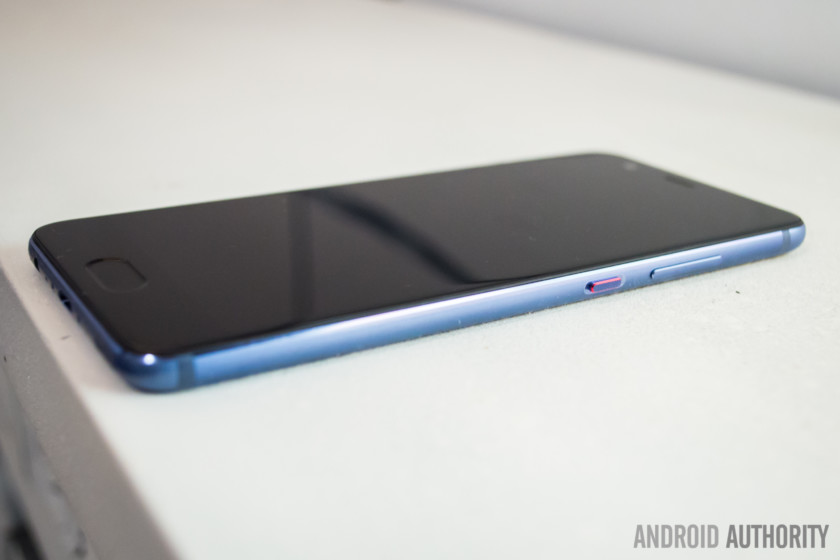
The P10 and P10 Plus, like their forebears, bring a solid metal construction with very impressive build quality. However, this time, there’s a bit more curvature to their smooth sides and corners. Rather than the old chamfered edge on the back, both phones have a slightly rounder edge that curves nicely onto the back of the device.
Both phones are very thin, making them light, manageable and easy to grip while still retaining the thinness the P series has always been known for
All buttons are on the right hand side of the phone, with a nice color accent around the power button that both Josh and I appreciate much more than we probably should. Both phones are also very thin at 7mm, making them light, manageable and easy to grip while still retaining the thinness the P series has always been known for.
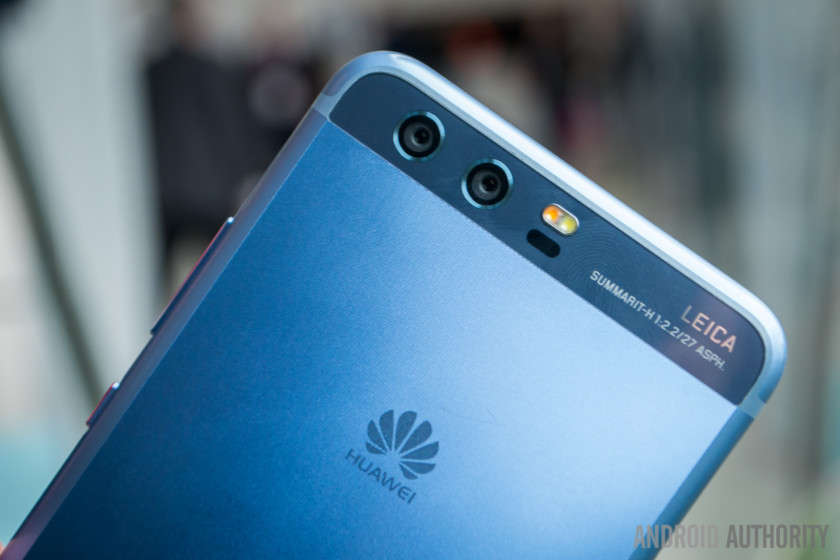
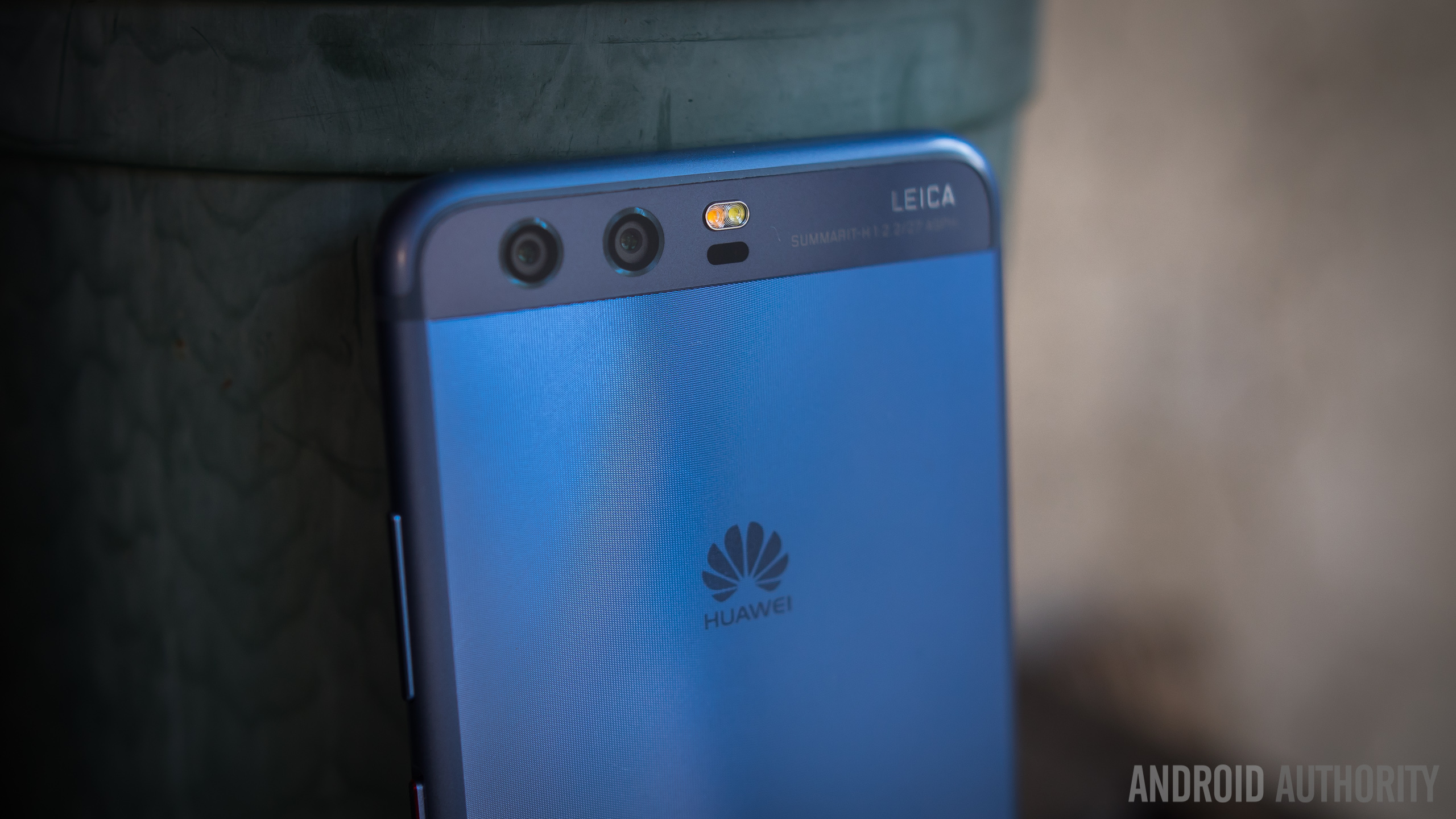
Looking at the back of the P10 and P10 Plus we again see the familiar glass “visor” from previous P series devices, once again housing a dual Leica camera setup (the specifics of which change depending on which model P10 you’re using) and two-tone LED flash. Below this is where things get interesting, with several new color options made in collaboration with Pantone and even a new texture this time around. While Huawei told us they didn’t design the “hyper diamond-cut” surface for the sounds it makes, you’ll likely find yourself just as prone to lazily scratching at it with your fingernail as we are. (Note: only available on the Dazzling Blue and Dazzling Gold colors)
On the P10 series, Huawei has relocated the fingerprint scanner to the front of the phone, where it can be used in place of on-screen buttons.
The other big design difference on the back of the phone, barring those very iPhone-esque antenna bands at the bottom, is the absence of the fingerprint scanner, which is now found on the front of the phone. The lozenge-shaped sensor, located on a bezel no larger than the P9 series, is of the solid state variety, meaning no physical clicks. Huawei has offered a slight haptic vibration for the scanner though, which you can enable for unlocking the phone or when using the fingerprint scanner for navigation.
Read more: The pros and cons of fingerprint scanner gestures
While on-screen navigation buttons are the default, you can enable fingerprint scanner gestures in the settings. Tapping the scanner takes you back a step, holding it down takes you home, and swiping left or right opens up the recents apps overview. Swiping up from the bezel to the right of the sensor onto the screen itself can also be used to call up Google Assistant.
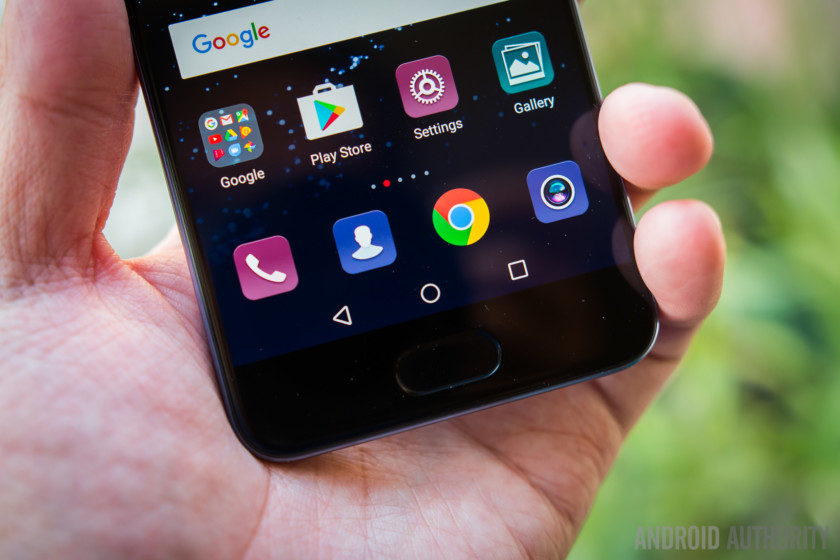
While these gestures are novel and surprisingly intuitive (Josh had more issues getting used to them than me), they offer a much more limited range of function than traditional on-screen or capacitive buttons, denying you button shortcuts for Nougat’s quick app switching and split-screen mode for example.
You can use a floating dock to have access to both fingerprint gestures and on-screen buttons (meaning quick app switching is possible, even if you’ll still need to enter split-screen mode via the recent apps overview), but it’s an inelegant and rather clumsy solution.
Fingerprint scanner gestures are novel and surprisingly intuitive, but they are limited in functionality
We can only hope navigation gestures weren’t the main reason for relocating the fingerprint scanner to the front of the phone, as both Josh and I only used these navigation gestures for a few days before switching back to the more familiar and full-featured on-screen buttons. While some might be willing to live without some shortcuts to use these fun gestures, the lack of any kind of visual indicators may put off novices just as much as their limited functionality will likely put off more advanced users. They’re also nowhere near as reliable as capacitive or on-screen buttons, sometimes requiring multiple attempts to register a gesture.
Display

The P10 features a 5.1-inch Full HD display while the P10 Plus has a 5.5-inch QHD display with 25 percent greater pixel density
The P10 is the easier device to handle out of the two, with its 5.1-inch screen compared to the P10 Plus’ 5.5-inch diagonal. Both devices use an IPS-NEO LCD under Gorilla Glass 5 although their resolutions differ: the P10 features a Full HD display (1,920 x 1,080 pixels, 431 ppi) while the P10 Plus has a QHD display (2,560 x 1,440 pixels, 534 ppi) with more than 25-percent greater pixel density. It’s worth noting that the P10 Plus has a display mode setting to render text and images larger than might be expected, which reduces the obviousness of its higher resolution screen.
See also:
Huawei P10 and P10 Plus: 5 things that could make them even better
2 weeks ago
Both IPS screens have great viewing angles and get plenty bright and are easily viewable under broad daylight, with an impressive brightness of close to 600 nits, both according to Huawei’s claims and to Android Authority’s display testing. The colors are easy enough on the eyes, with impressive saturation for LCDs, but by default they do seem to skew more toward the cooler side of the display spectrum. Fortunately, display colors can be modified in the display settings.
Performance

The Huawei P10 and P10 Plus both make use of the latest and greatest Kirin 960 chipset from Huawei subsidiary HiSilicon, combined with Mali-G71 MP8 graphics. The octa-core Kirin SoC delivers four high-performance Cortex A73 cores clocked at 2.4GHz and four energy-efficient Cortex A53 cores clocked at 1.8GHz for less demanding tasks. Huawei hasn’t been shy about pitching the Kirin 960 as a viable competitor to the best Qualcomm and Samsung have to offer this year and if you’re the type that’s prone to benchmark scores they put it pretty high up the food chain.
- Best of Android 2016: Performance
- Snapdragon 821 vs Kirin 960 vs Exynos 8890 vs MediaTek X25
As with most contemporary smartphones in their first week of use, the P10 and P10 Plus (which, in our case is the 128GB version equipped with 6GB of RAM rather than the 4GB found in other P10 models) didn’t skip a beat. Both devices were luxuriously lag and stutter free with no app crashes, restarts or any other unexpected behavior.
The base storage on both devices is 64GB and both can be supplemented with microSD expansion
Real-world performance was snappy and reliable and delivered everything you’d expect from a smaller Mate 9. The base storage on both devices is 64GB which is fantastic, and both can be supplemented with microSD expansion if you need a little more.
Both Josh and I put the P10 and P10 Plus through their gaming paces but while Josh went for graphically-intensive games like Jade Empire, I simply spent hours on various planes playing my current go-to, Sky Force Reloaded. While neither of us suffered from any slowdown or lost frames even after hours of gameplay, the higher resolution display on the P10 Plus naturally means it has to work harder because it has to push 25 percent more pixels around.
Don’t miss:
Huawei Mate 9 & Porsche Design Mate 9 review
December 20, 2016
The P10 family also benefits from the fabled machine learning algorithms introduced on the Mate 9 last year, which guarantee app load times 20 percent faster than normal and a system that will not slow down over time. Like the Mate 9, the P10 will supposedly learn from your usage habits, with its Ultra Memory function compressing the apps you don’t use very often and keeping the ones you do use always at the ready. This is all well and good, but only time will tell the degree of truth to be found in these types of claim.
Audio from the single bottom-firing speaker is capable if unexceptional, although it does get impressively loud without sounding too tinny. For many, a smartphone with front-facing bezels this size really should have come equipped with stereo front-facing speakers, but Huawei unfortunately doesn’t seem in any hurry to replicate the great speaker experience found on the Nexus 6P. The P10 does decently well for what it packs, but don’t buy this phone expecting BoomSound quality audio. Like most phones, things sound much better with headphones plugged in.

As for calls, we used the P10 Plus on the T-Mobile network in the US without any issues regarding call quality or connection speed and reliability. The P10’s “Loud Voice” mode helps boost in-call volume for noisy environments, alleviating the need to switch to the speaker just to be able to hear the person on the other end.
The P10 and P10 Plus will be heading to Canadian carriers too, meaning importing one into the US will be a much simpler affair than with previous Huawei devices not officially available via gethuawei.com. They’ll work fine on AT&T and T-Mobile at minimum, but check your carrier bands if you’re thinking of picking one up. All the usual connectivity options are on board: NFC, dual band Wi-Fi 802.11 a/b/g/n/ac and Bluetooth 4.2 LE. The P10 Plus also packs an IR blaster and 4×4 MIMO thanks to its four antennas for up to 600Mbit/s download speeds, both of which the regular P10 lacks.
Battery life
When it comes to battery life, both the P10 and P10 Plus excelled. In our initial test using our custom Android Authority battery testing app, we projected that the P10 Plus, with its 3,750mAh cell, would get six hours of screen-on time under typical usage. Josh found that even with his heavier usage habits, that included plenty of music playback, Jade Empire and YouTube viewing on top of emails and general messaging, that he was regularly knocking out five hours of screen-on time.
Related:
Screen-on time: Why is it important, and how can I extend it?
December 1, 2016
Unlike some previous P series phones, you shouldn’t find yourself scrounging around for a charger mid-afternoon.
Even on the P10 with its 3,200mAh battery, our custom battery test predicted just over five and a half hours of screen-on time and I had similarly impressive results to Josh, managing to regularly eke out at least five hours screen-on time thanks to the P10’s lower resolution screen. Unlike some previous P series phones, you shouldn’t find yourself scrounging around for a charger mid-afternoon.
Under the heaviest load, our custom gaming test, made the P10 Plus screen conk out at three and a half hours while the P10 made it to just under four hours. The same pattern emerged with our video playback test, where the P10 Plus managed an impressive nine and a half hours and the P10 knocked it out of the park with over 11 hours. Again, this is due to the smaller lower resolution display, so if the best possible battery life is what you’re after with the P10, you might have to reconsider how badly you want a larger, 2K display.

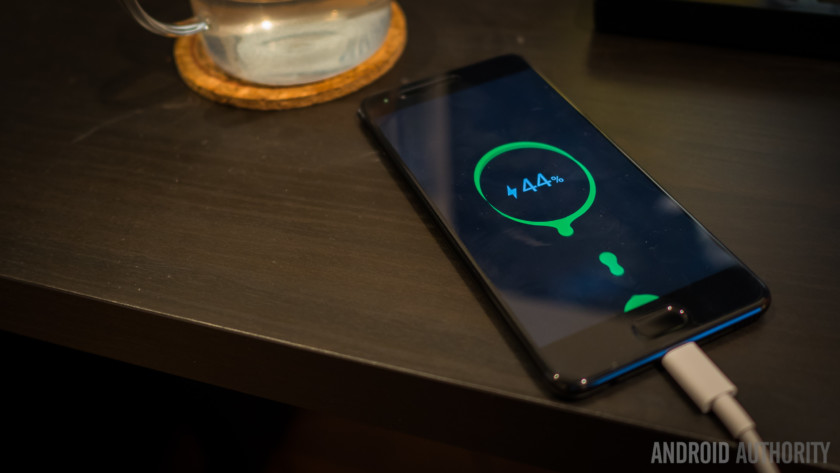
Fortunately, charging both phones up is a breeze using the included Supercharger brick and cable. Naturally, for best results you should always use the charger that came in the box, with the advantage being a nearly half full battery in a half an hour. However, both Josh and I also used regular Quick Charge 3.0 charging bricks and other USB Type-C cables, though naturally this combination wasn’t as fast as Huawei’s preferred solution. That said, neither of us ever felt any anxiety about battery charge levels while using the P10 and P10 Plus. Even with Josh’s higher resolution display, he was comfortably seeing out the day and with the Full HD P10 I had plenty to spare at day’s end.
Also read: Best of Android 2016: Battery

Huawei’s battery optimizations have been really good for a while and the added benefit of the Supercharger just goes even further towards putting the company near the top of the pile where pound-for-pound battery life is concerned. Of course there’s also the usual bevy of battery saving modes, both from Huawei and those those that come as part and parcel of Android Nougat to help manage your power consumption according to your particular needs and habits.
Camera
The camera package is really important for Huawei, as the P series was one of the first smartphone product lines to bring dual lens and sensor camera setups. While things were off to a good start on the P9 last year, with the P10 the dual Leica cameras feel like a further improvement to the system. (Note: the images embedded here are all from the P10, but there’s a gallery of shots from the P10 Plus is at the end of the camera section).
It won’t come as a surprise to know that Huawei’s latest camera offering is really good.
On the P10 you’ll get a regular 12MP Summarit-H lens at f/2.2 aperture, backed up by a 20MP monochrome sensor that does the work of getting depth and detail information before color is inserted into the scene. The P10 Plus gets a bump to Summilux-H lenses at f/1.8 aperture for even better low light performance and shallow depth of field photography. As you may have seen, DxOMark gave very high scores to the P10 camera recently, so it probably won’t come as much of a surprise to know that we also found Huawei’s latest camera offering to be really good.




First off, however, we should talk about that front-facing camera, which has now received the Leica treatment as well. An 8MP f/1.9 aperture shooter helps to get good lower light shots and is backed up by an almost uncomfortably powerful selfie mode that provides a lot of control over how your face ends up looking in the picture. This is called the “Perfect Selfie” mode and it requires you to look in a few different directions so that it can take control of areas like the subject’s eyes and jawline, among other settings.
You can see in the P10 Plus image gallery at the bottom of this section just how strong the results can be skewed, with an original selfie of Josh followed by others with the selfie settings ramped up to 5 and then 10 (see just below). Meanwhile, if you caught my “beauty mode” selfie efforts from MWC, where I pushed all settings to their limit just to see what would happen, you’ll get a good idea of just how ridiculous too much power can be when put in the wrong hands.
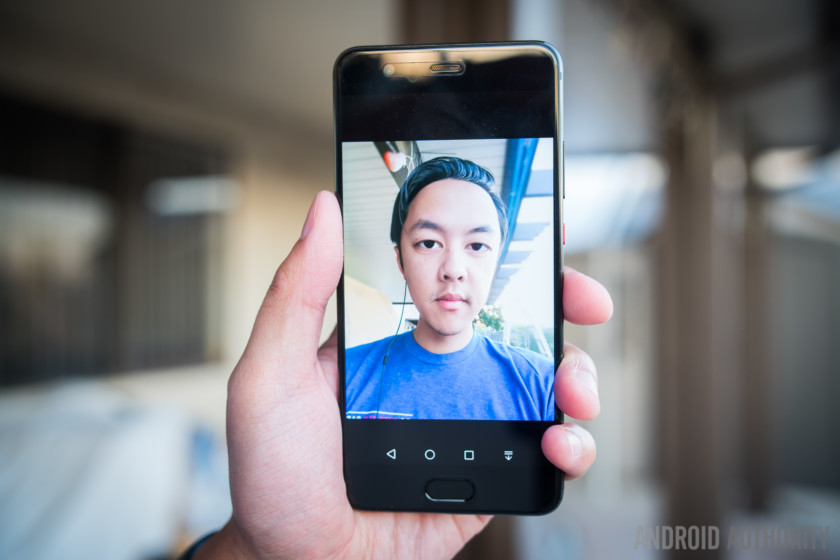
On the positive side, both the P10 and P10 Plus benefit from an adaptive selfie mode that recognizes multiple subjects and automatically switches to a wide angle mode to squeeze everyone in. If the selfie-focused nova and nova plus didn’t give it away, Huawei is really obsessed with selfies right now. Like, probably even more obsessed than selfie fans are. Fortunately, if you’re prone to taking photos of yourself, you’re going to run out of interest in tweaking things before the P10 and P10 Plus run out of selfie options and settings.




The bokeh effect on the front-facing camera is laughably bad at times
You can even get a similar fake bokeh effect from the front-facing camera that you can get from the primary camera’s wide aperture mode. The f/1.9 aperture on the fixed focus front-facing camera is already capable of blurring the background to a degree, but you can also enable “Artistic Effect” when in Portrait Mode to push things even further. While this sounds great in theory – softening up the background and further drawing attention to the subject’s face – the actual implementation is pretty spotty . In fact, it’s laughably bad a lot of the time, with bizarre out-of-focus halos enveloping the subject’s head or oddly in-focus patches of the background, as you can see above Lanh’s head and around mine and Nicole’s.

Which brings us to the much more well-equipped main camera and its capabilities. Portrait mode also comes on the main camera, with the same selfie and artistic features, but there is plenty more available at one’s disposal. Aperture settings can be set to pull the foreground away from everything behind it – getting as low as f/0.95 aperture, which is impressive on paper but it still can’t fully emulate the look of a real lens with the same aperture.
Enabling the P10’s wide aperture mode is useful to change the point of focus after a picture is taken, but again, the idea works better than the implementation more often than than not. Post-shot refocusing is a cool idea but it has very rarely been pulled off successfully. That said, when the P10 gets it right, it can produce some very nice results. Just don’t count on getting those every time.




As far as settings and options go, the P10 is almost comically well equipped. As with the Mate 9, the Huawei camera app takes a lot of getting used to, with multiple menus and settings to be found with a swipe in any direction. There’s a whole swathe of pre-loaded modes including a dedicated monochrome mode we highly recommend getting to know your way around, as well as other familiar fare like HDR, panorama, light shot, light painting, time lapse, slow motion, and so on, as well as additional downloadable modes for better food photos and more.
As far as settings and options go, the P10 is almost comically well equipped but the camera app takes a lot of getting used to.
The P10 can shoot 20MP and 12MP shots at 4:3 ratio with the highest resolution 16:9 shots available at 9MP. Of course, you can always just crop larger resolution images to whatever aspect ratio you prefer and RAW shooting is supported for tweaking your photos in post. Both photos and video can make use of standard, vivid or smooth colors, beauty mode and there’s a range of pre-loaded live preview filters too.




Video modes include 4K and 1080p 60fps recording, which are all good to see. The resulting videos look quite good and don’t overtly lack in any aspect; however, object tracking and the enhanced stabilization get turned off in 4K and 60fps Full HD recording modes. While OIS is available for usage no matter what, the 1080p videos end up looking smoother as a result of this setting.
It would be an effort in futility to try to do justice to all the features of the P10 camera in this review, but suffice it to say that if you can learn your way around the camera app and pick up on the little quirks of the camera, there is quite a bit of good to be found with the P10 and P10 Plus. For example, HDR, which you need to choose from the camera modes screen rather than enjoy it as an automatic setting.
Related: The best Android smartphone cameras
Even so, HDR is not a “one size fits all” mode either. To get the proper level of bump in highlights and shadows you’ll need to skew the exposure toward the blown out areas yourself. In this example, you’ll have to first lock the focus on the foreground subject and then drag the metering ring to a blown out area to make best use of the P10’s exposure compensation. Far from a simple procedure, this was only discovered through fiddling around with different exposure points first.
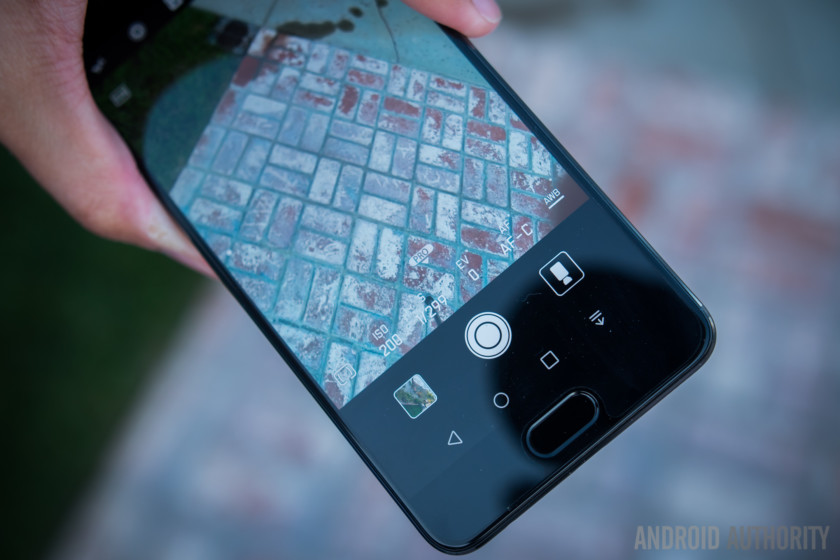
We always like to see manual controls built into camera apps, and that is exactly what you get with the P10. All of the controls you’ll need are available just a short swipe up from the shutter button, providing control of the ISO, exposure compensation, shutter speed, white balance, metering and focus mode. As mentioned above, photos can be captured in raw DNG format, which is nice for any seasoned photographers who want to pull more from their scenes in post-production or for those wanting to learn the basics on their phone before investing in a pricey DSLR.
ISO performance isn’t too bad, with the upper ceiling at ISO 3200 still providing usable photos without too much loss of detail. Thankfully, shutter speeds can be changed up to a great extent so you can still can get crisp long exposure shots as long as the phone is completely stabilized for the extended shutter time. Like most smartphones though, the P10 generally struggles a little in low light situations, with plenty of visible noise when you go looking for it. But the P10 covers up its flaws better than a lot smartphone cameras, producing solid images that only start to fall apart under 100 percent crops. To put it bluntly, you won’t get effortlessly good photos as reliably as you would with the Pixel, for example, but with a little effort and know-how you can get nearly as good images most of the time.



Overall, the pictures from the P10 prove that the dual camera lens and sensor combo works. Not to mention the fact that monochromatic photos look absolutely fantastic because the 20MP sensor is dedicated to it. Indeed, B&W photos are one of the biggest strengths of the P10 camera for obvious reasons and you might surprise yourself by just how into them you get when once you get a taste of how impressive the results are.
The level of detail, inside and out, make this camera one of the more memorable performers so far this year.
Photos generally have a good level of sharpness and the various color modes can instantly change the output to more vibrant or more subdued palettes depending on the effect you’re after (as you can see in the balcony shots above). But it’s really the level of detail, inside and out, that makes this camera one of the more memorable performers so far this year – it might not have the saturation or constant HDR+ rendering of Galaxy and Pixel phones, but with the proper attention to detail and to the different capabilities of the camera software, there is plenty to like about the shooting experience on the P10. If you’re willing to put in the time you’ll almost definitely be able to get the results you want.
Huawei P10 Plus camera samples

Software

And finally, EMUI – the Huawei Android iteration that has seen quite a few changes in the last few generations, most recently adding an option for an app drawer. With the P10, EMUI still has an impressively large number of customization features that make it one of the most robust versions of Nougat that we’ve seen thus far. Unfortunately, there is still a lot of needless app duplication going on.
Out of the box, you’ll get the P10 without an app drawer, but this can be easily added in the settings right off the bat. But that’s just the start of EMUI’s customization potential. As far as the display is concerned, there’s a blue light filter for those late night mobile sessions, complete with scheduled start and stop times, and a color wheel for adjusting the P10 display’s temperature to your liking.
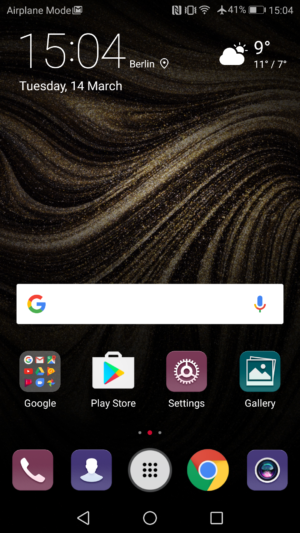
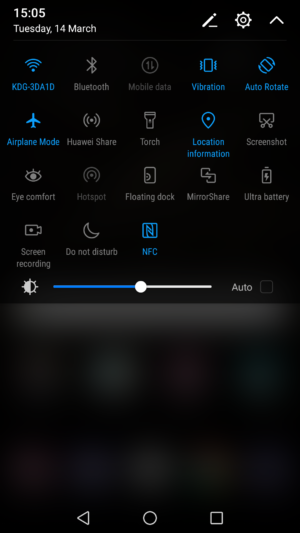
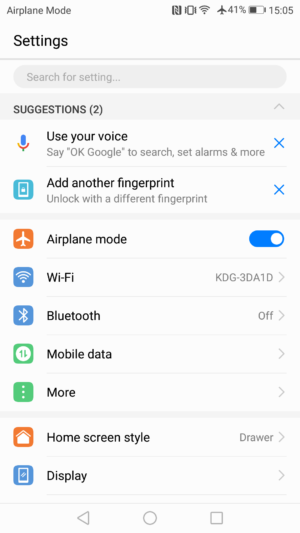
As mentioned above, you can choose between traditional on-screen buttons or fingerprint scanner gestures for navigation. But there’s also a floating navigation bubble that can replace on-screen buttons or supplement the scanner gestures. If you prefer on-screen buttons, you can also rearrange their order to your liking, including adding an additional button for pulling the notification shade down without having to reach up to the top of the screen.
There’s an app lock for securing sensitive apps with a fingerprint and a “safe” for your file manager that can be locked down in the same way. You can fully manage how much of your notifications appear on the lock screen, add or remove a step counter and signature and subscribe to various lock screen galleries including Leica photography that refresh every time you turn on your phone’s lock screen. Huawei’s silly knuckle gestures are also on board for quickly launching apps and taking a screenshot but you’d be forgiven for never using them.


There are also a bunch of battery saving settings including Nougat’s Doze on the Go, Do Not Disturb, app twin (for multiple simultaneous WhatsApp or Facebook logins), granular app permissions and a lot more that would be familiar to anyone with a passing knowledge of Huawei’s EMUI or Android Nougat’s feature set. Huawei’s settings menu is nicely laid out and clean, with most major features accessible with just a couple of taps. The notification shade follows the black-and-blue look introduced on the Mate 9 and offers customizable quick settings tiles as well as Direct Replies and bundled notifications.
See also:
Android 7.0 Nougat review: an Android version for Android fans
October 21, 2016
Specifically, the P10 and P10 Plus are running Huawei’s EMUI 5.1, an updated version of the EMUI 5 interface that first appeared on the Mate 9. For a more complete walkthrough of EMUI, head to EMUI 5 review here.
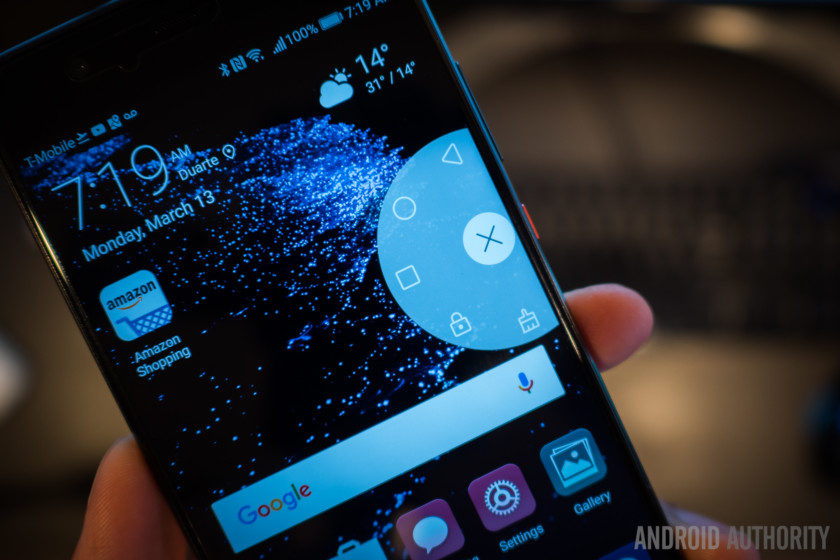
All of these functions (and many more) lie just beneath the surface of an updated interface that is more easy on the eye than perhaps any EMUI before it. The addition of the app drawer is a must for most Android enthusiasts and Huawei offers more customization options than most manufacturers, with the vast majority actually being useful.
The addition of the app drawer is a must for most Android enthusiasts and Huawei offers more customization options than most manufacturers.
We really wish Huawei would add a built-in icon pack manager or switch up those dated icons, but we have to give credit where credit is due. EMUI has come a long way in recent years and is now very far from the ugly clumsy beast it once was. But, like the camera app, you’re only going to get the most out of it if you go digging around.


Specifications
| Display | 5.1-inch LCD 1920 x 1080 resolution 431ppi Corning Gorilla Glass 5 |
5.5-inch LCD 2560 x 1440 resolution 534ppi Corning Gorilla Glass 5 |
| Processor | 64-bit octa-core (4 x 2.4 GHz A73+ 4 x 1.8 GHz A53) Hisilicon Kirin 960 | 64-bit octa-core (4 x 2.4 GHz A73+ 4 x 1.8 GHz A53) Hisilicon Kirin 960 |
| GPU | Mali-G71 MP8 | Mali-G71 MP8 |
| RAM | 4GB | 4/6GB |
| Storage | 64GB | 64/128GB |
| MicroSD | Yes, up to 256GB | Yes, up to 256GB |
| Cameras | Rear: Leica Dual-Camera 2.0 12 and 20MP sensors, f/2.2 aperture, OIS Front: 8MP sensor, f/1.9 aperture |
Rear: Leica Dual-Camera 2.0 Pro Edition 12 and 20MP sensors, f/1.8 aperture, OIS Front: 8MP sensor, f/1.9 aperture |
| Battery | 3,200mAh Non-removable Huawei SuperCharge |
3,750mAh Non-removable Huawei SuperCharge |
| Water resistant | No | No |
| Connectivity | USB Type-C | USB Type-C |
| NFC | Yes | Yes |
| Software | Android 7.0 Nougat EMUI 5.1 |
Android 7.0 Nougat EMUI 5.1 |
| Colors | Dazzling Blue, Graphite Black, Dazzling Gold, Rose Gold, Greenery, White Ceramic, Mystic Silver, Prestige Gold | Dazzling Blue, Graphite Black, Dazzling Gold, Rose Gold, Greenery, White Ceramic, Mystic Silver, Prestige Gold |
| Dimensions and weight | 145.3 x 69.3 x 6.98mm 145g |
153.5 x 74.2 x 6.98mm 165g |
Gallery
Price
The only official pricing for the P10 and P10 Plus so far is European, where Huawei is focusing its marketing efforts for the P10 family. For the versions with 64GB of storage and 4GB of RAM, the P10 costs €649, while the P10 Plus will set you back €699. The version of the P10 Plus with 128GB of storage and 6GB of RAM is priced at €799.
The Huawei P10 and P10 Plus do not have American prices as they will not (yet) be officially available in the country. Pricing for Canada has not yet been officially revealed either, although the P10 will be available through Rogers, Fido, Bell and Videotron. The P10 Plus will be a Rogers exclusive. For further market details, see our roundup of Huawei P10 pricing and availability.
Final thoughts

The Huawei P10 and P10 Plus are not perfect, but they are about as close as it is possible to get right now. They offer almost all the benefits of the larger Mate 9 flagship but in smaller, more manageable form factors. To put this is in perspective, most smartphones in the 5.1-inch range don’t have half the features of the regular P10, and the P10 Plus can comfortably hold its own against any of the 5.5-inch flagships around right now, even if some might argue it’s a little overpriced.
The Huawei P10 and P10 Plus offer almost all the benefits of the larger Mate 9 flagship but in smaller, more manageable form factors.
The improved dual Leica cameras on both phones are the major standout, offering exceptional quality for those willing to put in the effort to learn the intricacies of the camera app. Software is solid, with plenty of customization options and built-in features, display quality is great, build quality is impeccable and the battery life on both devices are seriously good. But there’s nothing life changing or earth-shattering going on here. Just incremental improvements that really stack up.
On the down side, audio is a bit of a let down and the complexity of the camera app will provide a barrier to a lot of users. The P10 is perfectly capable of getting great shots, but achieving those results sometimes requires a lot more effort than other exceptional shooters like the Google Pixel. The same goes for the software; while EMUI 5.1 is a huge improvement (barring the needless duplication of stock apps), you’re only going to get the most out of the P10’s software if you really commit to diving in and exploring.
There’s nothing life changing or earth-shattering going on here; just incremental improvements that really stack up.
That said, the P10 and P10 Plus may not be the perfect “average consumer” phone, requiring a longer acquaintance period than some of their competitors to get the most out of them. But for enthusiasts, especially of the photographic variety, there’s a lot to like here. Unfortunately, their lack of official availability in the American market will limit their popularity to only the dedicated few. But for those that do decide to pick up a P10 or P10 Plus, you’re very unlikely to be disappointed.
What are your thoughts on the Huawei P10 and P10 Plus? We want to hear what you have to say in the comments below!
Next:
Best Android phones
2 weeks ago
Snapchat and Vice are teaming up to bring a reality dating show to Snapchat
Why it matters to you
Looking for more stuff to watch on Snapchat? Be prepared for the oncoming flood of original content.
Snapchat is moving into original content and because you gotta give the people what they want, that content is going to be comprised of a dating reality show. Don’t blame Snap, blame Bachelor Nation and the consistently high viewership numbers it has managed to engender for shows like The Bachelor, The Bachelorette, and yes, Bachelor in Paradise. But now, you won’t be going to ABC to get your romantic fix. Instead, you will open your Snapchat app and check out a new Viceland-produced series called Hungry Hearts with Action Bronson.
Before you get too excited and start tripping over yourselves to apply for a spot on the show, it looks as though shooting has already wrapped. The show is slated to begin airing later in 2017 and has eight episodes to keep you entertained. Of course, considering the inherently ephemeral nature of Snapchat, we can’t say we’re surprised.
More: With Snapchat Bitmojis, you can now put your favorite friends on speed chat
The premise is simple — Action Bronson (also known as Arian Asllani), the rapper, chef, actor, and all-around entertaining character, will be sending new couples on dates and giving viewers a glimpse into romance. You can watch as these unsuspecting duos eat meals together, do activities together, and generally attempt to establish some sort of rapport. At the show’s end, Bronson attempts to predict whether the couple will want to come back for another round (which is to say, a second date), before revealing what actually comes of the couple’s fate.
While this might be the first show to air on Snapchat, it certainly won’t be the last. The social media company has already signed deals with NBC, ABC, BBC, Turner, The New York Times, Discovery, Time, and A&E Network to add more original content to its platform. Vice, however, has a longstanding relationship with Snapchat. In 2015, the two companies launched Snapchat Discover, in which Vice brought Snapchat users breaking news and culture-related content from musicians, artists, and other personalities.
Microsoft finally releases Patch Tuesday update, fixing some well-known exploits
Why it matters to you
Your Windows machine has been without security updates for an extra month, and so now is a good time to make sure it’s updated.
Microsoft’s March 2017 Patch Tuesday release was notable primarily because it covers two full months of security updates. A show-stopper bug derailed the February release, and so the company was forced to take the unusual step of delaying it for a full month.
Now that the update has been released, we can see that there was plenty to be patched. There were a number of security bugs to be fixed up, as TrendMicro’s Security Intelligence Blog reports, and also at least one small change that portends the impending release of Windows 10 Creators Update.
More: Stop refreshing Windows Update! Microsoft’s February 2017 Patch Tuesday is cancelled
The update’s changelog is extensive, listing out a slew of updates to fix a number of security holes. The zero-day bug causing issues with the Server Message Block (SMB) network protocol was fixed, and that’s particularly important because it’s actually not a zero-day vulnerability at this point — everyone knew about it over a month ago and it was one of the reasons why delaying Patch Tuesday was so problematic.
Other fixes were noted as well. Another SMB bug involving the SMBv1 server was fixed, along with a Windows Graphic Device Interface (GDI) issue that Google’s Project Zero disclosed, that could allow remote hackers to grab information from a system’s heap memory. In addition to those critical, well-known bugs, a number of other security issues were resolved, including a number of Internet Explorer bugs and a full 32 bugs in Microsoft’s newer Edge browser.
If you’re not a Windows Insider, then you may not be keeping up with the progress towards a public release of the upcoming Creators Update. Microsoft wants to make sure you know it’s coming soon, and so it added a brief notice in the Update Status section of the Settings app letting you know it’s on its way.

Mark Coppock/Digital Trends
Note that If you click on that “Yes, show me how” link, then you’ll be directed to a page indicating that you’ll be “one of the first to experience the Windows 10 Creators Update.” If you don’t want to be one of the first, then presumably you don’t want to click on this link. If you really want to get the Creators Update early, then of course you can join the Windows Insider program on the Fast Ring and the latest Windows 10 preview build is probably pretty close to what’s going to be publicly released.

Mark Coppock/Digital Trends
You can check out the complete list of fixes in the March 2017 Patch Tuesday release at Microsoft’s Technet site. You can also download the update from Microsoft’s Update Catalog, and if you do then you’ll notice that the download utilizes the new “delta update” method that helps to keep updates smaller and more palatable for IT departments with thousands of machines to update.
It’s always a good idea to let Windows install its Patch Tuesday updates on time. This month, it’s even more important, because you’re getting sixty days of updates including some vulnerabilities that are known and in the wild.
Score this Full HD, 23-inch PC monitor from Lenovo for $105 from Walmart
If you’re putting together a desktop PC, need to upgrade your current display, or simply want to add another monitor to your computer setup for cheap, then the excellent Lenovo LI2364d is currently on sale at a deep discount. Normally priced at around $160 at most retailers, Walmart is offering this modern and feature-laden Lenovo 23-inch monitor at a $42 discount off of its own price, which brings the cost down to just $104.
 The Lenovo LI2364d display boasts a backlit WLED screen that offers a bright picture and cuts down on power consumption. In-plane switching technology greatly increases the optimal viewing range to 178 degrees, so you don’t have to constantly readjust the monitor or shift your head around to maintain a perfect viewing angle. The screen can also tilt upward to roughly 45 degrees on its stand.
More: Score an Apple Mac Mini desktop computer for just $400 on Best Buy
The Lenovo 23-inch monitor provides a Full HD resolution of 1,920 x 1,080 pixels, a refresh rate of 75Hz, and a dynamic contrast ratio of 3,000,000:1 for vibrant bright colors and dark shades that won’t look faded or gray — perfect for improving your immersion in dark game environments. The  thin body and sleek tilt stand give the display a modern look, and super-slim bezels make the LI2364d a good choice for a low-cost multimonitor setup. A standard VGA port, as well as an HDMI connection, give you two options for hooking the display up to your computer.
Desktop monitors in this price range typically include older models or simpler designs with bulky bezels and fewer features, so the Lenovo 23-inch monitor is a great deal at just $104 from Walmart.
Buy it for $104 from Walmart
Testing shows Nvdia’s GeForce GTX 1060 outperforming AMD’s Radeon RX 480 in VR
Why it matters to you
Customers looking to beef up their desktops to support virtual reality now have an insight into which affordable graphics card to purchase.
Now that Oculus VR and Facebook have reduced the price of the Oculus Rift, customers have a more affordable option of diving into virtual reality. The bundled headset isn’t exactly cheap, but will likely push customers into grabbing a low-cost graphics card if their current hardware isn’t up to speed. Two affordable options include Nvidia’s GeForce GTX 1060 with 6GB of on-board memory ($300) and AMD’s Radeon RX 480 card with 8GB of onboard memory ($250). But which is the better buy for VR?
A recent test shows that Nvidia’s card comes out ahead. Testing included the use of the Oculus Rift, the HTC Vive, and four games: Chronos, Dirt Rally, Obduction, and Edge of Nowhere. The GTX 1060 outperformed the RX 480 in the first three games while both cards tied in performance in Edge of Nowhere. The cards’ performance was measured using FCAT VR, a frame capture analysis tool in the same vein as FRAPS, but for VR.
That, of course, raises a red flag. The tool is provided by Nvidia, so there is some skepticism given that the testing wasn’t performed with a non-Nvidia/AMD solution. However, the site testing the VR capabilities isn’t necessarily rooting for one specific team over the other, nor is there any indication that Nvidia fine-tuned the tool to provide better numbers for its GeForce cards.
That said, FCAT VR consists of two components. First, the Capture tool runs on the PC to evaluate its performance and uses data pulled from Oculus Event Tracing, the SteamVR performance API, and Nvidia driver stats. The second component is the Analyzer that grabs data generated by the Capture tool and shows the framerates, the dropped frames, warped frames, synthesized frames, and so on.
Finally, the testbed consisted of an Intel Core i7-5960X Haswell-E processor, an Asus Rampage V-Extreme X99 motherboard, 16GB of Ripjaws DDR4-3,200 from G.Skill, a Corsair AX1500i 1,500-watt power supply, and Windows 10 (64-bit). The operating system resided on a 256GB OCZ Agility 4 SSD and the tested games on a 500GB Adata SP610 SSD.
Using Nvidia driver version 378.78 and AMD driver version 17.2.1, the testing showed AMD’s card creating predicted frames in Chronos and Dirt Rally while Nvidia’s card generated all new frames. Both generated new frames in Edge of Nowhere whereas both cards were caught synthesizing predicted frames in Obduction.
Here are the numbers based on the high preset, which includes an additional test using the Oculus Rift-only Robo Recall game:
GTX 1060
Radeon RX 480
Chronos – Delivered FPS
90.0
76.0
Chronos – Unconstrained FPS
112.5
93.8
—–
Dirt Rally – Delivered FPS
90.0
47.0
Dirt Rally – Unconstrained FPS
76.3
57.9
—–
Edge of Nowhere – Delivered FPS
90.0
90.0
Edge of Nowhere – Unconstrained FPS
150.3
143.9
—–
Obduction – Delivered FPS
63.9
55.3
Obduction – Unconstrained FPS
73.2
61.8
—–
Robo Recall – Delivered FPS
63.9
55.3
Robo Recall – Unconstrained FPS
73.2
61.8
As the numbers show, the GeForce card may be a better investment for $50 more. But at $250, customers looking to upgrade their desktop to support VR can’t go wrong with AMD’s Radeon RX 480 either. How Nvidia’s GeForce GTX 1060 card will measure up to AMD’s upcoming Radeon RX Vega card with the same price tag will be interesting to see.
24 cases to keep your iPhone SE looking like new
Apple has repackaged the last-gen iPhone 6S into an iPhone 5S body to bring us the iPhone SE. This diminutive iPhone is cheaper and easier to handle than its big brothers and more recent iPhone models, but it still represents a fragile combination of glass and metal that will likely break if dropped. If you have an old iPhone 5S or iPhone 5 case lying around, then it can be repurposed for the SE. Most of you will likely prefer to snag a new one, however, so we’ve rounded up a few of our favorite iPhone SE cases in the lines below.
More: New to the App Store? Well, here are are our favorite iPhone apps to date
Twelve South BookBook Case ($50)

Disguise your iPhone SE as a vintage book with this genuine leather case that also doubles as a wallet. Open it up, and you’ll see there’s a leather-wrapped frame to hold your iPhone in place, along with a transparent ID pocket, three card slots, and a money pocket. There are also cut-outs for quick access to your phone’s controls, ports, and camera. It’s not the most protective case around and the leather will age, but it’s still a lot of fun.
Buy one now from:
Apple Amazon
Sena Classic Leather Sleeve ($20)

This is a simple solution to slip your iPhone SE away and keep it snug and safe when you aren’t using it. Sena’s slim pouch is made from genuine leather with neat stitching and a soft microsuede lining inside that will keep your iPhone SE looking great. The exterior leather has a pebbled texture to it that enhances grip and comfort. There are also openings in the bottom to ensure that the speaker isn’t muffled. You can get it in black, or visit Sena’s website for blue, green, white, pink, and purple options.
Buy one now from:
Amazon Sena
VRS Design Crystal Bumper Case ($14)

This case combines a TPU layer that’s shock absorbing and transparent with a tough polycarbonate bumper that surrounds the outside. The bumper has well-defined button covers for the volume and power keys, too, and there are four colors to choose from, so you can match the bumper to the color of your iPhone SE. The case will guard against small drops and bumps, and it also has a lip to protect your phone’s display, but it’s not a truly rugged case.
Buy one now from:
Amazon
FlexiShield Gel Case ($8)

Here’s a simple gel case that’s super easy to fit on your iPhone SE. It adds a thin layer for simple protection and grip, the latter of which makes your phone more comfortable to hold. You can get the case in black, blue, red, or pink, but we prefer the clear version as it shows off Apple’s design. There are thin button covers, and it offers all the necessary cut-outs for your phone’s features. The raised lip around the screen also provides a little protection when you place your phone face down, and helps prevent accidental screen touches.
Buy one now from:
Amazon
LuMee Selfie Light Case ($40)

The Lumee might seem rather clunky at first glance, but that’s because it packs its own lighting system, which can help you capture great selfies at night. There’s a dimmer switch inside the case, so you can pick the correct lighting level for your environment, and the built-in battery can last for up to 36 hours. The Lumee is also good if you need to find something in the dark, or FaceTime with someone. And the case does provide basic drop protection.
Buy one now from:
Amazon
Tech21 Evo Mesh Case ($18+)

An eye-catching mesh pattern and a special TPU formula that delivers solid drop protection should be enough to draw the Evo Mesh to your attention. If not, however, the case comes outfitted with easy-to-use button covers and accurate openings for your phone’s side switch, camera, and ports. The case is flexible and very easy to grip. It’s also translucent and comes with a white, black, or pink tinge. Tech21 is a name you can trust, and your iPhone SE will survive falls of up to 6.6 feet in height if it’s wearing this case.
Buy one now from:
Apple Amazon
Moshi iGlaze Armour Case ($40)

You’ll love the metallic style of this attractive case. It’s a hard shell that snaps onto your iPhone SE, and it has a soft plastic layer inside to prevent any impact damage from bumps and falls. There’s a little lip on the front of the case to protect your phone’s screen when you lay it face down. The cut-outs are perfect, including the round one on the back that showcases the Apple logo. The matte, metallic frame is only interrupted by soft plastic sections for the ports and the tactile button covers. The back panel is made of brushed aluminum, and there’s a shiny, silver ring to highlight the logo cut-out. This classy case also comes in one of several colors, including a pink and gray.
Buy one now from:
Moshi
Carved Traveler Wood Case ($24+)

Natural wood always looks nice, and Carved offers a wide selection of different woods to choose from, all of which are sustainably harvested. The slim cases are are made of flexible polycarbonate shells with a wood panel set into the back. You can go for plain wood grain or choose from one of the many stylish designs, all of which are made in partnership with various artists. The openings for the ports and camera are accurate and the button covers are minimal. The sides have a nice, grippy texture that helps ensure you don’t drop your iPhone. These cases start at $24 and go as high as $50, depending on what wood and design you choose.
Buy one now from:
Amazon Carved
RhinoShield CrashGuard Bumper Case ($25)

These clever bumper cases offer protection where you actually need it, leaving the screen and back of your iPhone SE uncovered. They’re chunky, rubbery bumpers that go all the way round the frame and extend from front and back to keep your iPhone from touching any surface when placed face down. You might fear you’re exposed, but these bumpers actually offer really solid drop protection. There are also openings for the ports and switch, and round button covers for the volume controls. You even get a special protective film in the box for the back of your iPhone SE, and you can add a screen protector ($20) for complete coverage.
Buy one now from:
Evolutive Labs
Speck CandyShell Inked Case ($22+)

If you’re bored by matte colors and dull designs, then the CandyShell Inked is definitely for you. Speck’s solid, military-standard drop protection combines a shock absorbent layer and a hard outer shell into a single case. Your iPhone SE is safe with this case on. The openings and button covers are just right, and there’s a raised bezel to help protect your smartphone’s display. The real attraction is the range of vibrant patterns and designs, which also happen to be resistant to scratches and fading.
Buy one now from:
Amazon Speck
Grovemade Maple and Leather Case ($79)

Grovemade’s beautiful cases combine natural materials for a classy and unique look. The hand-sanded, maple frame features precise openings for your phone’s ports and camera, and there are even wooden covers for the volume and power buttons. The back plate is vegetable-tanned leather, which looks and feels great. Each of the cases is slightly different due to the build materials, but they all age gracefully. They’re also designed and made in Portland, Oregon. If you don’t like the maple, you can always opt for walnut with black leather.
Buy one now from:
Grovemade
Incipio Isla Design Series Case ($6+)

You can wrap your iPhone SE in a stylish design and protect it at the same time with Incipio’s Design Series. The Isla features a metallic arrow pattern that’s available in an array of different colors, with a translucent shell for added visibility. The fit is perfect, and you’ll find easy access to ports and side switch. There’s also an opening for the camera, and subtle button covers for the power and volume keys. Incipio also offers a few alternative designs, including a wild rose pattern that’s very eye-catching.
Buy one now from:
Amazon Incipio
Otterbox Defender Series Case ($10+)

Triple layer protection should be enough to keep your iPhone SE safe and sound, even if you are really clumsy. The Defender offers really solid drop protection, and it covers every angle of your phone with a built-in screen protector and port covers. There are cut-outs on the back, too, so you can use the camera and continue to show off the Apple logo. The button covers are excellent and allow you to use TouchID with the case on, but really protective cases like this do impact general usability. If you don’t need this level of protection, consider stepping down to the Commuter Series.
Buy one now from:
Amazon Otterbox
Nodus Access Case 2 ($72)

Gorgeous, full-grain leather is the perfect material for a folio-style case. Instead of having a plastic shell inside to hold your iPhone SE in place, Nodus uses micro suction pads, which helps to keep the profile slim and retain full access to your phone’s ports and buttons. The lining of the case uses soft microfiber, and there’s a handy pocket in the cover with the Nodus logo. The exterior is uninterrupted leather finished in black, brown, yellow, or green with a cut-out on the back for the camera.
Buy one now from:
Nodus
Ringke Fusion Case ($10+)

You can avoid hiding the design of your iPhone SE with this transparent case. It sports a crystal-clear polycarbonate back panel, combined with a malleable TPU bumper, which takes the sting out of bumps and falls. There are button covers for the volume and power keys, and you’ll find accurate cut-outs for the camera, ports, and switch. The basic case is clear, but some models showcase a tinted bumper that’s available in either smoke black or rose gold.
Buy one now from:
Amazon
Griffin Survivor All-Terrain Case ($25+)

If you need serious protection from damage and the elements, then this case could be for you. The aptly-named Survivor All-Terrain exceeds military standards to safeguard your iPhone SE from dirt, rain, shock, and vibrations. It combines virtually unbreakable polycarbonate with shock-absorbing silicone. There are also special port plugs, camera and button covers, and a built-in screen protector. A chunky case like this obviously impacts ease of use — and some versions don’t work with TouchID — but it will certainly keep your phone safe.
Buy one now from:
Amazon Griffin
Spigen Tough Armor Case ($17+)

This is another tough case that combines an inner layer of flexible TPU with a hard, polycarbonate panel with contrasting color. It’s quite chunky, but it does deliver solid drop protection. The openings for the camera, ports, and switch are accurate, and there are over-sized button covers that work well. There’s also a cut-out for the Apple logo on the back, along with a raised lip that ensures your phone doesn’t come into contact with the ground or other surfaces.
Buy one now from:
Amazon Spigen
X-Doria Scene Case ($10+)

Here’s a slim case with a smart design that offers basic protection without cramping your iPhone SE’s style. The translucent polycarbonate back panel allows you to see the iPhone SE design, and X-Doria has added a rubberized bumper, which protects the phone from shock. The button covers are well-defined and easy to press, and there are cut-outs for the ports, camera, and switch. You can get the bumper in black, white, orange, or green.
Buy one now from:
Amazon X-Doria
Caseology Savoy Series Case ($13)

The low price is definitely a major attraction for this case, because it looks quite classy. The shell is made of polycarbonate with a soft touch finish on the outside, the latter component of which helps with grip. It’s fairly slim and there are cut-outs for your phone’s camera, ports, and buttons. The contrasting color combinations and the gloss finish also help it stand out from the crowd. It doesn’t look quite as good close up as it does from a distance, but it’s good value for money.
Buy one now from:
Amazon
Apple Leather Case ($39)

Apple’s official leather case is made using a finished leather that adds a quality feel to your iPhone. It’s slim, lightweight, and made specifically for the iPhone SE, so there won’t be any pockets of air or unappealing gaps between the phone and case. The inside is lined with soft, microfiber material to help protect your phone during drops, and the outside is subtle thanks to the attractive black (or blue) dye.
Buy one now from:
Apple
Power Support Air Jacket ($30)

The Air Jacket is a great case if you don’t want to cover up the design and style of the iPhone SE. The case is made of hard plastic and comes in Smoke, Black, Matte White, and Clear colors. The latter three options leave the phone visible to the outside world. It’s incredibly thin, and at a glance, you may not notice the case. Once it’s snapped on, however, it offers some basic protection from scratches and drops. The screen isn’t protected, but the package does come with screen protectors — one Anti-Glare and one Crystal Clear — meaning you can protect your phone while also maintaining the functionality and visibility of the screen.
Buy one now from:
Apple Amazon
Mophie Juice Pack Air ($60+)

If you want to double the total battery life of your iPhone SE, Mophie’s juice pack is the way to go. The Air variation of Mophie’s battery case is lighter and thinner than its juice pack plus counterpart, but still manages to get the job done all the same. Just flip the toggle on the case to begin charging your iPhone, and keep an eye on how much power is left using the built-in LED lights on the back. You’ll have access to the headphone jack, charge port, and the camera via cutouts, and the case protects the power and volume buttons with easy-to-press covers.
Buy one now from:
Apple Mophie Amazon
LifeProof FRĒ Series Waterproof Case ($60+)

LifeProof’s case completely encloses the iPhone SE to protect it from the elements. The case itself is as slim as it can be without compromising any of its features, which includes a waterproof, snowproof, dirtproof, and drop-resistant build. It also has a built-in screen protector and, despite its appearance, leaves every port, camera, and button accessible. You just need to flip off the covers protecting them. Additionally, should something go wrong with the case, it’s backed by a one-year warranty, so you can get a working replacement as soon as possible.
Buy one now from:
Amazon LifeProof
TORU Hidden Wallet Case ($15)

TORU’s case offers the same amount of storage as wallet cases, but does so without using the same design. The wallet compartment is found hidden in the back of the case, which can be revealed by flipping the back open. Inside, you can store money and up to three credit cards or IDs, or two cards if you want to use the included mirror. The case adds a bit of bulk to your iPhone SE, but with that bulk comes with dual-layer protection, shock absorption, and a kickstand that makes use of the aforementioned flip cover. The edges are also raised to keep the touchscreen from being scratched when placed face down on a table or the ground. Be careful how far your turn the back cover, however, as anything further than 120 degrees may cause it to snap off.
Buy one now from:
Amazon
LG is giving away a free Google Home to anyone that buys the new LG G6
Why it matters to you
LG is giving away a free Google Home with purchase of the G6, which could save you as much as $130.
Here is a pretty excellent deal to be aware of: Buy a new LG G6 and get a Google Home for free if you buy the device through the LG website. In other words, you can get two Google Assistant-enabled devices for the price of one.
The deal went live on Wednesday and will run until April 30, so you have over a month to make use of the deal if you want to. If you decide that indeed you want to buy the phone, all you have to do is head to the website set up for the promo and sign up.
More: Keep your shiny new LG G6 safe from damage with the best cases and covers
The LG G6 launched at Mobile World Congress 2017 and has so far been well reviewed. In our hands-on review of the device, we noted that the phone features a stunningly beautiful design that features two slates of Gorilla Glass with a metal frame — making it look and feel extremely premium. The device also features a dual camera and both sensors are 13MP with one being a wide angle. Last but not least, it features QuickCharge 3.0 and Android 7.0 Nougat.
Google Home has also been generally well received, though some do not find it as useful as the Amazon Echo, which uses Amazon’s Alexa digital assistant. Still, Home features Google Assistant — so if you’re an avid Android user, it should work better across your devices and with your Google account.
Regardless of the review, the deal is a pretty good one. Google Home is priced at $130, so you will be saving all that if you intended on buying both devices anyway. If you weren’t, this is LG’s big attempt at convincing you to do so — and if you’re an Android user the new G6 is a pretty great choice.
Need a good 2-in-1 tablet? Gold Samsung Galaxy TabPro S is $300 off at Best Buy
As tablets have grown in popularity, manufacturers like Samsung have bridged the gap between these handy mobile computers and traditional laptops with 2-in-1 designs that feature slim fold-out keyboards. The high-end Samsung Galaxy TabPro S is one such 2-in-1 tablet that launched in 2016, and the premium gold edition is now on sale from Best Buy for $700.
 The convertible form factor of the Galaxy TabPro S allows you to easily detach the slim keyboard, which doubles as a screen protector when the tablet is folded up and tucked away in your bag. This 2-in-1 runs on Windows 10, making it a good choice for those who want a full-featured tablet that can integrate with the wider Windows ecosystem. Windows 10 was designed to be an all-in-one desktop and mobile operating system that makes it easy to wirelessly connect, as well as share accounts, files, and more across all of your devices that run Windows.
More: Use these exclusive promo codes to save even more on Anker portable chargers
 Under the hood, the Samsung Galaxy TabPro S packs a sixth-generation Intel dual-core CPU paired with 8GB of RAM that delivers snappy performance and speedy multitasking. The vibrant 12-inch Super AMOLED display has a resolution of 2,160 x 1,440 for a crisp high-definition picture. Integrated Intel HD Graphics 515 easily handles graphical tasks like streaming online videos, gaming, and editing photos, while a 256GB solid state drive provides plenty of high-speed internal storage for your apps and personal files.
The gold Samsung Galaxy TabPro S launched late last year with a $1,000 price tag, and currently goes for $800-900 at most retailers, but Best Buy is offering this excellent Windows 10 2-in-1 tablet for just $700, giving you a tidy $300 discount off of its retail price. If you want to score even more savings, Best Buy also has open-box gold TabPro S tablets in like-new condition for $595.
Buy it from Best Buy for $700
YouTube and Daydream are collaborating on making VR video more realistic
Why it matters to you
You will soon be able to view more realistic VR video from YouTube — with lower bandwidth requirements — thanks to a collaboration with GooglreDaydream.
Google has a history of supporting virtual reality video through its YouTube streaming video service. It introduced 360-degree and 3D video in 2015, and followed that up with 360-degree live-streaming and spatial audio in 2016, accompanied by a dedicated YouTube VR app.
Now, Google has announced that YouTube is working with Daydream to make 360-degree and VR video even better. Specifically, the parties are collaborating on bridging the gap between what our eyes are capable of perceiving and what today’s internet connectivity and devices are capable of providing.
More: Google offers a peek at its upcoming YouTube VR app
The collaboration is focusing on improving the projection methods that fit a 360-degree view of a virtual world onto the rectangular video surfaces that make up our current VR systems. In the past, YouTube utilized “equirectangular [EQ] projection,” a common method that was easy to produce and edit.
EQ projection has some weaknesses, including higher quality at the top and bottom of images, where people don’t tend to look, along with lower quality at the equator, or horizon, which is precisely where the most interesting content tends to be found. The method results in fewer vertical pixels used in 3D imagery, and also experiences a a problem when mapping real-world straight line motion.
The team is instead looking to utilize a variation on cube maps for projecting 360-degree video. Cube maps take a sphere and turn it into a cube, and then lay out the cube’s six faces into a flat image. This method also is poor at avoiding pixel density variation that causes problems when viewing 3D.

The solution that YouTube and Daydream are working on utilizes “equiangular cubemaps,” or EACs, which essentially work to keep pixel density uniform by using saturation maps. The process is highly technical, but the result is improved image quality around the equator, where the most important content resides. It’s also the best use of available bandwidth.

Improved image quality will make VR more realistic within today’s internet connectivity constraints. Ultimately, this should result in YouTube doing a better job of displaying 360-degree and VR video without devouring more bandwidth than necessary. If you’re interested in how everything works, then feel free to check out the details, but otherwise, you can rest assured that more realistic images are on their way to your YouTube player.
 AIVAnet