


Google’s unique update process is one of the best parts of owning a Pixel

Google’s phones are updated the same way phones from other companies are, with one big difference.
There is an extremely well-defined divide between phones from Google and phones from any other company when it comes to updates. While a few exceptions exist, you know that you can only expect a timely Android update if you’re using a phone recently sold by Google. In short, unless your phone says Nexus or Pixel on the back of it, getting updates can be as random and unpredictable as rolling dice.
Whenever we start talking about the update situation, someone will mention that Google can do it faster because it isn’t going through the carriers and the companies that make the phone hardware. There is a lot more at play here, but a look at how a Google Android update is born and delivered should make for a fun conversation!
Two misconceptions

Let’s start by addressing two things most of us get wrong: 1) The number of devices sold makes a big difference. 2) Carriers and manufacturers aren’t in the picture.
Building a software update for one phone is the same as building a software update for one million phones. There are differences in the deployment because more people are downloading it and more errors can happen, but changing the code and testing how everything works is completely independent of how many phones that will use it are in the wild.
Android on a Nexus 5X is the same as Android on a Nexus 6P or Pixel.
Android is not developed in a bubble and it isn’t tested in one, either. A manufacturer is still involved in an update for a Pixel or Nexus phone. Someone works with the vendors that make the individual components and get everything working as expected and sort out the licensing, and then it’s tested with input from a lot of other companies, like big software vendors and carriers. Verizon (for example) places a pretty high value on its network and would blacklist a particular phone quickly if it caused trouble. Google gets Verizon to have a look before that can happen even though the phone in question may not be branded specifically for Verizon.
What we really mean here is that Google is the only company writing the software for an Android update on a Nexus or Pixel phone. This isn’t technically correct either, but it gets the message across. This is Android the way Google made it with no major changes.
The deployment
Google is pretty good at this internet stuff. It has built a FOTA update (Firmware Over The Air) system into Android that’s simple and robust. An application in the system software pings a server, and if the response indicates that an update is available a special download manager service starts and grabs the file. The files are hosted by Google for almost every Android phone.
Your phone is assigned an update slot based on your unique device ID and a bit of random number generation. By not making the update files available to everyone at the same time, download servers aren’t crushed by demand and if a critical error is uncovered the rollout can be stopped.
An update is deployed for almost every other phone this same way.
How an update is developed

This is the important part.
All updates, even Nexus or Pixel updates, have manufacturer and carrier involvement. They all get rolled out the same basic way through Google Android update servers. How the updated code is delivered by the people writing it to the people in charge of building software is where Google has a distinct advantage.
When an update is “finished” by Google it’s still not finished for Samsung.
The people involved in building Android for a Nexus or Pixel phone basically use the Android code the way it is written. Building Android from the source code isn’t difficult at all. A few commands given to a computer that’s been properly set up to compile Android is all that’s needed to build all the parts into software that can be copied to a phone. The “hard” work is done by the folks writing and changing the code itself.
Phones sold by Samsung or LG or any other company aren’t using the code the way it is written. That means they can’t just download the updated parts and build their software like Google can. This is especially apparent for those monthly Android security patches, which need to be adapted to work with the custom operating system companies build using Android as the base.

The way Google handles the source code and builds updated software for their own phones isn’t drastically different from the way anyone else does it. Developers make changes and add features to the Android source. Google Hardware takes that code and works with the companies that make the parts inside the phones to get it running well on each model, then makes it available to the public through the beta program.
The step Google Hardware doesn’t have to do — work these base layer changes into the code for a custom operating system — is what gives a Nexus or Pixel phone an edge when it comes to waiting for an update.
This is unavoidable when you have different companies building different software from the same base code. The goal is a rich ecosystem built from different companies that offer very different experiences while still being compatible with Android at the feature and app level. We wouldn’t want it any other way.
Android Nougat
- Android 7.0 Nougat: Everything you need to know
- Will my phone get Android Nougat?
- Google Pixel + Pixel XL review
- All Android Nougat news
- How to manually update your Nexus or Pixel
- Join the Discussion
Samsung Pay might come to Galaxy J phones in India
Samsung is looking to boost adoption of Samsung Pay by making it available on Galaxy J handsets.
Samsung Pay made its debut in India earlier this week, with the service becoming available for early access in the country. The digital payments service is limited to Samsung’s premium devices, including the Galaxy S7, S7 edge, Galaxy Note 5, Galaxy S6 edge+, Galaxy A7 (2016), and the Galaxy A5 (2016), and it now looks like Samsung may expand availability to its Galaxy J phones.

That’s according to unnamed sources talking to Mashable India. Samsung is said to roll out the feature to the Galaxy J phones in the country in the coming months, and if the company sees a lot of interest from consumers, it will bring the payments service to Galaxy J phones globally.
The move certainly makes sense for Samsung considering the Galaxy J series is its best-selling lineup in India. While devices like the Galaxy J7 Prime offer a fingerprint scanner, those that don’t have it — like the Galaxy J2 — will rely on a PIN-based authentication system for purchases.
The country’s demonetisation move led to an exponential increase in mobile wallets and digital payments services, and Samsung’s decision to bring Samsung Pay in India comes at an apropos time. Currently, Samsung Pay works with Visa and MasterCard cards from Axis Bank, HDFC, ICICI, Standard Chartered, and SBI, and Samsung is set to add support for American Express and Citibank shortly. Most PoS machines in the country lack NFC-based authentication, but Samsung’s payments service also works with the older MST, making it compatible with existing hardware.
LG G6 vs. LG V20: Is the flagship’s camera worth the extra cash?

How does the LG G6’s camera compare against its sibling, the V20? That’s what we’re going to find out.
The dual camera setup featured on the LG G6 isn’t new. This particular configuration was first introduced in LG’s V10, which was released under the guise of being the content creator’s ultimate camera smartphone. It’s a great phone, though not necessarily aimed at the mainstream, with camera modes to appease the casual photography all the way to the serious videographer. But which one is worth buying?
The hardware + specs
I took a pre-production version of the LG G6 out for a day on the town along with last year’s LG V20 in tow. Both phones boast a dual camera setup, though they’re both equipped with different hardware.
The G6 comes with two identical 13-megapixel sensors — with one regular 28mm equivalent lens, and the other a wide-angle 18mm lens — while the V20 packs a regular 16-megapixel main sensor along with an 8-megapixel wide-angle one. For the most part, there’s no striking difference in performance between the two devices, though the G6 does feel like a more polished version of what the V20 was aiming to do when it was initially launched late last year.
Significantly, LG heard feedback that the output between the V20’s (and predecessor G5’s) two cameras were too different, owing to variances in the sensors. The company attempted to address that issue by giving the G6 identical sensors at different focal lengths.
Performance and Interface
If you’ve used an LG smartphone In the past year, you may be familiar with the camera app’s relatively simple user interface. I like camera apps that don’t overwhelm you with options and camera modes all at once, and for the most part both the LG G6 and V20 succeed in that element. There are some nuances with the camera app on LG’s newest phone, however, that may take some getting used to.


LG G6’s camera app (left) and the LG V20’s camera app (right)
First off, the G6’s camera app takes advantage of its long, 18:9 screen by offering a camera roll of sorts to appear at the top of the viewfinder. It made me feel slightly claustrophobic at first, though, as I had the viewfinder pointed in the direction of the scene I wanted to shoot and a camera roll simultaneously updating on top every time I pressed the shutter button. Eventually, I came to appreciate the convenience of being able to quickly preview the last few shots I’d managed. It’s the equivalent of perusing through previous shots on a DSLR, for example. The interface refreshes the camera roll, too, and it disappears and starts over with every new shooting sessions.
It’s not particularly user-friendly to hide the HDR toggle behind a menu.
Second — and this is actually an annoyance with the V20, too — there is no button on the main viewfinder to quickly toggle on HDR. I imagine that would have crowded the interface with the wide-angle toggle resting pretty on the screen, but it’s not particularly user-friendly to hide it in the camera app’s settings panel either.
Regardless, LG’s camera app is one of the least user offensive offered up in Android camera land. The various other modes — besides HDR — are easy to toggle between and fairly self-explanatory. There’s also an options-within-a-feature menu offered for each individual mode; for example, you can switch between manual and automatic shooting when in auto-shooting mode. This particular menu screen shows up in the second screen on the V20.
The G6 introduces one new feature that might be helpful if you’re a social media fiend. The guided picture mode, available as part of the square shooting option, lets you program oft-used guides as you need for shooting a photo a certain way, whether that’s the way you hold something or simply ensuring that your backdrop is always on par. I’m still attempting to figure out useful situations for the other square camera modes related to this, but I’ll follow up in the second-round review of the flagship.
Both the LG G6 and V20 were quick to launch and zippy to use, and despite the G6’s pre-production software, I experienced no sudden crashes. I was a bit concerned about the G6’s focus abilities, however. I thought maybe the camera lens was a bit smudged, but even after wiping it I continued to have issues focusing on objects, particularly close up.
Lastly, and I’m happy to see this particular gesture implemented: both the LG G6 and V20 have quick camera launch abilities. From the main Settings panel, you can flip the switch to bring up the camera app with a double-press of the volume down button.
Photo Quality
There is not much disparity between the photos produced by the LG G6 and V20. You’ll only notice the slight differentiators if you’re really paying attention, and if you’re one of those people, then you should also know that the G6 offered the most malleability of the two, at least in terms of dynamic range. The G6 and V20 may both shoot in RAW format, if you so desire, but the former tends to retain more information to work with after the fact, not to mention that the photos it produces are sharper — despite having fewer megapixels.
Daylight


LG G6 (left) / LG V20 (right) — click to view larger


Photos at 100% zoom


An example of both the G6 and V20’s wide-angle abilities


In daylight, the LG G6 and V20 seemed to perform nearly neck and neck. Whether I was shooting vibrantly-colored red cars or lazily pointing the camera toward docked yachts, I was pleased with the overall performance of both smartphones. They both share a few flaws, too, like an ineffective digital zoom (you can peep this in the example above) and the tendency to automatically overexpose parts of a photo (this is particularly prevalent if you’re shooting in HDR).
The G6 was the better performer of the two smartphones because its end result tended to be better contrasted, even when the blue hues seemed to be displayed more vibrantly on the V20. The G6 also seemed to practice better white balancing than the V20, which was extremely helpful as I was shooting outside on a rainy day. And though most of the G6’s photo files were a megabyte or two smaller than the V20’s, owing to the lower-megapixel sensor, the photos tended to be slightly sharper, with better detail — a phenomenon that LG has managed to achieve despite putting a smaller 1/3″ sensor in the G6 compared to the V20’s 1/2.6″ primary.
Low light


LG G6 (left) / LG V20 (right) — click to view larger


The LG G6’s 1.12-micron pixels performed impressively well in low light environments. Remember how I said it was good at color balance, too? That comes through in darker photos, as seen in example above of the altar with the candlelight. I also liked the way the G6 captured the different colors of the decoden I have sprawled out on the table with the aid of a spotlight, whereas the V20 seemed to over process the color profile of each one. Still, both cameras performed well in low light conditions, and I was pleased with both soft-lighted portrait shots produced by the G6 and V20.
I also noticed that without the manual mode flipped on, the photos you shoot with the G6 or V20 in the dark will attempt to expose the entire scene, thus resulting in the overexposure of the actual light source. You can’t tell there’s a tea light candle in there. The G6’s result is definitely more detailed, though — when I zoom in, I can more easily distinguish the different threads in the yarn, for example, whereas the V20’s pixels appear muddled together.
Bottom line

This little comparison article has turned into a sort of revelatory journey on how the cameras have improved on LG’s smartphones. To my eyes, this is the first time in a while that an LG smartphone can compete alongside what Samsung puts out — not to mention the Pixel (though it remains to be seen what the Galaxy S8 is capable of). In daylight, the LG G6 takes bright and vibrant photos that aren’t overexposed. Conversely, the LG V20, which was marketed as the content creator’s phone, often produced unbalanced photos and didn’t offer nearly as much detail.
If you’re considering the V20 because of its sale price, you’ll get a camera that’s nearly as good as the LG’s latest.
The LG G6 is also a true performer in low light situations, though the V20 was fine, too. The pictures may not have been as sharp as what the G6 produced, but consider that they were considered the best low light photos that LG offered mere months ago. If anything, this comparison proves the LG V20 is a good bargain and with a discount it’s likely more affordable than what your carrier is charging for the G6. LG’s latest flagship certainly offers its own upsides for the extra cost, but you can rest easy knowing that if you’re considering the V20 because of its sale price, you’ll get a camera that’s nearly as good as the LG’s latest flagship.
LG G6
- LG G6 review!
- LG G6 specs
- These LG G6 features are exclusive to some countries
- LG forums
- Latest LG G6 news
LG V20
- LG V20 review: Built for power users
- LG V20 specs
- All LG V20 news
- LG V20 vs. Galaxy Note 7
- Discuss the V20 in the forums!
AT&T
T-Mobile
Sprint
B&H
Come meet the BlackBerry KEYone (and CrackBerry Kevin) in NYC and Miami this month!

If you’re in Miami or New York this month, come meet CrackBerry Kevin and get a first look at the BlackBerry KEYone!
If you want to buy a BlackBerry KEYone, you’ll be waiting until at least early April, but if you live in either New York City or Miami you can try one way before that!
After awesome turnouts in Barcelona during Mobile World Congress, and Toronto a week later, CrackBerry Kevin is holding a couple of fun little events that we’re happy to tell you about. These are very informal get-togethers where BlackBerry fans, new and old, can chat about BlackBerry Mobile’s upcoming hero phone, the KEYone.

CrackBerry Kevin celebrating 10 years of CrackBerry during MWC 2017!
I got a chance to try this phone in Barcelona and came away really impressed. This is a BlackBerry through and through, but with some modern niceties peppered throughout. It’s just a BlackBerry Classic on a lot of caffeine. From the fingerprint sensor embedded in the hardware keyboard to the Pixel-quality camera and big, beautiful 4.5-inch screen, this is a phone to get excited about.
The two get-togethers are a few days apart. The Miami meet-up is scheduled for Friday, March 17, and the New York event is scheduled for Wednesday, March 22nd, so make your plans soon! We’ll see you there!
RSVP: MIAMI – Friday, March 17th
RSVP: NEW YORK CITY – Wednesday, March 22nd
BlackBerry KEYone
- BlackBerry KEYone hands-on
- BlackBerry KEYone specs
- The latest KEYone news
- KEYone vs. Priv: Battle of the BlackBerry keyboards
- Join the discussion in the forums
BlackBerry Mobile
LG Watch Sport vs. Samsung Gear S3: Which should you buy?
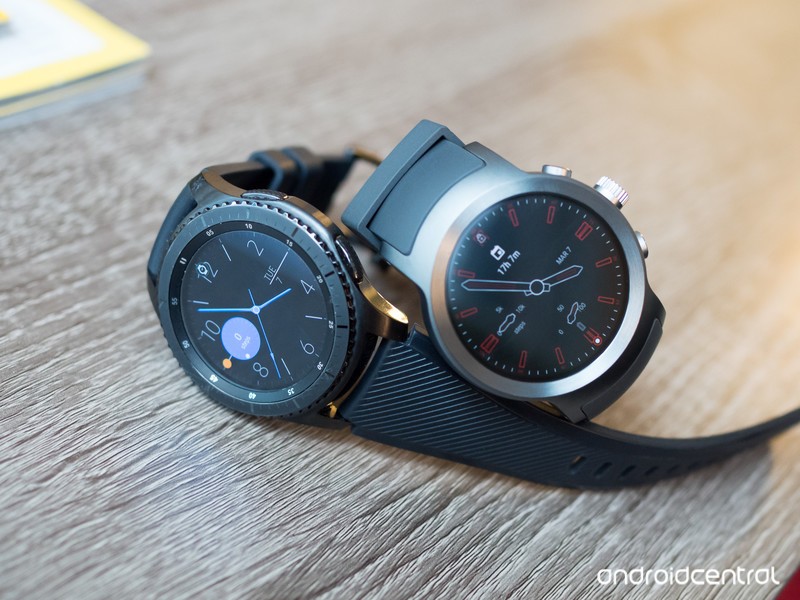
If you’re looking for a smartwatch, chances are these two will be on your radar.
Samsung’s Gear S3 Frontier has been around for a few months, but it’s still fresh in everyone’s mind as Samsung’s top-end wearable offering. Coming in just a tad later, The big and fully featured LG Watch Sport was a launch device for Android Wear 2.0 and matches the Gear S3 in more ways than one.
Both of these smartwatches are big, feature-packed and relatively expensive. So which one should you consider strapping to your wrist? Let us help you decide.
See Gear S3 Frontier at AmazonSee LG Watch Sport at AT&T
Hardware and design
Right from the start, these watches alienate a large portion of the potential market with their size. The LG Watch Sport’s case measures in at a very large 45.4 x 51.2 mm, while the Gear S3 has nearly the same footprint at 46 x 49 mm. The Watch Sport is incredibly thick at 14.2 mm, and the Gear S3 Frontier is 12.9 mm — svelte by comparison, but still large. With dimensions like that, neither of these watches will fit on smaller wrists, and even those with a wrist that can hold such a large watch may not be a fan of the size — the thickness, in particular, can be an issue on either watch when it comes to fitting underneath a sleeve.
Two huge, rugged watches with different overall looks.
The only thing to really differentiate the two is their external styling. The Gear S3 Frontier follows its name well with a rugged design that seems like it’d be at home in the woods or on a trail. Its dark metal exterior, large gnarled bezel and textured buttons give off a masculine look that’s definitely popular nowadays. Despite the “Sport” name, the LG Watch Sport is relatively tame by comparison. Its body is entirely smooth, lightly brushed metal that can fit with a wider variety of clothing but lacks a strong identity.
More: Our complete LG Watch Sport review!
Part of that identity on the Gear S3 is in its very nice rubber bands, which feel better than the LG Watch Sport’s. Further, the lug design on the Gear S3 gives the bands flexibility at their mounting point, which is more comfortable than the integrated bands on the Watch Sport. To complete the trifecta of wins, Samsung’s smartwatch lets you swap out the Gear S3’s bands for any 22mm bands you can find, giving you customization options down the road.
For its size, the LG Watch Sport does manage to give you more screen with a 1.38-inch display compared to the Gear S3’s 1.3-inch. That may not seem like a ton, but extra room is always welcomed on a (relatively) small device — especially when you’re getting it in the basically the same case size as the Gear S3. LG’s display is also higher resolution at 480×480 versus 360×360, though both displays offer automatic brightness and look great.
Software and experience
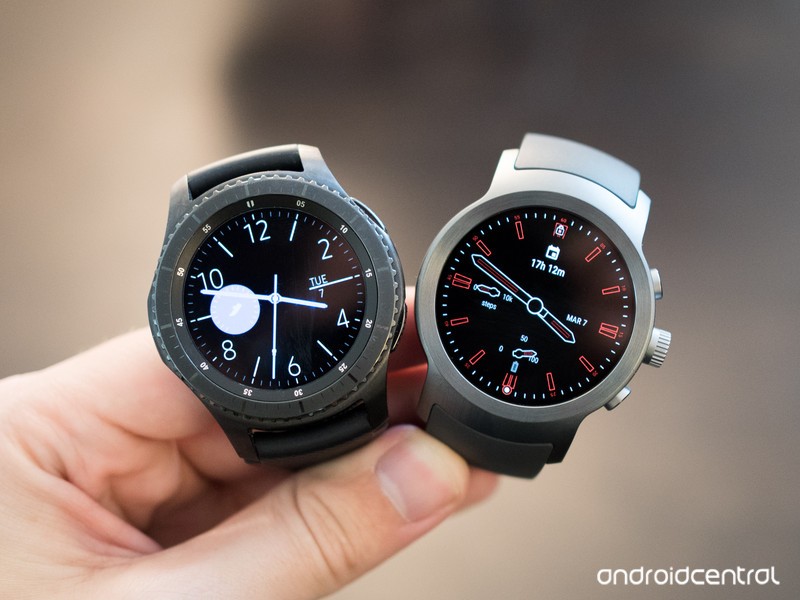
The differences here are bigger than the hardware styling of these two watches — starting, of course, with the different platforms. The LG Watch Sport has Google’s latest Android Wear 2.0 software, while the Gear S3 has Samsung’s own Tizen Wearable OS platform that is a small iteration from what we saw on the Gear S2.
Android Wear 2.0 gets the basics right, and has great watch faces.
Android Wear 2.0 a big step up in usability and functionality from previous iterations, focusing on feature-filled watch faces and manageable notifications. The API-based watch face complication setup on Android Wear 2.0 lets any watch face developer make great-looking dials that also integrate with any app on your watch designed for complications, and notifications are perfectly linked with your phone for a seamless experience. Though it can do more, Android Wear 2.0 really nails these basics.
More: Our complete Samsung Gear S3 review!
Tizen on the Gear S3 can be configured to be simple, but in general requires a bit more interaction with the watch in order to get the same tasks done. Some app notifications don’t play nice with the Gear S3, and while Samsung’s store has many great watch faces (plus the solid default set) it doesn’t have the same catalogue or potential of the Google Play Store. The same goes for installing apps directly on either watch, though both platforms hit the few big names you’d actually want to install on your watch so that’s a basically a wash.
You get all of the core specs and features — now pick a platform to get locked in to.
More important are the built-in features both watches offer — and with hardware this big, it shouldn’t be surprising that you get all of the bells and whistles on both. With either choice you’re getting a capable processor, 4GB of RAM, big battery, GPS, Bluetooth, NFC, IP68 water and dust resistance, heart rate monitoring and optional LTE connectivity. The Gear S3’s rotating bezel matches the LG Watch Sport’s rotating crown for non-touch input, and both give you a great way to get through the software on a daily basis. In my time with both watches the Gear S3 can offer better battery life, somewhere in the realm of 50-75% better than the Watch Sport, but chances are you’ll be charging both nightly anyway.
The only real question here is ecosystem lock-in for two big features: fitness tracking and mobile payments. The Gear S3 has S Health and Samsung Pay, while the LG Watch Sport gives you Google Fit and Android Pay. As far as payments go, the Gear S3 takes the advantage with MST technology that lets you pay anywhere a card can swipe. The fitness point may not be as big of a deal as you’d initially think, as you’ll be able to find big names like Endomondo, Map My Run, MyFitnessPal, Strava, Runtastic, RunKeeper and more (be sure to check compatibility before you choose) but daily tracking is still best handled by S Health and Google Fit.
Bottom line: Very similar smartwatches
The LG Watch Sport and Samsung Gear S3 Frontier have far more in common than you may think considering their different manufacturers and platforms. If you’re considering these watches, you’ve already decided that you can manage their large sizes. You’re also seeing value in a huge list of specs and hardware features that are shared between the two. It just comes down to which one you like the external design of more, and what platform you want to integrate with.
The Gear S3’s dark, rugged design with removable bands may speak to you more than the Watch Sport’s basic look and extra thickness with fixed bands. When you go with Android Wear on the LG Watch Sport, you’re going to see smoother integration with your Android phone and all of Google’s services, while the Gear S3 offers Samsung Pay and has a higher ceiling in terms of watch-only functionality.
Both watches charge the same $349 price and set the bar in many ways for what we want from a smartwatch today. Either one is a great choice if you don’t feel strongly about one platform or the other, so make your pick based on the design and few exclusive features that appeal to you most.
See Gear S3 Frontier at AmazonSee LG Watch Sport at AT&T
Android Wear
- Everything you need to know about Android Wear 2.0
- LG Watch Sport review
- LG Watch Style review
- These watches will get Android Wear 2.0
- Discuss Android Wear in the forums!
Get ready for more ads in Facebook’s Instant Articles
As part of its Journalism Project, Facebook has revealed that it will allow publishers to place more ads in Instant Articles. That will allow sites like the Washington Post and New York Times to eke a bit more money out of posts published directly onto the social network. Instant Articles are good for Facebook, because users stay on the site since they don’t need to click on a link. However, they’re not great for publishers, because you can’t see native ads, discover more articles or check out new videos — all of which help sites keep their doors open.
Facebook now lets publishers place adds every 250 words (about two paragraphs), rather than every 350 words like before. They can either manually choose video or static ads, in which case they keep 100 percent of the money, or use Facebook’s automatic ad placement feature,giving the social network a 30 percent cut.
As mentioned, Facebook’s walled off approach with Instant Articles is vexing to publishers who profit more by keeping users on their site, not Facebook. To address those concerns, Facebook launched the Journalism Project with initiatives like digests of multiple instant articles, helping users discover content from the same publisher. It’s also testing a feature with Germany’s Bild that will allow users to start paid subscriptions from within an Instant Article.
Despite that, website publishers regard Facebook with deep suspicion, since it hurts their business and doesn’t show much concern for journalistic integrity. At the same time, Facebook has become a necessary evil as a way to gain readership and eyeballs — in 2015, it reportedly surpassed Google as the primary driver of referral traffic.
Source: Facebook
Verizon FiOS streaming no longer counts toward your data cap
Since chairman and net neutrality skeptic Ajit Pal dropped an FCC investigation into data-free “zero-rating,” it’s full speed ahead for carriers on unlimited video streaming. Verizon is piling on with its FiOS Mobile App, which now lets you to stream some 140+ channels, recorded DVR shows and movies on the go without impacting your wireless data cap. The new deal applies to FiOS internet and TV subscribers on Verizon’s 5GB, Small, Medium and Large plans.
The app is likely a response to AT&T’s recent wireless plans that let you stream DirecTV Now with no data hit as long as you have both a qualifying mobile and DirecTV Now plan. T-Mobile offers DirecTV and Hulu with no data hit, too, though it has also used the offer to slam rival AT&T.
Verizon recently resurrected its Unlimited plan as well, again following the lead of AT&T and T-Mobile. Interestingly, zero-rated FiOS streaming is not included with the Unlimited plan, according to fine print on the company’s FiOS Mobile App page on iTunes, as spotted by The Verge. Instead, it counts toward the 22GB cap — so if you stream lots of TV and exceed it, your speeds could be throttled.
Verizon already zero-rated its Go90 video streaming app last year, something that perked up the ears of net neutrality advocates. While free video data sounds like a great thing, organizations like the Electronic Frontier Foundation and ACLU believe that by prioritizing their own content over rivals like Netflix, carriers are creating an uneven playing field.
As such, they and other groups wrote the FCC urging it to not eliminate net neutrality rules created in 2015. “In order to promote continued economic, social, and political growth and innovation, it is imperative that the Internet remain open and accessible to all people in the future,” the petition says.
Source: Verizon
Facebook will stream live MLS soccer matches this season
Liga MX isn’t the only pro soccer league you’ll be able to watch on Facebook this season. The social network has signed another deal with Univision to stream at least 22 live Major League Soccer (MLS) matches in 2017. In addition to action on the pitch the league will produce over 40 “Matchday Live” analysis shows that will be exclusively available on Facebook.
Just like with the Liga MX deal that was announced last month, live games will be available on the Univision Deportes page on Facebook. That analysis show will be streamed live on the MLS page. The move also follows reports late last year that the social network was planning to prime its video push with sports and scripted shows. Rumblings surfaced last month that Facebook was “in advanced talks” to stream live Major League Baseball games this year as well.
With soccer season already started in both Mexico and the MLS, Facebook has nabbed rights to select games from the two biggest leagues in North America. Of course, 22 matches doesn’t come close to the full slate of games. Like Twitter did with the NFL and Thursday Night Football, this is much more of a “game of the week” situation. Weekend MLS action is typically available to stream through both Fox Sports Go and WatchESPN, however both of those apps require a cable subscription. The league also has its own streaming option, MLS Live, that’s priced at $80/year or $15/month.
The first match available on Facebook will be Chicago Fire at Atlanta United FC at 4PM ET on Match 18th. A pilot episode of “Matchday Live” debuted on the opening weekend, but there will be a new installment this Saturday, March 11th at 4PM ET.
Via: Wall Street Journal
Source: MLS
Puzzle Game ‘The Witness’ Launches on Mac App Store, iOS Version Still Coming Soon
Jonathan Blow’s console and PC puzzle game The Witness has launched on the Mac App Store a little over a year after first debuting on PS4 and Windows PCs. Like other platforms, the game costs $39.99 [Direct Link] and tasks players with deciphering hundreds of puzzles set on a mysterious island.
Since its release early last year the game has received critical acclaim for its puzzle design, graphics, and secrets-filled backstory. The macOS version ports the same game and experience over to Apple computers running macOS 10.11.6 or later with 4GB of RAM and 5GB available storage space. The game also requires Apple’s new Metal graphics technology to run.
You wake up, alone, on a strange island full of puzzles that will challenge and surprise you.
You don’t remember who you are, and you don’t remember how you got here, but there’s one thing you can do: explore the island in hope of discovering clues, regaining your memory, and somehow finding your way home.
The Witness is a single-player game in an open world with dozens of locations to explore and over 500 puzzles. This game respects you as an intelligent player and it treats your time as precious. There’s no filler; each of those puzzles brings its own new idea into the mix. So, this is a game full of ideas.
An iOS port of the game has long been in development, and a few developers at Thekla — the game’s creators — mentioned in passing recently that the game is still being worked on for iOS, but a launch date is unspecified. Since The Witness is so graphically intensive, the iOS port will require a longer gestation to pare down the visuals in order to run properly on Apple’s smartphones and tablets.
The Witness is available today for $39.99 on the Mac App Store [Direct Link]. A Mac version of the game on Steam is also said to be coming in the next few weeks.
Related Roundup: macOS Sierra
Tags: Mac App Store, The Witness
Discuss this article in our forums
Tesla pledges to fix Australian state’s power woes
Lyndon Rive, co-founder of Solar City and head of Tesla’s energy division, believes that his company could fix an Australian state’s energy woes in just 100 days. Rive was talking to Australia’s Financial Review, claiming that Tesla could build between 100-300MWh of battery storage in that short a time. It’s a bet that his cousin (and boss) Elon Musk was eager to take up, later tweeting that Tesla would do the work for free if it missed that deadline.
The state of South Australia has been gripped by an energy crisis that has seen surging prices and frequent blackouts. The loss of two coal plants in the last few months have caused wholesale prices to peak at the state maximum of $14,000 per MWh. A lack of political will to solve the crisis and no scheme to build renewables means that the state stands on the precipice.
Adding battery storage to the system will, in theory, even out the state’s power supply issues in the short and medium terms. After all, they can be charged up when demand is low and release the energy back during spikes to ensure blackouts aren’t to frequent. Tesla does have previous experience in this space, getting a 80MWh battery plant installed in California in just 90 days. That plant was commissioned after the Aliso Canyon natural gas facility was unexpectedly closed after a massive leak.
@mcannonbrookes Tesla will get the system installed and working 100 days from contract signature or it is free. That serious enough for you?
— Elon Musk (@elonmusk) March 10, 2017
Australian billionaire Michael Cannon-Brookes, the co-founder of Atlassian, decided to contact Musk and Rive to enquire how serious the offer was. Musk responded in the affirmative, and later added that he would offer the system at US$250 per kWh of storage, with the project costing around $25 million in total. Financial Review believes that that’s around half the pre-discount price normally on offer.
@mcannonbrookes $250/kWh at the pack level for 100MWh+ systems. Tesla is moving to fixed and open pricing and terms for all products.
— Elon Musk (@elonmusk) March 10, 2017
Cannon-Brookes subsequently tweeted that he’s working to source the money and political consent to get the system working. The government is ready to “work with companies with serious proposals,” said Australia’s environment and energy minister Josh Frudenberg to Reuters. Tesla’s offer is being taken seriously, although it remains to be seen if the Australian government can get things moving within the seven-day deadline. That may not matter to Musk, who once again comes off looking like the great savior of the moribund energy infrastructure industry.
Via: Mashable
Source: Financial Review, (2), Reuters
 AIVAnet