


Mastercard app enables credit-card-free bar tabs
One of the most worrying things about going to a bar is the possibility that the credit card you handed over to open your tab with might get skimmed, or worse, stolen. Mastercard has a new digital payment tool that will let you open a bar tab through an app so you don’t have to hand your credit card over to the bartender. Instead, showing show them a 4-digit number (at least, during our demo) on your phone is all you have to do. You can pay for your orders from the app and leave after you’re done, without having to sit around and try to catch the bartender’s attention.
The new feature isn’t available as a standalone tool; instead, it is an option in Mastercard’s Qkr app that merchants can activate on their compatible payment systems. So, for instance, if your favorite pub is using a payment terminal that works with Qkr, they’ll need to enable the feature. You will then have to download the establishment’s app (since Qkr is a white-label service that companies can brand) or find their page on Mastercard’s Qkr Marketplace portal to pay for your order.
During a recent briefing, I checked out a prototype of the feature in Qkr Marketplace, which wasn’t fully functional yet. The home page displays a list of restaurants around you, and you select the one you’re at. Through the simple, colorful interface, you can create a bar tab, and when you’re ready to pay, you can claim exactly which food or drink items you want added to your bill. Your party can all join in on the app to split the tab, and each person can claim their own items, generating a specific total for each individual. That’s very handy, and can reduce time spent waiting at the end of a meal for someone to figure out the math. Of course, since our demo was just a prototype, it’s not certain exactly how the tool will operate when it does arrive.

Qkr is already available in several countries, including the US, where restaurant chain Wagamama has integrated Mastercard’s bill-sharing feature into its own app. Mastercard says some partners are onboard to start offering the bar tab tool this summer, but it can’t share details on who these are just yet. Still, this should excite frequent pubgoers who should welcome the day they will no longer have to worry about staying sober enough to remember to close out their tabs.
Click here to catch up on the latest news from MWC 2017.
Twitter offers more controls for muting abusers
Twitter’s attempt at automatically fighting abuse hasn’t worked flawlessly. However, you might not mind the missteps quite so much now that it’s implementing some (arguably overdue) improvements to both mute controls and abuse report feedback in its mobile apps. You can now mute people based on account types, including those with unverified email addresses, unverified phone numbers and even default avatars — finally, there’s an official way to mute those notorious egg accounts trolls like to use. Twitter is also building on its previous mute upgrades by giving you options to mute both directly from your main timeline and to specify how long a mute lasts, whether it’s permanent or just for a short while. This time-based muting isn’t completely new (Tweetbot says hi), but it’ll still be helpful if you want to avoid a nasty discussion for a day.
The social network is doing more to follow up when someone has crossed the line, too. When you report someone, you’ll get in-app notifications when Twitter receives a report and takes action against an offender. You won’t have to check your email to see if the company has suspended that troll you reported the other day.
The changes should be available worldwide in the “coming days and weeks.” The mute controls aren’t Twitter’s strongest weapon against abuse, since they don’t actually stop trolls by themselves — you just don’t see their vitriol in your mentions. However, it might discourage harassment by making it clear that the targets won’t have to put up with that hate, even from dedicated harassers who create new accounts as quickly as the old ones are knocked down. If nothing else, it shows that Twitter was telling the truth when it said it would pick up the pace on anti-abuse features.

Source: Twitter
Nintendo Switch review: Revolutionary, but it still needs work
There’s a certain magic in the air ahead of a console launch. Unlike with phones and other gadgets, we don’t see new game systems very often, so each new release feels momentous. That’s particularly true for Nintendo, a company that’s been striving to differentiate itself from its rivals. While Sony and Microsoft are pushing their consoles to be more like gaming PCs, Nintendo has focused on creating unique experiences that you can only get by buying one of its systems.
The Switch has a lot riding on it. Nintendo has to make up for the missteps it made with the Wii U, and it has to convince gamers that a portable system can also be a decent home console. And of course, the company is under pressure from Sony’s PlayStation 4 Pro and Microsoft’s upcoming Scorpio. But while those systems are focused on offering powerful specs for 4K gaming and VR, Nintendo is once again selling something completely different.
Hardware
 No doubt about it, the Switch is unlike any system we’ve seen before. It’s both a powerful portable device and a capable home console when connected to your TV. The ability to easily swap between different modes just by dropping the system into its dock is what makes it truly special. Nintendo doubled-down on the Wii U’s best feature: being able to play games entirely away from your TV. But unlike that console, which relied on a clunky Fisher Price-esque gamepad, the Switch is a lot more refined. And, thankfully, you don’t need to worry about staying within wireless range of it, either.
At its core, the Switch is basically just a very powerful tablet. It’s driven by a custom version of NVIDIA’s Tegra X1 chip, which also sits at the heart of that company’s Shield tablet and set-top box. The Switch is much beefier than a typical slate, though, measuring around 15.2 millimeters thick. It also features a 6.2-inch 720p display — a huge improvement over the Wii U’s low-resolution screen. And even though it’s made entirely out of plastic, it feels sturdy enough to survive a few drops.
Aside from the usual power button, volume controls and headphone jack on the top of the tablet, the Switch also has a USB-C port on the bottom for charging. It’s definitely nice to see Nintendo finally give up on proprietary charging cables. There’s also a slot for game cards on top, a kickstand around back, and a microSD card slot nestled underneath the kickstand. The console ships with 32GB of internal storage, but it’s helpful to be able to upgrade that easily.
Yes, Nintendo decided to forgo optical media with the Switch. The game cards it relies on look similar to the cartridges used on the Nintendo 3DS and DS. While it seems like a throwback, using game cards makes a lot of sense today. They don’t skip like optical media (which is important for a portable device), they load data faster than discs, and they can also store a lot more than they used to.

It wouldn’t be a new Nintendo console without unique gamepads, and the Switch’s Joy-Con controllers certainly fit the bill. They resemble two miniaturized gamepads; both feature an analog stick, four face buttons, two top buttons and another two buttons on the sides. There are a few differences, though. The left Joy-Con has a minus button and one for taking screenshot. The right Joy-Con, meanwhile, has a plus button and another one for quickly returning to the home screen.
Sliding on the included Joy-Con Strap accessories makes their buttons easier to hit, and gives you some helpful ways to secure the controllers when you’re playing a game that uses motion controllers. And, as you’ve probably seen from Nintendo’s Switch promotional videos, you can also hold the Joy-Con controllers horizontally to use them as tiny gamepads. While it’s not exactly an ideal way to play modern games, it lets you bring in a friend for head-to-head battles in titles like Mario Kart 8 Deluxe.
In many ways, the Switch is defined by how you’re using the Joy-Con gamepads with the tablet. Slide them onto the side of the Switch and you’ve got a game system you can take anywhere. You can also pop out the kickstand, place the Switch on a table, and hold the controllers in each hand. But once you dock the tablet and slide the controllers onto the included Joy-Con Grip accessory, you’re dealing with something that’s more like a traditional console.
As a portable console

While it might look hefty, the Switch is actually lightweight and easy to hold with two hands. It’s definitely a bit awkward to hold one-handed with the Joy-Con controllers attached, but that’s not something you’ll be doing much. Most importantly, it feels light years beyond the Wii U’s clunky gamepad, which in retrospect was little more than a prototype for the Switch. Whenever I handed the console over to someone, they immediately remarked on how light and balanced it felt.
The Switch’s screen is bold and sharp — for the most part. It worked best indoors and on cloudy days. But once there was a hint of sun in the sky, it was a lot harder to see anything on the screen. And yes, I made sure to turn off automatic screen adjustments and crank the brightness all the way up. Even when the screen was bright enough, its high reflectivity often got in the way. Compared to the displays we’re seeing on modern phones and tablets today, the Switch is noticeably inferior.
While it’s easy to hold, the Switch isn’t exactly pocket friendly. It’ll stick out of most pants and jacket pockets thanks to its extra-wide frame. This is definitely the sort of gadget that you’ll need a bag to transport. I’d also recommend snapping up a case to protect the screen.
I tested The Legend of Zelda: Breath of the Wild for most of this review, and at the last minute I received Super Bomberman R. Zelda performed surprisingly well too; it’s certainly a lot smoother than other games I’ve seen running on NVIDIA’s X1-powered hardware. In particular, Zelda’s stylized graphics also do a fine job of showing off the Switch’s screen indoors. Super Bomberman R meanwhile is… Bomberman. It’s not that different from other games in the series, and it doesn’t do much to show off the Switch’s capabilities.
I had no trouble playing Zelda for hours on end in the Switch’s portable mode. The Joy-Con controllers are well-suited to mobile play, since they’re not very large. All of the controller’s buttons offer a decent amount of feedback, though you can only expect so much from small buttons. Sure, I miss having a traditional directional pad on the left side of the console, but I’ll gladly forgo that for the ability to turn the Joy-Cons into two tiny gamepads. The latter feature isn’t very helpful in Zelda, but it will be in future games like 1-2 Switch and Snipperclips.

As you’d expect, battery life is the Switch’s biggest portable problem. I was only able to play Zelda for around two and a half hours before I needed to recharge. Nintendo claims less demanding games might last for up to six hours, but I’ll take that figure with a grain of salt, since the company previously said Zelda would get around three hours of battery life. Clearly, it’s not the sort of device you’d want to take on a long trip without a power adapter or backup battery.
Since it charges over a USB-C port, though, you should be able to juice up easily with typical battery packs in sleep mode. (Hooray for interoperable standards!) You might have trouble charging from some sources while playing Zelda, since the system would technically be using more power than it takes in.
It was a unique experience playing Zelda in the Switch’s tabletop mode (with the kickstand out), though it’s clearly not an ideal way to play the game. It’s far more immersive when you’re actually holding the Switch in your hands. That kickstand, by the way, is easily the flimsiest component of the entire system. It’s just a thin piece of plastic, and I often felt like I’d rip it out of the system whenever I used it. At least Nintendo recognizes it could be a problem: The company points out you can simply pop it back in the Switch if it falls out. Still, that’s a component that might not last too long in the hands of unruly kids.
As a home console

The Switch feels much more familiar when it’s docked to a TV. As soon as you slip the Joy-Cons into the Grip accessory, there really isn’t a huge difference between the Switch and Nintendo’s previous consoles. As a former Gamecube owner, I also felt a bit of nostalgia holding the Joy-Con Grip. It’s similar to Nintendo’s excellent Wavebird controller in your hands, even if the two gamepads don’t look much alike.
Naturally, Breath of the Wild is a much more epic experience on a large television. The game simply looks great, with long draw distances, spectacular lighting effects and detailed characters. I lost count of the amount of times I set the controller down just to take in Zelda’s detailed environments. In particular, I loved the way sunlight and clouds slowly rolled over the game’s expansive environments. Zelda had some performance issues when the screen was filled with enemies and lots of action, but it wasn’t anything game-stopping. It’s not really news that the Switch’s graphical capabilities aren’t competitive against the PlayStation 4 or Xbox One — that’s not the market Nintendo is aiming for.
The Joy-Con Grip held up through hours of playtime, though the smaller buttons on the controllers were irritating during longer play sessions. And, strangely enough, you can’t charge the Joy-Con’s from the Grip; you’ll have to reconnect them to the docked Switch to do so. If you wanted to refuel while playing a game, you’ll have to shell out another $30 for the Charge Grip accessory, which includes a micro-USB port on the top of the gamepad.

While the Joy-Cons should technically last for round 20 hours of playtime (I never noticed them losing much charge), it’s still baffling that Nintendo is making you pay extra for the privilege of a micro-USB port. And despite its name, the Grip Charge doesn’t have any sort of built-in battery to recharge the Joy-Cons, either.
Nintendo’s Switch Pro controller is a solid alternative for gamers looking for a more traditional gamepad, but at $70 it’s surprisingly pricey. It’s the only Switch controller with a directional pad, which makes it a must-have if you’re into fighting games. It wasn’t long before I started favoring the Pro controller while playing Zelda, though I noticed some build quality issues after a few hours. The controller’s right analog stick stopped rotating smoothly and feels a bit rough in certain spots now. That’s the sort of thing that a warranty would cover, but hopefully it’s not a widespread problem.

One surprising issue: There’s currently no way to get wireless audio from the Switch when it’s docked. That’s practically a standard feature in consoles today — even the Wii U! — and its absence could pose a problem for anyone who wants to game at night without disturbing their housemates. There’s a chance that you’ll be able to get wireless audio from the upcoming Switch mobile app, but Nintendo hasn’t commented on that yet.
Questions remain
As much as I loved the Switch’s ability to let me game just about anywhere, there’s still a lot we don’t know about the console. Nintendo didn’t have its eShop, or any networking capabilities ready before the Switch’s launch, so I can’t comment on those yet. And while the company has announced plans to release a unified multiplayer network for the Switch, we still don’t know what that will look like. At this point, all we’ve learned is that it will rely on a smartphone app and could potentially cost between $20 and $30 a year. You’ll also have to wait until who knows when to play Virtual Console titles on the Switch.

Additionally, I didn’t have a chance to review the Switch’s newer gaming experiences, like the unique 1-2 Switch minigame collection that will arrive at the system’s launch. I’ve enjoyed what I’ve played of that game from preview events, but it would have been nice to actually test it at home.
Clearly, Nintendo was in a bit of a rush to launch the Switch. That’s a shame, because it’s tough, as a reviewer, to completely weigh in on a system that’s not quite finished. It’s also particularly worrying after the failure of the Wii U, a console that launched with a series of baffling issues as well. If Nintendo wants to make shoppers more confident about its abilities to launch new hardware and networking capabilities, this isn’t a good start. We’ll update this review once we get a chance to test more games and features.
The competition

While the Switch technically competes with all of the other consoles on the market, it’s clear that Nintendo isn’t trying to take them head-on. Instead, like with the Wii, it’s offering an alternative experience. Sure, you can get luscious 4K graphics on other consoles, but when last have you gone head to head with a friend in Mario Kart?
Still, the Switch is $300, so if you only have a limited budget for gaming, you might be better off with the PlayStation 4 Slim or Xbox One S. Those consoles cost the same, but have far more robust libraries and multiplayer networking features. And while Nintendo claims the Switch doesn’t mean it’s giving up on the 3DS, it’s not hard to imagine that having a more powerful portable console on the market could eat into that system’s sales.
Wrap-up
My big takeaway from the Switch: Nintendo has figured out how to innovate once again. It’s clearly different from other consoles, and it does plenty of new things that gamers might appreciate. But the system’s battery life, outdoor screen performance and unknown networking capabilities have me worried. Nintendo has wowed us again, but it still has a long way to go to prove that the Switch isn’t another Wii U.
Aaron Souppouris contributed to this review.
Want an action camera that’s also a watch?
Back in the days of Google Glass, people balked at the idea that people could, or should, walk around with a camera on their face. Spacemap wants to see if there’s similar hostility to those folks who are effectively carrying an action camera on their wrist. Beoncam is a removable five-megapixel hemispheric camera that you can wear like a watch, pulling it out for those moments when a smartphone snap would be too slow.
In order to justify its placement on the edge of your forearm, the Beoncam also tells the time thanks to a digital display located below the camera lens. Otherwise, the chunky disc houses a microphone and lens inside a casing with three buttons. In addition to the wrist strap, the device is designed to be quickly hitched onto other things, like bike handlebars, a camera tripod or your backpack.
According to the company, the camera’s 400mAh battery will sit on standby for up to four days before you need to recharge. Once in use, however, it’ll tire out within three hours before you need to recharge it with a microUSB cable. You can also set the device up as a wireless hotspot, enabling you to preview your footage via a companion app for iOS and Android devices.
Like so many outlandish products with dubious use cases, Beoncam is launching today on Indiegogo in a hunt for your cash. Early birds can snag one of the units for $119, while everyone else will have to spend $149. Delivery is currently scheduled for July 2017, although it’s worth remembering that deadlines can, and often do, slide well into the future.
Source: Indiegogo
Li-Fi, the internet of light, turns LED fixtures into speedy wireless access
Why it matters to you
As our demands on Wi-Fi grow, Li-Fi offers a smart, efficient, and secure alternative to keep us connected.

Internet access is fast becoming a basic human right, but there are problems with our current delivery systems. As we connect more and more devices to the internet, a spectrum crunch is increasingly inevitable. Li-Fi, which allows us to access the internet via light, instead of the radio frequencies that Wi-Fi relies upon, could open up a lot of bandwidth.
More: We’ve seen the light! Li-Fi is the future of wireless connectivity
You may remember that we talked to Edinburgh-based PureLiFi last year to see a working prototype of its LiFi-X system. This year at MWC in Barcelona, we sat down with PureLi-Fi COO, Harald Burchardt again to find out how far the team has come in the last 12 months. As it turns out, the company has been busy raising significant funding, expanding the engineering team, and securing more partners.
What is Li-Fi?
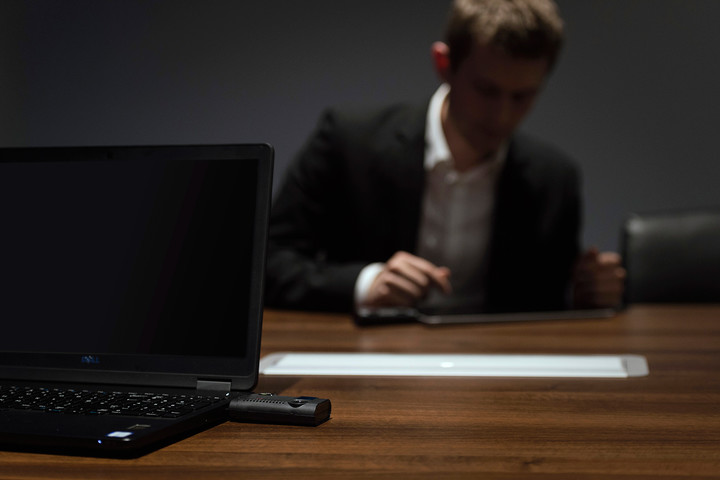
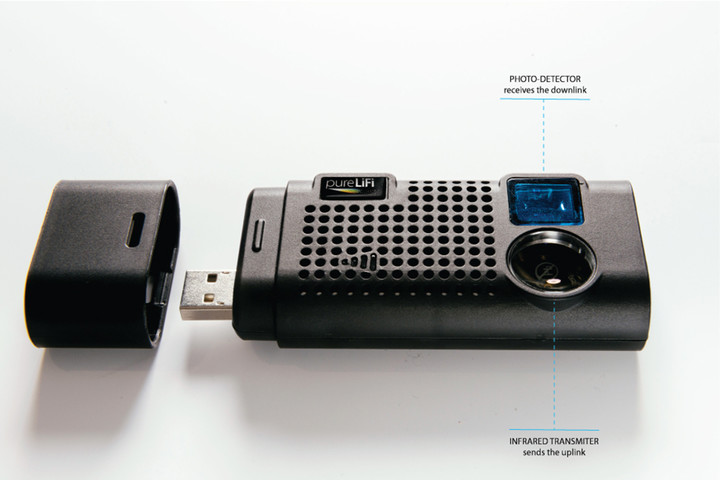
The LiFi-X system consists of a LED light fixture and a dongle that you can plug into a USB port on your laptop. It’s capable of delivering speeds of up to 42Mbps up and down. It’s already available and in use through various business partnerships.
PureLiFi has been working with a number of companies worldwide, including Cisco, British Telecom, and Babcock, to trial the technology and gather feedback for improvements. There are lots of reasons that a company might consider a Li-Fi system.
The LiFi-X dongles and LED light fixtures are capable of sending and receiving data through light.
“We work with a lot of companies where security is high on their agenda, for the enterprise bandwidth is a big thing, but also location for retail and financial services,” Burchardt told Digital Trends.
The LiFi-X dongles and LED light fixtures are capable of sending and receiving data through light. That means you can confine access to the network very easily, offering much greater security than Wi-Fi.
In order to get the light working, you need to hook it up in much the same way as you would a router. This is ideally achieved through Ethernet cabling, though it can also be retrofitted using existing power lines. The weakness of power line communications is that the lights are in a daisy chain, so you’re dividing the bandwidth between them. With Ethernet cabling, each individual light is hooked up directly.


PoE (Power over Ethernet) systems are actually growing in popularity because they offer very high-efficiency power and, since they don’t require a certified electrician to fit them, they’re also faster and cheaper to install. Having IP connectivity in every light fixture also offers benefits in terms of building control and device monitoring, which is growing more important as the IoT expands.
In the short term, PureLiFi is working on establishing a set of performance standards. It expects to hit speeds of 80 to 100 Mbps relatively soon, and will then look to push things further to 1 Gbps within three years.
Li-Fi might be in your phone one day
A lot of effort is also going into miniaturizing the technology. The current LiFi-X dongle is quite big, it’s suitable for a laptop, but probably too bulky for comfortable use with a tablet. We got a sneak peek at the newly redesigned dongle, which is coming in the second half of this year. We weren’t allowed to photograph it, but compared to the existing LiFi –X, it is much smaller. Imagine a sleek, stylish-looking USB thumb drive and you’re close. That’s a significant improvement, but it’s still not going to work for smaller devices, like our phones.
Rumors have already circulated about Li-Fi support in a future model of Apple’s iPhone.
“We are currently working on ways to reduce the size of the optical receiver so that it can fit in a smartphone,” says Burchardt.
It may be part of the screen, under the screen, or something separate about the size of a camera module.
“We are already in discussions with a number of manufacturers of smartphones, tablets, and laptops and the goal is to get to that stage where we’re developing chips that will go into the device,” Burchardt explained. “Our long-term goal is component supply for OEMs.”
PureLiFi remains tight-lipped about who the prospective partners are, but rumors have already circulated about Li-Fi support in a future model of Apple’s iPhone, after a reference to “LiFiCapability” was spotted in iOS code.
More: Why 2017 will be the year of blisteringly fast Wi-Fi
Businesses can talk to PureLiFi now and get to work implementing the technology, but if you’re clamoring for a consumer product, you’ll need to be patient for a while longer.
“Probably within the next three years we’ll have components available that can be technically integrated into a phone,” says Burchardt.
The future is bright for Li-Fi
By that time, the underlying infrastructure of Ethernet cabling, required for peak performance of Li-Fi, is likely to be far more widespread. PureLiFi is also working with a number of partners in the lighting industry, so the ecosystem required for Li-Fi to thrive is already growing. Component costs will also come down, as manufacturing ramps up, making it affordable for OEMs to integrate.
“We plan to provide components that are very low power, very cost effective, and very high performance,” says Burchardt.
The exponential growth in connected devices and data demands is leading to frequency congestion and that could make current wireless technologies unsustainable in the long term. Li-Fi can make much greater volumes of data accessible, and securing access is as simple as pulling the shades. The future looks bright for Li-Fi.
Li-Fi, the internet of light, turns LED fixtures into speedy wireless access
Why it matters to you
As our demands on Wi-Fi grow, Li-Fi offers a smart, efficient, and secure alternative to keep us connected.

Internet access is fast becoming a basic human right, but there are problems with our current delivery systems. As we connect more and more devices to the internet, a spectrum crunch is increasingly inevitable. Li-Fi, which allows us to access the internet via light, instead of the radio frequencies that Wi-Fi relies upon, could open up a lot of bandwidth.
More: We’ve seen the light! Li-Fi is the future of wireless connectivity
You may remember that we talked to Edinburgh-based PureLiFi last year to see a working prototype of its LiFi-X system. This year at MWC in Barcelona, we sat down with PureLi-Fi COO, Harald Burchardt again to find out how far the team has come in the last 12 months. As it turns out, the company has been busy raising significant funding, expanding the engineering team, and securing more partners.
What is Li-Fi?
The LiFi-X system consists of a LED light fixture and a dongle that you can plug into a USB port on your laptop. It’s capable of delivering speeds of up to 42Mbps up and down. It’s already available and in use through various business partnerships.
PureLiFi has been working with a number of companies worldwide, including Cisco, British Telecom, and Babcock, to trial the technology and gather feedback for improvements. There are lots of reasons that a company might consider a Li-Fi system.
The LiFi-X dongles and LED light fixtures are capable of sending and receiving data through light.
“We work with a lot of companies where security is high on their agenda, for the enterprise bandwidth is a big thing, but also location for retail and financial services,” Burchardt told Digital Trends.
The LiFi-X dongles and LED light fixtures are capable of sending and receiving data through light. That means you can confine access to the network very easily, offering much greater security than Wi-Fi.
In order to get the light working, you need to hook it up in much the same way as you would a router. This is ideally achieved through Ethernet cabling, though it can also be retrofitted using existing power lines. The weakness of power line communications is that the lights are in a daisy chain, so you’re dividing the bandwidth between them. With Ethernet cabling, each individual light is hooked up directly.


PoE (Power over Ethernet) systems are actually growing in popularity because they offer very high-efficiency power and, since they don’t require a certified electrician to fit them, they’re also faster and cheaper to install. Having IP connectivity in every light fixture also offers benefits in terms of building control and device monitoring, which is growing more important as the IoT expands.
In the short term, PureLiFi is working on establishing a set of performance standards. It expects to hit speeds of 80 to 100 Mbps relatively soon, and will then look to push things further to 1 Gbps within three years.
Li-Fi might be in your phone one day
A lot of effort is also going into miniaturizing the technology. The current LiFi-X dongle is quite big, it’s suitable for a laptop, but probably too bulky for comfortable use with a tablet. We got a sneak peek at the newly redesigned dongle, which is coming in the second half of this year. We weren’t allowed to photograph it, but compared to the existing LiFi –X, it is much smaller. Imagine a sleek, stylish-looking USB thumb drive and you’re close. That’s a significant improvement, but it’s still not going to work for smaller devices, like our phones.
Rumors have already circulated about Li-Fi support in a future model of Apple’s iPhone.
“We are currently working on ways to reduce the size of the optical receiver so that it can fit in a smartphone,” says Burchardt.
It may be part of the screen, under the screen, or something separate about the size of a camera module.
“We are already in discussions with a number of manufacturers of smartphones, tablets, and laptops and the goal is to get to that stage where we’re developing chips that will go into the device,” Burchardt explained. “Our long-term goal is component supply for OEMs.”
PureLiFi remains tight-lipped about who the prospective partners are, but rumors have already circulated about Li-Fi support in a future model of Apple’s iPhone, after a reference to “LiFiCapability” was spotted in iOS code.
More: Why 2017 will be the year of blisteringly fast Wi-Fi
Businesses can talk to PureLiFi now and get to work implementing the technology, but if you’re clamoring for a consumer product, you’ll need to be patient for a while longer.
“Probably within the next three years we’ll have components available that can be technically integrated into a phone,” says Burchardt.
The future is bright for Li-Fi
By that time, the underlying infrastructure of Ethernet cabling, required for peak performance of Li-Fi, is likely to be far more widespread. PureLiFi is also working with a number of partners in the lighting industry, so the ecosystem required for Li-Fi to thrive is already growing. Component costs will also come down, as manufacturing ramps up, making it affordable for OEMs to integrate.
“We plan to provide components that are very low power, very cost effective, and very high performance,” says Burchardt.
The exponential growth in connected devices and data demands is leading to frequency congestion and that could make current wireless technologies unsustainable in the long term. Li-Fi can make much greater volumes of data accessible, and securing access is as simple as pulling the shades. The future looks bright for Li-Fi.
Li-Fi, the internet of light, turns LED fixtures into speedy wireless access
Why it matters to you
As our demands on Wi-Fi grow, Li-Fi offers a smart, efficient, and secure alternative to keep us connected.

Internet access is fast becoming a basic human right, but there are problems with our current delivery systems. As we connect more and more devices to the internet, a spectrum crunch is increasingly inevitable. Li-Fi, which allows us to access the internet via light, instead of the radio frequencies that Wi-Fi relies upon, could open up a lot of bandwidth.
More: We’ve seen the light! Li-Fi is the future of wireless connectivity
You may remember that we talked to Edinburgh-based PureLiFi last year to see a working prototype of its LiFi-X system. This year at MWC in Barcelona, we sat down with PureLi-Fi COO, Harald Burchardt again to find out how far the team has come in the last 12 months. As it turns out, the company has been busy raising significant funding, expanding the engineering team, and securing more partners.
What is Li-Fi?
The LiFi-X system consists of a LED light fixture and a dongle that you can plug into a USB port on your laptop. It’s capable of delivering speeds of up to 42Mbps up and down. It’s already available and in use through various business partnerships.
PureLiFi has been working with a number of companies worldwide, including Cisco, British Telecom, and Babcock, to trial the technology and gather feedback for improvements. There are lots of reasons that a company might consider a Li-Fi system.
The LiFi-X dongles and LED light fixtures are capable of sending and receiving data through light.
“We work with a lot of companies where security is high on their agenda, for the enterprise bandwidth is a big thing, but also location for retail and financial services,” Burchardt told Digital Trends.
The LiFi-X dongles and LED light fixtures are capable of sending and receiving data through light. That means you can confine access to the network very easily, offering much greater security than Wi-Fi.
In order to get the light working, you need to hook it up in much the same way as you would a router. This is ideally achieved through Ethernet cabling, though it can also be retrofitted using existing power lines. The weakness of power line communications is that the lights are in a daisy chain, so you’re dividing the bandwidth between them. With Ethernet cabling, each individual light is hooked up directly.


PoE (Power over Ethernet) systems are actually growing in popularity because they offer very high-efficiency power and, since they don’t require a certified electrician to fit them, they’re also faster and cheaper to install. Having IP connectivity in every light fixture also offers benefits in terms of building control and device monitoring, which is growing more important as the IoT expands.
In the short term, PureLiFi is working on establishing a set of performance standards. It expects to hit speeds of 80 to 100 Mbps relatively soon, and will then look to push things further to 1 Gbps within three years.
Li-Fi might be in your phone one day
A lot of effort is also going into miniaturizing the technology. The current LiFi-X dongle is quite big, it’s suitable for a laptop, but probably too bulky for comfortable use with a tablet. We got a sneak peek at the newly redesigned dongle, which is coming in the second half of this year. We weren’t allowed to photograph it, but compared to the existing LiFi –X, it is much smaller. Imagine a sleek, stylish-looking USB thumb drive and you’re close. That’s a significant improvement, but it’s still not going to work for smaller devices, like our phones.
Rumors have already circulated about Li-Fi support in a future model of Apple’s iPhone.
“We are currently working on ways to reduce the size of the optical receiver so that it can fit in a smartphone,” says Burchardt.
It may be part of the screen, under the screen, or something separate about the size of a camera module.
“We are already in discussions with a number of manufacturers of smartphones, tablets, and laptops and the goal is to get to that stage where we’re developing chips that will go into the device,” Burchardt explained. “Our long-term goal is component supply for OEMs.”
PureLiFi remains tight-lipped about who the prospective partners are, but rumors have already circulated about Li-Fi support in a future model of Apple’s iPhone, after a reference to “LiFiCapability” was spotted in iOS code.
More: Why 2017 will be the year of blisteringly fast Wi-Fi
Businesses can talk to PureLiFi now and get to work implementing the technology, but if you’re clamoring for a consumer product, you’ll need to be patient for a while longer.
“Probably within the next three years we’ll have components available that can be technically integrated into a phone,” says Burchardt.
The future is bright for Li-Fi
By that time, the underlying infrastructure of Ethernet cabling, required for peak performance of Li-Fi, is likely to be far more widespread. PureLiFi is also working with a number of partners in the lighting industry, so the ecosystem required for Li-Fi to thrive is already growing. Component costs will also come down, as manufacturing ramps up, making it affordable for OEMs to integrate.
“We plan to provide components that are very low power, very cost effective, and very high performance,” says Burchardt.
The exponential growth in connected devices and data demands is leading to frequency congestion and that could make current wireless technologies unsustainable in the long term. Li-Fi can make much greater volumes of data accessible, and securing access is as simple as pulling the shades. The future looks bright for Li-Fi.
Serious work was put into the LG G6’s wallpaper design

There’s more to it than you’d think.
Everyone loves to personalize their phone a bit, and that usually starts with a wallpaper. But before you download one of your own, you’re going to start with a pre-installed wallpaper, and LG put some serious work into the default set on the LG G6.
They didn’t explicitly follow Material Design, but they sure got close.
LG’s visual designers spent a few days with the art and color experts at Pantone to create unique, eye-catching artwork for the dozen or so pre-installed wallpapers on the phone. The end result is lots of subtly colorful and graceful looks that don’t overflow with wild combinations like you may see on other phones. The default wallpaper, shown in LG’s marketing and on the box, was a product of this process — look for the subtle lines that make a “6” in the wallpaper.
You wouldn’t be alone if you saw hints of Material Design philosophy throughout the process, with the stacking of physical paper and plastic to create layers of depth. When we asked LG’s interface designers about their Material Design influence, they said that they weren’t directly following Google’s guide but did find in the end that they came up with many of the same ideas.
If you see an LG G6, be sure to take a few moments to appreciate the wallpapers.
LG G6
- LG G6 review!
- LG G6 specs
- These LG G6 features are exclusive to some countries
- LG forums
- Latest LG G6 news
Google has shipped 10 million Cardboard VR headsets since 2014

Mobile VR usage has skyrocketed last year.
Google has announced that it shipped over 10 million Cardboard VR viewers since its launch in 2014. The company also said that over 160 million Cardboard apps have been downloaded, out of which 30 apps have over 1 million downloads. The numbers are a healthy increase from January 2016, when Google touted 5 million sales and 25 million installs for Cardboard apps.
In recent months, Google has turned its attention to the Daydream mobile VR platform, with the company stating that it built a more immersive platform thanks to lessons learned from Cardboard. The Daydream View VR headset currently works with six phones — Axon 7, Pixel, Pixel XL, and the Moto Z series — and there are over 100 apps tailored for the platform. Google says that people using Daydream are spending about 40 minutes per week using the platform, and that YouTube accounts for over half of all content consumption.
At Mobile World Congress, Google’s VP of VR Amit Singh detailed new experiences coming to the Daydream platform. The company has partnered with Sky to bring Sky VR content to Daydream, including a red carpet show for Star Wars, David Beckham specials, clips from Disney’s The Jungle Book, and more. The content was previously limited to Cardboard, but today’s announcement makes it available for those using Daydream as well.
In addition to Sky VR, Google is adding new AR experiences:
Tango technology powers devices that help you bring virtual objects into your world, and now three new augmented reality (AR) experiences are available. The Sims app lets you use your phone with Tango technology to travel around the Sims house; Chelsea Kicker puts a Chelsea football player right in your space, so you can take your picture with him or even try to best him at a few soccer tricks; and WSJ AR lets you visualize stock trends.
The Morning After: Wednesday March 1 2017
Hey, good morning! You look fabulous.
Welcome to Wednesday. This morning we’re digging into Amazon’s big server outage, some new iPhone rumors and, surprise, surprise, Uber’s in trouble again.
AWS unpluggedAn Amazon server outage took vast areas of the internet offline

If your favorite internet service became tough to reach yesterday afternoon, it was probably related to an issue with Amazon Web Services’ S3 cloud storage. A problem in its East region datacenter affected our site, as well as others like Giphy, Slack and even the Securities & Exchange Commission. Everything is back up and running now, but not quite soon enough to keep cloud skeptics from noticing how many of these eggs are in the same basket.
Like PlayStation Now, but not in the cloudMicrosoft tries out a Netflix-for-games approach with Xbox Game Pass

The Xbox One is trailing in sales, major exclusive game releases, and, until Project Scorpio hits the streets, horsepower. So what can Microsoft do to take the fight to Sony? It’s going to try the Xbox Game Pass, a $10 per month subscription (outside of the Xbox Live fee) that opens up access to a rotating catalog of older Xbox One and Xbox 360 games. Unlike Sony’s PlayStation Now, it doesn’t stream the games, so players can download and install them as normal and even purchase the game at a discount if they choose to. Titles like Halo 5: Guardians and NBA 2K16 will be among the 100-game lineup when it launches this spring.
At least it doesn’t look like a potato on wheelsToyota Prius Prime review

According to Roberto Baldwin, Toyota’s Prius Prime has fixed a major plug-in hybrid problem: the looks. Between its gas engine and the 8.8-kWh battery, it can take drivers 640 miles, or up to 25 miles in pure electric mode. The biggest downside he found, however, was inside, where the infotainment system disappointed despite a large 11.6-inch touchscreen interface, lacking Android Auto and Apple CarPlay.
And USB-C?WSJ: 10th Anniversary iPhone will have a curved OLED screen

Apple isn’t at Mobile World Congress, but the rumor mill is still cranking out iPhone news. The Wall Street Journal has apparently confirmed that the so-called 10th Anniversary iPhone will, in fact, feature a curved OLED display, and even went a step further by claiming it might ditch the Lightning connector for USB-C.
Meet the GTX 1080 TiNVIDIA unveils the new world’s fastest gaming GPU

At GDC 2017, NVIDIA announced it’s pushing VR and 4K gaming ahead with the GTX 1080 Ti, which it claims offers 35 percent more performance than the standard GTX 1080, with 11GB of RAM and gobs of bandwidth. It’s even faster than the company’s $1,200 Titan X setup, and it will go on sale March 10th starting at $700. If you’d like something cheaper, last year’s GTX 1080 is getting a price drop to $500.
What’s next?Uber CEO caught on video arguing with a driver, apologizes

The #DeleteUber movement got another boost yesterday when Bloomberg posted a video of CEO Travis Kalanick arguing with a driver. The Uber Black driver was upset with dropping mileage rates that he said drove him into bankruptcy, while the CEO (who was getting a ride along with a couple of friends) told him “Some people don’t like to take responsibility for their own shit.” Now that the in-car video has been released, Kalanick responded with an apology, saying “this is the first time I’ve been willing to admit that I need leadership help and I intend to get it.”
Yet another skinny bundleYouTube launches a live TV service

This spring, Google will launch YouTube TV, a premium TV streaming service both broadcast and cable channels for $35 per month. CBS, Fox, NBC and CBS are aboard, as well as cable networks like USA, FX and ESPN. Included in that price is unlimited cloud DVR storage, which, along with the ability to view it on most of the screens YouTube is already on, could make for a compelling alternative to the cord-cutting favorites like Sling TV, DirecTV Now and PlayStation Vue.
But wait, there’s more…
- FCC chairman Ajit Pai calls net neutrality a ‘mistake’
- Google reveals the latest plans for its futuristic campus
- The Nokia 3310 stole Samsung’s show at MWC 2017
- Google pulls the plug on its Pixel laptops
The Morning After is a new daily newsletter from Engadget designed to help you fight off FOMO. Who knows what you’ll miss if you don’t subscribe.
 AIVAnet