


The Oculus Rift and Touch bundle is now $200 cheaper
We’re just a few weeks away from the one-year anniversary of Oculus shipping the Rift to consumers, so now would be a good time for the company to drop some news. And here it is. Starting today, Oculus will begin selling Rift and Touch bundles on its store for $598 — about a $200 price cut. On their own, the Rift headset is now $499 while the Touch controllers are $99, meaning that each saw a price drop of $100. Oh, and the cost of an extra Oculus sensor is now $59, which is $20 less than before.
“Oculus’ mission is to drive VR to the mass market,” said Jason Rubin, Oculus’ VP of content. “There are two fundamental things that we need to push on to do that.” The first, he says, is content, which is why Facebook has spent over $250 million on developers to create thousands of games and experiences for the VR platform (we saw several upcoming titles just a few days ago). The second, however, is to lower the price. “This is how technology moves forward,” says Rubin. “Prices drop so more people can afford it.”
But what if you already bought a Touch, like yesterday? Are you hosed? Not necessarily. Rubin says that if you bought one within the last 30 days, you can apply for a $50 store credit, and a similar offer might be on the table for the Rift, too. As for if the Rift and Touch will ever be sold together by default, Rubin says it still makes sense to keep them separate for now, especially since the Touch was just introduced a few months ago. “But in the long run, we do consider them as one package.”
“We know the price drop is just the first step,” says Rubin. “Our goal is to get the most people into VR. The more people in VR, the better it is.”
Click here to catch up on the latest news from GDC 2017!
Snapchat Has Reportedly Worked on App-Connected Drone and 360-Degree Camera
Camera-focused company Snap is said to have worked on a drone that would connect to the iOS and Android Snapchat app and let users take photos and videos from aerial angles, according to sources speaking with The New York Times. Details about the drone and any of its other capabilities remain under wraps, but the work is said to help Snap “bolster” its repositioning and rebranding as a modern-day camera company.
In a separate report by TechCrunch, Snap is believed to also have investigated and built a 360-degree camera, going so far as to bring in a camera developer with expertise in the field to hone in on the best hardware options for such a product. The 360-degree camera project is said to be in the “early phases.” For both projects, sources mentioned that it remains unclear if consumer-ready versions will ever hit the market, or how much they might cost.
The foldable DJI Mavic Pro Drone and Samsung Gear 360 Camera
The question driving Snap’s hardware ambitions is: What can’t your phone camera do? It can’t take first-person, hands-free video, so Snap built Spectacles. It can’t fly. And it can’t capture what’s around you in all directions at once. People often stick their camera phones in the air and do a slow pan to show off where they are. A 360 camera could do a much better job of making friends feel like they’re there with you.
The company is said to have a specific strategy for mergers and acquisitions that uses new startups to “gather information” about technologies it lacks expertise in, sometimes acquiring the companies and sometimes not. An example is given describing when Snap met with drone startup Lily before the latter company eventually shut down, and now rumors suggesting Snap’s entry into the drone market have begun circling.
Snap has previously met with startups with the implication that it might acquire them, when in reality it’s goal has been to gather information about new markets and technologies where it could compete, according to one source familiar with Snap’s M&A procedures.
In some cases, it has made acquisitions after these meetings. But in other cases, “they talked to a bunch of people and got them to tell them a bunch of stuff. Snap shows a little bit of leg and tries to be flirty to see what they can get” the source said.
Additionally, it was reported that Snap has “preliminarily discussed” other consumer products that would enhance its mobile app, including a durable GoPro-like camera, and another that would let users take 3D images.
The reports of new products from Snap follow the launch of its Spectacles sunglasses, which let users take 10-second videos from a camera mounted within a pair of glasses, providing freedom of movement with their hands. According to TechCrunch’s sources, the company is pursuing work on a second version of Spectacles, but the lack of “meaningful revenue” from the first iteration may pause those plans.
Market watchers are paying close attention to Snap today, as the company gets ready for the debut of its initial public offering on the U.S. stock market later in the afternoon.
Tag: Snapchat
Discuss this article in our forums
Huawei Watch 2 hands-on: not too classy, but packed with features
The original Huawei Watch is one of the most popular Android Wear devices to date, and for good reason. While it may be a tad on the chunky side, users flocked to the Huawei Watch because of its classy design and solid performance.
Now Huawei has just unveiled its successor (well, successors) to the original Watch here at MWC, and they certainly have a high bar to clear. Join us as we go hands-on with the Huawei Watch 2!
See also:
Huawei Watch 2 and Watch 2 Classic officially unveiled at MWC 2017
3 days ago
In case you haven’t read our previous Huawei Watch 2 coverage, there are two different variants this time around – the Huawei Watch 2 and Huawei Watch 2 Classic. Today we’re taking a look at the Watch 2, which is the version with LTE connectivity and a fitness-focused design. The Watch 2 Classic is, well, the classier version and offers Bluetooth and Wi-Fi connectivity. Aside from aesthetics and LTE support, these are pretty much the same watches.
The flimsy, low-quality silicone strap on the Watch 2 is a little concerning
Based on looks alone, most people probably wouldn’t be able to tell that this is device is even in the Huawei Watch family. The Watch 2 Classic is more of a direct successor to the original Watch, while the standard Watch 2 is for the sporty, outdoorsy type. The silicone band on the Watch 2 has actually been pretty overwhelming thus far; it’s sort of flimsy and feels like it’s going to break after extended use, which is slightly concerning as the original Huawei Watch was built so well.

The Watch 2 sports two physical buttons on the right side of the casing – the bottom button is programmable and can launch straight into a fitness application, and the top-most button will open up your app drawer or take you to the home screen. Unlike the LG Watch Sport and Watch Style, the Watch 2 doesn’t feature a rotating crown for navigation, meaning all of your navigation on the watch will be done via taps and swipes.
- LG Watch Sport and Watch Style review
- Samsung Gear S3 review
This may be fine for some people, but the crown on the LG watches and rotating bezel on the Samsung Gear S3 has spoiled us in this area. Especially after using the latest offerings from LG, we feel like we’re taking a step back in terms of navigation.

Both the Watch 2 and Watch 2 Classic are packed with the latest and greatest specs
If you are going to be swiping all around the interface, at least you have a nice display to work with. Both the Watch 2 and Watch 2 Classic feature 1.2-inch AMOLED displays with a resolution of 390 x 390, resulting in a pixel density of 326ppi. Under the hood, they’re packing the latest Snapdragon Wear 2100 processor, 768MB of RAM and 4GB of storage if you’d like to store music on the watch itself. Both devices also have 420mAh batteries, which Huawei says will be able to get you two full days of normal use on a single charge.
On the bezel of the display, you’ll notice Huawei has included etched-in number designations. This isn’t the first watch to adopt this design cue, but we can’t say we’re huge fans of it. It sort of makes us feel obligated to use an analog face.

In case the pictures don’t relay the message properly, the Watch 2 is a pretty bulky device, and for good reason. Huawei packed a lot of tech in these watches. Both come with an optical heart rate sensor, a built-in GPS, and even an IP68 rating for dust and water resistance.
Related:
Which smartwatches will get updated to Android Wear 2.0?
2 weeks ago
The Huawei Watch 2 and Watch 2 Classic are two of the first smartwatches to run Android Wear 2.0, and you can find our full review of the big 2.0 update right here. We’ll have to give you our a more detailed look at Wear 2.0 in our full review, but so far, performance on the Watch 2 has been pretty impressive. We haven’t experienced and lags or stutters in the interface.

Oh, one other thing. The Huawei Watch 2 (not the Watch 2 Classic) sports LTE connectivity, meaning you can use it to make calls, send and receive texts and do plenty of other things without needing your phone. We haven’t had the chance to throw a SIM card in our Watch 2 yet (we’re still in Barcelona, after all), but we’ll give you a full rundown in our review.

But we want to know what you think about the Huawei Watch 2 and Watch 2 Classic. Will one of these devices be your next smartwatch, or are you passing on Huawei’s offerings this time around? Be sure to let us know your thoughts in the comments below.
Android Authority is on the show floor at MWC 2017, bringing you all the new news as it happens. Head here to check out all our MWC 2017 coverage!
Next: Hands-on with the Huawei P10 at MWC
AOL appears to be killing third-party access to AOL Instant Messenger
Why it matters to you
You might have to stop using your third-party AIM client, and switch to the company’s own official app to stay connected.
AOL Instant Messenger (AIM) will be familiar to anyone who’s been using PCs for a while. There was a time when AOL was the leading internet service provider, and AIM was among the most popular instant messaging tools for keeping in touch with friends and family.
Fast forward to today, and while AOL still exists, it’s just a shadow of its former self. And AIM has also fallen by the wayside, enough so that the company is turning off the service used by third-party clients, as Ars Technical reports.
More: Simplicity breeds success: the lasting impact of AOL Instant Messenger
For quite some time, there have been two ways to use AIM as an instant messaging service. You could install AOL’s own messaging app, which runs on Windows, MacOS, iOS, and Android. That method still exists and likely will do so for at least the foreseeable future.
The other method was to install one of a number of third-party clients for your platform and access the service that way. A number of options existed, including Adium, Trillium, and Pidgin, some of the more popular options.
Those third-party apps require the use of AOL’s OSCAR chat protocol, however. Without it, there’s no way to pass messages to and from the AIM service. And as one user discovered and posted on Twitter, AOL is starting to cut apps off from its messaging service by turning off OSCAR support.
Just got this AIM message. Anyone else still using AIM out there? pic.twitter.com/2WpR1lTwmH
— Cyrus Farivar (@cfarivar) February 28, 2017
Speculation suggests that AOL is cutting its losses due to low usage of AIM, which costs the company real money to maintain. AOL hasn’t made any official announcements yet, but it’s possible that we might be experiencing the end of an era if the AIM service is indeed starting to ramp down.
Microsoft adds more intelligence to make Office 365 safer and easier to use
Why it matters to you
Office 365 will now help you create a PowerPoint presentation and edit your Word documents, but only if you’re an Office Insider.
There was a time when Microsoft’s business was primarily based on Windows with some Office productivity suite activity on the side. Now, the company is into cloud services, hardware, gaming, and a number of other business, and yet Office remains vital to its productivity strategy.
That’s likely why the company continues to improve Office, while simultaneously pushing the apps to other platforms. For February 2017, Microsoft is injecting some of its machine intelligence work into Office and making a number of tasks easier and more efficient.
More: Microsoft’s Office Insider now has its very own Insider Fast Ring
First up is a feature that Microsoft originally introduced at its Ignite 2016 event in September 2016. Specifically, QuickStarter for PowerPoint helps users create new presentations by creating a set of default slides.
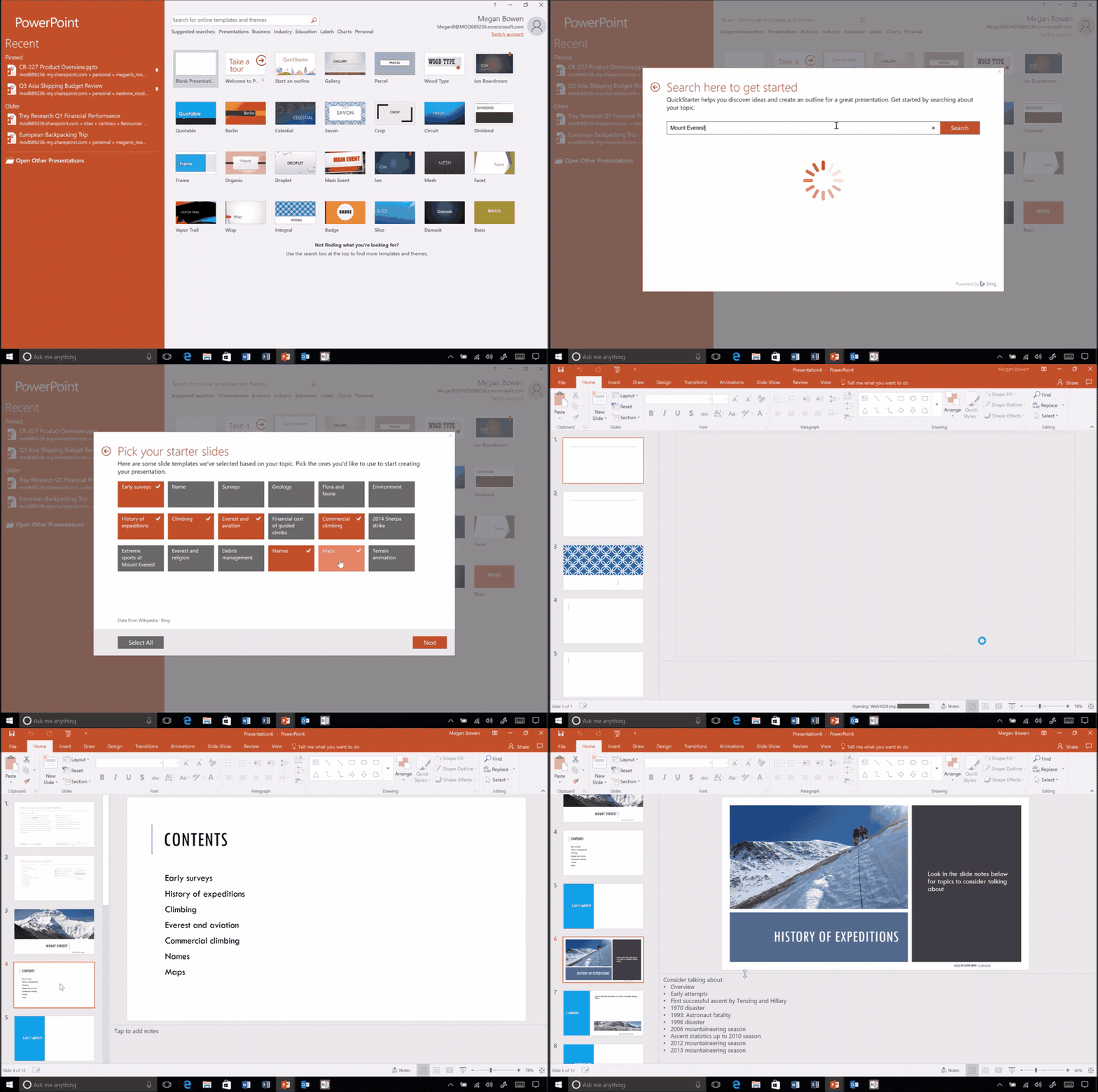
Type in a topic, and QuickStarter creates a curated outlined, some recommendations on categories, associated Creative Commons images, and research suggestions. QuickStarter is available in PowerPoint 2016 for Office Insiders in the Fast ring.
Next up are some enhancements to the Word 2016 Editor feature, which provides real-time writing assistance to users. The new Editor pane provides more information in terms of advanced spelling, grammar, and style recommendations, and enables users to scan entire documents in one place. The Editor pane replaces the old Spelling & Grammar pane, and is available to the Office Insider Fast ring.
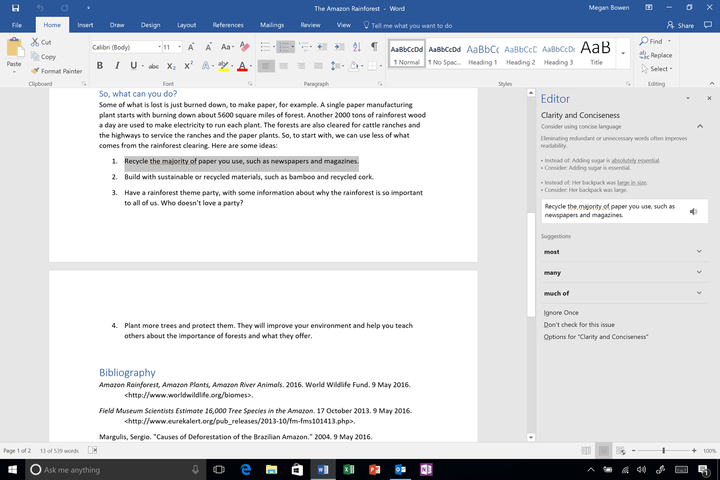
Microsoft also provided a review of some new functionality that’s been released in the past few months. Office 2016 for Mac now supports the Touch Bar on 2016 MacBook Pro machines, providing task-specific virtual function keys. And Cortana can now scan Outlook.com and Office 365 email messages for promised tasks and automatically generate reminders that show up in Windows 10.
More: Microsoft’s digital assistant Cortana will now remind you to keep your promises
Finally, Microsoft has improved security in Office 365 with a few new features. First up is Office 365 Secure Score, a security analytics tool that helps organizations understand their security configurations and what actions to take to improve security and reduce risk. Office 365 Intelligence keeps organizations aware of potential cyber threats and provides information from the Microsoft Intelligence Security Graph.
Overall, Microsoft’s February 2017 set of updates to its Office productivity suite is all about leveraging the company’s machine intelligence capabilities to make working in Office easier and more secure. Note that a few of the newest features are only available to Office Insiders, and you can sign up here to participate in that preview program.
This machine crushes empty beer bottles into sand in just 5 seconds
Why it matters to you
Everyone cares about saving the planet, but making recycling an exciting message can be a tall order. This beer bottle crushing machine offers a solution.
How do you dispose of a bottle of beer once you’re done drinking it? You crush it into fine-grain sand, right?
Well, thanks to a smart new promotion created by New Zealand brewers DB Breweries — working alongside the ad agency Colenso BBDO New Zealand — it’s possible to do exactly that.
“Two thirds of the world’s beaches are retreating as people across the world use non-renewable beach sand for construction, roading and other uses,” Simon Smith, brand PR and digital manager for DB Breweries, told Digital Trends. “We had some [conversations] over beers, and came up with an idea to crush glass bottles into a sand substitute that can be used in things such as construction, roading, even golf bunkers; meaning that we can keep our beautiful beach sand where it belongs: on our beaches.”
More: How to recycle your old computer
New Zealand, Smith said, has a pretty impressive recycling rate, although there’s always room to do more. To that end, DB Breweries has built several machines able to take empty bottles and turn them into substitute sand. All a drinker needs to do is deposit his or her bottle in the machine, which then uses miniature steel hammers to crush it into 200 grams of sand in only five seconds — after extracting the plastic labels with a vacuum system.

“Our sand will be processed through a screener which sorts it into a fine grades between 1.1 – 0.4mm particle sizes,” he continued. “Over the next few months, we’ll be creating up to 100 tons of sand, which is the equivalent of 500,000 DB Export Bottles. The resulting sand substitute will then be given to our construction and retail partners to use in place of beach sand.”
The ultimate goal is to provide a way of prompting people to recycle by giving them an image of what exactly it means to do so, rather than leaving it as an abstraction. “Our ambition for the campaign is for people to have something tangible to think about, such as the love of our beautiful beaches, as a reminder to recycle,” he said.
Hey, if it means we get to drink and save the planet, who’s losing out? Aside from our liver and bank balance, that is…
Make the most out of Google with this list of ‘OK, Google’ voice commands
One of the most useful things about using Google is the voice commands. Using just your voice you can command your device to do many things on your behalf. It’s fast, convenient, and still feels a bit like the future. The complete list of “OK, Google” commands and compatible apps has grown considerably over time, meaning there are likely things you can do with Google that you’re not even aware of.
More: How to get the most out of Google Now
If you own an Android device, you might want to turn on “OK, Google” so that you can start using this feature without having to tap the microphone icon. The first thing we need to do is make sure this feature is turned on, so let’s see if it is.
Turning on “OK, Google”
Open your App Drawer, and open the Google app.
Tap the Hamburger menu ( ) in the upper-left corner, and go to Settings.
Go to Voice > OK, Google detection, and turn on From any screen.
Follow the instructions to train your phone to respond to your voice.
If you’re having trouble when you say “OK, Google,” and it doesn’t seem to be working for you, then you can turn off Trusted Voice in the ‘OK, Google’ detection settings. The software may be having a hard time recognizing your voice.
Now that it is turned on, we can start using “OK, Google.” Let’s take a look at all the different commands you can use with your device. All you have to do is say “OK, Google,” and Google will start listening for your commands. You can always tap the microphone icon and issue a voice command, if you prefer not to use the “OK, Google” feature.
The Beoncam is a crazy 360-degree camera you strap onto your wrist
Why it matters to you
Spacemap’s Beoncam may just be the world’s most portable 360-degree camera: You can wear it on your wrist.

Cameras that shoot in 360 degrees are practically a commodity. There’s the Insta360, the Allie 360, the Nico360, the Insta360 Pro, to name a few. And that’s not counting the 360-degree cameras from Nokia, Samsung, LG, Huawei, and even Kodak. But none of those cameras fit inside a wrist-worn wearable.
Enter Singapore-based Spacemap’s Beoncam, the world’s first 360-degree cameras housed inside an “elegantly designed, sleek wristband.” The 46.6mm x 24.5mm sensor, which boasts a splash-proof body and a gyroscope sensor that orients the position of the camera when a photo is taken, captures 5-megapixel images and video up to 1,200 x 1,200 in resolution. It switches between 190-degree and 360-degree orientation, and shoots in modes including burst, time lapse, and loop recording.
More: Facebook makes good on promise to open-source its 360-degree camera
The Beoncam is more than just a 360-degree camera. When clipped into the wristband’s housing and paired to a smartphone via Bluetooth or Wi-Fi, it doubles as a notification screen. A smartphone companion app for iOS and Android lets users access and remotely control the Beoncam. And built-in sharing tools let users share images and videos to apps like Facebook, WhatsApp, and YouTube.
“With Beoncam, we wanted to create wearable technology that plays a meaningful part in people’s lives,” Rick Wong, director at Spacemap, said. “Because it’s always on, users can truly tell their stories — anytime, anywhere — and all without having to carry around bulky pieces of equipment. The wide range of features offered with Beoncam emphasizes our commitment to seamlessly working in all aspects of people’s daily living, whether it’s leisure time or during physical activity.”
Spacemap may be on to something. In November 2016, the New York Times launched The Daily 360, a daily series of 360-degree videos chronicling Saudi airstrikes, violence in Syria, and more. Twitter supports live-streaming 360-degree video capabilities, as do Facebook and Google. And analysts at Greenlight Insights forecast that by 2020, the 360-degree video market will balloon to $5 billion.
More: Insta360 Pro is an 8K, 360-degree camera for true professionals
The Beoncam is launching on IndieGogo with a funding goal of $30,000. Limited early-bird specials include a $130 package, or half off retail. Later this year, accessories including a wrist strap and strap ring, a cradle with tripod adapter mount, a bicycle handlebar ring, a flat clip, a helmet clip, a USB cable, a lens cloth, a carry pouch, and a $40 waterproof casing will begin shipping direct from Spacemap’s website.
These Smart Stamps validate a concert ticket by stamping your phone
Why it matters to you
Forget scanning: Smart Stamps validate tickets and loyalty cards by the physical act of stamping.

If you’re like us, it’s been ages since the last time you printed out a concert ticket and had to have it stamped. But in some regions (and theme parks) of the world, the ink-drenched rubber stamping contraptions serve as the only means of validation. If the folks at Echoss have their way, though, you might start seeing a lot more around — but not how you might remember them.
At Mobile World Congress in Barcelona, the Japan-based Echoss showed the Echoss Smart Stamp, a stamp that’s compatible with smartphones. Just like an off-the-shelf stamp at your local Staples, it doesn’t pack a battery, processors, or any electronics that require power, works offline, and springs back slightly when pressed against a surface.
More: Happy birthday cell phone! Here are 10 of the oddest phones from over the years
But unlike conventional stamps, the Smart Stamp validates tickets and coupons with “capacitive point technology.” Each unit packs a pattern of stylus-like points concealed beneath a conductive sheet, and when the stylus-like points make contact with a touchscreen and Smart Stamp-compatible app, the phone registers with Echos’ certification center. After a second or so, the ticket holder is good to go.
We asked Echoss about the potential for fraud — it doesn’t seem out of the realm of possibility that a determined hacker could disassemble a Smart Stamp and produce copies of the geometric pattern. But a company rep told Digital Trends that once a virtual ticket has been stamped, Echoss records the location and time, and each stamp’s pattern actuates at very specific angles on the smartphone screen. Simply put, if someone were to take one apart, they wouldn’t necessarily be able to produce a duplicate.
The standard Smart Stamp comes in blue and white, but a customized version, the Paper Stamp, lets brands create designs of their own. Echoss envision performers distributing collectible stamps for buzzy promotions, and sweepstakes holders awarding Paper Stamps as prizes. “[They] can create a unique fandom culture,” Echoss said.
More: 16 trends from Mobile World Congress that will reshape the year ahead
That’s less of a stretch than you might think. Smart Stamps are apparently quite popular overseas — Echoss’s partners include Samsung, NEC, Huawei, and WeChat. One of the most popular apps, Echossbook, lets users collect stamps in exchange for a coupon. Another, Cevly, rewards hair studio customers for rebooking stylists.
And it might not be long before they make their way to the U.S. — Echoss plans to announce new partners in the coming weeks.
So don’t freak out if the barista at your next coffee stop stamps — not scans — your digital loyalty card.
These Smart Stamps validate a concert ticket by stamping your phone
Why it matters to you
Forget scanning: Smart Stamps validate tickets and loyalty cards by the physical act of stamping.

If you’re like us, it’s been ages since the last time you printed out a concert ticket and had to have it stamped. But in some regions (and theme parks) of the world, the ink-drenched rubber stamping contraptions serve as the only means of validation. If the folks at Echoss have their way, though, you might start seeing a lot more around — but not how you might remember them.
At Mobile World Congress in Barcelona, the Japan-based Echoss showed the Echoss Smart Stamp, a stamp that’s compatible with smartphones. Just like an off-the-shelf stamp at your local Staples, it doesn’t pack a battery, processors, or any electronics that require power, works offline, and springs back slightly when pressed against a surface.
More: Happy birthday cell phone! Here are 10 of the oddest phones from over the years
But unlike conventional stamps, the Smart Stamp validates tickets and coupons with “capacitive point technology.” Each unit packs a pattern of stylus-like points concealed beneath a conductive sheet, and when the stylus-like points make contact with a touchscreen and Smart Stamp-compatible app, the phone registers with Echos’ certification center. After a second or so, the ticket holder is good to go.
We asked Echoss about the potential for fraud — it doesn’t seem out of the realm of possibility that a determined hacker could disassemble a Smart Stamp and produce copies of the geometric pattern. But a company rep told Digital Trends that once a virtual ticket has been stamped, Echoss records the location and time, and each stamp’s pattern actuates at very specific angles on the smartphone screen. Simply put, if someone were to take one apart, they wouldn’t necessarily be able to produce a duplicate.
The standard Smart Stamp comes in blue and white, but a customized version, the Paper Stamp, lets brands create designs of their own. Echoss envision performers distributing collectible stamps for buzzy promotions, and sweepstakes holders awarding Paper Stamps as prizes. “[They] can create a unique fandom culture,” Echoss said.
More: 16 trends from Mobile World Congress that will reshape the year ahead
That’s less of a stretch than you might think. Smart Stamps are apparently quite popular overseas — Echoss’s partners include Samsung, NEC, Huawei, and WeChat. One of the most popular apps, Echossbook, lets users collect stamps in exchange for a coupon. Another, Cevly, rewards hair studio customers for rebooking stylists.
And it might not be long before they make their way to the U.S. — Echoss plans to announce new partners in the coming weeks.
So don’t freak out if the barista at your next coffee stop stamps — not scans — your digital loyalty card.
 AIVAnet