


New iPhone Patent Suggests Touch ID May Live on in a Different Form
One of the more contentious iPhone 8 rumors we’ve seen recently is the claim that with the removal of the home button, Apple will ditch its Touch ID fingerprint recognition technology and replace it with another form of bio-recognition hardware.
While several possible alternatives have been put forward – such as iris scanning, facial recognition, and even a combination of technologies – each has its pros and cons, while it’s still far from clear how Apple would implement them in a purportedly bezel-free OLED handset.
On the other hand, it’s possible that Apple plans to retain a fingerprint identification system in the context of a wider technology which doesn’t rely on Touch ID as it is currently understood. A new Apple patent application published on Thursday and discovered by AppleInsider offers a case in point.
The patent is called “Acoustic imaging system architecture” and describes a method by which a conventional capacitive sensor like Touch ID is replaced by an array of acoustic transducers laid out beneath an iPhone display or in its protective housing.
Some embodiments describe the transducers as capable of generating acoustic waves, or pulses, which propagate through different substrates, including an iPhone’s coverglass. A sensing mode then monitors reflections, attenuations, and diffractions in the sound waves caused by a foreign body – such as a finger – coming into contact with the responsive substrate.
According to the filing, the ridges in a fingerprint create an identifiable acoustic impedance mismatch. The resulting scan data is transmitted as electric signals which subsequently inform an onboard image resolver to enable it to create a two-dimensional map of the surface. Similar to existing biometric security technology, the digital map is then compared against a database to authenticate the user.
Crucially, the system is capable of being configured to scan for particular body parts like a user’s ear or a skin pattern, in order to determine how the device is being held. Depending on the implementation, the acoustic imaging system might also replace an iPhone’s proximity sensors.
Additionally, the design of the acoustic system allows it to be installed almost anywhere in a device chassis, including directly under the display, around the screen’s perimeter or bezel, around buttons and in other, non-input areas like a rear chassis.
It’s not known if the system just described will find its way into an upcoming iPhone, but the patent suggests Apple may be working on sensor technology capable of various feats, with fingerprint identification being just one of them.
Alternatively, one could envision a scenario in which Apple considers its implementation of fingerprint recognition different enough to warrant a subtle re-definition of Touch ID – as when “Force Touch” on the MacBook became “3D Touch” on the iPhone, for instance. Indeed, at this early stage in the iPhone 8 rumor mill, the uncertainty surrounding the future of Touch ID may come down to a semantic quibble.
Related Roundup: iPhone 8 (2017)
Tags: patent, Touch ID
Discuss this article in our forums
Moov Fitness Coaching Tracker App Receives Major Update
Wearable activity tracking company Moov has issued a major update to its fitness coaching and tracking app, introducing high-intensity workouts and a design overhaul to make tracking data simpler to parse.
Version 4 of the Moov Coaching Tracker brings six new heart-rate based HIT circuit workouts that rely on body weight exercises, and two new high intensity running workouts. The workouts also introduce a new program overview screen that lets users preview the exercises involved before they commence interval training.
In addition, the new live workout screens have been redesigned to present a clearer picture of how users are performing during their workout, with more targeted advice on what they need to do to get the most benefit from the exercises.
New post-workout report cards also feature in the update, with greater granular data, clearer performance measures, and improved highlights.
The Moov Coach app is designed to work with the Moov Now fitness tracker, which senses both motion and 3D form in order to analyze the wearer’s movement, and gives tips to improve physical activities and workouts. It uses 9-axis sensors, including accelerometer, gyroscope, and magnetometer to evaluate form.
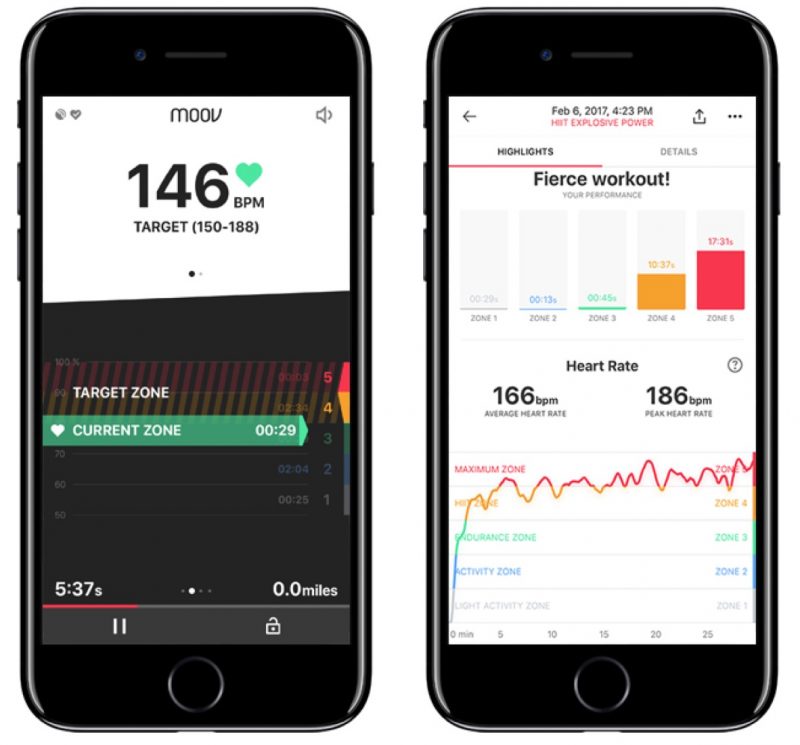
Version 4 of the Moov Coach app also anticipates next week’s release of the company’s HR heart rate-tracking headband, Moov HR Sweat, which combined with the Moov Coaching features, guides wearers through their workouts move by move to keep them in their optimal heart rate zone.
Move Coaching Tracker is a free download for iPhone and iPad from the App Store. [Direct Link]
Discuss this article in our forums
Oppo UDP-203 review: UHD Blu-ray has never looked so good
Look up “legend” in the Blu-ray dictionary and you’ll find pictures of Oppo’s BDP-105. These ultra expensive BD decks became the reference standard for Blu-ray playback across the world. Now Oppo is out to do the same thing for Ultra HD Blu-ray playback with its new UDP-203.
The 203 sets its premium stall out right away thanks to its heavy-duty metal chassis and the fact that it hulks over every other Ultra HD Blu-ray deck we’ve seen so far like some modern-day colossus.
Is it the 4K UHD Blu-ray player to plump for?
Oppo UDP-203 review: Better connected
- 2x HDMI out; 1x HDMI in; 3x USB; LAN & Wi-Fi
- Built-in audio decoder (8x audio line-outs)
- Optical and coaxial digital audio output
As well as looking smart in its brushed black finish, the 203’s front panel handily hosts a large, elegantly illuminated LED, while the rear space is packed with the biggest collection of connections found on any Ultra-HD Blu-ray player to date.
Oppo Digital
These include two HDMI outputs (one for video, one for sound); an HDMI input (so that you can feed external sources through the 203’s processors); a pair of USBs to go with a third on the front; a LAN port as a wired alternative to the integrated Wi-Fi; trigger in and out ports; optical and coaxial digital audio outputs; and a set of eight audio line outs for people who want to use its built-in multi-channel audio decoder.
Oppo UDP-203 UHD BR player review: HDR master
- HDR10 capable; Dolby Vision (due end-of March)
- DVD, Blu-ray, UHD Blu-ray, 3D, CD, SACD, DVD-A discs
The Oppo 203 can also play more disc types than any other deck, including 3D Blu-rays, SACDs and DVD Audio discs.
Its star attraction for many AV enthusiasts, though, is that following an upcoming firmware update (due by the end of March), it will become the first Ultra HD Blu-ray player in the world to support Dolby Vision high dynamic range (HDR) playback alongside the industry standard HDR10 system.
Oppo Digital
Given its self-consciously premium nature, it’s not surprising to find the Oppo 203 sporting some unusual features that should endear it to custom installers and high-end owners.
Oppo 4K Blu-ray player review: Match to display
- Target luminance: instruct player the output display’s max brightness
- Strip metadata HDR: best images for low-brightness displays
Particularly noteworthy and welcome is a “strip metadata HDR” option. This means that people with 4K-capable displays – typically projectors – that aren’t really bright enough to show HDR properly can take HDR out of a 4K Blu-ray image and just benefit from the format’s extra resolution and colour depth.
You may have to do a little re-calibration after activating the strip metadata option, but the bottom line is that it lets you achieve better results on low brightness displays than you can with HDR – or even HDR to SDR conversion – active.
Talking of HDR to SDR conversion, this option is available too. It’s not quite as clever as the same feature on Panasonic’s Ultra HD players, but it has been greatly improved in recent days by the addition of a “target luminance” feature that lets you tell the player how bright the display is that the converted signal is going to be feeding.
Oppo Digital
Also useful for people whose displays may be prone to colour banding when showing HDR is an option to force the signal to output as 10-bit or even 8-bit. Currently Panasonic’s UB900 flagship deck only outputs 12-bit if it thinks a TV can handle it, and this has led to signficant colour striping problems (though Panasonic is introducing a firmware update to fix this soon).
Oppo UHD BRP review: Perfect image quality?
Oppo claims that MediaTek chipset at the 203’s heart has been designed to deliver the best picture quality yet from the new Ultra HD Blu-ray format. And, for once, these claims appear to be true!
The Oppo 203 quite clearly beats all rivals – including the mighty Panasonic UB900 – in all three of the main performance areas that make 4K Blu-ray special. Colours, for instance, look bolder, somehow slightly brighter, but crucially also more natural and subtly defined.
So clear is this improvement that it’ll strike you as soon as you load up a few favourite discs, even without the need to run direct side-by-side comparisons. Of course we did some side-by-sides and these merely confirmed it. The 203 really is the master of image quality.
Oppo Digital
The Oppo 203’s pictures also look more generally dynamic than those of any of its rivals. Blacks look a little deeper, and peak whites and colours look more explosive. In other words, HDR looks more HDR, giving you a new appreciation of what this luminance range technology can do.
The 203 even manages to eke a bit more detail and sharpness out of the best quality Ultra HD Blu-rays. Side-by-side comparisons show the smallest elements of 4K pictures looking clearly crisper and cleaner on the 203 than on any of its rivals.
Oppo UDP-203 review: The downsides
The Oppo 203 doesn’t have things all its own way, however. Panasonic’s UB900 delivers slightly more detail in the very darkest parts of HDR images, and also slightly outguns the 203 when it comes to both upscaling HD Blu-rays and converting HDR to SDR. The UB900’s high-end audio system sounds slightly better too, especially when playing compressed audio files.
We also found that the 203 introduced distracting amounts of audio lag if used to feed external video sources – such as a Sky Q box – through it using its HDMI input.
Finally it’s important to point out that unlike all other UHD Blu-ray players to date, the Oppo 203 doesn’t carry any online app support. So if, for instance, you want to stream from Amazon, Netflix, et al, you’ll have to get a TV or some other external set-top box that offers such services.
Verdict
While it’s not perfect, even as it stands today the Oppo UDP-203’s 4K Blu-ray prowess goes a long way to justifying its premium price.
By the time you’ve added in its upcoming Dolby Vision talents at the end of March 2017 (something even Panasonic’s UB900 won’t be getting), it seems sure to become the deck of choice for the sort of AV fan who considers “compromise” to be a dirty word.
The Oppo 203 is available to buy now, priced £649 on Amazon.co.uk, or priced $729 on Amazon.com
The alternatives to consider…
Pocket-lint
Panasonic UB-900
£449
Considering the Panasonic is a good third cheaper than the Oppo thanks to a price drop, it’s the next-best choice to go for if you’re a high-end AV fan. The audio output is better, too, which is a bonus. Shame there’s no Dolby Vision though.
Read the full review: Panasonic UB-900 review: The UHD Blu-ray master
Pocket-lint
Samsung UBD-K8500
£210
One of the two original UHD Blu-ray players, Samsung’s play is with budget. It doesn’t have the imaging or audio chops of its top-end Panasonic and Oppo competitors, but at near to £200 it’s a relative bargain. So if you’re more about budget than perfection, this is one viable option.
Read the full review: Samsung UBD-K8500 review: Beautiful 4K Blu-ray
Pocket-lint
Xbox One S
£230
Hang on a minute, isn’t this a console? Yes, but it’s the only one that can play UHD Blu-ray discs. It is, therefore, a budget and multi-functional access point if you’re looking for a player that can do a little more.
Read the full review: Xbox One S review: Great console and 4K Blu-ray player, what else?
Google adds voice typing, Doodles and more emoji to gBoard on iOS
Google’s powerful Gboard app might now be on Android, but it’s the iPhone version that is receiving most of the updates. As part of its most recent overhaul, the search giant has extended support to 15 new countries*, and also added a number of new features that make it easier to say what you have to say.
As of now, users have access to all of the latest emoji in iOS 10. If you don’t remember, one of the most useful gBoard features is the ability to search and find the perfect emoji, allowing you to decorate texts and emails without scrolling through endless lists of icons.
By incorporating search into its keyboard, you don’t need to visit Google.com to find what you’re after and share it. Keeping with this theme, the app now also hosts Google Doodles, notifying you of new additions via the animated “G” button. If it’s moving, hit the icon and gBoard will display more information about the Doodle on that particular day.
Perhaps the most useful feature is voice support. Like the native keyboard, all you need to do is press the microphone and talk. If you’ve used Google’s voice services before, you’ll know that they are pretty reliable, so it might come in handy when you have your hands full or need your eyes fixed on something more important.
*Supported languages include: Croatian, Czech, Danish, Dutch, Finnish, Greek, Polish, Romanian, Swedish, Catalan, Hungarian, Malay, Russian, Latin American Spanish and Turkish. They can be selected by opening the Gboard app and choosing “Languages”, then “Add Language.”
Via: Google Blog
Source: gBoard (App Store)
Gboard Update Brings Google Doodle, Voice Typing, iOS 10 Emoji, and Additional Language Support
Google has announced a significant update for Gboard, bringing new emoji, Google Doodles, voice typing, and additional language support to the iOS keyboard app.
Gboard integrates the company’s search capabilities into an iPhone or iPad’s keyboard. Using the Google button in Gboard, users can search for information, send what they find, discover GIFs, emojis, and more, without having to exit a messenger app to visit Safari or Chrome.
The update means Gboard now supports all of the latest emoji from iOS 10. Additionally, Google has added subtle alerts about Google Doodles, which frequently animate the Google logo to honor holidays, anniversaries and notable people. Whenever a new Google Doodle goes live, the “G” button animates, prompting users to find out more about it.
Elsewhere, today’s update adds voice typing, which allows users to dictate messages directly to Gboard. To start a new text, users can now long-press the mic button on the space bar and talk.
The update also brings 15 additional languages to Gboard, including Croatian, Czech, Danish, Dutch, Finnish, Greek, Polish, Romanian, Swedish, Catalan, Hungarian, Malay, Russian, Latin American Spanish and Turkish.
Gboard is a free download for iPhone and iPad available on the App Store. [Direct Link]
Tag: Google
Discuss this article in our forums
Riding with strangers: Google’s Waze is about to expand its Carpool service
Why it matters to you
Cheap and hopefully cheerful, such a carpooling service could be a handy alternative to other ride-sharing services.
Google-owned Waze is gearing up for a major expansion of its carpooling service after a successful run in San Francisco.
Carpool will be launching in more cities in the U.S., as well as in Latin America, in the coming months, Waze boss Noam Bardin told the Wall Street Journal this week.
The rollout will put Waze up against the likes of ride-sharing giants Uber and Lyft, both of whom already offer carpooling options — UberPool and Lyft Line. And with around 80 million users already using the community-based traffic and navigation app on a regular basis, Waze knows it’s perfectly positioned to hit the ground running.
Waze’s system allows drivers to make up to two rides a day — for example, to and from work — and riders pay to cover the cost of gas, plus a little extra.
The downside? A Carpool user has to request a shared ride several hours ahead of time, and then hope someone responds. If no one does, you can always jump in an Uber or Lyft.
More: Get a peek at guest singers for Apple Music’s Carpool Karaoke TV series
Following carpool testing in San Francisco and also in the company’s home nation of Israel, Bardin admitted the biggest hurdle for its service is “[getting] the average person on his way to work to pick someone up and drop them off once in a while.” So far, around 150,000 Waze users in San Francisco and Tel Aviv have signed up to the carpool service since 2015, but only a very small number have so far given rides, according to Bardin.
The CEO added that at the current time his company doesn’t take a percentage of driver revenue but may levy a 15 percent fee of the total cost if the service proves a hit with users.
With Google’s backing and a massive user base, Waze seems well placed to make a go of its Carpool service. Though with both Uber and Google continuing to make progress with their respective autonomous vehicle projects, it may not be too long before empty cars are driving up to collect passengers, giving both companies additional options over the kind of transportation services they offer.
The Apollo 11 space capsule is being prepped for another mission
Why it matters to you
It’s a great chance to see an important part of American space history up close.
Nearly 50 years after it traveled to the moon and back, the Apollo 11 command capsule is being prepped for another mission, though this time on terra firma.
The capsule, Columbia, is set to leave the Smithsonian’s National Air and Space Museum for the first time in 46 years for a traveling exhibition called, “Destination Moon: The Apollo 11 Mission.”
The capsule is an important part of U.S. space exploration history as it’s the only surviving section of the spacecraft that transported the first astronauts to the moon — and back again.
The cross-country exhibition will celebrate the approaching 50th anniversary of the historic moon landing, and promises to wow visitors with an array of exciting exhibits. In the Smithsonian’s own words:
Through original Apollo 11-flown objects, models, videos and interactives, visitors will learn about the historic journey of the Apollo 11 crew — Neil Armstrong, Michael Collins and Buzz Aldrin. ‘Destination Moon’ will include an interactive 3-D tour, created from high-resolution scans of Columbia performed at the Smithsonian in spring 2016. The interactives will allow visitors to explore the entire craft including its intricate interior, an interior that has been inaccessible to the public until now.
The Apollo 11 spacecraft comprised three parts: The command module that held the astronauts and returned to Earth; the service module, which supported the command module with propulsion, electrical power, oxygen, and water; and the lunar module, nicknamed Eagle, that included a lower stage for getting Neil Armstrong and Buzz Aldrin to the moon’s surface and an upper stage that took the astronauts back to lunar orbit so they could return to Columbia.
More: NASA announces the largest ever discovery of potentially habitable exoplanets
Columbia’s first stop on its two-year tour to celebrate the first moon landing in 1969 will be Houston’s Space Center on October 14, 2017. Visitors will have until March 18, 2018, to marvel at the capsule before it moves on to the Saint Louis Science Center from April 14, 2018, through September 3, 2018.
The following stop will be at the Senator John Heinz History Center, Pittsburgh, from September 29, 2018, through February 18, 2019. Finally, Seattle’s Museum of Flight will host the Apollo 11 command capsule from March 16, 2019, through September 2, 2019.
Once the road trip’s over, Columbia will return to Smithsonian’s National Air and Space Museum in Washington, DC, and take its place in a new exhibition that’s set to open in 2021.
HTC 10 is picking up the Nougat update in India

Nougat update is now available for the HTC 10 in India.
HTC rolled out the Nougat update to the HTC 10 back in November, with unlocked units in the U.S. receiving the update first. The company has since rolled out the update to customers in the UK at the end of last month, and is now making Android 7.0 Nougat available to Indian users.
@LlabTooFeR htc 10 update in india#htc #htc pic.twitter.com/BqzJvMlmtr
— aakash goyal (@aakashklg) February 23, 2017
The Nougat update comes in at 1.21GB, and increments the software version to 2.41.400.5. The changelog highlights system enhancements as well as the latest security patch, with the Nougat update also bringing a new multi-window mode, improvements to Doze, and much more.
If you’re rocking the HTC 10 in India, head to your phone’s settings to download the Nougat update.
HTC 10
- HTC 10 review
- HTC 10 specs
- All HTC 10 news
- These are the HTC 10 colors
- Join our HTC 10 forums
HTC
Best Buy
Verizon
Sprint
Huawei P10 shown off in new leak, EMUI 5.1 and 360-degree camera teased
Huawei P10 gets shows off once again ahead of its official debut.
Huawei confirmed last month that it would launch the P10 at Mobile World Congress. We saw the device break cover earlier this month, which showed off the blue, gold, and green color options it will be available in, and today we’re getting a look at the press renders of the Huawei P10 ahead of its official unveil.
Huawei P10. pic.twitter.com/7UNx2w5blW
— Evan Blass (@evleaks) February 22, 2017
The image shows off the Leica dual cameras at the back, as well as a power button coated in red and a home button up front. Current rumors suggest the Huawei P10 will feature a 5.2-inch Full HD display, the HiSilicon Kirin 960, USB-C, 4GB of RAM as standard along with 32GB and 64GB storage options, and Huawei is rumored to launch a model with 6GB of RAM and 128GB storage.
Huawei is also said to be working on a Huawei P10 Plus with a 5.5-inch dual curved display, which we’ll likely see later this week.

Huawei is also teasing a new build of its operating system, dubbed EMUI 5.1. It’s unclear what sort of improvements we’ll see in the latest version of the OS, but it is likely that both the Huawei P10 and P10 Plus will be the first devices to run EMUI 5.1 out of the box.

Alongside the new handsets, Huawei will showcase a 360-degree camera, called the Honor VR Camera. The camera add-on is made in partnership with Insta360, and supports 3K videos and “seamless livestreaming.” The camera connects over a phone’s USB port, and you’ll be able to control video and livestream settings through Insta360’s app. There wasn’t any mention of price, but with the camera set to be available globally, we’re likely to hear more at Huawei’s event.
Sony launches the ‘world’s fastest’ SD cards
Sony’s latest SD cards are designed for photographers shooting in 4K.
Sony’s upcoming SF-G series of SD cards will be the fastest in the world, according to the company. The SD cards will be debuting sometime in the month of March, and will be available in 32GB, 64GB, and 128GB storage configurations. The cards feature read speeds of 300MB/s and write speeds of 299MB/s, which Sony says will come in handy not only for shooting 4K content, but also for transferring large amounts of data to a computer.

To that end, Sony is introducing a new memory card reader that interfaces over USB 3.1 Gen1, allowing you to quickly move data from the SD card to a computer. That said, if you’re relying on a mechanical hard drive, you’ll not be able to see those speeds on your computer.
While the cards are still based on the UHS-II interface, Sony is touting its unique firmware for the added performance boost, stating that its algorithm prevents the “decrease of data-writing speeds.” The SD cards are compatible with Sony’s file rescue software, and are waterproof, temperature resistant, shockproof and X-Ray proof.
No word on pricing yet, but with the cards aimed at enthusiast users, they’re likely to be priced higher than those currently available in the market.
 AIVAnet