


Military grade: Kyocera’s Torque X01 may be one of the toughest phones ever made
Why it matters to you
With feature phones in the conversation again, Kyocera’s Torque X01 could spark renewed interest in no-frills, dependable, ultra-tough devices.
Truly rugged phones are somewhat of a dying breed. Most customers opt to buy a conventional smartphone, then stuff it inside an airtight, sturdy case like a Lifeproof or Otter Box. Seriously strong phones tend to come with serious compromises in the way of features, and that also looks to be the case with Kyocera’s just-announced, Japan-exclusive Torque X01 flip phone.
Then again, it’s possible there’s never been a phone quite this tough before. The Torque X01 meets 18 separate categories of the U.S. military’s durability criteria, according to Kyocera, and survived the company’s proprietary 1.8-meter drop test from 26 different angles. It’s also certified waterproof and dustproof.
More: Meet the rugged smartphone case that X Games athletes rely on
To put things into perspective, the iPhone 7 and Samsung Galaxy S7 sport IP67 and IP68 water resistance, respectively — meaning the iPhone can last for 30 minutes submerged in up to 1m of water, and the Samsung can survive just as long at a maximum depth of 1.5m. The X01 matches the Samsung’s rating, but also meets IPX5 standards to endure rushing water — something most phones cannot handle.
Kyocera says it has built the X01 to stand a 40G shock, temperatures as low as -6 Fahrenheit or as high as 122 F for three hours, low-pressure environments, freezing rain, thawing, and 10 straight days of solar radiation, among other challenges set forth by the U.S. Department of Defense.
The phone also boasts more practical features that are sure to be appreciated by those working out in the elements, like large, embossed number keys for operation with gloves, an FWVGA display for easy viewing under direct sunlight, and dual, high-volume front facing speakers to help alerts cut through ambient noise. In terms of specs, the X01 surely won’t win any benchmarking tests with a 1.1GHz quad-core Qualcomm Snapdragon processor, but to its credit, Kyocera has packed in LTE and Wi-Fi connectivity. Combined with a suite of outdoor-minded apps for weather, temperature, barometric pressure, step counting, tide levels, and, most curiously, determining the activity levels of aquatic life, the X01 is smarter than its clamshell appearance suggests.
The Torque X01 is exclusive to Japanese carrier KDDI at the moment, though there’s the potential for a wider release if the recent resurgence of feature phones persists. Nokia surprised and excited the world with its announcement last week that its classic 3310 candy bar-style phone will soon be making a comeback. The 3310 is expected to surface at Mobile World Congress, set to begin on February 27.
Can’t get enough of the Really Blue Pixel? Get a pair of ‘Really Blue’ jeans
Why it matters to you
If you really want to show off your love for your phone, you’ll have to buy clothes that match, like a pair of Really Blue jeans for your Really Blue Pixel.
Think you love your mobile device? Unless you start matching it, you can’t really claim to be that big of a fan of your phone. Luckily, Google is giving you an opportunity to prove yourself. It’s all thanks to a new partnership between the tech giant and freelance fashion designer Christopher Cowan, which has resulted in a pair of “Really Blue” jeans.
That’s right — the wildly popular blue variant of the Google Pixel has now made its way not only to other countries (where it keeps selling out) but also to your legs. So if you’re one of the many customers having trouble finding the Really Blue Pixel in the U.S., Canada, or U.K., you can temporarily satisfy your desire for your new smartphone with a pair of matching pants.
More: What did you think of the Pixel’s design? Google wants to know
The “Really Blue” jeans are being rolled out in conjunction with the Pixel’s global launch, and make no mistake, these jeans were designed for this phone, not the other way around. In fact, the pants have only one pocket, and it’s designed for your Google smartphone. Said designer Cowan, “It’s awesome to be working with Google on this project and a challenge that I couldn’t resist. ‘Really Blue’ is such a unique color and the concept behind it really appealed to me.”
We should point out, of course, that like the Pixel itself, getting a pair of these pants is also going to be incredibly difficult. In order to buy the jeans, you have to order them directly from Cowan, who will actually make you a custom pair. That means that you need to go in for a special fitting with the designer, who will also then determine how large the single pocket needs to be.
This isn’t the first time Cowan has collaborated with a tech company — indeed, the designer previously worked with Acer on the launch of the company’s Iconia A1 – 840 tablet, whereupon Cowan designed a “Selfie Hat.” So if you want an accessory to go with your accessory, check out Christian Cowan and his blue jeans.
LG announces every Gram notebook for 2017, starts selling them immediately
Why it matters to you
If weight is what’s weighing on you when you’re looking for a laptop, LG’s latest offerings will be worth considering.

Mobile World Congress gives smartphone and wearable manufacturers a perfect chance to show off their latest and greatest, and even make some announcements. There are some laptops that sneak their way onto the showfloor, however. Take for example LG’s new Gram notebooks for 2017, which the firm has made sure will be available in stores right away. Similar models, announced at CES, were already available in South Korea, but there are some changes for the North American market.
The laptops are all very similar, and are divided into three groups by screen size — 13.3, 14.0, and 15.6. They’re all 1,920 x 1,080, and the two smaller sizes include a daylight mode that boosts brightness. All models also sport a USB Type-C port, two USB 3.0 Type-A ports, and full-sized HDMI, with an extra USB 2.0 on the largest screen size. They also all have backlit keyboards this time around.
All the 2017 LG Gram notebooks are clad in dark gray, save the base 13.3-inch model, which is stark white instead. It’s available with an Intel Core i5-7200U, 8GB of RAM, and a 256GB SSD for $1,000, with a $100 upgrade for a touchscreen and fingerprint scanner.
Moving up a weight class, the 14-inch model comes in two more disparate variations. The $1,200 model includes the Core i5-7200U with 8GB of RAM and a 256GB SSD, while the $1,500 configuration bumps the processor to a Core i7-7500U and doubles the size of the SSD. It’s also a touchscreen model.
Finally, the 15.6-inch offerings are very similar to the 14-inch configurations. The $1,200 base model includes a Core i5, 8GB of RAM, and a 256GB SSD, while the $1,700 upgraded model has a Core i7, 16GB of RAM, a 512GB SSD, and the touch panel.
More: LG ships 2017 TVs early this year, prices OLED and Super UHD TV lineup
Of course, the real draw with the LG Gram laptop is its insanely light weight. Manufacturers are constantly taking the lightest and thinnest laptop award from each other, but even the largest LG Gram only weighs 2.4 pounds, and that goes down to just 2.07 if you opt for the 13-inch model.
Of course, batteries are heavy, but LG says its “stack and fold” battery technology helps offset the short endurance problems that tend to plague thin and light machines. Our previous experiences with these machines hasn’t left us optimistic, but we’ll wait to spend time with the new models before passing judgement.
If you’re interested, the LG Gram notebooks are already available at Amazon, Fry’s, Costco, and Microcenter, among others.
Want to play your friend’s Steam games? Here’s how to use Steam Family Sharing
Steam is the most popular digital distribution platform for PC games, and if you are into PC gaming, it’s likely you and your friends have built up a substantial library of Steam games over the years. Although the service has frequent sales, one can only afford to buy so many games. Thankfully, if one of your friends owns a game that you don’t, it is possible for you to play it — without borrowing their computer — thanks to Steam’s Family Sharing function. The process is simple, and allows you to share your library with up to five other accounts, so if your friend wants to try, say, Shadow of Mordor from your account, they can do so hassle-free. Here’s how it works.
More: Kick off your streaming career with our complete guide to Twitch broadcasting
Before you share your account, you must enable the “Steam Guard” feature, which requires you to input a code — received by email or text message — when someone logs into your Steam account from a new computer.
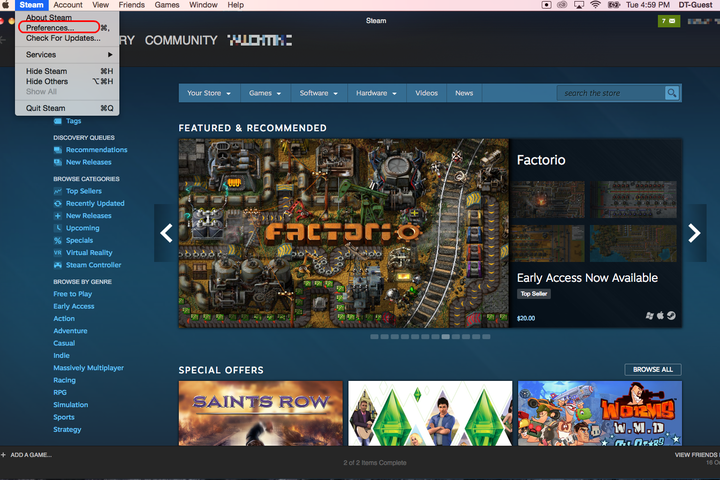
To activate Steam Guard, log into your account and open Preferences.
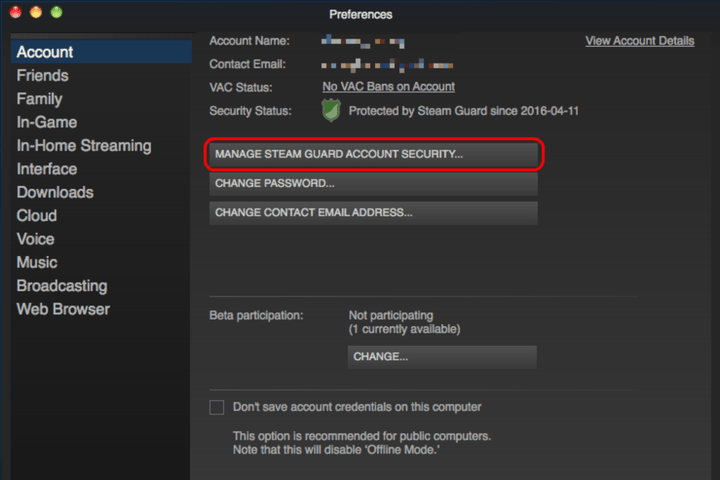
In the Account tab, click the button labeled Manage Steam Guard Account Security…
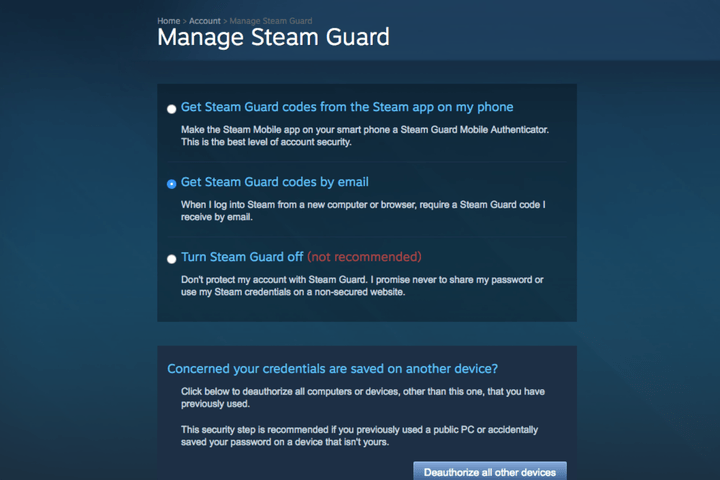
Next, select whether you want to receive your Steam Guard notifications via text or email.
With Steam Guard activated, you will be able to share your library with another computer. To do so, you must log into your Steam account on that computer and go to your Preferences. Afterward, select the tab labeled Family.

Check the box labeled Authorize Library Sharing on this computer.
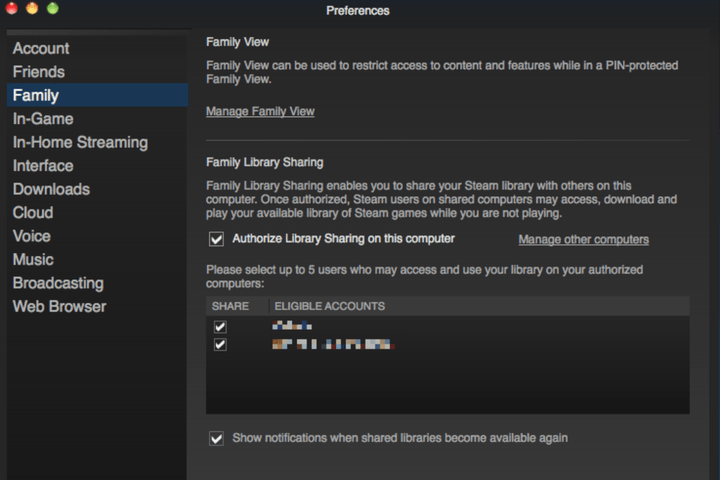
You should see a list of accounts that have also logged into that computer in the past. Check whichever ones you want to share with, then click the box labeled OK. Now, when your friend logs into the selected account on that computer, they will be able to download and play games from your library.
Keep in mind, however, that there are limits to Family Sharing: Two users cannot access the same library at the same time. In the event that you and your friend both want to play a game from the same account at the same time, the library’s owner gets priority.
Twitter user finds how much info you can glean from a locked phone
Why it matters to you
Think a locked iPhone is safe from prying eyes and ears? Think again. You’ll want to change your settings after reading what this Twitter user discovered.
If physical locks can be picked, it stands to reason that our digital locks can be broken, too. And sometimes, it doesn’t even take a mastermind hacker to access information protected by a password. In fact, iPhone owners may be horrified to find out that their trusty personal assistant is giving them up. That’s right — Siri, whom you’ve always trusted to help you out in a tight spot, may not be as loyal as you think.
A Twitter user recently discovered that even a locked iPhone can reveal many of your secrets — or at least quite a bit of your personal information. As @afronomics_ explained in a series of tweets, after she found a locked iPhone in a bathroom and tried to return it to its rightful owner, she found out just how much Siri was willing to divulge when it comes to her owner’s data.
More: With the SiriusXM Onyx Plus, you won’t be left struggling with FM radio ($64)
“I asked siri what’s my name,” @afronomics_ tweeted, “It pulled up her info. Cool. I asked Siri who do I call most. Pulled up her recent calls. Cool.” More like yikes.
it was that easy. all from a locked phone. I could've got directions to her car and her home. that shit scared me.
— uninterested hō (@afronomics_) February 20, 2017
And that’s not the only information Siri was willing to give up. The Twitter user was able to find her recent call log, her notifications, her first and last name, where she lived, and the location of her car. “It was that easy,” @afronomics_ wrote, noting that she could’ve asked for directions to the iPhone owner’s car and home. Truly a frightening thought.
I told the girl. she was shook. then I changed her settings for her so that couldn't happen.
— uninterested hō (@afronomics_) February 20, 2017
But don’t worry, friends. Not only was the iPhone returned to its rightful owner, but the finder also gave her a few tips on how to ensure that Siri wouldn’t be so loose-lipped. All you have to do is head over to Settings, navigate to Touch ID & Passcode, then under “Allow Access When Locked,” turn off Siri, Today’s View, and Notification View. Because you have enough to worry about on a daily basis without worrying about what Siri is telling strangers about you.
ZeniMax files for injunction that could bar Oculus from selling VR headsets
Why it matters to you
ZeniMax’s legal action against Oculus VR could have a profound impact on the contest for supremacy in the virtual reality headset space.
Earlier this month, ZeniMax’s legal battle with Oculus VR closed out its first chapter when a court found that members of the Facebook-owned virtual reality company had failed to comply with non-disclosure agreements. ZeniMax was awarded $500 million in damages, but the video game publisher has now taken steps to reignite its dispute with Oculus.
On Thursday, ZeniMax representatives appeared in a federal court in Dallas, Texas to request an injunction against Oculus. If successful, the company will be blocked from using the code at the center of the earlier court case — it’s alleged to be based on work carried out by John Carmack before he jumped ship from ZeniMax subsidiary Id Software.
This injunction could have a huge impact on Oculus if it is granted, perhaps even more so than the damages the company was ordered to pay on February 1. It could prevent devices including the Oculus Rift and Samsung Gear VR from being sold, as well as potentially taking some VR games off the market, according to a report from Tom’s Hardware.
More: Oculus Rift still facing issues with room-scale tracking, but a fix is on the way
The code in question is thought to be used in Oculus’ hardware, and is also said to have been distributed to certain developers for use in their projects. If this is the case, those products might themselves have to be pulled from sale.
However, it’s not yet clear whether or not ZeniMax’s injunction will be successful. While Oculus staff were found to have breached non-disclosure agreements earlier this month, the court ruled that the company had not misappropriated trade secrets.
Shortly after the case was decided, Carmack weighed in with his thoughts on ZeniMax’s claims of code theft, criticizing some of the arguments leveled against him, and the plaintiff’s expert in particular. “The notion of non-literal copying is probably delicious to many lawyers, since a sufficient application of abstraction and filtering can show that just about everything is related,” he wrote, going on to downplay the concrete similarities between work he submitted to Id Software and Oculus’ code.
The quarrel between ZeniMax and Oculus seems poised to run on and on, and if successful, this injunction could have a major impact on the VR landscape. $500 million in damages isn’t a huge setback for a company backed by the deep pockets of Facebook — being forced to withdraw Rift hardware from sale, on the other hand, would be a major obstacle to overcome.
The FAA has yet to confirm any drone-airplane collisions, despite more sightings
Why it matters to you
Many are concerned about the possibility of a drone colliding with a passenger aircraft, but the FAA hasn’t confirmed a single incident.
The latest Federal Aviation Administration reports show a growth in the number of pilots reporting potential encounters with drones but the organization has yet to confirm any of the unmanned aerial vehicles hitting an aircraft in the U.S.
The report, released on Thursday, details possible drone sightings from February through September 2016. The FAA identified 1,274 potential sightings, while the same time frame the previous year only produced 874 reports.
More: More drone crashes caused by technical glitches, not human error, study shows
“Although the data contain several reports of pilots claiming drone strikes on their aircraft, to date the FAA has not verified any collision between a civil aircraft and a civil drone,” the FAA wrote in an updated release. “Every investigation has found the reported collisions were either birds, impact with other items such as wires and posts, or structural failure not related to colliding with an unmanned aircraft.”
Operating drones near airports, airplanes, and helicopters is illegal and could lead to fines and jail time. The FAA uses a B4UFLY app to help hobbyist pilots determine where it’s safe to fly, while commercial drone pilots need to pass a test that includes understanding maps showing where flights are restricted.
While consumer drone sales doubled in 2016 at the same time the number of potential drone collisions was reported, the FAA says the reports contain a number of collisions with birds and other objects unrelated to drone flight. Every potential drone sighting near an aircraft, whether reported by pilots, law enforcement or civilians, is investigated, the FAA says.
“Reputable analyses of FAA data show that many ‘possible drone sightings’ turn out to be perfectly legitimate drone flights, or objects that clearly are not drones, and we expect these latest reports will show the same pattern,” said Kara Calvert, the Executive Director of the Drone Manufacturers Alliance. “The Drone Manufacturers Alliance expects all our members’ customers to fly safely, responsibly and far away from airplanes and helicopters. That’s why our members are constantly developing new technology to enhance safety, while working closely with the FAA and promoting its Know Before You Fly campaign to encourage educated flight.”
Google outage causes confusion, as devices log out and reset to factory defaults
Why it matters to you
If you have a Google Account, you might have experienced some weird login issues last night, but it doesn’t look like the outage compromised your security.
Late last night, Google experienced a bizarre outage which caused a number of devices to misbehave. The devices in question, the OnHub router, Google Wifi, and Chromecast, all logged themselves out of their user accounts, and in some cases went so far as to reset themselves to factory settings.
It’s unknown precisely how many devices were affected, but it appears to be the result of an internal issue at Google, not some kind of malicious attack. According to Tech Hive, if you were logged out of your device last night, your data is secure, but you might have to set up the device all over again.
We know some of you had issues signing in today. Please try again now. Rest easy — your account's security was not affected.
— Google (@Google) February 24, 2017
The Google Wifi mesh network routers, and the last-gen Google OnHub routers were the most profoundly affected by the outage. Instead of just being logged out, the Google routers were reset to factory defaults. If your router was affected, you’ll have to set up your network all over again.
“We experienced an issue with our Google Accounts engine that may have affected your Google Wifi or OnHub device. This causes some devices to automatically reset to the initial state you bought them in,” reads the Google help page dedicated to the issue.
Google’s Accounts Engine, the beating heart of your Google experience, appears to have been the culprit. While it’s certainly convenient to login to so many devices and services with the same account, last night’s outage illustrates one of the dangers posed by convenience. When one account goes down, all the services and devices reliant upon it will follow suit — like dominoes.
More: Google’s Gboard keyboard on iOS adds new languages, voice typing, and more
Luckily, last night’s outage was over quickly, and doesn’t appear to have been too widespread. Being logged out and having a few devices reset to factory settings is inconvenient, but not dangerous.
Still, while you’re rebuilding your home network, and logging into your Google accounts again, now would be a good time to make sure you have two-factor authentication enabled, and change your passwords just for good measure.
Protect files and apps on your Galaxy S7 with Samsung’s Secure Folder
Why it matters to you
Samsung’s Secure Folder makes encrypting sensitive content on your smartphone easier than ever, and adds critical features for locking apps and accounts behind an added layer of security.
We store our entire lives on our smartphones, and at one point or another, every user has sensitive content on their device they’d rather keep private from prying eyes. That’s surprisingly hard to do on Android or iOS without a third-party app, as neither platform gives users the ability to create encrypted storage spaces out of the box. Fortunately, Samsung is bucking that trend by launching Secure Folder support for its Galaxy S7 and S7 Edge smartphones.
Secure Folders actually debuted on last year’s Galaxy Note 7, though, regrettably, not many owners got the chance to become well-acquainted with the feature. That’s changing now that Samsung has released a downloadable version through its Galaxy Apps store. Secure Folders pretty much accomplish exactly what you’d imagine they would, allowing users to lock images, documents, and even apps behind a form of authentication, be it a PIN, password, pattern, or fingerprint.
More: Samsung Galaxy S8 rumors and news leaks

Samsung
What differentiates Secure Folder from other solutions, however, is that it can actually be used to store copies of apps with their own unique data, sandboxed from the rest of the phone. For example, a user could copy Twitter to a Secure Folder, and use that copy of the app for a separate account that wouldn’t be accessible from the original app on the home screen. As Samsung notes in its Newsroom post, “any notes, photos, contacts or browsing history within the apps stored in Secure Folder will remain separate from the same apps outside Secure Folder.”
That is a useful, powerful addition that is sure to please users managing high-risk information on their phones every day, made better by the fact that Secure Folders also support Samsung’s cloud-based backup and restore functionality. These backups remain isolated from the phone’s other general backup files, and are tied to a single Samsung account.
Finally, Samsung points out that Secure Folders can be customized with different names and icons to make them less conspicuous, or be hidden from the Apps screen entirely. Secure Folder is currently only compatible with Galaxy S7 devices running Android 7.0, though Samsung says it expects to bring the app to more of its phones in the future.
Our new forums are here!
We’ve redesigned our Forums to make them more accessible to more users — all while maintaining what made them great for our seasoned community members to start!
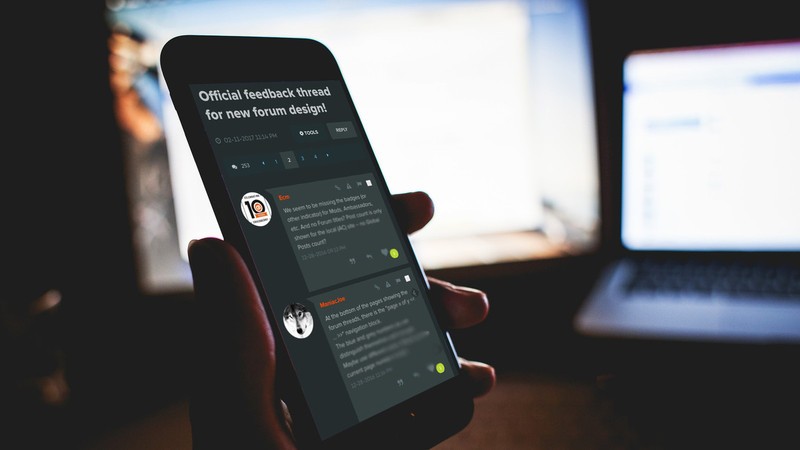
We want more people reading and engaging with the great content that is being produced in our Forums. Here is an overview of some of the biggest changes – a big thank you to Gio Martinez in particular for absolutely crushing it in coding these new designs, and to our community for helping us with feedback throughout – more on that later.
Speed
In our tests we see a 35% boost in how fast the pages load with the new templates. This was one of the most important aspects of the redesign and something we will continue to improve on. Sometimes we still see badly behaving ad units that slow things down and while we try to tackle this they appear — it’s often like a game of whack-a-mole, but we’re doing everything we can on our end to make our codebase as quick as possible.
Clarity
More than 80% of our Forum traffic comes from Google, and to be frank, a user coming into the forums blindly for search wouldn’t have a good experience. We saw issues with how far you had to scroll to see the content you came for and a lack of visual queues telling you this was a conversation.
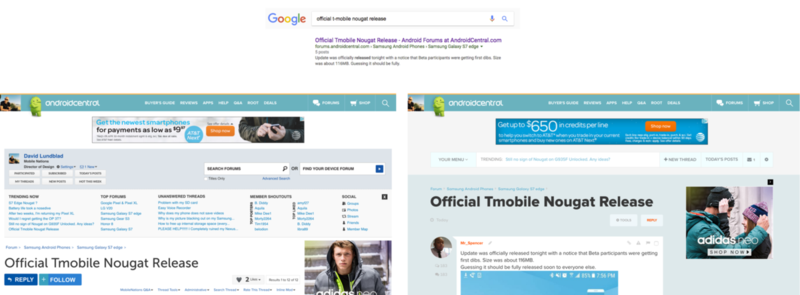
Hierarchy
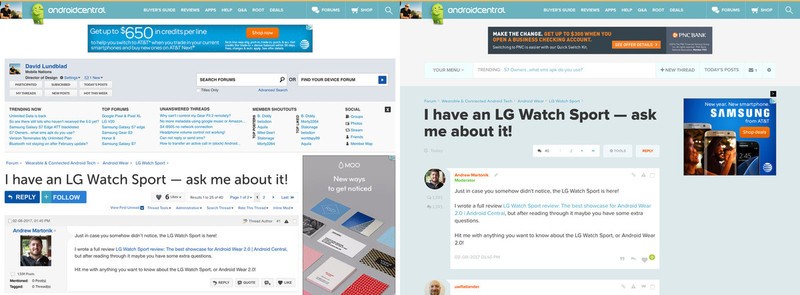
In the old forums everything had the same ‘weight’ and demanded the same amount of attention. In our new design we have a clear idea about what we want to stand out and what can be in the background. This means that some actions that were previously exposed and very clear to the experienced VB user are now slightly more hidden.
Our priority — what we want a visitor to immediately grasp — is that they are in the right place (Forum Thread Title) and that this is a conversation (Avatar + Post that looks like a message). Everything else can take a back seat.
Recognition
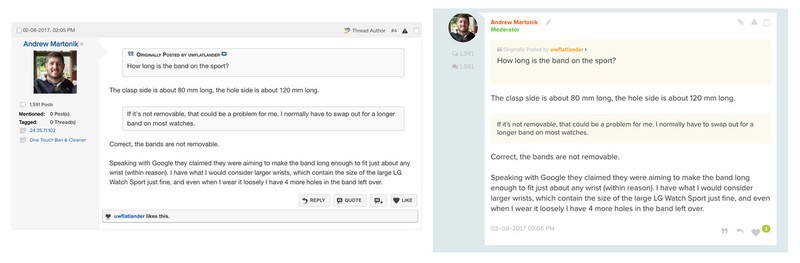
Our forums are built off of VBulletin, a long-standing software that underpins many other large and popular communities. The problem is that the base styling, which we also had based our old interface on, was also old and long-standing. The old-school style of forums is no longer the only way that people engage in serious conversations online. The kind of discussions we see in our Forums also happen in Facebook comment threads, Quora, Twitter replies, and a host of other group messaging apps. It made sense for us to at least visually move towards the look and feel of these hugely popular platforms — they’re not just modern, they’re simplified from the masses of forum controls in a very smart way.
By the Community
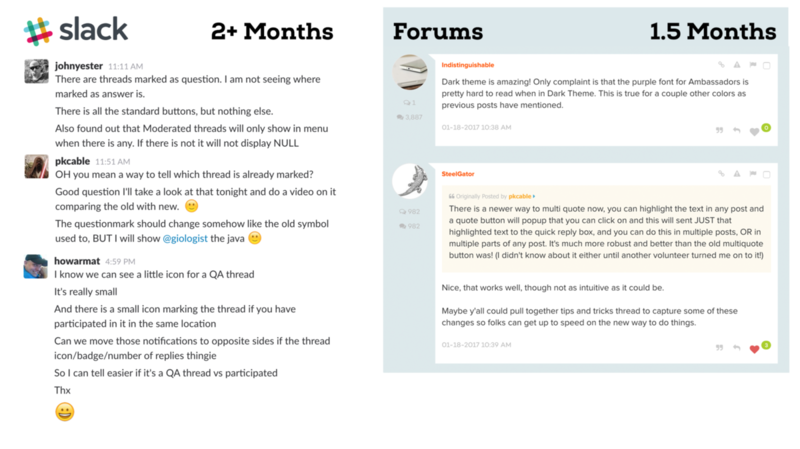
This has been the most extensive user testing we’ve ever done and we believe it’s paid off. Since late November 2016 a group of select Forum users have been giving us nonstop feedback through slack — a BIG thank you to all of you! In late December we also opened up access to volunteers who have been helping us out with additional feedback in this forum thread.
I seriously cannot stress enough how important this feedback process has been — it’s the best decision we’ve ever made.
Dark Theme
Sorry it took us so long! Enough said 🙂
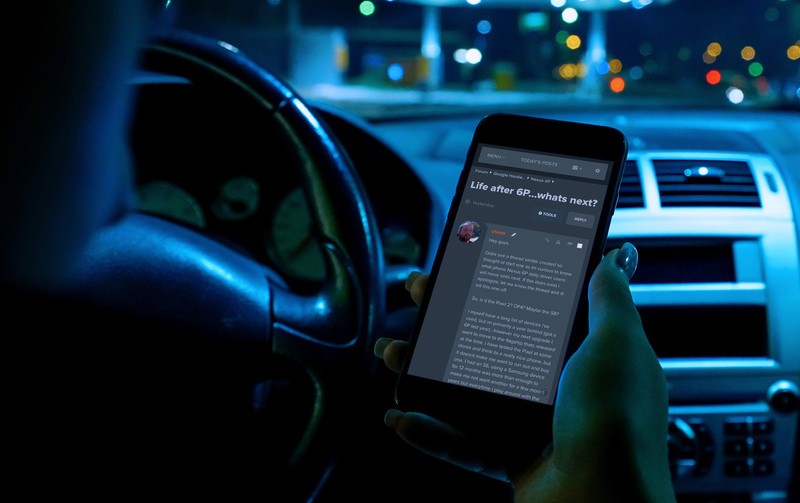
You can find the Dark Theme inside Your Menu at the very bottom right – hidden away behind a moon icon like a little Easter egg.
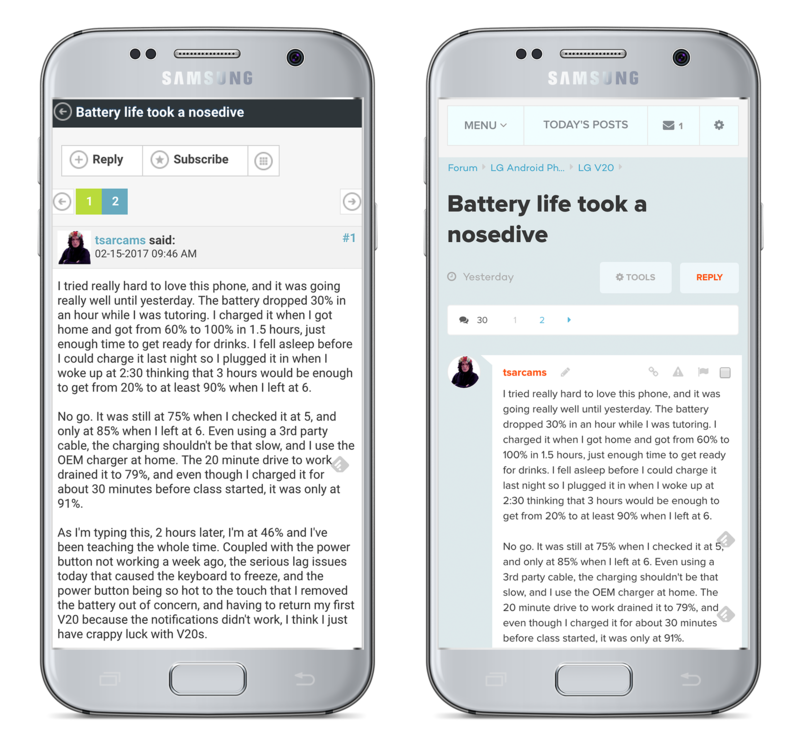
Mobile with all the Trimmings
We wanted you to have all the same tools you enjoy on the desktop while using a mobile phone. This also means our Moderators and Ambassadors have the ability to do their work more easily on the go than before.
Small tweaks and Fixes everywhere
In addition to the huge overall changes we’ve made a bunch of smaller changes throughout the forums. You might not notice them for a while, and many are back-end tools that will make life easier for our volunteer Moderators. It’s been a big project for us and we are really happy with the attention to detail it forced upon us. We are suitably humbled by the complexity of doing any changes to a tool many of you spend hours in every day.
Lastly, we fully expect there to be more issues and for our members to have better ideas than we have on how to improve the Forums. Please engage in the conversation over here in this forum thread — we really want your feedback, good and bad, so that we can continue to improve these forums for you.
Thank you!
 AIVAnet