


Nvidia’s Shield tablet gets Nougat update to support its new controller
Why it matters to you
Not only does this update add new features provided by Android 7.0 Nougat, but Shield tablet owners can now use the new Shield controller launched in January.
Nvidia is rolling out a new update for its Shield-branded tablet. Dubbed as Software Upgrade 5.0, it brings support for the new Shield controller, improved notifications, better power consumption, and more. The update will have a staggered release over the next few days to make sure there are no immediate problems.
Nvidia released its second-generation Shield Controller in January. It sports a refined design, a better battery than the original, and a slim touchpad in the center that replaces the volume buttons. It’s also more aesthetically pleasing to the eye while adding dual vibration feedback in the process. The update brings the Shield Tablet up to speed with this peripheral so users have better control over their gaming experience.
More: Nvidia debuts line of Quadro Pascal GPUs, including superpowerful GP100
Software Upgrade 5.0 also updates the operating system to Android 7.0 “Nougat.” This version adds features like running two apps side by side, a new “doze” feature for saving battery power while users are on the move, smarter notifications, a faster boot time, and more. Users will see 72 new emoji too.
Here is a detailed list of what Android 7.0 brings to the Shield Tablet:
Multitasking
Split-screen:
Compatible apps can run side by side in portrait and landscape modes.
—————
Quick Switch:
Double-tapping on the Overview button brings users back to the previous app.
Notifications
Bundled Notifications:
Multiple notifications from a single app are now bundled together.
—————
Direct Reply:
Users can reply to messages within notifications without having to open the app.
—————
Silence:
Tap and hold on a notification to silence or block an app’s following notifications.
Power
Doze:
This feature will conserve battery power when the device is in motion.
Usability
Adjustable Sizes:
The display and font sizes can now be separately adjustable.
—————
Customize Quick Settings:
This area can now be customized in the menu by tapping “edit.”
—————
Quick Settings Tiles:
On the lock screen, users can now swipe down to access the top Quick Settings tiles.
—————
Improved Settings:
Settings now includes a Navigation menu & Suggestions.
—————
Revised Overview:
The “clear all” option in Overview now resides at the top right.
System Improvements
Data Saver:
This feature will disable access to cellular data for apps running in the background.
—————
Updated JIT Compiler:
In a nutshell, this speeds up the system and app update processes.
—————
Updated Security:
Nougat updates Android to the December 1, 2016, Android Security Patch Level.
Software Upgrade 5.0 also introduces Shield Rewards, an exclusive “loyalty” program for Shield device owners. This program provides members with the latest news regarding apps, games, and products for Shield devices. It also serves up “premium rewards” like discounts, chances to win prizes, free games, and so on.
Launched in July 2014, Nvidia’s Shield-branded tablet is based on the company’s Tegra K1 all-in-one chip (SoC). Costing $199, it sports an 8-inch screen, a 1,920 x 1,200 resolution, 2GB of system memory, and 16GB of internal storage. Other features include Wireless N and Bluetooth 4.0 connectivity, a 5MP camera, and support for Nvidia’s Shield DirectStylus 2.
Everything you need to know about Google Daydream

Daydream, Google’s high-quality virtual reality platform for Android, is here — and so is the search giant’s headset, Daydream View.
The platform is Google’s strongest attempt yet at muscling into a market that competitors like Facebook’s Oculus, HTC’s Vive, and others have already begun to corner. And more broadly speaking, it’s a show of confidence in a burgeoning medium that some say has the potential to upend entire industries.
More: Google Daydream View review
Wondering what’s up with Daydream? Not to worry. We’ve rounded up all the pertinent details and fresh-off-the-press news for your perusal. Bookmark our handy guide to Google’s VR and never worry again about which phones support it, which apps are debuting on it, and which headsets support it.
Daydream software
Google said the latest version of its Android mobile operating system, Android Nougat, is optimized for Daydream applications — which is to say that it’s fine-tuned for “performance” and “responsiveness.” Google said it targeted a latency of under 20 milliseconds and designed an intuitive user interface with notifications that lays “intuitively” atop VR apps and games.
More: ZTE jumps on the VR train with a headset for its Daydream-ready Axon 7
Android Nougat also sports a Samsung Gear VR-like home screen, called Daydream Home, that provides access to a suite of specially designed apps. There’s a VR version of Google Play, plus Google’s Street View, Google Play Movies, and Google Photos. And more are on the way.
Chrome

If you’ve ever dreamed of surfing the web in virtual reality, you’re in luck: Google has officially released an updated version of Chrome for Android that supports a stable version of WebVR, which is a Javascript API that allows you to view VR content — i.e., 360-degree videos and 3D models — in your browser.
There are a number of things you’ll be able to access on Chrome with your Daydream headset — including tourist attractions on Matterport and various VR scenes on Sketchfab.
Find out more here.
Third-party apps

Third-party support for Daydream will be robust as it is far-reaching and will only continue to grow, according to Google. At launch, several apps such as CNN VR, Mekorama VR, Hunters Gate, The Turning Forest, The Guardian VR, Fantastic Beasts, and Google Street View have been available.
Google has announced a “second wave” of Daydream apps, and they are mostly VR games. These include Gunjack: End of Shift, Need for Speed, Lego Brickheadz, Wands, Underworld Overlord, and Layers of Fear.
HBO Now is also available in the latest wave of Daydream apps, as well as Netflix, though you need subscriptions to access them. Other apps include that have been available since launch include:
Hulu VR, which offers Hulu’s entire library as well as two exclusive shows from HuffPo RYOT: The Big Picture: News in Virtual Reality, and a VR comedy show titled, Virtually Mike and Nora, with Nora Kirkpatrick and Mike O’Brien. The app is only available in the U.S.
Invasion is an “award-winning VR animation” that will also be available on Daydream. It’s narrated by Ethan Hawke. Star Chart VR lets you explore the solar system in a “real-time” space simulation; The Wall Street Journal VR and NYT VR offer virtual reality news content.
Games like Danger Goat, Wonderglade, and Home Run Derby are also currently available for the platform. You can explore a virtual world of Fantastic Beasts and Where to Find Them as well — it’s an exclusive interactive experience that lets you wave a wand to explore the latest universe from J.K. Rowling.
And that won’t be all, more than 50 partners are expected to bring apps and games to the platform before the year ends. We’ll keep adding to this list as we learn more.
Find out more here.
YouTube VR

The retooled YouTube app incorporates features such as voice search, discovery, and playlists. It includes YouTube’s entire library of content — traditional, non-VR content will be adapted on the fly for Daydream viewing. You’ll be able to watch everything from classic 16 x 9 videos to 360-degree footage to full immersive VR experiences in 3D.
Find out more here.
Here are all the places that support Apple Pay
Apple Pay is Apple’s contactless payment service, and it’s available to the iPhone 6/6S, 6/6S Plus, iPhone SE, and the iPhone 7 and 7 Plus. The service, like Android Pay, requires stores to have NFC terminals at checkout so that you can simply tap your phone to make a payment.
While Apple was hardly the first with contactless payments, the company’s solution has banks, stores, and companies jumping on the bandwagon and pledging their support for Apple Pay. It seems as if new partners are joining every day, so we’ve put together this handy list of all the major partners, which we’ll update as more are added. Here are all the brands and countries that support Apple Pay.
Apple Pay around the world
Initially, Apple Pay only worked in the United States, but Apple is interested in bringing the service to users in many countries. Apple has to prioritize which countries it will reach first, as the company has to take several factors into account. Apple evaluates credit and debit card penetration, the current infrastructure in place for mobile payments, and the popularity of iPhones in each country.
Whether or not Amex and Visa cards are accepted in each country is also part of the vetting process, because both credit card providers are partners with Apple Pay. Their presence in any given country speeds up Apple Pay adoption. Indeed, that’s likely why so many countries kick off Apple Pay launches with limited support for Amex and Visa cards only.
Spain
Spain is the latest country to get Apple Pay support, and you can add credit or debit cards from Carrefour, American Express, Banco Santander, and Ticket Restaurant. The service also supports Mastercard.
Apple says more than 25 major vendors accept Apple Pay, including Media Markt, Starbucks, Bershka, Zara, Repsol, and Pull & Bear.
Singapore
Apple users in Singapore have been able to use Apple Pay since the summer of 2016, but now HSBC customers can use it as well. The banking institution is offering a promotion for its customers that use Apple Pay — link an HSBC credit card to get $5 off every transaction that’s $10 or more. This offer will last until January 15.
Other banks in Singapore that support Apple Pay are United Overseas Bank, Standard Chartered, OCBC Bank, POSB Bank, American Express, and DBS Bank.
Japan
One of the rockier rollouts took place in Japan, where Apple Pay debuted after much anticipation on Oct. 25. Commuters had a difficult time loading their train passes onto their iPhones on the morning after major railways began accepting Apple Pay. Luckily, most services were restored after a couple hours. East Japan Railway Co. noted that much of the disruption was due to “the large number of attempts to access the service,” so it certainly looks as though Apple Pay has come to an eager audience.
At Apple’s September 7 event, the company announced that it was bringing Apple Pay to Japan. Of course, in Japan, they actually use a different technology to NFC, so along with the launch of Apple Pay in the country, Apple will also be selling the iPhone 7 with support for a technology called Felica — it’s very similar to Bluetooth, but the broader point is that the iPhone will now support Apple Pay in Japan.
The list of supported institutions are too great to mention, but you can check them out here.
Russia
On Oct. 4, 2016, Apple Pay expanded its services to Russia. Mastercard is supported, and you can add cards from Alfa-Bank, Bank “Otkritie”, Bank Saint-Petersburg, MDM Bank, MTS Bank, Otkritie, Raiffeisenbank, Rocketbank, Russian Standard Bank, Sberbank, Tinkoff Bank, Tochka, VTB 24, and Yandex.Money.
France
Apple launched support in France in July 2016. Apple Pay works with Visa and MasterCard, and you can add credit and debit cards from Carrefour Banque, Banque Populaire, Caisse d’Épargne, Edenred (Ticket Restaurant cards), Boon, and Orange Cash.
Switzerland
In July 2016, Switzerland got Apple Pay support. The service works with credit cards issued by Bonus Card, Cornercard, Swiss Bankers, and Swisscard.
Hong Kong
In Hong Kong, Apple Pay is compatible with Mastercard, Visa, and American Express accounts. Supported banks within the country include the Bank of HeBei, ChengDu Rural Commercial Bank, China Minsheng Banking Corporation, Zheshang Bank, Chongqing Rural Commercial Bank, Fujian Rural Credit Union, HSBC, LangFang Bank, Shanghai Huarui Bank, Shanxi, Rural Credit Cooperatives Union, WeBank, Xiamen International Bank, YellowRiver, Yinzhou Bank, the Bank of China, Hang Seng Bank, HSBC, The Bank of East Asia, Standard Chartered, DBS Bank, HSBC, HKT Payment Limited, and “soon” Tap & Go. Apple Pay launched in the country in August 2016.
Australia and New Zealand
Apple is having some trouble getting major banks in Australia to sign up for the service, but at least ANZ is supported. American Express cards are also supported, as well as those from other institutions such as The Bank of Sydney, Bank Australia, The Mac, and more. You can read the full list here.
ANZ is the only supported bank in New Zealand at the moment.
Canada
Apple Pay came to Canada late last year, but it only available to a handful of banks. A bigger expansion in early 2016 made the service more prevalent. American Express cards are supported, as well as ones from banks like ATB, Bank of Montreal, Canadian Tire, CIBC, Desjardins, President’s Choice, the Royal Bank of Canada, Scotiabank, Tangerine, and TD.
U.K.
The U.K. was the first country to get Apple Pay after it launched in the U.S. It’s compatible with American Express cards, and more than 20 banks currently support the service including Barclays, Bank fo Scotland, Halifax, HSBC, Lloyds, Barclaycard, Boon, Cash Passport, Clydesdale Bank, First Direct, M&S Bank, MBNA, Metro Bank, Nationwide Building Society, NatWest, Royal Bank of Scotland, Santander, Tesco Bank, The Co-operative Bank, TSB, Ulster Bank, and Yorkshire Bank.
China
Although cracking the Chinese payments market is considered extremely tough, Apple Pay got a boost from the Industrial and Commercial Bank of China, which is the biggest lender in the country, Reuters reported. In total, Apple has 19 of China’s biggest banks on-board, and around 80 percent of Chinese credit and debit cards will work on the service from the get-go. The main disadvantage Apple faces in the country is the prevalence of other mobile payment services like Alibaba’s AliPay, WeChat, and UnionPay. You can see the full list of supported banks here.
More: Tim Cook says money will be forgotten by history, thanks to Apple Pay
We’ll keep you updated as more countries support Apple Pay.
Drop your phone? Verizon offers same-day, on-site screen repair in select cities
Why it matters to you
Eligible Verizon customers can now get their phones fixed immediately, from the convenience of their own home.
Verizon is rolling out some changes to its Total Mobile Protection plan in 2017, and among them is the option for same-day, on-site screen repair. Owners of select devices can now request a technician to meet them at home or work to have a shattered display immediately replaced — provided they live in one of the locations where the carrier is launching the program.
The news release on Verizon’s website specifies which phones are eligible for same-day repair, as well as the more than 200 cities where remote service is available. Multiple versions of the Apple iPhone, and Samsung Galaxy S and Galaxy Note, as well as Motorola’s Verizon-exclusive Droid brand, are included — though iPhone 7 and Galaxy S Edge devices are absent. Customers will have to pay a $79 deductible for repair, in addition to the standard monthly cost of $11 for a smartphone, $9 for basic phones and tablets, or $33 for multi-device protection for 3 to 10 lines.
More: 26 best iPhone 7 Plus cases to protect your Apple phone
Verizon is also allowing Total Mobile Protection customers to file up to three claims a year, instead of the previous two. For multi-device applicants, one account can now share nine claims, up from six.
The news comes with a helpful reminder that those who would like to equip their devices with one of Verizon’s four protection plans only have a limited time to act. Normally, customers are forced to subscribe to a program within a month after purchasing a device, but during the carrier’s open enrollment period — which extends from February 9 to April 9 this year — they’ll have a second chance.
The Total Mobile Protection is the most comprehensive of Verizon’s plans. It extends the warranty of the device, comes with Tech Coach technical support, and covers physical damage, theft, and loss. Total Equipment coverage, which is $9 per month for smartphones and $7 per month for basic phones and tablets, contains everything found in the top-level plan except for Tech Coach.
Rounding out the list, the Wireless Phone Protection option, which runs $7.15 per month for smartphones and $5 per month for everything else, only covers damage, theft, and loss without extending the manufacturer’s original one-year warranty. Customers can sign up for an extended warranty alone for $3 a month. More details on all of these programs are available on Verizon’s site.
Microsoft’s digital assistant Cortana will now remind you to keep your promises
Why it matters to you
Cortana can now save you from yourself by making sure you don’t make promises that you forget to keep.
Cortana is Microsoft’s personal digital assistant that is built into Windows 10 — and available on iOS and Android as well — and she has come a long way since she was first introduced in 2014. You can ask Cortana to perform all kinds of tasks, from setting reminders to creating calendar appointments to conducting searches, and she will respond accordingly to help you be more productive.
One of Cortana’s most powerful aspects is that Microsoft can continuously add new functionality in the background, which then rolls out to Cortana-enabled devices. On Thursday, Microsoft announced the general availability of suggested reminders, a feature that has been available to Windows Insiders for some time.
More: Which digital assistant would you hire? Cortana vs. Siri vs. Google Now
Basically, suggested reminders means that Cortana will search your email messages looking for promises and commitments that you made where a reminder might be helpful in keeping you on track. For example, if you tell your boss you will send a report by the end of the work day, then Cortana will offer to create a reminder to make sure you get it done.
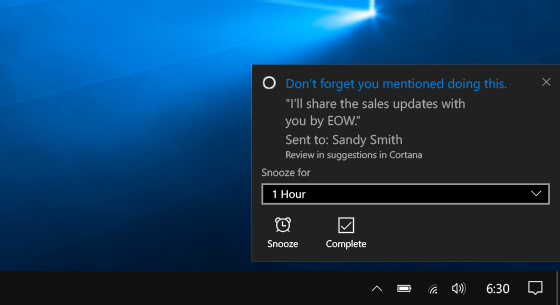
The suggested reminders feature uses machine learning technology created by Microsoft Research and it works completely in the background to parse out relevant information, such as deadlines and tasks, to create meaningful reminder suggestions. Once she finds relevant emails, she will create a reminder that is populated with pertinent information.
For now, suggested reminders work on Windows 10 and accesses emails through Outlook.com and Office 365 for business and education. Support for other email systems, along with iOS and Android, is coming soon. To enable the feature in Windows 10, make sure your Outlook.com or Office 365 work or school account is connected to Cortana.
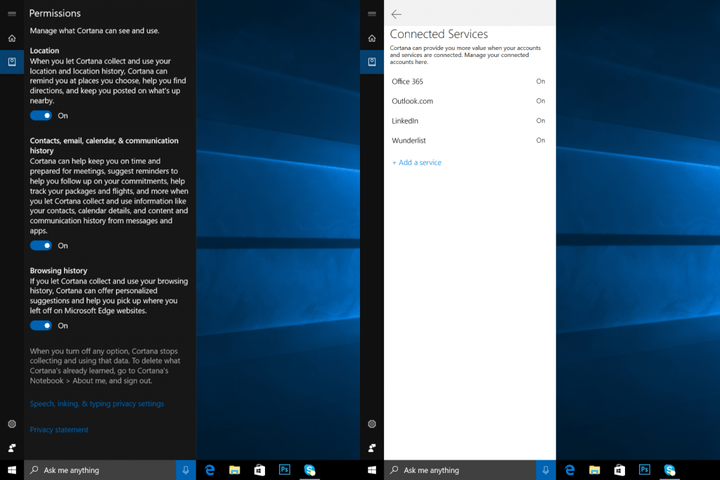
You can test the functionality by sending yourself an email with a commitment, such as “I will bake you a cake on Friday,” and then wait for Cortana to create a reminder. If you use suggested reminders as a Windows Insider, then you will notice that the digital assistant has improved its capabilities and will now do things like link to the email and turn on notifications.
That sandwich may have cost more than you thought — Arby’s hit by malware
Why it matters to you
If you’ve eaten recently at Arby’s, you may want to check your bank statement — some of its outlets’ point-of-sale systems were hacked.
The biggest danger associated with fast food isn’t clogged arteries — apparently, it’s compromised credit card data. On Thursday, security blog KrebsOnSecurity reported that Arby’s had “recently remediated a breach involving malicious software installed on payment card systems at hundreds of its restaurant locations nationwide.” That’s right — if you’ve eaten a roast beef sandwich from the chain recently, you may want to check your credit card statements.
“Arby’s Restaurant Group, Inc. (ARG) was recently provided with information that prompted it to launch an investigation of its payment card systems,” the company said in a written statement provided to KrebsOnSecurity. “Upon learning of the incident, ARG immediately notified law enforcement and enlisted the expertise of leading security experts,” the statement continued. “While the investigation is ongoing, ARG quickly took measures to contain this incident and eradicate the malware from systems at restaurants that were impacted.”
More: The SEC opens an investigation into Yahoo regarding its data breaches
According to Arby’s, malware was placed on payment systems within Arby’s corporate stores, but franchised restaurants were not impacted. About a third of Arby’s 3,300 U.S. stores are corporate-owned, but details have yet to be released around exactly which locations were impacted by the breach.
“Although there are over 1,000 corporate Arby’s restaurants, not all of the corporate restaurants were affected,” Christopher Fuller, Arby’s senior vice president of communications, told KrebsOnSecurity. “But this is the most important point: That we have fully contained and eradicated the malware that was on our point-of-sale systems.”
The fast-food chain has yet to reveal how long the malware remained active on corporate payment systems, though it is estimated that it was effective between October 25, 2016 and January 19, 2017.
So what to be done? While you’re not liable for any fraudulent charges that may hit your credit or debit cards, you’ll still need to be vigilant about reporting these transactions. That means that you’ll have to keep close watch on your statements. We’ll update you with any additional information as it becomes available.
Horse antibodies may offer the perfect — and affordable — cure to Ebola
Why it matters to you
Effective, fast, and affordable, an Ebola cure produced with horse antibodies could be the solution scientists have been searching for.
Scientists have developed a rapid, effective and affordable treatment for the deadly Ebola virus, and the secret ingredient is … horse antibodies?
“We have produced equine antibodies against Ebola virus and have shown that they are effective in preventing death of non-human primates if given 24 hours after a lethal dose of Ebola virus,” Alexander Khromykh, Professor of Molecular Virology at Australia’s University of Queensland, told Digital Trends. “The post-exposure treatment commenced at 24 hours after Ebola infection and was continued daily for five days. This was sufficient to greatly suppress Ebola virus replication in animals and allowed [them] to develop their own immune response, which subsequently cleared the virus.”
According to Khromykh, the closest treatment to the one created by his team are the monoclonal antibodies developed for treating infected medical professionals.
More: The key to stopping Ebola? Using machine learning to track infected bats
The problem with that solution? That manufacturing large quantities of monoclonal antibodies is expensive and requires specialized facilities. That is all well and good in some parts of the world, but less feasible in developing and resource-poor countries. Not coincidentally, these are where the largest outbreaks have been — such as the 2014-2016 outbreak in west Africa, which infected 30,000 people and killed more than 11,000.
The new alternative, however, relies on equine antibody production, which is already in widely manufactured and used to treat things like snake bites.
So when will this be made available to the public? Sadly the answer may be, “don’t be so hasty.”
“We are actively seeking support to generate sufficient material so that our process would be ready to roll as soon as the next Ebola outbreak occurs,” Khromykh said. But he noted that this is not an easy task since the last crisis has ended and “preparedness is not usually high on anyone’s agenda.”
Grab your tripods, a partial lunar eclipse is coming Friday night
Why it matters to you
Friday night and early Saturday morning will be a good time for some night-sky photography — or just plain skywatching.
Friday night will bring not one but three different lunar events that could introduce a few good possibilities for night-sky photography. The moon on February 10 will be both a snow moon and a partial or penumbral lunar eclipse. The closest comet to earth in the past 30 years will also make an appearance early on February 11, though Comet 45P likely won’t be close enough for most telephoto lenses.
The Snow Moon is simply the name of February’s full moon, but the view from many areas will be a bit different. That’s because February 10 will also bring a penumbral lunar eclipse. Unlike a total lunar eclipse, in a penumbral, the moon passes through the lighter portion of Earth’s shadow.
More: How to photograph the moon
The effect, unlike the red or orange of a full lunar eclipse, means the moon will be just a bit darker than a typical full moon. For night-sky photography, that could make it just a bit easier to capture the craters and details in the moon, since overexposing the moon obscures all those details.
The height of the penumbral eclipse will occur at 7:43 p.m. ET on Friday. Most of North America will be able to see the lunar event at moonrise, while areas farthest to the east including Maine will be able to view the entire eclipse as the moon makes its way across the sky. Europe, Asia and Africa are also expected to have a pretty good view, while Australia and Japan aren’t expected to get a glimpse at all. Of course, local weather patterns will also factor in.
Along with the lunar event, the Comet 45P will be one of the closest comets earthlings have seen for a few decades, approaching to about 30 times the distance between the Earth and the Moon. That’s still not likely close enough to allow us to see the comet with the naked eye though, partially due to the brightness of that full moon, which means even a 300mm lens likely isn’t enough to catch a good image of the comet.
The comet has been visible by telescope for the past few weeks, but it comes the closest early Saturday around 3 a.m. — NASA says to look for a green tail near the Hercules constellation in order to sort it from the rest of the sky. (Viewers who don’t have a pair of binoculars or a telescope handy can catch a live-stream).
Best ways to use your Android phone with your PC

Make your Android phone interoperable with your PC.
Getting your Android phone to seamlessly connect to your PC isn’t as daunting as it used to be. There are several services that let you mirror notifications, reply to messages, and sync data between your phone and PC. Here are some of the best options currently available on both platforms.
Pushbullet

Pushbullet is the easiest way to send files between your Android phone to your PC. The app started out as a way to “push” links, files, and documents between devices, but has since evolved into a robust messaging platform. Along with the ability to mirror notifications from your phone onto your PC, Pushbullet lets you view and send text messages from your computer.
Pushbullet also lets you send files and links to your friends. All you need to do is add the email ID your friend used to register for the service, and you’ll be able to share messages, links, and files with ease. Then there’s the Channels feature, which offers notification feeds across categories, including news, sports, gaming, entertainment, and tech.
Pushbullet is available as an extension for Chrome, Firefox, and Opera, and you can download the Android app from the Play Store. The browser extensions let you access most of the functionality that Pushbullet has to offer, but if you want to access files on your computer remotely via your phone, then you need to install the Windows client.
Pushbullet is still the service to beat for notification mirroring and seamless transfer of files.
Using the native Windows client lets you remotely access files on your computer through your phone, and vice versa. Setting it up is easy: all you need to do is enable Remote Files access on both the Windows client and Android app, and you’ll be able to access files on your computer through your phone.
The service is now offered in two tiers — a free option that has most of the features you’re likely to use, and a pro version that costs $4.99 a month or $39.99 yearly that comes with universal copy and paste across all your devices, actionable notifications, and increased storage and file transfer limits. The free tier lets you send files up to 25MB in size and has a storage limit of 2GB, while the paid service lets you transfer files up to 1GB and offers 100GB of storage. You’ll also be able to send unlimited SMS messages on the paid plan, whereas in the free tier you’re limited to 100 per month.
Of all the pro features, the one that stands out is actionable notifications, which lets you reply to WhatsApp, Facebook Messenger, or Allo messages directly from your computer. Regardless of the tier, Pushbullet offers end-to-end encryption using AES-256 for notification mirroring, SMSes, and universal copy and paste.
Pushbullet offers tremendous value, and while its pricing leaves a lot to be desired, the free tier should be adequate for a majority of users interested in transferring files and syncing notifications between devices.
Download Pushbullet (free/$4.99 monthly)
Join

Join is very similar in functionality to Pushbullet, with the service also offering notification mirroring, the ability to reply to notifications from your computer, send and receive texts, share links, files and documents, as well as a universal clipboard. Tasker and Google Assistant integration is baked in as well, letting you extend the functionality of the service.
Join also offers end-to-end encryption, and you can locate your device remotely by making it ring. Join is available as a Chrome extension, a Windows 10 native client, and an Android app.
The main difference is that unlike Pushbullet’s yearly or monthly subscription plans, Join requires a one-time fee of $4.99 to unlock all the features. If you’d like to take a look, Join offers a 30-day trial with all the features enabled.
Download Join (free for 30 days)
Syncthing

Syncthing is similar to Lenovo’s ShareIt in that both services let you transfer files across devices. That’s where the similarities come to an end. Syncthing is a decentralized file sharing service that relies on an open source framework and encryption to secure your data.
With Syncthing, you essentially set up a server, and use it to connect to other devices. For instance, you can run a server on your phone, and connect to the server from your desktop computer to sync files between the two devices. Best of all, Syncthing is a free service, and its interface isn’t riddled with ads. You don’t even have to create a user account with the service, as it relies on unique identifiers for each device. Just enter the ID of the device you want to connect to, and you’ll be able to transfer files between the two with ease.
Download Syncthing (free)
Cloud storage services

Cloud storage services are different from utilities like Syncthing in that they act as centralized repositories of data. You can pick from a multitude of services based on your needs, including the likes of Dropbox, Google Drive, Box, OneDrive, and so on. Each service has a free tier that gives you a certain amount of storage, and you can upgrade your storage quota by paying a monthly or annual fee.
A free Dropbox account comes with 2GB of storage, and Dropbox Pro offers 1TB of storage for $9.99 a month or $99.99 yearly. You get 15GB of free cloud storage with Google Drive, and you can increase your quota to 100GB for $1.99 a month or $19.99 yearly. If you have more storage requirements, you can get 1TB of storage for $9.99 a month or $99.99 yearly.
All services mentioned above have robust native clients for Windows, as well as feature-rich Android versions. If you’re looking for a hassle-free way to sync files across several devices, a public cloud storage service is a good place to start.
Your turn
What service do you rely on to transfer data from your Android device to your computer? Let us know in the comments.
Molson Canadian and Sportsnet bringing 360 VR experience to Hockey Night in Canada
Beer, hockey, and virtual reality — a Canadian dream come true!
Sportsnet and Molson Canadian are teaming up to give Canadian hockey fans a front row seat for six upcoming Hockey Night in Canada broadcasts thanks to the power of virtual reality… and beer!

To check things out you’ll first need the Sportsnet app and a special VR viewer from specially marked cases of Molson Canadian beer. Load up the VR tab in the app, enter the special pin code from your VR viewer, then load up your preferred camera angle, slip your phone in the viewer and you’re good to go!
There are six games on tap for this VR experience, the first an all-Canadian affair against the Calgary Flames and the Vancouver Canucks on February 18th. Here’s the full schedule:
- Calgary Flames @ Vancouver Canucks: Saturday, Feb. 18
- Montreal Canadiens @ Toronto Maple Leafs: Saturday, Feb. 25
- Detroit Red Wings @ Edmonton Oilers: Saturday, Mar. 4
- Calgary Flames @ Winnipeg Jets: Saturday, Mar. 11
- Chicago Blackhawks @ Toronto Maple Leafs: Saturday, Mar. 18
- Ottawa Senators @ Montreal Canadiens: Saturday, Mar. 25
There’s no word whether you need a Rogers subscription to access this content, but you will need to buy a case of Molson Canadian to get pin code — although you have no obligation to drink the beer.
Learn more at Sportsnet.ca
 AIVAnet