


The MacBook Pro’s battery life is better, but it’s still not the best

Read:
Apple MacBook Pro 13-inch with Touch Bar Review
The release of Apple’s latest MacBook Pro line was controversial for several reasons, one of which was the battery. Reducing the laptop’s size apparently forced the company to do the same to the battery. The previous MacBook Pro 13 had a 74.9 watt-hour battery, but the new MacBook Pro 13 with Touch Bar has a much smaller 49.2 watt-hour battery.
That’s still not bad, but it’s less than some competitors like the Dell XPS 13, which has a 60 watt-hour battery. Apple also pairs the battery with a slightly more power-hungry processor. Logically, that would suggest a hit to battery life compared to previous models. Our review showed exactly that.
Apple responded first by disabling battery life estimates in MacOS, a move that the company said was due to the estimate’s lack of reliability. Then in January, Apple responded to a Consumer Reports review that found highly variable battery life. The company said it had discovered a GPU bug that could increase battery draw by failing to turn off the GPU when it’s not needed. Consumer Reports confirmed the fix did extend life, and gave the MacBook Pro line a recommendation afterwards.
A lot has happened since our initial review. We wanted to see if the changes impact our results, now that we’ve updated to MacOS 10.12.3, which Apple says includes the battery-changing bug fix.
How we test
Before we get to the results, let’s go through a tour of our tests.
The Peacekeeper test loops the Peacekeeper web browsing benchmark until the battery dies. On the Mac, we perform this test in Safari. Though this benchmark is defunct as a performance test, we’re not interested in it for that. Instead, we like it because it constantly loops demanding web browser scenarios. We feel it represents the shortest life a user can expect in normal use. You might do something even more demanding — but at that point, you can’t really expect decent battery life.
The Mac simply has less power to work with.
Next up is our video loop. We always use the same 1080p video, a clip from Marvel’s The Avengers, and always use a laptop’s default video player. The clip loops until the battery dies. While you might think video a demanding task, it’s not — even less so then browsing mostly-text websites — and thus represents the maximum life you can expect in normal use.
We’re also careful to calibrate the display to 100 lux with a light meter. This is an important step, because display brightness has a huge effect on battery life. And laptops represent brightness in very different ways. For example, the MacBook Pro seems to handle brightness on a curve. Moving brightness from 80 to 100 percent increases the display’s measured output far more than moving it from 20 to 40 percent.
Finally, we make sure to turn off any sleep, adaptive brightness, and adaptive performance modes which might throw off the results.
And now, the big moment
With the technical details out of the way, let’s talk about our results. It’s time for a bar graph!

Okay then. A bar graph is worth at least half as many words as a picture, so it speaks for itself. Does the latest version of MacOS improve battery life?
Yes, though only somewhat.
We saw a slight improvement of 21 minutes in Peacekeeper. That’s an increase from four hours and 42 minutes, to five hours and three minutes.

That fits with the idea a bug might’ve been squashed, since we run that test in Safari. Or perhaps it’s not the bug at all, but instead some general enhancements. The video loop test, not performed in Safari, saw essentially no change. Our video tests under MacOS 10.12.3 lasted seven minutes less on average than before, which is insignificant.
The extra 21 minutes of endurance is good to have. Adding it means the laptop is now competitive with the Dell XPS 13 with Core i7-7500U processor (though not the Core i5 model, which still lasts an hour longer). It also now defeats the HP Spectre x360, where it’d be a bit behind before. The improvement is enough for us to feel more respect for the MacBook Pro 13’s battery life.
Conclusion
In our review, we described the MacBook Pro 13’s endurance as “adequate.” It might be more fair to describe it as “average.” There’s a chance that the MacBook Pro 13 with Touch Bar will get you through a workday — if you’re not a heavy user. Most people don’t use a laptop on battery for a full eight-hour span.
On the other hand, the new Pro 13’s battery remains decidedly mid-pack, even with the latest full release of MacOS. The Mac’s results are a long way from the worst, but an equally long way from the best. Past Apple laptops soundly defeated Windows competitors in battery life. That’s no longer the case.
Indeed, we don’t expect to see notable improvement from software updates. The life of Apple’s latest laptop is good relative to the size of its battery. MacOS is clearly more efficient than Windows, as the MacBook Pro 13 with Touch Bar is squeezing more life out of each watt-hour than any of its competitors.
The Mac simply has less power to work with. Only so much can be done to get around that disadvantage. We hope the mid-cycle refresh, rumored to bring seventh-generation Intel Core processors, will also add a slightly larger battery. We don’t expect to see the MacBook Pro take back its battery life crown until then, at the soonest.
Gingerbread is officially dead as it loses Google Play Services support
It’s time to throw out the Gingerbread, it’s finally gone stale.
Android Gingerbread and Android Honeycomb are over six years old — in fact, Android Honeycomb turns 7 next week — and they are finally losing support from the Google Play Services framework. Google Developers announced back in November that 10.0 would be the last SDK version to support to support them, and with this week’s Google Play Services 10.2, they have officially been left behind.
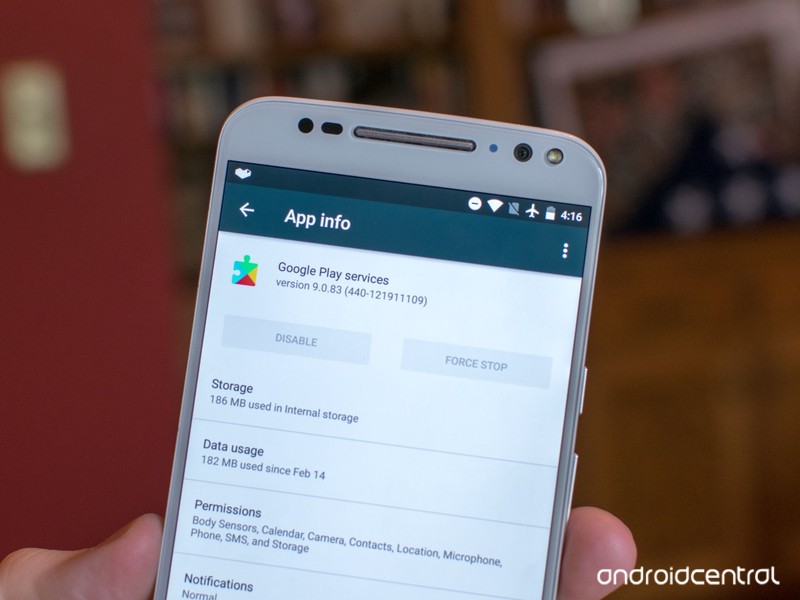
What does this mean?
Well, the apps that Gingerbread users already have will still be there for them, but once developers start using the newest SDK and targeting Ice Cream Sandwich as the minimum API level, developers have to start building multiple APKs for their app in order to support the older devices or drop support for these really, really old versions of Android that is only being used by about 1% of the Android market.
Android Nougat
- Android 7.0 Nougat: Everything you need to know
- Will my phone get Android Nougat?
- Google Pixel + Pixel XL review
- All Android Nougat news
- How to manually update your Nexus or Pixel
- Join the Discussion
Don’t expect to see the app compatibility for Gingerbread drop off a cliff overnight, but as more and more developers migrate to the 10.2 SDK and beyond, you will start to see things dry up over the coming months. And considering that Gingerbread is old enough to be in grade school, it’s time to upgrade to something a little newer.
Sprint’s own pricing chart makes the case for T-Mobile’s unlimited plan
Sprint’s own chart undermines its latest promotion, which shows the real strength of T-Mobile right now.
I’m Canadian; I have no skin in this game. Up here, we pay far more than anyone in the U.S. for far less. In Canada, the closest we come to ‘unlimited’ is bottomless breadsticks at Olive Garden.

We’re now in this strange situation where T-Mobile is setting the tone and pace for the rest of the industry.
Which is why it’s been fascinating watching the disruptive T-Mobile, which has double the subscribers of the entire population of Canada, almost singlehandedly upend the U.S. wireless industry, causing monumental shifts in the way customers use and consume wireless data.
On the one hand, the push to unlimited is a good thing; customers don’t have to think about policing themselves — the vast majority of people can just pick up and use a phone without distinguishing whether it’s on LTE or Wi-Fi. The downside there, though, is that unlimited comes at the expense of additional fine print; while one can technically continue slurping up as much data as he or she wants, after a predetermined amount — between 22GB and 28GB, depending on the carrier — traffic gets “deprioritized.”
T-Mobile began this trend two and a half years ago (simpler times, simpler times) with Music Freedom, which, for Simple Choice customers on particular plans, didn’t count a number of music streaming services towards one’s data bucket. Back then, unlimited was just a glint in T-Mobile’s eye, its network not yet able to keep up with the growing demand of a hungry population. But by the end of 2015, T-Mobile’s network, having launched 700Mhz service and refarmed enough of MetroPCS’s own spectrum, felt ready to move to video, launching Binge On.
In the proceeding months, Binge On was met with enormous amounts of criticism from all sides: net neutrality defenders believed it was contravening the very ideals of treating all internet traffic the same; consumer protection groups like the EFF were upset that T-Mobile was throttling all video traffic, not just services signed up for Binge On; and consumers themselves found the service confusing and difficult to disable. These issues were all addressed in due time, with John Legere himself bearing the brunt of the concern, but in the ensuing 18 months saw T-Mobile steal millions of customers from Verizon, AT&T and Sprint, leading to some of the best metrics we’ve seen from a U.S. carrier in years.

So now we’re in this strange situation where T-Mobile, the third-largest carrier in the U.S., is setting the tone and pace for the rest of the industry, genuinely affecting the bottom lines of the incumbents, AT&T and Verizon. What was a single fly buzzing around making noise just a couple of years ago is now a swarm that the top carriers can no longer ignore.
Which brings us to this chart. Sprint, the embattled fourth carrier, is still making amends for its decision to invest in WiMax all those years ago, and has neither the coverage nor the balance sheet to make a run for T-Mobile. Its latest act of desperation is a salvo worthy of a surrounded army: offer five lines for the cost of two in the hopes that entire families — the true money makers — will switch over. But Sprint’s deal is hobbled by the fact that it’s for new customers only, and that the promotional price will revert to its far more expensive regular cost in just over a year.
This isn’t to say that Sprint’s deal is a bad one; unlike AT&T’s newly-expanded unlimited plan, it does include tethering and HD video streaming, but Sprint’s network is neither as robust nor its devices as transferrable as T-Mobile’s.
At the end of the day, though, unlimited is just another buzzword for a handful of networks that are now technically able to eke sizeable profits without crumbling under the weight of America’s lust for video. And that’s a good thing for everyone.
Which unlimited plan should you buy: T-Mobile, AT&T, Sprint, or Verizon?
Huawei Mate 9 vs. LG V20: As good as it gets

Two completely different phones with very similar outcomes.
I have a problem. See, there are two phones in front of me, and they’re both very good. I’ve literally been switching between them every day to get a sense of their strengths and weaknesses, and have been assiduously noting the differences to get a sense of what a large “phablet” flagship should and shouldn’t do.
These two phones are the Huawei Mate 9, which recently arrived in the U.S., and the LG V20, which debuted at the tail end of 2016. Despite the obvious similarities — they’re both big phones with great specs, etc. — I have been left with a strangely bitter taste in my mouth, as I can’t decide which one I like better.
Specs
| Operating System | Android 7.0 Nougat | Android 7.0 with EMUI 5.0 |
| Display | 5.7-inch IPS Quantum Display2560x1440 (513 ppi)Second Screen 160x1040Gorilla Glass 4 | 5.9-inch 1920×1080 (373ppi) IPS LCD 2.5D glass |
| Processor | Qualcomm Snapdragon 8202.15GHz + 1.6GHz quad-core | Huawei Kirin 960 4x A73 @ 2.4Ghz, 4x A53 @ 1.8Ghz Mali-G71 MP8 GPU i6 co-processor |
| Storage | 64GB | 64GB |
| Expandable | microSD up to 2TB | microSD up to 2TB |
| RAM | 4GB LPDDR4 | 4GB LPDDR4 |
| Rear Cameras | Main: 16MP f/1.8, OISSecond: 8MP f/2.4 wide-angleLaser AF, Phase-detect AF, Contrast AF | 20MP (monochrome) + 12MP (color) f/2.2 OIS |
| Front Camera | 5MP f/1.9 wide-angle | 8MP, f/1.9 |
| Connectivity | Wi-Fi 802.11ac, Bluetooth 4.2LE, USB 2.0, NFC | Wi-Fi 802.11ac, Bluetooth 4.2LE, USB 2.0, NFC |
| Audio | 32-bit Quad DAC | |
| Battery | 3200 mAhRemovable | 4000 mAh Non-removable |
| Charging | USB-CQuick Charge 3.0 | USB-C Huawei proprietary quick charge |
| Water resistance | No | No |
| Security | Rear fingerprint sensor | Rear fingerprint sensor |
| Dimensions | 159.7 x 78.1 x 7.7 mm | 156.9 x 78.9 x 7.9 mm |
| Weight | 173 grams | 190 grams |
Hardware

The differences between these two devices couldn’t be more stark. The LG V20 is taller and narrower, with slightly larger bezels and a more streamlined appearance. It’s not what I would call an attractive phone, but in its quirks there are hints of beauty. The Huawei Mate 9 is far more imposing and, for better or worse, considerably more stately — like an old schooner. Much of that grandiosity is thanks to its 190 gram weight, which is nicely spread through its all-metal chassis. The metal on the Mate 9 feels more substantial — thicker — than the V20, but at the end of the day they’re made of aluminum and glass, and are alike in many ways.
To me, despite the Mate 9 feeling more solid, it’s also more generic.
Perhaps the most interesting design decision on the V20 is the removable back plate which, while metal, still lends the phone a slightly more DIY look and feel. The plate latches with a satisfying click, but on my two units actually getting it to do so takes a bit of finagling. And while removing the rear is not going to be too common — the battery is replaceable, and you need to remove it to get to the SIM card — it’s still a design issue that, over time, may be exacerbated.
Still on the back, both phones have two camera sensors, though the Mate 9’s is arrayed vertically and the V20’s stays horizontal — and as we’ll see later, their purposes are quite different.
To me, despite the Mate 9 feeling more solid, it’s also more generic — the V20 has an awkward style, and I enjoy its dual-toned color scheme a bit more than Huawei’s uniformity. It’s also slightly narrower than then Mate 9, which makes it easier to use with one hand in spite of it being slightly taller. I also prefer a few minor things about the phone: the placement of its volume buttons on the left, separate from the power button (which is on the back in this case); and the headphone jack on the bottom.

The screen on the V20 is also better, not just owing to its higher QHD resolution but its color reproduction and overall calibration, though the Mate 9’s 1080p display is comparable in those areas.
Audio is another area the two phones differ: the V20’s single downward-facing speaker is softer but comparatively full compared to the much-louder but thinner, sibilant profile of the Mate 9. Audio from the V20’s headphone jack is also slightly cleaner — an obvious benefit of the Quad DAC — though I’d have to defer to our resident audiophile for line-out testing.

Obviously, the biggest aesthetic difference between the two phones, at least up front, is the V20’s Second Screen, a sliver of additional screen real estate just above the main display and to the right of the selfie camera. In my time with the V20, I’ve learned to appreciate, if not love, the extra functionality, though in the course of a day I’ll probably only interact with it a handful of times.
The screen on the V20 is also better, not just owing to its higher QHD resolution but its color reproduction and overall calibration.
That it’s there to show notifications and provide quick access to favorite contacts, apps and shortcuts is a nice bonus, but it’s not an essential feature. Instead, the Mate 9’s slimmer bezels allow for a physically larger screen — a 5.9-inch display fits into a smaller space — which many people will prefer. Your mileage may vary.
Software

My brief love affair with Huawei’s EMUI 5.0 didn’t last long. Based on Android 7.0, I came to it immediately after using a Google Pixel for a few weeks, and though there are similarities, Huawei’s tendency to mess with fundamental aspects of Android — like notifications — still grates.
LG, on the other hand, uses a much lighter hand with its changes to Android 7.0 Nougat, and I’ve grown to appreciate most of what the company has tried to do — with one exception. See, I love Huawei’s fingerprint gestures: in particular, the ability to swipe down on the sensor to bring down the notification shade. While there are apps that can imitate this feature for devices like the V20, it doesn’t come close to matching the real-time nature of Huawei’s implementation.
LG uses a much lighter hand with its changes to Android 7.0, and I’ve grown to appreciate most of what the company has tried to do.
Elsewhere, the two are comparable once you overcome their rather luckluster launchers — I really recommend switching to something like Nova Launcher or Action Launcher as soon as possible. They’re not unusably bad, and both have options to enable app drawers (though they’re not on by default), but I increasingly find that even the free versions of the aforementioned third-party alternatives do a lot better.
Performance on both devices is stellar. While the V20 sports a Snapdragon 820 and 4GB of RAM, and the Mate 9 the technically more powerful Kirin 960 and 4GB of RAM, both devices have no problems keeping up with the minutiae of day-to-day work. There is an argument to be made that the Kirin 960 will enjoy greater longevity in terms of performance by virtue of its more powerful GPU — it’s the same one rumored to be in international versions of the Galaxy S8 — but right now it’s a wash.
The reason I continue to prefer the V20’s software is that Huawei makes seemingly-arbitrary changes to the way notifications function on the device. Lock screen notifications, for example, are disabled by default, and you have to go in and enable them individually per app. While our own Jerry Hildenbrand, chief bouncer and head of security for Mobile Nations, loves this idea, I don’t, and think it runs counter to the way Android was built. I also know that I’m not alone in this, since I’ve heard from many Mate 9 owners that the extra step seems unnecessary and awkward. Also awkward is the fact that, by default, EMUI calls out what it considers “power-intensive” applications, something that, again, I believe Android should take care of itself.
Overall, though, I really like the software on both of these phones, and think they represent a more restrained and careful approach to Google’s Android, which I think is best for all OEMs in the long run.
Camera

Both the Mate 9 and V20 have excellent rear cameras — two excellent cameras, to be specific — in distinct formats. The former has a combination of 12MP color and 20MP monochrome sensors in order to eke more detail from shots in addition to facilitating artificial “portrait” bokeh effects, while the latter has a 16MP “regular” shooter and an 8MP wide-angle option for improved landscapes.
Let’s first talk interface. Both LG’s and Huawei’s interfaces are very easy to use and hide a number of powerful modes and features a few swipes or taps away. In particular, Huawei’s use of a slider to access the camera’s manual mode is a thing of brilliance, but I have to say I’m disappointed in the lack of automatic HDR. And while both phones support RAW capture, only the V20 has peaking abilities that I absolutely adore. Peaking is an overlay that shows where in the viewfinder is in focus, and it’s done so well on the V20 it’s like I’m using my Sony RX-100IV.

Huawei’s use of a slider to access the camera’s manual mode is a thing of brilliance.
And while the Mate 9 has so many modes including things like Light Painting and Watermarking, at the end of the day it comes down to photo and video quality, stabilization, audio capture and other fundamentals, and here’s where things get a bit tricky. While the Mate 9 defaults to 12MP shots — the same size as the color sensor — it can capture more detail at 20MP, though the differences are negligible. Colors on the V20 are slightly more saturated, though the Mate 9 uses additional post-processing to make the finished product more contrasty.


Huawei Mate 9 (left) | LG V20 (right)


I capture amazing photos with both phones’ rear cameras, especially in daylight. While the Mate 9’s main 12MP sensor has comparatively larger individual pixels, the V20 has a wider f/1.8 aperture, which lets in more light in darker situations. The V20 wins here, hands down: while it’s possible to eke a decent low-light shot from the Mate 9, more often than not it comes out blurry, grainy and unpleasant. At the same time, the V20’s secondary wide-angle sensor is more useful, at least for me, than the Mate 9’s artificial-looking background blur, which operates from a farcical f/0.95 all the way up to f/16.
On the video side, the V20 has a distinct advantage: this thing was built to capture great video. The company made a huge splash about the camera’s excellent manual video controls, and they bear fruit here: the footage is even and smooth, and the controls are easy to use, though powerful once mastered. Audio capture, too, is superior on the LG phone, and can be adjusted in real time.
Battery

If the V20 wins in the camera department, the Mate 9 wipes the floor with LG in the battery department. Despite the 25% larger cell — 4000mAh to the V20’s 3200mAh — battery life is often double on the Mate 9, with a day and a half of near-constant usage (in between sleep, of course), compared to just under 16 hours on the V20.
Yes, it’s great that the V20 has a removable battery, but like most people I would prefer a larger enclosed cell — and it appears that from the LG G6 rumors, the South Korean company agrees.
Which should you buy? Either one

I love both of these phones. This is the first comparison I’ve done that has been difficult for me to come up with an outright winner. On one hand, the V20 is, in opinion, better and more originally designed, with a superior camera experience and more thoroughly-regarded software. But the Mate 9 is more robust, with a superior fingerprint sensor, better daylight photos and significantly better battery life.
See Huawei Mate 9 at Jet
Here’s the thing about the Mate 9: it’s not available on any U.S. carriers, so you’re forced to buy it outright for $599. That’s actually much cheaper than the $700-ish V20, but you can find LG’s flagship at any of the four major U.S. carriers, and unlocked at places like B&H — though at a much less palatable $799.
See at LG V20 at B&H Photo Video
GIF your way through American Sign Language with Giphy
Gifs — they’re for more than reactions and shade.
As a millennial, I tend to punctuate a lot of my tweets and personal communication with gifs. I often turn to Giphy when I need to say something with a short repeating video, and with their latest featured collection, I can say things in a new language with it — American Sign Language. Giphy has teamed with Sign With Robert to help teach people ASL using the power of repetitive, silent video.
That’s right, we can learn with gifs now.

Sign With Robert’s director/producer Hilari Scarl told Mashable that “GIFs, as a visual format untethered from audio, makes them a perfect medium for sign language.” Giphy reached out to Sign With Robert while looking for ways to help educate using gifs, and ASL gifs seems like a no-brainer, and one that can help thousands learn at least a little ASL.
If you think this sounds like nothing but a novelty, consider that there are first responders, medical professionals, and civil servants who could benefit themselves and their communities by being able to recognize some basic signs like “allergic” or “fire extinguisher”. In fact, we could all benefit from recognizing a few of these, so head over to Giphy’s gallery and try to memorize a few. And if you work in an area where sign language could help your job, consider taking advantage of Giphy’s download functions to save some on your phone for easy access.
How Nanab and Pinap berries in Pokémon Gen 2 will improve your game

With the new update Pokémon Go will add Pinap and Nanab berries to buffs you can use while capturing Pokémon.
Just when you thought the hype over Pokémon Go had cooled down to a simmer, Niantic announced a huge new update. To help you capture the 80 new species of Pokémon being added to the game, there is the addition of two new types of berries; Pinap and Nanab.
Nanab berries

The Nanab Berry isn’t here to replace your Razzberries, instead it’s going to help you to become even more effective when trying to catch Pokémon. Especially if you are dealing with a particularly shy Pokémon that is prone to running away — Abra, we’re looking at you little buddy! The Ninab berry looks like a banana, but it’s no joke.
Each time that you throw a Ninab Berry at a Pokémon you are attempting to capture it will slow it down. This means it will take them much longer to dodge, making them much easier to hit and capture. That also makes it extra handy when used in conjunction with the Razzberry, since you can slow down a Pokémon to capture him, and then ensure he has one heck of a time escaping your clutches.
Pinap Berries

Pinap Berries look like a Pineapple, but unlike Razzberries or Nanab Berries, it won’t aid you in capturing a new Pokémon. Instead, it will ensure that you get the biggest perk possible once you eventually capture that pocket monster. Each time you use a Pinap Berry and then successfully catch a Pokémon you will receive double candy for your efforts.
While that might not seem like much for some Pokémon, it does mean that gathering up enough candy to finally evolve your Magikarp to a Gyarados. Likewise, that may mean you want to hold onto your Pinap Berries until you come across a rare Pokémon, or one that is just a few candies off from evolution in order to maximize the benefits of the candy.
Pokémon Go
- Pokémon Go Game Guide!
- Pokémon Go Gen 2 FAQ
- Pokémon Go tips and tricks
- How to deal with GPS errors in-game
- How to play without killing your battery
- Join our Pokémon Go forums!
Plug in to your Gear VR and nothing happens? Here’s what to do next!

If Oculus isn’t launching when you plug your phone into Gear VR there might be a serious problem.
Usually jumping into your Gear VR is as easy as plugging your phone in, and putting on your headset. However, if when you plug your phone into Gear VR, and nothing happens, then you definitely have a problem.
Before you panic, there are two causes for this issue, and we have the details on what to do.
Read more at VRHeads.com
Congressman requests investigation on Trump’s old Android phone
With reports that President Donald Trump is still relying on his old, unsecured Galaxy S3, even as he’s one of the most visible hacking targets in the world, Congressman Ted Lieu (D-CA) has proposed a House investigation into the new administration’s lackluster security habits. In particular, he wants to know if Trump is actively using the Android phone (which seems to be the case, based on some of his most recent Tweets). But Lieu also calls Trump to task for basic national security gaffes, like discussing nuclear strategy at his Mar-A-Lago club in plain view of guests, and without restricting nearby devices.
“Cybersecurity experts universally agree that an ordinary Android phone, which the President is reportedly using despite repeated warnings from the Secret Service, can be easily hacked,” Lieu wrote in the letter, which was also signed by 14 other Congressional members. “The device President Trump insists on using — most likely the Samsung Galaxy S3 — has particularly well-documented vulnerabilities. The use of an unsecured phone risks the President of the United States being monitored by foreign or domestic adversaries many of whom would be happy to hijack the President’s prized Twitter account causing disastrous consequences for global stability.”
Additionally, Lieu wants to investigate the new administration’s use of insecure email accounts (something Trump loved to criticize when it concerned Hillary Clinton), which is particularly disturbing in the wake of Russia’s widespread election hacks. Lieu is no stranger to cybersecurity issues — last year he called for an investigation into the SS7 security flaw, which could be used to track your movements and record phone calls and nearby audio.
Source: House of Representatives
ZTE cancels ill-fated Kickstarter to focus on a better phone
ZTE’s plans to crowdsource ideas for its next mobile device has been a mostly smooth-sailing journey. But the company’s efforts to make the eye-detecting phone a reality has been far less successful. After feedback from its underwhelming Kickstarter campaign indicated that people were expecting better specs from the device, ZTE is canceling the crowdfunding project and going back to the drawing board.
That’s not to say the project is scrapped altogether. The Kickstarter is being cancelled so that backers who’ve already paid for early bird versions of the phone can get refunds.
The company’s vice president of technology and planning Jeff Yee told Engadget that people still seem to be interested in the device’s main features, and that ZTE is still hoping to release something this year. The concept phone, dubbed Hawkeye, is supposed to support eye-detection and have an adhesive frame to allow for hands-free use. Back at CES 2017 when we first saw prototypes of Hawkeye, the rest of its specs were mostly undecided. After the details were listed on the subsequent Kickstarter campaign, however, the public was unimpressed by the midrange list of components, including a Snapdragon 625 processor and 3GB of RAM.
Yee told Engadget that the decision to use midrange specs was to make the phone more accessible to a wider audience. Indeed, at a $199 early bird price on Kickstarter, Hawkeye was already one of the more affordable smartphones on the market.
Now that he’s gotten better feedback on what consumers want, though, Yee says Hawkeye will more likely come with flagship specs. “It has to be at least Snapdragon 820, if not 835, as a baseline,” he said. The company also ran more polls to get more details on what other features people expect.

Given this hiccup, it’s not clear if ZTE will meet its initial goal of launching Hawkeye this year. The project was initially on track, but this episode has cost the company four months, as it has to go back to the design phase. “We didn’t expect a twist,” said Yee. “This is maybe not exactly what we wanted at this stage, but we are able to swallow our pride and recognize that the specs that we listed were not exactly what the community wanted,” he added.
The company is now “trying to figure out a sweet spot that the majority can agree on,” according to Yee, and got more specific about its means of getting feedback from commenters online. The delay now means that some parts of the crowdsourcing process, such as getting public input on the Hawkeye logo and software experience, might no longer happen. The good news, though, is that ZTE appears to have learned a lesson, and its ability to acknowledge its mistakes in a timely manner is laudable.
The Female Governors’ Summit aims to get more girls into tech
Jobs in computer science and engineering aren’t just highly lucrative — they’re also crucial for national innovation. With that in mind, Oklahoma’s Governor Mary Fallin, Rhode Island’s Governor Gina Raimondo and Iowa’s Lieutenant Governor Kim Reynolds are set to meet with Girls Who Code, Facebook and the consulting firm Deloitte today at the first Female Governor’s Summit. Their big plan? To try and figure out how to get more girls excited about — and jumping into — computer science.
“I am thrilled to welcome leaders from across the country to work together on a critical issue that will affect an entire generation of young girls,” said Facebook COO Sheryl Sandberg said in a statement. “Women remain dramatically underrepresented in technology fields. They’re missing out on opportunities and the world is missing out on their ideas. We need to harness the full talents of our population and this summit is proof that our female governors are committed to addressing and closing the gap.”
While there’s still some debate as to whether a so-called “STEM surplus” exists, it’s hard to deny that we’ll need more people to flesh out an increasingly information-heavy economy. Consider these figures from the US Bureau of Labor Statistics: between 2014 and 2024, it expects to see employment in computer occupations to grow by about 12.5 percent. That works out to something like half a million new jobs being created over the next few years, not to mention about a million job openings over the same ten year span as a result of people leaving their gigs. New research from Girls Who Code and Accenture suggests women only hold about 24 percent of technology jobs out there, so the task of filling those (probably crucial) future roles will only be helped by efforts like this to close the tech gender gap.
There’s no telling how long it’ll take to fully close that gap, but we could get close soon. GWC points to a new approach in which efforts to popularize STEM and computing would start in earnest with current junior high girls and continue throughout their education careers. Optimistically, that could nearly triple the number of women working in tech between now and 2025, and events like today’s can only help. Fascinated? You can catch a livestream of the meeting here, starting at 10AM Pacific/1PM Eastern.
 AIVAnet