


Samsung is starting its 5G tests in London alongside Arqiva
Why it matters to you
We’ve been stuck on 4G LTE for what feels like an eternity, and now, 5G could be coming to London thanks to Samsung and Arqiva tests
The future is coming fast for the U.K. According to the latest reports, Samsung and telecommunications firm Arqiva will be debuting 5G mobile internet to the U.K. in the second half of this year. A partnership between these two companies will bring 5G trials to central London in hopes of determining whether this technology could replace fiber optic broadband beginning in 2020.
The hope, IBTimes reports, is to determine the feasibility of a future “where residential and commercial properties connect to a super-fast internet connection wirelessly over 5G, as smartphones do with 4G today.” Today, most of these connections are made through a fixed fiber optic cable. Not only is this a slower option, but it also requires significant time and resources to install new cables as businesses and populations grow. But with 5G, homes and businesses could simply buy a router and get online.
More: Trends with Benefits: 5G may allow you to cord cut everything & home exoskeletons are becoming a reality
“5G will be a crucial pillar of the U.K.’s economy in the 2020s. The smarter network infrastructure and an enhanced ability to support exponential scale for connectivity will open the doors to further applications across a variety of markets such internet-of-things, industrial applications, and the full promise of autonomous vehicles,” Arqiva chief executive Simon Beresford-Wylie told IBTimes.
So why are these tests being conducted in the U.K.? According to Thomas Riedel, head of Samsung Networks Europe, “There is so much opportunity in the region due to the diversity of markets and services already in place here, and we think the U.K. is a prime candidate to show off the benefits that 5G can bring to consumers here.”
The nation itself is also investing plenty of capital in connectivity. As Karen Bradley, the culture secretary, noted, “The government wants the U.K. to be a world leader in 5G and we’re already laying the foundations for a successful launch. We are investing [$1.25 billion] to boost the U.K.’s digital infrastructure and support 5G trials, and will shortly be publishing our 5G strategy.”
How to clean your PlayStation 4 console

Keeping your console clean is mandatory for the best gaming experience!
Your PlayStation 4 is a behemoth when it comes to delivering awesome games, movies, and even VR content. However, you may start to notice some slow down if you let dust build up over time, and nobody wants that. To keep your console running as efficiently as possible, you definitely need to keep it clean. Thankfully this is an easy task that should only take about 10 minutes of your time.
Compressed Air

The first thing that you want to do while cleaning your system is to go ahead and grab a can of compressed air. Your PlayStation 4 is covered with vents located at the front, sides, and back of the system, and these have a tendency to get absolutely covered in dust. To take care of this all that you need to do is go ahead and point the nozzle of the can at those vents, and then spray in short measured bursts. You ought to see the dust clear out of all the vents very quickly, and since PlayStation 4 consoles are black it’s easy to see where the dust has evacuated the system.
Now when you’re using compressed air you want to keep the nozzle a fair few inches away from the system so that the dust can escape properly. Likewise, you want to ensure that you hit all the vents on the system so you don’t miss built up dust somewhere. By cleaning out all of the vents, you’re ensuring the system is able to expel excess heat which helps reduce strain on the internal components.
PS4 in need of a good dusting? You can order a two-pack of compressed air via Amazon.
See at Amazon
Microfiber Cloth
Now if your system frequently turns gray with dust, you might be tempted to hit it with a wet wipe of some kind. Do not, we repeat, do not do that. You never want to introduce any kind of moisture to the system. Instead what you’ll want to use is a microfiber cloth. Using the cloth you’ll want to wipe the entire system down. This includes the top, sides, front, and back. Depending on how you have your console set up, wiping down the bottom isn’t a bad call either. Depending on how much dust you are dealing with you may need to clean the cloth off a few times, but the shiny black of a clean console is very easy to differentiate. You can stock up on microfibre clothes for cheap with this Amazon Basics 24-pack.
See at Amazon
Cleaning your Dualshock 4 controllers

Much like your system, if your controllers sit on a rack all day long they are going to accumulate dust. All that you need to do is go ahead and use a cleaning cloth to wipe down the controller. While wet wipes are still a general no-no, they can be used on the controller so long as you are avoiding the headphone jack, and charge port. When wiping down the controller you’ll want to pay special attention to all of the buttons, the analog sticks, and the light bar at the back of the controller.
Specifically, you want to ensure theres no dust or grime blocking that light bar, especially if you are playing PlayStation VR games, since the camera needs to be able to properly see that light bar. Likewise, nobody wants to use a controller with sticky buttons caused by dust or debris. If that’s exactly what you’re dealing with, your best bet is to turn off the controller and then use a wet wipe to clean away the dust and grime. This can also be particularly handy for those times when you can’t actually see what is causing a button of analog stick to get stuck. Just ensure that the controller has plenty of time to dry out before use, and limit the amount of moisture as much as possible to avoid damage.
Cleaning your PlayStation Move controllers
The first thing that you want to do is pick your compressed air back up. With controlled bursts, spray all of the ports and crevices on the controller to make sure there isn’t any dust hiding in a sneaky spot. From there, all you need to do is go ahead and wipe down the rest of the controller with a microfiber cloth. If there is any sticky residue, use a slightly damp paper towel or wet wipe while avoiding all ports.
If you have a pair of Move controller that you want to bust out, but that are particularly dusty, there are a few things to remember. The PlayStation camera reads Move controllers by tracking the lights in the bulb of each controller, so you want to ensure that they are as clean of dust and debris as possible. Likewise, cleaning out the ports, and around the button ensures that you won’t get distracted while playing a game.
Tips

It’s basically impossible to keep your system entirely clear of dust, but there are a few things that you can do to help minimize the amount of dust or debris you need to clean. Just keep in mind that the PlayStation 4 console is essentially a dust magnet thanks to that shiny black exterior.
- Keep it away from pets: If you have dogs or cats, try to keep the console as far from the floor as possible so that animal hair isn’t getting stuck on your system.
- Avoid glass entertainment centers: Glass already has a tendency to attract dust, so if you set up your PS4 on a glass entertainment center you can expect your system to need a good cleaning about once a week or so. You can set your system in vertical orientation or invest in a dust cover to help keep the dust to a minimum.
- Don’t smoke in the house: Cigarette smoke causes faster dirt accumulation, and this definitely includes your console.
Conclusion

PlayStation 4 consoles are going to get dirty; it doesn’t matter if they are sitting up on a shelf or hanging out on the entertainment center. What matters is knowing how to properly clean it up and get it back up and running in tip-top shape after it’s gone gray with dust. Armed with just a microfiber cloth and some compressed air, you can easily dispatch the army of dust bunnies that has taken up residence on your console and its controllers. Do you have a particular tip for cleaning your system? Is there something we missed? Be sure to drop us a comment below and tell us about it!
The downsides to using an ‘alternative’ carrier
Beware of things that seem great “for the price”.

The company that provides your cellular service has a single goal in mind — to make money. Achieving that goal in 2017 means offering features you want at a price you are willing to pay, and guaranteeing a certain quality level to that service. Some of us pay more for that guarantee, or more for an increased capacity to enjoy wireless service, but for the most part the US cellular market is fairly static. Those of us paying close attention to relatively small changes in service get excited by the theater of competitive marketing, but overall the “big four” have been mostly the same for years.
This is why there are frequently pockets of excitement surrounding “alternative” carriers. Sometimes we call them pre-paid providers, sometimes we call them MVNOs, but they’re all basically the same thing. These alternatives are exercises in securing users willing to sacrifice features for a lower monthly rate, but in recent years the marketing around these companies has become so good it’s often difficult to see what features you are losing.
How these ‘alternatives’ work

When land line telephones were in their infancy, service providers would sell more lines than they could support in an area. It was highly unlikely that everyone would pick up the phone at the same time to make a call, so there was always part of the network left unused. In selling a fraction of those unused lines, the phone company could make more money without expanding service.
Just like everything else, read the fine print first.
A similar technique is used in the cellular world today. Many people pay the “big four” for more than they actually use, either as a way of ensuring there’s never a surprise overage fee at the end of the month or because a lower alternative isn’t available. This means there’s a portion of the network almost never being used, even when selling over the theoretical capacity. This leftover network is sold as a bulk service to a Mobile Virtual Network Operator (MVNO for short) which turns around and sells this service just a hair above the cost of the bulk rate offered by the carrier.
The benefit to users is clear. It’s a noticeably cheaper cellular service that can claim to be “just as good” most of the time, and for people on strict budgets or those who view cellular service as a luxury it’s a good way to save money. This smaller company makes a reasonable profit from reselling leftover network, and the host company makes a reasonable profit with almost no additional work on its end. Everyone wins, at least in theory.
What you sacrifice for that lower rate

There’s gotta be a catch, right? There’s always a catch. With MVNOs, the catch is all in the quality of service. That can mean a couple of different things, and each of them are important to consider when choosing whether it’s actually worth it to spend less.
For starters, the service you get from an MVNO is never “just as good” as the host service. The alternative option will almost always be slightly slower when using the 4G LTE, and in many cases the performance difference is more than just a 1-2mbps difference. The host carrier will always prioritize the service of their regular customers over the other users on the network, because they’re paying for the privilege.
The prioritization also happens when the network is completely saturated, which doesn’t happen terribly often in most places. Your cellular network is usually only fully loaded when a tremendous amount of people in a single unplanned place start using their phone all at once. For example, if a natural disaster occurs and suddenly everyone is making calls and broadcasting video streams all at once, the host network is designed to ensure its primary customers have service no matter what. The same can not be said of your average MVNO. In fact, most of these budget service providers include this clause in the Terms of Service:
WE MAY LIMIT, THROTTLE, SUSPEND OR TERMINATE YOUR SERVICE OR AGREEMENT WITHOUT NOTICE AT ANY TIME AND FOR ANY REASON
For anyone using cell service as their one and only phone line, that kind of planned instability invites catastrophe. But the specter of what might happen isn’t as concerning as not being able to hold the company responsible for failing to deliver the service promised in the advertising. If you call Verizon Wireless after an outage, you can ask for a credit for the time you were not able to use your service. If you call an MVNO and ask for the same, you will frequently be reminded of the section of Terms and Conditions that reads:
You agree we are not liable for problems relating to Service availability or quality.
Which brings us to the final problem with ‘alternative’ carriers — good old fashioned customer service. The whole point of an MVNO is to be able to offer you discounted service because the operating costs are much lower, and that includes customer service. The “big four” are available to you 24/7/365, usually through phone and email and even text chat on each of the websites. In some cases, you can even get support through Twitter and Facebook. You won’t find the same level of support through an alternative carrier, because it’s expensive to offer that level of support all the time.
Budget carriers can be expensive in other ways

As long as you know what you’re getting into when you sign up for service, there’s nothing wrong with saving money by going with a cheaper service provider. There are plenty of perfectly valid reasons to need or want to save money on your phone bill, and many of these alternative carriers offer that ability to save as the primary feature.
Just like everything else, read the fine print first. You always give up something when switching from a company that manages its own network to a company that resells a product as its own, and in most cases the cheaper you go the more you give up. If you’re using that service as your only way to communicate with the rest of the world, giving up the guarantee that you’ll even have service when you need it can be a real hassle.
Access geo-restricted content from anywhere with this lifetime subscription for just $39
Ever go to watch a show or stream music only to find out that it isn’t available where you live? There is nothing worse, right? Whether it is something on HBO that you want to check out, or some music you want to stream on Pandora, not being able to access it because it is only available in a different country is completely annoying. There are ways around it, but some are difficult, and others are expensive. It doesn’t have to be this way though!
Get a lifetime subscription now! Learn More
Meet Unblock All, one of the easiest ways to access geo-restricted services from anywhere. Whether the Netflix content you want isn’t available by you, or Pandora isn’t accessible, with Unblock All you’ll be able to gain access. You can change your location from Canada to the UK, or Australia to the U.S. all with just one click.

Some of the other features include:
- Access blocked content from anywhere in the world
- Change your location to the US, Canada, UK, or Australia w/ one click
- Browse faster than w/ a VPN or Proxy thanks to no traffic limits & equal security
- Use on an unlimited amount of devices
Save 81% right now! Learn More
Normally a lifetime license to the service would run around $215, but right now you can pay much less than that. For just $39 you can get the lifetime of access, or if you just want to check it out for a year, you can for only $19. If you want to access content that isn’t normally available in your area, you’ll want to check out Unblock All now!
WhatsApp now has 200 million users in India

WhatsApp has conquered the Indian messaging market.
WhatsApp usage is ubiquitous in India, and the latest numbers back it up. The Facebook-owned messaging platform has crossed 200 million users from the subcontinent, a drastic uptick from the 160 million it boasted just three months ago.
WhatsApp co-founder Brian Acton is in the country to meet with IT Minister Ravi Shankar Prasad to discuss the platform’s role in commercial messaging and digital payments solutions. With the recent demonetisation drive, customers have flocked to mobile wallets, with local services integrating with WhatsApp to facilitate money transfers through the messaging platform:
India is a very important country to us, and we’re proud to have 200 million people who use WhatsApp to connect with their friends, family and communities. We build every WhatsApp feature to be simple, reliable, and secure, and this vision is in line with what Digital India promises to achieve.
We will continue to invest so we can help more people across India, and we hope to contribute more to India’s vision for digital commerce in the future.
Views on #DigitalIndia by Brian Acton, Co-founder of @WhatsApp . pic.twitter.com/OaIqqfo97A
— Ravi Shankar Prasad (@rsprasad) February 24, 2017
Given WhatsApp’s availability on all mobile platforms and its ability to work on slow internet connections, it’s unlikely that there will be a rival service that will dethrone the messaging app in India anytime soon. With the service adding voice and video calls and the ability to post ephemeral status updates, it is slowly turning into an all-in-one communications platform, and an indispensable one at that.
Nintendo Switch Protip — Get discounts on game pre-orders!
Save yourself some cash and plan out your Nintendo Switch games.

Not everyone likes pre-ordering games, especially launch games for a new console. Many people wait for game reviews to decide whether they want to participate in the excitement, and those aren’t always available as the first wave of games come out for a new console.
If you’re already planning to get a Nintendo Switch, and you know you’re going to want at least one or two of the games, you should pre-order those games now. Even if you aren’t planning on getting the console the day it is available to everyone, pre-ordering Nintendo Switch games will save you a considerable amount of money.
Amazon pre-orders

Did you know everyone with an Amazon Prime subscription gets 20% off the cost of a game when you pre-order through Amazon? It’s a feature Amazon has offered for a while now, but it’s not something you see on the site unless you go to a specific game and look at the final price.
Under the listed price of the game, you’ll see a Prime Savings flag. That tells you the price at checkout, which is 20% lower than the listed price. For Nintendo Switch games, it means the $59.96 price tag is lowered to $47.99.
Even if you don’t think that’s a huge savings for a single game, when you add up the savings across the new Legend of Zelda, Mario Kart 8 Deluxe, Splatoon 2, and that crazy new ARMS punching game you almost have a free game in savings!
Best Buy Gamers Club Unlocked

The gaming service at Best Buy has offered exclusive rewards certificates and points towards discounts from every purchase for a while now, but the $30 every two years upgrade to that service quickly pays for itself when a new console is launched.
The Gamers Club Unlocked subscription gives you 20% off pre-orders for any games, 20% off the e-guides for those games, and a 10% increase on your trade-in value if you decide you’re done with the games you currently have.
Best Buy includes a sign-up form on its website, and if you’ve never had an Unlocked subscription before you get special coupons towards your first purchase as a thanks you for joining. Not only is this great for your wallet now, but the points you earn on purchases can be used to take the price down on your next console as well!
How to enable VR for Elite: Dangerous
Are you ready to sit in your favorite ship?

One of the greatest things about Elite: Dangerous is the ability to set your own pace and theme. If you want to wander around and explore the stars, occasionally delivering packages to pay for upgrades to your ship, you can do that with no problem. If you want to fly around and show everyone just how great a bounty hunter you are, leaving wrecked ships in your wake as you sail, you have everything you need. As the player, you get to choose your experience, which is awesome.
You also have some control over the level of immersion you have in the game. You can play on a laptop in a coffee shop with a gamepad, at a wide screen desktop with flight sticks, or dive fully into a VR rig and have everything move with your head. Here’s a quick guide on how to enable that last part!
Read more at VR Heads!
How to accessorize your Black Onyx Galaxy S7
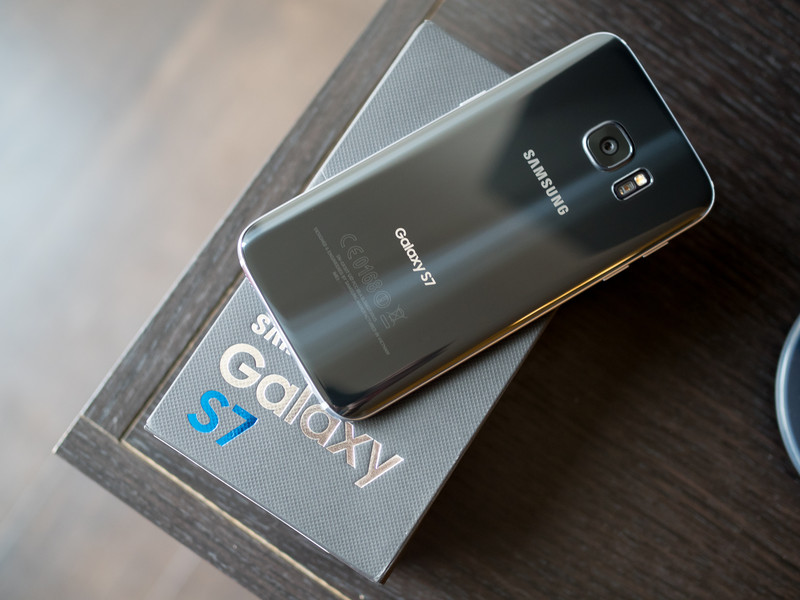
Black is always in style.
The Samsung Galaxy S7 looks absolutely gorgeous in black. Like really good. So good, you may want to make sure that all your accessories for it match.
So we’ve collected our favorite accessories that’ll not only look smashing alongside your black Galaxy S7 but also add a ton of added functionality for your phone. Let’s dive right in!
- Samsung Gear VR
- Samsung Wireless Charging Pack
- Samsung S-View Flip Case
- Spigen Style Ring (black)
- Samsung Fast Charge Wireless Charging Stand
Samsung Gear VR
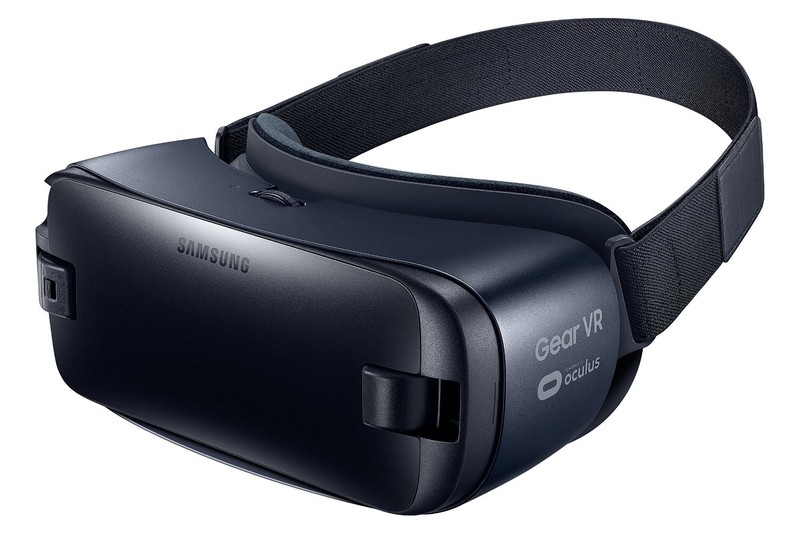
While the best VR experience is still to be had with the HTC Vive or Oculus Rift, Samsung is arguably leading the mobile VR sector with the Samsung Gear VR. This updated headset is designed to work with the Samsung Galaxy S7 along with USB-C devices such as the now-defunct Note 7. The 2016 edition is all-black, which fits perfectly with accessories that match your black S7.
Virtual Reality is an entirely subjective experience, and it’s possible that VR is just not your bag. But if you’ve got the itch to dive right in and see what VR has to offer, the Samsung Gear VR is a great entry point. Available for well under $100, it’s the best value for VR you’ll find. And make sure to check in with our pals over at VRHeads.com, who have a growing list of the best games for the Samsung Gear VR. You’re definitely going to want to invest in a few games to show this thing off to friends and family.
See at Amazon
Samsung Wireless Charging Pack
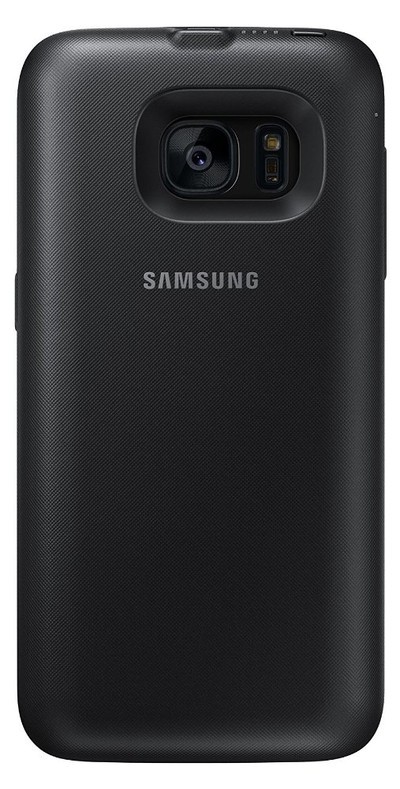
There are a number of great external battery packs that’ll work great with your Samsung Galaxy S7, but carrying around a separate accessory and cable to keep your phone charged is cumbersome.
The Samsung Wireless Charging Pack is a case that not only offers basic protection from your phone from drops but will also help keep your battery topped up throughout the day with an extra 3,100mAh of extra power available via wireless charging, which also leaves your ports at the bottom of the phone completely open. Buying a battery case can be tricky because they often add a ton of extra bulk to your phone. That’s not an issue here, as Samsung has designed perhaps the slimmest battery pack you’ll find. It’s also available in black, of course.
See at Amazon
Samsung S-View Flip Case
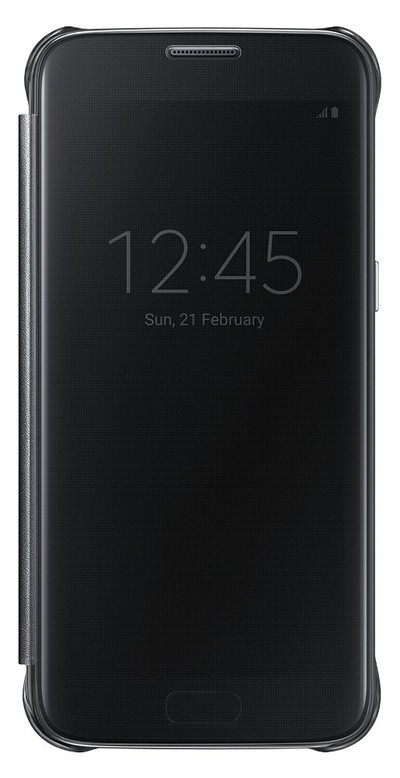
When it comes to cases for your phone, you got options — like a ton of great case options depending on your needs. But in keeping with our theme of accessorizing your black Galaxy S7, we got to give the nod to this proprietary case from Samsung that offers a bunch of added functionality that will keep your phone protected yet accessible at all times.
Using the Samsung ID chip, your phone knows when the case is closed and will display specific information that can be viewed through the frosted front of the case and will allow you to interact with the phone through it. This lets you cool things like answer calls without having to flip the front cover open. Your phone snaps in quick and easy into the hard plastic back plate, which also features extra protection in the corners — a particularly vulnerable area for your phone to fall. You can get yours in black to match your phone.
See at Amazon
Spigen Style Ring (black)
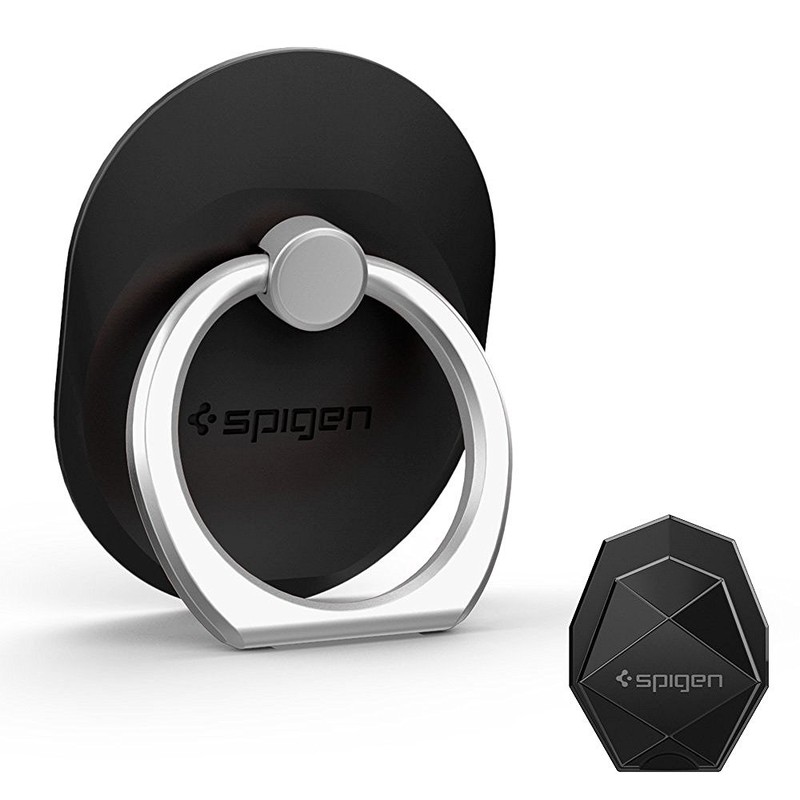
This one is always a somewhat contentious accessory pick because not everyone is down with adding a mounted hook on the back of your expensive phone. We get that. But, the Spigen Style Ring is seriously one of those accessories that will not only grow on you with time, you’ll absolutely come to rely on the added functionality it provides.
It works as a kickstand for hands-free viewing, includes a very handy mount to install in your car for hands-free calls and directions as you drive, and also comes in real handy when inserting and removing your phone from your Samsung Gear VR. It comes available in multiple different colors and is fairly painless to remove without leaving any marks or residue on the back of your phone. It will impede with some NFC functionality and wireless charging, so if those are important features for you, then you’re best off slapping it on the back of a case instead. It’s just a super versatile accessory that seems unconventional at first but becomes essential in short time.
See at Amazon
Samsung Wireless Charging Pad
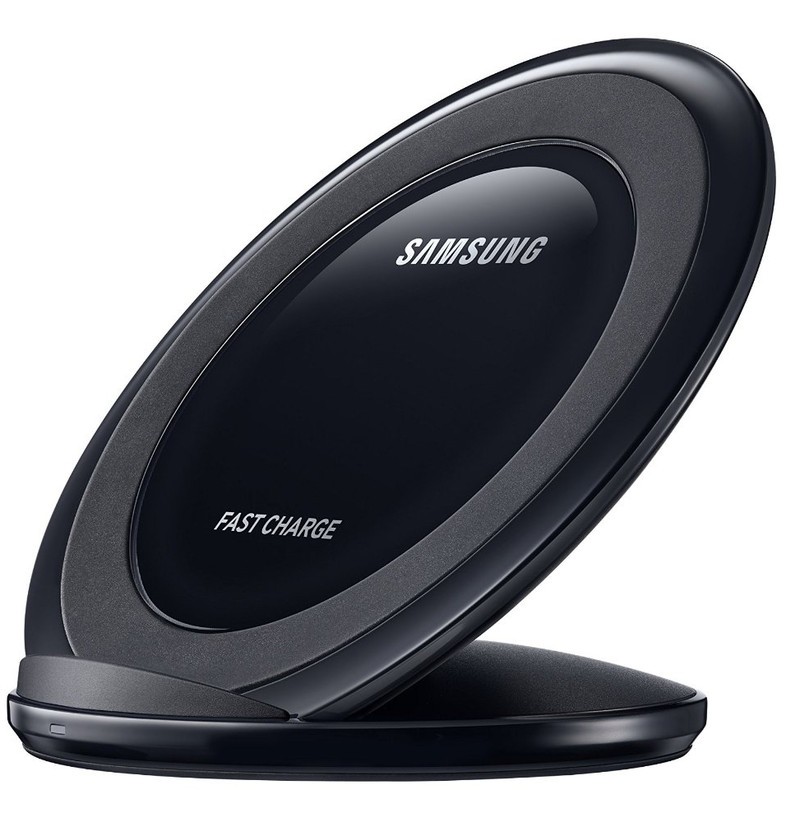
This wireless charging pad from Samsung is a great accessory for your black Galaxy S7 for a number of reasons; it’ll charge your phone faster than any other QI wireless charging pad, you don’t need to worry about plugging or unplugging your phone at your desk and, perhaps most important of all, it lets you show off your beautiful phone to all your office mates.
This is an upgrade over Samsung’s older wireless charging pad, which laid flat on your desk. Having your phone tilted up at a 45-degree angle lets you easily keep tabs on notifications and incoming calls while offering a bigger charging surface and a grippier rubber surface to keep your phone in place. AC’s Andrew Martonik summed it up quite well in his official review:
“Combine the easier positioning with the subtle improvements in the charging status LED, while also keeping the same fast wireless charging tech inside, and this is quite easily the best wireless charger that Samsung has ever made.”
See at Amazon
Pick up an unlocked Moto Z at Best Buy for just $449 today only!
Our friends at Thrifter are back with another great deal, this time saving you $250 on a Moto Z at Best Buy!
Best Buy’s Deal of the Day scores you an unlocked Moto Z for just $449, which is a savings of $250 from the regular price. This brings it down to the same price you’d normally pay for a Moto Z Play, but allows you to grab the model with higher specs instead. The Moto Z is powered by a Snapdragon 820 processor that is paired with 4GB of RAM and 64GB of internal storage. Inside, you’ll find a 2600mAh battery that recharges via USB-C.

One of the big appeals of the Moto Z line is the Moto Mods, which allow you to add a battery pack, speakers, a projector and more to the back with ease. This deal is only good for today, February 24, so don’t wait too long to make your purchase or you’ll be stuck paying the full price!
See at Best Buy
For more great deals on tech, gadgets, home goods and more, be sure to check out our friends at Thrifter now!
30 famous Photoshopped and doctored images from across the ages
Photoshop is the modern go-to tool for editing and altering images, but changing photographs to put a different spin on them is far from a new trend.
There are plenty of instances where photo manipulation techniques have been misused – to even change history at times. Some of them occurring long before Photoshop existed.
We’ve tracked down some of the best from over the years, including recent examples that did indeed use Adobe’s software, to show just how popular and crazy this trend has been.
Abraham Lincoln’s head on someone else’s body
Fourandsix Technologies, Inc
One of the earliest examples of an altered image is this classic portrait of President Lincoln which has been doctored with his head appearing on John Calhoun’s body.
General Ulysses S. Grant on a Horse
Fourandsix Technologies, Inc
This photo from circa 1864 shows US General Ulysses S Grant in front of his troops during the American Civil War.
However, a full investigation into this image by researchers at the Library of Congress showed that this photo was actually an amalgamation of several different snaps. They included the body of Major General Alexander M Cook, a different photo of General Grant and a background image of prisoners captured during a battle.
Fourandsix Technologies, Inc
Stalin’s enemies and lost friends
Fourandsix Technologies, Inc
During his reign as leader of the Soviet Union from the 1920’s until his death in 1953, Stalin was famous for many things, including the notorious doctoring of images to remove people who had fallen out of his favour.
So rife was this trend that there’s even a Wikipedia page dedicated to it. In this photo, Commissar Nikolai Yezhov is removed by censors after he fell out with Stalin, was arrested in 1939 and later executed.
Another classic example shows a photograph changing multiple times as the people in it fell out of good graces with the Stalin regime.
Wikipedia
Hitler loses Goebbels
Fourandsix Technologies, Inc
Stalin wasn’t the only famous dictator prone to removing friends from his photos. There are several instances of Adolf Hitler having people censored from official snaps too.
Here Joseph Goebbels is shed from this otherwise friendly scene of Hitler and friends.
The many faces of Hitler
Rare Historical Photos
Near the end of World War Two, the Allies were concerned that Hitler might try to escape Germany and assume a disguise of some sort.
The Office of Strategic Services, a precursor to the CIA, created these altered portraits to show what Hitler could look like if this happened. With his death at the end of the war they were never needed but were later published when a German magazine discovered them in the 1990s.
Another similarly amusing (and disturbing) set was published at the end of the war by a Canadian newspaper.
Rare Historical Photos
Flag over the Reichstag
Wikipedia
Another famous photo has one of the smallest alterations we’ve seen. Here, Soviet soldiers are pictured raising their flag over the Reichstag at the end of World War Two. If you look closely you’ll see the original photograph shows the soldier below wearing what looks like a watch on each wrist.
The photo was later edited for fear that it might imply that the soldiers had been looting. There was however conjecture that one of the wrists was merely a tactical compass.
Wikipedia
Churchill’s trademark cigar
Kings College London
Many of the iconic photos of Winston Churchill feature the trademark cigar, but this one was digitally altered to remove the cigar when it was featured at The Britain At War Experience museum in London. Though why, nobody knows, not even the museum manager.
Link to the past
Sergey Larenkov
An amalgamation of two images, one from 1945, the other from 2012 shows the location of the Yalta Conference with the Allied Powers coming together to discuss the shaping of post-war peace and the new Europe.
This is one of a series of photos by Sergey Larenkov which blends the past with the present and includes many photos of World War Two merged into their modern scenes.
Then & Now
Xav Marseille photography
Adopting them same technique and blending photographs from modern times with a bygone era, Xav Marseille sets a modern scene blended with the past but without the backdrop of war. In a series of photos dubbed “Then & Now” we’re thrown back through time via locations we might find familiar in our everyday lives.
Fidel Castro’s forgotten friends
Fourandsix Technologies, Inc
Another classic case of old friends and comrades falling out of favour, this photo of Fidel Castro taken in 1968 shows him approving the Soviet intervention in Czechoslovakia.
The original image included Carlos Franqui who had abandoned the regime and gone into exile in Italy.
The Queen Mother and Canadian Prime Minister
Fourandsix Technologies, Inc
This apparently doctored photo shows Canadian Prime Minister William Lyon Mackenzie King with the Queen Mother and King George VI.
King George VI was removed from the final photo presumably to make the Prime Minister seem more powerful and magnetic.
The Beatles Abbey Road
Legends Revealed
The original album cover to the famous “Abbey Road” album from The Beatles shows Paul McCartney holding a cigarette. At a later date, an American poster company removed the cigarette from the picture. They did so without permission and no seems to know why.
John Lennon jamming with Che Guevara
3nz
Another famous photo puts John Lennon and Che Guevara together strumming out some tunes. An unlikely duo indeed.
No surprise then that this is yet another in a long line of fakes and the real photo is of Wayne Gabriel and Lennon. Here Che’s face has been superimposed over the top with almost convincing results.
A British soldier calming civilians
Chilloutpoint
This modern doctored image (top) was a culmination of two other photos combined to enhance the composition and emotion of the shot.
Here a British soldier is pictured in Basra urging Iraqi civilians to stay down and take cover. The staff photographer, Brian Walski altered the image to improve the end result.
US National Debt
List25
This doctored photo was taken during an American Republican convention in 2012 but was altered to show the US National Debt counter above the slogan. In reality this counter was on the other side of the convention arena and could not be seen from this angle.
Asian Tsunami 2004
Snopes
This image purports to show the incoming disaster that was the 2004 Tsunami in Asia but was revealed to have been taken on the coast of Chile with the enormous waves simply Photoshopped in.
“The accidental tourist” from the 9/11 terrorist attacks
Péter Guzli
In quite possibly one of the worst attempts at a manipulated photo we’ve seen (and in poor taste too) this one depicts a tourist atop the World Trade Center on 11 September 2001 just before the hijacked planes struck the towers.
It was later revealed that Péter Guzli had taken the image and doctored it for friends.
Iran’s failed missile launch
The Telegraph
As a demonstration of their military might, Iran released this photo in 2008 showing multiple missiles being launched from mobile platforms in the desert.
In reality, only three of the four missiles successfully fired and the photo was doctored to cover up the failure.
The Telegraph
The Situation room
Know your meme
The Situation Room was a photograph originally taken in the White House showing various members of the National Security Council including Barack Obama, Hilary Clinton and others watching the events unfolding around the special forces mission to capture Osama Bin Laden.
The photo was later Photoshopped heavily across the internet after being posted to the White House’s official Flickr account and included such joy as Sad Keanu being inserted.
The dead body of Osama Bin Laden
Just Scandals
After the mission to capture Osama Bin Laden and his subsequent death, several fake photographs of his body appeared online.
Most notable was this one that was shown to be composition from several different doctored photos with the majority of the picture being made up of a frame from the film Blackhawk Down.
Korean military might
Korean Central News Agency
In an attempted show of military might, this photo was released in 2013 by the Official Korean Central News Agency, apparently showing military manoeuvres being carried out by North Korea.
Closer inspection shows some of the hovercraft to be clones with inaccurate wakes, possibly to make the force appear more intimidating.
North Korea’s fake missile launch
KCNA / EPA
Photos released in 2015 show Kim Jong-un watching a test-firing of a ballistic missile from an underwater submarine – posing a serious threat to America and the rest of the world.
At the time its authenticity was questioned as the photos appeared to be heavily modified and included discrepancies with the reflections of the missile exhaust flame on the water below.
George Bush and the upside-down book
Snopes
This classic photo from 2002 shows President Bush holding a book upside-down when visiting the George Sanchez Charter School in Houston Texas. The photo purports to show Bush as the buffoon that many people thought him to be.
In fact, on closer inspection the book shows signs of being digitally doctored and the original image shows the book the correct way up in his hands.
David Cameron’s poppy
The Telegraph
British Prime Minister David Cameron came under criticism in 2015 after a photo of him wearing a Remembrance Day poppy was posted on Downing Street’s Facebook page. The poppy was clearly Photoshopped and the official page was forced to take the photo down after a sea of ridicule that included many follow-up edits poking fun at the Prime Minister.
@paulwaugh @mrjamesob @dylanhm Thank god they didn’t go for the first draft of that Photoshop! pic.twitter.com/FexJreOBST
— Ian Payne (@01101001) November 2, 2015
The Scuba diving couple
ebaumsworld
An unsuspecting couple on holiday in Australia had their photo snapped underwater blissfully unaware that there’s a great white shark lurking behind them. Of course, this one was quickly outed as a fake, but at least it’s reasonably well done.
Helicopter shark
Wikipedia
Another classic case of two photos being merged together, this photo dubbed “helicopter shark” purportedly shows a great white shark leaping out of ocean to grab a free lunch in the form of military personnel climbing down a Black Hawk ladder.
Gaining popularity in 2001, helicopter shark was quickly found landing in email inboxes across the world.
Donald Trump’s inauguration crowd
@realdonaldtrump
After US President Donald Trump’s inauguration there was much debate as to whether the crowd sizes were comparable with that of Barack Obama’s in 2009.
Comparison photos show side-by-side differences but President Trump put these stories to bed as “fake news” when he shared this panoramic photograph of the event – the only problem being the photo was captioned as being taken on 21 January – the day after the inauguration took place.
The Stock Photobomber
The Stock Photobomber
In 2015 Matt Vescovo (aka The Stock Photobomber) began humorously injecting himself into a variety of stock photos breathing hilarity into otherwise dry and depressing photos from stock image suppliers.
Average Rob and celebrity photographs
The Average Rob
We all know how heavily Photoshopped images of celebrities are generally, but The Average Rob has put a fresh spin it by putting himself into the picture in different and hilarious ways.
Instagram prankster Rob describes himself as a “mediocre dude” from Belgium but his photography shenanigans are anything but dull.
The angry koala
Img.ur
One of the less famous, but probably most scary Photoshopped images in our list is this snap of a wet Koala who is apparently not too happy at being photographed or rained on or both.
Thankfully, the image is fake and was shown to be a Photoshop of a dog’s jaw superimposed over the Kola’s. The original snaps of the wet Koala are far less terrifying.
 AIVAnet